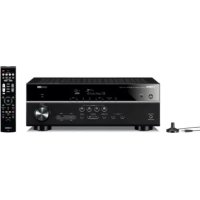
HTR3072 - Home cinema amp YAMAHA - Free user manual and instructions
Find the device manual for free HTR3072 YAMAHA in PDF.



| Product Type | Home Theater Amplifier |
| Brand | YAMAHA |
| Model | HTR3072 |
| Dimensions (W x H x D) | 435 x 161 x 315 mm |
| Weight | 7.7 kg |
| Power Supply | 120 V AC, 60 Hz (US/Canada); 220-240 V AC, 50/60 Hz (other regions) |
| Power Consumption | 260 W (standby: 0.2 W) |
| Maximum Power | 600 W |
| Audio Inputs | HDMI, Optical Digital Audio, Analog Audio, USB, Bluetooth |
| Audio Outputs | 5.1 Speakers, Subwoofer, Headphones |
| Main Functions | YPAO (automatic speaker calibration), Bluetooth, USB, FM/AM Tuner, HDMI with ARC, SCENE, Sound Programs (Movie, Music, etc.), Straight/Direct/Enhancer |
| Speaker Impedance | 6 ohms minimum (adjustable) |
| Bluetooth | Version 2.1+EDR, A2DP profile, SBC codec, max range 10 m |
| Tuner | FM (87.5-108 MHz) and AM (530-1710 kHz) depending on region |
| Maintenance | Clean with a soft, dry cloth; do not use chemicals |
| Safety | Do not expose to water, do not disassemble, use appropriate voltage, unplug during storms |
| Repairability | Contact an authorized Yamaha dealer or qualified technician |
| Supplied Accessories | Remote control, AM/FM antennas, YPAO microphone, quick start guide |
| HDMI Compatibility | HDCP 2.2, CEC, ARC |
| Standby Power Consumption | 0.2 W (Bluetooth off, HDMI control off) |
Frequently Asked Questions - HTR3072 YAMAHA
User questions about HTR3072 YAMAHA
0 question about this device. Answer the ones you know or ask your own.
Ask a new question about this device
Download the instructions for your Home cinema amp in PDF format for free! Find your manual HTR3072 - YAMAHA and take your electronic device back in hand. On this page are published all the documents necessary for the use of your device. HTR3072 by YAMAHA.
USER MANUAL HTR3072 YAMAHA
AV Receiver
Ampli-tuner audio-video
AV PecuBep
RX-V385/HTR-3072
Precautions 2
Preparations. 7
Playback. 15
English
EN Quick Start Guide
FR Guide de démarrage rapide
ES Guía de inicio=rápida
PT Guia de Iniciação Rápida
KpaTKoe pyKOBoCTBO no Haay pa6oTbI
Précautions d'usage 23
Preparations. 28
Lecture. 36
Français
The precautions listed below are to prevent risk of harm to the user and others, as well as to prevent property damage, and to help the user use this unit properly and safely. Be sure to follow these instructions.
After reading this manual, be sure to keep it in a safe place where it can be referenced at any time.
- Be sure to request inspections or repairs from the dealer where you purchased the unit or from qualified Yamaha service personnel.
- Yamaha cannot be held responsible for injury to you or damage of the products caused by improper use or modifications to the unit, or data that is lost or destroyed.
- This product is for ordinary homes. Do not use for applications requiring high reliability, such as managing lives, health care or high-value assets.

WARNING
This content indicates "risk of serious injury or death."
Power supply/power cord
-
Do not do anything that could damage the power cord.
-
Do not place it near a heater.
- Do not bend it excessively or alter it.
- Do not scratch it.
- Do not place it under a heavy object.
Using the power cord/adaptor with the core of the cord exposed could cause electric shocks or a fire.
- Do not touch the power plug or cord if there is a chance of lightning. Failure to observe this may cause electric shocks.
-
Use this unit with the power supply voltage printed on it. Failure to connect to an appropriate AC outlet may cause a fire, electric shocks, or malfunctions.
-
Check the electric plug periodically and remove any dirt or dust which may have accumulated on it. Failure to observe this may cause a fire or electric shocks.
- When setting up the unit, make sure that the AC outlet you are using is easily accessible. If some trouble or malfunction occurs, immediately turn off the power switch and disconnect the plug from the AC outlet. Even when the power switch is turned off, as long as the power cord is not unplugged from the wall AC outlet, the unit will not be disconnected from the power source.
- If you hear thunder or suspect approaching lightning, quickly turn off the power switch and pull the power plug from the AC outlet. Failure to observe this may cause a fire or malfunctions.
- If not using the unit for long periods of time, be sure to pull the power plug from the AC outlet. Failure to observe this may cause a fire or malfunctions.
Do not disassemble
- Do not disassemble or modify this unit. Failure to observe this may cause a fire, electric shocks, injury, or malfunctions. If you notice any irregularities, be sure to request an inspection or repair from the dealer where you purchased the unit or from qualified Yamaha service personnel.
Water warning
- Do not expose the unit to rain, use it near water or in damp or wet conditions, or place on it any containers (such as vases, bottles or glasses) containing liquids which might spill into any openings or places where water may drop. A liquid such as water getting into the unit may cause a fire, electric shocks, or malfunctions. If any liquid such as water seeps into the device, turn off the power immediately and unplug the power cord from the AC outlet. Then, request an inspection from the dealer where you purchased the unit or from qualified Yamaha service personnel.
- Never insert or remove an electric plug with wet hands. Do not handle this unit with wet hands. Failure to observe this may cause electric shocks or malfunctions.
Fire warning
- Do not place any burning items or open flames near the unit, since they may cause a fire.
Maintenance and care
- Do not use aerosols or spray-type chemicals that contain combustible gas for cleaning or lubrication. The combustible gas will remain inside the unit, which may cause explosion or fire.
Battery use
- Do not disassemble a battery. If the contents of the battery get on your hands or in your eyes, it can cause blindness or chemical burns.
- Do not dispose of batteries in fire. Doing so may result in the battery bursting, causing a fire or injury.
-
Do not expose a battery to high temperatures, such as direct sunlight or a fire. The battery may burst, causing a fire or injury.
-
Do not attempt to recharge batteries that are not intended to be charged. Charging could cause the battery to burst or leak, which can cause blindness, chemical burns, or injury.
- If the batteries do leak, avoid contact with the leaked fluid. If the battery fluid should come in contact with your eyes, mouth, or skin, wash immediately with water and consult a doctor. Battery fluid is corrosive and may possibly cause loss of sight or chemical burns.
Wireless unit
- Do not use this unit near medical devices or inside medical facilities. Radio waves from this unit may affect electro-medical devices.
- Do not use this unit within 15cm (6 in) of persons with a heart pacemaker implant or a defibrillator implant. Radio waves from this unit may affect electro-medical devices, such as a heart pacemaker implant or defibrillator implant.
If you notice any abnormality
-
If any of the following abnormalities occur, immediately turn off the power and disconnect the power plug. If any of the following abnormalities occur, immediately turn off any amplifiers and receivers.
-
The power cord/plug is damaged.
- An unusual smell or smoke is emitted from the unit.
Foreign material gets into the interior of the unit. - There is a loss of sound during use.
- There is a crack or damage in the unit.
Continued use could cause electric shocks, a fire, or malfunctions. Immediately request an inspection or repair from the dealer where you purchased the unit or from qualified Yamaha service personnel.
- Be careful not to drop or apply strong impact to this unit. If you suspect the unit may have been damaged due to dropping or impact, immediately turn off the power and pull the power plug from the AC outlet. Failure to observe this may cause electric shocks, a fire, or malfunctions. Immediately request an inspection from the dealer where you purchased the unit or from qualified Yamaha service personnel.

CAUTION
This content indicates "risk of injury."
Power supply/power cord
- Do not use an AC outlet where the power plug fits loosely when inserted. Failure to observe this may cause a fire, electric shocks, or burns.
- When removing the electric plug from the unit or an AC outlet, always hold the plug itself and not the cord. Pulling by the cord can damage it and cause electric shocks or a fire.
- Insert the power plug firmly all the way into the AC outlet. Using the unit when it is not plugged in sufficiently can cause dust to accumulate on the plug, causing a fire or burns.
Installation
- Do not place the unit in an unstable position where it might accidentally drop or fall over and cause injuries.
- Do not block this unit's ventilation holes (cooling slits). This unit has ventilation holes on the top/side/bottom to prevent the internal temperature from becoming too high. Failure to observe this may trap heat inside the unit, causing a fire or malfunctions.
-
When installing this unit:
-
Do not cover it with any cloth.
-
Do not install it on a carpet or rug.
-
Make sure the top surface faces up; do not install on its sides or upside down.
-
Do not use the device in a confined, poorly-ventilated location.
Failure to observe the above may trap heat inside the unit, causing a fire or malfunctions. Ensure that there is adequate space around the unit: at least 30~cm (11-3/4 in) on top, 20~cm (7-7/8 in) on the sides, and 20~cm (7-7/8 in) on the roar.
- Do not install the unit in places where it may come into contact with corrosive gases or salt air. Doing so may result in malfunction.
- Avoid being near the unit during a disaster, such as an earthquake. Since the unit may turn over or fall and cause injury, quickly move away from the unit and go to a safe place.
- Before moving this unit, be sure to turn off the power switch and disconnect all connection cables. Failure to observe this may damage the cables or cause you or someone else to trip and fall.
- For proper Installation of the outdoor antenna, make sure to have it done by the dealer from where you purchased the unit or by qualified service personnel. Failure to observe this may cause the installation to fall and result in injury. Installation requires special skills and experience.
Hearing loss
- Do not use the unit/speakers or headphones for a long period of time at a high or uncomfortable volume level, since this can cause permanent hearing loss. If you experience any hearing loss or ringing in the ears, consult a physician.
- Before connecting the unit to other devices, turn off the power for all devices. Also, before turning the power of all devices on or off, make sure that all volume levels are set to the minimum. Failing to do so may result in hearing loss, electric shock, or device damage.
- When turning on the AC power in your audio system, always turn on the amplifier or receiver LAST, to avoid hearing loss and speaker damage. When turning the power off, the amplifier or receiver should be turned off FIRST for the same reason. Failure to observe the above may cause hearing impairment or speaker damage.
Maintenance
- Remove the power plug from the AC outlet before cleaning the unit. Failure to observe this may cause electric shocks.

Handling caution
- Do not insert your hand or fingers into the ventilation holes of this unit. Failure to observe this may cause injury.
- Do not insert foreign materials such as metal or paper into the ventilation holes of this unit. Failure to observe this may cause a fire, electric shocks, or malfunctions. If foreign material gets into the unit, immediately shut off the power and pull the power plug from the AC outlet and request an inspection from the dealer where you purchased the unit or from qualified Yamaha service personnel.
-
Do not do the following:
-
put heavy items on top of the equipment.
- place the equipment in a stack.
-
apply unreasonable force to buttons, switches, input/output terminals, etc.
-
Avoid pulling the connected cables to prevent injuries or damage to the unit by causing it to fall.
Battery use
- Always replace all batteries at the same time. Do not use new batteries together with old ones. Using new ones with old ones could cause a fire, burns, or inflammation due to fluid leaks.
- Do not use batteries other than specified batteries. Doing so can cause fire, burns, or inflammation due to leakage.
- Do not mix battery types, such as alkaline batteries with manganese batteries, or batteries from different makers, or different types of batteries from the same maker, since this can cause a fire, burns, or inflammation due to fluid leaks.
- Keep batteries away from children. A child could accidentally swallow a battery. Failure to observe this may also cause inflammation due to battery fluid leaks.
- Do not put in a pocket or bag, carry, or store batteries together with pieces of metal. The battery could short, burst, or leak, causing a fire or injury.
- Always make sure all batteries are inserted in conformity with the +/- polarity markings. Failure to do so might result in a fire, burns, or inflammation due to fluid leaks.
- When the batteries run out, or if the unit is not to be used for a long time remove the batteries from the remote control to prevent possible leakage of the battery fluid.
- When storing or discarding batteries, insulate the terminal area by applying tape, or some other protection. Mixing them with other batteries or metal objects can cause a fire, burns, or inflammation due to fluid.
Notice
Indicates points that you must observe in order to prevent product failure, damage or malfunction and data loss.
Power supply/power cord
- If not using the unit for a long period of time, be sure to pull the power plug from the outlet. Even if the (Standby/On) switch has been turned off (the screen display is off), a minute current is still flowing.
Installation
- Do not use this unit in the vicinity of other electronic equipment, such as a TV, radio, or mobile phone. Failure to observe this may cause this unit or the TV or radio to produce noise.
- Do not use this unit in a location that is exposed to direct sunlight, that becomes extremely hot, such as near a heater, or extremely cold, or that is subject to excessive dust or vibration. Failure to observe this may cause the unit's panel to become deformed, the internal components to malfunction, or for operation to become unstable.
- Install this unit as far away from other electronic equipment as possible. Digital signals from this unit may interfere with other electronic equipment.
- If using a wireless function, avoid installing this unit near metal walls or desks, microwave ovens, or other wireless network devices. Obstructions could shorten the transmission distance.
Connections
- If connecting external units, be sure to thoroughly read the manual for each unit and connect them in accordance with the instructions. Failure to properly handle a unit in accordance with the instructions could cause malfunctions.
- Do not connect this unit to industrial units.
Digital audio interface standards for consumer use and industrial use are different. This unit has been designed to connect to a consumer-use digital audio interface. Connections to an industrial-use digital audio interface could not only cause this unit to malfunction, but could also damage the speakers.
Handling
- Do not place vinyl, plastic, or rubber products on this unit. Failure to observe this may cause discoloration or deformation in the panel of this unit.
- If the ambient temperature changes drastically (such as during unit transportation or under rapid heating or cooling) and there is a chance condensation may have formed in the unit, leave the unit for several hours without turning on the power until it is completely dry before use. Using the unit while there is condensation can cause malfunctions.
Maintenance
- When cleaning the unit, use a dry, soft cloth. Using chemicals such as benzine or thinner, cleaning agents, or chemical scrubbing cloths can cause discoloration or deformation.
Batteries
- Be sure to discard used batteries in accordance with local regulations.
Information
About content in this manual
The illustrations and screens in this manual are for instructional purposes only.
The company names and product names in this manual are the trademarks or registered
trademarks of their respective companies.
Software may be revised and updated without prior notice.
Wireless communication functions [U.K. and Europe models]
Bluetooth
Radio Frequency (Operational Frequency): 2402 MHz to 2480 MHz
Maximum Output Power (EIRP): 4 dBm (2.51 mW)
Information for users on collection and disposal of old equipment and used batteries:
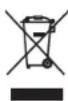
These symbols on the products, packaging, and/or accompanying documents mean that used electrical and electronic products and batteries should not be mixed with general household waste.
For proper treatment, recovery and recycling of old products and used batteries, please take them to applicable collection points, in accordance with your national legislation.

By disposing of these products and batteries correctly, you will help to save valuable resources and prevent any potential negative effects on human health and the environment which could otherwise arise from inappropriate waste handling.
For more information about collection and recycling of old products and batteries, please contact your local municipality, your waste disposal service or the point of sale where you purchased the items.

Pb
For business users in the European Union:
If you wish to discard electrical and electronic equipment, please contact your dealer or supplier for further information.
Information on Disposal in other Countries outside the European Union: These symbols are only valid in the European Union. If you wish to discard these items, please contact your local authorities or dealer and ask for the correct method of disposal.
Note for the battery symbol (bottom two symbol examples):
This symbol might be used in combination with a chemical symbol. In this case it complies with the requirement set by the EU Battery Directive for the chemical involved.
(weee_battery_eu_en_02)

Introduction
- This unit is a product for enjoying music and video at home.
- This document explains basic speaker system setup and unit configuration, followed by step-by-step instructions. Basic operations, such as playing Blu-ray Discs, DVDs, and radio content, are also explained.
The unit is equipped with a number of other functions not described in this document. For more information about this product, refer to the Owner's Manual on the Yamaha website.
Follow one of the methods described below to view the latest Owner's Manual.
In HTML format
- Scan the QR code found on the front cover of this document.
- Visit the following website.
RX-V385
http://avpro.global.yamaha.com/manual/avr/rxv385/
HTR-3072
http://avpro.global.yamaha.com/manual/avr/htr3072/
In PDF format
- Visit the following website.
http://download.yamaha.com/
[For U.S. customers only]
Visit the following website for additional information, FAQ's, downloads such as "Owner's Manual" and product updates.
http://usa.yamaha.com/support/
Trademarks and trade names used in this document are those of their respective owners. See the Owner's Manual for more information.
Features
The unit is also capable of the following, which are not described in this document. See the Owner's Manual to help you get the most out of the unit.
- ECO mode (power saving function)
- Controlling TV, AV receiver, and BD/DVD player operation (HDMI Control)
- Configuring system settings (ADVANCED SETUP menu)
For more information, see "What you can do with the unit" in the Owner's Manual.
AV SETUP GUIDE
AV SETUP GUIDE is an app that guides you through the process of connecting a TV or playback device, such as a BD/DVD or CD player, and speakers to the AV receiver. Search "AV SETUP GUIDE" on the App Store or Google Play for details.
1
Preparation
Confirming package contents Preparing cables
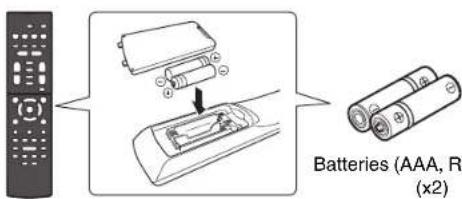
Remote control
The following cables (not supplied) are required to build the system described in this document.
- Speaker cables (depending on the number of speakers)
Audio pin cable (x1)
HDMI cables (x3)

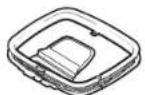
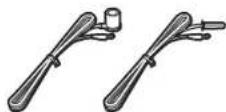
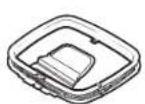
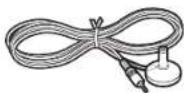
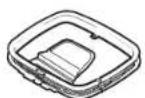
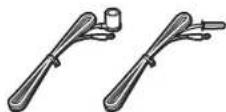
AM antenna FM antenna
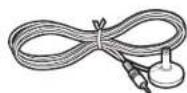
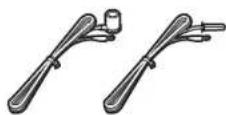
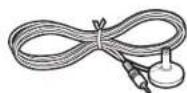
YPAO microphone
One of the above is supplied
depending on the region of purchase.
Quick Start Guide (this booklet)
2
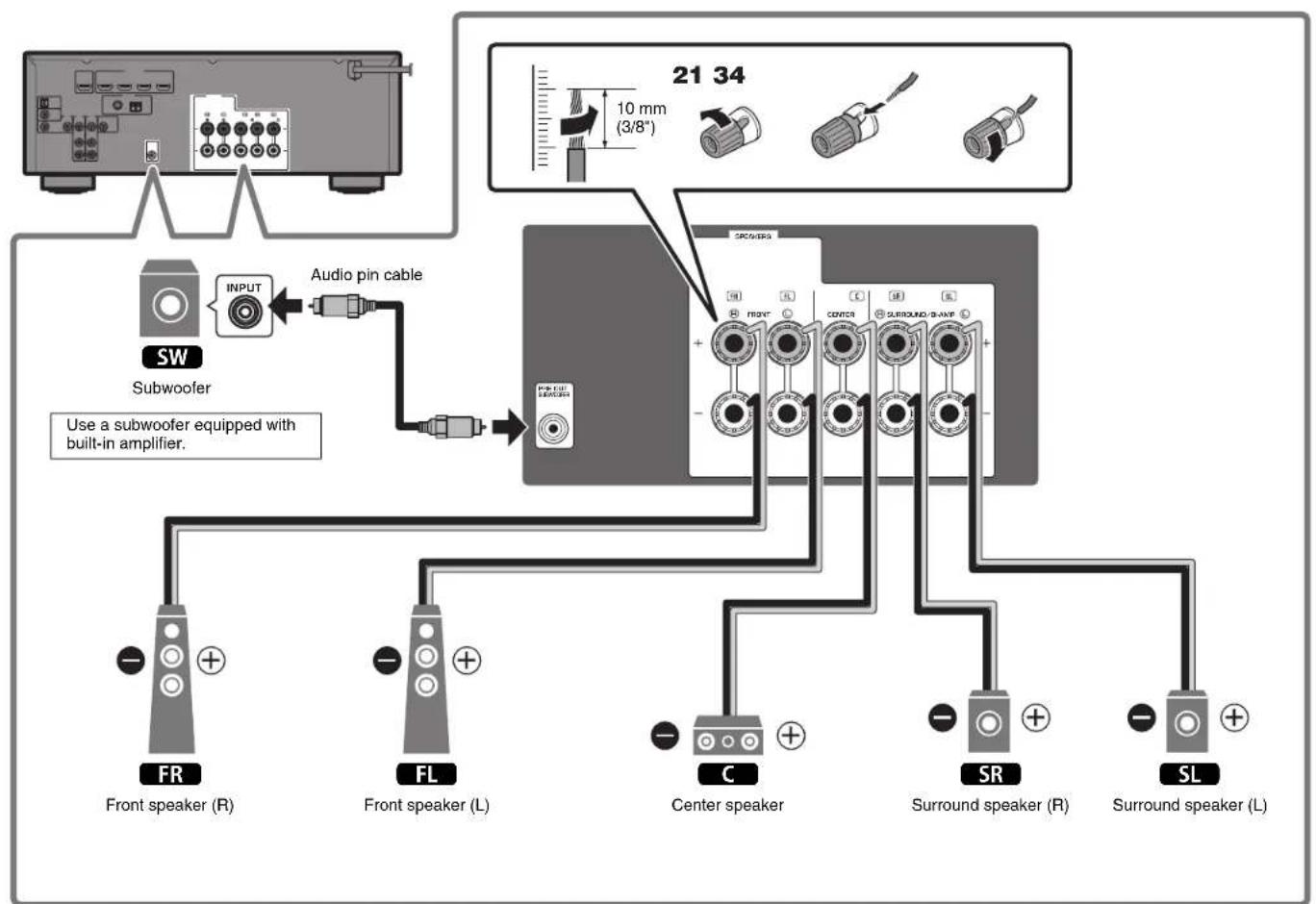
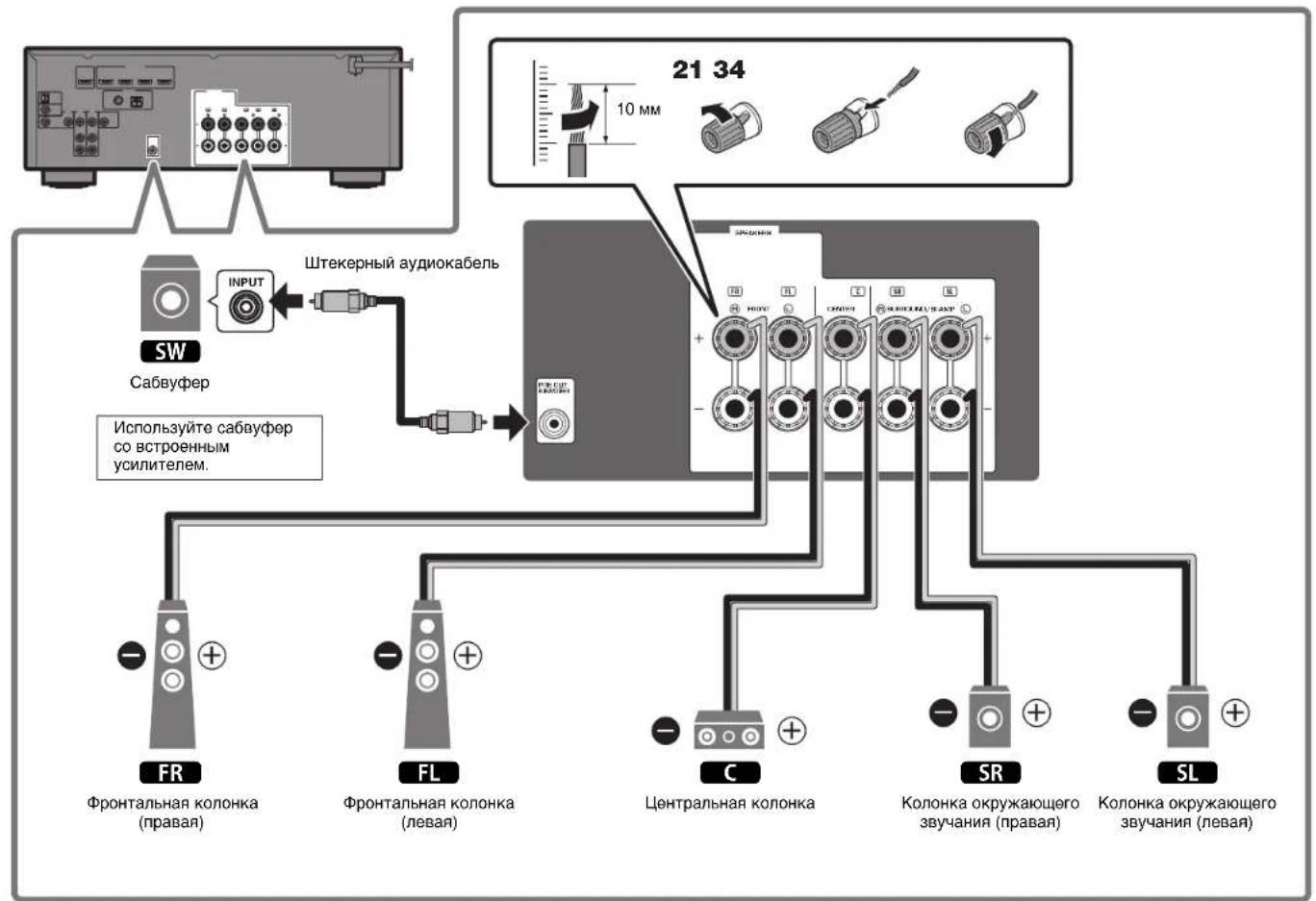
Connecting speakers/subwoofer
Positioning speakers
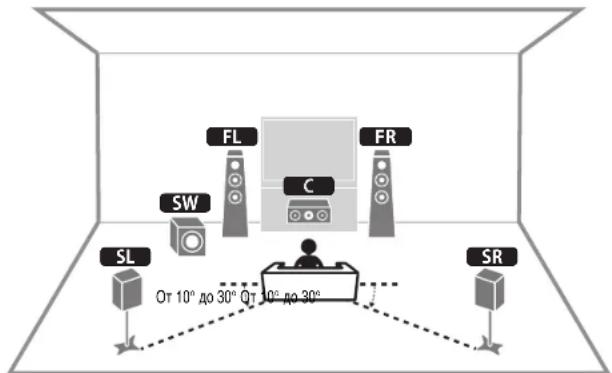
Use the diagram as a reference for positioning speakers.
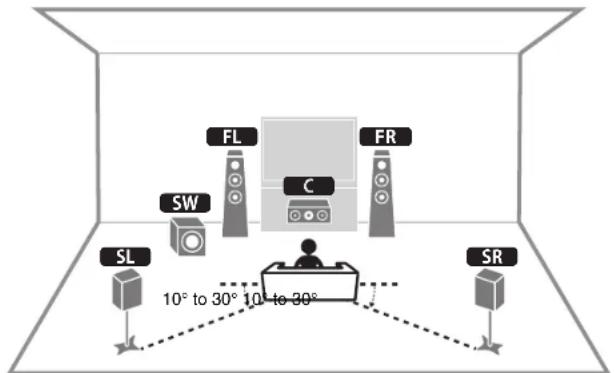
FL / FR Front speaker (L/R)
Center speaker
SL / SR Surround speaker (L/R)
SW Subwoofer
When connecting 6-ohm speakers
(U.S.A. and Canada models only)
Set the unit's speaker impedance to "6 Ω MIN". For details, see "Setting the speaker impedance" under "Connecting speakers" in the Owner's Manual.
Precautions for connecting speaker cables
- Be sure that the unit and subwoofer are turned off.
- Prepare speaker cables in a place away from the unit, to avoid accidentally dropping wire strands into the unit's interior which could result in a short circuit or malfunction of the unit.
-
Improper connection of speaker cables could cause a short circuit resulting in damage to, or malfunctioning of, the unit or speakers.
-
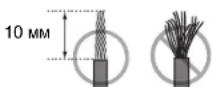
Carefully remove approximately 10mm (3/8^) of insulation from the speakerconnection ends of the cables, and twist the bare wires of each speaker cable together firmly.
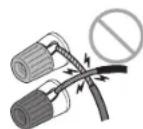
- Do not allow the bare wires of separate speaker cables to come into contact with one another.

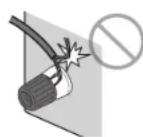
- Do not allow speaker cable bare wires to come into contact with metal parts on the unit (rear panel and screws).
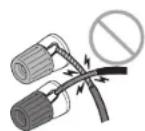
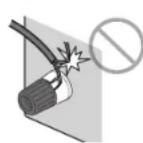
If "Check SP Wires" is shown on the front display when the unit is turned on, turn off the unit and be sure that speaker cables have not caused a short circuit.
3
Connecting external devices
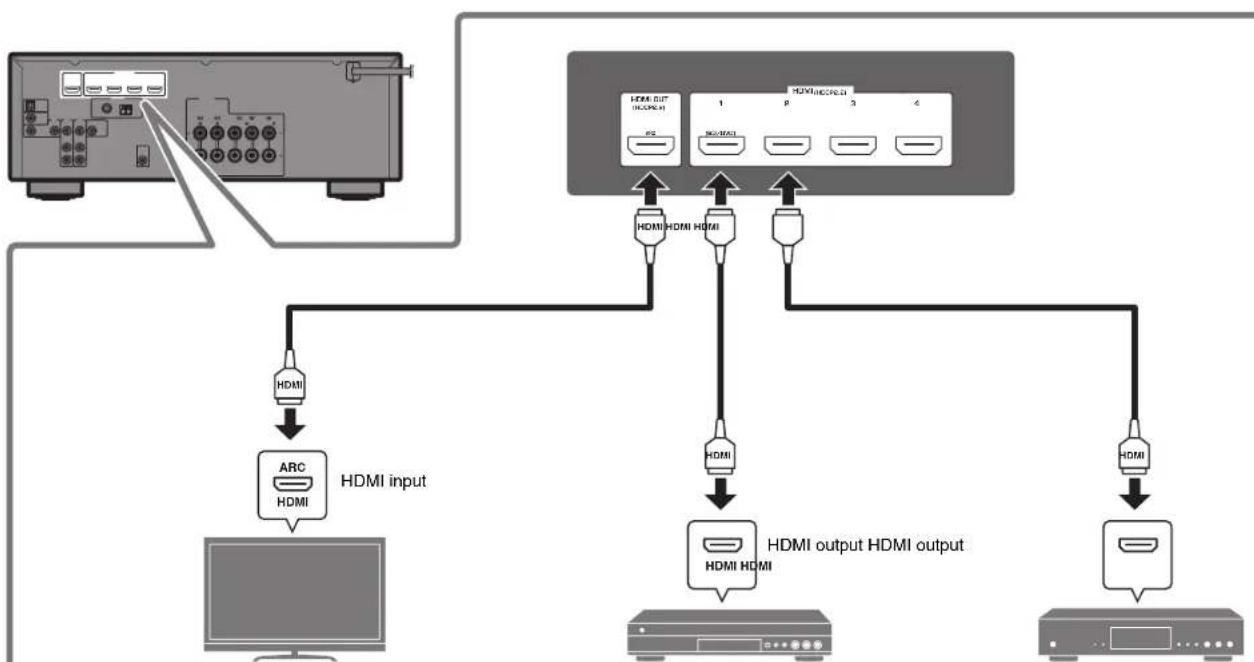
TV BD/DVD player Satellite/cable set top box
4
Connecting the FM/AM antennas
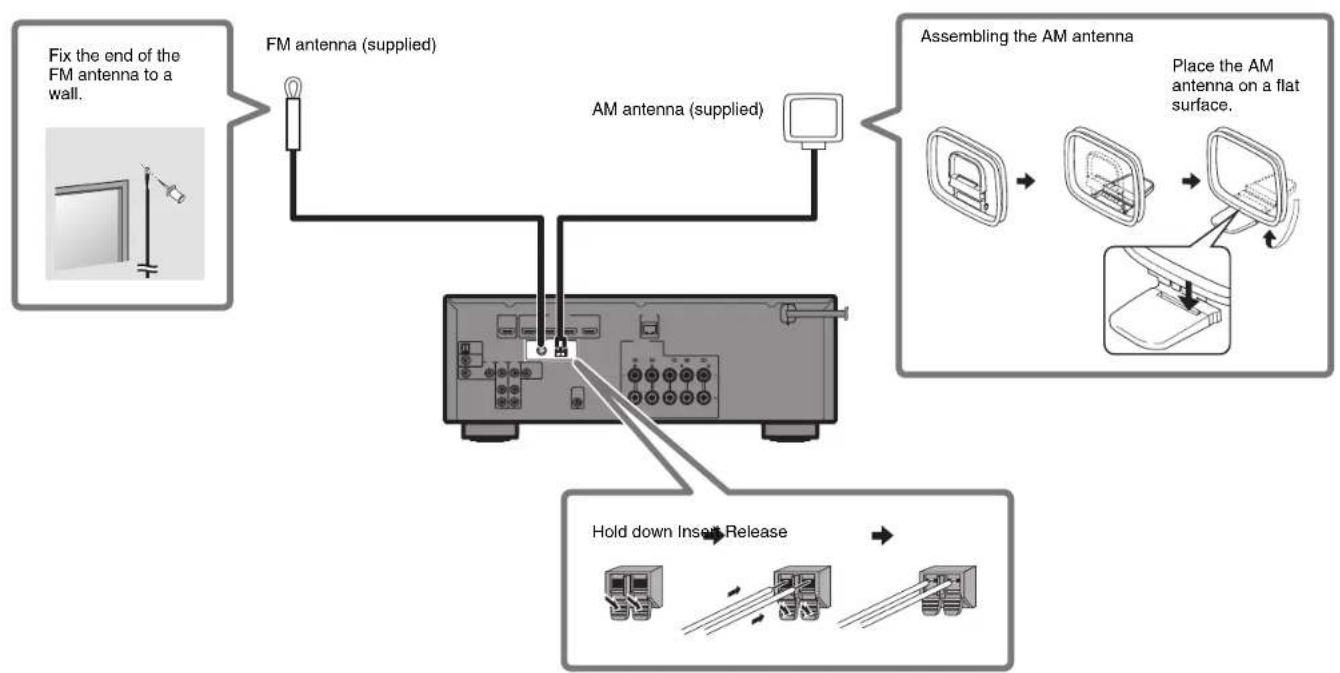
5
Connecting the power cable to an AC wall outlet, and turning on the unit

Warning
Before connecting the power cable
(Taiwan, Brazil, and Central and South America models only)
Set the switch position of VOLTAGE SELECTOR according to your local voltage.
Voltages are AC 110-120/220-240 V, 50/60 Hz.
1 Plug the power cable into an AC wall outlet.
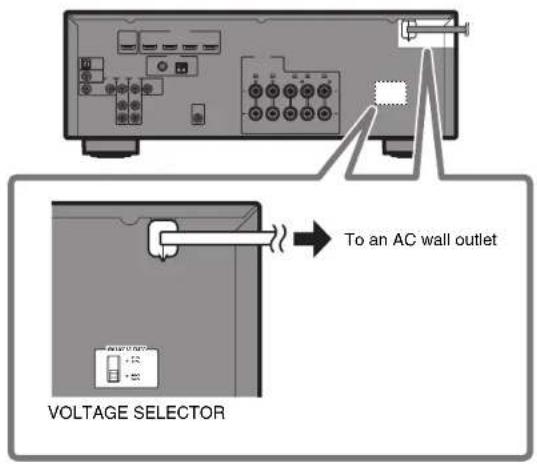
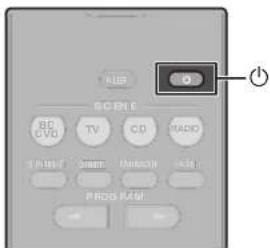
2 Press (receiver power) to turn on the unit.
3 Turn on the TV and switch the TV input to display video from the unit (HDMI OUT jack).
6
Optimizing the speaker settings automatically (YPAO)
The Yama h t i t, and then automatically optimizes the speaker settings, such as volume balance and acoustic parameters, to suit your room.
Note the following regarding YPAO measurement
Test tones are output at high volume and may surprise or frighten small children.
Test tone volume cannot be adjusted.
- Keep the room as quiet as possible.
- Stay in a corner of the room behind the listening position so that you do not become an obstacle between speakers and the YPAO microphone.
- Do not connect headphones.

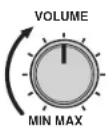
1 Turn on the subwoofer and set the volume to half.
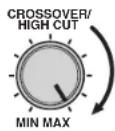
If the crossover frequency is adjustable, set it to maximum.
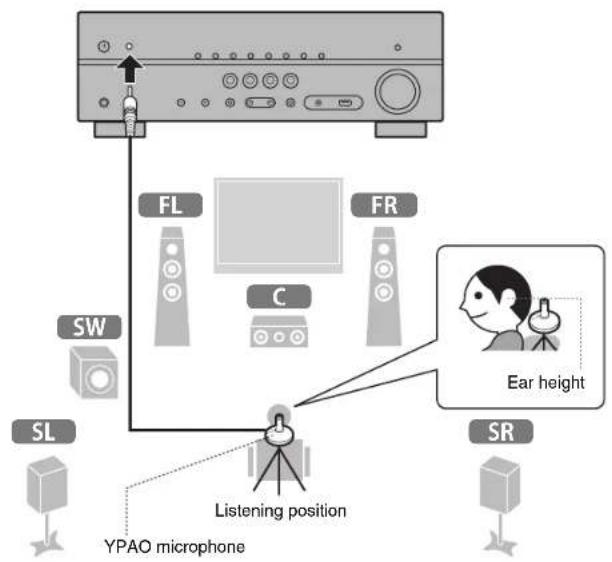
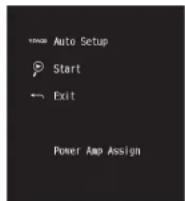
2 Place the YPAO microphone at your listening position and connect it to the YPAO MIC jack on the front panel.
The screen below appears on the TV.
Note
Place the YPAO microphone at your listening position (same height as your ears). We recommend the use of a tripod as a microphone stand. You can use the tripod screws to stabilize the microphone.
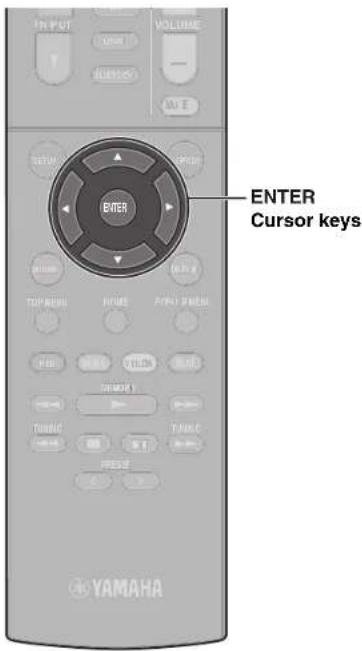
3 Press ENTER.
The measurement will start in 10 seconds.
It takes about 3 minutes to measure.
The screen below appears on the TV when the measurement finishes.
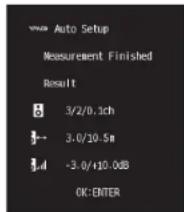
Note
If an error message (such as E-1) or warning message (such as W-2) appears, see "Error messages" or "Warning messages" under "Optimizing the speaker settings automatically (YPAO)" in the Owner's Manual.
4 Confirm the results displayed on the screen and press ENTER.
5 Use the cursor keys (< / ) to select "SAVE" (Save) and press ENTER.
6 Disconnect the YPAO microphone from the unit.
This completes optimization of the speaker settings.
Playback
This section describes basic operations such as playing Blu-ray Discs and DVDs, and tuning into radio stations. Most operations can be performed using the remote control.
Basic playback functions
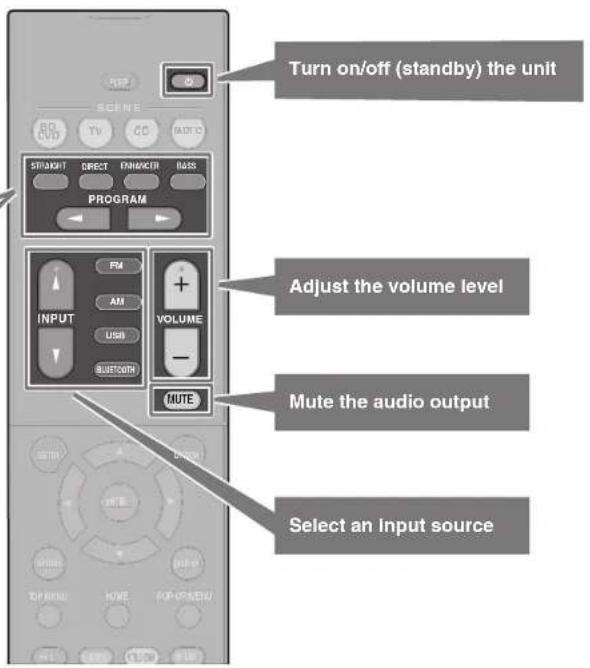
The unit is equipped with a variety of sound programs and surround decoders that allow you to enjoy playback sources in your favorite sound mode.
STRAIGHT: Input sources will be played without any sound field effects.
DIRECT: Input sources will be played using only those functions absolutely vital to playback to minimize noise generated by electronic circuitry. Functions such as the front panel display will be temporarily disabled to achieve Hi-Fi sound quality.
ENHANCER: Compressed music stored on a Bluetooth device or USB storage device will be played with additional depth and breadth.
BASS: Extra bass allows you to enjoy enhanced bass sounds.
PROGRAM < > :Sound programs optimized for movie, music, and stereo playback, as well as playback using a Surround Decoder, are available.

Playing a BD/DVD
We recommend playing back multichannel audio (5.1-channel or more) to feel surround sound produced by the unit.
1 Turn on the BD/DVD player.
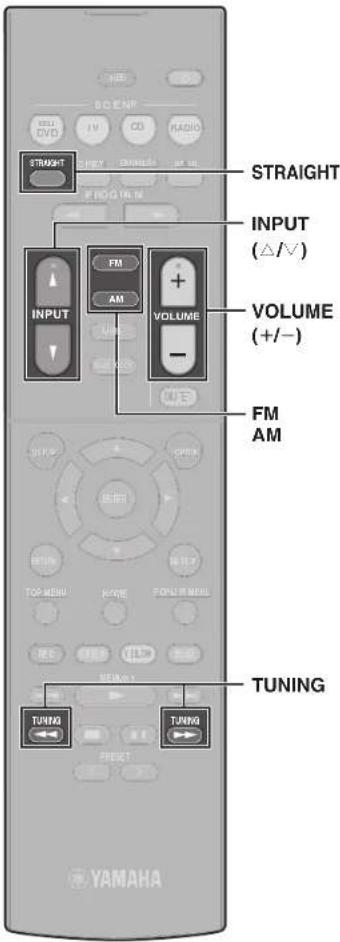
2 Press INPUT ( / ) repeatedly to select "HDMI 1".
The name of the connected device such as "BD player" may be displayed.

Input source Device name
3 Start playback on the BD/DVD player.
4 Press STRAIGHT to select "STRAIGHT".
Note
When "STRAIGHT" (straight decode) is enabled, each speaker produces each channel audio signal directly (without sound field processing).
5 Press VOLUME to adjust the volume.
Note
When sound is not heard, or no sound is output from a specific speaker, see "TROUBLESHOOTING" in the Owner's Manual.
Listening to FM/AM radio
1 Press FM or AM to select "TUNER" as the input source.
2 Press TUNING to set a frequency.
Hold down the key for about a second to search stations automatically.

"TUNED" lights up when the unit is receiving an FM/AM radio station signal.
"STEREO" lights up when the unit is receiving a stereo FM radio signal.
Setting the frequency steps (Asia, Taiwan, Brazil, and Central and South America only)
At the factory, the frequency step setting is set to 50kHz for FM and 9kHz for AM.
Depending on your country or region, set the frequency steps to 100kHz for FM and 10kHz for AM.
1 Set the unit to standby mode.
2 Hold down STRAIGHT on the front panel and press
3 Press PROGRAM on the front panel repeatedly to select "TU".

4 Press STRAIGHT on the front panel to select "FM100/AM10".
5 Press to set the unit to standby mode and turn it on again.
SCENE function
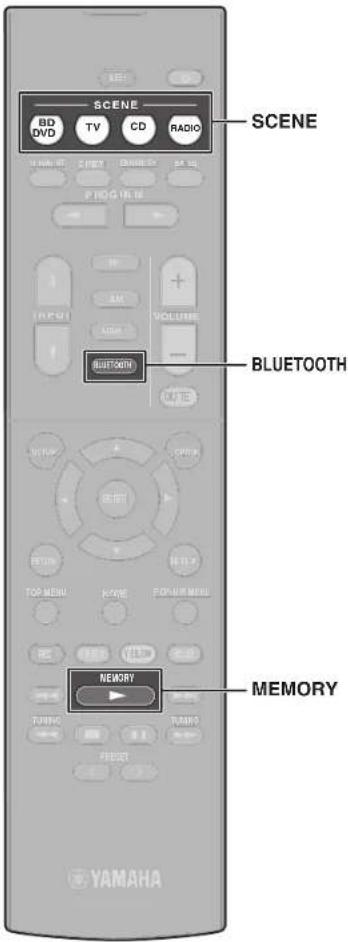
Unit input sources and settings that have been assigned to SCENE keys can be selected with a single touch (SCENE function). When a SCENE key is pressed, the unit turns on automatically if it is in standby mode. By default, the following settings have been assigned to each SCENE key.
| SCENE key | BD DVD | TV | CD | RADIO |
| Input HDMI1 AUDIO1 AUDIO2 TUNER | ||||
| Sound program | MOVIE (Sci-Fi) | STRAIGHT STRAIGHT | STEREO (5ch Stereo) | |
| Compressed Music Enhancer | Off On Off On | |||
| SCENE link playback | On On Off Off | |||
Registering a scene
The settings assigned to each SCENE key by default can be changed to suit individual preferences.
- Play an input source.
- Apply settings for functions such as Sound programs and Compressed Music Enhancer.
- Press and hold a SCENE key until "SET Complete" appears on the front display.
Playing music stored on a Bluetooth® device
1 Press BLUETOOTH to select "Bluetooth" as the input source.
2 Hold down MEMORY for more than 3 seconds.
"Searching..." appears in the front display.
3 Turn on the BLUETOOTH function on your device, and select the model name of the unit from the BLUETOOTH device list on your device.
If the passkey is required, enter the number "0000". When the connection is established, the indicator will glow in the front display.
4 Select a song and start playback on the Bluetooth device.
Note
Audio playing on the unit can be transmitted to Bluetooth wireless speakers or headphones (except when Bluetooth is selected as the unit's input source). See "Enjoying audio using Bluetooth speakers/headphones" in the Owner's Manual for more information.
Playing music stored on a USB flash drive
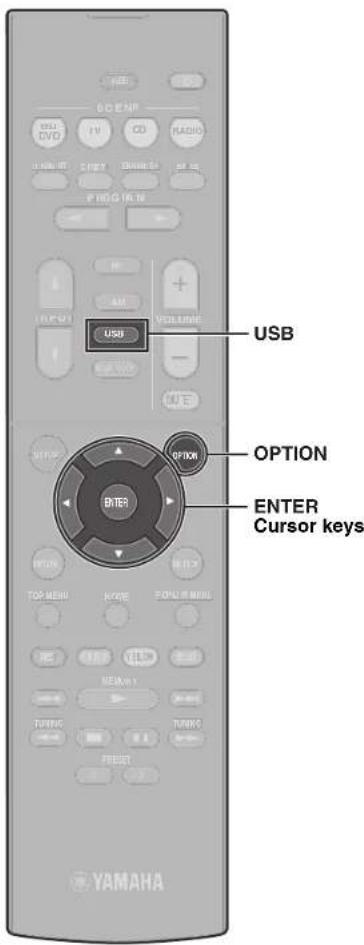
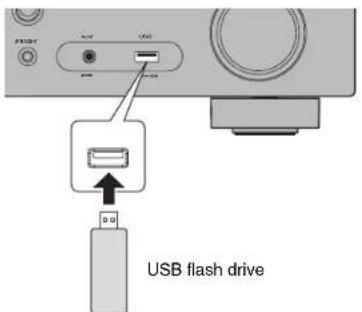
1 Connect the USB flash drive to the USB jack.
Note
Connect the USB flash drive directly to the USB jack. Do not use an extension cable.
2 Press USB to select "USB" as the input source.
The browse screen is displayed on the TV.
3 Use the cursor keys to select an item and press ENTER.
When a song is selected, playback starts and the playback screen is displayed.
Basic operation of the Option menu
This section explains basic operation of the Option menu. The Option menu can be used to configure the unit's playback functions according to the input source.
1 Press OPTION.

The Option menu is also displayed on the TV screen.
2 Use the cursor keys to select an item and press ENTER.
3 Use the cursor keys to select a setting.
4 Press OPTION.
For more information, see "Configuring playback settings for different playback sources (Option menu)" in the Owner's Manual.
Basic operation of the Setup menu
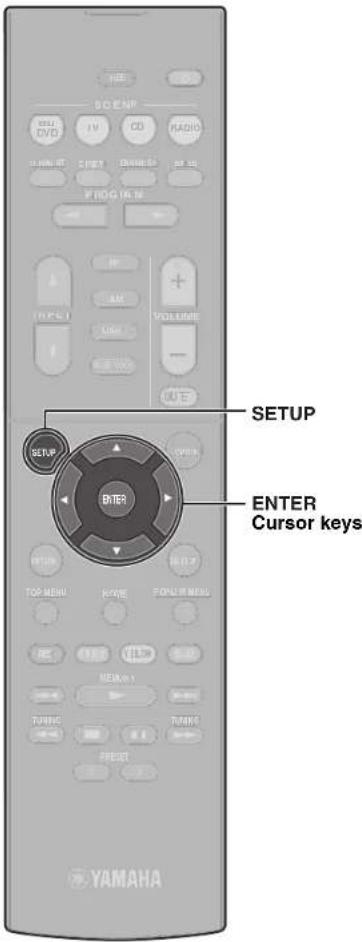
This section explains basic operation of the Setup menu. The setup menu can be used to configure the unit's functions in detail.
1 Press SETUP.
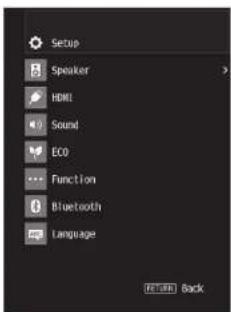
2 Use the cursor keys to select a menu and press ENTER.
3 Use the cursor keys to select an item and press ENTER.
4 Use the cursor keys to select a setting and press ENTER.
5 Press SETUP.
For more information, see "Configuring various functions (Setup menu)" in the Owner's Manual.

Troubleshooting
If trouble occurs, first check the following:
Make sure of the following when the unit does not function properly.
The power cables of the unit, TV and playback devices (such as BD/DVD players) are connected to AC wall outlets securely.
The unit, subwoofer, TV and playback devices (such as BD/DVD players) are turned on.
- The connectors of each cable are securely inserted in to jacks on each device.
If there is no problem with the power and cables, refer to the instructions shown in the table below.
If the problem you are experiencing is not listed or if the instructions do not help, turn off the unit. disconnect the power cable and contact the nearest authorized
Yamaha dealer or service center.
| Problem Cause Remedy | ||
| The power does not turn on. The protection circuitry has been activated three times consecutively.When the unit is in this condition, the standby indicator on the unit's front panel blinks if you try to turn on the power. | As a safety precaution, capability to turn on the power is disabled. Contact your nearest Yamaha dealer or service center to request repair. | |
| The power turns off (standby mode) immediately. | The unit was turned on while a speaker cable was shorted. | Twist the bare wires of each speaker cable firmly and reconnect to the unit and speakers (p. 8). |
| The unit is not reacting. The internal microcomputer is frozen, due to an external electric shock (such as lightning or excessive static electricity) or to a drop in the power supply voltage. | Hold down Ⓒ on the unit's front panel for more than 10 seconds to initialize and reboot the unit. (If the problem persists, disconnect the power cable from the AC wall outlet and plug it again.) | |
| No sound. | Another input source is selected. | Select an appropriate input source with the input selection keys. |
| Signals that the unit cannot reproduce are being input. | Some digital audio formats cannot be played back on the unit. To check the audio format of the input signal, use "Signal Info." in the "Option" menu (p. 18). For details, see "Checking information about the video/audiosignals" in the Owner's Manual. | |
| No sound is coming from a specific speaker. | The playback source does not contain a signal for the channel. | Use "Signal Info." in the "Option" menu (p. 18) to check the audio signal. For details, see "Checking information about the video/audiosignals" in the Owner's Manual. |
| The currently selected sound program/decoder does not use the speaker. | Use "Test Tone" in the "Setup" menu (p. 19) to check the speaker output. For details, see "Outputting test tones" in the Owner's Manual. | |
| Audio output of the speaker is disabled. Perform YPAO (p. 13). | Use "Configuration" in the "Setup" menu to change the speaker settings. For details, see "Configuring the speaker settings" in the Owner's Manual. | |
| No sound is coming from the subwoofer. | The playback source does not contain LFE or low-frequency signals. | Enable the Extra Bass function using the BASS key (p. 15). |
| Subwoofer output is disabled. Perform YPAO (p. 13). | ||
| Set "Subwoofer" in the "Setup" menu to "Use" (p. 19). For details, see "Setting the use of a subwoofer" in the Owner's Manual. | ||
| No video. | Another input source is selected on the unit. | Select an appropriate input source with the input selection keys. |
| Another input source is selected on the TV. Switch the TV input to display the video from the unit. | ||
| No video from the playback device connected to the unit with HDMI. | The input video signal (resolution) is not supported by the unit. | To check the information about the current video signal (resolution), see "Checking information about the video/audiosignals" in the Owner's Manual. For information about video signals supported by the unit, see "HDMI signal compatibility" in the Owner's Manual. |
| The TV does not support HDCP (High-bandwidth Digital Content Protection). | Refer to the instruction manuals for the TV and check the TV's specifications. If you want to play back contents that require HDCP 2.2-compatible devices, both the TV and playback device must support HDCP 2.2. | |
Specifications
| Bluetooth | |
| Supported profile A2DP | |
| Supported codec SBC | |
| Bluetooth version Ver. 2.1+EDR | |
| Wireless output Bluetooth Class 2 | |
| Maximum communication distance | 10 m (33 ft) without interference |
| Supported content protection method | SCMS-T |
| Tuner | |
| Tuning Range U.S.A. and Canada models [FM] 87.5 MHz to 107 | |
| [AM] 530 kHz to 1710 kHz | |
| Asia, Taiwan, Brazil, and Central and South America models only | [FM] 87.5/87.50 MHz to 108.0/108.00 MHz[AM] 530/531 kHz to 1710/1611 kHz |
| China, Korea, Australia, U.K., Europe, and Russia models | [FM] 87.50 MHz to 108.00 MHz[AM] 531 kHz to 1611 kHz |
| General | ||
| Power Supply U.S.A. and Canada | Canada models AC 120 V, 60 Hz | |
| Taiwan, Brazil, and Central and South America models | AC110 to 120/220 to 240 V, 50/60 Hz | |
| China model AC 220 V, 50 Hz | ||
| Korea model AC 220 V, 60 Hz | ||
| Australia model AC 240 V, 50 Hz | ||
| U.K., Europe, and Russia models AC 230 V, 50 Hz | ||
| Asia model AC 220 to 240 V, 50/60 Hz | ||
| Power Consumption 260 W | ||
| Standby Power Consumption | Bluetooth Standby OFF | |
| HDMI Control ON, Standby Through Auto (No Signals) | 1.2 W | |
| Standby Through ON (No Signals) 1.2 W | ||
| Standby Through OFF 0.2 W | ||
| Bluetooth Standby ON | ||
| HDMI Control OFF, Standby Through OFF | 0.2 W | |
| HDMI Control ON, Standby Through Auto (No Signals) | 1.2 W | |
| Standby Through ON (No Signals) 1.2 W | ||
| Maximum Power Consumption | 600 W | |
| Dimensions (W x H x D) 435 | x 161 x 315 mm (17-1/8" x 6-3/8" x 12-3/8") | |
| Weight | 7.7 kg (17.0 lbs) | |
The contents of this manual apply to the latest specifications as of the publishing date. Refer to the Owner's Manual on the Yamaha website to confirm specifications other than described above and obtain the latest information of the unit.
PRECAUTIONS D'USAGE
LISEZ ATTENTIVEMENT AVANT DE PROCÉDER À TOUTE UTILISATION. VEILLEZ À SUIVRE CES INSTRUCTIONS.
(weew battery eu fr 02)
Introduction
(weeebattery_eu(es_02)
Introduccion
Aunities also may be capable of doing the work. Consults to a Legal Office should be obtained by the Legal Office.
Antena AM Antenna FM
Microfone YPAO
He pa36bnpaTe annapat n He 3mMeHnTe ero KOhctpyKuHIO. Hec6bIooJeHne 3tOrO yk33AHn MOKET pNBeCTn K NOxApay, PNOAeHKeO 3NeKTpHeCKIM TOKOM, TpaBAM nHn HeNCPbAHOCTM. PnN pOBHeHn HnONoLaOp 6ObpaaJcT bN OCMOTpa Hn peMOHTa B MeTO npNobpeTeHHn annapata n N B cEpBNCH nEHTP YamaHa.
BepuyoT BoDbl
- He donnyckaTe nonadahn annapata noDdoJb, he noIb3yItecb im padom c booJ, b yocnoHx cbpoCTN INN NOBIIueHHN BLXKHOCT. He CTabBe HA annapat KAKHe-ni60 BoMKoCTC x JHXKOCTBO (HANPMep, B3bl, 6byTbnIKu INN CTAKaHb), KOtOPAR MOKET npONITcB n NOnactb BO TEPBCTHA, a TAOKe HE noJIb3yIteCB annapatOM tam, rHe Ha Hero MOKET nOJaCTB BODA. IonoJaHE XINKOCTN, HANPMep BOBJ, BHTpy ANAPATa MOKET CTaB npMHN HOJ NOKapa, nopaxekHn NEkTPmecKn TOM kU HeHcnPABHOCTB. C cyJyae NOpanADHa B annapat XINKOCTN, HANPMep BOBJ, HEmEJnEHNO OTKNIHOITE NITAHNE NTCOeMHNTe Ka6BeNBnTAHNAOT PO3EKH NpeMeHORO TOKA. 3ATEM o6paTInTeCb dnn OCMToPA annapata B MeTO pnpObePeTeHH INN B cepBnCHb ueHTp YamaHa.
Hn B Koem CnyAe HcBCTaJIaTE H He BbHMImte WtTeCENb MOKbIMn DyKAMn. He 6epNTec3 baannapat BaNkHbMn pyKAMn. HecBoIIOHeNeT OTO rKa3AHnM NOKet pNINBeC K N oPakJEHNO 3IEKTHNCEHKM TOKOM HIN HEnICnPABHOCTm.
Bepeb ot orHa
- HaP3MaEaIeTO rOpIaIIpeIeMBeTI HINI ITOCHN4HQN KTOBPTORO ANR PAOM C anapAtonAT, NOCKoJIbKY 3TO MOTEPI PnEBcTeK B03rOPaHIO.
06cnykubahne nyxoid
He HcNolbyyIe IIN OYCTK INI CMA3KN A3PO30NI INI pAcBJIpReMle XMMHueckKe BceCTBA, COePxAaIIIO ROpOIO Ra3b. TOpOuN RA3 MoGOT OCTaBcR BHyTpAnnapata, YTO MOET PnPBCTN K B3pBuY INI NOXAPy.
Ncnojb3ObaHne 6aTaapeek
- He pa36npaTne 6atapeKny. PonaIaHne coepxMIMO 6atapeKu B rna 3aHa pyKu MoKET npBeCTN K nOtepe 3peHn IIN XmHHeCKOMy OXkOy.
He 6pocate BatapehK BOHOB.3TO MOKET PnIeCTN K B3bBy BatapeHKn N CTaB pIuHNOH NOXAPA HIN TAPMBI.
He noDBepraTe 6atapeky BO3dEChTBHO BbICOKHX TemnepaTp, HApIMeP npRMO COIohno CBO eTAtOnrH. BatapeKa MoKet B3OpBaTbCnCTaTb npUHHO NoXapa IIN TpABMbI.
HeIbTuTaeCb3apXbAtb6aTeKIn,HeIpeDnHa3auHHeBJeIpe3aPdKn.3apRkA. MoKET pINBeCTK b3BbBy IIN IIOpeKaTHo 6aTePekIn,HTO,B CBOO OuepeDb, MoKET Bb3BaTb NOTIOpEzPHN, XMMHcckn OOKr IIN TPAMyB. - EcnbatapeKnBce Kne npoteKn, n36eaiTe KOHTaTc B bteKTHm 3NEkTPoNTOM. B Cnyae NpndaanH 3NEkTPoNTa B rna3a, pot Hn HA K0KY HEmEJNDHO CMOTe 3NEkTPoNT BdoDn 6bpaTntc K bpay. 3NEkTO -3to EkoCBe BuejcTBO, cnocoo6ho Bb3BtBn Tepio 3PHeN INXMMHecKe OKON.
Moylb6ecnpoBDOHNOcB3N
He HcnoIb3yIe annapat OKOJI MEniHcKHX NpI6OBu IN MeiHcHcKHX yUpeKJdHKe. PaHIOBnJIbOT OaHIOHa ANpPaTa MOrT Bo3JeCTBOBaTb Ha 3NEKtpeHcKHe MEiHcNcKHe YcTPOHa
He nnonbayte annapat 6nke, cem B 15 cm ot JIOe C mnnnantnpoBaHHbIM
KAPINIOCTMIMYNTOPOH NIN DNOBIOHNH,ROHOPIpyMOB DAHHBM annapatom, MOrT NOIbNTb HA POaOy TEKPTNECKHX MEIMUNCKNXYTPOITCB, HAPIMPE BKNBENHbIX KAPINIOCTMIMYNTOPOH NIN DEpMnRnTPOB.
HeWtathbIe cHTyaun
PnB03HKnHOBeHmNIO6oN3yka3aHHbIXHnKpeNpObIeHMeEJIeHHOOTKIOHTe NITAHHeNOTcOeAINHTeKa6eJIbNTAHnO TJIeKTPOcETn. PnpB03HKnHOBeHmNAKKO106oN3nepeuCnEHHbIXHapUeHMeHMeJNeHHo BbIKIOHTe BcYcUNTTeN IN NPDMEHNKK.
-NoBpeXdeHnKa6eNnTuTaHn nnWtencen.
-13annapataNCXOHTHeo6bHb3aIaxnnDbIM.
-BHtpb annapata nonan nocToPOHHn npEdMeT.
-BoBpEMpaobTb nponaaet 3ByK.
- Ha annapate IMeIOrTa TpeunHb nn NOBpeKDeHRA.
PpOJIOXHEHNEIPOI3B03AHNHO MOKET BYB3aTb NopAeXHEHIEJIKTPNueCKHM TOKOM, KAPMn IIN pINBecTeN K HEMCNPABHOCTH. HeaMeIINTeBHO 6oMaTHcEbI OACMOtpa Annapata B MECTO ERO pINOPOEETMEIN B CEPBNCHI ueHTP YamaHa
He poHnIte H He noBepraTe annapa TcNbHomy Fm3neckomy Bo3eJeCTBIO.EcnI cyueCTBeT BepoTHOCTb TOR,To AnnapaTb 6bn NOBpeKdE B p3yBtState naedHn IIN PnH3neCKOBO3EETBTHN,HEmeDNeHOOTKNOHIENTMNEI H OTOEHNITE WTeNCel b OTpo3EKn NEpemEHNO TOKA.HecobIOJEHMe 3TOr Yka3AHn MOKeT npBcTeN KnpaJekHIO 3NEKTpuceKMM TOKOM,POkApY INI HncnPabHOCTM. He3aMeJInTeNsBO opaHTeCe bIraOCmToPa annapata B MeTO npNo6peTeHHN INI B cepBCHbIeHTP Yahama.

BHUMAHNE
DaanHnHOpMaun npedynpeKdaet o pncke nonyeHn TpaBMbl.
IcToHmNnTaHmN Ka6Enb nTaHm
HeHCNoB3yIePo3eTKnpeMeHHoroTOKA,BKToPbIX WTeNCelb depXHTcRe HEnaDHexKO.HeoCNoHBeMteT0rO yka3aHmNOKeT npBcETN K NOxApy,npaxHeHO 3NEKTpHECKIM TOKOM NIN NKOTAM.
BbHIMaCeTeByO UntencelN3 yCTpoiCTBa HnI po3eTK npeMeHHoro TOKa,
depKntcEcb 3a cam Untencel. HnKOrJa HE TAnHe 3a UHyp. 3To MOxET npINBOCTK
noBpeXeHNIO Ka6eJI N CTaTb PnHHOI nopaeHnI 3NeKTPueeCKM TokOM HnI NOxapka.
BctabnIte wntencnb B po3eTky nepemehHoro ToKa IIOTHo I do ynopa.
Vncnbsbnahe yctpoiCTBa, wntencnb KOTOPORHO HeOCTaTOHNO TNOTHO BCTABNEHa B
po3eTKy, MoKET Bbl3BaTb HAKONNEHe qACTNU nbIN HA WtENCeNcTaTb pNHHOH
NoXkapa nIN OXORA.

YCTAHOBKa
He octabnaine annapat B huyctonhyOB NIOLOKHOI Annapat MOOCT CNyauHHO ynaftb nPnHHHTb TpABM.
He 3akpbIaBe THE BENTHNIIOHOHBE OTEBPCTO (OXXJKAIOIOpePNO) ANAPATA.
DAnHHN AnapAT OCSAONB BENTHNIIOHOHMBOTBPCTAO BBXPY/C6Oxy/BHN3y DnnpEoTBPauEHM CINIKOM CMbHoro NObIbHEHNI TEMnPepaTyBI BYTpH. HecoSIIOHeH 3TOYkA3AHMOKETPNEBCNT K HApUEHNO IOBOda TENa OTANAPATA. 3TO MOKET CTat pNPHNO NOKAPA HNNCNPABHOCTe.
- Bo BPOMy yCTaHOBKn annpaTa:
-HeHaKpbBaTe annapaT KaHbIO;
-HeCTaBbTe anNaPaT Ha KOBPKN NIN KOBPbI;
- 8eDaiTeBc, YTOBEXHnAbaHnApBaJIbHeBA BEXx I TOO annapat HeYCTaHOBEN B nepebepyHTOM NOXKeHN HIN N An HOK?
- HNOJb3yIeBc 1nnapATOM B TcBxH, INIOX npOBpTBAaBMxN NMOUHNIX.
HHeoBIOJIeHNE pINBDEHINb BYIuK EHAARHHN MOEPT pINBCTN K HAPUUGHNO OTOBDA.
TEPLA OYCTPOIECTBA. 3TO MOEET CTbT pINHNO NOJAKA INI INEHCnpABHOCTe.
YBeDnTeB C HAnHIM DOCTAOHORBO CBOOHOH pONCTPAHCTBA BOKpyr Annapata: no
KApHInepe Mepe 30 CM CBEXPY, 20 CM NO6aAM N 20 CM caADm.
- He yctaHABIMBAIte annapat B MecTx, Ie OH MOKeT KOHTAKTIPOBaTb C KopposnoHHbIM raaAMM WJN COJIeHbIM BO3dyXOM. 3TO MOKeT CTaTB pinnHHOH HnCpNABHOCTN.
He peKoMHdyETc HaxOHTbC B HENOCpECDTBHNO 6B30CTN OT annapata BO BPEM CTXHINHBx 6BcTBI, HANPMep 3EMNETPcEHNI. POKoNkIy Annapat MOxET nepeBEPHyTbCn ynaCTb n pNHNHTb TpaBMy, b6tPo oToNDte OT annapata npoeDnTe B6030NAHcO MeCTO. - Pnepd nppeoouHem anapapa otKIOHOTy BbIKHOATEN NITAHNA NTPOOCHHTNE KABEN. HecoiDneHNr 3TOrO YAkaHHM OMKET nPMBCTN KOBpEHHNO KABENI NPMBCTN K NaedHHBO BAC IIN KORO-NIO BO Eue.
Динадпжшу yctahOBKn BHEHNe aHTeHHbOHa DoNkHа ocyIeCTBnTbCnIpePOM, YKOTOPOR npno6pTeH anAPAT, NIK KBAINФMnPOBaHHbM cepBcHbIM nepCOHAnOM. Heco6nDHeMe 3TO rya3AHm MOxET n KaDeHnO yctahOBKn nOnyHeHn TpaMbI.ДиYCTAHOBKn Tpe8yETC HANHne CnuaaBbXbHabkbIO nOblTa.
Iopepcnyxa
He MCnObl3yIte annapat/KoIOHKn IIN Nai HayuHKn B TeueHne JInTeIbHoro nepnoJa BPEMHN C BbcOKHM INN HEKOMΦOpTbM IYPOBHE PROMKOCTN, NOCKONBky 3TO MOKET npBecTN K HeoPbTMOn IOtepe CnyxA. Pp IN yxyDuHm CnyxA INI 3BOHe B yyxax 6OBaPTeCk BC BYAPv.
IpepeIOKIOJIIOHHEM apnapata K dpyTNM YCTPOTHCTBAM OTKIOHHTE IN NTHANHE, TAKKENEpek BIKHOJEHHEM INN bIKIOHJHEM NITAHNA HIObIX YCTPOTBCTYb6dNTcB, YTO BCEpyrntopbI rpoMKoCTN yctahOBHeHb HA MMHNMAJIbHOe 3HAeHMe. BpOtnBHOM cnyae30 MOKeT pINBEcN K NOTPe CNYXa, NOpaXeHNO 3JeKTPueckIM TOKOM INN NOBpExDHHIO YCTPOCTBa.
- Pnp BkIOOHm nHTAHnNEpOeMHOro ToKa B ayDMocCTMe BCgDa BkIOuHte ycnnttBnIpeCNBeP B NOCLEHIO OHEPEb Bo 46ekxHHe NTepn CNYXn NOBpEXDEHn DNAMKOB. Pnp BkIOOHm nTAHnE yCNNTeB nIpeCNBeP CNeYET BblNKaHTe PEPBbIM noTo Jne pNCHHe. Heco5NODeHHe 3TOr OykaAHHMOKeT npBecTu K nToTepe CNYXn NOBpeKJeHm DNAMKOB.
Texnueckoe obcnyuBaHne
BoBpMaYnCTKnOTcoeDnHnTne annapat OTAnekTpocTe. Heco6NIOeHnE 3TOyKa3aHmMOKeTnpBeCTN KnpaKeHnO 3NeKtpueckIM TOKOM.
Mepbi be30nacHocT npn 3KcnnyatauN
He BCTABNJIte pyKU INI NablJIbBuB BeHTINNAIOHOHBE TBePcTBAH Na DAHOM ANNAPATE. HecOboIDeBOE STTOR KAYAHAJI MOKET PnEBCTNa K T PABMe.
He BCTABNIE NoctoPONHHE npEeMtB, HAnpIMep, MetaIIIN 6ymaIy, B BEHTNAUHOHbIE OTEBPCTMa HAanapatte. HecoNDIOe3TOr Yka3AHN MOKET PnEBCTN K NopAaeHNBOIeKTHPcKeCKHM TOKOM IIN HeCNPBAHOCTAM. PnIN NOIaDNH NocToPCHMN NpEeMTOB B anapat APHEMNEHNO BkIKNCHTE mTAHNE IN OTOeDHNTE UITeCEnb OTo3eTKN NEpeMeHHOR TOKA nOcbATITcE 3a npOBeDHMEOCmTopa K dInepy, y KOTOPOro 6bl npNoBepToH annapat, n60 B cOpBChhI cHTP YamaHa.
3anpeuaeTc:
CTaBHTb Ha 06OpDobAHne TAgKeJIbe NpeDMeTbI
-CTABUTb 3K3eMnnpbI OOBpyoBaHnHa Dpyra;
- PIMMOHHTB36B107HUYO CNY K KHONKAM, NOPOKHIOUATENAM, PA3bEMAM BBODa BBIBDa U T.;
He TnHITAE 3aNkDIOCHUYHbO KaBIO. 3TO MOKETPNIBOCTN K TpAMM IIN NOBpeBENHOI Annpapata BCJeCTBcE rpoAeHNHa
UcnoJb3ObaHne 6aTapeek
Bcerda 3aemeHre BCE 6aatepeKn OIOHOpeMeHHo. He cnoIb3yHe HOBbe 6aataeKn BMEcTe CO tApbIM.NcIOJIbSIOBAHne HObIX BcATEaeK BMEcTe CO tApbIM MOKeT cTaB pNCHNOH NOKAPA, OXOROB INBOCNAMOHHN 13-3a nPOTOKAHN JNEKTPOITNA.
IcnoB3yTe batapeKn TOIbKO yka3aHHO TnHa. HecoBIOJeHMe 3TOr Tp6oBaHmMOkET cTb pNtMHO nOxapara, OOKOTOB INI BOCIIaMEHeHn H3-3a IPOTEKaHnBatapeKn.
He MCIOJIb3yIe BMeCTe 6aTapeIKn pa3HbIX TINOB, HanpIMpe, IeONOHBie 6aTapeIKn BMECTe CMAPRAHJEBMbN, INIaTapeIKn pa3HbIX pNO3BODITNEI, NIO6 bATEIKN pa3HbIX TINOB ONDHOPOINBOIDNTEN, NOCKOLBYK 3TO MOKET CTaTb PNHMHoNIOKApA, OKOTOB INI BOCLNANEHEHNA-3A IIPOTEKAHIJIIEKTPOINITA.
XpaHnte bataepKn B MeCTax, HeoocTynhbx dnaTeJe. Pe6eHOK MOxET cnyaHo npOrtoNTb bataepKy. HecOblouDHe 3TOr yka3AHN MoxET pNBEcT N K OXORY I3-3a YTEKHN 3NEKPTONJIbtaBataepKy.
He nmeaate 6aTapeky B KapMaH INn NaKet, He HocTe IN He xpaHIne 6batapeky prDM C METaJIYNECKMIM NpEIMETAMN. Pnp KOPOTKOM 3AmblKaHN 6BaTapeKaMOKeT B3OpBaTcBnIO INo IN He MoKet NpTeH 3NeKTPOINIT, CTAB INPHHOJ NOXapa INI TPABMt.
O63aTeIbHbO yCTaHABINBAIte 8BaTapeKn B COOTBETCTBN C OTMTKAMH I-1, yKa3bIaOuIMN NOIPOHcTe. Hec6bIOHeHE 3TOr Yka3AHNI MOKET PNPBECTN K OKoram INI 803roPAHNO BCNECTNaYTEKNI ANKPTONIA.
EcnBbatapeKn pa3pRkHbHn INc ennnapat dntntbHoe Bpme HbDyET nNtBbOaBcR,TO BO N6eKaHHe BO3MxHOH yTeKn 3NEKtpOnHa NTBNeKNTe batapeKn N pNbTa DuctAHIOHORo YnpabReHnE.
- Pn xpaHHeHH Hn yTmN3aHm Batapeek H30npyTe o6NaCTb NOIIOOB C nMOOcBIO KneKoH NnBtH mN npDyTO rMaTePMA. KOHTAK C pdyrMM BatapeKAMn Hn MeTaJIHNEeCKHM NpEeMToA MOnkET pNBeCTN K NoXApY, OOKaRm Hn BO3rOpAHN I3-3a npOTeKAHn 3NeKTPOJNTA.
YBeOMJeHne
Yka3aHn, KOtOpbIe Heo6xOdImo Co6JIOdaTb BO n36eKaHne HEnCnpaBHOCTn, NOBpeXDeHn IIN HApUWeHn pa60TbI N3DeHn, a TAKKe NoTePn DaHHbIX.
NCTOCHNK NHTAHNA KabeJIb NITaHNA
- Ecn annapat He 6ydt NcNlB30BaTbc B TeHHe NnIeTbHoro BpeMeH,OTcoEHNHTe TENTCENb OT pO3eTKInepeMeHHOro ToKa. Daxe eCNi BbIKNoHTeNb (OxNuaHHe/ BkIOHHe) BbIKNoHTe (3KpAH BbIKNoHTe), He3NaHTeNtBbHToK 6ydt IpOdoJXaTb npOTekTab.
yCTaHOBka
He IcNoIb3yTe DaHHbI annapaT pAOM C pyuMM 3JKeTPOHHbIM o6OpOBAHmEM, HanpMMe, TOnEBN3OPOM, PAIO NIN MOBnblbIM TEnFOHOH. Hec6bNODeHne 3TOYkA3AHM MoKET CTaTb PnMHOn WMyOB, CO3DaBaEmbIX TeneBn3OPOM INPAIDONPMEHMNKOM.
He HcHb3yIe 3OT AnnapaB MBeCT, KOTOpoe NIOBepKHO B03JeCTBIO npHMORO COHNEHOro CBEta, KOtOpoe MOKET CINIKOM CINIBHO HArpeTbCH (HarpIMMeP, PdROMC O6OReBaTeAme) INN OXJIaDITcBnIO KOtOpoe NIOBepKEO CINIKOM CINIBHO BMBOB O3OeHTBnIO BnIN NIN BnBPaQn. 3TO MOKET pRnBECTN K JApOPMaun nAnenl AnnapaTa, BvBAtB HeCNpPaBHocTH BHYTpEHHIX KOMIOHETOB INN CTaTb PnMHON HeCTAbiHbOBaTObTb.
- UctahabnabaTe annapataKAKMOXHO danbue OT DpyTOro 3NEKTPOHHOrO o6opyDobAHn. LInpOboe CnHbA bT annapaTa MOrTy Co3daBaTb NOMEXn dRpyTOro 3NEKTPOHHOrO o6opyDobAHn.
- Pnp HcnoIb3oBaHHn BecnpoBDOH OH cTeH 136eAHTe yCTaHO daHHoro aannapata pRdOM C METJIIMCNECKM CTENAMN INN CTONAMN, MINKPOBOIHOBBIMN neyAMN INN DPyrMM BecnpoBDOHBMn CeTeBBIMN YcTpoHCTBMN. PprrrTcTBMR MYRT cOKpATNTb paCtONHME npedAAH.
IopKJIIOUeHnA
PnnoDknOchHmBHeHHxYCTPOChTB 083aTeBHO BHMMATEbHO pOHTaTEpyKOBOCTBO DnKdOro YcTPOCHTBu NNOKnIOHTe INB CooTBeTcTBUNC
MHCTpyKUARMM.
HennpaBnHOe NOI KIOHOENHE annapaTa, HApuyauOooee INHCTpyKUn, MoXeT pINBECTN K ero HnpaBnHNb noPa0Te.
He npKIOHAHTOT annapat K npOMBUNHbM yCTPOICTBAM. DnBbTOBO rnpOMBUNHOrO hONb3OBAHn pPmNEHOrTa pa3bHe uDpOBey aynOHTEpeFcbbl. 3OT annapat npEpanaHcHae nOKnIOeHnrK b6TbTOBMy uDpOBOMy ayDNOHTERPeCy. NpKIOHOHHeN K npOMBUNHHOmy uDpOBOMy ayDNOHTERPeCy MOKeT He TOJIbKO pINBeCtN K HEICnPABHOCTm annapaTa, HO nOBpeBDn DnHAMNK.
OboaueHne c annapatom
He CTbTaBe h 3OT anAnpat BInHOBnBbe, NtAaMCTcoBbe n pe3INHObe npEeMeTb. 3TO MOKTe CTb Ta pNCHNODeFopmauN mI bUbcETAHn aHanEnI anAnpatata.
Ecn npri peKOM MMEHENHI BHEHNE TEMEPATpyb (HarpHMeP, npri TPAHIOPTPOBKE annapata nn ppi 5bCTpom HarpBebe NIOOxANJDEHM) eCTb BEPORTHOCb O6pa3OBAHnK OHDECATA B annapataTEpeNHCNOJIb3OBAHNMcOCTABeTbe Ho HA HECKONJIKO YACOB, He BKJHOUYA NIHTAHN, NOKA ONe HE BbCOXENTNoHOTcBO. IIOJIb3OBAHN annapata npri HauHHINB HEM KOHDeHCATA MOKET PNPBECTCH K ERO NOBPEKDEHNO
Texnueckoe obcnyuBaHne
ДлгчNTkn annapata NOJIb3yIeTcB MANKC yOxK TKAhMb. IcNoJIb3OBAHne XMHMKaTOB, TAKK KAc 6e3Hn mN pa3abBeTbe, MoIOUx cpeCTB mN TKAeHn Dn YIMMNECKOY MCTKn MOXET npBBOCTn K DEpOPMAuN mN OBC6BbBAHINo.
Batapeien
IcIIOJIb3OABHHe B6aTapeKHN CNEJyET yTNIM3HPOBAITB COOTBTCTBIM C MECTbIM 3AKOHODATEBCTOBM.
HΦopMaun
O codepkahnn 3Toro pykoBoDCTBa
NIIIOCTPAUNI CHMMKN 3KpaHOB B DAHHOM PYKOBOCDBE PNBOEChT OINko B KAUCHTEB PNPMOE.
Habahnai KOMpanhni MDAIeNMI B DaHOM PYKOBOCTB EBAIIOCTOB TAOBAPbHMNI 3HAKAMNI INI 3AepNEFTCIPPOBaHbIM NTABOpBHMI 3HAKAMCI COOTBE7CYTOUIXKOMpanhai.
- IprorpAMMHOE 06cneHHe MOKET N3MeHHTbCn O6bHOBnTbCn 6e3 pIepBaPTenbHOrO yBdOOMNII.

В级以上
3TOT annapat npedctabnreT c60B npooyKT dna npocnyuBaHH My3bIKI nPcOMeTpA BInDeo Doma.
B 30m dokymente noka3aHa 6a3oBaHnactpoKa akyctmuecko cnCTembl annapata, a taKae cOepkatach noarOobie nHcTpyuun. TaKe 06bACHIOCT OCHOBHbIe onepaun, TAKHe KAK BocPOn3BeEHeHne DnCKOB Blu-ray, DVD-dmcKOB n pncsnuhBaHne paHno.
Annapat Ochaeta MHOXECTBOMpyHIXyHNKII,heONnCAHHbIX BdaHHOM DOKyMeHTe.ДгнОПУЕHRANOONHITeBhoINHfOpMaUNO daHHOM 3NdEmm.CyKOBOCTBO NOIb3OBaTeNHa Be6-caTyeYamaHa.
BocnoIb3yItecb OdHIM 0nOncHHbx HxKc CnOCoOB dI npocMToPa nocJeDnIX N3MeHeHm B DOKyMeHTe PyKOBoCTBO NOJb3ObaTeJI.
B φopmate HTML
- CkaHpyuTe QR-KoD Ha nepeDne 06NoXKe daHHOrO dOKymeHTa.
-NepeiDHTe Ha yka3aHHbH Hxke Be6-caT.
RX-V385
http://avpro.global.yamaha.com/manual/avr/rxv385/
HTR-3072
http://avpro.global.yamaha.com/manual/avr/htr3072/
BΦopMaTe PDF
-Перейдente Ha yka3aHHbн HnKe Be6-caNT. http://download.yamaha.com/
[Tonbko dnnnokynateneB CUSA]
TocTe Tte CneIyUOuN Be6-caT dnn NOnyuEHH DoONHtEnbHO HnΦopMaun, Yacto 3aDaaBaeMbx BNPc0CB, 3aRpy3Kn, HanpImep, DOKyEmHa, PyKOBoCTBO NOb3OBaTeNn N O6HOBLeHn PpOdyKTOb. http://usa.yamaha.com/support/
ToBaHbIe 3AnKu TOpRoBle HaBaHn,NCOnlbYeMbIe B DaHOM DOKyMeHTe, pNHaDnEkaTcoBTBeTcTBouOUM BnaDeBlaam. Cm. RykoBoDCTBO noBtB0aTeRn dA noNuyeN noDpO6Hn INΦoPmaUm.
Onncahne
Annapat Tacke cnoocob HbIINONHrtb CneDyUOme FyHKuIN, KOtOpBie He onncaHB DAHHOM DOKUMente. CM. PyKOBoCTBO NIOb3OBaTeJI dI INONYEHNMAKCMMAHbOH OTdAHT OI annapata.
-PexnEMCO(yHKnIa3heproc6epekeHH)
- Ynpablenne TeIeBn3Opom, AB-npneMHNKOM n onepaunm BD/DVDnponrpblateH (HDMI KoHTpoIb)
- Hactpoika cnctemhIx npametpoB (MeHIO ADVANCED SETUP)
Дл nonуенид дононтельhoи nHфорmaцn CM. "Bo3moхнoctn annapata" B dokumentePykoBOdCTBO noIb3ObaTeN.
AV SETUP GUIDE
AV SETUP GUIDE 3To npinnoxeHne, KOtopoe nomoraet BbInonHNITb IpOeCC NOpKnIOueHn TeneBm3opa nnu yCTPOiC7Ba BCnPOM3BeDeHHn HAnpMep PnOINrpBtAEIe KOMNKT-DnCKOB nn BD/DVD-ndCKOB, nDnHAMNKOB K AB-npmeMHNY. DnnaNoyehn doOnnHteJIbHbIX CBeDEHn BbInONHnte Nock "AV SETUP GUIDE" Ha Be6caTe App Store nnu Google Play.
1 Iopdrotobka
AM-aHTeHHa FM-aHTeHHa
MmKpoqoh YPAO
B3aHCHMOCTO PERHOA NOKYTNKNOCTABNRETCOJDAH M NOKA3AHbIX BbIe AHTeH.
KpaTKoe pyKOBoCTBO no Haany pa60TbI (daHHaB 6pOwUopa)

Ru 91
2
PacCTaBbTe KONOHKn, pyKOBoDcTByRcB npuBeDeHHO CXEMoN.
FL / FR ΦpoHTaIbHaKoNtHa (neBa/npBa)
C LHeHTpaBHa KJIOHka
SL / SR Konohka okpykaiooero 3byaHn (neBa/npaBA)
SW Ca6Bydpep
PnnoKJIOHcHnn KOHOOK c HmneHaCom 6 O M (Tolbko moDen nIa CUSA KaHaBbl)
YcTaHOBnTe DnI NmpeDaHca KonoHOK annapaTa 3NaeHne "6Ω MIN".ДЯ nOlyueHnIO npo6HoN INΦoPMAuMn CM. "HaCTpoKa NmpeDaHca KonoHOK" B pa3eJe "POnkIoUeHne KonoHOK" B DOKymeTe PykoBoDCTBO nonb3OBateN.
Mepbl npedocTopoxhoctn npn noKJIOueHm Kabeel KOLOHOK
- Y6eNTecb TOM, yTo annapaT n ca6Bypep BbIKIOueHbI.
Iodrotobte Ka6eHn KOHOHK Ha ydaJIeHNn OT annapata, YTO6bl n36Ekatb KOPOTKOrO 3aMbKaHn IIN NOBpeXdHn annapata B pe3yIbTaTe CnyaHORo nonaDaHn ORoJIeHHbIX KOHcOB Ka6eJe BHyTpB annapata. - HenpaBnIbHoe NOdkJIOUeHHe KaBeJe KONOHOK MOKeT Bb3BaTb KOpOTKoe 3aMbKaHne H NOBpeINb annapat Nn KOHOKn.
-OctopoxHO CHMNTe np60n3HTeBho 10 MM n3OJIaHm HA KOUax Ka6eIe I NaODKnIOUChEHH KONOHOHKnAedXHO CKpyTte ORoJEnHbIe CACTn npOBoD.
-He donyckaTe cOpnKacAHn dpyr c dpyrom oroneHHbIX KOHcOB ka6eJe KonoHOK.
- He donyckaIte KOHTAKTa I npobodOB KAbenei KOHOK C mETALIeCKMn HaCTmN annapata (c 3aJne NaeHbIO u BnHTAMr).
Ecnn npn BkIOHcHm annapata HaIcnIe nepeJeHne naHeJI nOBHTC coocheHene "Check SP Wires", bIKIOHcTe annapat n npOBepbTe haNmHe KOpOTKOrO 3aMbKAnHRe N KaBENIX KONOHK.
3
Ka6eHn HtAnH annapata, TeneBn3opa n Bocnpu3Boduaux yctpoCTB (taKx, Ka BD/DVD-npOurpbIbATEH) HAdExHO noKnHoeHb K HAcTeHHbIM p03ETkAM NepemEHORTO KA;
-
annapat, c6Byep, TeIeBn3Op n Bocnpn3B0aJne yCtpoNCTBa (Takne, KaK BD/DVD-npOrrpbBaTei) BKIOueHb;
-
WTeKepeK KaKDoRo Ka6eNa HaJeXHo BCTaBneHb B rHe3Da KaKDoRo yCtPoIcTBA.
PnO TcyTCTBm npo6nem C nHTaHnem n Ka6eJAMn CM. INHCTpyKUIN, npNBedeEHbE B TaBnIe HnXe.
EcHn HncnpaBHOCTb He yka3aHa B Ta6nue nnnn Hnctpykun He nnoor, BbIKIOHTe annapat, oTcoednHte KaebN NtAHn N 6paTnTe b K 6nKaiMeMy aTOpIN3OBAHOMy dInepy nN B cepBnChb neHTp Yamaha.




