
XDAAMP5400RK - Home cinema amp YAMAHA - Free user manual and instructions
Find the device manual for free XDAAMP5400RK YAMAHA in PDF.



User questions about XDAAMP5400RK YAMAHA
0 question about this device. Answer the ones you know or ask your own.
Ask a new question about this device
Download the instructions for your Home cinema amp in PDF format for free! Find your manual XDAAMP5400RK - YAMAHA and take your electronic device back in hand. On this page are published all the documents necessary for the use of your device. XDAAMP5400RK by YAMAHA.
USER MANUAL XDAAMP5400RK YAMAHA
Multi Zone Amplifier
Amplificateur Multizone
XDA-AMP5400RK
(XDA-AMP5400 + Brackets)
(XDA-AMP5400 + Supports)
OWNER'S MANUAL
MODE D'EMPLOI
PART NAMES AND FUNCTIONS 4
Front panel 4
Rear panel 5
PLACEMENT AND CONNECTION 6
Placing the unit 6
Mounting the unit on a rack 6
Placing the unit without a rack.... 6
Connecting devices ....7
Connecting speakers 8
Connecting speakers in bridge mode .... 8
Connecting external devices 8
Connecting the power cord....8
Connection examples 9
SPECIFICATIONS 13
Specifications 13
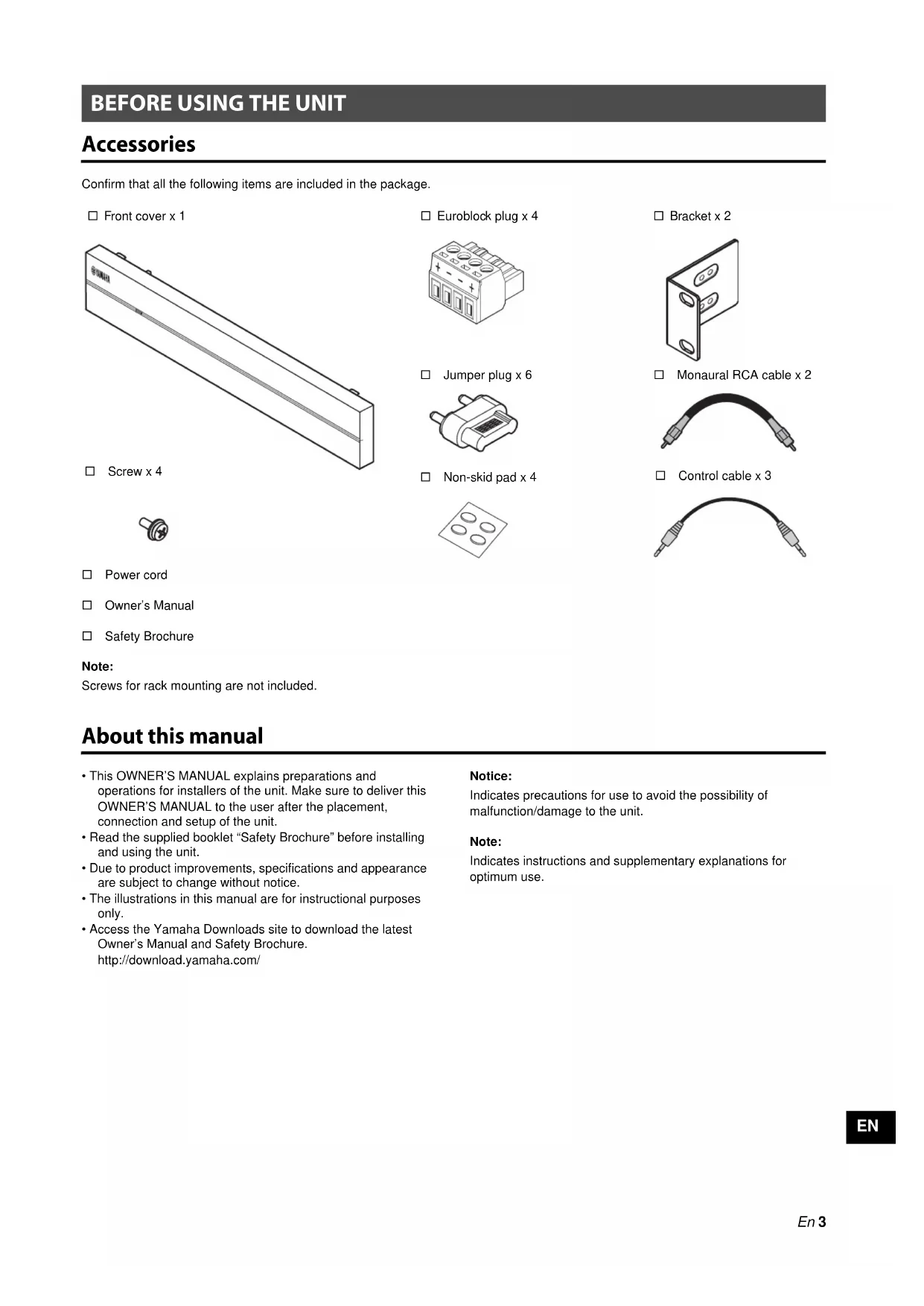
Accessories
Confirm that all the following items are included in the package.
□ Front cover x 1

□ Screw x 4

□ Power cord
□ Owner's Manual
□ Safety Brochure
Note:
Screws for rack mounting are not included.
□ Euroblock plug x 4

□ Jumper plug x 6

□ Non-skid pad x 4

□ Bracket x 2

□ Monaural RCA cable x 2

□ Control cable x 3

About this manual
- This OWNER'S MANUAL explains preparations and operations for installers of the unit. Make sure to deliver this OWNER'S MANUAL to the user after the placement, connection and setup of the unit.
- Read the supplied booklet "Safety Brochure" before installing and using the unit.
- Due to product improvements, specifications and appearance are subject to change without notice.
- The illustrations in this manual are for instructional purposes only.
- Access the Yamaha Downloads site to download the latest Owner's Manual and Safety Brochure. http://download.yamaha.com/
Notice:
Indicates precautions for use to avoid the possibility of malfunction/damage to the unit.
Note:
Indicates instructions and supplementary explanations for optimum use.
PART NAMES AND FUNCTIONS
Front panel

①MAIN STATUS indicator
Indicates the unit status depending on its color and whether it is lit or flashing.
- Unlit Standby
White Lit Power on
Red Lit Audio Sense on
Flashing Error occurred
②RESET key
Resets the unit. The unit is restarted forcibly by holding down RESET key for over 10 seconds.
③STATUS indicators
Indicate the AMP1 - AMP4 status depending on whether they are lit or flashing.
- Unlit Standby
White Lit Power on
4STANDBY keys
Set AMP1 - AMP4 to on / standby. The unit consumes a small power even in standby mode. The unit's standby power consumption depends on the standby configuration.

①GND screw terminal
Connecting the source device chassis to the GND terminal of the unit may reduce noise in the signal.
Note
The ground is not a safety ground.
②IR IN/OUT jack
Connection: 3.5 mm monaural mini-plug
For connecting to an external remote control device and inputting/outputting remote control signals. The output with pass-through function is enabled even in standby mode.
③AMP 1-4: IN/THRU. OUT jacks
Connection: stereo RCA plug (L/R)
IN: For connecting to an audio playback device such as a CD player (analog out jack) and inputting audio signals in AMP1-AMP4.
THRU. OUT: For outputting analog audio signals input in AMP 1–4 : IN jacks by pass-through function. The output is enabled even in standby mode.
④ AUTO STANDBY switch
Enables/disables the auto-standby function.
OFF: does not set the unit to standby mode automatically.
ON: sets the unit to standby mode when there are no operations for 8 hours.
AUDIO SENSE switch
Enables/disables the audio sense function that detects analog audio signals input in AMP 1–4 : IN.
OFF: disables the audio sense function.
ON: detects the input in AMP 1–4 : IN, and thereby turns AMP1–AMP4 to on.
Note
Unplug the unit's power cord from the AC wall outlet before changing the AUDIO SENSE switch setting.
AUDIO SENSE MODE switch
Selects the audio sense mode that determines the amount of time required between input of analog audio signals being detected and analog audio signals being output.
STANDBY: outputs analog audio signals about 7 seconds after detecting the input of them. This setting reduces the unit's standby power consumption..
ACTIVE: outputs analog audio signals within 1 second after detecting the input of them.
⑤TRIGGER IN 1-4 jacks
Connection: 3.5 mm monaural mini-plug (Tip: + / Sleeve: -) For inputting trigger signals (DC 12 V). Each AMP is powered on by inputting "High".
⑥TRIGGER OUT 1-4 jacks
Connection: 3.5 mm monaural mini-plug (Tip: + / Sleeve: -) For outputting trigger signals (DC 12 V) iby powering on each AMP.
⑦NORMAL/BRIDGE switch
Selects NORMAL/BRIDGE connection of speakers. This switch is normally set to NORMAL. Change the setting to BRIDGE only when the speaker is used in bridge connection.
Note
Unplug the unit's power cord from the AC wall outlet before changing the NORMAL/BRIDGE switch setting.
⑧SPEAKERS terminals
Connection: Euroblock connectors (supplied)
Speaker impedance: 4 Ω or over (NORMAL), 8 Ω or over (BRIDGE)
For connecting to speakers with supplied Euroblock connectors.
⑨ AC IN jack
For connecting the supplied power cord.
Placing the unit
■ Mounting the unit on a rack
Use the supplied brackets to mount the unit on an EIA standard rack. Screw the brackets to the unit horizontally.

Notice
- Do not use the brackets for devices other than the XDA-AMP5400.
- When installing brackets, use the included screws.
- Tighten the screws until the brackets are securely fixed.
Note
Screws for rack mounting are not included.
Precautions for rack mounting
If the unit is mounted together with additional units and/or other devices in an EIA standard equipment rack, the internal temperature can rise due to heat generated from the devices, resulting in impaired performance. If the unit is mounted in a rack, always observe the following requirements to avoid heat buildup:
- If the unit is mounted in a rack with other devices that generate a significant amount of heat, such as a power amplifier, leave more than 1U of space between the unit and other devices (both above and below). Also, make sure to either leave any open spaces uncovered or install appropriate ventilating panels to minimize the possibility of heat buildup.
- To ensure sufficient airflow, leave the rear of the rack open and position it at least 10 cm from walls or other surfaces.
■ Placing the unit without a rack
Affix the supplied non-skid pads at the four corners on the bottom of the unit, and then place the unit on a shelf or rack.

Note
Allow ventilation space of at least 10 cm (4 in.) on the top, either side and back of the unit.
The following is an example of connecting the devices. Unplug the unit's power cord from the AC wall outlet before connecting the devices.
XDA-QS5400
![graph TD A["YAMAHA XDA-GB5400"] --> B["Remote control device (Infrared signal receiver)"] A --> C["Remote control device (Infrared signal transmitter)"] A --> D["Power amplifier (i.e. XDA-AMP5400)"] A --> E["Audio output"] B --> F["Switch 1: STANDY USB, Connect SHC"] C --> G["Switch 2: STANDY USB, C…](/content/2026/03/570832/images/e8b1c3d3511755b6e780c3a132cf7cae055ab544f2bb7e28bb878dedf221a56b.jpg)
The unit does not have volume controls. Make sure you connect a device with volume control (such as a pre-amplifier) to the unit. If you connect a device without volume control (such as a CD player) directly to the unit, the volume may become excessively loud and result in damage to the unit or speakers.
■ Connecting speakers
Connect the speakers to the unit with the supplied Euroblock plug and commercially-available speaker cables.
![graph TD A["①"] --> B["Step 1: Rotation of component"] B --> C["Step 2: Step with circular arrows indicating rotation"] C --> D["Step 3: Rotation of component"] D --> E["Final Assembly"]](/content/2026/03/570832/images/87283470e578f3d7ec02321ef6d00df138e8aa53f373d9bff9c0a3331f78aa3e.jpg)

1 Loosen terminal screws.
2 Insert cables.
3 Securely tighten terminal screws.
4 Insert the Euroblock plug into the SPEAKERS terminals of the unit.
Note
- You must use the supplied Euroblock plugs. If the plugs have been lost, please contact your Yamaha dealer.
- Recommended cable gauges for the Euroblock plug: AWG26 (0.13 mm 2 ) to AWG16 (1.3 mm 2 )
- To prepare the cable for attachment to a Euroblock connector, strip the wire as shown in the illustration using stranded wire to make connections. With a Euroblock connection, stranded wires may be prone to breakage because of metal fatigue due to the weight of the cable or due to vibration. When rack mounting your device, use a lacing bar when possible to bundle and fasten the cables.
- Do not tin (solder) the exposed end.
■ Connecting speakers in bridge mode
Connect the speakers to the unit with the supplied Euroblock plug and commercially-available speaker cables, and set the NORMAL/BRIDGE switch to "BRIDGE".
Note
Unplug the unit's power cord from the AC wall outlet before changing the NORMAL/BRIDGE switch setting.

■ Connecting external devices
■ For an external device with analog stereo audio output Use a commercially-available analog stereo pin cable (stereo audio RCA cable). You can also use supplied jumper plugs and monaural RCA cables for various sound system configurations.
Note
For details on the configurations with supplied jumper plugs and monaural RCA cables, see the following:
- "Connection examples" (p.9)
■ For a remote control device
Use a commercially-available 3.5 mm monaural mini-plug cable. For connecting to an infrared signal receiver/emitter that allows you to operate the unit and other devices from another room.
■ For a device compatible with the trigger function
Use a commercially-available 3.5 mm monaural mini-plug cable. The trigger function can be controlled by external devices (such as XDA-QS5400) in conjunction with powering on/off the device.
■ Connecting the power cord
After all the connections are complete, plug the supplied power cord into the AC IN jack on the rear panel, and then plug the power cord to an AC wall outlet.
■ Connection examples
Example 1

![graph TD A["Source1 L"] --> B["AMP 1 AMP 2 AMP 3 AMP 4"] C["Source2 L"] --> D["AMP 1 AMP 2 AMP 3 AMP 4"] E["Source3 L"] --> F["AMP 1 AMP 2 AMP 3 AMP 4"] G["Source4 L"] --> H["AMP 1 AMP 2 AMP 3 AMP 4"] I["Speaker1 L R"] --> J["Speaker3 L R"] K["Speaker2 L R"] --> L["Speaker3 L R"] M["Speaker4 L R"] -…](/content/2026/03/570832/images/b03234d0fc33bc8b9f8667190541e3f625c296763e2bda79198eea604acb8b0e.jpg)
■ Example 2

![graph TD A["Source1 L R"] --> B["Jumper plug x 4"] C["Source2 L R"] --> B D["Speaker1 L R Speaker2"] --> E["Jumper plug x 4"] F["Speaker3 L R Speaker4"] --> E B --> G["AMF 1 AMP 2 AMP 3 AMP 4"] E --> H["AND Gate"] style A fill:#f9f,stroke:#333 style C fill:#f9f,stroke:#333 style D fill:#f9f,stroke:#…](/content/2026/03/570832/images/86f0fdc06323de87fc9362fb75593552d6a392531ca076cf6fb0799f20d8ed02.jpg)
■ Example 3

![graph TD A["Source1"] -->|L R| B["Jumper plug x 4"] C["Source2"] -->|L R| B B --> D["Speaker1"] B --> E["Speaker2"] B --> F["Speaker3"] B --> G["Speaker4"]](/content/2026/03/570832/images/af05c404fff15e09682277dfd82701d530394bfd19374700ddcd646f434758a6.jpg)
■ Example 4
![graph TD A["Source1 Stereo"] --> B["AMP1"] A --> C["AMP2"] A --> D["AMP3"] A --> E["AMP4"] B --> F["Speaker1"] C --> G["Speaker2"] D --> H["Speaker3"] E --> I["Speaker4"]](/content/2026/03/570832/images/2889dcfca898a2819ea9f57effaf1eeca219ee0f3c83b31773ce7f4818da319b.jpg)
![graph TD A["Source1"] -->|L R| B["Jumper plug x 6"] B --> C["Speaker1 Speaker1"] B --> D["Speaker2 Speaker2"] B --> E["Speaker3 Speaker3"] B --> F["Speaker4 Speaker4"] C --> G["L"] D --> H["R"] E --> I["L"] F --> J["R"] G --> K["AMP 1 AMP 2 AMP 3 AMP 4"] H --> L["AMP 1 AMP 2 AMP 3 AMP 4"] I --> M["A…](/content/2026/03/570832/images/23c414a595f6ffe45ffefe215104ef28ce9e99760fdf91da15d669e0bb420bd8.jpg)
■ Example 5

![graph TD A["Source1 Mono"] --> B["Jumper plug x 6 Monaural RCA cable x 1"] B --> C["Speaker1: Mono"] B --> D["Speaker2: Mono"] B --> E["Speaker3: Mono"] B --> F["Speaker4: Mono"]](/content/2026/03/570832/images/4fc5668c8eab040f65f22dddbc98e63ffa46301c00ee8a30ede715058921d798.jpg)
Example 6

![graph TD A["Source1"] -->|L/R| B["Speaker1"] C["Source2"] -->|L/R| D["Speaker2"] B --> E["Speaker3"] D --> E E --> F["BRIDGE IMP: 4ΩMIN"] F --> G["NORMAL IMP: 4ΩMIN"] G --> H["BRIDGE IMP: 8ΩMIN"] H --> I["Speaker3"] style A fill:#f9f,stroke:#333 style C fill:#f9f,stroke:#333 style B fill:#ccf,stroke…](/content/2026/03/570832/images/705c26dbaa3dc67e558bdd0f1e41d1655d6e93b781f7bba577d3fa6c63474460.jpg)
■ Example 7
![graph TD Source1["Source1"] -->|L| AMP1["AMP1"] Source1 -->|R| AMP2["AMP2"] Source1 -->|L| AMP3["AMP3"] Source1 -->|R| AMP4["AMP4"] AMP1 --> Speaker1["Speaker1"] AMP2 --> Speaker1 AMP3 --> Speaker2["Speaker2"] AMP4 --> Speaker2](/content/2026/03/570832/images/5b75391fa0bc3e0608caa708364410530df077885a1c443da238ee0003ee101a.jpg)
![graph TD A["Source1 L R"] --> B["Monaural RCA cable x 2"] B --> C["Speaker1 Speaker2 (High Power) (High Power)"] B --> D["Speaker2 Speaker2 (High Power) (High Power)"] B --> E["Speaker3 Speaker2 (High Power) (High Power)"] B --> F["Speaker4 Speaker2 (High Power) (High Power)"] B --> G["NORMAL IMP: 4…](/content/2026/03/570832/images/3b05aee13d5b30af8e1ff0a7f6d8fdaf5c96142ed82ed39e56ce969ada82d06b.jpg)
Specifications
The specifications of the unit are as follows.
Input jacks
Analog Audio
- Stereo Audio (RCA) x 4
Output jacks
Analog Audio
- Speaker Out x 4 (L/R)
- Stereo Audio (RCA) x 4
Other jacks
Trigger In x 4
Trigger Out x 4
Remote In x 1
Remote Out x 1
Audio Section
Rated Output Power
• (2-channel driven, 1 kHz, 0.9% THD, NORMAL, 4/8 Ω) 90/50 W
• (2-channel driven, 1 kHz, 0.9% THD, BRIDGE, 8 Ω) 100 W
• (1-channel driven, 1 kHz, 0.9% THD, NORMAL, 4/8 Ω) 100/50 W
• (1-channel driven, 1 kHz, 0.9% THD, BRIDGE, 8 Ω) 200 W
Dynamic Power
• (2-channel driven, 20 Hz to 20 kHz, 0.08% THD, 20ms Burst, NORMAL, 4/8 Ω) 80/40 W
• (2-channel driven, 20 Hz to 20 kHz, 0.08% THD, 20ms Burst, BRIDGE, 8 Ω) 150 W
• (2-channel driven, 1 kHz, 0.9% THD, 20ms Burst, NORMAL, 4/8 Ω) 100/50 W
• (2-channel driven, 1 kHz, 0.9% THD, 20ms Burst, BRIDGE, 8 Ω) 200 W
• (All channel driven, 1 kHz, 0.9% THD, 20ms Burst, NORMAL(8-ch), 4/8 Ω) 80/50 W
- (All channel driven, 1 kHz, 0.9% THD, 20ms Burst, BRIDGE(4-ch), 8 Ω) 170 W
Maximum Effective Output Power (JEITA)
• (1-channel driven, 1 kHz, 10% THD, NORMAL, 4/8 Ω) 130/65 W
• (1-channel driven, 1 kHz, 10% THD, BRIDGE 8 Ω) 260 W
Total Harmonic Distortion (THD)
• (20 Hz to 20 kHz, SP OUT, 25 W, 8 Ω) 0.04% THD
Frequency Response (+0/-3 dB)
• SP OUT (AMP IN) 5 Hz to 40 kHz
Signal to Noise Ratio (IHF-A)
• SP OUT (AMP IN) 108 dB
Maximum Input Signal
• AMP IN (1 kHz, 0.9% THD) 1.0 V
Gain
- SP OUT (1 V INPUT) 25.8 dB
Input Sensitivity
- 1 W power (1 W/8 Ω output) 150 mV - MAX power (50 W/8 Ω output) 1.0 V
General
Power Supply
• [U.S.A. model] AC 120 V, 60 Hz • [Other models] AC 220 to 240 V, 50/60 Hz
Power Consumption 130 W
- Amp1 - Amp4 On, No Signal Condition 32 W
- Amp1 - Amp4 Off, Audio Sense On, Audio Sense Mode Active 14.8 W
Standby Power Consumption
- Audio Sense Off 0.3 W - Audio Sense On, Audio Sense Mode Standby 0.5 W
Dimensions (W x H x D)
437 x 46 x 443 mm (17-1/4" x 1-3/4" x 17-3/8")
Weight 6.0 kg (13.2 lbs)
Reference Dimensions
- Brackets with front cover
481 x 44 x 453 mm (18-7/8" x 1-3/4" x 17-7/8")

• Table Top Mount-with front cover
437 x 46 x 453 mm (17-1/4" x 1-3/4" x 17-7/8")

- Brackets
481 x 44 x 443 mm (18-7/8" x 1-3/4" x 17-3/8")

* The contents of this manual apply to the latest specifications as of the publishing date. To obtain the latest manual, access the Yamaha website then download the manual file.
EN
TABLE DES MATIÈRES
AVANT D'UTILISER L'UNITÉ 17
Accessoires ....17
□ Vis x 4

□ Bornier Euroblock x 4 □ Support x 2

①Borne à vis GND

![graph TD A["Source 1"] -->|G D| B["AMP 1"] C["Source 2"] -->|G D| D["AMP 2"] E["Source 3"] -->|G D| F["AMP 3"] G["Source 4"] -->|G D| H["AMP 4"] I["Enceinte 1"] --> J["G D"] K["Enceinte 2"] --> L["G D"] M["Enceinte 3"] --> N["G D"] O["Enceinte 4"] --> P["G D"] style A fill:#f9f,stroke:#333 style C f…](/content/2026/03/570832/images/705d52b9e84a2fc6df24d36710c4274123c2993d0609626e155a7ffbf4a8f08b.jpg)
■ Exemple 2
![graph LR A["Source 1"] --> B["Enceinte 1"] B --> C["AMP1"] B --> D["AMP2"] E["Source 2"] --> F["Enceinte 3"] F --> G["AMP3"] F --> H["AMP4"] C --> I["Enceinte 2"] D --> J["Enceinte 2"] G --> K["Enceinte 4"] H --> L["Enceinte 4"]](/content/2026/03/570832/images/23077e771f9bccf40f2346516019cdc9949c1fce84c0e1d06571df858a64c348.jpg)
![graph TD A["Source 1"] -->|G D| B["Connecteur cavalier x 4"] C["Source 2"] -->|G D| B B --> D["Enceinte 1 G D G D Enceinte 2"] B --> E["Enceinte 3"] B --> F["Enceinte 4"] style A fill:#f9f,stroke:#333 style C fill:#f9f,stroke:#333 style B fill:#ccf,stroke:#333 style D fill:#cfc,stroke:#333 style E f…](/content/2026/03/570832/images/89dafea741a2aa1413d67192ceca9078fba7776cf1f2e4656a50cd0049220ec5.jpg)
FR
■ Exemple 3
![graph LR A["Source 1"] --> B["AMP1"] C["Source 2"] --> D["AMP2"] C --> E["AMP3"] C --> F["AMP4"] B --> G["Output Block"] D --> H["Output Block"] E --> I["Output Block"] F --> J["Output Block"]](/content/2026/03/570832/images/a62ff3ae2ab56806cc916e754f5e6ae83cdb4f6ae955ec4ab787d2dd96b57415.jpg)
![graph TD A["Source 1"] -->|G D| B["AMP 1"] A -->|G D| C["AMP 2"] B --> D["AMP 3"] C --> E["AMP 4"] D --> F["Connecteur cavalier x 4"] E --> F F --> G["Enceinte 1"] F --> H["Enceinte 2"] F --> I["Enceinte 3"] F --> J["Enceinte 4"]](/content/2026/03/570832/images/4d87a7fdf771f734032a1ac5d8574ed9a0ed01424ccfd28aa14de4870c335f99.jpg)
■ Exemple 4
![graph LR Source1["Source 1"] -->|Stereo Enceinte 1| AMP1["AMP1"] Source1 -->|Stereo Enceinte 1| AMP2["AMP2"] Source1 -->|Stereo Enceinte 1| AMP3["AMP3"] Source1 -->|Stereo Enceinte 1| AMP4["AMP4"] AMP1 --> ENceinte2["Enceinte 2"] AMP2 --> ENceinte2 AMP3 --> ENceinte3["Enceinte 3"] AMP4 --> ENceinte4…](/content/2026/03/570832/images/e9059a17fdbd447292eb85b073be24d299ea451626f74c066e4290e217fd0618.jpg)

- SP OUT (AMP IN) 108 dB
Dimensions (L x H x P) 437 x 46 x 443 mm
Poids 6,0 kg
• Supports
481 x 44 x 443 mm

□ Tornillo × 4

□ Conector Euroblock × 4

①Terminal de tornillos GND
⑦Interruptor NORMAL/BRIDGE
• SP OUT (AMP IN) De 5 Hz a 40 kHz
- SP OUT (AMP IN) 108 dB
- Soportes
481 × 44 × 443 mm

https://download.yamaha.com/
Manual Development Group
© 2018 Yamaha Corporation
Published 12/2018 NVEM-C0




- MULTI ZONE AMPLIFIER
- AMPLIFICATEUR MULTIZONE
- XDA-AMP5400RK
- PART NAMES AND FUNCTIONS 4
- PLACEMENT AND CONNECTION 6
- SPECIFICATIONS 13
- ACCESSORIES
- NOTE
- ABOUT THIS MANUAL
- NOTICE
- PART NAMES AND FUNCTIONS
- FRONT PANEL
- ①MAIN STATUS INDICATOR
- ②RESET KEY
- ③STATUS INDICATORS
- 4STANDBY KEYS
- ①GND SCREW TERMINAL
- ②IR IN/OUT JACK
- ③AMP 1-4: IN/THRU. OUT JACKS
- ④ AUTO STANDBY SWITCH
- AUDIO SENSE SWITCH
- AUDIO SENSE MODE SWITCH
- ⑤TRIGGER IN 1-4 JACKS
- ⑥TRIGGER OUT 1-4 JACKS
- ⑦NORMAL/BRIDGE SWITCH
- ⑧SPEAKERS TERMINALS
- ⑨ AC IN JACK
- PLACING THE UNIT
- MOUNTING THE UNIT ON A RACK
- PRECAUTIONS FOR RACK MOUNTING
- PLACING THE UNIT WITHOUT A RACK
- CONNECTING SPEAKERS
- CONNECTING SPEAKERS IN BRIDGE MODE
- CONNECTING EXTERNAL DEVICES
- FOR A REMOTE CONTROL DEVICE
- FOR A DEVICE COMPATIBLE WITH THE TRIGGER FUNCTION
- CONNECTING THE POWER CORD
- SPECIFICATIONS
- INPUT JACKS
- OUTPUT JACKS
- OTHER JACKS
- AUDIO SECTION
- GENERAL
- TABLE DES MATIÈRES
- AVANT D'UTILISER L'UNITÉ 17
- ①BORNE À VIS GND
- ①TERMINAL DE TORNILLOS GND
- ⑦INTERRUPTOR NORMAL/BRIDGE
Brand : YAMAHA
Model : XDAAMP5400RK
Category : Home cinema amp