Performance Line Drive Unit 25 kmh - Electric motor BOSCH - Free user manual and instructions
Find the device manual for free Performance Line Drive Unit 25 kmh BOSCH in PDF.



| Product type | Electric motor for electric bike (eBike) |
| Brand | Bosch |
| Model | Performance Line Drive Unit 25 kmh |
| Continuous rated power | 250 W |
| Max torque | 63 Nm (Cruise version) / 75 Nm (CX version) |
| Rated voltage | 36 V |
| Operating temperature | -5 to +40 °C |
| Storage temperature | -10 to +50 °C |
| Protection type | IP54 (dust-tight and splash-proof) |
| Weight | Approx. 4 kg |
| Maximum assist speed | 25 km/h |
| Assistance levels | OFF, ECO, TOUR, SPORT, TURBO |
| Main functions | Pedal assist, push assist (Walk up to 6 km/h), compatible with eShift |
| Power supply | Compatible 36 V Bosch battery |
| Maintenance and cleaning | Clean without immersing or using a pressure washer; annual technical inspection recommended |
| Safety | Do not open yourself; use only original Bosch batteries and parts; follow safety instructions |
| Spare parts and repairability | Repairs exclusively by an authorized dealer with original parts; unauthorized opening voids warranty |
| General information | Manual available in multiple languages at notice-facile.com |
Frequently Asked Questions - Performance Line Drive Unit 25 kmh BOSCH
User questions about Performance Line Drive Unit 25 kmh BOSCH
0 question about this device. Answer the ones you know or ask your own.
Ask a new question about this device
Download the instructions for your Electric motor in PDF format for free! Find your manual Performance Line Drive Unit 25 kmh - BOSCH and take your electronic device back in hand. On this page are published all the documents necessary for the use of your device. Performance Line Drive Unit 25 kmh by BOSCH.
USER MANUAL Performance Line Drive Unit 25 kmh BOSCH
Performance Line Performance Line
natural_image
3D rendering of a mechanical device with no visible text or symbols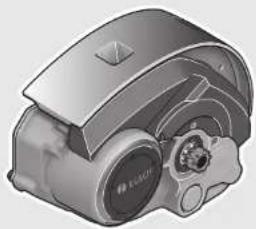
natural_image
3D rendering of a mechanical device with no visible text or symbolsRobert Bosch GmbH
Bosch eBike Systems
72703 Reutlingen
GERMANY
www.bosch-ebike.com
0 275 007 PDC (2016.04) T/53 WEU
Drive Unit (25 km/h)
0275007043|0275007037

BOSCH
natural_image
Close-up of a mechanical component with hands and a numbered label (1), no readable text or symbols present.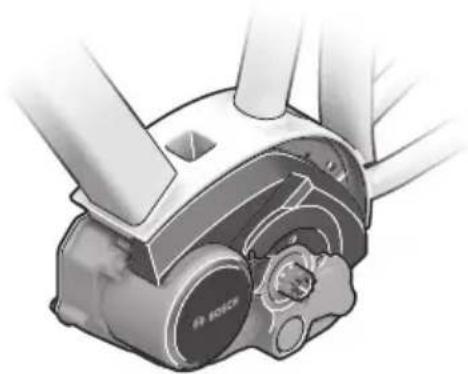
natural_image
Technical illustration of a Bosch wind turbine assembly (no text or symbols visible)A
Sicherheitshinweise

Read all safety warnings and all instructions. Failure to follow the warnings and instructions may result in electric shock, fire and/or serious injury.
Save all safety warnings and instructions for future reference.
The term “battery pack” used in these operating instructions, irrespective of model, refers both to standard battery packs (battery packs with holder on the bike frame) and to rack-type battery packs (battery packs with holder in the rear rack/carrier).
▶ Do not open the drive unit yourself. The drive unit must be repaired only by qualified experts and only with original spare parts. This will ensure that the safety of the drive unit is maintained. Unauthorised opening of the drive unit will void warranty claims.
All components mounted to the drive unit and all other components of the eBike drive (e.g., the chainwheel, chainwheel seat, pedals) may be replaced only with identical components or components specifically approved for your eBike by the bicycle manufacturer. This protects the drive unit against overload and damage.
Remove the battery pack from the eBike before beginning work (e.g. inspection, repair, assembly, maintenance, work on the chain, etc.) on the eBike, transporting it by car or plane, or storing it. Unintentional activation of the eBike system poses a risk of injury.
The eBike system can switch itself on when the eBike is pushed backwards.
The push-assistance function may only be used when pushing the eBike. Danger of injury when the wheels of the eBike do not have ground contact while using the push-assistance function.
The pedals may also rotate when the push assistance is switched on. When the push assistance is activated, make sure that your legs are a sufficient distance away from the rotating pedals. There is a risk of injury.
▶ Use only original Bosch battery packs approved for your eBike by the manufacturer. Using other battery packs can lead to injuries and pose a fire hazard. When using other battery packs, Bosch shall not assume any liability and warranty.
▶ Do not make any modifications to your eBike system or fit any other products which would be suitable for increasing the performance of your eBike system. This
normally reduces the lifetime of the system and risks damage to the drive unit and the bike. There is also a risk of losing the guarantee and warranty claims on the bike you have purchased. By handling the system improperly you are also endangering your safety and that of other road users, thus running the risk of high personal liability costs and possibly even criminal prosecution in the event of accidents attributable to manipulation.
▶ Please observe all national regulations on registering and using eBikes.
▶ Please read and observe the safety warnings and instructions enclosed in the operating instructions of the battery pack as well as in the operating instructions of your eBike.
Product Description and Specifications
Intended Use
The drive unit is intended only for driving your eBike and must not be used for other purposes.
Product Features
The numbering of the components shown refers to the illustrations on the graphic pages at the beginning of the manual. All illustrations of bike parts except for the drive unit, onboard computer including operating unit, speed sensor and the corresponding holders are schematic and may differ on your eBike.
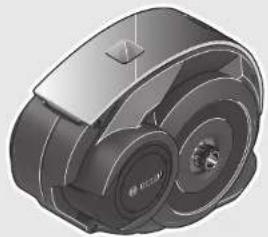
1 Drive unit
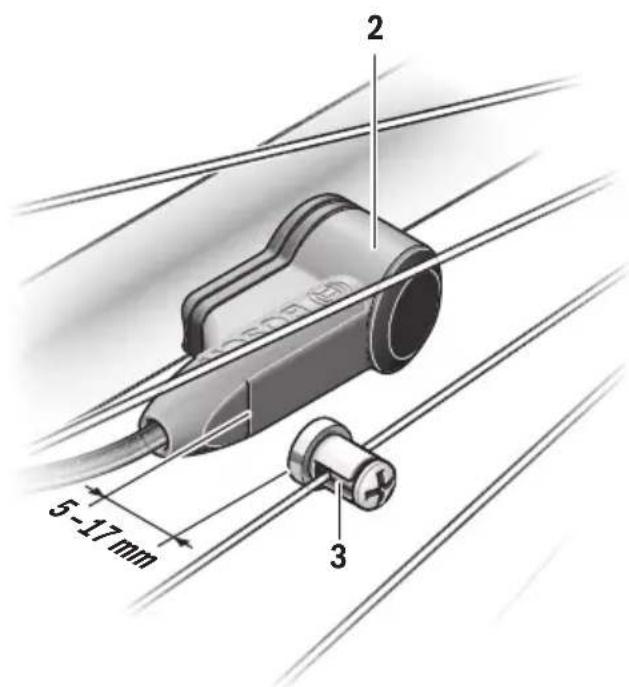
2 Speed sensor
3 Spoke magnet of the speed sensor
Technical Data
| Drive Unit Drive Unit Cruise | ||
| Article number | 0 275 007 043 | |
| Rated continuous output | W | 250 |
| Torque at drive, max. | Nm 63 | |
| Rated voltage | V= | 36 |
| Operating temperature | °C -5...+40 | |
| Storage temperature | °C -10...+50 | |
| Degree of protection | IP 54 (dust and splash water protected) | |
| Weight, approx. | kg | 4 |
Drive Unit Drive Unit CX
| Article number | 0 275 007 037 | |
| Rated continuous output | W | 250 |
| Torque at drive, max. | Nm 75 | |
| Rated voltage | V= | 36 |
| Operating temperature | °C -5...+40 | |
| Storage temperature | °C -10...+50 | |
| Degree of protection | IP 54 (dust and splash water protected) | |
| Weight, approx. kg 4 |
Bike lights 1)
| Voltage, approx.2)3) | V= | 6 |
| Maximum output | ||
| - Front light | W | 8.4/17.4 |
| - Taillight | W | 0.6/0.6 |
1) Not possible via the eBike battery pack in all country-specific versions, depending on the statutory regulations
2) The voltage level is preset and can be changed only by the bicycle dealer.
3) When changing the bulbs, ensure that the bulbs are compatible with the Bosch eBike system (ask your bicycle dealer) and that the specified voltage matches. Bulbs must be replaced only with bulbs of the same voltage.
▶ Incorrectly inserted bulbs can be destroyed!
Assembly
Inserting and removing the battery pack
For inserting and removing the eBike battery pack in/from the eBike, please read and observe the battery pack operating instructions.
Checking the Speed Sensor (see figure A)
The speed sensor 2 and its spoke magnet 3 must be mounted in such a manner that the spoke magnet, after a turn of the wheel, moves past the speed sensor with a clearance of at least 5 mm, yet no more than 17 mm.
Note: If the distance between speed sensor 2 and spoke magnet 3 is too small or too large, or if the speed sensor 2 is not properly connected, the speed indication will fail, and the eBike drive unit will operate in emergency mode.
In this case, loosen the screw of the spoke magnet 3 and fasten the spoke magnet to the spoke in such a manner that it runs past the mark of the speed sensor at the correct clearance. If the speed is still not being indicated in the speed indication after this, please contact an authorised bicycle dealer.
Operation
Initial Operation
Requirements
The eBike system can only be activated when the following requirements are met:
- A sufficiently charged battery pack is inserted (see battery pack operating instructions).
- The on-board computer is properly inserted in the holder (see on-board computer operating instructions).
- The speed sensor is connected properly (see "Checking the Speed Sensor", page English-2).
Switching the eBike System On/Off
Options for \$witching on the eBike system: 2
- If the on-board computer is already switched on when you insert it into the holder, then the eBike system will be switched on automatically.
- When the on-board computer and the eBike battery pack are inserted, briefly press the On/Off button of the on-board computer.
- When the on-board computer is inserted, press the On/Off button of the eBike battery pack (see battery pack operating instructions).
The drive is activated as soon as you step on the pedals (except when in the push aid feature, see "Switching the Push-assistance mode On/Off", page English-3). The motor output depends on the settings of the assistance level on the onboard computer.
As soon as you stop pedaling when in normal operation, or as soon as you have reached a speed of 25 km/h, the assistance from the eBike drive is switched off. The drive is automatically re-activated as soon you start pedaling again and the speed is below 25 km/h.
Options for switching off the eBike system:
- Press the On/Off button of the on-board computer.
- Switch the eBike battery pack off by its On/Off button (see battery pack operating instructions).
- Remove the on-board computer out of its holder.
If the eBike is not moved and no button is pressed on the onboard computer for 10 minutes, the eBike system will shut down automatically in order to save energy.
eShift (optional)
eShift is the integration of automatic gear shifting systems into the eBike system. The eShift components are electrically connected to the drive unit by the manufacturer. The operation of automatic gear shifting systems is described in the operating instructions of the on-board computer.
Setting the Assistance Level
On the on-board computer you can set how much the eBike drive assists you while pedalling. The assistance level can be changed at any time, even while cycling.
Note: For individual versions, it is possible that the assistance level is pre-set and cannot be changed. It is also possible that less assistance levels are available for selection than listed here.
The following assistance levels (max.) are available:
- “OFF”: The motor assistance is switched off, and the eBike can be moved as a normal bicycle only by pedalling. The push assistance/start assistance cannot be activated in this assistance level.
- “ECO”: Effective assistance at maximum efficiency for maximum cruising range
- “TOUR”: Uniform assistance, for touring with long cruising range
- “SPORT”: Powerful assistance for sportive riding off road as well as for urban traffic
- “TURBO”: Maximum assistance, supporting highest cadence for sportive riding
The requested motor output is displayed in indicator. The maximum motor output depends on the selected assistance level.
| Assistance Level Assistance Factor* (Derailleur) | |
| Cruise CX | |
| “ECO” | 50 % 50 % |
| “TOUR” | 120 % 120 % |
| “SPORT” | 190 % 210 % |
| “TURBO” | 275 % 300 % |
| * The motor output can vary for individual versions. | |
Switching the Push-assistance mode On/Off
The push-assistance feature makes it easier to push the eBike. The speed in this function depends on the set gear and cannot exceed 6 km/h (max.). The lower the set gear, the lower the speed in the push-assistance function (at full output).
The push-assistance function may only be used when pushing the eBike. Danger of injury when the wheels of the eBike do not have ground contact while using the push-assistance function.
To activate the push-assistance function, briefly press button "WALK" on your on-board computer. After activation, press button "+" within 3 s and keep it pressed. The eBike drive is switched on.
Note: The push assistance cannot be activated in the "OFF" assistance level.
The push assistance is switched off as soon as one of the following occurs:
- you release button “+”,
– the wheels of the eBike are blocked (e.g. by actuating the brakes or impacting against an obstacle), - the speed exceeds 6 km/h.
Note: On some systems the push-assistance function can be started directly by pressing the "WALK" button.
Switching bike lights on/off
For bikes with back-pedalling function, the pedals rotate when the push aid is switched on. If the rotating pedals are blocked, the push aid switches off.
Notes on Riding with the eBike System
When does the eBike Drive Unit Operate?
The eBike drive unit assists you when riding, as long as you step into the pedals. Without pedaling, there is no assistance. The motor output always depends on the amount of your pedaling power.
When applying less pedaling power, the assistance or support will be lower than when applying a lot of pedaling power. This applies independent of the assistance Level.
The eBike drive automatically switches off at speeds in excess of 25 km/h. When the speed falls below 25 km/h, the drive is automatically available again.
An exception applies to the push-assistance function, in which the eBike can be pushed at low speed without pedalling. The pedals may also rotate when the push assistance is used.
The eBike can also be ridden as a normal bicycle without assistance at any time, by either switching off the eBike system or setting the assistance level to "OFF". The same applies when the battery pack is empty.
Interaction of the eBike System with the Bicycle Gears
The bicycle gears should be used as with a normal bicycle, even with eBike motor assistance (please observe the operating instructions of your eBike).
Independent of the type of gearing, it is recommended to briefly interrupt the pedaling while changing gears. This makes changing gears easier and reduces the wear of the drive train.
By selecting the right gear, you can increase the speed and range with the same pedaling effort.
Gathering First Experience
It is recommended to gather first experience with the eBike away from roads with heavy traffic.
Test the various assistance levels. Start with the lowest assistance level. As soon as you feel confident, you can ride your eBike in traffic like any other bike.
Test the operating range of your eBike under different conditions before planning longer and more challenging rides.
Influences on the Operating Range
The range is affected by a number of factors, such as:
- Assistance level
- Speed
-Gearchangingbehaviour
– Tyre type and tyre pressure
– Age and condition of the battery - Route profile (gradients) and conditions (road surface)
- Headwind and ambient temperature
- Weight of eBike, driver and luggage.
For this reason, it is not possible to precisely predict the range before and during a trip. General rules:
- With the same assistance level on the eBike drive: The less energy you need to exert in order to reach a certain speed (e.g. by changing gears optimally), the less energy the eBike drive will consume and the higher the range per battery charge will be.
- The higher the assistance level under otherwise same conditions, the lower the range.
Careful Handling of the eBike
Please observe the operating and storage temperatures of the eBike components. Protect the drive unit, on-board computer and battery against extreme temperatures (e.g. from intense sunlight without adequate ventilation). The components (especially the battery pack) can become damaged through extreme temperatures.
Maintenance and Service
Maintenance and Cleaning
When changing the bulbs, ensure that the bulbs are compatible with the Bosch eBike system (ask your bicycle dealer) and that the specified voltage matches. Bulbs must be replaced only with bulbs of the same voltage.
Do not immerse any components, including the drive unit, in water or clean them with pressurised water.
Have your eBike system checked by an expert at least once a year (including mechanical parts, up-to-dateness of system software).
For service or repairs on the eBike, please refer to an authorised bicycle dealer.
After-sales Service and Application Service
In case of questions concerning the eBike system and its components, please refer to an authorised Bosch eBike dealer.
For contact data of authorised Bosch eBike dealers, please refer to www.bosch-ebike.com
Disposal

The drive unit, on-board computer including operating unit, battery pack, speed sensor, accessories and packaging should be disposed of in an environmentally correct manner.
Do not dispose of eBikes and their components into household waste!
Only for EC countries:
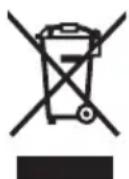
According to the European Guideline 2012/19/EU, electrical devices/tools that are no longer usable, and according to the European Guideline 2006/66/EC, defective or used battery packs/batteries, must be collected separately and disposed of in an environmentally correct manner.
Subject to change without notice.
Drivenhet Drive Unit CX
Drivenhet Drive Unit CX
| Produktnummer | 0 275 007 037 | |
| Nominell kontinuerlig ytelse W | 2 | 5 |
| Dreiemoment på driven- heten maks. | Nm 75 | |
| Nominell spenning | V= | 36 |
| Driftstemperatur | °C -5...+40 | |
| Lagertemperatur | °C -10...+50 | |
| Beskyttelsestype | IP 54 (støv- og sprut- vannbeskyttet) | |
| Vekt, ca. | kg 4 | |
- Performance Line Performance Line
- Drive Unit (25 km/h)
- BOSCH
- Sicherheitshinweise
- Save all safety warnings and instructions for future reference.
- Product Description and Specifications
- Intended Use
- Product Features
- Assembly
- Inserting and removing the battery pack
- Checking the Speed Sensor (see figure A)
- Operation
- Initial Operation
- Requirements
- Switching the eBike System On/Off
- eShift (optional)
- Setting the Assistance Level
- Switching the Push-assistance mode On/Off
- Switching bike lights on/off
- Notes on Riding with the eBike System
- When does the eBike Drive Unit Operate?
- Interaction of the eBike System with the Bicycle Gears
- Gathering First Experience
- Influences on the Operating Range
- Careful Handling of the eBike
- Maintenance and Service
- Maintenance and Cleaning
- After-sales Service and Application Service
- Disposal
- Only for EC countries:
Brand : BOSCH
Model : Performance Line Drive Unit 25 kmh
Category : Electric motor