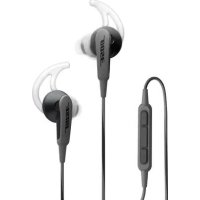
SoundSport Inear - Wireless Earbuds BOSE - Free user manual and instructions
Find the device manual for free SoundSport Inear BOSE in PDF.



| Product Type | Wired in-ear headphones |
| Brand | Bose |
| Model | SoundSport Inear |
| Weight | Approximately 20 g (with cable) |
| Cable length | Approximately 1.2 m |
| Connector | 3.5 mm jack |
| Audio technology | TriPort for natural bass |
| Water resistance | Resistant to sweat and weather |
| Eartips | StayHear (3 sizes: S, M, L) |
| Microphone | Built-in microphone with 3-button remote |
| Compatibility | iPod, iPhone, iPad and devices with 3.5 mm jack |
| Sports use | Yes, with clothing clip |
| Control functions | Volume, play/pause, skip, call, voice commands |
| Maintenance | Clean eartips with water and mild detergent; nozzles with dry cotton swab |
| Safety | Do not use at high volume for prolonged periods; be careful while driving |
| Warranty | Limited warranty (see Bose website) |
| Spare parts | Replacement eartips available |
Frequently Asked Questions - SoundSport Inear BOSE
User questions about SoundSport Inear BOSE
0 question about this device. Answer the ones you know or ask your own.
Ask a new question about this device
Download the instructions for your Wireless Earbuds in PDF format for free! Find your manual SoundSport Inear - BOSE and take your electronic device back in hand. On this page are published all the documents necessary for the use of your device. SoundSport Inear by BOSE.
USER MANUAL SoundSport Inear BOSE
for use with select iPod, iPhone, and iPad models
Owner's Guide | Brugerveledning | Bedienungsanleitung | Gebruikershandleiding
Guía del usuario | Käytöohje | Notice d'utilisation | Manuale di istruzioni
Kezelési utmutató | Brukerveledning | Podrecznik uzytkownika | Bruksanvisining
|用户指南使用者指南|才一一式方不卜
Please read this owner's guide carefully and keep for future reference.

WARNING:
- DON'T use the headphones at a high volume for any extended period.
- To avoid hearing damage, use your headphones at a comfortable, moderate volume level.
- Turn the volume down on your device before placing the headphones in your ears, then turn the volume up gradually until you reach a comfortable listening level.
- DO use caution and follow applicable laws regarding mobile phone and headphone use if using the headphones for phone calls while driving. Some jurisdictions impose specific limitations, such as single earpiece configuration, on the use of such products while driving. DON'T use the headphones for any other purpose while driving.
- DO focus on your safety and that of others if you use the headphones while engaging in any activity requiring your attention, e.g., while riding a bicycle or walking in or near traffic, a construction site or railroad, etc. Remove the headphones or adjust your volume to ensure you can hear surrounding sounds, including alarms and warning signals.
- DON'T use mobile phone adapters to connect headphones to airplane seat jacks, as this could result in personal injury such as burns or property damage due to overheating.
DO remove headphones and disconnect immediately if you experience a warming sensation or loss of audio. - DON'T submerge or expose for extended period to water, or wear while participating in water sports, i.e. swimming, waterskiing, surfing, etc.
- DON'T place naked flame sources, such as lighted candles, on or near the product.

WARNING: Contains small parts which may be a choking hazard. Not suitable for children under age 3.

WARNING: This product contains magnetic material. Contact your physician if you have questions on whether this might affect the operation of your implantable medical device.

Bose Corporation hereby declares that this product is in compliance with the essential requirements and other relevant provisions of Directive 2014/53/EU and all other applicable EU directive requirements. The complete declaration of conformity can be found at: www.Bose.com/compliance

This symbol means the product must not be discarded as household waste, and should be delivered to an appropriate collection facility for recycling. Proper disposal and recycling helps protect natural resources, human health and the environment. For more information on disposal and recycling of this product, contact your local municipality, disposal service, or the shop where you bought this product.
| Names and Contents of Toxic or Hazardous Substances or Elements | ||||||
| Toxic or Hazardous Substances and Elements | ||||||
| Part Name Lead (Pb) Mercury (Hg) Cadmium (Cd) | Hexavalent (CR(VI)) | Polybrominated Biphenyl (PBB) | Polybrominated diphenylether (PBDE) | |||
| PCBs X O O O O O O | ||||||
| Metal parts X O O O O O O | ||||||
| Plastic parts O O O O O O | ||||||
| Speakers X O O O O O | ||||||
| Cables X O O O O O | ||||||
| This table is prepared in accordance with the provisions of SJ/T 11364. O: Indicates that said hazardous substance contained in all of the homogeneous materials for this part is below the limit requirement of GB/T 26572. X: Indicates that said hazardous substance contained in at least one of the homogeneous materials used for this part is above the limit requirement of GB/T 26572. | 10 | |||||
©2018 Bose Corporation. No part of this work may be reproduced, modified, distributed, or otherwise used without prior written permission.
About your Bose® SoundSport® in-ear headphones 4
Carton contents 5
Connecting to your device 6
Using the headphones with your device 6
6
Basic functions 7
Media playback functions 7
Importance of proper fit 8
Fitting the headphones to your ear 8
Changing the eartips 9
Adjusting for comfort and stability. 10
Using the clothing clip 10
Using a single earpiece. 10
Troubleshooting 11
Cleaning. 12
Limited warranty 12
iPad, iPhone, and iPod are trademarks of Apple Inc., registered in the U.S. and other countries. The trademark "iPhone" is used with a license from Aiphone K.K.
"Made for iPod," "Made for iPhone," and "Made for iPad" mean that an electronic accessory has been designed to connect specifically to iPod, iPhone, or iPad, respectively, and has been certified by the developer to meet Apple performance standards. Apple is not responsible for the operation of this device or its compliance with safety and regulatory standards. Please note that the use of this accessory with iPod, iPhone, or iPad may affect wireless performance.
Please complete and retain for your records:
The serial and model numbers can be found on the warranty card.
Serial number
Model number
Purchase date
We suggest you keep your receipt with this owner's guide.
About your Bose® SoundSport® in-ear headphones
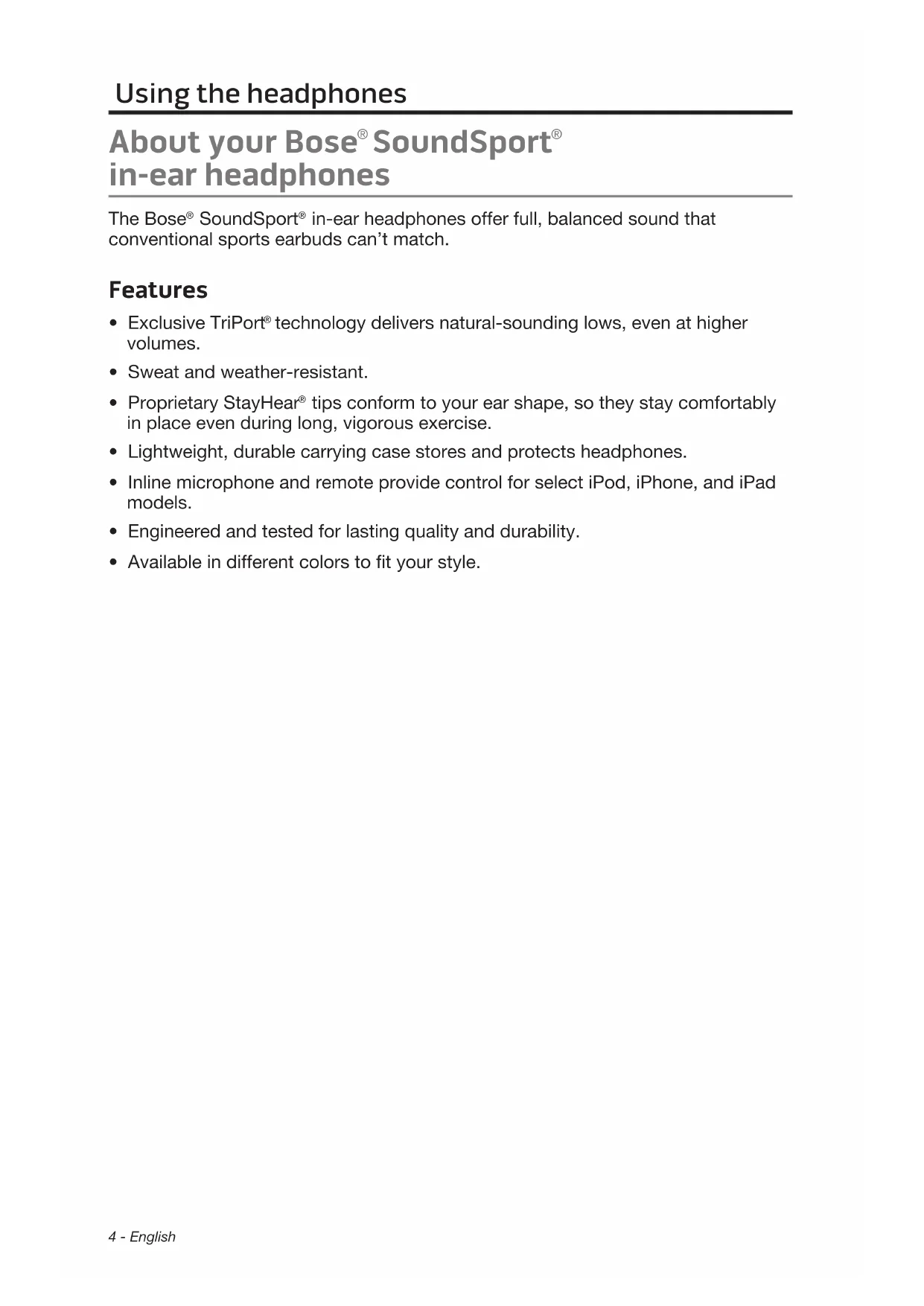
The Bose® SoundSport® in-ear headphones offer full, balanced sound that conventional sports earbuds can't match.
Features
- Exclusive TriPort® technology delivers natural-sounding lows, even at higher volumes
- Sweat and weather-resistant.
- Proprietary StayHear® tips conform to your ear shape, so they stay comfortably in place even during long, vigorous exercise.
- Lightweight, durable carrying case stores and protects headphones.
- Inline microphone and remote provide control for select iPod, iPhone, and iPad models.
Engineered and tested for lasting quality and durability.
Available in different colors to fit your style.
Carton contents
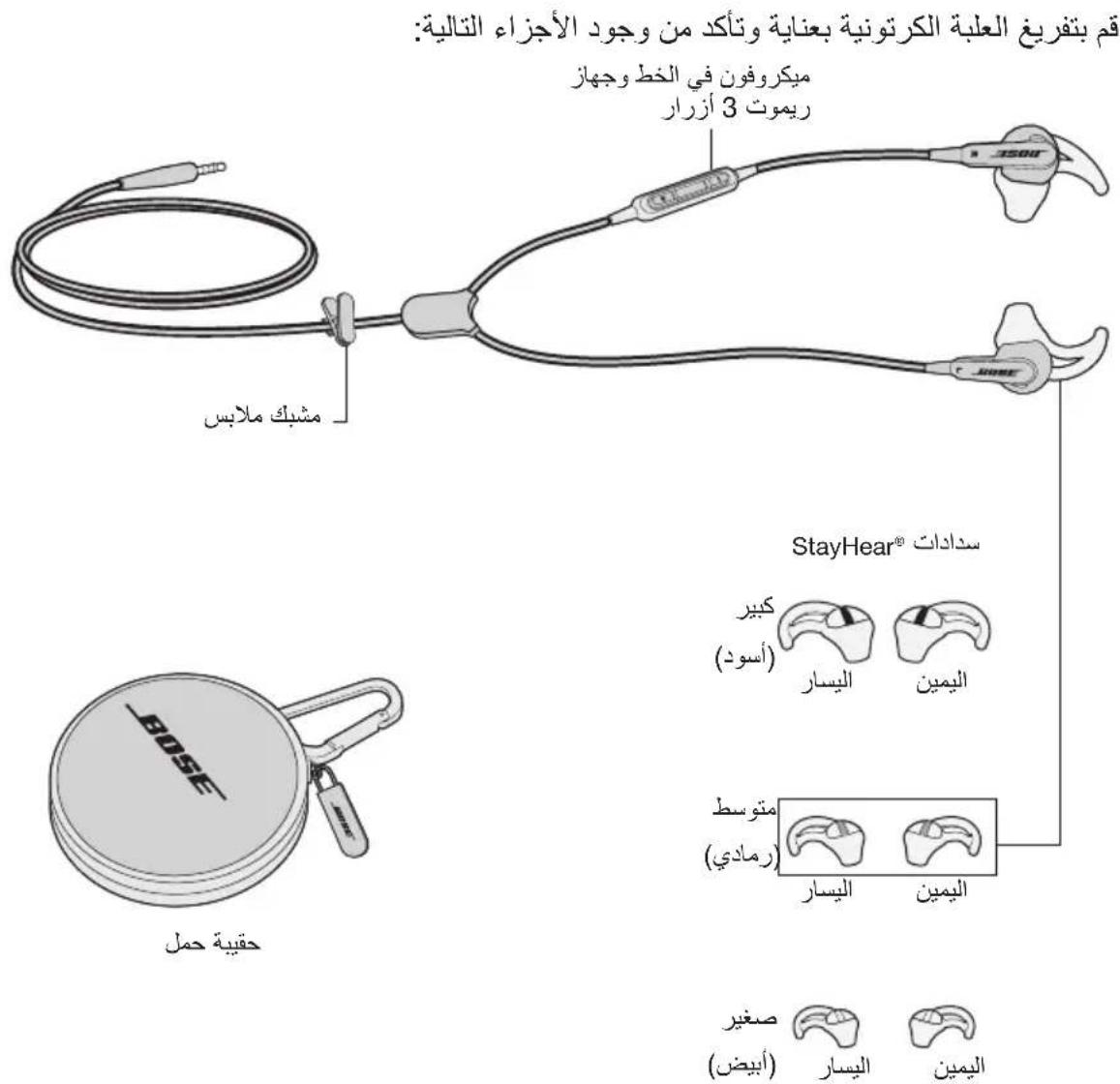
Carefully unpack the carton and confirm that the following parts are included:
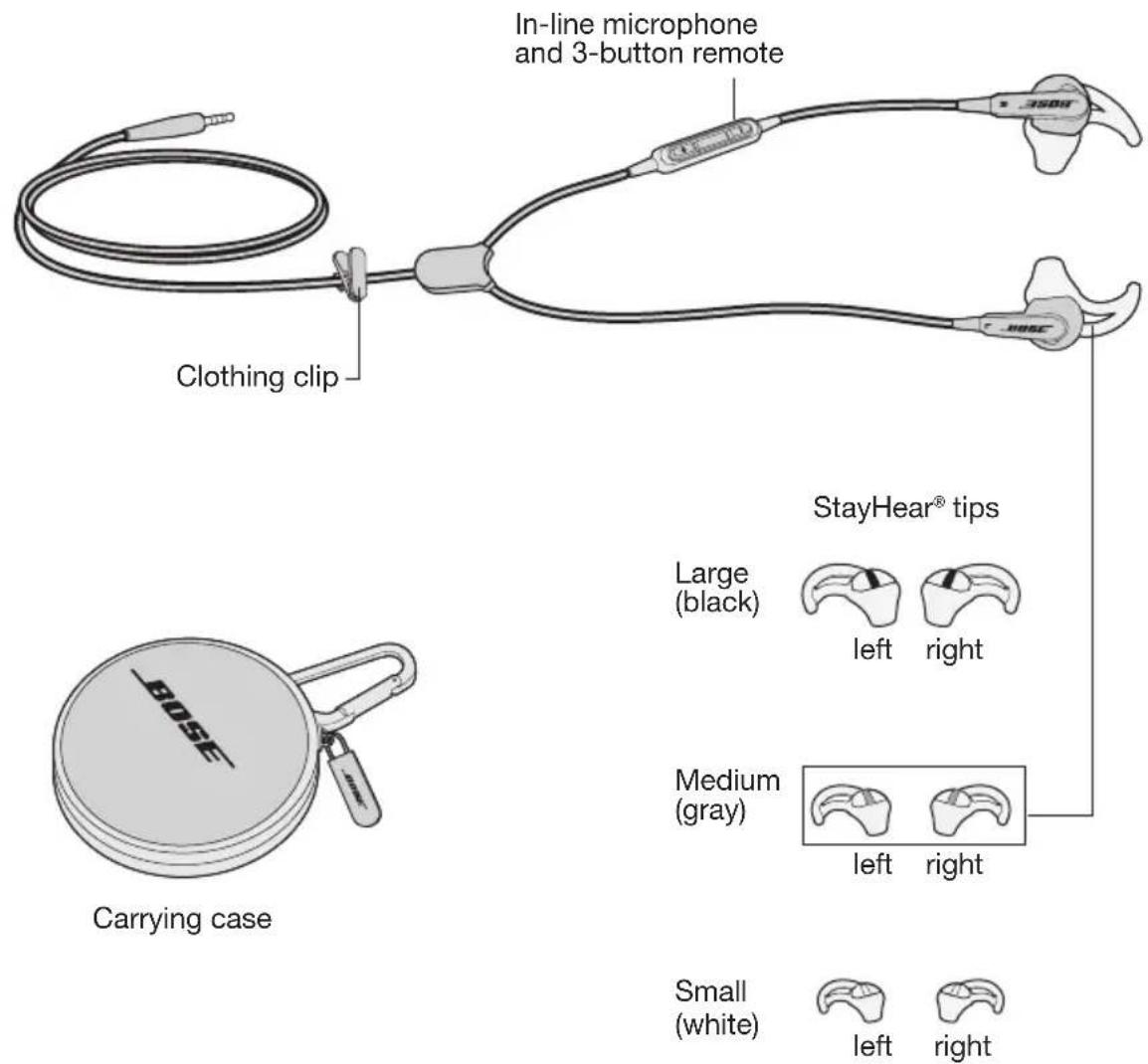
Note: The headphones come with medium (gray) StayHear® tips attached.
Using the headphones
Connecting to your device
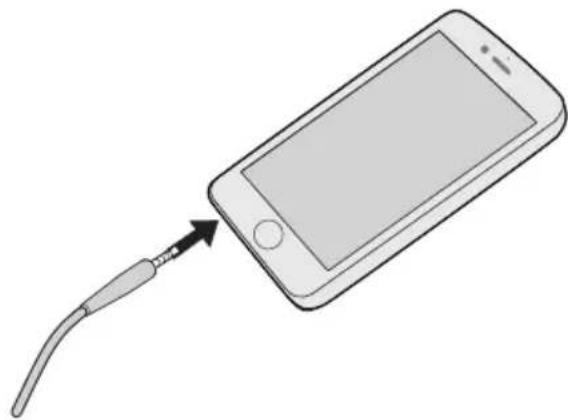
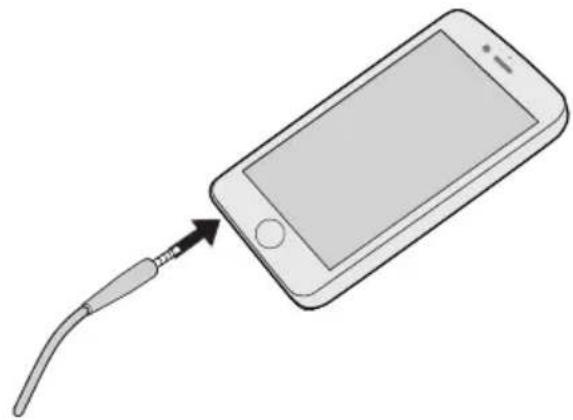
Attach the headphone cable to the standard 3.5 mm headphone connector on your iPod, iPhone, or iPad.
Using the headphones with your device
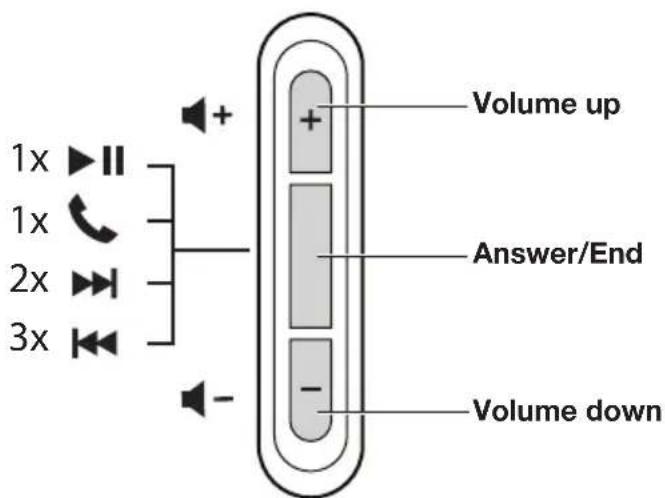
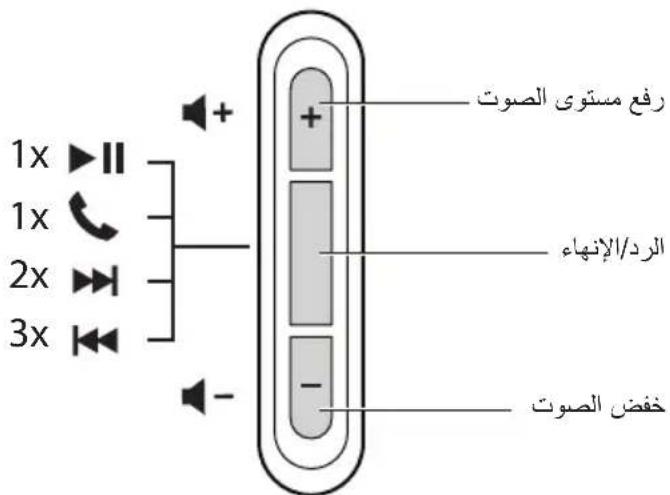
The Bose® SoundSport® in-ear headphones come with an inline microphone and 3-button remote.
Note: Full controls may not be available for some devices or applications.
Headphone controls
Basic functions
| Increase volume Press and release the + button. |
| Decrease volume Press and release the - button. |
| Answer a call When you receive an incoming call, press and release the Answer/End button to answer. |
| End a call Press and release the Answer/ End button. |
| Decline an incoming call Press and hold the Answer/ End button for about two seconds, then release. |
| Switch to an incoming or on-hold call and put the current call on-hold While on a call, press and release the Answer/ End button once. Press and release again to switch back to the first call. |
| Switch to an incoming or on-hold call and end the current call While on a call, press and hold the Answer/ End button for about two seconds, then release. |
| Use Voice Control Press and hold the Answer/ End button. For more information on Voice Control, refer to your device user's guide. |
Media playback functions
| Play or pause a song or video Press and | release the Answer/End button. |
| Skip forward Press and release the Answer | er/End button twice quickly. |
| Fast forward Press and release the Answer | er/End button twice quickly and hold the second press. |
| Skip backward Press and release the Answer | swer/End button three times quickly. |
| Rewind Press and release the Answer/End | button three times quickly and hold the third press. |
Importance of proper fit
For optimum audio performance, it is important to choose the correct size StayHear tip. Select the size that gives you the best comfort and fit in each ear. You may need to try all three sizes to determine the best fit.
Note: To test the fit, try speaking aloud. Your voice should sound muffled in both ears. If not, select another tip size.
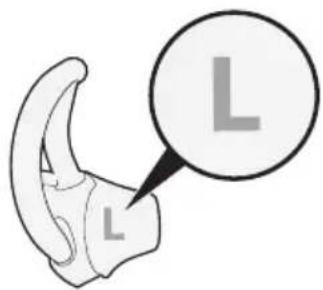
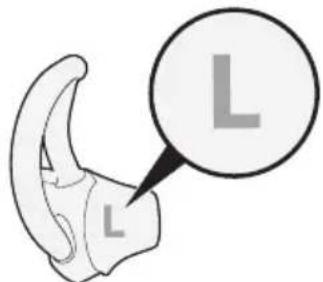
Each tip is marked with either an L or an R. Be sure to attach the left tip (L) to the left earpiece and the right tip (R) to the right earpiece.
Fitting the headphones to your ear
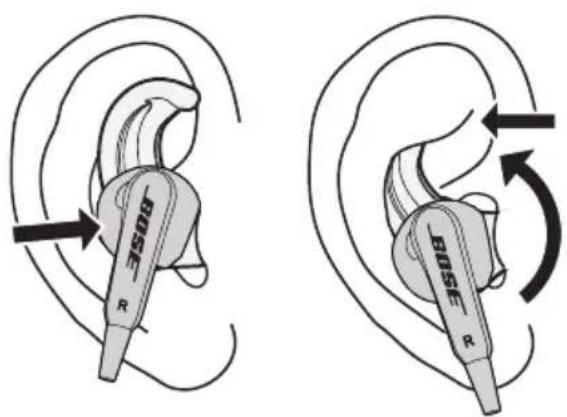
TheStayHear tip allows the earpiece to rest comfortably in the bowl of your ear. The wing part of the tip fits just under your ear ridge.
To determine if the tip is the right size:
-
Insert the headphone into the ear so the tip gently rests in the opening of the ear canal.
-
Tilt the headphone back and press the tip wing under the ear ridge until it is secure.
The tips should fit comfortably yet securely in the bowl of the ear.
Changing the eartips
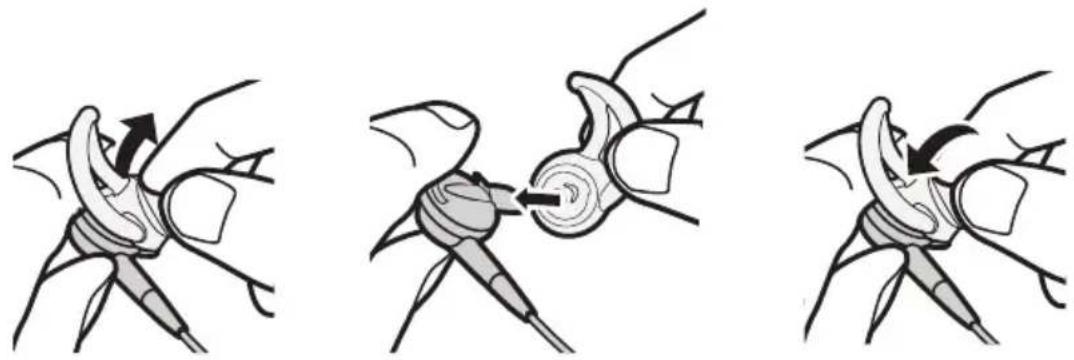
- Gently peel the edges of the attached tip away from the earpiece, using care not to tear the tip.
Caution: To prevent damage, do not pull on the StayHeat tip wing.
-
Position the opening of the new tip over the nozzle and the small slot over the nozzle hook.
-
Ease the base of the tip down around the base of the earpiece until the tip feels secured.
Adjusting for comfort and stability
You can adjust your headphones to provide additional comfort and stability. You can customize how you wear your headphones using the clothing clip.
Using the clothing clip
Use the clothing clip to fasten the cable to your clothing, for convenience, stability, and to help manage the cable. This can be helpful during high-movement activities or when using the headphones in a single earpiece configuration.
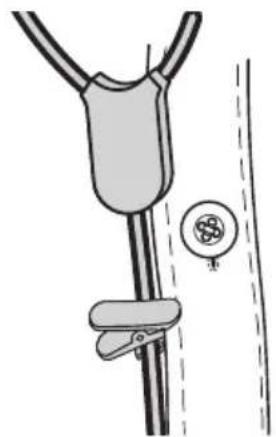
Using a single earpiece
The Bose® SoundSport™ in-ear headphones can be used with only the right (R) earpiece in your ear. This allows you to take calls and still hear surrounding sounds.
Troubleshooting
If you experience any trouble using your headphones, try the following troubleshooting instructions.
| Problem What to do | |
| No audio/intermittent audio | • Securely connect the headphone cable to 3.5 mm headphone connector on your device. • Try another eartip size. • Try another device. |
| Excessive bass | • Turn off any audio enhancement features on the audio source. |
| Microphone is not picking up sound | • Make sure you are using a compatible device. See the “Made for” list on the product carton. • Securely connect the headphones plug to the headphone input. • Make sure the microphone opening on the back of the Answer/End button is not blocked. • Try another phone call. • Try another device. |
| Device is not responding to remote (button) presses | • Securely connect the headphone cable to 3.5 mm headphone connector on your device. • For multi-press functions: Vary speed of presses. |
| Device is not responding to remote | • Full controls may not be available for some devices or applications. |
| Eartips falling off | • Securely attach the eartips to the earpiece and nozzle hook. |
| Lost eartip • Contact Bose | ® for replacement tips. |
| Sound is muffled from earpiece | • Clear any debris or wax build-up from the eartips and headphones nozzles. • Unplug the headphones from the audio source, then plug back in making sure they are securely connected. • Try another device. |
Cleaning
Your headphones may require periodic cleaning:
Eartips: Remove the eartips from the headphones. Wash them with a mild detergent and water. Make sure you thoroughly rinse and dry them before putting them back on the headphones.
Headphone nozzles: Clean only with a dry, soft cotton swab or equivalent. Never insert any cleaning tool into the nozzle.
Limited warranty
Your headphones are covered by a limited warranty. Visit our website at global.Bose.com/warranty for details of the limited warranty.
To register your product, visit global.Bose.com/register for instructions. Failure to register will not affect your limited warranty rights.
"Wiipod", "wiipodipod" uipod" wipidipod" wipidipod" wipidipod" wipidipod" wipidipod" wipidipod" wipidipod" wipidipod" wipidipod" wipidipod" wipidipod" wipidipod" wipidipod" wipidipod" wipidipod" wipidipod" wipidipod"
Jrnnnnaaannnnae nn nnnnnnnaa
n777682d3a6629n77682d3a6629
HNNN: WAnAnAnAnAnAnAnAnAnAnAnAnAnAnAnAnAnAnAnAnAnAnAnAnAnAnAnAnAnAnAnAnAnAnAnAnAnAnAnAnAnAnAnAnAnAnAnAnAnAnAnAnAnAnAn
ywnnnnnae nnne nnnn ne L noa R aonnoanen (L)
nnaaennnnnnae
WJWJWJWJWJWJWJWJWJWJWJWJWJWJWJWJWJWJWJWJWJWJWJWJWJWJWJWJWJWJWJWJWJWJWJWJWJWJWJW
W: 100000000000000000000000000000000000000000000000
nwnw: nannnnnnae aenrnnnne nnne eanennnne ne ane ennnnne nnnnne
n
WwWwWwWwWwWwWwWwWwWwWwWwWwWwWwWwWwWwWwWwWwWwWwWwWwWwWwWwWwWwWwWwWwWwWwWwWwWwWwWwWwWwWwWwWwWwWwWwWwWwW
i

#
歴習のようDear, Hi, stay! Hi, stay! Hi, stay! Hi, stay! Hi, stay! Hi, stay! Hi, stay! Hi, stay! Hi, stay! Hi, stay! Hi, stay! Hi, stay! Hi, stay! Hi, stay! Hi, stay! Hi, stay! Hi, stay! Hi, stay! Hi, stay! Hi, stay! Hi, stay! Hi, stay! Hi, stay! Hi, stay! Hi, stay! Hi, stay!
首:中用成电电电电电电电电电电电电电电电电电电电电电电电电电电电电电电电电电电电电电电电电电电电电电电电电电电电电电电电电电电电电电电电电电电电电电电电电电电电电电电电电电电电电电电电电电
www.Bose.com/compliance

This symbol means the product must not be discarded as household waste, and should be delivered to an appropriate collection facility for recycling. Proper disposal and recycling helps protect natural resources, human health and the environment. For more information on disposal and recycling of this product, contact your local municipality, disposal service, or the shop where you bought this product.
| Names and Contents of Toxic or Hazardous Substances or Elements | ||||||
| Toxic or Hazardous Substances and Elements | ||||||
| Part Name Lead (Pb) Mercury (Hg) Cadmium (Cd) | Hexavalent (CR(VI)) | Polybrominated Biphenyl (PBB) | Polybrominated diphenylether (PBDE) | |||
| PCBs X O O O O O | O | |||||
| Metal parts | X O O O O O | O | ||||
| Plastic parts | O | O | O | O | O | O |
| Speakers | X O O O O O | O | ||||
| Cables | X O O O O O | O | ||||
| This table is prepared in accordance with the provisions of SJ/T 11364. O: Indicates that said hazardous substance contained in all of the homogeneous materials for this part is below the limit requirement of GB/T 26572. X: Indicates that said hazardous substance contained in at least one of the homogeneous materials used for this part is above the limit requirement of GB/T 26572. | 10 | |||||
a a a a a a a a a a a a a a a a a a a a a a a a a a a a a a a a a a a a a a a a a a a a a a a a a a
S OBC = S AOB + S_ BOC
1 1 1 1 1 1 1 1 1 1 1 1 1 1 1 1 1 1 1 1 1 1 1 1 1 1 1 1 1 1 1 1 1 1
y
.
aia jally g jiallall ggs alalllg aaii 1
3 10
13 la Jauaiy 15 12 auby Juaay
1
ailllgl aolll 1g gll l jjglgaaai
sglwulwlilafizoojg jg
i gii
()
iPhone iPod j3.5 1
jgs jnclaw
jglg jll g Ss Bose SoundSport in-ear 3 3
:450.
a
auiuie 1 ailgai
biluogll jiei jilg
global.Bose.com/register 1
BOSE Better sound through research
©2018 Bose Corporation, The Mountain, Framingham, MA 01701-9168 USA AM743726 Rev. 01
- Please read this owner's guide carefully and keep for future reference.
- WARNING:
- Please complete and retain for your records:
- About your Bose® SoundSport® in-ear headphones
- Features
- Carton contents
- Using the headphones
- Connecting to your device
- Using the headphones with your device
- Headphone controls
- Importance of proper fit
- Fitting the headphones to your ear
- To determine if the tip is the right size:
- Changing the eartips
- Adjusting for comfort and stability
- Using the clothing clip
- Using a single earpiece
- Troubleshooting
- Cleaning
- Limited warranty
- Jrnnnnaaannnnae nn nnnnnnnaa
- nnaaennnnnnae
- n
- i
- #
- jgs jnclaw
- BOSE Better sound through research
Brand : BOSE
Model : SoundSport Inear
Category : Wireless Earbuds