USER MANUAL DXMA1902092E DEWALT
Jobsite Pro-X1 True Wireless
Earbuds with Charging Case
JOBSITE PRO-X1 TRUE WIRELESS EARBUDS WITH CHARGING CASE
INSTRUCTION MANUAL
WARNING: TO REDUCE THE RISK OF INJURY, USER MUST READ ALL INSTRUCTIONS BEFORE OPERATING THIS PRODUCT.
SAVE THESE INSTRUCTIONS
Thank you for purchasing the Jobsite Pro-X1 True Wireless Earbuds with Charging Case.
With this wireless headset, you can: - Enjoy convenient wireless hands free calls
Control wireless music
- Switch between calls and music
Package Contents
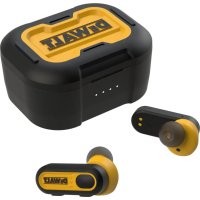
True Wireless Earbuds - left and right
Charging case
- Type C charging cable
- Earbud cushions - 8 sets of cushions
COMPONENTS AT A GLANCE
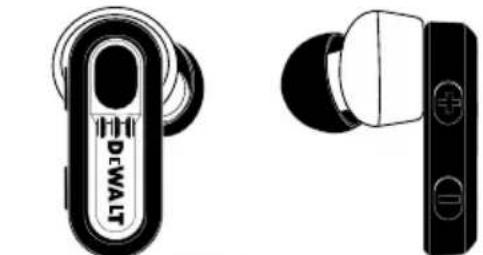
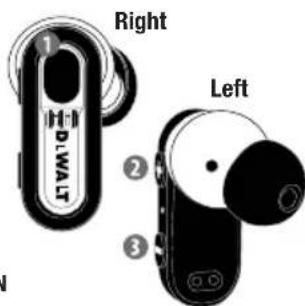
TRUE WIRELESS EARBUDS:
In Ear Smart Sensor
LED indicator (earbud)
3 Multi-function button (on/off/pause)
Volume +/Next song
Volume-/Previous song
6 Microphone (2)
IPX6 Rated for sweat and moisture protection
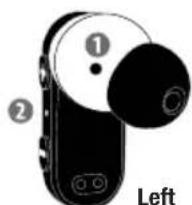
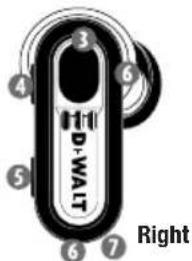
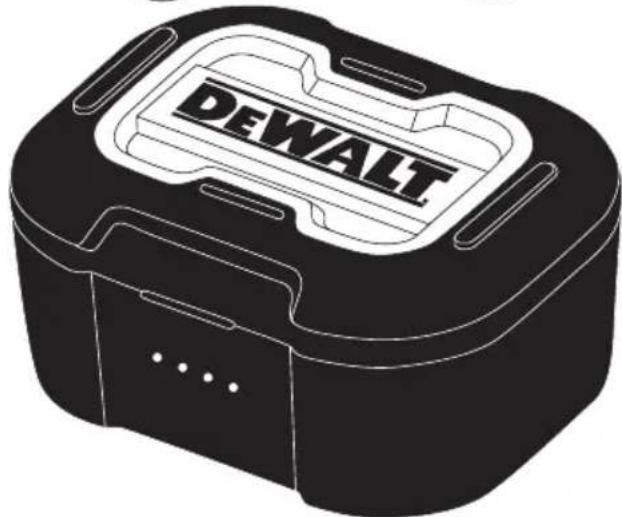
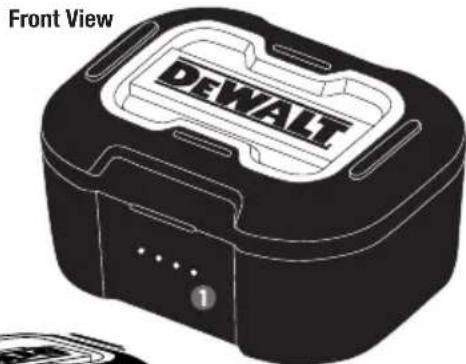
CHARGING CASE:
Battery light indicator
Factory reset button
Type C charge port
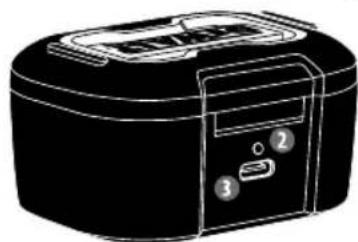
Back View
EARBUD CUSHIONS:
18 sets of cushions:


Small
Medium
Medium
Large
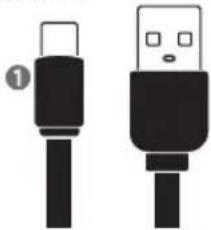
CHARGER CONNECTOR CABLE:
Type C to USB
DEFINITIONS: SAFETY GUIDELINES
The definitions below describe the level of severity for each signal word. Please read the manual and pay attention to these symbols.
ADANGER: Indicates an imminently hazardous situation which, if not avoided, will result in death or serious injury.
WARNING: Indicates a potentially hazardous situation which, if not avoided, could result in death or serious injury.
CAUTION: Indicates a potentially hazardous situation which, if not avoided, may result in minor or moderate injury.
NOTICE: Indicates a practice not related to personal injury which, if not avoided, may result in property damage.
GETTING STARTED
CHARGE THE CASE
Connect the Type C end of the USB cable into the charging case, and USB A end into the power source.
- Charging process is indicated by the white LED light on the front panel.
- When the charging case is fully charged, the white light stays on.
CHARGE EARBUDS
- Place the earbuds in the charging case. The earbuds will start charging.
PAIR THE EARBUDS WITH YOUR BLUETOOTH DEVICE
Take both earbuds from the charging case, the earbuds will power on automatically, entering pairing mode.
-
When taking out both earbuds, there will be a voice, "POWER ON - Battery HIGH (or battery medium or battery low) Pairing" after the voice you will hear two "D00-D00", which means both earbuds are connecting to the Bluetooth device. If unable to connect to previous playing device, it will take 5-10sec, the earbuds will flash red and blue. The earbud is now in pairing mode and will voice "PAIRING" from both earbuds.
-
Turn on the Bluetooth function of your Bluetooth device and pair the earbuds with your Bluetooth device.
- When successfully connected to a phone or other Bluetooth device, the Blue LED will stay on for 1 second, then voice, "Your device is connected".
THE FOLLOWING DIRECTIONS SHOW YOU HOW TO PAIR THE EARBUDS WITH YOUR BLUETOOTH DEVICE
Turn on the Bluetooth function of your Bluetooth device, select DEWALT TWS 209A. Enter the earbuds password "0000" if prompted. For those Bluetooth device featuring Bluetooth 3.0 or higher, no need to enter a password.
SINGLE EARBUD PAIBING (MONO MODE)
Take either earbud from the charging case, the earpiece will power on automatically. Search for DEWALT TWS 209A and tap to connect. Once the pairing has succeeded, you will hear a voice "Your device is connected" and the indicator light will be off.
PAIR THE EARBUDS WITH ANOTHER BLUETOOTH DEVICE
If you have another Bluetooth device that you want to pair with the earbuds, make sure the Bluetooth function in any other previously paired or connected devices are turned off. Then follow the steps in "Pair the earbuds" with your Bluetooth device at the first time.
CONNECT THE EARBUDS TO YOUR BLUETOOTH DEVICE
Turn on the Bluetooth function of your Bluetooth device. Take both earbuds from the charging case, the earbuds will power on and reconnect automatically. If no device is connected, the earbuds will automatically turn off after 2 minutes. Both earbuds are now powered on and are paired with each other automatically. The earbuds will search for the previous connected Bluetooth device and reconnect to it automatically. If the last connected one is not available, the earbuds will search and reconnect to the next most recently connected device.
CONTROLS
- To turn earbuds ON: remove from the charging case. Earbuds automatically power on.
- To turn earbuds OFF: place back in charging case and close cover. The first and fourth LED on charging case will stay on for 5 seconds. This indicates the earbuds are off and are charging.
MANAGE YOUR CALLS AND MUSIC:
- To play or pause music: Press the Multi-Function button once (left or right)
Forward (next song): Press V+ for 2 seconds Volume increase press V+
Backward (previous song): Press V- for 2 seconds Volume decrease press V-
CALL CONTROL
- Answer/Hang up: Press the multi-function button once (left or right)
- Reject incoming call: Press the multi-function button (left or right) and hold for 1 seconds
- Switch caller during call: Press the multi-function button (left or right) twice
Voice Control - Siri/Google: Press the multi-function button twice (left or right)
LED INDICATOR - EARBUDS
- Earbuds are powered on: The Red and Blue LED flashes 1 second
- Earbuds are pairing to a Bluetooth device: The Red and Blue LED flashes alternately
- Earbuds are connected to a Bluetooth device: The Blue LED stays on for 1 second
- Earbuds are powered on and connected to a Bluetooth device:
The Red and Blue LED flashes. If no connection can be made, the headset will power itself off after 2 minutes
LED Indicator lights
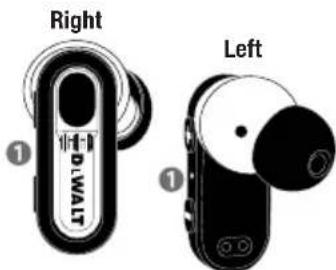
- Low battery level: The Red LED will flash 3 times every 2 seconds and will voice, "Battery Low", every 100 seconds
Battery is fully charged: The LED is off
Earbuds feature an IPX6 rating for protection against sweat and moisture.
LED INDICATOR - CHARGING CASE
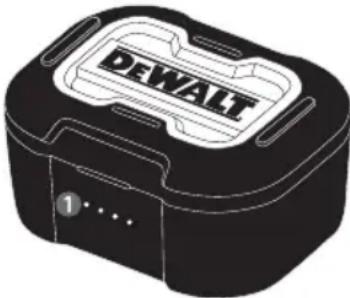
- Close the charging case cover for earbuds to charge. The first and fourth LED will stay on for 5 sec.
4 White LED lights = 75-100% power
3 White LED lights = 50-75% power
2 White LED lights = 25-50% power
1 White LED lights = 0-25% power
LED Indicator lights
LED INDICATOR - CHARGE CASE WITH EARBUDS INSIDE
- While charging the earbuds, White LED status:
3 White LED lights stay on and the 4th LED flashes every second for 75 - 100% power
2 White LED lights stay on and the 3rd LED flashes every second for 50 - 75% power
1 White LED lights stay on and the 2nd LED flashes every second for 25 - 50% power
1 White LED light flashes every second for 0-25% power
FACTORY RESET
- If your earbuds were previously paired, be sure to "Forget this device" or "Unpair" (DEWALT TWS 209A) in your Bluetooth device's "paired devices" list before resetting.
- Place earbuds into the charging case and keep case open.
- Press the factory reset button twice. This will disconnect the earbuds
from any paired devices and reset them to factory setting.
- To pair again immediately after resetting, go to your device's Bluetooth setting and select "DEWALT TWS 209A".
TECHNICAL DATA - EARBUDS
Music time: Up to 7.5 hours per charge (total up to 30 hours with charging case)
Talk time: Up to 6 hours per charge(total up to 24 hours with charging case)
Standby time: 220 days
Charging time: 1.5 hours
Rechargeable Li-ion battery: 55mAh on each earpiece
Bluetooth version: 5.0
Compatible Bluetooth profiles: HFP / HSP / A2DP / AVRCP
Supported audio codec: SBC
Frequency band: 2.4 GHz ISM Band
Transmitter power: ≤ 4 dBm
Operating range: 10 meters (33 feet)
TECHNICAL DATA - CHARGING CASE
Charging time: 2 hours
Rechargeable Li-ion battery: 500mAh
IMPORTANT SAFETY INSTRUCTIONS FOR ALL RECHARGEABLE BATTERY PACKAGING
The battery is not fully charged out of the carton. Before using the earbuds, read the safety instructions below and then follow the charging procedures outlined.
Do not incinerate the battery module even if it is severely damaged or is completely worn out. The battery can explode in a fire. Toxic fumes and materials are created when lithium batteries are burned. If battery contents come into contact with the skin, immediately wash area with mild soap and water. If battery liquid gets into the eye, rinse water over the open eye for 15 minutes or until irritation ceases. If medical attention is needed, the battery electrolyte is composed of a mixture of liquid organic carbonates and lithium salts.
Contents of opened battery cells may cause respiratory irritation. Provide fresh air. If symptoms persist, seek medical attention.
These earbuds are splash, water, and dust resistant and was tested under controlled laboratory conditions with a rating of IPX6 under IEC standard 60529. Splash, water, and dust resistance are not permanent conditions and resistance might decrease as a result of normal wear. Do not attempt to charge wet earbuds; To dry your earbuds, leave your earbuds in a dry area with some airflow. Placing your earbuds in front of a fan blowing cool air directly onto the earbuds might help the drying process. The charge case does not have an IP rating. Liquid damage is not covered under warranty.
Storage Recommendations
- The best storage place is one that is cool and dry, away from direct sunlight and excess heat or cold.
- For long storage, it is recommended to store the earphones in a cool dry place for optimal results.
WARNING: DO NOT leave earbuds or charge case in any location with excessive heat.
WARNING: DO NOT charge or use the battery in explosive atmospheres, such as in the presence of flammable liquids, gases or dust.
WARNING: DO NOT modify the battery in any way to fit a non-compatible charger as the battery may rupture causing serious personal injury.
WARNING: DO NOT splash or immerse in water or other liquids.
WARNING: DO NOT store or use the earbuds in locations where the temperature may reach or exceed 105^ ( 40^ ) (such as outside sheds or metal buildings in summer). For best life, store earphones in a cool, dry location.
WARNING: Burn hazard. Battery liquid may be flammable if exposed to spark or flame.
WARNING: Fire hazard. Never attempt to open the battery pack for any reason. If the battery pack is cracked or damaged, do not insert the charging cable. Do not crush, drop or damage the battery. Do not use the earphones if they have received a sharp blow, been dropped, run over or damaged in any way (e.g. pierced with a nail, hit with a hammer, stepped on).
Damaged batteries should be returned to a service center for recycling.
If you have a problem with this product or have questions on how to use it, please visit:
www.2helpU.com
Please include the model number, date of purchase, and description in all communication.
No queme el modulo de baterias, except that you can find a gas station in the nearby town. The gas station is located on the north side of the city, and it's about 10 km from the nearest bus stop.
Pile lithium-ion rechargeable: 500mA· h
INSTRUCTIONS DE SECURITE IMPORTANTES POUR TOUS EMBALLAGE DES PILES RECHARGEABLES
SAVE THESE INSTRUCTIONS
Tpoostacia a to tov 1pwa kai nvy uypaia.
ENAEIEH LED - OHKH FOPTIeH2
Tel: +4021.320.61.04
www.dewalt.bg/3/
Croatia
GM&M Trgovina d.o.o.
Cesta dr. Zoëta Pūnika 10
1290 Grosplje
Slovenija
Tel: +386 01 78 66 573
Fax: +386 01 78 61 205
www.g-mm.si
gmm@g-mm.si
servis@g-mm.si
Czech Republic
Stanley Black & Decker Czech
Republic s.r.o.
Praha 4 - Chodov, Turkova 5b
149 00 Praha, Czech Republic
Tel.: +420 228 887 265
www.dewalt.cz
&A. Boulaayevns, flupda
16674.Ahrya
SERVICE: Hp@T0oc Xav
Aδaμ) -193 00 Aπpó upyoc
TnA:00302108981616
QaE:00302108983570
www.dewalt.gr
Greece. Service@sbdinc.com
Espana
DEWALT
Parc de Negocios "Mas Blau"
c/o Energypark Building 3 sud
20871 Vimercate (MB), IT
Tel: 800-014353
+39 039 9590200
Fax:+390399590313
www.dewalt.it
service.italia@sbdinc.com
Latvia
LIC GOTUS SIA
Ullbrokas Str.
LT-1021Rga
Tel: +371 286 15454
Fax: +371 675 55140
www.licgotus.lv
Lithuania
UAB ELREMTA MASTERMANN
Naglio Str 4C
LT-52367Kaunas
Tel: +370 37 370 138
Fax: +370-37-406540
Info@elremta.it
Servisas@elmast.It
Malta
Via Energypark 6
c/o Energypark Building 3 sud
20871 Vimercate (MB), IT
Tel. +39 039-9590-200
Fax+39039-9590-313
www.dewalt.it
service.italia@sbdinc.com
Nederlands
DEWALT
Netherlands BV
Postbus 83
Tel: 31 164 283 063
www.dewalt.nl
Enduser.NL@SBDinc.com
Norge
DEWALT
service.austria@sbdinc.com
Poland
Stanley Black & Decker Polska
Sp. z 0.0.
Prosta 68, 00-838 Warsaw,
Poland
Tel.: +48 22 431 05 05
https://www.dewalt.pl/
https://www.dewalt.pl/
pomoc-i-wsparcie/skontak
tuj-sie-z-nami
Portugal
DEWALT
Centro Empresarial Arquiparque
Rua Dr. Antonio Borges, n^0 1
2^ Piso
1495-131 Algés - Portugal
Portugal
Tel: 214667500
Fax: 214667580
www.dewalt.pt
resposta,resvenda@sbdinc.com
Romania
STANLEY BLACK & DECKER
ROMANIA SRL.
Phoenix Business Center
Turtlelelo Street No 11A 4th
Floor,
Module 12-15.
Tel: +4021.320.61.04
Fax: +4037.225.36.84
www.dewalt.ro
office.bucharest@sbdinc.com
Serbia
HAMMERCOM D.O.O.
Valjevska 3
11000 Beograd
Serbia
Tel: +386 (0)11 2543 683
office@hammercom.co.rs
Slovakia
BAND SERVIS s.r.o.
Paulinska 22
917 01 Tmava, Slovakia
Tel.: +421 335 511 063
Fax.: +421 335 512 624
www.2helpU.com
www.bandservis.sk
Slovenia
GM&MTRGOVINA D.0.O.
CESTA DR. JOZETA PUÇNIKA 10
1290 GROSUPLJE
SLOVENIJA
Tel: +386 01 78 66 573
www.dewalt.com
www.g-mm.si
gmm@g-mm.si
Suomi
DEWALT
PL47
00521 Helsinki
Puh. 010 400 43 33
Faksi 0800 411 340
www.dewalt.fi
Stanley Black & Decker Turkey
Içerenköy Mah. Umut Sok:Quick
Tower
No:10-12/82-83-84 Atasehir
Istanbul
Tel:90 216 665 29 25
https://tr.stanleytools.global/tr
United Kingdom &
Republic of Ireland
DEWALT
270 Bath Road;
Slough, Berks SL1 4XD
Tel: +44 (0)1753 511234
www.dewalt.co.uk
service.uk@sbdinc.com
Part No. DXMA1902092E © 2023 Stanley Black & Decker, Inc.
DeWALT® and the DEWALT Logo are trademarks of the DeWALT Industrial Tool Co., or an affiliate thereof and are used under license. The yellow/black color scheme is a trademark for DEWALT power tools & accessories.
Manufactured by E-filliate Inc.
11321 White Rock Rd.
Rancho Cordova, CA 95742 USA