
Voxtel C110 - Cordless phone AEG - Free user manual and instructions
Find the device manual for free Voxtel C110 AEG in PDF.
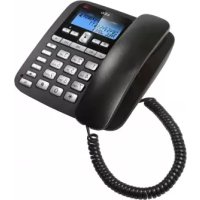



| Product Type | Cordless Phone |
| Brand | AEG |
| Model | Voxtel C110 |
| Handset Power Supply | 3 AAA alkaline batteries 1.5V (not included) |
| Base Power Supply | Via telephone line (no power adapter) |
| Display | LCD screen with backlight |
| Main Functions | Caller ID display (20 entries), incoming/outgoing call lists, 3 direct memories (M1-M3), 10 indirect memories, hands-free speakerphone, hold, mute, redial, pause, time/date settings, LCD contrast, ringer and speaker volume |
| Number of Handsets | 1 (single handset) |
| Network Compatibility | Analog telephone network (PSTN) |
| Operating Temperature | 0°C to 40°C |
| Storage Temperature | -20°C to 60°C |
| Warranty | 24 months |
| Maintenance | Clean with a damp cloth, do not use solvents |
| Disposal | Recycle electronic components and batteries according to local regulations |
Frequently Asked Questions - Voxtel C110 AEG
User questions about Voxtel C110 AEG
0 question about this device. Answer the ones you know or ask your own.
Ask a new question about this device
Download the instructions for your Cordless phone in PDF format for free! Find your manual Voxtel C110 - AEG and take your electronic device back in hand. On this page are published all the documents necessary for the use of your device. Voxtel C110 by AEG.
USER MANUAL Voxtel C110 AEG
Thank you for purchasing this product. This product has been designed and assembled with utmost care for you and the environment. This is why we supply this product with a quick installation guide to reduce the number of paper (pages) and therefore save trees to be cut for making this paper. Thank you for supporting us to protect our environment.
2 UNPACKING YOUR PHONE
In the box you will find:
- Base Unit
- Handset
- Coiled Handset cord
- Telephone line cord for base unit
- User manual
- Wall mount bracket
Keep the packing materials in a safe place in case you later need to transport the unit.
Important note - batteries:
The Voxtel C110 requires 3 x 1.5V AAA size Alkaline batteries installed into the battery compartment before use.
Warning:
The caller display will not work and you will only be able to make and receive basic handset calls without batteries installed.
3 INTENDED USE
This telephone is intended to be connected to a public analogue telephone network or to an analogue extension of an approved compatible PBX system.
4 GETTING TO KNOW YOUR PHONE
(See P1)
| # Meaning | ||
| 1 LCD screen | ||
| 2 | Ringer light indication | |
| 3 | Caller display list and up/down buttons | |
| 4 | New calls LED | |
| 5 | × | Delete button |
| 6 | Dial button | |
| 7 | → | Outgoing calls list button |
| 8 | Menu button | |
| 9 | → | Memory button |
| 10 | M1M2 M3 | Direct dial memory buttons |
| 11 | ⊗ | Mute button |
| 12 | - | Hold button |
| 13 | R | Recall/flash button |
| 14 | P | Pause button |
| 15 | ◎ | Last number radial button |
| 16 | ◎ | Speakerphone light |
| 17 | ▲ | Handsfree button |
| 18 | ← | Store button |
| 19 | Handset cord socket on the handset | |
| 20 | Handset cord socket on the base unit | |
| 21 | ▲▲ | Ringer high/low switch |
| 22 | Phone line socket on the base unit | |
| 23 | ▲-▲+ | Speaker volume control |
5 INSTALLATION
1. Locating the base unit (See P2 and P3)
The base unit should be placed on a level surface, in a position where:
- the telephone line cable will reach your telephone line socket or extension socket.
- it is not close to a sink, bath or shower, or anywhere else where it might get wet.
- it is not close to other electrical equipment - fridges, washing machines, microwave ovens, TVs, fluorescent lights, etc.
2. Installing (or replacing) the battery (See P4)
IMPORTANT:
Before removing the battery compartment cover, always make sure the base unit is disconnected from the telephone line.
- Install 3 Alkaline AAA batteries into the battery compartment in the underside of the base and re-fit the cover before use.
Note:
1) Please do NOT use Rechargeable batteries in this phone. 2) Batteries are not included with the unit. 3) The battery life is typically about 6 months, depending on usage.
When the battery is low, will flash on the display. If you do not replace the batteries, they will become totally discharged and your display screen will not work. You may lose all the telephone memories and settings.
- Plug the coiled handset cord into the handset 19. Plug the other end into the socket on the side of the base unit 20.
- Place the handset on the base unit.
- Plug the telephone line cord into the phone line socket at the back of the base unit 22 and the other end into your telephone line socket.
- Lift the handset and check for dial tone in the earpiece.
6 WALL MOUNT INSTALLATION
To place the Voxtel C110 on a wall, connect the wall mount bracket to the bottom of the phone in the slots near the front of the base as shown below
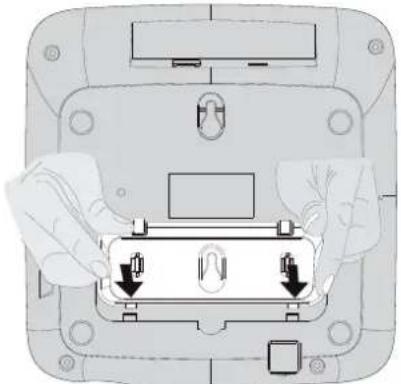
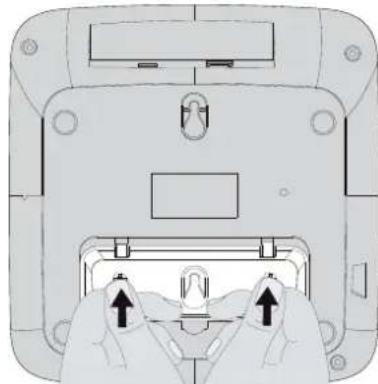
Insert the rigid clips of the bracket into the slots on the bottom of the phone (nearer the front of the base). Press down firmly until the flexible clips click into place in the slots nearer the centre of the base. To remove the bracket, (1) pinch the flexible clips, (2) back the bracket, and then (3) slide up and forward as shown below.
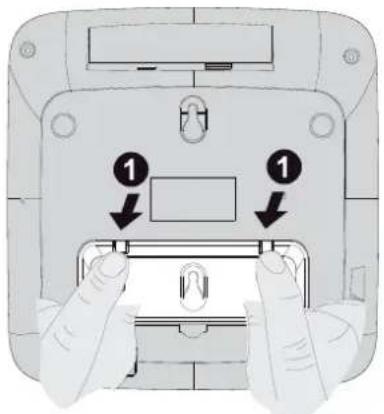
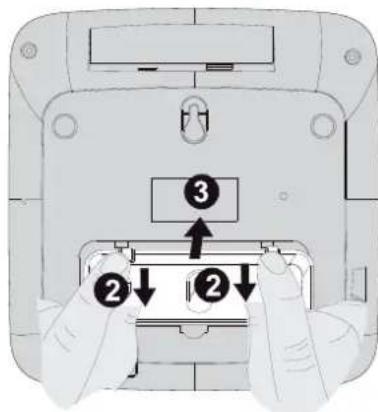
Mark two points on the wall that are 80 mm apart to lay the fixing centres as shown below.
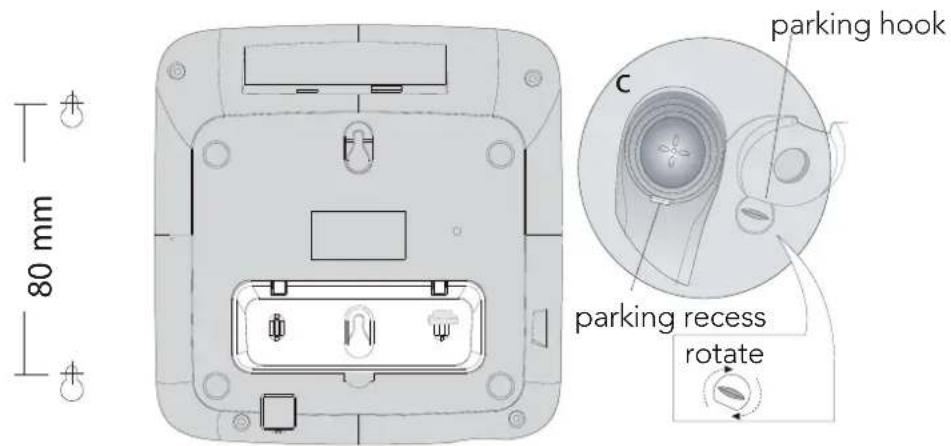
BE CAREFUL to check that there are no pipes or electrical wires hidden in the wall.
Fix two screws (7mm head screws required, not supplied) at the marked locations, leaving approximately 7mm between the wall and the screw head.
Hang the telephone on the screws using the wall mount slots. You may need adjust the screws so that the telephone is securely fixed and does not wobble.
Place the handset on the cradle with the parking hook on the cradle arranged to fit in the parking recess under the earpiece on the handset.
7 SETTING UP YOUR PHONE
Press the menu store button to enter the menu and then use up and down buttons to cycle through the following options:
- SET 1 DATE
- SET 2 LCD
- SET 3 FLASH
Note:
The system will time out if you leave more than 8 seconds between key presses.
7.1 Set time/date
You will need to set the time and date so they can be shown correctly on the display.
If you subscribe to a caller display service, the time and date will be set automatically on receipt of your first incoming call, but you may still need to set the correct year.
- In standby mode, press the store button. The display shows "SET 1 DATE".
- Press the store button to confirm. The "year" icon will be blinking.
- Press the up or down button to set the year.
- Press the store button to confirm. The "month" icon will be blinking.
- Press the up or down button to set the month.
- Press the store button ← to confirm. The "date" icon will be blinking.
- Press the up or down button () () to set the date.
- Press the store button ← to confirm. The "hour" icon will be blinking.
- Press the up or down button to set the hour (24 hour format only).
- Press the store button ← to confirm. The "minute" icon will be blinking.
- Press the up or down button to set the minute.
- Press the store button ← to confirm the setting. The display shows, "SET 2 LCD", you can continue with programming, or press the delete button X to return to standby mode.
7.2 Set LCD contrast
- In standby mode, press the store button ← .
The display shows "SET 1 DATE".
- Press the up or down button until the display shows "SET 2 LCD".
- Press the store button to confirm.
- Press the up or down button to select your comfortable display viewing level (1~8).
The default setting is 4.
- Press the store button to confirm the setting.
The display shows "SET 3 FLASH" you can continue with programming, or press the delete button to return to standby mode.
7.3 Set flash time
This telephone gives you the possibility to use the special services of your network provider.
When pressing the recall button R, the phone generates a line interruption and the length depends on your flash time setting.
The default value is 100ms, which is correct for most exchanges and should not need changing, but if the phone is connected to a PBX that requires a different timing, there are options for 300ms, 600ms or 1000ms.
- In standby mode, press the store button.
The display shows "SET 1 DATE".
- Press the up or down button until the display shows "SET 3 FLASH".
- Press the store button to confirm.
- Press the up or down button (△) (∇) to select 100.
> (default), 300, 600, or 1000.
- Press the store button ← to confirm the setting.
The display shows "SET 1 DATE". You can continue with programming, or press the delete button × to return to standby mode.
8 TELEPHONE OPERATIONS
8.1 Making a call
- Lift the handset or press the speakerphone button and listen for a dial tone. The display shows "00-00".
- Dial the telephone number you wish to call. The display shows the number as you dial (maximum of 14 digits).
- To end the call, return the handset to the base unit or press the speakerphone button if speakerphone is selected.
OR
You can pre-dial the number and check it on the display before dialling it.
Key in the telephone number you wish to call.
The display shows the number as you dial, and if you make a mistake you can press the delete button × to delete the last digit.
- When you have entered the full number (maximum 32 digits), lift the handset or press the speakerphone button or dial button on the base, and the number will dial out automatically.
- To end the call, return the handset to the base unit or press the speakerphone button if speakerphone was selected.
8.2 To answer a call
When the phone rings:
- Lift the handset or press the speakerphone button on the base unit.
The call timer starts after going on line and the speakerphone light will turn on if speakerphone is selected.
8.3 To adjust the speakerphone volume
During a call:
Adjust the volume of the speakerphone to your comfortable volume level using the speakerphone volume slide control - + located on the right side of the base unit.
8.4 To end a call
- Replace the handset on the base unit cradle or press the speakerphone button on the base unit.
The speakerphone light indicator will turn off.
8.5 To switch between the handset and the speakerphone
During a phone conversation through the handset, press the speakerphone button to speak hands-free.
The conversation remains through the handset until the handset is replaced on the base unit cradle.
Then the speakerphone light will turn on. While in speakerphone mode, lift the handset to switch off the speakerphone and talk through the handset.
8.6 Last number redial
- Lift the handset or press the speakerphone button on the base unit.
- Press the redial button.
The phone automatically dials the last number you called (maximum of 32 digits).
Automatic redial
If the number you have called is busy, you can redial it automatically by simply pressing the dial button.
4, which will release the current call, wait a few seconds and then redial the last number.
8.7 Outgoing call list
The Voxtel C110 automatically stores the number (up to 16 digits) and duration of the last 10 calls made.
8.8 Viewing the outgoing call list
- In standby mode, press the out button.
The display shows the most recent dialled call and its position in the outgoing calls list.
If there are no outgoing records, the display will show "End".
- Press the out button again to show the duration of that call.
Press the out button repeatedly to step through each call record in turn.
8.9 To redial a call
- When the outgoing record is displayed, lift the handset or press the speakerphone or dial button on the base unit.
The phone automatically dials out the displayed record.
8.10 To delete an outgoing call record
- In standby mode, press the out button repeatedly until the display shows the outgoing call record you want to delete.
- Press the delete button to delete the outgoing record.
The display shows the next outgoing record.
- Press and hold the delete button for 3 seconds to delete all the outgoing call records. The display automatically returns to standby mode.
8.11 Mute function
During a call, press the mute button.
When the mouthpiece is muted, the "mute" symbol is shown on the display and the person at the other end of the call cannot hear you, but you can hear his side. To get back to the call, press the mute button again.
8.12 Hold function
- During a call, press the hold button. When the hold is on, the display shows "hold", a melody is played to line and the mouthpiece is muted so the person at the other end of the call cannot hear you, but you can still hear them.
- To get back to the call, press the hold button again.
8.13 Inserting a pause in the dialling sequence
For some PABX, an access number must be dialled (usually an 0 or 9) to get an outside line, before dialling the rest of the number.
- Press the pause button P after the access number and then dial the rest of the number you require.
This will insert a pause of about 3 seconds between the access number and the rest of the number.
8.14 Storing a number in M1-M2-M3 memories
- In standby mode, key in the telephone number you wish to store. Up to a maximum 14 digits.
- Press store button. The display shows "SAVE".
- Press the M1, M2 or M3 button to store it in the selected memory.
8.15 To delete direct records memory
To delete a number from a direct memory (M1-M3).
- In standby mode, press the M1, M2 or M3 button. The display shows the memory number.
- Press the delete button × to delete the stored number. The display shows "dEL".
8.16 Dial out a direct memory
- Lift up the handset or press the speakerphone button then press the M1, M2 or M3 button you want to dial.
The number dials automatically.
8.17 Storing a number in (0-9) two-touch memories
- In standby mode, key in the telephone number you wish to store.
Up to a maximum of 14 digits.
- Press the store button.
The display shows "SAVE".
- Press a (0-9) button to store the number in the selected memory.
8.18 To delete two-touch memory records
To delete a number from a two-touch memory (0-9).
- In standby mode, press the memory button → . The display shows "LoAd". Key in the memory location number (0-9). The display shows the memory number.
- Press the delete button to delete the stored number. The display shows "dEL".
8.19 Dial out a (0-9) two-touch memory number
To dial a number stored in a two-touch memory (0-9)
- Lift up the handset or press the speakerphone or dial button.
- Press the memory button.
The display shows "LoAd".
Key in the memory location number (0-9).
The number dials automatically.
8.20 Ringer volume
The ringer high/low switch located at the back of the base unit allows you to adjust the volume of the ringer.

High volume

Low volume
To use caller display you must first subscribe to your network provider's caller display service. If you subscribe to a caller display service, you can see the phone number of the person calling you before you answer and in the calls list afterwards.
The caller display information includes:
- The caller's number (up to 14 digits) and the date and time of the call.
| Condition of Incoming caller Information LCD | Screen will display |
| It is a repeated call REP | |
| It is a new call NEW | |
| A call from someone whose number is unavailable (for example an international call) | UNAVAILABLE |
| A call from someone whose number is with held (private call) | WITHHELD |
| The caller display is incomplete or corrupted ERROR | |
| Your have a new voice mail message. (this is a network service provided by your network operator) | × |
Caller display list
The Voxtel C110 automatically stores the caller display information from the last 20 incoming calls (up to 14 digits). If new calls are stored, the new calls LED flashes and the display icon is on with the number of new calls indicated.
The total number of calls is shown on the main standby screen by "00 CALL", "01 CALL" or "XX CALLS".
If a call is received when the call list is full, the new entry will replace the oldest one.
9.1 Viewing the caller display list
- In standby mode, press the up or down button.
The display shows the most recent record.
If there are no caller display records, the display will show "End".
- Press the up or down button again to scroll to the next caller display record.
9.2 To return a call
- When the caller display record is displayed, lift the handset or press the speakerphone or dial button on the base unit.
The phone automatically dials out the displayed record.
9.3 To delete caller display records
- When the caller display record is displayed, press the delete button × to delete the caller display record. The display shows the next caller displayed record.
- Press and hold the delete button × for 3 seconds, all the caller display records will be deleted. The display automatically returns to standby mode.
10 GUARANTEE AND SERVICE
The unit is guaranteed for 24 months from the date of purchase shown on your sales receipt. This guarantee does not cover any faults or defects caused by accidents, misuse, fair wear and tear, neglect, faults on the telephone line, lightning, tampering with the equipment, or any attempt at adjustment or repair other than through approved agents.
Please keep your sales (till) receipt; this is your proof of guarantee.
10.1 While the unit is under Guarantee
- Disconnect the base unit from the telephone line and the mains electricity supply.
- Pack up all parts of your unit, using the original package.
- Return the unit to the shop where you bought it, making sure you take your sales receipt.
- Remember to include the mains adapter.
10.2 After the Guarantee has expired
If the unit is no longer under Guarantee, contact us via www.aegtelephones.eu
11 TECHNICAL DETAILS
Model Voxtel C110 Telephone
Temperature range Operating 0°C to 40°C
Storage -20 °C to 60 °C
PBX compatibility Flash: 100 ms.
Pause length: 3.6 seconds.
Signalling type: DTMF (dual-tone multifrequency)
12 CE DECLARATION
This product is in compliance with the essential requirements and other relevant provisions of the R&TTE directive 1999/5/EC.
The declaration of conformity can be found on: www.aegtelephones.eu
13 DISPOSAL OF THE DEVICE (ENVIRONMENT)

At the end of the product lifecycle, you should not throw this product into the normal household garbage but bring the product to a collection point for the recycling of electrical and electronic equipments. The symbol on the product, user guide and/or box indicate this. Some of the product materials can be re-used if you bring them to a recycling point. By reusing some parts or raw materials from used products you make an important contribution to the protection of the environment. Please contact your local authorities in case you need more information on the collection points in your area.
Batteries must be removed before disposing of the device. Dispose of the batteries in an environmental manner according to your country regulations.
14 CLEANING AND CARE
Do not clean any part of your phone system with benzene, thinners or other solvent chemicals as this may cause permanent damage which is not covered by the Guarantee.
When necessary, clean it with a damp cloth.
Keep your phone system away from hot, humid conditions or strong sunlight, and don't let it get wet.
- SET 1 DATE
- SET 2 LCD
- SET 3 FLASH
Note:
- SET 1 DATE
- SET 2 LCD
- SET 3 FLASH
Note:
- SET 1 DATE
- SET 2 LCD
- SET 3 FLASH
Note:
Signal type: DTMF (dual-tone multifrequency)
12 CE DECLARATION
- SET 1 DATE
- SET 2 LCD
- SET 3 FLASH
Note:
- SET 1 DATE
- SET 2 LCD
- SET 3 FLASH
Note:
- SET 1 DATE
- SET 2 LCD
- SET 3 FLASH
Note:
- SET 1 DATE
- SET 2 LCD
- SET 3 FLASH
Note:
8. PROGRAMMING THE TELEPHONE
8.1 Preliminary operations
- SET 1 DATE
- SET 2 LCD
- SET 3 FLASH
Note:
Signal type: DTMF (dual-tone multifrequency)
12 CE DECLARATION
7. PROGRAMMING THE TELEPHONE
Press the MENU button or the OK key to enter the menu, and then use the arrow keys up and down to navigate through the options.
- SET 1 DATE
- SET 2 LCD
- SET 3 FLASH
3a6eAekka:
The time for setting the system will expire if you make changes more than 8 seconds without pressing a button.
7.1 Setting the clock
You need to set the clock and date so that the time is displayed correctly on the display. If you have subscribed to the incoming call display service, the clock and date will be set automatically upon receiving the first incoming call, but you can still set the time manually.
Time setting: Press the button to confirm. The display shows "SET1 DATE". - Press the confirm button to confirm. The "Year" icon will appear. - Press the up or down button to set the year. - Press the confirm button to confirm. The "Month" icon will appear. - Press the up or down button to set the month. - Press the confirm button to confirm. The "Date" icon will appear.
- Press the up or down button to set the date.
- Press the confirm button to confirm.
The "Hour" icon will appear.
- Press the up or down button to set the hour (only in 24-hour format).
- Press the confirm button to confirm.
The "Minute" icon will appear.
- Press the up or down button to set the minutes.
- Press the confirm button to confirm the setting.
The display shows "SET 2 LCD". You can scroll through the programmed options or press the erase button X to return to standby mode.
7.2 Setting the LCD contrast
In standby mode, press the programming button.
The display shows "SET 1 DATE". - Press the up or down button until the display shows "SET 2 LCD". - Press the programming button to confirm. - Press the up or down button to select the desired viewing angle of the display (1~8).
The setting is saved automatically.
- Press the programming button to confirm the setting.
The display shows "SET 3 FLASH". You can scroll through the programmed options or press the erase button X to return to standby mode.
7.3 Setting the flash time
This telephone has two possibilities for using the special features of the exchange.
When you press the redial button R, the telephone generates a flash of the line. The duration depends on the setting of the flash time.
The default setting is 100 ms, which is correct for most telephone exchanges and does not require adjustment, but if the telephone is connected to a PBX that requires different synchronization, there are options for 300 ms, 600 ms, or 1000 ms.
In standby mode, press the programming button.
The display shows "SET 1 DATE".
- Press the up or down button until the display shows "SET 3 FLASH".
- Press the programming button to confirm.
- Press the button for the direction up or down to select 100.
> (by default), 300, 600 or 1000.
- Press the button for confirmation ←, to confirm the setting.
The display shows "SET 1 DATE", you can continue with programming or press the button for exit X, to return to standby mode.
8 TELEPHONE OPERATION
8.1 Making a call
Lift the handset or press the speakerphone button and you will hear the dial tone.
The display shows "00-00".
- Enter the desired telephone number. The display shows the number as you dial (max 14 digits). To stop dialing, place the handset on the base unit or press the speakerphone button if the speakerphone is selected.
M
You can enter the emergency number or check the display before dialing.
Enter the telephone number you wish to call.
The display shows the number as you dial, and if you make a mistake, you can press the exit button X to delete the last digit. When you have entered the full number (max 32 digits), lift the handset or press the speakerphone button or the dial button. The base number will be dialed automatically. To stop dialing, place the handset on the base unit or press the speakerphone button if the speakerphone was selected.
8.2 Answering a call
Short tones;
Press the CALL button to dial the number on the high-speed base unit.
Now for activation, the station starts after the engine is turned on, and the high-speed speaker is selected if the high-speed speaker is selected.
8.3 Adjusting the volume of the high-speed speaker
The display shows the list of incoming calls.
- Press and hold the button for 3 seconds to delete the entire list of incoming calls.
The display automatically returns to standby mode.
10 WARRANTY SERVICE
The telephone system has a warranty for 24 months from the date of purchase, as indicated on the sales receipt. This warranty does not cover malfunctions or defects caused by accidents, incorrect use, normal wear and tear, negligence, malfunctions in the telephone line, modifications to the device, or any attempt at adjustment or repair by unauthorized persons.
Keep the purchase receipt (cash receipt) as it is your warranty.
10.1 While the device is under warranty
- Disconnect the base unit from the telephone line and the electrical outlet. -Pack all parts of the telephone system in the original packaging. Return the device to the store where you purchased it, remembering to take your purchase receipt. Do not forget to include the power adapter.
10.2 Extending the warranty period
If the warranty of the device has expired, contact us at www.aegtelephones.eu
11 TECHNICAL DATA
Model Telephone Voxtel C110
Temperature ranges
Operation from 0°C to 40°C
Storage -20°C to 60°C
Compatibility with PBX
Paging time: 100 ms.
Ring duration: 3.6 seconds.
Dialing type: DTMF (dual-tone multi-frequency)
12 DECLARATION OF CONFORMITY

This product complies with the essential requirements of the other relevant directives of Directive R&TTE 1999/5/EC.
The declaration of conformity can be found at the address: www.aegtelephones.eu
13 DISPOSAL OF THE DEVICE (WASTE ELECTRICAL AND ELECTRONIC EQUIPMENT)

At the end of the product's service life, do not dispose of it with household waste; instead, take it to a collection point for recycling of electrical and electronic equipment. This is indicated by the symbol on the product, in the user manual, and on the packaging. Some materials in the product can be reused if you take them to a recycling point. By recycling
and reusing some parts or raw materials from used products, you contribute to protecting the environment. Please contact your local authorities for information on collection points in your region.
Batteries must be removed before disposing of the device. Dispose of batteries in an environmentally safe manner according to national regulations.
Do not use any part of the telephone system with benzene, or other flammable substances, as this may cause damage and will not be covered by the warranty.
If necessary, clean with a damp cloth.
Keep the system away from heat and humid conditions, and from strong light. Do not allow it to get wet.
1 WE CARE
- SET 1 DATE
- SET 2 LCD
- SET 3 FLASH
Note:
© 2012 Binatone Electronics International Limited
All rights reserved
Subject to availability. Rights of modification reserved.
AEG is a registered trademark used under license from AB Electrolux (publ)
www.aegtelephones.eu



- UNPACKING YOUR PHONE
- IMPORTANT NOTE - BATTERIES
- WARNING
- INTENDED USE
- GETTING TO KNOW YOUR PHONE
- INSTALLATION
- LOCATING THE BASE UNIT (SEE P2 AND P3)
- INSTALLING (OR REPLACING) THE BATTERY (SEE P4)
- IMPORTANT
- NOTE
- WALL MOUNT INSTALLATION
- SETTING UP YOUR PHONE
- SET TIME/DATE
- SET LCD CONTRAST
- SET FLASH TIME
- TELEPHONE OPERATIONS
- MAKING A CALL
- OR
- TO ANSWER A CALL
- TO ADJUST THE SPEAKERPHONE VOLUME
- TO END A CALL
- TO SWITCH BETWEEN THE HANDSET AND THE SPEAKERPHONE
- LAST NUMBER REDIAL
- AUTOMATIC REDIAL
- OUTGOING CALL LIST
- VIEWING THE OUTGOING CALL LIST
- TO REDIAL A CALL
- TO DELETE AN OUTGOING CALL RECORD
- MUTE FUNCTION
- HOLD FUNCTION
- INSERTING A PAUSE IN THE DIALLING SEQUENCE
- STORING A NUMBER IN M1-M2-M3 MEMORIES
- TO DELETE DIRECT RECORDS MEMORY
- DIAL OUT A DIRECT MEMORY
- STORING A NUMBER IN (0-9) TWO-TOUCH MEMORIES
- TO DELETE TWO-TOUCH MEMORY RECORDS
- DIAL OUT A (0-9) TWO-TOUCH MEMORY NUMBER
- RINGER VOLUME
- CALLER DISPLAY LIST
- VIEWING THE CALLER DISPLAY LIST
- TO RETURN A CALL
- TO DELETE CALLER DISPLAY RECORDS
- GUARANTEE AND SERVICE
- WHILE THE UNIT IS UNDER GUARANTEE
- AFTER THE GUARANTEE HAS EXPIRED
- TECHNICAL DETAILS
- CE DECLARATION
- DISPOSAL OF THE DEVICE (ENVIRONMENT)
- CLEANING AND CARE
- PROGRAMMING THE TELEPHONE
- PRELIMINARY OPERATIONS
- A6EAEKKA
- SETTING THE CLOCK
- SETTING THE LCD CONTRAST
- SETTING THE FLASH TIME
- TELEPHONE OPERATION
- M
- ANSWERING A CALL
- ADJUSTING THE VOLUME OF THE HIGH-SPEED SPEAKER
- WARRANTY SERVICE
- WHILE THE DEVICE IS UNDER WARRANTY
- EXTENDING THE WARRANTY PERIOD
- TECHNICAL DATA
- DECLARATION OF CONFORMITY
- DISPOSAL OF THE DEVICE (WASTE ELECTRICAL AND ELECTRONIC EQUIPMENT)
- WE CARE
Brand : AEG
Model : Voxtel C110
Category : Cordless phone