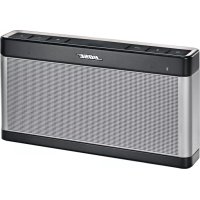
SoundLink III - Speakers BOSE - Free user manual and instructions
Find the device manual for free SoundLink III BOSE in PDF.



| Product Type | Bluetooth Speaker |
| Brand | Bose |
| Model | SoundLink III |
| Dimensions (H x W x D) | 13.5 cm x 25.6 cm x 4.8 cm |
| Weight | 1.37 kg |
| Power Source | Mains (via adapter) and rechargeable lithium-ion battery |
| Battery Life | Up to 14 hours |
| Full Charge Time | 3 hours |
| Wireless Connection | Bluetooth (pairs up to 6 devices) |
| Auxiliary Input | 3.5 mm mini-jack |
| Main Functions | Bluetooth playback, volume control, mute, source selection (Bluetooth/AUX), status indicator |
| Care and Cleaning | Soft dry cloth; do not use solvents or chemicals |
| Operating Temperature Range | 0°C to 45°C |
| Bluetooth Output Power | 7 mW at 2400-2483.5 MHz |
| Safety | Do not expose to water; do not modify; use only the supplied charger |
| Materials | Contains magnetic components; caution for medical implants |
| Included Accessories | Mains power supply, mains adapters (depending on country), cable not included |
Frequently Asked Questions - SoundLink III BOSE
User questions about SoundLink III BOSE
0 question about this device. Answer the ones you know or ask your own.
Ask a new question about this device
Download the instructions for your Speakers in PDF format for free! Find your manual SoundLink III - BOSE and take your electronic device back in hand. On this page are published all the documents necessary for the use of your device. SoundLink III by BOSE.
USER MANUAL SoundLink III BOSE
Please read this guide
Please take the time to follow the instructions in this owner's guide carefully. It will help you set up and operate your system properly and enjoy its advanced features. Please save this guide for future reference.
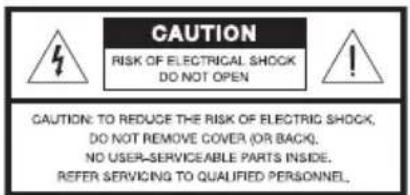

The lightning flash with arrowhead symbol within an equilateral triangle alerts the user to the presence of uninsulated, dangerous voltage within the system enclosure that may be of sufficient magnitude to constitute a risk of electric shock.

The exclamation point within an equilateral triangle, as marked on the system, is intended to alert the user to the presence of important operating and maintenance instructions in this owner's guide.

WARNING:
- To reduce the risk of fire or electrical shock, do not expose the product to rain or moisture.
- Do not expose this apparatus to dripping or splashing, and do not place objects filled with liquids, such as vases, on or near the apparatus. As with any electronic products, use care not to spill liquids into any part of the system. Liquids can cause a failure and/or a fire hazard.
- Do not place any naked flame sources, such as lighted candles, on or near the apparatus.
- Do not use any charger other than that specifically provided for use with the equipment.
- The battery needs to be charged before use. Always use the correct charger and refer to the manufacturer's instructions or equipment manual for proper charging instructions.
- After extended periods of storage, it may be necessary to charge and discharge the battery pack several times to obtain maximum performance.
The battery pack gives its best performance when it is operated at normal room temperature (68^ + / - 23^ or 20^ + / - 5^) - Do not leave a battery on prolonged charge when not in use.
- The battery pack shall not be exposed to excessive heat such as sunshine, fire or the like.
- Do not subject battery pack to mechanical shock.
- In the event of fluid from the battery leaks from the equipment, do not allow the liquid to come in contact with the skin or eyes. If contact has been made, wash the affected area with copious amounts of water and seek medical advice.
- Do not use any battery pack which is not designed for use with the equipment.
- Keep battery pack clean and dry.
- For battery replacement, please contact Bose Customer Service.
The Bluetooth® word mark and logos are registered trademarks owned by Bluetooth SIG, Inc. and any use of such marks by Bose Corporation is under license.
Wi-Fi is a registered mark of the Wi-Fi Alliance.
©2018 Bose Corporation. No part of this work may be reproduced, modified, distributed, or otherwise used without prior written permission.

WARNING: This product contains magnetic material. Please contact your physician if you have any questions on whether this might affect the operation of your implantable medical device.

CAUTION: Make no modifications to the system or accessories. Unauthorized alterations may compromise safety, regulatory compliance, and system performance.

NOTES:
- The product label is located on the bottom of the product.
- Where the mains plug or appliance coupler is used as the disconnect device, such disconnect device shall remain readily operable.
- The AC power supply provided with this product must be used indoors. It is neither designed nor tested for use outdoors, in recreation vehicles, or on boats.
- This product is intended to be used only with the AC power supply provided, or a Bose AC power supply or charger designed for use with this product.
Important Safety Instructions
- Read these instructions.
- Keep these instructions.
- Heed all warnings.
- Follow all instructions.
- Do not use this apparatus near water.
- Clean only with a dry cloth.
- Do not block any ventilation openings. Install in accordance with the manufacturer's instructions.
- Do not install near any heat sources such as radiators, heat registers, stoves, or other apparatus (including amplifiers) that produce heat.
- Only use attachments/accessories specified by the manufacturer.
- Unplug this apparatus during lightning storms or when unused for long periods of time.
- Refer all servicing to qualified personnel. Servicing is required when the apparatus has been damaged in any way, such as power-supply cord or plug is damaged, liquid has been spilled or objects have fallen into the apparatus, the apparatus has been exposed to rain or moisture, does not operate normally, or has been dropped.
Information about products that generate electrical noise
This device complies with FCC and Industry Canada RF radiation exposure limits set forth for general population. It must not be co-located or operating in conjunction with any other antennas or transmitters.
This device complies with Part 15 of the FCC Rules. Operation is subject to the following two conditions: (1) This device may not cause harmful interference, and (2) this device must accept any interference received, including interference that may cause undesired operation.
U.S.A. only
NOTE: This equipment has been tested and found to comply with the limits for a Class B digital device, pursuant to Part 15 of the FCC Rules. These limits are designed to provide reasonable protection against harmful interference in a residential installation. This equipment generates, uses, and can radiate radio frequency energy and, if not installed and used in accordance with the instructions, may cause harmful interference to radio communications. However, there is no guarantee that interference will not occur in a particular installation. If this equipment does cause harmful interference to radio or television reception, which can be determined by turning the equipment off and on, the user is encouraged to try to correct the interference by one or more of the following measures:
- Reorient or relocate the receiving antenna.
- Increase the separation between the equipment and receiver.
- Connect the equipment into an outlet on a circuit different from that to which the receiver is connected.
- Consult the dealer or an experienced radio/TV technician for help.
Changes or modifications not expressly approved by Bose Corporation could void the user's authority to operate this equipment.
Canada
This Class B digital apparatus complies with Canadian ICES-003.
This device complies with Industry Canada licence-exempt RSS standard(s). Operation is subject to the following two conditions: (1) This device may not cause interference, and (2) this device must accept any interference, including interference that may cause undesired operation of the device.
Output power: 7 mW @ 2400-2483.5 MHz
Bose Corporation hereby declares that this product is in compliance with the essential requirements and other relevant provisions of Directive 2014/53/EU and to all applicable EU directive requirements. The complete declaration of conformity can be found at www.Bose.com/compliance
| Names and Contents of Toxic or Hazardous Substances or Elements | ||||||
| Part Name | Toxic or Hazardous Substances and Elements | |||||
| Lead (Pb) | Mercury (Hg) | Cadmium (Cd) | Hexavalent (CR(VI)) | Polybrominated Biphenyl (PBB) | Polybrominated Diphenyl Ether (PBDE) | |
| PCBs X 0 0 | 0 0 0 | |||||
| Metal parts | X 0 0 | 0 0 0 | ||||
| Plastic parts | 0 0 0 | 0 0 0 | ||||
| Speakers X | 0 0 0 0 0 | |||||
| Cables X 0 | 0 0 0 0 | |||||
| O: Indicates that this toxic or hazardous substance contained in all of the homogeneous materials for this part is below the limit requirement in SJ/T 11363-2006. | ||||||
| X: Indicates that this toxic or hazardous substance contained in at least one of the homogeneous materials used for this part is above the limit requirement in SJ/T 11363-2006. | ||||||
Please complete and retain for your records.
The serial and model number can be found on the bottom of the speaker.
Serial number:
Model number:
Purchase date:
We suggest you keep your receipt with this owner's guide.
Introduction
Overview. 6
Unpacking 6
Operation
Connecting to AC power 7
Pairing and connecting a device to the speaker. 9
First-time setup. 9
Adding another device to the speaker 10
Speaker memory 10
Reconnecting a device 10
Switching to a different device. 10
Control buttons. 11
System status indicators 12
Connecting a device using the AUX connector 13
Operating on battery power 14
Checking the battery 14
Charging the battery 14
Battery protection mode 14
Tips on placing the speaker 15
Maintenance and Care
Troubleshooting 16
Replacing the battery 18
Cleaning the speaker 18
Contacting customer service 18
Technical information 18
Overview
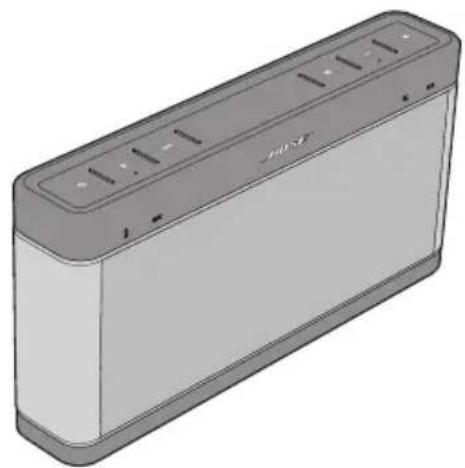
Thank you for purchasing the Bose® SoundLink® Bluetooth® speaker III. Enjoy music wirelessly from your smartphone, tablet, laptop, or other Bluetooth device anywhere you choose.
Features
- Wireless Bluetooth link eliminates the need to physically connect your Bluetooth device.
- Rechargeable lithium-ion battery provides hours of Bose performance.
- AUX connector lets you connect any music device directly to your speaker.
- Pair up to six Bluetooth devices.
Easy grab-and-go mobility.
Unpacking
Open the carton and remove the speaker and AC power supply. Depending on your region, the carton may also contain AC power adapters for the AC power supply. Be sure to save all of the packing materials. These provide the safest means for any necessary shipping or transporting of the system.
If any part of the product appears to be damaged, do not attempt to use it. Contact your authorized Bose dealer immediately or call Bose Customer Service. For contact information, refer to the contact list at the end of this guide or visit http://global.Bose.com.
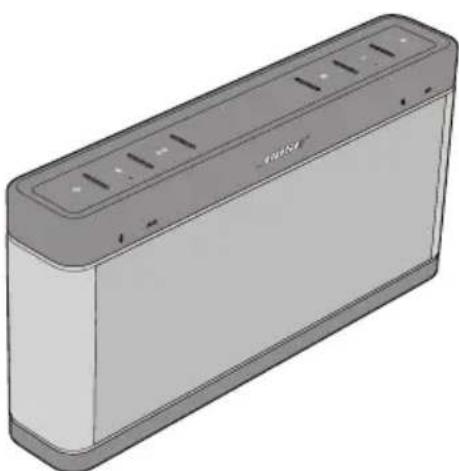
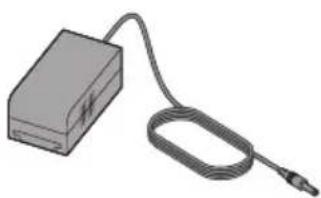
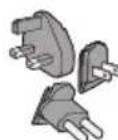
SoundLink® Bluetooth® speaker III AC power supply AC power supply
adapters
Connecting to AC power
The first time using your SoundLink® Bluetooth® speaker III, connect it to AC (mains) power and charge the battery for three hours. While the battery is charging, you can begin using the speaker.
- Depending on your AC power supply type:
a. Extend the prongs from the AC power supply.
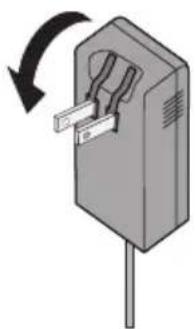
Or,
b. Slide the AC power adapter for your region onto the AC power supply.
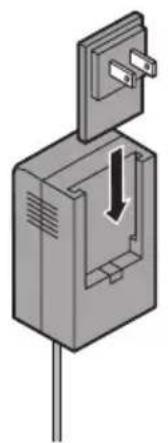
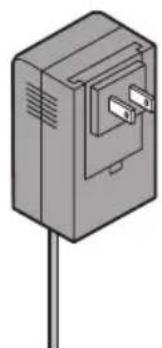
Operation
- Plug the power cord on the AC power supply into the DC connector on the back of the speaker.
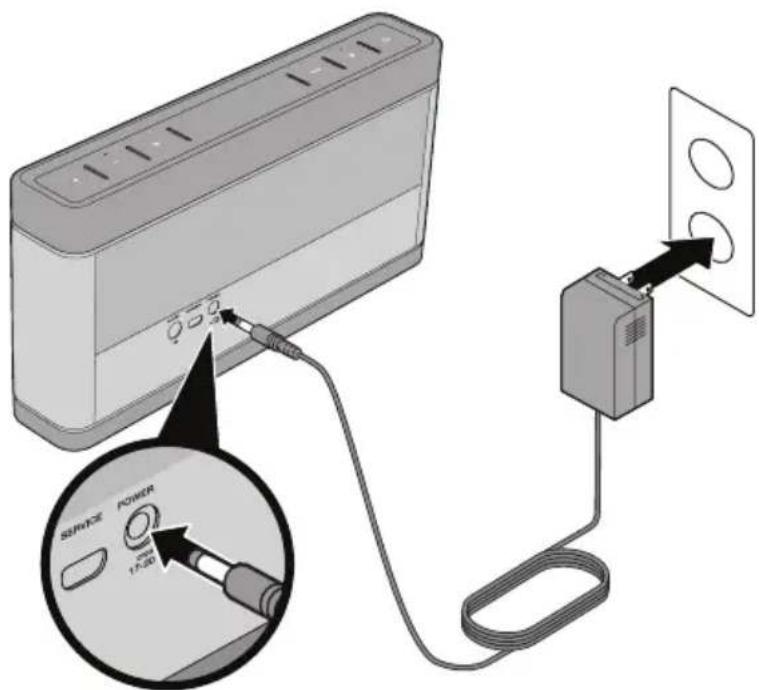
- Plug the AC power supply into a live AC (mains) outlet.
The speaker emits a tone to confirm connection to AC power, and charging begins. On the front of the speaker, the battery status indicator blinks yellow to show the battery is charging.
Pairing and connecting a device to the speaker
Before listening to music from your Bose® Soundlink® Bluetooth® speaker III, you must pair and connect your Bluetooth device to the speaker.
First-time setup
The first time you turn on your speaker, it is ready to pair and connect your first device.
- Press Power ( ) to turn the speaker on.
The Bluetooth status indicator on the speaker blinks blue to show the speaker is discoverable.
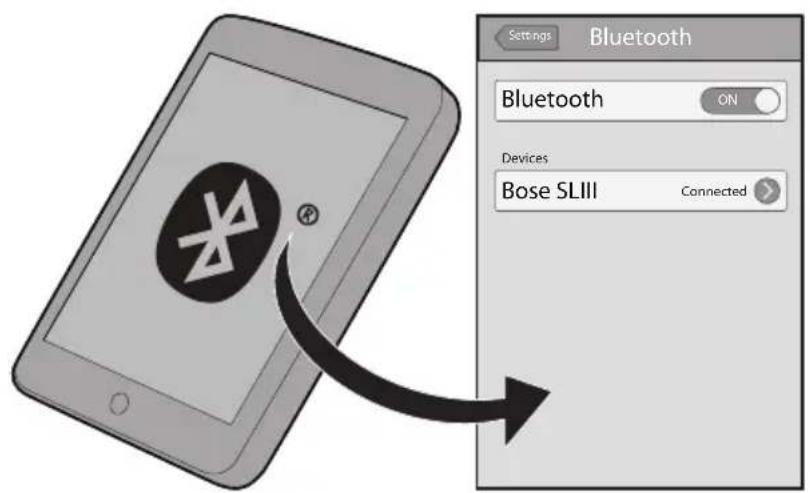
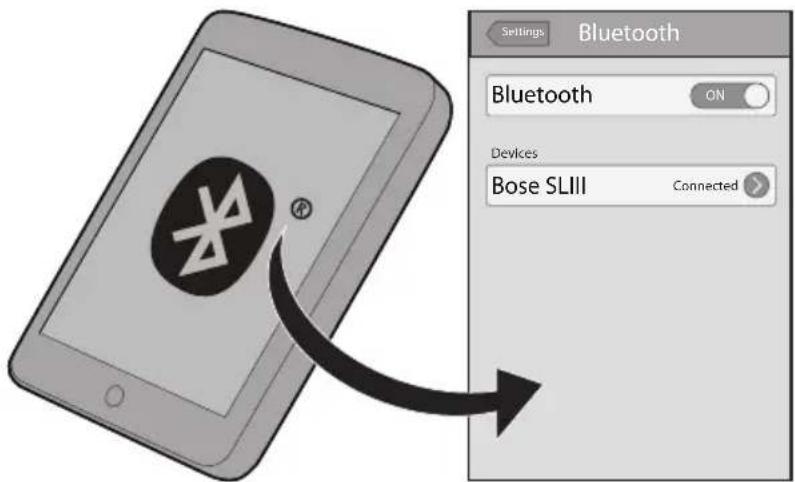
- On your device, turn Bluetooth on, locate the Bluetooth device list, and select the device named "Bose SLIII." If your device prompts you for a passcode, enter "0000" (four zeros).
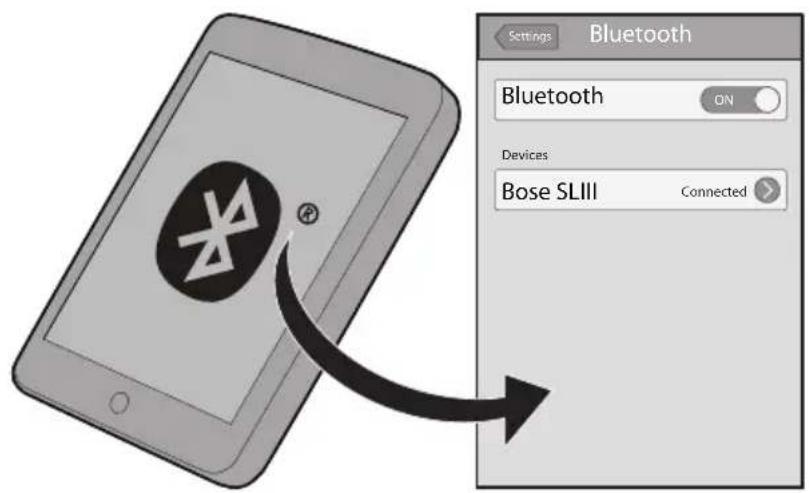
When pairing is complete and your device is connected to the speaker, the Bluetooth status indicator on the speaker changes from blinking blue to solid white and the speaker emits a tone.
Note: If the speaker turns off after five minutes, it has not paired or connected with your device. Turn the speaker off and back on, and try pairing your device again. See "Troubleshooting" on page 16.
Adding another device to the speaker
Pair another device to the speaker by making the speaker discoverable.
- Press Bluetooth on the speaker, so the Bluetooth status indicator blinks blue.
- On your device, turn Bluetooth on, locate the Bluetooth device list, and select the device named "Bose SLIII." If your device prompts you for a passcode, enter "0000" (four zeros).
When the device connects to the speaker, the Bluetooth status indicator turns to solid white.
Note: You can switch between connecting/connected and discoverable by pressingBluetooth on the speaker.
Speaker memory
The speaker can remember up to six paired devices. If you pair the speaker with an additional device, the device least recently connected is no longer paired with the speaker.
Note: To clear the speaker memory of all devices, press and hold Bluetooth (about 10 seconds) until you hear a tone. All devices are cleared and the speaker becomes discoverable.
Reconnecting a device
When turned on, the speaker attempts to reconnect with a device in memory starting with the last connected device. If the last connected device is not available, the speaker connects to the next to last connected device, and so forth. The speaker searches for a paired device for approximately 30 seconds.
Switching to a different device
You can switch the speaker from your connected device to another previously paired device. The device you are switching to must be in the speaker memory.
- On your previously paired device, make sure Bluetooth is turned on.
- Press Bluetooth on the speaker to make the speaker discoverable.
The Bluetooth status indicator 串 speaker blinks blue to show the speaker is discoverable.
- On your device, select "Bose SLIII" from the Bluetooth device list.
The Bluetooth status indicator blinks white, while the speaker attempts to connect to the device.
When the speaker and Bluetooth device have successfully connected, the Bluetooth status indicator changes from blinking to solid white and the speaker emits a tone.
Control buttons
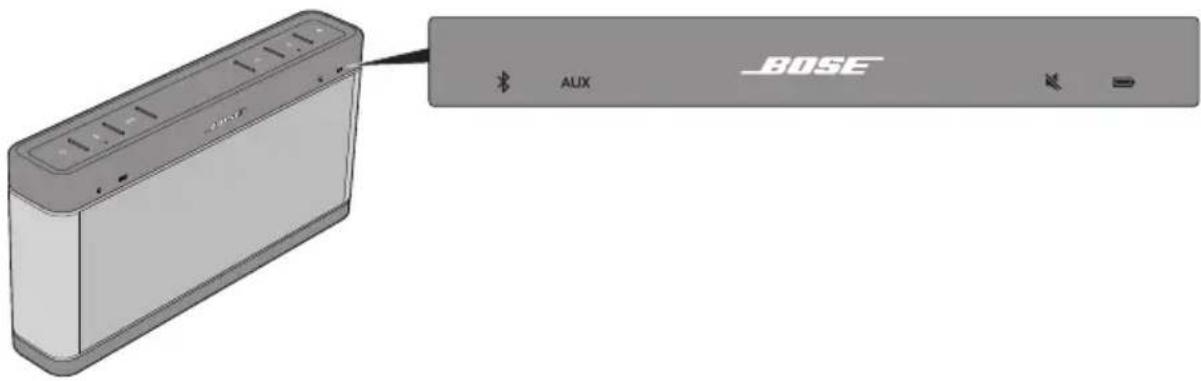
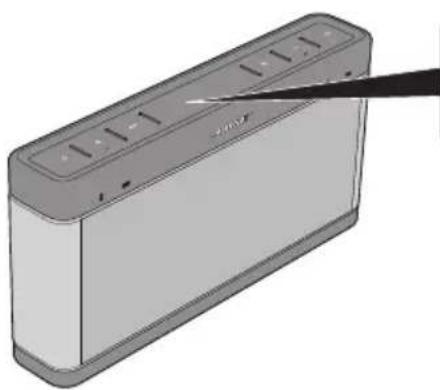
Control buttons are located on the top of the speaker.
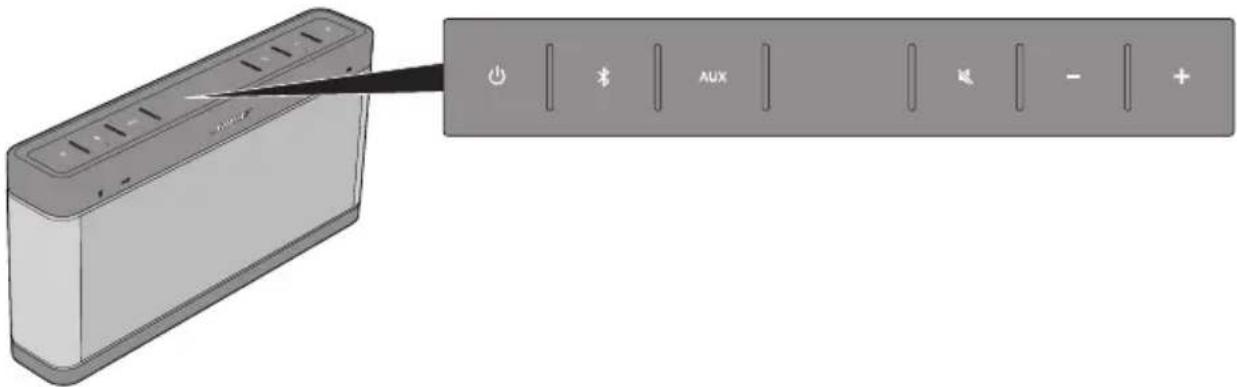
| Control button Description | |
| Press to turn the speaker on or off. ·When Bluetooth is the selected source, the speaker attempts to reconnect to the last connected device. If there are no paired devices, the speaker becomes discoverable. See “Pairing and connecting a device to the speaker” on page 9. ·If operating on battery power, press and hold to observe the battery status indicator. See “Checking the battery” on page 14. ·If the speaker is not used within 30 minutes, the speaker automatically turns off to preserve battery power. | |
| Press to select the Bluetooth source. ·The speaker attempts to connect to the last paired device. If there are no paired devices, the speaker becomes discoverable. ·If Bluetooth is connecting/connected, press to set the speaker to discoverable to allow pairing with another Bluetooth device. Press again to go back to connecting mode. | |
| AUX | Press to listen to a device plugged into the AUX connector. See “Connecting a device using the AUX connector” on page 13. |
| Press to mute/unmute sound from the speaker. | |
| - | Press to decrease the speaker volume incrementally. Press and hold to decrease the volume continuously. |
| + | Press to increase the speaker volume incrementally. Press and hold to increase the volume continuously. |
System status indicators
Status indicators illuminate to show when an audio source or speaker state is activated. Status indicators are located on the front of the speaker.
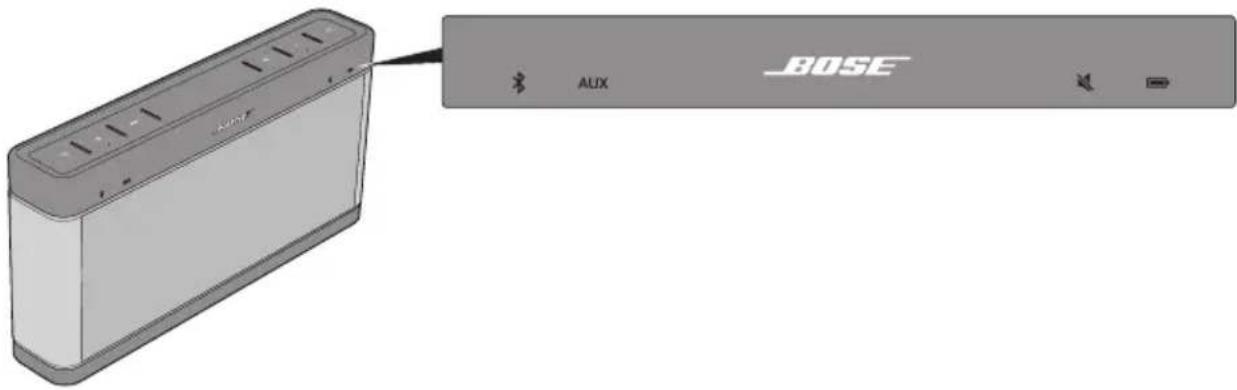
| Status indicator System status | |
| * | Indicates the Bluetooth® state of the speaker when the Bluetooth source is selected. See “Pairing and connecting a device to the speaker” on page 9. • Blinking blue light – Discoverable and ready to pair with a device. • Blinking white light – Attempting to connect to a paired device. • Solid white light – Connected to a paired device. • Blinks as the volume of the speaker increases or decreases when Bluetooth is the source. When the indicator blinks twice, the maximum or minimum volume has been reached. |
| AUX | • The speaker is playing the source connected to the AUX IN-connector. • Blinks as the volume of the speaker increases or decreases when AUX is the source. When the indicator blinks twice, the maximum or minimum volume has been reached. |
| × | Blinks when the sound is muted. |
| ○ | Indicates the battery power level or the battery charging state. See “Checking the battery” on page 14. |
Connecting a device using the AUX connector
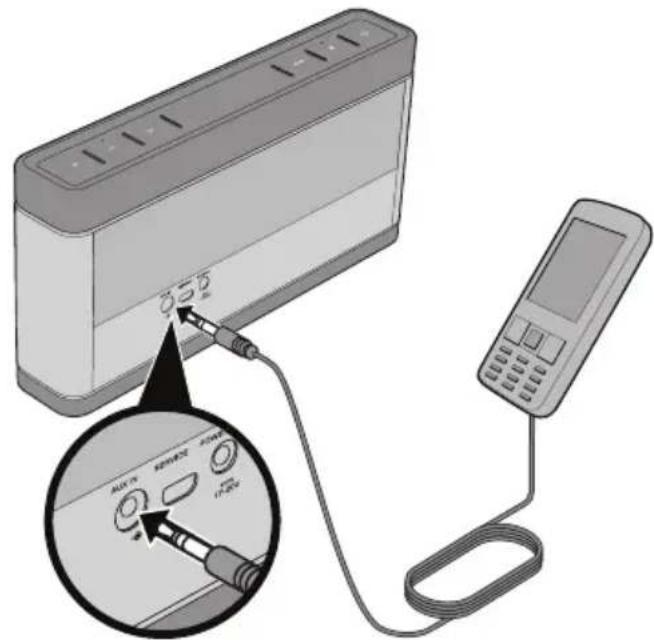
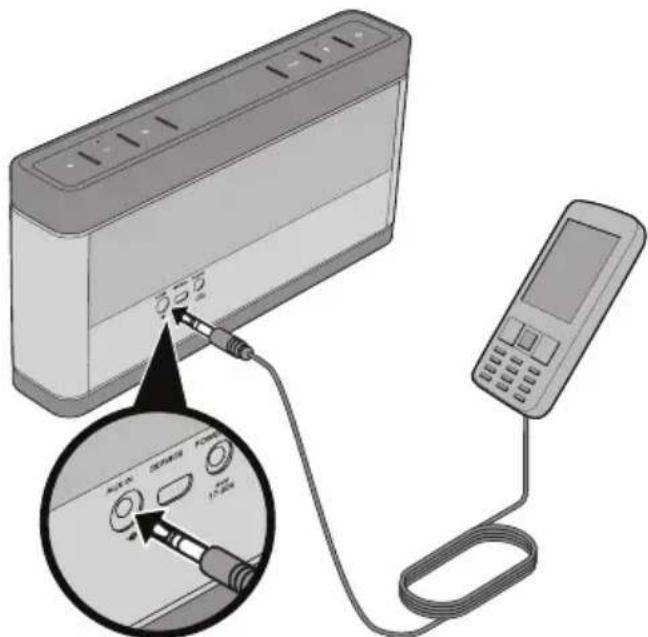
You can use your speaker with any device that features a headphone or audio output. This feature requires using a stereo audio cable with a 3.5mm plug on one end to connect to the AUX IN input on the speaker. This type of cable is available for purchase at electronics stores.
To use the AUX IN connector:
- Plug the cable from your audio device into the AUX IN connector on the back of the speaker.
-
Press Power on the speaker.
-
Press AUX on the speaker.
-
Adjust the volume on the connected device to near maximum, then use the speaker volume buttons to adjust the volume level.
Notes:
-
If the connected device stops playing audio for 30 minutes, the speaker automatically turns off to conserve battery power.
-
The SERVICE connector on the back of the speaker is only for software updates. It cannot be used to connect an audio device.
Operating on battery power
Battery performance varies with the content played and the loudness at which it is played. In typical usage, the speaker battery lasts up to 14 hours.
Checking the battery
When the speaker is turned on, the battery status indicator briefly illuminates, then turns off to conserve battery power. However, if the battery requires charging, the battery status indicator illuminates and continuously blink red until the speaker the speaker is connected to AC power and the battery begins charging.
To check the battery charge level, press and hold Power on the speaker and observe the battery status indicator.
| Solid green Full charge | |
| Solid yellow Medium charge | |
| Blinking red Charging is needed |
Charging the battery
The battery status indicator on the speaker blinks red when the battery needs charging.
To charge the battery, connect the speaker to AC power (see "Connecting to AC power" on page 7). The speaker emits a tone to confirm the power connection. Recommended charging time is three hours to fully charge the battery. The battery status indicator indicates the charging status. You can use the speaker while charging the battery.
| Blinking yellow Battery is charging |
| Solid green Battery is fully charged |
Battery protection mode
When the speaker is unplugged and unused for more than 24 days, it enters battery protection mode to preserve battery power. To reactivate the speaker, connect it to AC power (see "Connecting to AC power" on page 7).
Tips on placing the speaker
When using your speaker indoors, the tonal quality can vary depending on where the speaker is placed in a room.
When using your speaker outdoors, you should expect the tonal quality to change as you move farther away from the speaker.
Follow these guidelines when placing your speaker:
- The speaker is designed to sound best when placed on a surface that is 24 to 48 inches high.
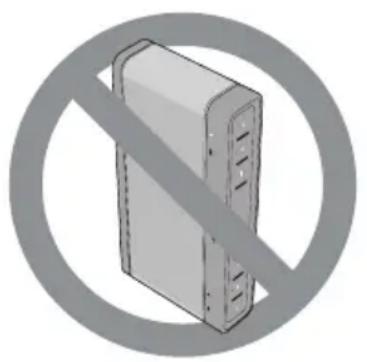
- For best bass response, the back of the speaker should be placed near a wall, but not directly against a wall. Bass response decreases as the speaker is moved away from a wall. Do not lay the speaker on its back. Sound is emitted from both the front and the rear of the speaker.
- Do not place the speaker in small areas where the speaker is enclosed on all sides except the front, as this will adversely affect sound quality.
- Do not place the speaker on wet or dirty surfaces.
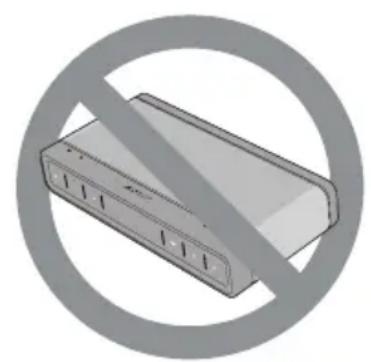
Troubleshooting
| Problem What to do | |
| Speaker will not turn on | If using AC power, ensure: · Your system is connected to a working AC (mains) outlet. · You are using the Bose® AC power supply shipped with your speaker or a Bose accessory charger designed for the speaker. If using battery power, the battery may be in protection mode or discharged. Connect to a working AC outlet to restore the battery to operational mode and charge the battery. |
| Cannot pair the speaker with my Bluetooth device | · Ensure your speaker is discoverable (Bluetooth status indicator blinks blue). See “Pairing and connecting a device to the speaker” on page 9. · Ensure Bluetooth is enabled on your device. · Ensure you have selected “Bose SLIII” in the Bluetooth device list on your device and the connection has been confirmed by your device. · Your Bluetooth device may be out of range. Try moving it closer to the speaker. · If possible, turn off all other nearby Bluetooth devices or disable their Bluetooth functionality. · Ensure your device supports the A2DP (stereo Bluetooth) profile. · When pairing and connecting to a PC or Mac computer, ensure you have selected the SoundLink® Bluetooth® speaker III as the audio output device within the audio settings menu of the computer. You may need to play an audio track to finalize the connection (see the computer manufacturer for detailed instructions). · Refer to the owner's guide, help system, or technical support for your Bluetooth device to learn how it pairs with other Bluetooth devices. · Turn the speaker off and back on, and pair and connect your device. See “First-time setup” on page 9 and “Adding another device” on page <?>. · Reset the speaker. Press and hold Mute on the speaker for ten seconds until all status indicators briefly illuminate and the speaker turns off. Turn the speaker on again, and pair your device. · Check for updated software for your Bluetooth device, or go to owners.Bose.com for updates to the SoundLink® Bluetooth® speaker III. |
| Paired Bluetooth device will not connect to the speaker | · Ensure your speaker is discoverable (Bluetooth status indicator blinks blue). See “Pairing and connecting a device to the speaker” on page 9. · Ensure Bluetooth is enabled on your device. · Your device may be out of range. Try moving it closer to the speaker. · Turn your device off and back on, and connect it to the speaker. See “Reconnecting a device” on page <OV>. · If possible, turn off all other nearby Bluetooth devices or disable their Bluetooth functionality. · Reset the speaker. Press and hold Mute on the speaker for ten seconds until all status indicators briefly illuminate and the speaker turns off. Turn the speaker on again, and connect your device. · Clear the speaker memory. Pair and connect the device to the speaker again. See “Speaker memory” on page 10 and “First-time setup” on page 9. |
Problem What to do
| The speaker indicates a connection, but is not playing music | ·Ensure the device you want to hear is connected to the speaker and playing audio. ·Ensure the speaker is not muted and the speaker volume is turned up. ·Turn up the volume on your device. ·Your Bluetooth® device may be out of range. Try moving it closer to the speaker. ·Move your device away from any device that generates electromagnetic interference, such as another Bluetooth device, cordless phone,microwave oven, or wireless router. ·If possible, turn off all other nearby Bluetooth devices or disable their Bluetooth functionality and reconnect the device you want to hear. ·Refer to the owner's guide, help system, or technical support for your Bluetooth device to learn how it pairs with other Bluetooth devices. ·Turn the speaker off and back on. ·Reset the speaker. Press and hold Mute on the speaker for ten seconds until all status indicators briefly illuminate and the speaker turns off. Turn the speaker on again, and connect your device. |
| Poor sound quality from a Bluetooth device | Connect your Bluetooth device to the speaker using the AUX connection. If sound quality improves using the AUX connection, try these solutions: ·Your Bluetooth device may be out of range. Try moving it closer to the speaker. ·Move your device away from any device that generates electromagnetic interference, such as another Bluetooth device, cordless phone,microwave oven, or wireless router. ·Reduce the number of applications running on your device. Running multiple applications can reduce the amount of internal resources available to transmit audio. Closing non-essential applications may improve audio quality. ·Try turning off Wi-Fi® on your device to improve audio quality. ·Try clearing your device from the speaker by disabling Bluetooth on your device. Pair your device and the speaker again. ·If your device is in your pocket, try placing it in open air, without your body between the device and the speaker. ·Turn the speaker off and back on. ·Reset the speaker. Press and hold Mute on the speaker for ten seconds until all status indicators briefly illuminate and the speaker turns off. Turn the speaker on again, and pair and connect your device. ·Check for updated software for your Bluetooth device, or go to owners.Bose.com for updates to the SoundLink® Bluetooth® speaker III. |
| No audio or poor sound quality from an AUX device | ·Ensure your connected device is on and playing audio. ·Ensure the 3.5 mm plug of the stereo cable is fully inserted into the speaker and the other end into the AUX device. ·Press AUX on the speaker and ensure the AUX status indicator is on. ·Ensure the speaker is not muted and the speaker volume is up. ·If there is no sound, increase the volume level on the AUX device. ·If sound quality is poor, reduce the volume level on the AUX device. ·Try using a different AUX cable. |
Replacing the battery
The battery should be replaced when:
- The battery status indicator continues blinking yellow after ten hours of charging.
The period of battery operation noticeably decreases.
Only Bose can replace the battery in your speaker. If you need a new battery, please contact the Bose organization in your country/region. For contact information, refer to the contact list at the end of this guide or visit http://global.Bose.com.
Cleaning the speaker
To clean the exterior surface of your product, wipe it using a soft, dry cloth.
- Do not use solvents, chemicals, or sprays.
- Do not allow liquids to spill or objects to drop into any openings.
Contacting customer service
For questions about the Bose® SoundLink® Bluetooth® speaker III, contact your local Bose dealer. For contact information, refer to the contact list at the end of this guide or visit http://global.Bose.com.
Limited warranty
Your Bose® SoundLink® Bluetooth® speaker III is covered by a limited warranty. Details of the limited warranty are provided on the product registration card included in the carton. Refer to the card for instructions on how to register. Failure to register will not affect your limited warranty rights.
Technical information
AC power supply rating
Input: 100 - 240V, 50/60 Hz, 600 mA
Output: 17 VDC, 1A Max
Input power rating
Input: 17 - 20 VDC, 1A Max
Dimensions
5.2^ × 10^ × 1.9^ (13.5 cm x 25.6 cm x 4.8 cm)
Weight
3.03 lb (1.37 kg)
Temperature range for use
32^ to 113^ (0^ to +45^)
Temperaturinterval for drug
0^ til +45C
Comment contacter le service client
Entree:100-240V,50/60Hz,600mA
Sortie:17Vcc,1Amax.
Entree:17-20Vcc,1A max.
Dimensions
| ® | Bluetooth® Bluetooth® Bluetooth® Bluetooth® Bluetooth® Bluetooth® Bluetooth® Bluetooth® Bluetooth® Bluetooth® Bluetooth® Bluetooth® Bluetooth® Bluetooth® Bluetooth® Bluetooth® Bluetooth® Bluetooth® Bluetooth® Bluetooth® Bluetooth® Bluetooth® Bluetooth® Bluetooth® Bluetooth® Bluetooth® Bluetooth® Bluetooth® Bluetooth® Bluetooth® Bluetooth® Bluetooth® Bluetooth® Bluetooth® 蓝牙5.0 |
| AUX | • new technology for wireless communication with a 3G-based voice assistant (V2C)• new technology for wireless communication with a 4G-based voice assistant (V4C)• new technology for wireless communication with a 5G-based voice assistant (V5C)• new technology for wireless communication with a 6G-based voice assistant (V6C)• new technology for wireless communication with a 7G-based voice assistant (V7C)• new technology for wireless communication with a 8G-based voice assistant (V8C)• new technology for wireless communication with a 9G-based voice assistant (V9C) |
| ® | new technology for wireless communication with a 10G-based voice assistant (V10C)• new technology for wireless communication with a 11G-based voice assistant (V11C)• new technology for wireless communication with a 12G-based voice assistant (V12C)• new technology for wireless communication with a 13G-based voice assistant (V13C)• new technology for wireless communication with a 14G-based voice assistant (V14C)• new technology for wireless communication with a 15G-based voice assistant (V15C)• new technology for wireless communication with a 16G-based voice assistant (V16C)• new technology for wireless communication with a 17G-based voice assistant (V17C)• new technology for wireless communication with a 18G-based voice assistant (V18C)• new technology for wireless communication with a 19G-based voice assistant (V19C)• new technology for wireless communication with a 20G-based voice assistant (V20C)• new technology for wireless communication with a 21G-based voice assistant (V21C)• new technology for wireless communication with a 22G-based voice assistant (V22C)• new technology for wireless communication with a 23G-based voice assistant (V23C)• new technology for wireless communication with a 24G-based voice assistant (V24C)• new technology for wireless communication with a 25G-based voice assistant (V25C)• new technology for wireless communication with a 26G-based voice assistant (V26C)• new technology for wireless communication with a 27G-based voice assistant (V27C)• new technology for wireless communication with a 28G-based voice assistant (V28C)• new technology for wireless communication with a 29G-based voice assistant (V29C)• new technology for wireless communication with a 30G-based voice assistant (V30C)• new technology for wireless communication with a 31G-based voice assistant (V31C)• new technology for wireless communication with a 32G-based voice assistant (V32C)• new technology for wireless communication with a 33G-based voice assistant (V33C)• new technology for wireless communication with a 34G-based voice assistant (V34C)• new technology for wireless communication with a 35G-based voice assistant (V35C)• new technology for wireless communication with a 36G-based voice assistant (V36C)• new technology for wireless communication with a 37G-based voice assistant (V37C)• new technology for wireless communication with a 38G-based voice assistant (V38C)• new technology for wireless communication with a 39G-based voice assistant (V39C)• new technology for wireless communication with a 40G-based voice assistant (V40C)• new technology for wireless communication with a 41G-based voice assistant (V41C)• new technology for wireless communication with a 42G-based voice assistant (V42C)• new technology for wireless communication with a 43G-based voice assistant (V43C)• new technology for wireless communication with a 44G-based voice assistant (V44C)• new technology for wireless communication with a 45G-based voice assistant (V45C)• new technology for wireless communication with a 46G-based voice assistant (V46C)• new technology for wireless communication with a 47G-based voice assistant (V47C)• new technology for wireless communication with a 48G-based voice assistant (V48C)• new technology for wireless communication with a 49G-based voice assistant (V49C)• new technology for wireless communication with a 50G-based voice assistant (V50C)• new technology for wireless communication with a 51G-based voice assistant (V51C)• new technology for wireless communication with a 52G-based voice assistant (V52C)• new technology for wireless communication with a 53G-based voice assistant (V53C)• new technology for wireless communication with a 54G-based voice assistant (V54C)• new technology for wireless communication with a 55G-based voice assistant (V55C)• new technology for wireless communication with a 56G-based voice assistant (V56C)• new technology for wireless communication with a 57G-based voice assistant (V57C)• new technology for wireless communication with a 58G-based voice assistant (V58C)• new technology for wireless communication with a 59G-based voice assistant (V59C)• new technology for wireless communication with a 60G-based voice assistant (V60C)• new technology for wireless communication with a 61G-based voice assistant (V61C)• new technology for wireless communication with a 62G-based voice assistant (V62C)• new technology for wireless communication with a 63G-based voice assistant (V63C)• new technology for wireless communication with a 64G-based voice assistant (V64C)• new technology for wireless communication with a 65G-based voice assistant (V65C)• new technology for wireless communication with a 66G-based voice assistant (V66C)• new technology for wireless communication with a 67G-based voice assistant (V67C)• new technology for wireless communication with a 68G-based voice assistant (V68C)• new technology for wireless communication with a 69G-based voice assistant (V69C)• new technology for wireless communication with a 70G-based voice assistant (V70C)• new technology for wireless communication with a 71G-based voice assistant (V71C)• new technology for wireless communication with a 72G-based voice assistant (V72C)• new technology for wireless communication with a 73G-based voice assistant (V73C)• new technology for wireless communication with a 74G-based voice assistant (V74C)• new technology for wireless communication with a 75G-based voice assistant (V75C)• new technology for wireless communication with a 76G-based voice assistant (V76C)• new technology for wireless communication with a 77G-based voice assistant (V77C)• new technology for wireless communication with a 78G-based voice assistant (V78C)• new technology for wireless communication with a 79G-based voice assistant (V79C)• new technology for wireless communication with a 80G-based voice assistant (V80C)• new technology for wireless communication with a 81G-based voice assistant (V81C)• new technology for wireless communication with a 82G-based voice assistant (V82C)• new technology for wireless communication with a 83G-based voice assistant (V83C)• new technology for wireless communication with a 84G-based voice assistant (V84C)• new technology for wireless communication with a 85G-based voice assistant (V85C)• new technology for wireless communication with a 86G-based voice assistant (V86C)• new technology for wireless communication with a 87G-based voice assistant (V87C)• new technology for wireless communication with a 88G-based voice assistant (V88C)• new technology for wireless communication with a 89G-based voice assistant (V89C)• new technology for wireless communication with a 90G-based voice assistant (V90C)• new technology for wireless communication with a 91G-based voice assistant (V91C)• new technology for wireless communication with a 92G-based voice assistant (V92C)• new technology for wireless communication with a 93G-based voice assistant (V93C)• new technology for wireless communication with a 94G-based voice assistant (V94C)• new technology for wireless communication with a 95G-based voice assistant (V95C)• new technology for wireless communication with a 96G-based voice assistant (V96C)• new technology for wireless communication with a 97G-based voice assistant (V97C)• new technology for wireless communication with a 98G-based voice assistant (V98C)• new technology for wireless communication with a 99G-based voice assistant (V99C)• new technology for wireless communication with a 100G-based voice assistant (V100C) |
AUX
3.5 WU. 10000000000000000000000000000000000000000000000000000000000000000000000000
muauxAUXIN:
- AUX IN
- nuiu
- nAUX
- 1
#
- 30 w n
- 1
n
1
n
WwWwWwWwWwWwWwWwWwWwWwWwWwWwWwWwWwWwWwWwWwWwWwWwWwWwWwWwWwWwWwWwWwWwWwWwWwWwWwWwWwWwWwWwWwWwWwWwWwWwW
y
7
WwWwWwWwWwWwWwWwWwWwWwWwWwWwWwWwWwWwWwWwWwWwWwWwWwWwWwWwWwWwWwWwWwWwWwWwWwWwWwWwWwWwWwWw
nwnnnnnnnnnnnnnnnnnnnnnnnnnnnnnnnnnnnnnnnnnnnnnnnnnnnnnnnnnnnnnnnnnnnnnnnnnnnnnnnnnnnnnnnnnnnnnnnnnnnnnnnnnnnnnnnnnnnnnnnnnnnnnnnnnnnnnnnnnnnnnnnnnnnnnnnnnnnnnnnnnnnnnnn
nnaanrnnnnaaannnnae
waaan 24 u zauuunnnaa aauwaa (waaan waaan waaan waaan waaan waaan waaan waaan waaan waaan waaan waaan waaan waaan waaan waaan waaan waaan waaan waaan waaan waaan waaan waaan waaan waaan waaan waaan waaan waaan waaan waaan waaan waaan waaaan waaaan waaaan waaaan waaaan waaaan waaaan waaaan waaaan waaaan waaaan waaaan waaaan waaaan waaaan waaaan waaaan waaaan waaaan waaaan waaaan
w
WwWwWwWwWwWwWwWwWwWwWwWwWwWwWwWwWwWwWwWwWwWwWwWwWwWwWwWwWwWwWwWwWwWwWwWwWwWwWwWwWwWwWwWw
w
J1
24
- 1
W
·
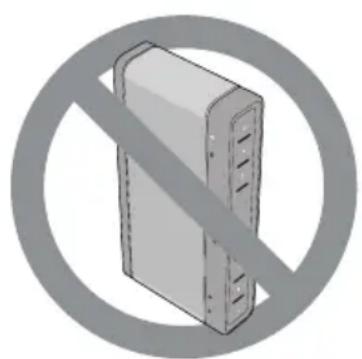
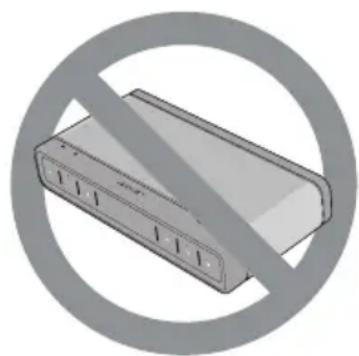
| ### | |
| ### | |
| ### | |
| ### | |
| ### | |
| ### | |
| ### | |
| ### | |
| ### | |
| ### | |
| ### | |
| ### | |
| ### | |
| ### | |
| ### | |
| ### | |
| ### | |
| ### | |
| ### | |
| ### | |
| ### |
n
1
©2018 Bose Corporation.

BateRlIeepg 14
[BaTeRl] 14
BabrLi BhoH MoT 14
S形器包用电一 15
津志保
注释 16
BateRlI. 18
S. 18
GOAKS TIRBIS SNTER Dn
J 18
吉将格
#
Bose® Soundlink® Bluetooth® SsrfK III® where it happens to reach the front of the smartphone.
戸音
Stéckter'sBluetooth®®®®®®®®®®®®®®®®®®®®®®®®®®®®®®®®®®®®®®®®®®®®®®®®®®®®®®®®®®®®®®®®®®®®®®®®®®®®®®®®®®®®®®
2.장치에서Bluetooth을 기고Bluetooth장치복본을 출“A Bose SLIII”라운이름을선theticall.장치에서만스고드를요cheng한“0000"(4개)을일tychallnida.
Stépré'sBluetooth®®®®®®®®®®®®®®®®®®®®®®®®®®®®®®®®®®®®®®®®®®®®®®®®®®®®®®®®®®®®®®®®®®®®®®®®®®®®®®®®®®®®®®®
- 音制的Bluetooth音制默录器“Bose SLIII”到手
SFlIeK BAtIe AduHyOuHAnT
Information about products that generate electrical noise
This device complies with FCC and Industry Canada RF radiation exposure limits set forth for general population. It must not be co-located or operating in conjunction with any other antennas or transmitters.
This device complies with Part 15 of the FCC Rules. Operation is subject to the following two conditions: (1) This device may not cause harmful interference, and (2) this device must accept any interference received, including interference that may cause undesired operation.
U.S.A. only
NOTE: This equipment has been tested and found to comply with the limits for a Class B digital device, pursuant to Part 15 of the FCC Rules. These limits are designed to provide reasonable protection against harmful interference in a residential installation. This equipment generates, uses, and can radiate radio frequency energy and, if not installed and used in accordance with the instructions, may cause harmful interference to radio communications. However, there is no guarantee that interference will not occur in a particular installation. If this equipment does cause harmful interference to radio or television reception, which can be determined by turning the equipment off and on, the user is encouraged to try to correct the interference by one or more of the following measures:
- Reorient or relocate the receiving antenna.
- Increase the separation between the equipment and receiver.
- Connect the equipment into an outlet on a circuit different from that to which the receiver is connected.
- Consult the dealer or an experienced radio/TV technician for help.
Changes or modifications not expressly approved by Bose Corporation could void the user's authority to operate this equipment.
Canada
This Class B digital apparatus complies with Canadian ICES-003.
This device complies with Industry Canada licence-exempt RSS standard(s). Operation is subject to the following two conditions: (1) This device may not cause interference, and (2) this device must accept any interference, including interference that may cause undesired operation of the device.
Bose Corporation hereby declares that this product is in compliance with the essential requirements and other relevant provisions of Directive 2014/53/EU and to all applicable EU directive requirements. The complete declaration of conformity can be found at www.Bose.com/compliance
| Names and Contents of Toxic or Hazardous Substances or Elements | ||||||
| Part Name | Toxic or Hazardous Substances and Elements | |||||
| Lead (Pb) | Mercury (Hg) | Cadmium (Cd) | Hexavalent (CR(VI)) | Polybrominated Biphenyl (PBB) | Polybrominated Diphenyl Ether (PBDE) | |
| PCBs X 0 0 | 0 0 0 | |||||
| Metal parts | X 0 0 | 0 0 0 | ||||
| Plastic parts | 0 0 0 | 0 0 0 | ||||
| Speakers X | 0 0 0 0 0 | |||||
| Cables X 0 | 0 0 0 0 | |||||
| O: Indicates that this toxic or hazardous substance contained in all of the homogeneous materials for this part is below the limit requirement in SJ/T 11363-2006. | ||||||
| X: Indicates that this toxic or hazardous substance contained in at least one of the homogeneous materials used for this part is above the limit requirement in SJ/T 11363-2006. | ||||||
aaii jaiia aaii iaiy
Jg Jg Jg Jg Jg Jg Jg Jg
XaaJIaJiaJuaJIaJI
Bose 2008,SoundLink'Bluetooth speaker III aclaw Jx
http://global.Bose.com
1g2081 jao
BoseSoundLinkBluetoothspeaker III aclaw jy
1
i1
2
600.60/50 24-100
1 1
jLJyAaBz
- 1
1
4.8 x 25.6 x 13.5) 1.9 x y 10x5.2
(137)3.03
1
55+0)131 2
eaii gagogao:
aclawy 1 y
48 24 n 4e jie bgs ie gao and i Jooia aea aally
aclawyiaegjgaiylaai jgyao ygi aclaw ayla gajgaaagaae
| الإستعمال | |
| Bluetooth®Bluetooth®Bluetooth®Bluetooth®Bluetooth®Bluetooth®Bluetooth®Bluetooth®Bluetooth®Bluetooth®Bluetooth®Bluetooth®Bluetooth®Bluetooth®Bluetooth®Bluetooth®Bluetooth®Bluetooth®Bluetooth®Bluetooth®Bluetooth®Bluetooth®Bluetooth®Bluetooth®Bluetooth®Bluetooth®Bluetooth®Bluetooth®Bluetooth®Bluetooth®Bluetooth®Bluetooth®Bluetooth®Bluetooth®Bluetooth®Bluetooth®Bluetooth®Bluetooth®Bluetooth®Bluetooth®Bluetooth®Bluetooth®Bluetooth®Bluetooth®Bluetooth®Bluetooth®Bluetooth®Bluetooth®Bluetooth®Bluetooth®Bluetooth®,Bluetooth®,Bluetooth®,Bluetooth®,Bluetooth®,Bluetooth®,Bluetooth®,Bluetooth®,Bluetooth®,Bluetooth®,Bluetooth®,Bluetooth®,Bluetooth®,Bluetooth®,Bluetooth®,Bluetooth®,Bluetooth®,Bluetooth®,Bluetooth®,Bluetooth®,Bluetooth®,Bluetooth®,Bluetooth®,Bluetooth®,Bluetooth®,Bluetooth®,Bluetooth®,Bluetooth®,Bluetooth®,Bluetooth®,Bluetooth®,Bluetooth®,Bluetooth®,Bluetooth®,Bluetooth®,Bluetooth®,Bluetooth®,Bluetooth®,Bluetooth®,Bluetooth®,Bluetooth®,Bluetooth®,Bluetooth®,Bluetooth®,Bluetooth®,Bluetooth®,Bluetooth®,Bluetooth®,Bluetooth®,Bluetooth®,Bluetooth®Bluetooth®,Bluetooth®,Bluetooth®,Bluetooth®,Bluetooth®,Bluetooth®,Bluetooth®,Bluetooth®,Bluetooth®,Bluetooth®,Bluetooth®,Bluetooth®,Bluetooth®,Bluetooth®,Bluetooth®,Bluetooth®,Bluetooth®,Bluetooth®,Bluetooth®,Bluetooth®,Bluetooth®,Bluetooth®,Bluetooth®,Bluetooth®,Bluetooth®,Bluetooth®,Bluetooth®,Bluetooth®,Bluetooth®,Bluetooth®,Bluetooth®,Bluetooth®,Bluetooth®,Bluetooth®,Bluetooth®,Bluetooth®,Bluetooth®,Bluetooth®,Bluetooth®,Bluetooth®,Bluetooth®,Bluetooth®,Bluetooth®,Bluetooth®,Bluetooth®,Bluetooth®,Bluetooth®,Bluetooth®,Bluetooth®Bluetooth®Bluetooth®,Bluetooth®,Bluetooth®,Bluetooth®,Bluetooth®,Bluetooth®,Bluetooth®,Bluetooth®,Bluetooth®,Bluetooth®,Bluetooth®,Bluetooth®,Bluetooth®,Bluetooth®,Bluetooth®,Bluetooth®,Bluetooth®,Bluetooth®,Bluetooth®,Bluetooth®,Bluetooth®,Bluetooth®,Bluetooth®,Bluetooth®,Bluetooth®,Bluetooth®,Bluetooth®,Bluetooth®,Bluetooth®,Bluetooth®,Bluetooth®,Bluetooth®,Bluetooth®,Bluetooth®,Bluetooth®,Bluetooth®,Bluetooth®,Bluetooth®,Bluetooth®,Bluetooth®,Bluetooth®,Bluetooth®,Bluetooth®,Bluetooth®,Bluetooth®,Bluetooth®,Bluetooth®,Bluetooth®Bluetooth®,Bluetooth®Bluetooth®,Bluetooth®,Bluetooth®,Bluetooth®,Bluetooth®,Bluetooth®,Bluetooth®,Bluetooth®,Bluetooth®,Bluetooth®,Bluetooth®,Bluetooth®,Bluetooth®,Bluetooth®,Bluetooth®,Bluetooth®,Bluetooth®,Bluetooth®,Bluetooth®,Bluetooth®,Bluetooth®,Bluetooth®,Bluetooth®,Bluetooth®,Bluetooth®,Bluetooth®,Bluetooth®,Bluetooth®,Bluetooth®,Bluetooth®,Bluetooth®,Bluetooth®,Bluetooth®,Bluetooth®,Bluetooth®,Bluetooth®,Bluetooth®,Bluetooth®,Bluetooth®,Bluetooth®,Bluetooth®,Bluetooth®,Bluetooth®,Bluetooth®,Bluetooth®,Bluetooth®,Bluetooth®,Bluetooth®Bluetooth®Bluetooth®Bluetooth®,Bluetooth®,Bluetooth®,Bluetooth®,Bluetooth®,Bluetooth®,Bluetooth®,Bluetooth®,Bluetooth®,Bluetooth®,Bluetooth®,Bluetooth®,Bluetooth®,Bluetooth®,Bluetooth®,Bluetooth®,Bluetooth®,Bluetooth®,Bluetooth®,Bluetooth®,Bluetooth®,Bluetooth®,Bluetooth®,Bluetooth®,Bluetooth®,Bluetooth®,Bluetooth®,Bluetooth®,Bluetooth®,Bluetooth®,Bluetooth®,Bluetooth®,Bluetooth®,Bluetooth®,Bluetooth®,Bluetooth®,Bluetooth®,Bluetooth®,Bluetooth®,Bluetooth®,Bluetooth®,Bluetooth®,Bluetooth®,Bluetooth®,Bluetooth®,Bluetooth®,Bluetooth®Bluetooth®,Bluetooth®,Bluetooth®Bluetooth®,Bluetooth®,Bluetooth®,Bluetooth®,Bluetooth®,Bluetooth®,Bluetooth®,Bluetooth®,Bluetooth®,Bluetooth®,Bluetooth®,Bluetooth®,Bluetooth®,Bluetooth®,Bluetooth®,Bluetooth®,Bluetooth®,Bluetooth®,Bluetooth®,Bluetooth®,Bluetooth®,Bluetooth®,Bluetooth®,Bluetooth®,Bluetooth®,Bluetooth®,Bluetooth®,Bluetooth®,Bluetooth®,Bluetooth®,Bluetooth®,Bluetooth®,Bluetooth®,Bluetooth®,Bluetooth®,Bluetooth®,Bluetooth®,Bluetooth®,Bluetooth®,Bluetooth®,Bluetooth®,Bluetooth®,Bluetooth®,Bluetooth®,Bluetooth®,Bluetooth®,Bluetooth®Bluetooth®,Bluetooth®Bluetooth®Bluetooth®,Bluetooth®,Bluetooth®,Bluetooth®,Bluetooth®,Bluetooth®,Bluetooth®,Bluetooth®,Bluetooth®,Bluetooth®,Bluetooth®,Bluetooth®,Bluetooth®,Bluetooth®,Bluetooth®,Bluetooth®,Bluetooth®,Bluetooth®,Bluetooth®,Bluetooth®,Bluetooth®,Bluetooth®,Bluetooth®,Bluetooth®,Bluetooth®,Bluetooth®,Bluetooth®,Bluetooth®,Bluetooth®,Bluetooth®,Bluetooth®,Bluetooth®,Bluetooth®,Bluetooth®,Bluetooth®,Bluetooth®,Bluetooth®,Bluetooth®,Bluetooth®,Bluetooth®,Bluetooth®,Bluetooth®,Bluetooth®,Bluetooth®,Bluetooth®,Bluetooth®,Bluetooth®Bluetooth®Bluetooth®,Bluetooth®Bluetooth®,Bluetooth®,Bluetooth®,Bluetooth®,Bluetooth®,Bluetooth®,Bluetooth®,Bluetooth®,Bluetooth®,Bluetooth®,Bluetooth®,Bluetooth®,Bluetooth®,Bluetooth®,Bluetooth®,Bluetooth®,Bluetooth®,Bluetooth®,Bluetooth®,Bluetooth®,Bluetooth®,Bluetooth®,Bluetooth®,Bluetooth®,Bluetooth®,Bluetooth®,Bluetooth®,Bluetooth®,Bluetooth®,Bluetooth®,Bluetooth®,Bluetooth®,Bluetooth®,Bluetooth®,Bluetooth®,Bluetooth®,Bluetooth®,Bluetooth®,Bluetooth®,Bluetooth®,Bluetooth®,Bluetooth®,Bluetooth®,Bluetooth®,Bluetooth®,Bluetooth®,Bluetooth®Bluetooth®Bluetooth®Bluetooth®Bluetooth®,Bluetooth®,Bluetooth®,Bluetooth®,Bluetooth®,Bluetooth®,Bluetooth®,Bluetooth®,Bluetooth®,Bluetooth®,Bluetooth®,Bluetooth®,Bluetooth®,Bluetooth®,Bluetooth®,Bluetooth®,Bluetooth®,Bluetooth®,Bluetooth®,Bluetooth®,Bluetooth®,Bluetooth®,Bluetooth®,Bluetooth®,Bluetooth®,Bluetooth®,Bluetooth®,Bluetooth®,Bluetooth®,Bluetooth®,Bluetooth®,Bluetooth®,Bluetooth®,Bluetooth®,Bluetooth®,Bluetooth®,Bluetooth®,Bluetooth®,Bluetooth®,Bluetooth®,Bluetooth®,Bluetooth®,Bluetooth®,Bluetooth®,Bluetooth®,Bluetooth®Bluetooth®,Bluetooth®,Bluetooth®,Bluetooth®Bluetooth®,Bluetooth®,Bluetooth®,Bluetooth®,Bluetooth®,Bluetooth®,Bluetooth®,Bluetooth®,Bluetooth®,Bluetooth®,Bluetooth®,Bluetooth®,Bluetooth®,Bluetooth®,Bluetooth®,Bluetooth®,Bluetooth®,Bluetooth®,Bluetooth®,Bluetooth®,Bluetooth®,Bluetooth®,Bluetooth®,Bluetooth®,Bluetooth®,Bluetooth®,Bluetooth®,Bluetooth®,Bluetooth®,Bluetooth®,Bluetooth®,Bluetooth®,Bluetooth®,Bluetooth®,Bluetooth®,Bluetooth®,Bluetooth®,Bluetooth®,Bluetooth®,Bluetooth®,Bluetooth®,Bluetooth®,Bluetooth®,Bluetooth®,Bluetooth®,Bluetooth®Bluetooth®,Bluetooth®,Bluetooth®Bluetooth®Bluetooth®,Bluetooth®,Bluetooth®,Bluetooth®,Bluetooth®,Bluetooth®,Bluetooth®,Bluetooth®,Bluetooth®,Bluetooth®,Bluetooth®,Bluetooth®,Bluetooth®,Bluetooth®,Bluetooth®,Bluetooth®,Bluetooth®,Bluetooth®,Bluetooth®,Bluetooth®,Bluetooth®,Bluetooth®,Bluetooth®,Bluetooth®,Bluetooth®,Bluetooth®,Bluetooth®,Bluetooth®,Bluetooth®,Bluetooth®,Bluetooth®,Bluetooth®,Bluetooth®,Bluetooth®,Bluetooth®,Bluetooth®,Bluetooth®,Bluetooth®,Bluetooth®,Bluetooth®,Bluetooth®,Bluetooth®,Bluetooth®,Bluetooth®,Bluetooth®,Bluetooth®Bluetooth®,Bluetooth®Bluetooth®,Bluetooth®Bluetooth®,Bluetooth®,Bluetooth®,Bluetooth®,Bluetooth®,Bluetooth®,Bluetooth®,Bluetooth®,Bluetooth®,Bluetooth®,Bluetooth®,Bluetooth®,Bluetooth®,Bluetooth®,Bluetooth®,Bluetooth®,Bluetooth®,Bluetooth®,Bluetooth®,Bluetooth®,Bluetooth®,Bluetooth®,Bluetooth®,Bluetooth®,Bluetooth®,Bluetooth®,Bluetooth®,Bluetooth®,Bluetooth®,Bluetooth®,Bluetooth®,Bluetooth®,Bluetooth®,Bluetooth®,Bluetooth®,Bluetooth®,Bluetooth®,Bluetooth®,Bluetooth®,Bluetooth®,Bluetooth®,Bluetooth®,Bluetooth®,Bluetooth®,Bluetooth®,Bluetooth®Bluetooth®,Bluetooth®Bluetooth®Bluetooth®Bluetooth®,Bluetooth®,Bluetooth®,Bluetooth®,Bluetooth®,Bluetooth®,Bluetooth®,Bluetooth®,Bluetooth®,Bluetooth®,Bluetooth®,Bluetooth®,Bluetooth®,Bluetooth®,Bluetooth®,Bluetooth®,Bluetooth®,Bluetooth®,Bluetooth®,Bluetooth®,Bluetooth®,Bluetooth®,Bluetooth®,Bluetooth®,Bluetooth®,Bluetooth®,Bluetooth®,Bluetooth®,Bluetooth®,Bluetooth®,Bluetooth®,Bluetooth®,Bluetooth®,Bluetooth®,Bluetooth®,Bluetooth®,Bluetooth®,Bluetooth®,Bluetooth®,Bluetooth®,Bluetooth®,Bluetooth®,Bluetooth®,Bluetooth®,Bluetooth®,Bluetooth®Bluetooth®Bluetooth®,Bluetooth®,Bluetooth®Bluetooth®,Bluetooth®,Bluetooth®,Bluetooth®,Bluetooth®,Bluetooth®,Bluetooth®,Bluetooth®,Bluetooth®,Bluetooth®,Bluetooth®,Bluetooth®,Bluetooth®,Bluetooth®,Bluetooth®,Bluetooth®,Bluetooth®,Bluetooth®,Bluetooth®,Bluetooth®,Bluetooth®,Bluetooth®,Bluetooth®,Bluetooth®,Bluetooth®,Bluetooth®,Bluetooth®,Bluetooth®,Bluetooth®,Bluetooth®,Bluetooth®,Bluetooth®,Bluetooth®,Bluetooth®,Bluetooth®,Bluetooth®,Bluetooth®,Bluetooth®,Bluetooth®,Bluetooth®,Bluetooth®,Bluetooth®,Bluetooth®,Bluetooth®,Bluetooth®,Bluetooth®Bluetooth®Bluetooth®,Bluetooth®Bluetooth®Bluetooth®,Bluetooth®,Bluetooth®,Bluetooth®,Bluetooth®,Bluetooth®,Bluetooth®,Bluetooth®,Bluetooth®,Bluetooth®,Bluetooth®,Bluetooth®,Bluetooth®,Bluetooth®,Bluetooth®,Bluetooth®,Bluetooth®,Bluetooth®,Bluetooth®,Bluetooth®,Bluetooth®,Bluetooth®,Bluetooth®,Bluetooth®,Bluetooth®,Bluetooth®,Bluetooth®,Bluetooth®,Bluetooth®,Bluetooth®,Bluetooth®,Bluetooth®,Bluetooth®,Bluetooth®,Bluetooth®,Bluetooth®,Bluetooth®,Bluetooth®,Bluetooth®,Bluetooth®,Bluetooth®,Bluetooth®,Bluetooth®,Bluetooth®,Bluetooth®,Bluetooth®Bluetooth®Bluetooth®Bluetooth®,Bluetooth®Bluetooth®,Bluetooth®,Bluetooth®,Bluetooth®,Bluetooth®,Bluetooth®,Bluetooth®,Bluetooth®,Bluetooth®,Bluetooth®,Bluetooth®,Bluetooth®,Bluetooth®,Bluetooth®,Bluetooth®,Bluetooth®,Bluetooth®,Bluetooth®,Bluetooth®,Bluetooth®,Bluetooth®,Bluetooth®,Bluetooth®,Bluetooth®,Bluetooth®,Bluetooth®,Bluetooth®,Bluetooth®,Bluetooth®,Bluetooth®,Bluetooth®,Bluetooth®,Bluetooth®,Bluetooth®,Bluetooth®,Bluetooth®,Bluetooth®,Bluetooth®,Bluetooth®,Bluetooth®,Bluetooth®,Bluetooth®,Bluetooth®,Bluetooth®,Bluetooth®,Bluetooth®Bluetooth®Bluetooth®Bluetooth®Bluetooth®Bluetooth®Bluetooth®Bluetooth®Bluetooth®Bluetooth®Bluetooth®Bluetooth®Bluetooth®Bluetooth®Bluetooth®Bluetooth®Bluetooth®Bluetooth®Bluetooth®Bluetooth®Bluetooth®Bluetooth®Bluetooth®Bluetooth®Bluetooth®Bluetooth®Bluetooth®Bluetooth®Bluetooth®Bluetooth®Bluetooth®Bluetooth®Bluetooth®Bluetooth®Bluetooth®Bluetooth®Bluetooth®Bluetooth®Bluetooth®Bluetooth®Bluetooth®Bluetooth®Bluetooth®Bluetooth®Bluetooth®Bluetooth®Bluetooth®Bluetooth®Bluetooth®Bluetooth© | * |
| AUXIN | AUX |
| logit | logit |
| 14 | 14 |

aclauu jiljg aol
auiuui auiia aclauil jaiia ciauill jj jj jj
Bluetooth
Jll jlll 100000000000000000000000000000000000000000000000000
.0000"Jd, 1000".Bose SLII"
blnblnblnblnblnblnblnblnblnblnbln
eawllle Bluetooth 1 1 1 1 1 1 1 1 1 1 1 1 1 1 1 1 1 1
aclawl jslj
j 1 1
aclawly li jiao jai liya Jgall jglll
10)Bluetooth 8
()
JgJaggl
J 15 J. 15 J. 15 J. 15 J. 15 J. 15 J. 15 J. 15 J. 15 J. 15 J. 15 J. 15 J. 15 J. 15 J. 15 J. 15 J. 15 J. 15 J. 15 J. 15 J. 15 J
30 1
jie jie jie jie jie jie jie jie jie jie jie jie jie jie jie jie jie jie jie jie jie jie jie
Jgblj glll lalwll Jglnbltee.
Jn Jn Jn Jn Jn Jn Jn Jn Jn Jn Jn Jn Jn Jn Jn Jn Jn Jn Jn Jn Jn Jn Jn Jn Jn Jn Jn Jn Jn Jn Jn Jn Jn Jn Jn Jn Jn Jn Jn Jn Jn Jn Jn Jn Jn Jn Jn Jn Jn Jn Jn
aaiiaeawll jaiy
aclawjglg jgsg j
aclaw no n 8e aowlll jia cwlly Bluteoth jg Jusuogn
.Bose® Soundlink® Bluetooth® speaker III
JgJgJgJgJgJgJgJgJgJgJgJgJgJgJgJgJgJgJgJgJgJgJgJgJgJgJgJgJgJgJgJgJgJgJgJgJgJgJgJgJgJgJgJgJgJgJgJgJgJgJ
Power 1
L 1
e 1
B. aocnns
1
.16"Jlal J" jil .s jj
22 jiall jilyi yiyil 22,
SoundLink® Bluetooth ® aclawl speaker III
A
- 6.
#
7
9
9. 0
10.
10.
10.
10.
11
12.
13. AUX JauuJy jue
14.
14
14
14
15.
aaiia g aie jll
16
18.
18.
18.
18.
a
15 15 a jll B aill j 15 a j g j g j g j g j g j g j g j g j g j g j g j g j g j g j g j g j g j g j g j g j g j g j g j g j g j g j g j g j g j g j g j g j g j g j g j g j g j g j g j g j g j g j g j g j g j g j g j g j g j g j
Jilaiu 1 gao gao jolai
Jlai jie jie jie jie jie jie jie jie jie
j j 1 j 1 j 1 j 1 j 1 j 1 j 1 j 1 j 1 j 1 j 1
sclalll l jy jali yj 0 jai jn jui jia jia jia jia jia jia
Bose Corporation 2
jzgl1130
1.5
CES-003 1aalalalalalalalalalalalalalalal
(1) RSS Industry Canada (2)
j 1
2483.5-2400 @ 7
2014/53/EU 4
eueae eae ee eee eee eee eee eee eee eee eee eee eee eee eee eee eee eee eee eee eee eee eee eee eee eee eee eee eee eee eee eee eee eee eee eee eee eee eee eee eee eee eee eee eee eee eee eee eee eee eee eee eee eeee
| الإستعمال | ||||||
| الإستعمال | الإستعمال | الإستعمال | (PS) | (PS) | (PS) | (PS) |
| الإستعمال | (PS) | (PS) | (PS) | (PS) | (PS) | (PS) |
| (PS) | (PS) | (PS) | (PS) | (PS) | (PS) | (PS) |
| (PS) | (PS) | (PS) | (PS) | (PS) | (PS) | (PS) |
| (PS) | (PS) | (PS) | (PS) | (PS) | (PS) | (PS) |
| (PS) | (PS) | (PS) | - | - | - | - |
| (PS) | (PS) | (PS) | - | - | - | - |
| (PS) | (PS) | (PS) | - | - | - | - |
| (PS) | (PS) | (PS) | - | - | - | - |
| (PS) | (PS) | (PS) | - | - | - | - |
| (PS) | (PS) | - | - | - | - | - |
| (PS) | (PS) | - | - | - | - | - |
| (PS) | (PS) | - | - | - | - | - |
| (PS) | (PS) | - | - | - | - | - |
| (PS) | (PS) | - | - | - | - | - |
| (PS) | (PS) | - | - | - | - | |
| (PS) | (PS) | - | - | - | - | - |
| (PS) | (PS) | - | - | - | - | - |
| (PS) | (PS) | - | - | - | - | - |
| (PS) | (PS) | - | - | - | - | - |
| (PS) | (PS) | |||||
BOSE Better sound through research
©2018 Bose Corporation, The Mountain, Framingham, MA 01701-9168 USA AM373985 Rev. 02