
RTMG 10 8 LI - Multitools EINHELL - Free user manual and instructions
Find the device manual for free RTMG 10 8 LI EINHELL in PDF.



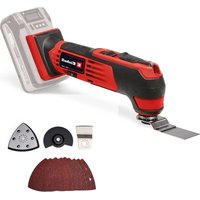
| Product Type | Cordless Multi-Function Tool |
| Brand | Einhell |
| Model | RTMG 10 8 LI |
| Rated Voltage | 10.8 V DC |
| Battery Type | Lithium-ion |
| No-load Speed | 5000 – 17000 rpm |
| Orbital Frequency | 10000 – 34000 rpm |
| Sanding Surface | 90 × 90 × 90 mm |
| Oscillation Angle | 3° |
| Charging Time | Approximately 3 hours |
| Charging Current | 0.6 A |
| Charger Mains Voltage | 230 V ~ 50 Hz |
| Sound Pressure Level (LpA) | 78.5 dB(A) |
| Sound Power Level (LWA) | 89.5 dB(A) |
| Vibration (Handle) | 2.97 m/s² (K=1.5 m/s²) |
| Protection Class | II (double insulation) |
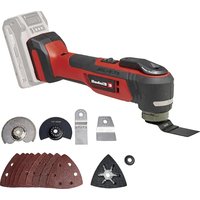
| Delivery Contents | Tool, triangular sanding pad, scraper, hex key, 6 sanding sheets, HSS saw blade, diamond saw blade, battery, charger, manual |
| Applications | Sanding, sawing, scraping |
| Recommended Storage | Dry place, frost-free, between +5 and +30 °C |
| Warranty | 2 years |
Frequently Asked Questions - RTMG 10 8 LI EINHELL
User questions about RTMG 10 8 LI EINHELL
0 question about this device. Answer the ones you know or ask your own.
Ask a new question about this device
Download the instructions for your Multitools in PDF format for free! Find your manual RTMG 10 8 LI - EINHELL and take your electronic device back in hand. On this page are published all the documents necessary for the use of your device. RTMG 10 8 LI by EINHELL.
USER MANUAL RTMG 10 8 LI EINHELL
- Safety information
- Layout
- Items supplied
- Intended use
- Technical data
- Before starting the equipment
- Starting up
- Cleaning, maintenance and ordering of spare parts
-
Storage
-
Disposal and recycling

"Caution - Read the operating instructions to reduce the risk of inquiry"

Wear ear-muffs.
The impact of noise can cause damage to hearing.

Wear a breathing mask.
Dust which is injurious to health can be generated when working on wood and other materials.
Never use the device to work on any materials containing asbestos!

Wear safety goggles.
Sparks generated during working or splinters, chips and dust emitted by the device can cause loss of sight.

Store the battery only in dry rooms with an ambient temperature of +10^ to +40^ . Place only charged batteries in storage.
GB
Important!
When using the equipment, a few safety precautions must be observed to avoid injuries and damage. Please read the complete operating instructions and safety information with due care. Keep these operating instructions in a safe place so that the information is available at all times. If you give the equipment to any other person, hand over these operating instructions and the safety information as well. We cannot accept any liability for damage or accidents which arise due to a failure to follow these instructions and the safety information.
1. Safety information
Please refer to the booklet included in delivery for the safety information.
CAUTION
Read all the safety regulations and instructions.
Any errors made in following the safety information and instructions set out below may result in an electric shock, fire and/or serious injury.
Keep all safety information and instructions in a safe place for future use.
Additional safety instructions
This tool may only be used for dry grinding/sanding operations.
Always guide the power cable away from the back of the tool.
Use of the tool on materials containing asbestos is prohibited.
Always remove the plug from the power supply socket before carrying out any work on the machine (cleaning the sander, changing the sandpaper, etc.).
Always disconnect the machine by removing the plug from the socket, not by pulling on the power cable.
To protect your health, always wear safety goggles and a dust mask during sanding work.
- Keep your workplace clean and well illuminated.
Make sure that the workpiece is sufficiently secured so that it cannot slip.
- Keep children away.
For your own sake, keep the machine clean at all times and check it for signs of damage each time after using it.
Make sure that the switch is set to OFF before you insert the plug into the power supply socket.
Make sure of your footing, particularly when working on ladders and platforms.
- Touching or inhaling this dust can be harmful for the operator and other persons nearby.
If you discover any damage to the machine, use the exploded diagram and the spare parts list to determine which parts need to be ordered from Customer Service.
Important! Wear safety goggles and a dust mask.
2. Layout (Fig. 1)
- ON/OFF switch
- Tool chuck
- Battery charger
- Speed controller
- Allen key for changing tools
- Battery
- Scaper
- Triangular sanding/grinding plate
- Pushlock button
- HSS saw blade
- Diamond saw blade
3. Items supplied
- Open the packaging and take out the equipment with care.
- Remove the packaging material and any packaging and/or transportation braces (if available).
Check to see if all items are present.
Inspect the equipment and accessories for transport damage.
If possible, keep the packaging until the end of the guarantee period.
IMPORTANT
The equipment and packaging material are not toys! Do not let children play with plastic bags, foils or small parts! There is a danger of swallowing or suffocating!
Original Operating Instructions
Safety information
Cordless multifunction tool
Triangular sanding/grinding plate
Scaper
Allen key
6 grinding/sanding papers
HSS saw blade
Battery
Battery charger
Diamond saw blade
4. Intended use
The multifunction tool is suitable for sanding/grinding small areas. A sanding/grinding tool with a vacuum extractor must be used for sanding/grinding large areas.
The equipment is designed for the sanding/grinding of wood, iron, plastic and similar materials using the appropriate sanding/grinding paper. Furthermore, the equipment is intended for sawing wood, plastic and similar materials, as well as scraping off glued carpets, filling compound residues, old paint and similar applications.
The equipment may only be used for the tasks it is designed to handle. Any other use is deemed to be a case of misuse. The user/operator and not the manufacturer will be liable for any damage or injuries of any kind caused as a result of this.
Please note that our equipment has not been designed for use in commercial, trade or industrial applications. Our warranty will be voided if the equipment is used in commercial, trade or industrial businesses or for equivalent purposes.
5. Technical data
Motor power supply: 10.8 V DC
ldling speed: 5000-17000 min -1
Oscillating speed: 10,000 - 34,000 min
Sanding/grinding area: 90 × 90 × 90 mm
Oscillation angle: 3^
Protection class: II / 回
Charge voltage for rechargeable battery: 10.8 V DC
Charge current for rechargeable battery: 0.6 A
Battery charger supply voltage: 230V 50Hz
Charging time: approx. 3 hours
Battery type: Lithium-ion
Weight: 0.8
Sound and vibration
Sound and vibration values were measured in accordance with EN 60745.
L_pA sound pressure level 78,5 dB(A)
K_pA uncertainty 3 dB
LwAsound power level 89,5 dB(A)
The impact of noise can cause damage to hearing. Total vibration values (vector sum of three directions) determined in accordance with EN 60745.
Handle
Vibration emission value a_h = 2.97 m/s^2
Uncertainty K = 1.5 m/s^2
Additional information for electric power tools
Warning!
The specified vibration value was established in accordance with a standardized testing method. It may change according to how the electric equipment is used and may exceed the specified value in exceptional circumstances.
The specified vibration value can be used to compare the equipment with another electric power tools.
The specified vibration value can be used for initial assessment of a harmful effect.
Reduce noise generation and vibration to a minimum!
Use only equipment that is in perfect condition.
- Maintain and clean the equipment regularly.
- Adopt your way of working to the equipment.
Do not overload the equipment.
Have the equipment checked if necessary.
- Switch off the equipment when not in use.
Wear gloves.
kg
GB
Residual risks
Even if you use this electric power tool in accordance to instructions, certain residual risks cannot be eliminated. The following hazards may arise in connection with the equipment's construction and layout:
- Lung damage if no suitable protective dust mask is applied.
- Damage to hearing if no suitable ear protection is applied.
- Health damage caused by hand-arm vibrations if the equipment is used over a longer period or is not properly guided and maintained.
6. Before starting the equipment
Before you connect the equipment to the power supply make sure that the data on the rating plate are identical to the supply voltage.
6.1 Fitting the plug-in tools (Figures 1/2/3)
To fit the plug-in tools safely you should hold the multifunction tool so that the ON/OFF switch (1) points down and the tool mounting (2) faces up.
- Place the plug-in tool (e.g. the triangular sanding/grinding plant) on the tool mounting (2) so that the pins of the tool mounting (2) fit into the recesses in the plug-in tool.
- Secure the plug-in tool using the supplied screw (b) and tighten the screw securely with the Allen key (5).
Make sure that the washer (a) is used for the screw (b) (see Figure 3). In this case the corrugated face of the washer must be placed against the plug-in tool.
Check that the plug-in tool is secure.
6.2 Triangular sanding/grinding plate
Fit the triangular sanding/grinding plate to use the equipment as a delta sander/grinder.
6.2.1 Fastening the sanding/grinding paper
The Velcro fastener enables easy changing of sanding/grinding paper.
Make sure that the vacuum extraction holes on the sanding/grinding paper and the sanding/grinding disk are aligned.
7. Starting up (Fig. 6)
7.1 Charging the LI battery pack (Fig. 1/4/8)
The battery is protected from exhaustive discharge. An integrated protective circuit automatically switches off the equipment when the battery is flat. In this case the bit chuck will cease to turn.
Warning! Do not press the ON/OFF switch any more if the protective circuit has actuated. This may damage the battery.
- Remove the battery pack (6) from the handle by pressing the pushlock buttons (9) on the left and right sides.
- Check that your mains voltage is the same as that marked on the rating plate of the battery charger. Insert the power plug of the charger (3) into the mains socket outlet.
- Connect the charging cable (a) to the charging adapter.
- The green LED on the charger will come on. Plug the battery (6) into the charging adapter. Now the red LED will come on to indicate that the battery pack is being charged. When the charging period is completed after approx. 3 hours, the red lit LED will go out again. The temperature of the battery (6) may rise during the charging operation. This is normal.
If the battery pack fails to charge, check the following:
whether there is voltage at the socket-outlet
and check for proper contact with the charging contacts in the battery charger.
If the battery pack still fails to charge, send
the battery charger
and the battery pack
to our customer services department.
To ensure that the battery pack provides long service, you should take care to recharge it promptly. You must recharge the battery pack when you notice that the power of the cordless equipment drops. Never fully discharge the battery pack. This will cause it to develop a defect.
7.2 Switching on/off
Slide the switch (1) forwards to switch on the equipment.
7.3 Practical tips
- Switch on the equipment.
Work away from the body. - Never move your hands into the direct vicinity of the work area.
Use only plug-in tools which are in good working order and undamaged.
7.3.1 Plug-in tools
Sawing: Sawing wood and plastic.
Notes on working practice: When sawing, watch out for foreign bodies in the material and remove them if necessary.
Plunge cutting is allowed only in soft materials such as wood or plasterboard.
Sanding/grinding: Surface sanding/grinding at edges, in corners or hard-to-reach areas. Depending on choice of sanding/grinding paper for the sanding/grinding of wood, paint, lacquer, etc. Notes on working practice:
This equipment offers particularly high performance for the sanding/grinding of hard-to-reach corners and edges. To sand/grind profiles and channels you can also work with just the tip or the edge of the sanding/grinding disk. Various sanding/grinding papers are available, specially designed for the different types of material you may be working on and the amount you wish to remove from the surface. The amount removed will depend largely on the choice of sanding/grinding paper and pressure applied to the sanding/grinding disk.
Scraping: Scraping off old paint or adhesives. Notes on working practice: Move the plug-in tool against the area you want to remove. Begin with a flat angle of incidence and little pressure. The surface (e.g. wood, plaster) may be damaged if too much pressure is used.
Diamond saw blade: For small repairs to tiled areas indoors and to brick walls. Notes on working practice: Work only at high oscillating speed.
7.4 Speed control (Fig. 6)
You can select the speed by turning the speed controller (4).
Plus direction: Higher speed Minus direction: Lower speed
8. Cleaning, maintenance and ordering of spare parts
Always pull out the power plug before starting any cleaning work.
8.1 Cleaning
- Keep all safety devices, air vents and the motor housing free of dirt and dust as far as possible. Wipe the equipment with a clean cloth or blow it down with compressed air at low pressure.
We recommend that you clean the equipment immediately after you use it.
Clean the equipment regularly with a damp cloth and some soft soap. Do not use cleaning agents or solvents; these may be aggressive to the plastic parts in the equipment. Ensure that no water can get into the interior of the equipment.
8.2 Servicing
There are no parts inside the equipment which require additional maintenance.
8.3 Ordering replacement parts
Please provide the following information on all orders for spare parts:
Equipment model/type
Equipment article number
Equipment ID number
- Spare part number of the required spare part
For our latest prices and information please go to www.isc-gmbh.info
9. Storage
Store the equipment and accessories out of children's reach in a dark and dry place at above freezing temperature. The ideal storage temperature is between 5 and 30^ . Store the electric tool in its original packaging.
10. Disposal and recycling
The equipment is supplied in packaging to prevent it from being damaged in transit. The raw materials in this packaging can be reused or recycled. The equipment and its accessories are made of various types of material, such as metal and plastic. Defective components must be disposed of as special waste. Ask your dealer or your local council!

Table des matieres
7.4 Regulator otacek (obr. 6)
Notified Body: Notified Body No.:
Reg.No.:
2000/14/EC_2005/88/EC
Annex V
Annex VI
Noise: measured L_WA = dB (A); guaranteed L_WA = dB (A)
P = KW; L/0 = cm
Notified Body:
2004/26/EC
Emission No.
Standard references:
EN 60745-1; EN 60745-2-4; EN 55014-1; EN 55014-2;
EN 60335-1; EN 60335-2-29; EN 61000-3-2; EN 61000-3-3
Subject to change without notice Wiesenweg 22, D-94405 Landau/Isar
Documents registrar: Daniel Protschka


Nur fur EU-Lander
For EU countries only
Never place any electric tools in your household refuse.
To comply with European Directive 2002/96/EC concerning old electric and electronic equipment and its implementation in national laws, old electric tools have to be separated from other waste and disposed of in an environment-friendly fashion, e.g. by taking to a recycling depot.
Recycling alternative to the demand to return electrical devices:
As an alternative to returning the electrical device, the owner is obliged to cooperate in ensuring that the device is properly recycled if ownership is relinquished. This can also be done by handing over the used device to a returns center, which will dispose of it in accordance with national commercial and industrial waste management legislation. This does not apply to the accessories and auxiliary equipment without any electrical components which are included with the used device.
The reprinting or reproduction by any other means, in whole or in part, of documentation and papers accompanying products is permitted only with the express consent of ISC GmbH.
F
All of our products undergo strict quality checks to ensure that they reach you in perfect condition. In the unlikely event that your device develops a fault, please contact our service department at the address shown on this guarantee card. Of course, if you would prefer to call us then we are also happy to offer our assistance under the service number printed below. Please note the following terms under which guarantee claims can be made:
- These guarantee terms cover additional guarantee rights and do not affect your statutory warranty rights. We do not charge you for this guarantee.
- Our guarantee only covers problems caused by material or manufacturing defects, and it is restricted to the rectification of these defects or replacement of the device. Please note that our devices have not been designed for use in commercial, trade or industrial applications. Consequently, the guarantee is invalidated if the equipment is used in commercial, trade or industrial applications or for other equivalent activities. The following are also excluded from our guarantee: compensation for transport damage, damage caused by failure to comply with the installation/assembly instructions or damage caused by unprofessional installation, failure to comply with the operating instructions (e.g. connection to the wrong mains voltage or current type), misuse or inappropriate use (such as overloading of the device or use of non-approved tools or accessories), failure to comply with the maintenance and safety regulations, ingress of foreign bodies into the device (e.g. sand, stones or dust), effects of force or external influences (e.g. damage caused by the device being dropped) and normal wear resulting from proper operation of the device. This applies in particular to rechargeable batteries for which we nevertheless issue a guarantee period of 12 months.
The guarantee is rendered null and void if any attempt is made to tamper with the device.
- The guarantee is valid for a period of 2 years starting from the purchase date of the device. Guarantee claims should be submitted before the end of the guarantee period within two weeks of the defect being noticed. No guarantee claims will be accepted after the end of the guarantee period. The original guarantee period remains applicable to the device even if repairs are carried out or parts are replaced. In such cases, the work performed or parts fitted will not result in an extension of the guarantee period, and no new guarantee will become active for the work performed or parts fitted. This also applies when an on-site service is used.
- In order to assert your guarantee claim, please send your defective device postage-free to the address shown below. Please enclose either the original or a copy of your sales receipt or another dated proof of purchase. Please keep your sales receipt in a safe place, as it is your proof of purchase. It would help us if you could describe the nature of the problem in as much detail as possible. If the defect is covered by our guarantee then your device will either be repaired immediately and returned to you, or we will send you a new device.
Of course, we are also happy offer a chargeable repair service for any defects which are not covered by the scope of this guarantee or for units which are no longer covered. To take advantage of this service, please send the device to our service address.
BULLETIN DE GARANTIE
Chere CLIENT, Cher Client
eeppeeppeeppeeppeeppeeppeeppeeppeeppeeppeeppeeppeeppeeppeeppeeppeeppeeppeeppeeppeeppeeppeeppeeppeeppeeppeeppeeppeeppeeppeeppeeppeeppeeppeeppeeppeeppeeppeeppeeppeeppe
:nnn / n-68eae
Date ^1 / ^2
VIIATEI
:
COS! N-N-Neonate
(ue zeneepnneepnneepnneepnneepnneepnneepnneepnneepnneepnneepnneepnneepnneepnneepnneepnneepnneepnneepnneepnneepnneepnneepnneepnneepnneepnneepnneepnneepnneepnneepnneepnneepnneep
EH 06/2011 01

- GB
- Important!
- Safety information
- CAUTION
- Additional safety instructions
- Layout (Fig. 1)
- Items supplied
- IMPORTANT
- Intended use
- Technical data
- Sound and vibration
- Handle
- Additional information for electric power tools
- Warning!
- Reduce noise generation and vibration to a minimum!
- Residual risks
- Before starting the equipment
- Fitting the plug-in tools (Figures 1/2/3)
- Check that the plug-in tool is secure.
- Triangular sanding/grinding plate
- Fastening the sanding/grinding paper
- Starting up (Fig. 6)
- Charging the LI battery pack (Fig. 1/4/8)
- Switching on/off
- Practical tips
- Plug-in tools
- Speed control (Fig. 6)
- Cleaning, maintenance and ordering of spare parts
- Cleaning
- Servicing
- Ordering replacement parts
- Storage
- Disposal and recycling
- Table des matieres
- Regulator otacek (obr. 6)
- Nur fur EU-Lander
- For EU countries only
- BULLETIN DE GARANTIE
- Chere CLIENT, Cher Client
Brand : EINHELL
Model : RTMG 10 8 LI
Category : Multitools