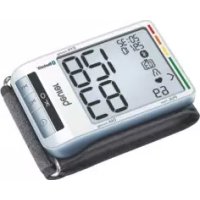
USER MANUAL BC 85 BEURER
EN Blood pressure monitor
Instructions for use....18
natural_image
Three identical line drawings of a mechanical component or bracket, showing internal features and mounting holes (no text or symbols)
Quelle: WHO, 1999 (World Health Organization)
- Getting to know your device ....18
- Important notes....19
- Unit description....22
- Preparing for the measurement....23
- Measuring blood pressure.....25
- Evaluating results ......26
Included in delivery
• Blood pressure monitor with cuff
- 2 x 1.5 V AAA batteries
- USB cable
- Quick start guide
- Storage box
- Instructions for use
Dear customer,
thank you for choosing a product from our range. Our name stands for high-quality, thoroughly tested products for applications in the areas of heat, weight, blood pressure, body temperature, pulse, gentle therapy, massage, beauty and air. Please read these instructions for use carefully and keep them for later use, be sure to make them accessible to other users and observe the information they contain.
With kind regards,
Your Beurer team
- Displaying and deleting measurements .....27
- Transferring measurements....29
- Error messages/troubleshooting ....30
- Cleaning and storing the device and cuff....30
- Technical specifications ....30
- Warranty/service....31
1. Getting to know your device
Check that the device packaging has not been tampered with and make sure that all contents are present. Before use, ensure that there is no visible damage to the device or accessories and that all packaging material has been removed. If you have any doubts, do not use the device and contact your retailer or the specified Customer Services address.
The wrist blood pressure monitor is used to carry out non-invasive measurement and monitoring of arterial blood pressure values in human adults. This allows you to quickly and easily measure your blood pressure, save the measurements and display the development of the measurements. You are also warned of possible existing cardiac arrhythmia.
The recorded values are classified and evaluated graphically.
2. Important notes

Signs and symbols
The following symbols are used in these instructions for use, on the packaging and on the type plate for the device and the accessories:
| Attention |
| NoteNote on important information |
| Observe the instructions for use |
| Application part, type BF |
| Direct current |
| Disposal in accordance with the Waste Electrical and Electronic Equipment EC Directive – WEEE |
| Dispose of packaging in an environmentally friendly manner |
| Manufacturer |
| Storage / Transport | Permissible storage and transport temperature and humidity |
| Operating | Permissible operating temperature and humidity |
| Protect from moisture |
| SN | Serial number |
| CE0483 | The CE labelling certifies that the product complies with the essential requirements of Directive 93/42/EEC on medical devices |
| EAC | Certification symbol for products that are exported to the Russian Federation and members of the CIS |

Notes on use
- In order to ensure comparable values, always measure your blood pressure at the same time of day.
- Before every measurement, relax for about five minutes.
- If you want to perform several measurements on the same person, wait five minutes between each measurement.
- Do not take a measurement within 30 minutes of eating, drinking, smoking or exercising.
- Repeat the measurement if you are unsure of the measured value.
- The measurements taken by you are for your information only – they are no substitute for a medical examination.
Discuss the measurements with your doctor and never base any medical decisions on them (e.g. medicines and their administration).
- Using the blood pressure monitor outside your home environment or whilst on the move (e.g. whilst travelling in a car, ambulance or helicopter, or whilst undertaking physical activity such as playing sport) can influence the measurement accuracy and cause incorrect measurements.
- Do not use the blood pressure monitor on newborns or patients with pre-eclampsia. We recommend consulting a doctor before using the blood pressure monitor during pregnancy.
- In the case of restricted circulation on the arm as a result of chronic or acute vascular diseases (including vascular constriction), the accuracy of the wrist measurement is limited. In this case you should avoid using an upper arm blood pressure monitor.
- This device is not intended for use by people (including children) with restricted physical, sensory or mental skills or a lack of experience and/or a lack of knowledge, unless they are supervised by a person who has responsibility for their safety or they receive instructions from this person on how to use the device. Supervise children around the device to ensure they do not play with it.
-
Cardiovascular diseases may lead to incorrect measurements or have a detrimental effect on measurement accuracy. The same also applies to very low blood pressure, diabetes, circulatory disorders and arrhythmias as well as chills or shaking.
-
The blood pressure monitor must not be used in connection with a high-frequency surgical unit.
- Only use the unit on people who have the specified wrist measurement for the device.
- Please note that when inflating, the functions of the limb in question may be impaired.
- During the blood pressure measurement, the blood circulation must not be stopped for an unnecessarily long time. If the device malfunctions, remove the cuff from the arm.
- Do not allow sustained pressure in the cuff or frequent measurements. The resulting restriction of the blood flow may cause injury.
- Ensure that the cuff is not placed on an arm in which the arteries or veins are undergoing medical treatment, e.g. intravascular access or therapy, or an arteriovenous (AV) shunt.
- Do not use the cuff on people who have undergone a mastectomy.
- Do not place the cuff over wounds as this may cause further injury.
- Place the cuff on your wrist only. Do not place the cuff on other parts of the body.
- The blood pressure monitor can only be operated with batteries.
- To conserve the batteries, the monitor switches off automatically if you do not press any buttons for 2 minutes.
- The device is only intended for the purpose described in these instructions for use. The manufacturer is not liable for damage resulting from improper or careless use.

Instructions for storage and maintenance
- The blood pressure monitor is made from precision and electronic components. The accuracy of the measurements and service life of the device depend on its careful handling:
- Protect the device from impacts, humidity, dirt, marked temperature fluctuations and direct sunlight.
- Do not drop the device.
- Do not use the device in the vicinity of strong electromagnetic fields and keep it away from radio systems or mobile telephones.
- We recommend that the batteries be removed if the device will not be used for a prolonged period of time.

Notes on handling batteries
- If your skin or eyes come into contact with battery fluid, flush out the affected areas with water and seek medical assistance.
- Choking hazard! Small children may swallow and choke on batteries. Store the batteries out of the reach of small children.
- Observe the plus (+) and minus (-) polarity signs.
- If a battery has leaked, put on protective gloves and clean the battery compartment with a dry cloth.
- Protect the batteries from excessive heat.
- Risk of explosion! Never throw batteries into a fire.
- Do not charge or short-circuit batteries.
- If the device is not to be used for a long period, take the batteries out of the battery compartment.
- Use identical or equivalent battery types only.
• Always replace all batteries at the same time.
- Do not use rechargeable batteries.
- Do not disassemble, split or crush the batteries.

Instructions for repairs and disposal
- Batteries do not belong in household waste. Please dispose of empty batteries at the collection points intended for this purpose.
- Do not open the device. Failure to comply will result in voiding of the warranty.
- Do not repair or adjust the device yourself. Proper operation can no longer be guaranteed in this case.
- Repairs must only be carried out by Customer Services or authorised suppliers. Before making a claim, please check the batteries first and replace them if necessary.
- For environmental reasons, do not dispose of the device in the household waste at the end of its useful life. Dispose of the device at a suitable local collection or recycling point. Dispose of the device in
accordance with EC Directive – WEEE (Waste Electrical and Electronic Equipment). If you have any questions, please contact the local authorities responsible for waste disposal.

Notes on electromagnetic compatibility
- The device is suitable for use in all environments listed in these instructions for use, including domestic environments.
- The use of the device may be limited in the presence of electromagnetic disturbances. This could result in issues such as error messages or the failure of the display/device.
- Avoid using this device directly next to other devices or stacked on top of other devices, as this could lead to faulty operation. If, however, it is necessary to use the device in the manner stated, this device as well as the other devices must be monitored to ensure they are working properly.
- The use of accessories other than those specified or provided by the manufacturer of this device can lead to an increase in electromagnetic emissions or a decrease in the device's electromagnetic immunity; this can result in faulty operation.
- Failure to comply with the above can impair the performance of the device.
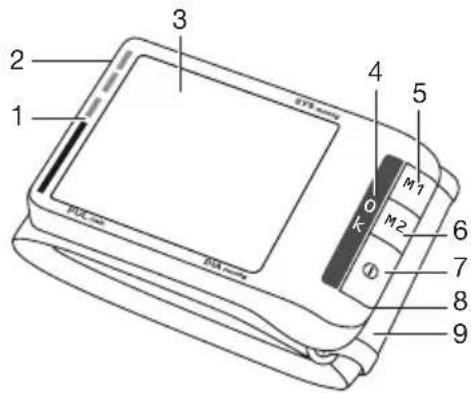
3. Unit description
- Risk indicator
- USB interface
- Display
- Positioning display (heart level)
- Memory button M1
- Memory button M2
- START/STOP button ①
- Battery compartment lid
- Wrist cuff
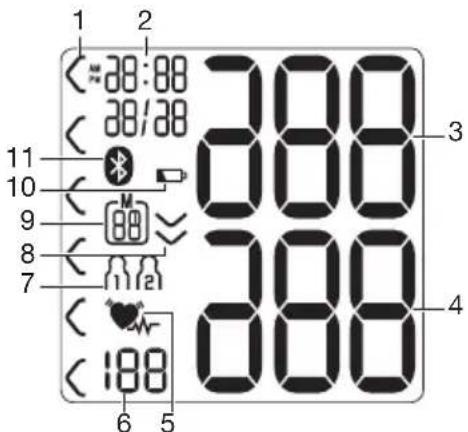
- Risk indicator
- Time and date
- Systolic pressure
- Diastolic pressure
- Cardiac arrhythmia symbol
Pulse symbol
- Calculated pulse value
- User memory
- Pump up, release air (arrow)
- Memory space number/memory display average value ( R), morning (Rn), evening (Pn)
- Battery status indicator
- Symbol for Bluetooth® transfer

System requirements for the „ beurer Health Manager“ PC software.
- from Windows 7 SP1
- from USB 2.0 (Type-A)
System requirements for the "beurer HealthManager" app
-iOS ≥ 9.0, AndroidTM ≥ 5.0
- Bluetooth® ≥ 4.0
List of compatible devices:
4. Preparing for the measurement Inserting the batteries
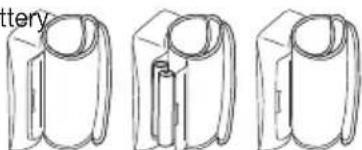
- Remove the b compartment lid on the left side of the device.
- Insert two 1.5 V AAA (alkaline type LR03) batteries. Make sure that the I way round. Do not use rec
- Close the battery compartment lid again carefully.
natural_image
Three line drawings of cylindrical objects with no visible text or symbols
If the battery change symbol is flashing and 6 appears, no more measurements are possible and you must replace all batteries.
All display elements are briefly displayed, 24ashes in the display. Now set the date and time as described below.

Battery disposal
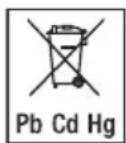
- The empty, completely flat batteries must be disposed of through specially designated collection boxes, recycling points or electronics retailers. You are legally required to dispose of the batteries.
- The codes below are printed on batteries containing harmful substances:
Pb = Battery contains lead,
Cd = Battery contains cadmium,
Hg = Battery contains mercury
This menu allows you to set the following functions, one after another.

It is essential to set the date and time. Otherwise, you will not be able to save your measured values correctly with a date and time and access them again later.
If you press and hold the M1 or M2 memory button, you can set the values more quickly.
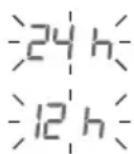
- Press and hold the START/STOP button ① for 5 seconds.
- Select the desired hour format using the M1/M2 memory buttons and confirm with the START/STOP button ①
Date
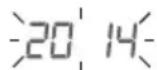
The year flashes on the display.
- Select the year using the M1/M2 memory buttons and confirm with the START/STOP button ①
The month flashes on the display.
- Select the month using the M1/M2 memory buttons and confirm with the START/STOP button ①.

The day flashes on the display.
- Select the day using the M1/M2 memory buttons and confirm with the START/STOP button①

If the hour format is set as 12h, the day/month display sequence is reversed.
Time
The hours flash on the display.
- Select the hour using the M1/M2 memory buttons and confirm with the START/STOP button ①.

The minutes flash on the display.
- Select the minute with the M1/M2 memory buttons and confirm with the START/STOP button ①.

Once all the data has been set, the device switches off automatically.
Bluetooth®
The Bluetooth® symbol flashes on the display.
- Use the M1/M2 memory buttons to choose whether automatic Bluetooth® data transfer is activated (Bluetooth® symbol flashes) or deactivated (Bluetooth® symbol is not shown) and confirm with the START/STOP button ⓘ
i Bluetooth® transfers will reduce the battery life.
5. Measuring blood pressure
Ensure the device is at room temperature before measuring. The measurement can be performed on the left or right wrist.
Attaching the cuff
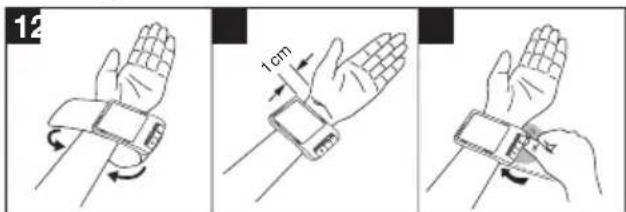
- Expose your wrist. Ensure that the circulation of the arm is not hindered by tight clothing or similar.
Place the cuff on the inside of your wrist.
- Close the cuff with the hook-and-loop fastener such that the upper edge of the device is positioned approx. 1 cm underneath the heel of the hand.
- The cuff must be fitted tightly around the wrist, but must not constrict.
Adopt the correct posture
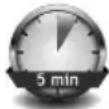
- Before every measurement, relax for about five minutes. Otherwise deviations can occur.
- You can take the measurement while sitting or lying.
To take your blood pressure, make sure you are sitting comfortably with your arms and back leaning on
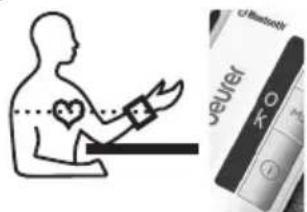
something. Do not cross your
legs. Place your feet flat on the ground. Make sure to rest
your arm and move it. Relax your arm and the palm of
your hand. Always make sure that the cuff is at heart level.
Otherwise significant deviations can occur. A position
indicator is integrated into the device to additionally assist
you. It signals the correct position of the blood pressure
monitor. When you see O.K. on the display, you know that
the device is positioned correctly.
- To avoid falsifying the measurement, it is important to remain still during the measurement and not to speak.
As described above, attach the cuff and adopt the posture in which you want to perform the measurement.
- Press the START/STOP button to start the blood pressure monitor. All displays will illuminate briefly.
The blood pressure monitor will begin the measurement automatically after 3 seconds.
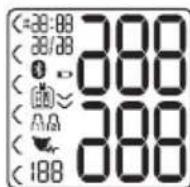
The measurement is taken during the inflation phase.
i You can cancel the measurement at any time by pressing the START/STOP button①
As soon as a pulse is found, the pulse symbol 🧑 displayed.
- The systolic pressure, diastolic pressure and pulse rate measurements are displayed.
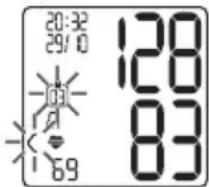
- E_- appears if the measurement could not be performed properly. Observe the chapter on error messages/troubleshooting in these instructions for use and repeat the measurement.
- Now select the desired user memory by pressing the M1 or M2 memory buttons. If you do not select a user memory, the measurement is stored in the most recently used user memory. The relevant symbol M1 or M2 appears in the display.
- Press the START/STOP button Ⓐ to switch off the blood pressure monitor. The measurement is then stored in the selected user memory.
If Bluetooth ^® data transfer is activated, data is transferred after pressing the START/STOP button ^①
- TheBluetooth ^ symbol flashes on the display. The blood pressure monitor now attempts to connect to the app for approx. 30 seconds.
- TheBluetooth ^ symbol stops flashing as soon as a connection is established. All measurement data is automatically
transferred to the app. Once the data has been successfully transferred, the device switches off.
- If a connection to the app cannot be established after 30 seconds, the Bluetooth® symbol goes out and the blood pressure monitor switches off automatically after 3 minutes.
If you forget to turn off the device, it will switch off automatically after approx. 3 minutes. In this case too, the value is stored in the selected or most recently used user memory.
Wait at least 5 minutes before taking another measurement.
6. Evaluating results
Cardiac arrhythmia:
This device can identify potential disruptions of the heart rhythm when measuring and if necessary, indicates this after the measurement with the symbol 🤒.
This can be an indicator for arrhythmia. Arrhythmia is an illness in which the heart rhythm is abnormal because of flaws in the bioelectrical system that regulates the heartbeat. The symptoms (skipped or premature heart beats, pulse being slow or too fast) can be caused by factors such as heart disease, age, physical make-up, excess stimulants, stress or lack of sleep. Arrhythmia can only be determined through an examination by your doctor.
If the symbol is shown on the display after the measurement has been taken, repeat the measurement. Please ensure that you rest for 5 minutes beforehand and do not speak or move during the measurement. If the symbol appears frequently, please consult your doctor. Self-diagnosis and treat-
ment based on the measurements can be dangerous. Always follow your GP's instructions.
Risk indicator:
The measurements can be classified and evaluated in accordance with the following table.
However, these standard values serve only as a general guideline, as the individual blood pressure varies in different people and different age groups etc.
It is important to consult your doctor regularly for advice. Your doctor will tell you your individual values for normal blood pressure as well as the value above which your blood pressure is classified as dangerous.
The classification on the display and the scale on the unit show which category the recorded blood pressure values fall into. If the values of systole and diastole fall into two different categories (e.g. systole in the 'High normal' category and diastole in the 'Normal' category), the graphical classification on the device always shows the higher category; for the example given this would be 'High normal'.
| Blood pressure value category | Systole (in mmHg) | Diastole (in mmHg) | Action |
| Setting 3: severe hypertension | ≥180≥110 | | seek medical attention |
| Setting 2: moderate hypertension | 160–1791 | 00–109 | seek medical attention |
| Blood pressure value category | Systole (in mmHg) | Diastole (in mmHg) | Action |
| Setting 1: mild hypertension | 140–159 | 90–99 | regular monitoring by doctor |
| High normal 130 | 13985–89 | | regular monitoring by doctor |
| Normal 120–129 | 80–84 self-monitoring | |
| Optimal <120<80 | self-monitoring | |
Source: WHO, 1999 (World Health Organization)
7. Displaying and deleting measurements User memory
The results of every successful measurement are stored together with the date and time. The oldest measurement is overwritten in the event of more than 60 measurements.
- Select the desired user memory ( 🔊 🔒) using the M1 or M2 memory buttons if the device is switched off.
- To view the measurement data for user memory press the M1 memory button.
- To view the measurement data for user memory 📄 press the M2 memory button.
The average of all measurements appears on the display.
If Bluetooth ^® is activated (the symbol will flash on the display), the blood pressure monitor is attempting to connect to the app. If you press the M1 button in the meantime, the
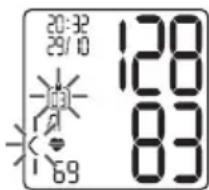
transfer will be cancelled and the morning average will be displayed.
If you press the M2 button, the transfer is cancelled and the measurement data of user memory is displayed. The symbol is no longer shown. The buttons are deactivated as soon as a connection is established and the data is transferred.
i Press the M1 button if you have selected user memory 1. Press the M2 memory button if you have selected user memory 2.
Average values
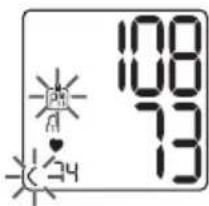
R flashes on the display.
The average value of all saved measured values in this user memory is displayed.
- Press the relevant memory button (M1 or M2).
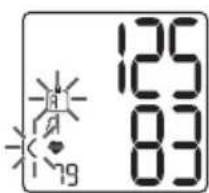
AN flashes on the display.
The average value of the morning measurements for the last 7 days is displayed (morning: 5.00 a.m. - 9.00 a.m.).
- Press the relevant memory button (M1 or M2).
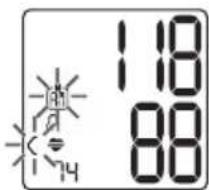
PN flashes on the display.
The average value of the evening measurements for the last 7 days is displayed (evening: 6.00 p.m. - 8.00 p.m.).
Individual measured values
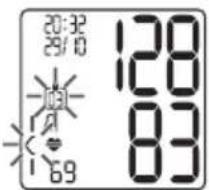
- When the relevant memory button (M1 or M2) is pressed again, the last individual measurement is displayed (in this example, measurement 03).
- When the relevant memory button (M1 or M2) is pressed again, you can view your individual measurements.
- To switch the device off again, press the START/STOP button ①
i You can exit the menu at any time by pressing the START/STOP button ①
Deleting measured values
- To clear the memory of the relevant user memory, you must first select a user memory.
- Start the retrieval of the average values.
- Press and hold the M1 or M2 memory buttons for 5 seconds.
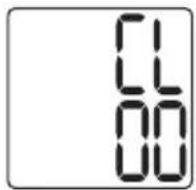
CL and 00 appear on the display.
All the values in the current user memory are deleted.
The device will then switch off automatically.
Deleting individual measurements
To clear individual measurements from the relevant user memory, you must first select a user memory.
- Start individual measurement access.
- Press and hold the memory button M1 or M2 for 5 seconds (depending on the user memory you are in).
- The selected value is deleted. The device briefly displays CL 00.
- If you would like to delete other values, repeat the process described above.
You can switch off the device at any time by pressing the START/STOP button①
8. Transferring measurements
Transfers using the USB interface
Connect the blood pressure monitor to your PC using the USB cable.
No data transfer may be launched whilst performing a measurement.
PC is shown on the display. Begin the data transfer in the "beurer HealthManager" PC software. During the data transfer, an animation is shown on the display. A successful data transfer is displayed as in figure 1. If the data transfer is unsuccessful, an error message appears as in figure 2. In this case, interrupt the PC connection and start the data transfer again.
After 30 seconds of not being in use or if communication with the PC is interrupted, the blood pressure monitor switches itself off automatically.
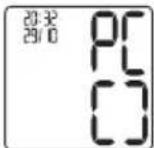
figure 1

figure 2
Transfer via Bluetooth®
It is also possible to transfer the measured values saved on the device to your smartphone using Bluetooth ^® .
You will need the "beurer Health Manager" app for this. This is available in the Apple App Store and from Google Play.
Proceed as follows to transfer values:
If Bluetooth® is activated in the settings menu, the data is transferred automatically after the measurement. The symbol appears in the top left of the display (see chapter 4 "Preparing the measurement").
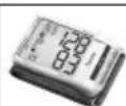
Step 1: BC 85
Activate Bluetooth® on your device (see chapter 4 "Preparing the measurement, Bluetooth®").


Step 2: "beurer HealthManager" app
In the "beurer HealthManager" app, add the BC 85 under "Settings/My devices".

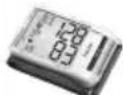
Step 3: BC 85
take a measurement.


Step 4: BC 85
data transfer immediately following measurements.
- If Bluetooth® data transfer has been activated, data is transferred after having confirmed the user memory and pressing the START/STOP button ①
Step 4: BC 85
Data transfer at a later point:
- Go to memory mode (chapter 7). Select the desired user memory. The Bluetooth® transfer starts automatically.
The "beurer HealthManager" app must be active to allow data transfers.
If your smartphone has a protective cover, remove this to ensure that there is no interference during the transfer. Begin the data transfer in the “beurer HealthManager” app.
9. Error messages/troubleshooting
In the event of errors, the error message E_- appears on the display.
Error messages may appear if:
- It was not possible to record the pulse: E;
- You move or speak during the measurement::E2;
- The cuff is fastened too tightly or loosely: E3;
- Errors occur during the measurement: E4;
• The pump pressure is higher than 300 mmHg: E5;
• The batteries are almost empty ☐ E6
- The data could not be sent via Bluetooth®: E7.
In such cases, repeat the measurement. Ensure that you do not move or speak during the measurement. If necessary, reinsert or replace the batteries.
10. Cleaning and storing the device and cuff
- Clean the device and cuff carefully using a slightly damp cloth only.
- Do not use any cleaning agents or solvents.
- Under no circumstances hold the device and cuff under water, as this can cause liquid to enter and damage the device and cuff.
- If you store the device and cuff, do not place heavy objects on the device and cuff. Remove the batteries.
11. Technical specifications
Model BC 85
Type BC 80
Measurement method Oscillometric, non-invasive blood pressure measurement on the wrist
Measurement range Cuff pressure 0-300 mmHg, Systolic 50-250 mmHg, Diastolic 30-200 mmHg, Pulse 40-180 beats/minute
Display accuracy Systolic ± 3 mmHg,
Diastolic ± 3 mmHg,
Pulse ± 5 % of the value shown
Measurement inaccuracy
Max. permissible standard deviation according to clinical testing:
Systolic 8 mmHg /
Diastolic 8 mmHg
| Memory 2 x 60 memory spaces |
| Dimensions L 97 mm x W 68 mm x H 22 mm |
| Weight Approximately 108 g (without batteries) |
| Cuff size 135 to 230 mm |
| Permissible operating conditions | +5 °C to +40 °C, 15-93 % relative humidity (non-condensing) |
| Permissible storage conditions | -25°C to +70°C, <93% relative humidity, 700-1060 hPa ambient pressure |
| Power supply 2 x 1.5V | AAA batteries— |
| Battery life For approx. 300 measurements, depending on levels of blood pressure and pump pressure |
| Classification Internal supply, IPX0, no AP or APG, continuous operation, application part type BF |
| Data transfer 2402MHz – 2480MHz frequency band |
 | Transmission power max. 0 dBmThe blood pressure monitor uses Bluetooth® low energy technologyCompatible with Bluetooth® 4.0 smartphones/tabletsList of supported smartphones/tablets |
The serial number is located on the device or in the battery compartment.
Technical information is subject to change without notification to allow for updates.
- This device is in line with European Standard EN 60601-1-2 (In accordance with CISPR 11, IEC61000-4-2, IEC61000-
4-3, IEC61000-4-8, EN 55022, EN 55024) and is subject to particular precautions with regard to electromagnetic compatibility (EMC). Please note that portable and mobile HF communication systems may interfere with this unit.
- This device corresponds to the EU Medical Devices Directive 93/42/EEC, the German Medical Devices Act (Medizinproduktgesetz) and the standards EN 1060-1 (non-invasive sphygmomanometers, Part 1: General requirements), EN 1060-3 (non-invasive sphygmomanometers, Part3: Supplementary requirements for electro-mechanical blood pressure measuring systems) and IEC 80601-2-30 (Medical electrical equipment – Part 2-30: Particular requirements for the basic safety and essential performance of automated non-invasive sphygmomanometers).
- The accuracy of this blood pressure monitor has been carefully checked and developed with regard to a long useful life.
If using the device for commercial medical purposes, it must be regularly tested for accuracy by appropriate means. Precise instructions for checking accuracy may be requested from the service address.
- We hereby confirm that this product complies with the European RED Directive 2014/53/EU. The CE Declaration of Conformity for this product can be found under: www.beurer.com/web/we-landingpages/de/cedeclarationofconformity.php.
12. Warranty/service
In case of a claim under the warranty please contact your local dealer or the local representation which is mentioned in the list “service international”.
In case of returning the unit please add a copy of your receipt and a short report of the defect.
The following warranty terms shall apply:
-
The warranty period for BEURER products is either 5 years or- if longer- the country specific warranty period from date of Purchase.
In case of a warranty claim, the date of purchase has to be proven by means of the sales receipt or invoice.
-
Repairs (complete unit or parts of the unit) do not extend the warranty period.
-
The warranty shall not be valid for damages because of
a. improper treatment, e.g. nonobservance of the user instructions.
b. repairs or tampering by the customer or unauthorised third parties.
c. transport from the manufacturer to the consumer or during transport to the service centre.
d. The warranty shall not be valid for accessories which are subject to normal wear and tear (cuff, batteries etc.).
-
Liability for direct or indirect consequential losses caused by the unit are excluded even if the damage to the unit is accepted as a warranty claim.
FRANÇAIS
Sommaire
natural_image
Three identical line drawings of a mechanical component or bracket, showing internal features and mounting holes (no text or symbols)
natural_image
Line drawing of a human hand wearing a wristband (no text or symbols)
Source : WHO, 1999 (World Health Organization)
Transmission via Bluetooth®
natural_image
Three line drawings of cylindrical objects with internal structures, no text or symbols present
Fuente: WHO, 1999 (World Health Organization)
natural_image
Three sequential line drawings of a mechanical component or housing, showing internal structure and mounting features (no text or symbols)
natural_image
Illustration of a person using a device with heart symbols, alongside a medical device labeled 'K-O' (no text or symbols on the device itself)
Fonte: WHO, 1999 (World Health Organization)
natural_image
Three identical line drawings of a cylindrical mechanical component, showing cross-sectional and side views (no text or symbols)
Kaynak: WHO, 1999 (World Health Organization)
natural_image
Three identical line drawings of a cylindrical mechanical component, showing internal structure and mounting holes (no text or symbols)
natural_image
Three line drawings of cylindrical mechanical components with no visible text or symbols
The Bluetooth® word mark and logos are registered trademarks owned by Bluetooth SIG, Inc. and any use of such marks by Beurer GmbH is under license. Other trademarks and trade names are those of their respective owners.
Apple and the Apple logo are trademarks of Apple Inc., registered in the U.S. and other countries. App Store is a service mark of Apple Inc., registered in the U.S. and other countries.
Google Play and the Google Play logo are trademarks of Google LLC.
Android is a trademark of Google LLC.

BEURER GmbH • Söflinger Str. 218 • 89077 Ulm (Germany) • www.beurer.com
www.beurer-gesundheitsratgeber.com • www.beurer-blutdruck.de • www.beurer-healthguide.com