BBH210 - Earphones BEEWI - Free user manual and instructions
Find the device manual for free BBH210 BEEWI in PDF.



Frequently Asked Questions - BBH210 BEEWI
User questions about BBH210 BEEWI
0 question about this device. Answer the ones you know or ask your own.
Ask a new question about this device
Download the instructions for your Earphones in PDF format for free! Find your manual BBH210 - BEEWI and take your electronic device back in hand. On this page are published all the documents necessary for the use of your device. BBH210 by BEEWI.
USER MANUAL BBH210 BEEWI
For additional languages, visit our website
www.bee-wi.com
User's guide
ENGLISH 4
FRANCAIS 12
DEUTSCH 20
ITALIANO 28
ESPANOL 36
PORTUGUES 44
NEDERLANDS 52
БылгAPСКИ 60
ROmAN 68
Thank you for purchasing the BBH210 Bluetooth stereo headphone from BEEWI. Please read the following instructions to learn how to configure and use more effectively your product.
1. ABOUT THE HEADPHONES
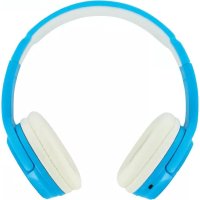
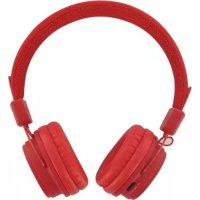
The BBH210 is a wireless stereo headphone with the latest Bluetooth 2.1 technology to be used both as a hands-free headset and a stereo music headphone. It is compatible with all Bluetooth compliant devices using HFP and A2DP profiles such as mobile phones and music players and also supports Dual AirTM streaming (check www.bee-wi.com for compatibility statement).
Note the headphone can also connect simultaneously to 2 different Bluetooth enabled devices, such as a mobile phone to support hands-free telephony and a music player to listen to stereo music. Calls will automatically be routed to the headphone when listening to the music, so you can enjoy music listening without missing a call.
2.PRODUCT OVERVIEW
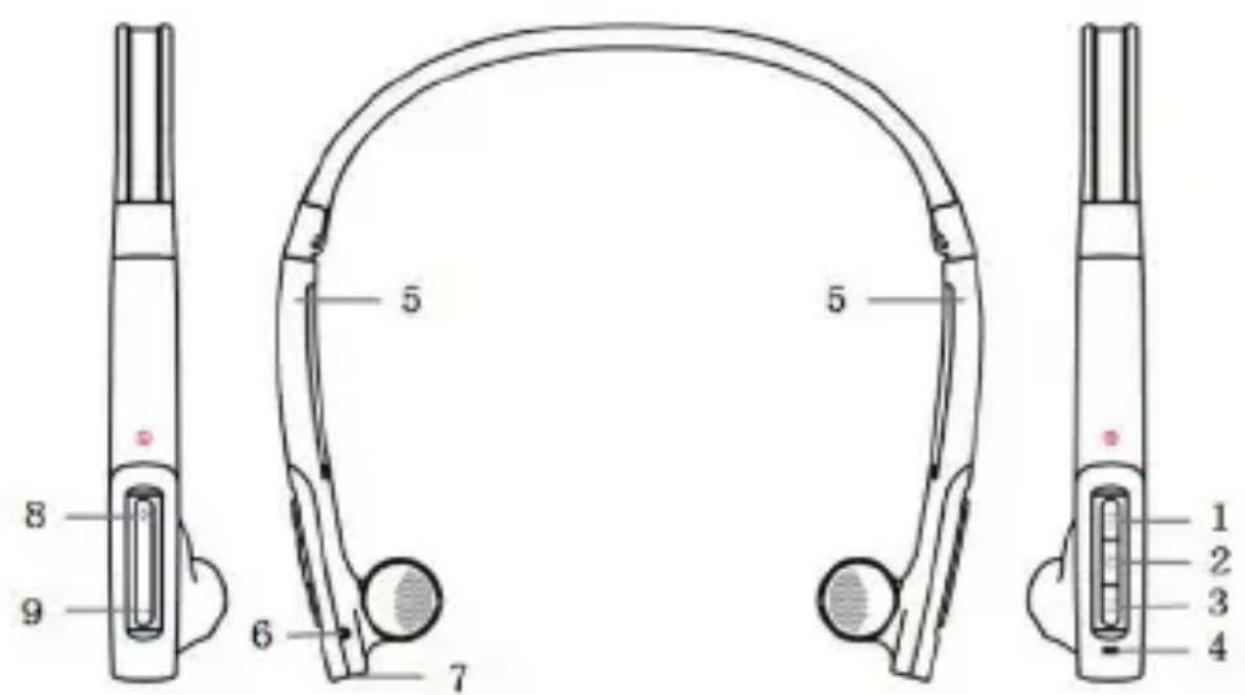
- <key:previous track
- Microphone
- Multifunction button (MFB):
- Charging socket
-
key: next track
- (+) key: volume up
- Indicator lights
- (-) key: volume down
- Adjustable headband
3. CHARGING THE HEADPHONES
Make sure that your headphone is fully charged for 2.5 hours before you start using it. Connect the USB cable provided to your PC and to the charging connector (7) of the headphone. Use only the USB cable provided as using other devices may damage your headphone.
When the indicator lights are solid red, your headphone is charging. When the lights turn off, the headphone is fully charged
| Function Operation LIGHT indicator | ||
| Turn on | Press and hold the MFB for 3~5 seconds till the blue LIGHT blinks. | Blue LIGHT indicator light for 1 second |
| Turn off | Press and hold the MFB for 3~5 seconds till the red LIGHT blinks. | Blue LIGHT indicator light for 1 second |
Remark: The headphone will turn off automatically if no devices are connected after 5 minutes in order to save power.
5. PAIRING WITH A PHONE OR OTHER DEVICE
Before you use your headphone you must pair it up with a mobile phone or/ and another Bluetooth enabled device.
-
Put the headphone into pairing mode: when the headphone is turned off press and hold the MFB until the indicator light is blinking blue/red.
-
Set your mobile phone or other device to 'discover' the headphone following your phone's instruction guide.
- Your phone will find the "BeeWi BBH210" and ask if you want to pair with it. Accept and confirm with the passkey or PIN = 0000 (4 zeros).
Your phone or other device will confirm when pairing is complete. After successful connecting, the blue light of the headphone blinks 3 times every 4 seconds. In case of unsuccessful pairing repeat steps 1 to 3.
6. CONNECTING WITH A SECOND DEVICE
You can connect two devices at the same time to enjoy hands-free communication and music streaming, only if they are using different profiles (one is using HFP, the other AD2P). When one profile is being used by one device, it cannot be used by another.
After having paired the headphone with your mobile phone, you can pair it with your music player or PC. The music player will use audio streaming profiles (A2DP and AVRCP), so you can use music playback and remote control features and the phone will use the hands-free profiles so you can use the phone features.
To pair to the second device, put the headphone in pairing mode, then follow the user guide for your MP3/music player or Bluetooth stereo adapter..
7. WEARING THE HEADPHONES
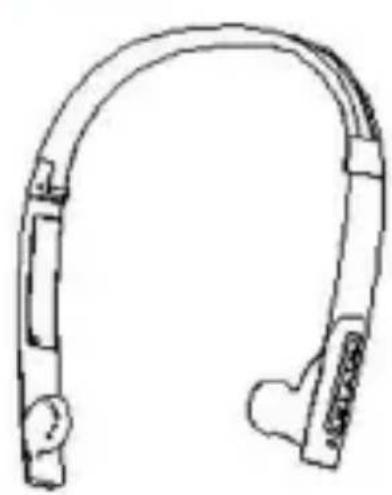
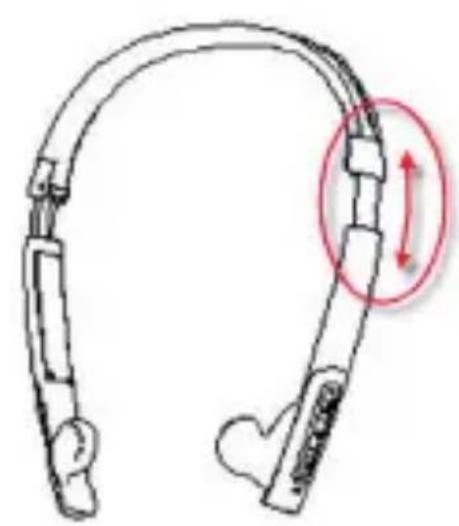
The Headband of this headphone is adjustable according to your size by pulling the earphones. "L" printing on the microphone stands for left ear, "R" for right ear.
8. TELEPHONY FONCTIONS
| Function Operation | |
| Activate Voice dialing | Press and hold the ➔ for 2s, until a sound is heard |
| Redial last number Press the MFB twice | |
| Adjust sound and volume | Press the volume up or down (+ or -) to adjust the volume |
| Answer a call Short press the MFB | |
| Reject a call | Press and hold the MFB for 2s, until a sound is heard |
| End a call Short press the MFB | |
| Switch hands-free between head- phone and cell phone | Press and hold the MFB for 2s, until a sound is heard |
| Microphone mute Quickly press the | MFB twice |
| Cancel mute Quickly press the MFB | twice |
9. MUSIC CONTROL
| Function Operation | |
| Adjust sound and volume | Short press or long press (+) or (-) keys |
| Play / Pause Tap the MFB | |
| Previous song Short press key | ←→ |
| Next song Short press key | →→ |
Remark: please refer to the specifications of your mobile phone or Bluetooth transmitter to check if it supports AVRCP remote control function.
10. LIGHT & SOUND INDICATORS
| Light indicator Status | |
| Red light is on Charging | |
| Red light is off Fully charged | |
| Red and blue light blink alternately Pairing mode | |
| Blue light blinks once every 2 seconds | $standby mode (not connected) |
| Blue light blinks 3 times every 4 seconds | Standby mode (connected to Bluetooth device) |
| Blue light blinks twice every 4 seconds | ncoming call |
| Red light blinks once every 4 seconds | Conversation mode |
Note: the blue indicator will turn red in case of low power.
| Tune notification Status of headphone | |
| Two tones every 5 seconds | Conversation mode and microphone mute |
| Three tones every 30 seconds Low power |
Always store the headphone in a safe place.
- Avoid storage at extreme temperatures, above 45^ (including direct sunlight) or below -10^ . This can shorten battery life and may affect operation.
- Do not expose the headphone to rain or moisture.
12. SPECIFICATIONS
| Bluetooth version Bluetooth V2.1+EDR | |
| Bluetooth profile HSP, HFP, A2DP, AVRCP | |
| Effective range 10m | |
| Working time | Music: Up to 5 hrs Talk: Up to 6 hrs |
| Standby time Up to 120 hrs | |
| Input voltage DC+5.0±0.25VA | |
| Charging time Approx 2.5 hrs | |
| Dimension 158*148*26 mm | |
| Weight Approx. 40 g |
European Union Directives Conformance Statement
Hereby, VOXLAND declares that this product is in compliance with:
The essential requirements and other relevant provisions of Directive 1999/5/EC
- All other relevant EU Directives
You can view your product's Declaration of Conformity (DoC) to Directive 1999/5/EC (to R&TTE Directive) at www.bee-wi.com.
Caring for the environment by recycling
Do not dispose of electrical devices or accessories with your household waste.
In some countries or regions, collection systems are set up to handle electrical and electronic waste items. Contact your regional authorities for more details.
Copyright and other legal information
BEEWI is a registered trademark. Other trademarks mentioned herewith are owned by their proprietors. All other product or service names are the property of their respective owners.
The use of wireless devices and their accessories may be prohibited or restricted in certain areas. Always obey the laws and regulations on the use of these products.
This product is covered by a 2-year product warranty which is valid from the date of purchase. Users are not permitted to make changes or modify the device in any way. Changes or modifications not expressly approved by the party responsible for compliance will void the user's warranty.
Please visit our website www.bee-wi.com for more information.
Technical support: support@bee-wi.com.
© VOXLAND, 2010.
NOTES:
Support technique: support@bee-wi.com.
© VOXLAND, 2010.
NOTES:
3. 3APEXДАHE HA CNYUJAJIKITE
IpeDi nIbPBOHaJHnA ynoTpe6a ce yBepTe, ye cLy7aJIKNTe ca HAnbJIHo 3apeDEni B npOdbJIxKeHne Ha 2.5 Yaca.CBbpKTe IpeIOCTaBeHnRA USB ka6eN C KOMNIObpa N C nopTa Ha cLy7aJIKNTe (7). I3NoI3BaIte eINHCTBeHNO ppeIOCTaBeHnRA USB ka6eN, n3NoI3BaHHeTo Ha dpyr Ka6eN MoKe Da IOBpeDi cLy7aJIKNTe.
ДOKATO Индikatopьт CBETN HepeKbchato B YepBeHo, CnywaJknte ce 3apejkdT. Korato INdikatopbT n3rache, CnywaJknte ca HanblHo 3apeJeHn.
4. BKJIIOUBAHE / N3KJIIOUBAHE HA CJYUJAJKITE
| Функция ДейстбVE С Beetлиен ИndикатOP | ||
| Включвае | Нат生态系统 MHOROFYUNKQUHANHЯБУTOH 3a 3-5 секунд, дOKATO CBETHE СИNGYТ ИndикатOP. | СINHAЯТ ДЮДSBETN1 секунда |
| Изключвае | Нат生态系统 MHOROFYUNKQUHANHЯБУTOH 3a 3-5 секунд, дOKATO CBETHE ЧERBEHЯТ ИndикатOP. | ЧERBEHЯТ ДЮДSBETN1 секунда |
3a6eKka: c ceI yIbJIkaBaHe BpeMeTo Ha pa6oTa Ha 6aTePnraTcNyuJaIKte Ce n3KIOuBaT aBTOMaTHUHO, aKO Do 5 MInHyTN He ceCBbpKe HnKaKBO yCTpOiCTBO.
5.CDBOBAHE C MOBUNEH TELEFOH NIN DpyrO yCTPOIcTBO
Ipei Da n3no3BaTe cnywaKnte cn, Bne Tp86Ba da rncDBOnte C MObHnna cn Telefoh nn npyro yctpoicTbo Bluetooth, c Koeto r
PON3BaTe.
- Bключete сушалкite в ржим Ha сдвоганe: дOKaTO сушалкite ca ИЗКлючен, наTNСе МHorOФункциоHAЛнЯ 6уTOH, дOKaTO CBETЛINHHЯT ИнДИКaTOP 3aNoчHe Дa MInaВ сIHBO И черBEHO.
- KoHΦnHypnpaTe MoBnHnCn TeNeΦoH Da TbpcN nepnΦepHn yCTpoiCTBa Bluetooth, KaTo CneDbATE yKa3aHnraTa, DaJeHn B pBkoBOdCTBOTo Ha TeNeΦoHa.
- След телегов Като открпс сныалкпе "BeeWi BBH210", Изберети, приемete Исканeto 3a сдвоган e иnotвьрдerte сдвоганeto уpe3 ВьБжданe на кoda "0000" (4 hyln).
CneI KaTO MObUNHnT TeJeOHO NOTBbPdN CDbOraBaHeTo, CnyuJaIKnTe Ce CBbp3BaT aBTOMaTHUHO IN CBETJIHHnT INHdNKaTOP 3aNoUBA da Mmra 3 nTn Ha BCEKn 4 cekyHdn. Ako CdbOraBaHeTo He e n3BbPseHo npabUNHO, NOBTOpeTe rOpHnTe CTbKn 1-3.
6. CBbP3BAHE HA BTOPO YCTPOICTBO
EДнOBpeMeHNO MOraT Da Ce CBbPkaT DBe yCTpoiCtBa,При yCNoBne Ye Te n3noJ3BaT pa3nUHN pOoФnI (eDHOTo n3noJ3Ba npoФnI HFP 3a TeJeΦOHHa a DpyrTO - pOoФnI A2DP 3a pa3npocTpapanHe Na My3nKa).Korato eDInn pOoФnI Ce n3noJ3Ba OT eDHO yCTpoiCtBO,Toi He MoKe Da 6bIe cNoJdeJIeH C dpyro yCTpoiCtBO.
CneI KaTO cDBOnte CnyuJaIKTe C Mo6JIeH TeJeOH, MoKeTe Da rN cDBOnte I C PIIeYbP NIN KOMnIObP. PIIeYbPbT n3NoJ3Ba npoOJIInTe 3a pa3npoctpaHeHne Ha 3Byk A2DP n AVRCP 3a DnCTaHcNOHNO ynpabLeHne, a TeJeOHObT n3NoJ3Ba npoOHa HFP 3a KomyHnKaZna "XeHdC ppr".
3a Da 3aNoUHeTe CDbOraBaHTo, BKnUoyTe CnyuJaIKnTe B peKIM Ha CDbOraBaHe, Cnei KoETo CneiDaIe PbKOBOdCTBOTO 3a yNtpe6a Ha PIIeYbpa IIN KOMnIOrTa, 3a Da OcBJeCTBInTe CDbOraBaHTo N Bluetooth Brb3ka.
7. PÉRVJINPAHE HA CJYLIAJKITE
IpnHaJneJat Ha TexHInTe CO6CTBHeHnI. DpyrInTe IMeHa Ha n3NoJ3BaH npOdyKT nn yCnyra ca CO6CTBeHOCT Ha CbOTBeTHInTe nM CO6CTBHeHnI.
Ynotpe6aTa Ha 6e3xuHn anapatn n Ha texHnte akcecoapn Moke da 6bnde 3a6paHena Ha HAKON MeCTa. BnHaRn cna3BaIte DeiCTBaUNTe npaBnHNuN i 3aKOHn.
To3n npOdyKT nMa DByroDnHa rapaHcNra, KOrTO ce npInarra cHTaHO OT DaTata Ha 3aKnyBaHe Ha MaTePnAna. 3a nobuee HOpMaZnra, nocetete NaShna caT www.bee-wi.com.
Texhnuecka podprbxxka: support@bee-wi.com
VOXLAND, 2010.