BBH200 - Earphones BEEWI - Free user manual and instructions
Find the device manual for free BBH200 BEEWI in PDF.



| Product Type | Wireless Bluetooth Stereo Headset |
| Brand | BeeWi |
| Model | BBH200 |
| Dimensions | 162 x 153.5 x 32 mm |
| Weight | Approx. 103 g |
| Bluetooth Version | Bluetooth 2.1 + EDR |
| Bluetooth Profiles | HSP, HFP, A2DP, AVRCP |
| Range | Class 2, up to 10 meters |
| Music Playback Time | Up to 8 hours |
| Talk Time | Up to 11 hours |
| Standby Time | Up to 250 hours |
| Charging Time | Approx. 2.5 hours |
| Operating Voltage | +5.0 ± 0.25 V DC |
| Battery Type | Built-in rechargeable battery |
| Multi-connection | Up to 2 devices simultaneously (phone and player) |
| Phone Functions | Voice dialing, redial, answer, reject, mute, audio switching |
| Music Control | Play/pause, previous/next track, volume |
| Indicators | Blue/red LED, audible notification (low battery, mic muted) |
| Maintenance | Avoid extreme temperatures (-10°C to 45°C), humidity and mold |
| Warranty | 2 years from date of purchase |
Frequently Asked Questions - BBH200 BEEWI
User questions about BBH200 BEEWI
0 question about this device. Answer the ones you know or ask your own.
Ask a new question about this device
Download the instructions for your Earphones in PDF format for free! Find your manual BBH200 - BEEWI and take your electronic device back in hand. On this page are published all the documents necessary for the use of your device. BBH200 by BEEWI.
USER MANUAL BBH200 BEEWI

User's guide
ENGLISH 4
FRANCAIS 10
DEUTSCH 16
ITALIANO 22
ESPAÑOL 28
PORTUGUES 34
DUTCH 40
4

BeeWi
Simply wireless
Thank you for purchasing the BBH200 Bluetooth stereo headphone from BEEWI. Please read the following instructions to learn how to configure and use more effectively your product.
1. About the headphone
The BBH200 is a wireless stereo headphone with the latest Bluetooth 2.1 technology to be used both as a hands-free headset and a stereo music headphone. It is compatible with all Bluetooth compliant devices using HFP and A2DP profiles such as mobile phones and music players and also supports Dual AirTM streaming (check www.bee-wi.com for compatibility statement). Note the headphone can also connect simultaneously to 2 different Bluetooth enabled devices, such as a mobile phone to support hands-free telephony and a music player to listen to stereo music. Calls will automatically be routed to the headphone when listening to the music, so you can enjoy music listening without missing a call.
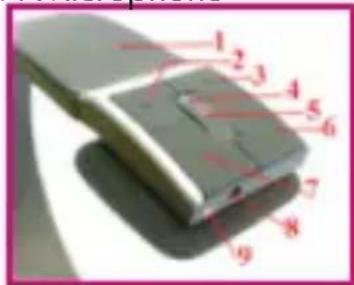
2. Product Overview
-
Adjustable headband
-
< key: previous track
-
key: next track
-
Indicator lights
-
Multifunction button (MFB): turn on/off, manage ingoing and outgoing calls, mute, redial, voice dial and switch conversation, play/pause music.
-
(+) key: volume up
-
(-) key: volume down
-
Charging socket
-
Microphone
3. Charging the headphone
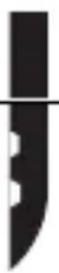
Make sure that your headphone is fully charged for 2.5 hours before you start using it. Connect the USB cable provided to your PC and to the charging connector (8) of the headphone. Use only the USB cable provided as using
5
other devices may damage your headphone.
When the indicator lights are solid red, your headphone is charging. When the lights turn off, the headphone is fully charged.
4. Turning on/off your headphone
| Function Operation LIGHT indicator | ||
| Turn on | Press and hold the MFB for 5 seconds till the blue LIGHT blinks. | Blue LIGHT indicator light will flash four times |
| Turn off | Press and hold the MFB for 10 seconds till the red LIGHT blinks. | Blue LIGHT indicator light will flash four times |
Remark: The headphone will turn off automatically if no devices are connected after 5 minutes in order to save power.
5. Pairing with a phone or other device
Before you use your headphone you must pair it up with a mobile phone or/ and another Bluetooth enabled device.
-
- Put the headphone into pairing mode: when the headphone is turned off, press and hold the MFB until the indicator light is blinking blue/red.
-
- Set your mobile phone or other device to 'discover' the headphone following your phone's instruction guide.
-
- Your phone will find the "BeeWi BBH200" and ask if you want to pair with it. Accept and confirm with the passkey or PIN = 0000 (4 zeros).
Your phone or other device will confirm when pairing is complete. After successful connecting, the blue light of the headphone blinks twice every 4 seconds. In case of unsuccessful pairing repeat steps 1 to 3.
- Your phone will find the "BeeWi BBH200" and ask if you want to pair with it. Accept and confirm with the passkey or PIN = 0000 (4 zeros).
6. Connecting with a second device
You can connect two devices at the same time to enjoy hands-free communication and music streaming, only if they are using different profiles (one is using HFP, the other AD2P). When one profile is being used by one device, it cannot be used by another.
After having paired the headphone with your mobile phone, you can pair it
6
with your music player or PC. The music player will use audio streaming profiles (A2DP and AVRCP), so you can use music playback and remote control features and the phone will use the hands-free profiles so you can use the phone features.
To pair to the second device, put the headphone in pairing mode, then follow the user guide for your MP3/music player or Bluetooth stereo adapter..
7. Wearing the headphone
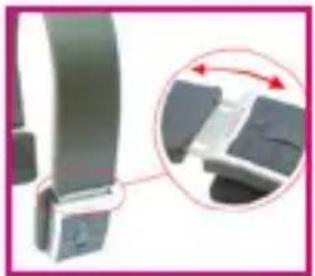
The Headband of this headphone is adjustable according to your size by pulling the earphones. "L" printing on the earphone stands for left ear, "R" for right ear.
8. Telephony functions
| Function Operation | |
| Activate Voice dialing | Press and hold the MFB for 2s, until a sound is heard |
| Redial last number Press the MFB twice | |
| Adjust sound and volume | Press the volume up or down (+ or -) to adjust the volume |
| Answer a call Short press the MFB | |
| Reject a call | Press and hold the MFB for 2s, until a sound is heard |
| End a call Short press the MFB | |
| Switch hands-free between head-phone and cell phone | Press and hold the MFB for 2s, until a sound is heard |
| Microphone mute | Quickly press the MFB twice |
| Cancel mute | Quickly press the MFB twice |
9. Music Control
| Function Operation | |
| Adjust sound and volume Short | press or long press (+) or (-) keys |
| Play / Pause Tap the MFB | |
| Previous song Short press | < key |
| Next song Short press> | key |
Remark: please refer to the specifications of your mobile phone or Bluetooth transmitter to check if it supports AVRCP remote control function.
10. What the lights mean
| Light indicator Status | |
| Red light is on Charging | |
| Red light is off Fully charged | |
| Red and blue light blink alternately Pairing mode | |
| Blue light blinks twice every 2 seconds | Standby mode (not connected) |
| Blue light blinks twice every 4 seconds | Standby mode (connected to Bluetooth device) |
| Blue light blinks 3 times every second | Ringing |
| Red light blinks once every 2 seconds | Conversation mode |
Note: the blue indicator will turn red in case of low power.
8
| Tune notification Status of headphone | |
| Two tones every 5 seconds Conversation mode and microphone mute | |
| Three tones every 30 seconds Low power |
11. Taking care of your headphone
• Always store the headphone in a safe place.
- Avoid storage at extreme temperatures, above 45°C (including direct sunlight) or below -10°C . This can shorten battery life and may affect operation.
- Do not expose the headphone to rain or moisture.
12. Specifications
| Bluetooth version: | Bluetooth V2.1+EDR |
| Bluetooth profile: | Headphone, Hands free, A2DP, AVRCP |
| Effective range: | 10m |
| Working time: | Music: Up to 8 hrs - Talk: Up to 11hrs |
| Standby time: | Up to 250 hrs |
| Input voltage: | DC: +5.0±0.25VA |
| Charging time: | Approx 2.5 hrs |
| Dimension: | 162*153.5*32 mm |
| Weight: | Approx. 103 g |
European Union Directives Conformance Statement
9
CE Hereby, VOXLAND declares that this product is in compliance with:
• The essential requirements and other relevant provisions of Directive 1999/5/EC
• All other relevant EU Directives
You can view your product's Declaration of Conformity (DoC) to Directive 1999/5/EC (to R&TTE Directive) at www.bee-wi.com.
Copyright and other legal information
BEEWI is a registered trademark.
Other trademarks mentioned herewith are owned by their proprietor. All other product or service names are the property of their respective owners. The use of wireless devices and their accessories may be prohibited or restricted in certain areas. Always obey the laws and regulations on the use of these products.
This product is covered by a 2-year product warranty which is valid from the date of purchase. Users are not permitted to make changes or modify the device in any way. Changes or modifications not expressly approved by the party responsible for compliance will void the user's warranty.
Please visit our website www.bee-wi.com for more information.
Technical support: support@bee-wi.com.
© VOXLAND, 2009.

Caring for the environment by recycling
When you see this symbol on a product, do not dispose the product with household waste. Do not dispose of electrical devices or accessories with your household waste. In some countries or regions, collection systems are set up to handle electrical and electronic waste items.
Contact your regional authorities for more details.
10

BeeWi
Simply wireless
3. Charge du casque
Support technique: support@bee-wi.com.
© VOXLAND, 2009.
L k te
Remark: please refer to the specifications of your mobile phone or Bluetooth transmitter to check if it supports AVRCP remote control function.
10. Lichtindicatoren en geluidssignalen
Note: the blue indicator will turn red in case of low power.
44
11. Taking care of your headphone

For additional languages, visit our website
www.bee-wi.com


- USER'S GUIDE
- BEEWI
- ABOUT THE HEADPHONE
- PRODUCT OVERVIEW
- CHARGING THE HEADPHONE
- TURNING ON/OFF YOUR HEADPHONE
- PAIRING WITH A PHONE OR OTHER DEVICE
- CONNECTING WITH A SECOND DEVICE
- WEARING THE HEADPHONE
- TELEPHONY FUNCTIONS
- MUSIC CONTROL
- WHAT THE LIGHTS MEAN
- TAKING CARE OF YOUR HEADPHONE
- SPECIFICATIONS
- EUROPEAN UNION DIRECTIVES CONFORMANCE STATEMENT
- COPYRIGHT AND OTHER LEGAL INFORMATION
- CARING FOR THE ENVIRONMENT BY RECYCLING
- CHARGE DU CASQUE
- LICHTINDICATOREN EN GELUIDSSIGNALEN
Brand : BEEWI
Model : BBH200
Category : Earphones