
AAV15EG - Battery charger JVC - Free user manual and instructions
Find the device manual for free AAV15EG JVC in PDF.
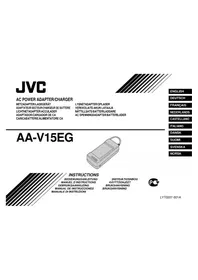



| Brand | JVC |
| Model | AA-V15EG |
| Product type | Battery charger / AC adapter |
| Power supply | AC 110-240 V, 50/60 Hz |
| Power consumption | 23 W |
| Charging output voltage | 8.5 V DC |
| Charging output current | 1.3 A |
| Camcorder output voltage | 6.3 V DC |
| Camcorder output current | 1.8 A |
| Charging system | Constant current, peak detection, timer control |
| Dimensions (W x H x D) | 140 x 42 x 68 mm |
| Weight | Approx. 300 g |
| Compatible batteries | BN-V12U, BN-V22U, BN-V25U |
| Charging time (BN-V12U) | Approx. 1 h 10 min |
| Charging time (BN-V22U) | Approx. 2 h 10 min |
| Charging time (BN-V25U) | Approx. 2 h 40 min |
| Refresh function (REFRESH) | Yes, full discharge after 5 charges max. |
| Charge indicator | Yes, CHG LED. |
| Protection | Automatic stop at end of charge |
| Safety | Do not open, no user-serviceable parts |
| Operating conditions | Charging temperature 10-35°C, operation 0-40°C |
| Included accessories | Power cord, DC cable |
| Maintenance | Clean with a dry cloth, do not use solvents |
| Spare parts and repairability | Not available to the user, contact after-sales service |
Frequently Asked Questions - AAV15EG JVC
User questions about AAV15EG JVC
0 question about this device. Answer the ones you know or ask your own.
Ask a new question about this device
Download the instructions for your Battery charger in PDF format for free! Find your manual AAV15EG - JVC and take your electronic device back in hand. On this page are published all the documents necessary for the use of your device. AAV15EG by JVC.
USER MANUAL AAV15EG JVC
ENGLISH
DEUTSCH
FRANÇAIS
NEDERLANDS
CASTELLANO
ITALIANO
DANSK
SUOMI
SVENSKA
NORSK
INSTRUCTIONS
BEDIENUNGSANLEITUNG
MANUEL D'INSTRUCTIONS
GEBRUIKSAANWIJZING
Thank you for purchasing the JVC AA-V15EG AC Power Adapter/Charger. This unit provides DC power for the JVC Video Camera from a household AC outlet. It can be used to recharge or discharge the JVC battery pack for exclusive use with the JVC Video Camera. To avoid problems and obtain the best results, please read this instruction booklet carefully before use.
WARNING: TO PREVENT FIRE OR SHOCK HAZARD, DO NOT EXPOSE THIS UNIT TO RAIN OR MOISTURE.
This unit should be used with AC 110 - 240 V~, 50/60 Hz only.
CAUTION: To prevent electric shocks and fire hazards, do NOT use any other power source.
CAUTION: When you are not using this unit for a long period of time, it is recommended that you disconnect the power cord from AC outlet.
CAUTION: To prevent electric shock, do not open the cabinet. No user serviceable parts inside. Refer servicing to qualified service personnel.
NOTE: The rating plate (Serial number plate) is on the bottom of the unit.
As an AC Power Adapter/Charger, the AA-V15EG is used exclusively with the JVC Video Camera.
CAUTIONS:
- If used near a radio, this unit may interfere with reception.
- Prevent inflammables, water and metallic objects from entering the unit.
- Do not disassemble or modify the unit.
- Do not apply shocks to the unit.
- Do not subject the unit to direct sunlight.
- Avoid using the unit in extremely hot or humid places.
- Avoid using the unit in places subject to vibrations.
A WORD ON THE EXCLUSIVE BATTERY PACKS
The battery packs are nickel-cadmium batteries and nickel-metal hydride batteries.
Give attention to the following to make the most of their characteristics.
For charging: 10°C to 35°C
For operating: 0°C to 40°C
For storing: -10°C to 30°C
This unit is produced to comply with Standard IEC Publ. 65.
CHARGING THE BATTERY PACK
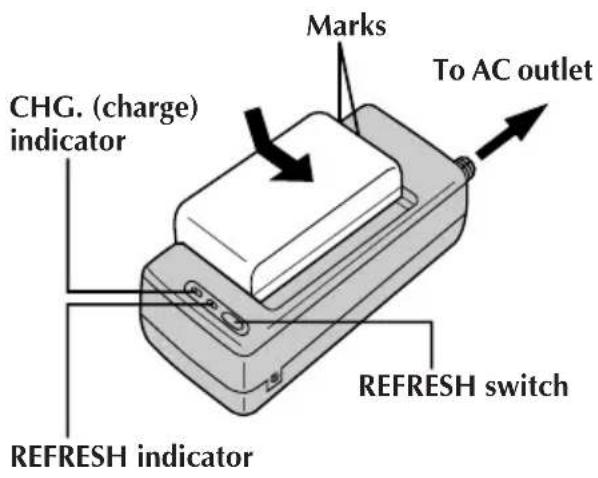
SUPPLY POWER
1 Connect the charger's AC power cord to a wall outlet.
ATTACH BATTERY PACK
2 Align the marks and slide the battery pack in the direction of the arrow until it locks in place.
• The CHG. indicator begins blinking to indicate charging has started.
DETACH BATTERY PACK
3 When the CHG. indicator stops blinking but stays lit, charging is finished. Slide the battery pack opposite the direction of the arrow.
| BATT. PACK | CHARGE DISCHARGE |
| BN-V12U | approx. 1 hr. 10 min. approx. 3 hrs. 30 min. |
| BN-V22U | approx. 2 hrs. 10 min. approx. 7 hrs. |
| BN-V25U | approx. 2 hrs. 40 min. approx. 10 hrs. |
NOTES:
- The recording time per charge is affected by such factors as the time spent in Record-Standby mode and the frequency of zooming. It is safer to have spare battery packs.
- Charging times are for fully discharged battery packs, and discharging times are for fully charged battery packs. ● Charging and discharging times vary according to the ambient temperature and the status of the battery pack.
- Remember to set the charge marker after charging a battery pack or after detaching a discharged one from your camcorder.
- High temperatures can damage the battery pack, so use only where good ventilation is available. Don't allow it to discharge in a container, such as a bag.
- If you stop recharging or discharging part way through, make sure to remove the battery pack before unplugging the adapter's AC cord.
- Remove the battery pack from the adapter immediately after discharging.
- To avoid interference with reception, do not use the AC Power Adapter/Charger near a radio.
- Make sure you unplug the DC cord before charging or discharging the battery pack.
- The CHG. indicator may not light properly with a brand new battery pack, or with one that's been stored for an extended period. In this case, remove and reattach the battery pack and recharge it. The CHG. indicator should blink during recharging. If not, contact your nearest JVC dealer.
USING THE REFRESH FEATURE
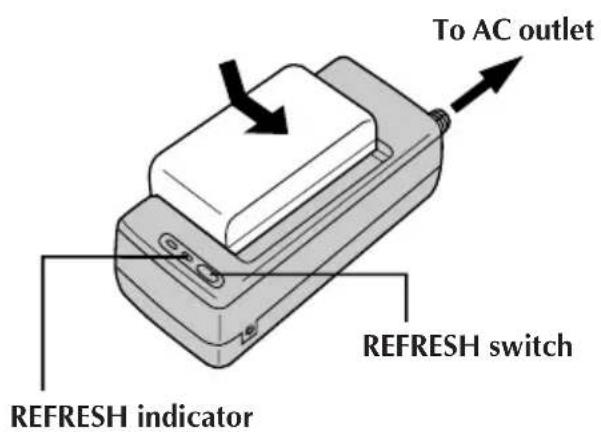
REFRESH
The AC power adapter features a REFRESH function that allows you to fully discharge the battery pack before recharging. Perform the REFRESH function after no less than 5 charging.
To discharge the battery...
..... attach the battery pack to the adapter as shown in the illustration. Then push REFRESH. The REFRESH indicator lights when discharging starts, and goes out when discharging is complete.
NOTES:
- Perform the REFRESH function after no less than 5 charging cycles.
- While the AC Power Adapter/Charger's power cord is disconnected from the AC outlet, it is possible to discharge the battery by pressing the REFRESH switch. During that time, the AC Power Adapter/Charger does not charge the battery. When discharging is complete, detach the battery from the AC Power Adapter/Charger to store it.
USING AC POWER
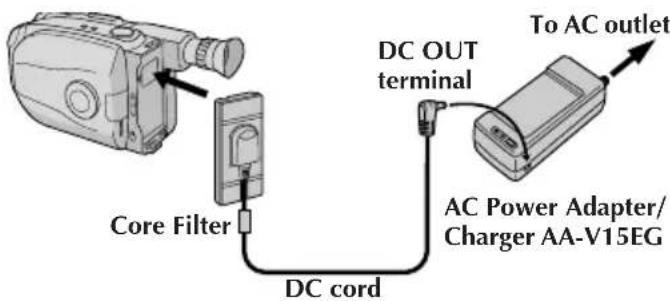
Use the AC Power Adapter (connect as shown in the illustration above).
NOTE:
The supplied AC Power Adapter/Charger features automatic voltage selection in the AC range from 110 V to 240 V.
SPECIFICATION
Power requirement: AC 110 V to 240 V~, 50/60 Hz
Power consumption: 23 W
Output
Charge: DC 8.5 V, 1.3 A VTR: DC 6.3 V, 1.8 A
Charging system: Constant current, peak detection, timer controlled
Dimensions: 140 (W) x 42 (H) x 68 (D) mm
Weight: Approx. 300 g
WARNING— DANGEROUS VOLTAGE INSIDE THE APPARATUS
WARNING
DO NOT EXPOSE THIS APPARATUS TO RAIN OR MOISTURE, AS THIS MAY CAUSE FIRE OR ELECTRIC SHOCK.
WARNING— CONTAINS DANGEROUS VOLTAGE
WARNING: TO PREVENT FIRE OR SHOCK HAZARD, DO NOT EXPOSE THIS UNIT TO RAIN OR MOISTURE.
JVC VICTOR COMPANY OF JAPAN, LIMITED
COPYRIGHT© 1998 VICTOR COMPANY OF JAPAN, LTD.


Printed in Japan 0598AYV*YP*YP


- INSTRUCTIONS
- CAUTIONS
- A WORD ON THE EXCLUSIVE BATTERY PACKS
- CHARGING THE BATTERY PACK
- SUPPLY POWER
- ATTACH BATTERY PACK
- DETACH BATTERY PACK
- NOTES
- USING THE REFRESH FEATURE
- REFRESH
- TO DISCHARGE THE BATTERY
- USING AC POWER
- NOTE
- SPECIFICATION
- WARNING— DANGEROUS VOLTAGE INSIDE THE APPARATUS
- WARNING
- WARNING— CONTAINS DANGEROUS VOLTAGE
- JVC VICTOR COMPANY OF JAPAN, LIMITED
Brand : JVC
Model : AAV15EG
Category : Battery charger