Passport Player - Exercise bike Horizon Fitness - Free user manual and instructions
Find the device manual for free Passport Player Horizon Fitness in PDF.



| Product type | Exercise bike media player |
| Brand | Horizon Fitness |
| Model | Passport Player |
| Connectivity | HDMI, Composite (RCA), S-Video, USB (2 ports) |
| Power supply | Power adapter (included), 100-240V |
| Remote control | Yes, with AAA batteries (not included) |
| Main features | Virtual Active, media playback, user profiles, machine synchronization |
| Storage | Provided USB flash drive (capacity not specified) |
| Supported formats | Common audio and video formats (MP3, MP4, etc.) |
| Display | Requires a TV or AV receiver (not included) |
| Dimensions | Approximately 15 x 10 x 3 cm (estimate) |
| Weight | Approximately 200 g (estimate) |
| Languages | Multilingual (French, English, German, etc.) |
| Maintenance | Unplug before cleaning; use a damp cloth; do not use liquid or aerosol cleaners |
| Safety | Do not expose to water or moisture; do not open the casing; entrust repairs to qualified technician |
| Included accessories | Power adapter, HDMI cable, USB flash drive, remote control |
| Usage | To be used with a compatible Horizon Fitness exercise bike |
Frequently Asked Questions - Passport Player Horizon Fitness
User questions about Passport Player Horizon Fitness
0 question about this device. Answer the ones you know or ask your own.
Ask a new question about this device
Download the instructions for your Exercise bike in PDF format for free! Find your manual Passport Player - Horizon Fitness and take your electronic device back in hand. On this page are published all the documents necessary for the use of your device. Passport Player by Horizon Fitness.
USER MANUAL Passport Player Horizon Fitness
text_image
Passport MEDIA PLAYER WITH VIRTUAL ACTIVE1 Passport Player Owner's Manual
9 Manuel d'Utilisation Lecteur Passport
17 Manual de Usuario Passport Player
25 Passport Player Bedienungsanleitung
33 Gebruikershandleiding Passport Player
41 Passport 播放器使用手册
49 Passport 播放器使用說明書
57 バスポートプレーヤー取扱説明書
65 Manuale del proprietario di Passport Player
English
Passport manual Res2 2 indd 1-0 1225013 3431PM
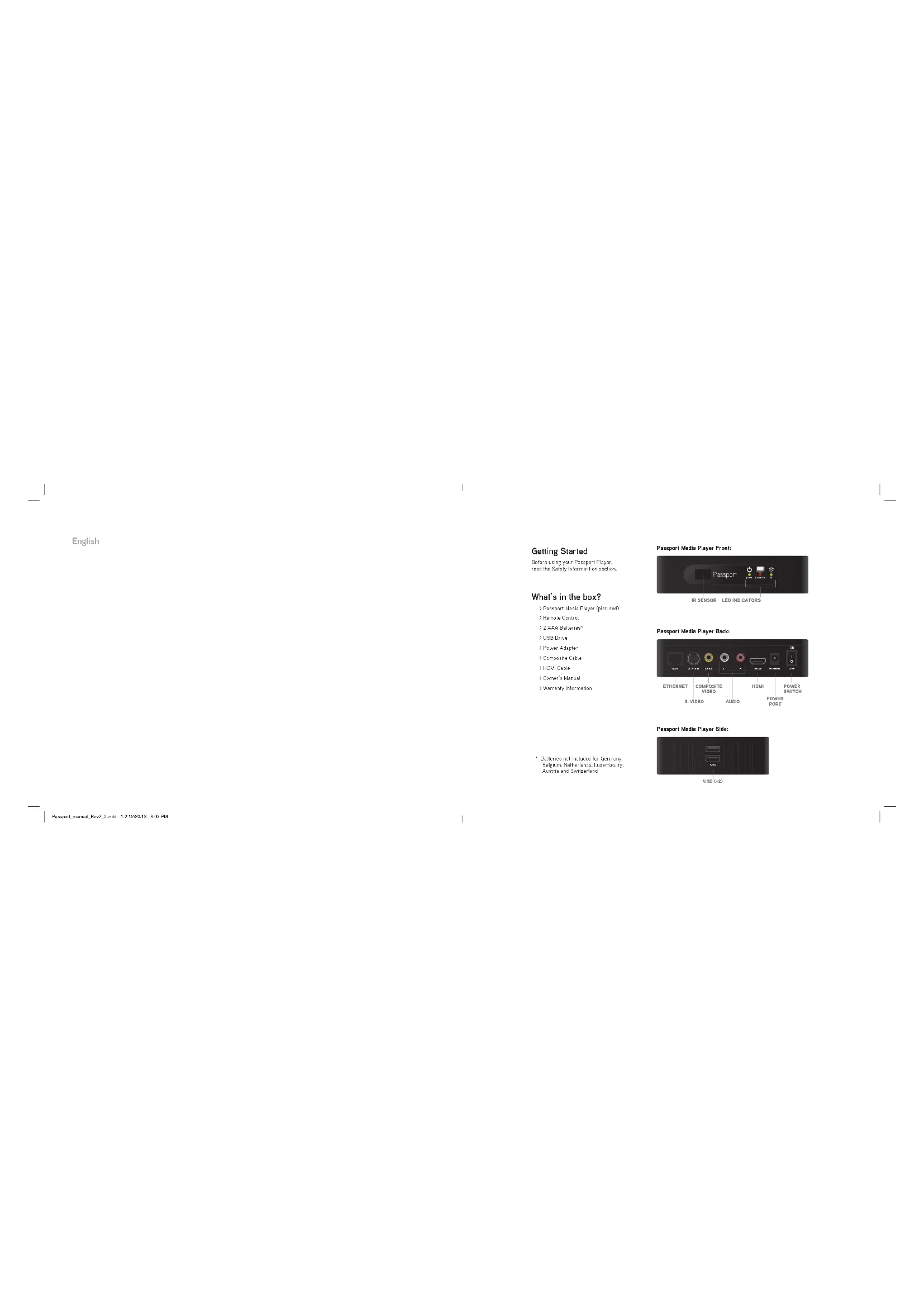
Getting Started
Before using your Passport Player, read the Safety Information section.
What's in the box?
Passport Media Player (pic-tred)
) Remote Control
2 AAA Batteries*
3 USB Drive
Pleasant Adapter
) Composite Cable
Hinks Cable
) Owner's Manual
Warranty information
Passport Media Player Front:
Passport Media Player Back:

Passport Media Player Side:
USB(=2)
Connecting Passport Media Player
Turn on your TV or A/V Receiver and see it to the correct video input. Connect your Passport Media Player to your TV or A/V Receiver using one of the methods listed below. For the best video and audio quality, HDMI is recommended.
Option 1: HDMI
Connect one end of the HDMI cable to the Passport Player and the other end of the HDMI cable to your TV or A/V Receiver.
Option 2: Composite
Connect the yellow, red and white composite cables to the Passport Player and the other ends of the composite cables to your TV or AV Receiver.
Option 3: \$-Video
Connect an S-Video cable (not included) to the Passport Player and the other end of the S-Video cable to your TV or A/V Receiver. Connect the red and white audio composite cables (included) to the Passport Player and the other ends of the composite cables to your TV or A/V Receiver. INDF: The yellow composite cable does not need to be connected.
Inserting a USB Drive
Insert: the included USD drive into the top USD port. Make sure the power switch is in the "DEF" position (evert).
Connecting to a Power Source
-
Connect the power adapter to the power port on the back of the Passport Media Player. Then plug the other end of the power adapter into a power outlet.
-
Move the power switch to the "ON" position (up) to start the Passport Player. Note: The first time Passport is powered on, you will be prompted to select a default language.

text_image
S-VIDEO COMPOSITE CABLES HDMI POWER CABLE TV OR A/V RECEIVERCongratulations!
Your Passport Media Player is ready to use. Press the arrow keys on your Passport remote to navigate to the User Guide icon at the bottom of the Home screen tax shown. Press select on your Passport remote to learn more about Passport Media Player and its lectures.
Note: If your Homescreen does not have the User Guide icon I pictured, an update is possible for your Passport Style.
For additional information visit passocrtplayer.com.
Using Passport Media Player
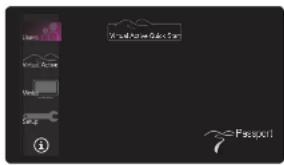
Virtual Active Quick Start - Press select on your Passport remote to start playing a Virtual Active destination. By default, User 1 for the edited User 1 name is used for this Quick Start function
User - Press select to create, edit or choose a Passport user. When creating an editing a user, make sure to press select on your Passport remote on the save card to store the information.
) Virtual Active - Press select to preview the available Virtual Active destinations on your USD. Each Virtual Active destination contains a brief description about the course location. Press select on the Virtual Active destination to choose that course.
NOTE: If your machine is not synced with your Passport Player, a message will open on your TV or A/V receiver asking if you want to 'Continue without syncing?', if you select 'Yes', the Virtual Active destination you choose will begin. Your TV or A/V receiver will not display any of your war soul information and your machine will not automatically change incline or resistance during your workout. If you select 'No', you will be taken to the 'Setup-Sync' section. Here, you will need to choose your machine type syncing instructions will be deployed, and you will sync your equipment with your Passport Player. See your equipment's owner's manual for detailed syncing directions.
text_image
Users Virtual Active Window Setup i Virtual Active Active Start 7 PassportPassport Media Player Homescreen
) Media Press select to preview media stored in the Library folder on your USD. Press select to begin your workout or view your media content on your TV or A/V receiver. If your machine is not synced with your Passport Player, a message will appear on your TV or A/V receiver asking if you want to Continue without syncing?
NOTE: Place your media files in the 'Library' folder on your USD to use this feature. Passport can play many popular file formats.
) Setup - Press select to view syncing instructions, restore factory defaults and view system information. Note: When factory defaults are restored, all setting (every your chosen default) languysed will be reset.
) i - This user guide helps explain Passport Player functions on your TV or A/V receiver.
Remote Control Information

text_image
A B C D E F G H I J K L M N O P Q R S T U V W X Y Z A B C D E F G H I J K L M N O P Q R S T U V W XRemote Control Button Functions
A Power. Turn Passport Media Player on or all
B. Arrows: Naviges through Passport Media Player's menu
C. Select - Choose an icon or section
D Home Return to the main men.
E Dock - Go back to the previous screen
F Kyle: Tum music and sound to send off
Is Media - Turn on and off the media controls
Inserting the batteries in the Remote Control
Remove the battery cover on the back of the remote and insert
- No. 801, 357, 196, 196, 196, 196, 196, 196, 196, 196, 196, 196, 196, 196, 196, 196, 196, 196, 196, 196, 196, 196, 194
Using Virtual Active and Media Content
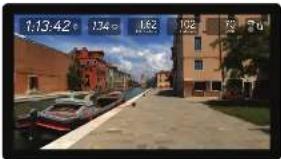
Show/Hide Status Bar
Press △Move the status bar to the top, bottom, or to hide your status bar. If your status bar is hidden, press the up or down button to display status bar again.
Audio
Press Mute to turn off Virtual Active course music. Press Mute again to turn off Virtual Active course sounds the course music and no course sounds. Press Mute again to listen to both course music and course sounds from Virtual Active. The Mute function for all other media types is un- or off.
Note: Many users prefer to listen to their own music while using Virtual Active. Pressing the mute button and time will turn off the course music while still having the course sounds (environments, noises) audible.
Show/Hide Scrolling Text
Press Select to turn around and off the information scrolling tests on Virtual Active courses. The 🐘 can in the status bar indicates if this scrolling text is on or off.
Note: Scrailing text is only available on Virtual Active courses.
Show/Hide Media Controller
Press Media to turn on and off the media controls. Press is to go to the previous media file, press to go to the next media file, or press select to play/pause the media.
For additional information, please visit: passportlayer.com
text_image
1:13:42 1:34 1:62 1:92 2:2 2:5 7sVirtual Active Screenshot
natural_image
Child interacting with a deer on grass (no text or symbols visible)Media Player Screenshot
Safety Information
3 Read Instructions. All the safety and operating instructions should be rest before the product is operated.
Retain Instructions. The safety and operating instructions should be retained for future reference.
) Hood Warnings. All warnings on the product and in the operating instructions should be adhered to.
Follow Instructions. All operating and use instructions should be followed.
) Cleaning. Unpiling this product from the wall outlet before cleaning. Do not use liquid cleaners or several cleaners. Use a damp cloth for cleaning.
Water and Moisture. To reduce the risk of fire or electric shock, do not expose this appliance to rain or moisture. Apparatus shall not be exposed
to dropping or splash ring and no objects filled with liquids, such as vasses, shall be placed on the splash. In not one this product near solar for example, gave a bathtub, grassbined, kitchen sink or be able to be in a seat (bathroom) in rear a selenium canal and the fish.
A. Agergrine. Do not give this product in a varnish, not stand, mixed, broquet or take. The product may fall on
7 Accessories. Do not take this product on a durable cart stand, a pod basket or table. The product may fail, costing serious injury to a child or adult and serious damage to the product. Use only with a cart stand, tripod, bracket or table recommended by the manufacturer, or sold with the product. A product and cart combination should be moved with care. Quick stops, excessive force and uneven surfaces may cause the product and cart combination to overturn.
) Power Sources. This product should be operated only from the type of power source indicated on the marking label. If you are not sure of the
type of power supply to your home, consult your product dealer or local power company.
Grounding or Polarization. This product may be equipped with a polarized alternating current line plug to plug having one blade wiser than the other. This is an alternative.
the power. This plug will hit into the power bullet only one way. This is a safety feature. If you are unsible to insert the plug fully into the bullet, by reversing the plug. If the plug should still fail to fit, contact your electrician to replace your obsolete bullet. Do not defeat the safety purpose of the polarized plug.
Power Cord Protection. Power-supply cords should be routed so that they are not likely to be walked on or pinched by items placed upon or
against them, paying particular attention to cerds at plugs, convenience receptacles and the point where they can from the product.
Overloading. Do not overload wall outlets, extension cords or integral convenience receptacles as this can result in a risk of fire or electric shock.
Object and Liquid Entry. Never push objects of any kind into this product through openings as they may touch dangerous voltage points or
short-cut parts that could result in a fire or electric shock. Never spill liquid of any kind on the product
Servicing. Do not attempt to service this product yourself as opening or removing covers may expose you to dangerous voltage or other hazards.Damage Requiring Service. Unding this product from the wall outlet and refer servicing to qualified service personnel under the following
conditions: - When the power supply cost or give is deferred.
- If liquid has been spilled or defects have fallen into the product,
- If the product has been exposed to rain or water
- If the product does not operate normally by following the operating instructions. Adjust only those controls that are covered by the operating
instructions as an improper adjustment of other controls may result in damage and will often require defensive work by a qualified technician to restore the product to its normal operation.
- If the product has been dropped or damaged in any way, and
- When the product exhibits a distinct change in performance, this indicates a need for service.
3 Heat. The product should be situated away from heat sources such as radiators, heat registers, stoves or other products (including amplifiers) that
produce heat
Français
Pour commencer
text_image
Home Insert Home Transfer Setup 7 PassportPassport Media Player Homescreen
text_image
A B C D E F G H I J K L M N O P Q R S T U V W X Y Z A B C D E F G H I J K L M N O P Q R S T U V W Xnatural_image
Child interacting with a deer on grass, no visible text or symbolstext_image
A B C D E F G H I J K L M N O P Q R S T U V W X Y Z A B C D E F G H I J K L M N O P Q R S T U V W XC. Selective per me elegible in case a area section
- My own, a unit of words in the words multivertile
natural_image
Child interacting with a deer on green grass (no text or symbols visible)Captura de pantalla de Media Player
Passport Media Player (altgeblider)
)Fernbedierung
text_image
Image Mode Scan ③ F-4000X11text_image
A B C D E F G H I J K L M N O P R S T U V W X Y Z A B C D E F G H I J K L M N O P Q R S T U V W X Y Znatural_image
Child interacting with a deer on grass (no text or symbols visible)Media Player Screenshot
He vaordat i.1w Passport Player in
gebruk hseemi,
text_image
A B C D E F G H I J K L M N O P Q R S T U V W X Y Z A B C D E F G H I J K L M N O P Q R S T U V W X Y ZOpmerking, sceltaikst is also beschranken; cents Virtual Active- n routes
Mediacontroller weergeven/verbergen
natural_image
Child interacting with a deer on green grass (no text or symbols visible)Schermafdruk Media Player
text_image
Password ③Passport媒体播放端主屏幕
natural_image
Child interacting with a deer on grass (no text or symbols visible)媒体播放器屏幕截图
安全信息
text_image
Password ③Passport 媒道排故障主查询
natural_image
Child interacting with a deer on grass, no visible text or symbols媒稿播放器西
安全資訊
text_image
Password Color Bar Password Color Bar Password Color Bar Password Color Bar Password Color Bar Password Color Bar Password Color Bar Password Color Bar Password Color Bar Password Color Bar Password Color Bar Password Color Bar Password Color Bar Password Color Bar Password Color Bar Password Color Bar Password Color Bar Password Color Bar Password Color Bar Password Color Bar Password Color Bar Password Color Bar Password Color Bar Password Color Bar Password Color Bar Password Color Barパスポートプレーヤーホーム画面
text_image
A B C D E F G H I J K L M N O P Q R S T U V W X Y Z A B C D E F G H I J K L M N O P Q R S T U V W X各リモコンボタンの機能
natural_image
Child interacting with a deer on green grass (no text or symbols visible)Media Playerの画面表示
安全上の注意
For magazine information, six months ended 2018.
text_image
Password ①text_image
A B C D E F G H I J K L M N O P Q R S T U V W X Y Z A B C D E F G H I J K L M N O P Q R S T U V W Xnatural_image
Child interacting with a deer on green grass (no text or symbols visible)Screenshot Media Player
All Content © 2013 Passport and Johnson Health Tech. All rights reserved. | Made in China.
For service go to: passportplayer.com
Rev 2.2