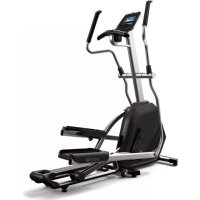
ANDES 7i - Exercise bike Horizon Fitness - Free user manual and instructions
Find the device manual for free ANDES 7i Horizon Fitness in PDF.



| Product Type | Exercise Bike |
| Brand | Horizon Fitness |
| Model | ANDES 7i |
| Power Supply | Mains 110-240 V ~ 50/60 Hz |
| Console Display | LCD screen with backlight |
| Training Programs | 14 programs: Manual, Intervals, Game, Fitness Test, Weight Loss, Weight Loss Plus, Alternate, Reverse, Constant Watts, Watts per Period, FCC Zone, % FCC, Muscle Power Development, Custom |
| Resistance Levels | 20 levels |
| Connectivity | Wi-Fi (ViewFit), Passport, 3.5 mm audio jack input |
| Speakers | Integrated, volume adjustment |
| Device Holder | For book, phone or tablet |
| Heart Rate Sensor | Built into console, compatible with chest strap (optional) |
| Power Saving Mode | Automatic standby after 15 minutes of inactivity |
| Dimensions (L x W x H) | Not specified |
| Device Weight | Not specified |
| Maximum User Weight | 150 kg estimated |
| Additional Features | xID account for ViewFit, Passport sync, built-in fitness test, warm-up game |
| Safety | Grounding, emergency stop by holding Start/Stop button for 3 seconds |
| Maintenance | Clean with a soft dry cloth; do not use abrasive products |
| Warranty | Not specified |
Frequently Asked Questions - ANDES 7i Horizon Fitness
User questions about ANDES 7i Horizon Fitness
0 question about this device. Answer the ones you know or ask your own.
Ask a new question about this device
Download the instructions for your Exercise bike in PDF format for free! Find your manual ANDES 7i - Horizon Fitness and take your electronic device back in hand. On this page are published all the documents necessary for the use of your device. ANDES 7i by Horizon Fitness.
USER MANUAL ANDES 7i Horizon Fitness
This section explains how to use your elliptical's console and programming. The BASIC OPERATION section in the ELLIPTICAL GUIDE has instructions for the following:
• LOCATION OF THE ELLIPTICAL
• POWER/GROUNDING INSTRUCTIONS
- FOOT POSITIONING
• MOVING THE ELLIPTICAL
• LEVELING THE ELLIPTICAL
• POWER/MANUAL INCLINE OPERATION
• USING THE HEART RATE FUNCTION


text_image
HORIZON ANDES® Time RPM Distance Speed Temperature 1306 1142 125 Reset For Minute 350 10 197 Width Size: Level Calories 4 8 10 12 16 Enter HORIZON A F E H G B F C DANDES 3 CONSOLE OPERATION
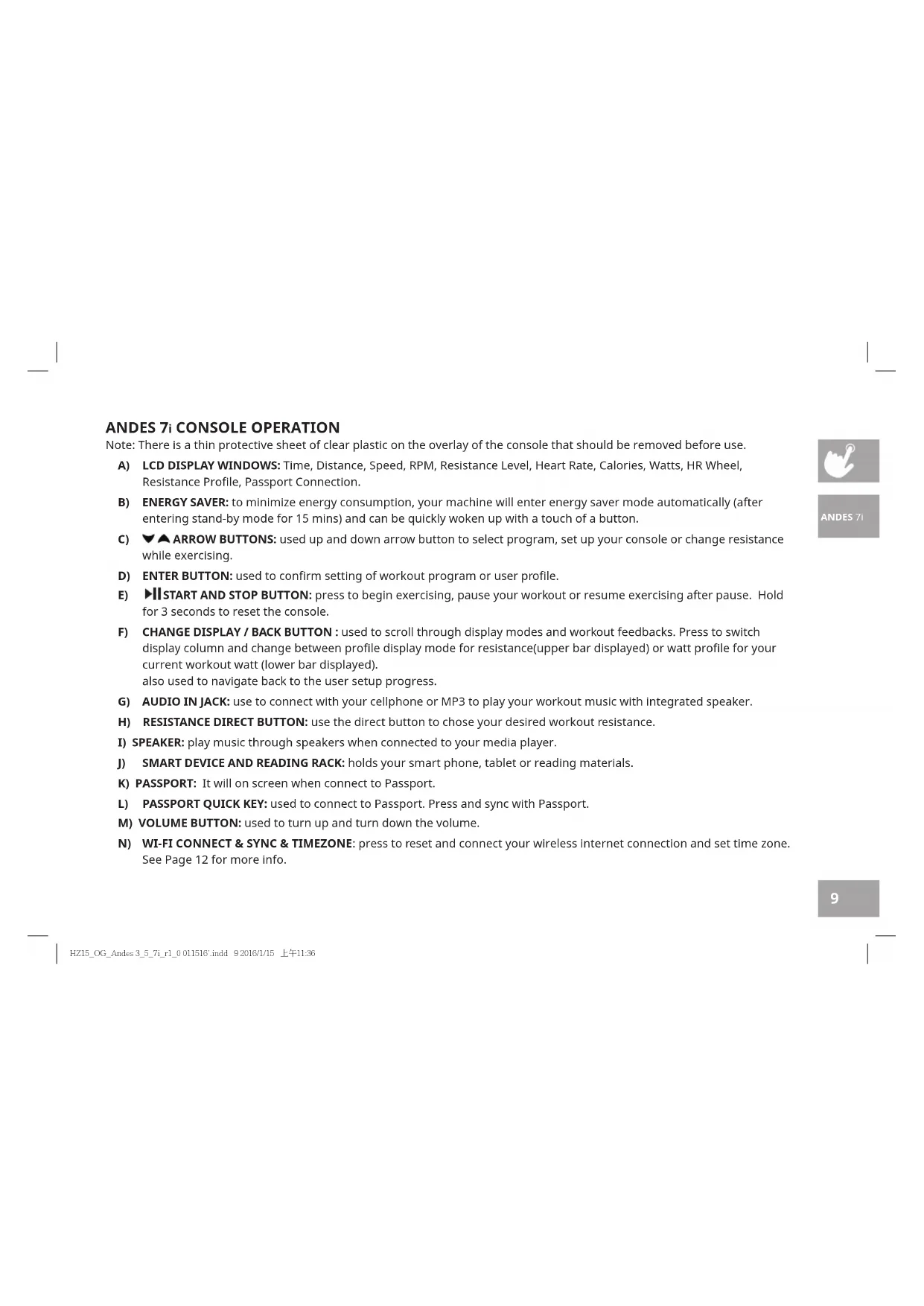
Note: There is a thin protective sheet of clear plastic on the overlay of the console that should be removed before use.
A) LCD DISPLAY WINDOWS: Time, Distance, Speed, RPM, Resistance Level, Heart Rate, Calories, Watts, HR Wheel, Resistance Profile.
B) ENERGY SAVER: to minimize energy consumption, your machine will enter energy saver mode automatically (after entering stand-by mode for 15 mins) and can be quickly woken up with a touch of a button.
C) ▼▲ ARROW BUTTONS: used up and down arrow button to select program, set up your console or change resistance while exercising.
D) ENTER BUTTON: used to confirm setting of workout program or user profile.
E) ▶I START AND STOP BUTTON: press to begin exercising, pause your workout or resume exercising after pause. Hold for 3 seconds to reset the console.
F) CHANGE DISPLAY / BACK BUTTON : used to scroll through display modes and workout feedbacks. Press to switch display column and change between profile display mode for resistance(upper bar displayed) or watt profile for your current workout watt (lower bar displayed).
also used to navigate back to the user setup progress.
G) RESISTANCE DIRECT BUTTON: use the direct button to chose your desired workout resistance.
H) SMART DEVICE AND READING RACK: holds your smart phone, tablet or reading materials.


text_image
A K N L M G E J HORIZON Time SET RPM Speed 1306 1.42 125 Basis For Minute 350 10 197 Balance Control 4 8 12 16 20 Enter HORIZON H B F C DANDES 5 CONSOLE OPERATION
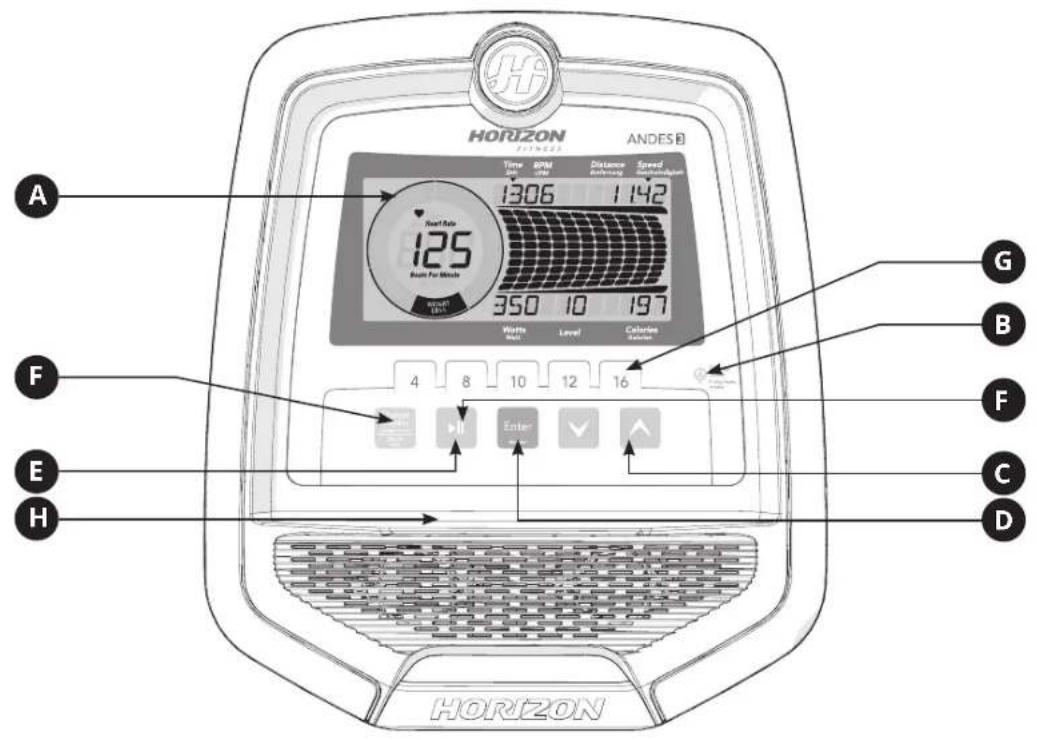
Note: There is a thin protective sheet of clear plastic on the overlay of the console that should be removed before use.
A) LCD DISPLAY WINDOWS: Time, Distance, Speed, RPM, Resistance Level, Heart Rate, Calories, Watts, HR Wheel, Resistance Profile, Passport Connection.
B) ENERGY SAVER: to minimize energy consumption, your machine will enter energy saver mode automatically (after entering stand-by mode for 15 mins) and can be quickly woken up with a touch of a button.
C) ▼▲ ARROW BUTTONS: used up and down arrow button to select program, set up your console or change resistance while exercising.
D) ENTER BUTTON: used to confirm setting of workout program or user profile.
E) ▶I START AND STOP BUTTON: press to begin exercising, pause your workout or resume exercising after pause. Hold for 3 seconds to reset the console.
F) CHANGE DISPLAY / BACK BUTTON : used to scroll through display modes and workout feedbacks. Press to switch display column and change between profile display mode for resistance(upper bar displayed) or watt profile for your current workout watt (lower bar displayed).
also used to navigate back to the user setup progress.
G) AUDIO IN JACK: use to connect with your cellphone or MP3 to play your workout music with integrated speaker.
H) RESISTANCE DIRECT BUTTON: use the direct button to chose your desired workout resistance.
I) SPEAKER: play music through speakers when connected to your media player.
J) SMART DEVICE AND READING RACK: holds your smart phone, tablet or reading materials.
K) PASSPORT: It will on screen when connect to Passport.
L) PASSPORT QUICK KEY: used to connect to Passport. Press and sync with Passport.
M) VOLUME BUTTON: used to turn up and turn down the volume.
N) WI-FI CONNECT & SYNC & TIMEZONE: press to reset and connect your wireless internet connection and set time zone. See Page 12 for more info.


text_image
A K N L M G E J HORIZON HORIZON VIEW/IT 8.88 Begin For Minute Age Weight 18.8 Water/Power 5 10 15 20 30 Change Display Back Enter Y I H B F C DANDES 7i CONSOLE OPERATION
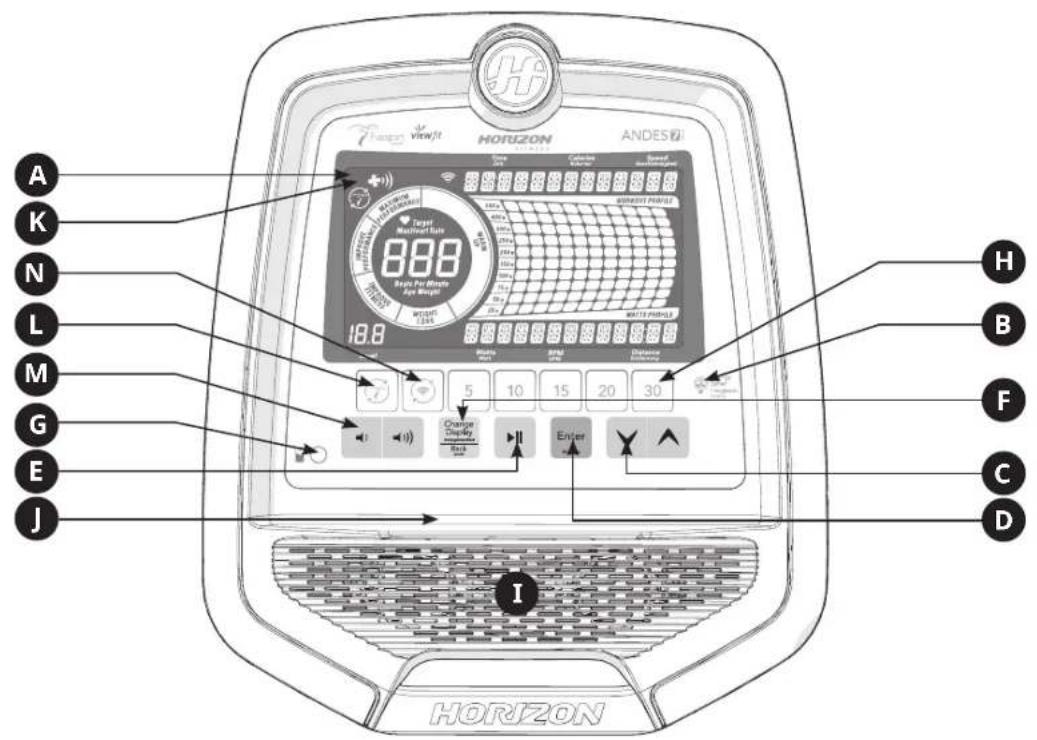
Note: There is a thin protective sheet of clear plastic on the overlay of the console that should be removed before use.
A) LCD DISPLAY WINDOWS: Time, Distance, Speed, RPM, Resistance Level, Heart Rate, Calories, Watts, HR Wheel, Resistance Profile, Passport Connection.
B) ENERGY SAVER: to minimize energy consumption, your machine will enter energy saver mode automatically (after entering stand-by mode for 15 mins) and can be quickly woken up with a touch of a button.
C) ▼▲ ARROW BUTTONS: used up and down arrow button to select program, set up your console or change resistance while exercising.
D) ENTER BUTTON: used to confirm setting of workout program or user profile.
E) ▶I START AND STOP BUTTON: press to begin exercising, pause your workout or resume exercising after pause. Hold for 3 seconds to reset the console.
F) CHANGE DISPLAY / BACK BUTTON : used to scroll through display modes and workout feedbacks. Press to switch display column and change between profile display mode for resistance(upper bar displayed) or watt profile for your current workout watt (lower bar displayed).
also used to navigate back to the user setup progress.
G) AUDIO IN JACK: use to connect with your cellphone or MP3 to play your workout music with integrated speaker.
H) RESISTANCE DIRECT BUTTON: use the direct button to chose your desired workout resistance.
I) SPEAKER: play music through speakers when connected to your media player.
J) SMART DEVICE AND READING RACK: holds your smart phone, tablet or reading materials.
K) PASSPORT: It will on screen when connect to Passport.
L) PASSPORT QUICK KEY: used to connect to Passport. Press and sync with Passport.
M) VOLUME BUTTON: used to turn up and turn down the volume.
N) WI-FI CONNECT & SYNC & TIMEZONE: press to reset and connect your wireless internet connection and set time zone. See Page 12 for more info.


text_image
Time Zeit RPM UFM Distance Entfernung Speed Geschwindigkeit 1306 1.42 Heart Rate 125 Beats Per Minute WEIGHT LOSS 350 10 197 Watts Watt Level Calories KälarienANDES 3/5 DISPLAY WINDOWS
• TIME: Shown as minutes : seconds. View the time remaining or the time elapsed in your workout.
• RPM: Revolutions Per Minute.
• DISTANCE: Shown as km. Indicates distance traveled or distance remaining during your workout.
- SPEED: Shown as KM/H. Indicates how fast the wheels are moving.
• WATTS: Displays current user power output.
• LEVEL: Shows the current level of resistance.
• CALORIES: Total calories burned during your workout.
• HEART RATE: Shown as BPM (beats per minute). Used to monitor your heart rate.
• MAXIMUM HEART RATE: Shows your maximum heart
rate. The Change Display button switches between your MAXIMUM HEART RATE and your current HEART RATE. The MAXIMUM HEART RATE is calculated as (220-age).
- HEART RATE WHEEL: Displays your current activity zone during your workout. With this Heart rate wheel you can be certain if your exercise level fits your workot goal.
WARM UP: 0-60% of maximum heart rate.
WEIGHT LOSS: 60-70% of maximum heart rate. IMPROVE FITNESS: 70-80% of maximum heart rate. IMPROVE PERFORMANCE: 80-90% of maximum heart rate. MAXIMUM PERFORMANCE: 90-100% of maximum heart rate. - PASSPORT (ANDES 5 ONLY): Indicates when the machine is in Passport mode to sync with Passport.
- WI-FI (ANDES 5 ONLY): Indicates wireless connection is present and the strength (low, medium, high).
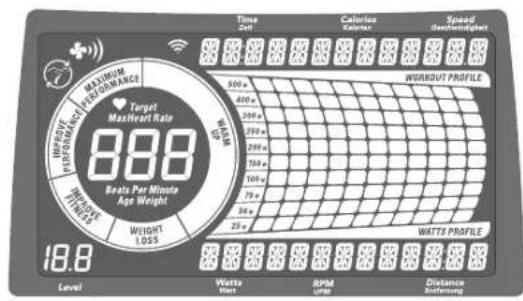
ANDES 7i DISPLAY WINDOWS
• TIME: Shown as minutes : seconds. View the time remaining or the time elapsed in your workout.
• RPM: Revolutions Per Minute.
- DISTANCE: Shown as km. Indicates distance traveled or distance remaining during your workout.
- SPEED: Shown as KM/H. Indicates how fast the wheels are moving.
• WATTS: Displays current user power output.
• LEVEL: Shows the current level of resistance.
• CALORIES: Total calories burned during your workout.
- HEART RATE: Shown as BPM (beats per minute). Used to monitor your heart rate.
- MAXIMUM HEART RATE: Shows your maximum heart rate. The Change Display button switches between your MAXIMUM HEART RATE and your current HEART RATE. The MAXIMUM HEART RATE is calculated as (220-age).
- HEART RATE WHEEL: Displays your current activity zone during your workout. With this Heart rate wheel you can be certain if your exercise level fits your workot goal.
WARM UP: 0-60% of maximum heart rate.
WEIGHT LOSS: 60-70% of maximum heart rate.
IMPROVE FITNESS: 70-80% of maximum heart rate.
IMPROVE PERFORMANCE: 80-90% of maximum heart rate.
MAXIMUM PERFORMANCE: 90-100% of maximum heart rate.
- WATT SCALE AND PROFILE DISPLAY: shows your current workout watt. ex. 50W dot will light up to show when reaching or selecting 25-50 watt. You may use change display key to switch back to workout profile display. Note: Scale will only show up to 400w in Watts programs to reflect your target watt range of 25-400 watt.
- PASSPORT: Indicates when the machine is in Passport mode to sync with Passport.
- WI-FI: Indicates wireless connection is present and the strength (low, medium, high).

SET UP XID ACCOUNT FOR VIEWFIT CONNECTIVITY
Creating an xID account will allow you to save and share workout data using the View Fit Wi-Fi. Up to four users can be saved on a machine. This process is the first step in connecting your equipment. It must be done from a computer, tablet, or mobile device.
1) Visit the web site: www.Viewfit.eu
2) Once at the web site, select the CONNECT YOUR EQUIPMENT option on the top menu bar.
3) The first step in connecting your equipment will to be creating your xID account. This will be your login to View Fit.
4) Enter your phone number or another easy-to-remember 10-14 digit number. This will be your account number.
5) Fill in your profile information to finish the xID account set up process. You will be asked to provide an email address not associated with any other xID account. Check your email after the set-up process for a link to validate your account.
CONNECT WI-FI
Once you have created your xID account, you will be able to move on to activating the Wi-Fi on your equipment. Reminder, this requires you to use your computer, tablet, or mobile device that is connected to the internet.
1) Press and hold 📤 for 3-5 seconds you can use up/down button to set your timezone, then press enter button you will see the message ACTIVATED on your screen.
2) On your computer or other device, go to your Wi-Fi settings. You should select the "View Fit" network. Doing this enables you to connect your equipment to your wireless network.
3) A new window will pop up with the list of wireless networks your equipment can see. Select your home Wi-Fi network and connect.
4) The remaining step is to reconnect your computer or other device back to your Wi-Fi network. Go to your settings again and connect as you normally would.
Congratulations! You are now connected and ready to get started.
GETTING STARTED
Select your xID account, Use, Guest, or Edit a Use using ▲ and press ENTER.
When you log in for the first time as Use 1-4, you will be prompted to enter your xID information.
a) Enter your xID account number using ▲▼each number you should press ENTER to confirm it .After the final input, press ENTER.
b) Enter your passcode using ▲▼ each number you should press ENTER to confirm it .After the final input, press ENTER.
c) If you key the incorrect number during entering your xID or pascode, press CHANGE DISPLAY to delete the last entered number.
QUICK START
1) Make sure the power is on.
2) Press START / STOP ▶II to start exercise in MANUAL mode.
3) Press ▲ to adjust resistance level during the workout.
START YOUR WORKOUT
1) Select guest / user1 / user2 / user3 / user4.
2) Select your weight.
3) Select your age.
4) Select your desired program.
5) Select your gender (required only under Fit-Test program).
6) Select the program settings, time, level, etc.
7) Press Start/Stop ▶II to start your workout.
Note: Console will save your setting for user 1 / 2 / 3 / 4 ready for next workout.
TO CLEAR SELECTION/RESET THE CONSOLE
Hold START/STOP▶br 3 seconds.
When your workout is complete, the bike will stop and beep. You can unplug the machine or it will enter Energy Saver Mode in 15 mins.

PROGRAM INFORMATION
Andes 3: 10 programs (Manual, Intervals, Game, Weight Loss, Rolling, Reverse Train, Random, Constant Watts, THR Zone, Custom)
Andes 5: 12 Programs (Manual, Intervals, Game, Weight Loss, Rolling, Reverse Train, Random, Constant Watts, THR Zone, %THR, Strength Builder, Custom)
Andes 7i: 14 programs (Manual, Intervals, Game, Fit Test, Weight Loss, Weight Loss Plus, Rolling, Reverse Train, Constant Watts, Interval Watts, THR Zone, %THR, Strength Builder, Custom)
1) MANUAL: Allows you to adjust the resistance level to your preference, without a preset program. Adjust your resistance manually during your workout. User sets time and resistance using (up/down arrow) and ENTER.
2) INTERVALS: Improves your strength, speed, and endurance by raising and lowering the resistance levels throughout your workout to involve both your heart and muscles. Time based program with 16 levels to choose from. User sets time and level using (up/down arrows) and ENTER.
3) GAME: This warm up game simulates a Car Racing Game. To control the car up and down, you pedal faster or slower. Try to avoid those barriers and keep on track. Your remaining chances will be shown on upper LCD with 10 dots and each time you hit a barrier one dot will be removed. You only have 11 chances to complete the circuit, so be careful.
4) FIT-TEST (ANDES 7i ONLY): Test your current level of physical condition. Keep RPM between 60 and 80 during test, program will change resistance automatically during test per an embedded chart. Try to keep your RPM until you can not go any further. Console will look up the table and give you your current physical condition estimation.
5) WEIGHT LOSS: Promotes weight loss by raising and lowering the resistance level, while keeping you in your fat burning zone. Time based program with 16 levels to choose from. User sets time and level using (up/down arrows) and ENTER. Please drink enough water while and after doing exercise to enhance the weight loss results.
6) WEIGHT LOSS PLUS (ANDES 7i ONLY): Promotes weight loss by increasing and decreasing the resistance, while keeping you in your fat burning zone. Time based program with 15 levels to choose from and greater intensity than the weight loss program. User sets time and level using (up/down arrows) and ENTER.Please drink enough water while and after doing exercise to enhance the weight loss results.
7) ROLLING: Maintains weight by gradually raising and lowering the resistance level to gradually raise and lower your heart rate.
8) REVERSE TRAIN: Special training program to build your muscle. This program will gradually increases resistance level and prompt you to pedal at a Forward (F), or Reverse (R) to help you reach your fitness goal.
9) RANDOM (ANDES 3/5 ONLY): Special designed chart based program that will simulate resistance being changed randomly.
10) CONSTANT WATTS: This workout automatically adjusts the resistance to keep you within a set Watts range and maintains your desired level of exercise intensity.
1) Select Constant Watts program using ▲ and press ENTER.
2) Set time using ▲ and press ENTER.
3) Select desired watts using ▲ and press ENTER.
4) Press START▶to begin the program.
11) INTERVAL WATT PROGRAM (ANDES 7i ONLY): Allows you to choose a high WATTs value and a low WATTs value. The interval program will switch between High and Low WATTs values, making for a very intense and effective workout.
1) Select Constant Watts program using and press enter.
2) Set time using and press enter.
3) Select your desired low watts target and press enter.
4) Select your desired high watts target and press enter.
5) Press START ▶II to begin the program.


12) THR ZONE: Simulate the intensity of your favorite sport as the program resistance automatically adjusts to maintain a set Target Heart Rate range. (Suggest to use chest belt with this program. You may purchase chest belt separately from your dealer)
1) Select THR Zone program using ▲ and press ENTER.
2) Select TIME using ▲▼ and press ENTER.
3) The HEART RATE window will flash showing the default target heart rate of 80 beats per minute. Select your target heart rate (from heart rate training chart) using ▲ and press ENTER.
4) Press START ▶II to begin.
HEART RATE TRAINING
The first step in knowing the right intensity for your training is to find out your maximum heart rate (max HR = 220 - your age). The age-based method provides an average statistical prediction of your max HR and is a good method for the majority of people, especially those new to heart rate training. The most precise and accurate way of determining your individual max HR is to have it clinically tested by a cardiologist or exercise physiologist through the use of a maximal stress test. If you are over the age of 40, overweight, have been sedentary for several years, or have a history of heart disease in your family, clinical testing is recommended. This chart gives examples of the heart rate range for a 30 year old exercising at 5 different heart rate zones. For example, a 30-year-old's max HR is 220 - 30 = 190 bpm and 90% max HR is 190 × 0.9 = 171 bpm.
13)% THR (ANDES 5/7i ONLY): Benefits weight loss by maintaining an optimum exercise level to burn fat, while adjusting the resistance to keep you in your target heart rate zone. First set up your personal data (your machine will automatically calculate your maximum workout heart rate) and select the percentage you wish to workout base on your maximum heart rate. (Suggest to use chest belt with this program. You may purchase chest belt separately from your dealer)
Note: The heart rate program is base on your heart rate target. Resistance will change automatically according to your pedaling speed and make sure you keep your workout in your target heart rate. Please do not pedal too slow or too fast. If you are out of the target zone LCD will show arrow sign beside RPM column to tell you to adjust your speed. Upper arrow for speed up your RPM and arrow down for slowing down your workout.
14) STRENGTH BUILDER (ANDES 5/7i ONLY): Help you gradually increase your muscle strength with a preset workout program. Time based program with 20 levels to choose from. User sets time and level using (up/down arrows) and ENTER.
15) CUSTOM: Customized workout, time defaults to 15 minutes.
1) First enter the program setting and profile display will guide you through all the workout column.
2) Use upper and lower arrow to change the resistance and press enter to confirm. Console will display your current segment number and guide you through segment 1 to segment 15.
3) After finish all setting press START ▶II to begin.
4) Program resets if press ENTER is held for 5 seconds.


PROGRAM CHARTS
(Andes 3)
| Intervals | ||||||||||||||||||||
| Warm Up Program Segments - Repeat Cool Down | ||||||||||||||||||||
| Seconds | 60 | 60 | 60 | 60 | 30 | 90 | 90 | 30 | 30 | 90 | 30 | 90 | 80 | 30 | 90 | 60 | 60 | 60 | 60 | |
| Level 1 | 2 | 3 | 4 | 5 | 6 | 7 | 8 | 9 | 10 | 11 | 12 | 13 | 14 | 5 | 16 | 17 | 18 | 19 | 20 | |
| 1 | 1 | 1 | 1 | 1 | 1 | 1 | 1 | 1 | 1 | 1 | 1 | 1 | 1 | 1 | 1 | |||||
| 2 | 1 | 1 | 2 | 8 | 2 | 2 | 8 | 2 | 8 | 2 | 2 | 2 | 2 | 1 | 1 | |||||
| 3 | 1 | 1 | 2 | 9 | 3 | 3 | 9 | 3 | 9 | 3 | 3 | 2 | 1 | 1 | ||||||
| 4 | 1 | 1 | 3 | 10 | 4 | 4 | 10 | 10 | 4 | 10 | 4 | 4 | 10 | 4 | 4 | 3 | 1 | 1 | ||
| 5 | 1 | 2 | 3 | 3 | 11 | 5 | 5 | 11 | 5 | 11 | 5 | 5 | 3 | 3 | 2 | 1 | ||||
| 6 | 1 | 2 | 3 | 4 | 12 | 6 | 6 | 12 | 6 | 12 | 6 | 6 | 4 | 3 | 2 | 1 | ||||
| 7 | 1 | 2 | 3 | 4 | 13 | 7 | 7 | 13 | 7 | 13 | 7 | 7 | 7 | 4 | 3 | 2 | 1 | |||
| 8 | 1 | 2 | 3 | 5 | 14 | 8 | 8 | 14 | 8 | 14 | 8 | 8 | 5 | 3 | 2 | 1 | ||||
| 9 | 2 | 2 | 3 | 5 | 15 | 9 | 9 | 15 | 9 | 15 | 9 | 9 | 5 | 3 | 2 | 2 | ||||
| 10 | 2 | 2 | 4 | 6 | 16 | 10 | 10 | 16 | 16 | 10 | 10 | 10 | 16 | 10 | 10 | 6 | 4 | 2 | 2 | |
(Andes 5)
| INTERVALS | |||||||||||||||||||
| Warm Up Program Segments - Repeat Cool down | |||||||||||||||||||
| Seconds | 60 | 60 | 60 | 60 | 30 | 60 | 60 | 30 | 30 | 60 | 30 | 60 | 60 | 80 | 30 | 60 | 60 | 60 | 60 |
| Level 1 | 3 | 4 | 5 | 6 | 7 | 8 | 9 | 10 | 11 | 12 | 13 | 14 | 15 | 16 | 17 | 18 | 19 | 20 | |
| 1 | 1 | 2 | 3 | 5 | 1 | 5 | 5 | 1 | 1 | 5 | 5 | 1 | 3 | 2 | 2 | 1 | |||
| 2 | 1 | 2 | 3 | 6 | 2 | 2 | 6 | 6 | 2 | 2 | 6 | 2 | 3 | 2 | 2 | 1 | |||
| 3 | 1 | 2 | 4 | 7 | 3 | 3 | 7 | 3 | 7 | 3 | 7 | 3 | 4 | 2 | 2 | 1 | |||
| 4 | 1 | 2 | 5 | 8 | 4 | 4 | 8 | 4 | 8 | 4 | 8 | 4 | 5 | 2 | 2 | 1 | |||
| 5 | 2 | 3 | 5 | 6 | 9 | 5 | 9 | 9 | 5 | 5 | 9 | 5 | 6 | 5 | 3 | 2 | |||
| 6 | 2 | 3 | 5 | 7 | 10 | 6 | 6 | 10 | 6 | 10 | 6 | 6 | 7 | 5 | 3 | 2 | |||
| 7 | 2 | 3 | 5 | 8 | 11 | 7 | 7 | 11 | 7 | 11 | 7 | 7 | 11 | 11 | 7 | 8 | 5 | 3 | 2 |
| 8 | 2 | 3 | 5 | 9 | 12 | 8 | 8 | 12 | 8 | 12 | 8 | 8 | 12 | 12 | 8 | 9 | 5 | 3 | 2 |
| 9 | 3 | 4 | 5 | 10 | 13 | 9 | 9 | 13 | 3 | 9 | 13 | 9 | 9 | 13 | 3 | 9 | 10 | 5 | 4 |
| 10 | 3 | 4 | 8 | 11 | 4 | 10 | 10 | 4 | 14 | 10 | 14 | 10 | 10 | 14 | 14 | 10 | 11 | 8 | 4 |
| 11 | 3 | 6 | 10 | 12 | 15 | 11 | 11 | 15 | 15 | 11 | 15 | 11 | 11 | 15 | 15 | 11 | 12 | 10 | 6 |
| 12 | 3 | 6 | 10 | 13 | 16 | 12 | 12 | 16 | 16 | 12 | 16 | 12 | 12 | 16 | 16 | 12 | 13 | 10 | 6 |
| 13 | 5 | 9 | 13 | 14 | 17 | 13 | 13 | 17 | 17 | 13 | 17 | 13 | 13 | 17 | 17 | 13 | 14 | 13 | 9 |
| 14 | 5 | 9 | 13 | 15 | 18 | 14 | 14 | 18 | 18 | 14 | 18 | 14 | 14 | 18 | 18 | 14 | 15 | 13 | 9 |
| 15 | 5 | 9 | 13 | 16 | 19 | 15 | 15 | 19 | 19 | 15 | 19 | 15 | 15 | 19 | 19 | 15 | 16 | 13 | 9 |
| 16 | 5 | 9 | 13 | 17 | 20 | 16 | 16 | 20 | 20 | 16 | 20 | 20 | 16 | 20 | 20 | 16 | 17 | 15 | 9 |
(Andes 7i)
| INTERVALS | |||||||||||||||||||
| Warm Up Program Segments - Repeat Cool down | |||||||||||||||||||
| Seconds | 60 | 60 | 60 | 60 | 30 | 60 | 60 | 30 | 30 | 60 | 30 | 60 | 60 | 80 | 30 | 60 | 60 | 60 | 60 |
| Level 1 | 2 | 3 | 4 | 5 | 6 | 7 | 8 | 9 | 10 | 11 | 12 | 13 | 14 | 15 | 16 | 17 | 18 | 19 | 20 |
| 1 | 1 | 3 | 4 | 7 | 1 | 7 | 7 | 1 | 7 | 7 | 1 | 4 | 3 | 1 | |||||
| 2 | 1 | 3 | 4 | 9 | 3 | 9 | 9 | 3 | 3 | 9 | 3 | 4 | 3 | 1 | |||||
| 3 | 1 | 3 | 6 | 10 | 4 | 4 | 10 | 10 | 4 | 10 | 4 | 4 | 3 | 3 | 1 | ||||
| 4 | 1 | 3 | 7 | 12 | 6 | 6 | 12 | 12 | 6 | 12 | 6 | 12 | 6 | 7 | 3 | 3 | 1 | ||
| 5 | 3 | 4 | 9 | 13 | 7 | 7 | 13 | 7 | 7 | 7 | 13 | 7 | 9 | 7 | 4 | 3 | |||
| 6 | 3 | 4 | 10 | 15 | 9 | 9 | 15 | 15 | 9 | 9 | 15 | 5 | 9 | 10 | 7 | 4 | 3 | ||
| 7 | 3 | 4 | 12 | 16 | 10 | 16 | 16 | 10 | 16 | 10 | 10 | 16 | 16 | 10 | 12 | 7 | 4 | 3 | |
| 8 | 3 | 4 | 13 | 18 | 12 | 18 | 18 | 12 | 18 | 12 | 12 | 18 | 18 | 12 | 13 | 7 | 4 | 3 | |
| 9 | 4 | 6 | 15 | 19 | 13 | 19 | 19 | 13 | 19 | 13 | 13 | 19 | 19 | 13 | 15 | 7 | 6 | 4 | |
| 10 | 4 | 6 | 12 | 16 | 21 | 15 | 15 | 21 | 21 | 15 | 21 | 21 | 15 | 16 | 12 | 6 | 4 | ||
| 11 | 4 | 9 | 15 | 18 | 22 | 16 | 22 | 22 | 16 | 22 | 16 | 16 | 22 | 22 | 16 | 18 | 15 | 9 | 4 |
| 12 | 4 | 9 | 15 | 19 | 24 | 18 | 18 | 24 | 24 | 18 | 24 | 18 | 24 | 24 | 18 | 19 | 15 | 9 | 4 |
| 13 | 7 | 13 | 19 | 21 | 25 | 19 | 19 | 25 | 25 | 19 | 25 | 19 | 25 | 25 | 19 | 21 | 19 | 13 | 7 |
| 14 | 7 | 13 | 19 | 22 | 27 | 21 | 27 | 21 | 27 | 21 | 27 | 21 | 27 | 27 | 21 | 22 | 19 | 13 | 7 |
| 15 | 7 | 13 | 19 | 24 | 28 | 22 | 28 | 22 | 28 | 22 | 28 | 22 | 28 | 28 | 22 | 24 | 19 | 13 | 7 |
| 16 | 7 | 13 | 19 | 25 | 30 | 24 | 24 | 30 | 24 | 30 | 24 | 24 | 30 | 30 | 24 | 25 | 19 | 13 | 7 |
( Andes 7i ) ( Andes 7i )
Protocol for Men
| FIT -TEST | ||
| Stage Time(min) Intensity(Watts) | ||
| 10 - 235 | ||
| 22 - 470 | ||
| 34 - 6105 | ||
| 46 - 8140 | ||
| 58 - 10 | 175 | |
| 6 | 10 - 12 | 210 |
| 7 | 12 - 14 | 245 |
| 8 | 14 - 16 | 280 |
| 9 | 16 - 18 | 315 |
| 10 | 18 - 20 | 350 |
| 11 | 20 - 22 | 385 |
| 12 | 22 - 24 | 420 |
| 13 | 24 - 26 | 455 |
| 14 | 26 - 28 | 490 |
| 15 | 28 - 30 | 525 |
Protocol for Women
| FIT -TEST | ||
| Stage Time(min) Intensity(Watts) | ||
| 10 - 225 | ||
| 22 - 450 | ||
| 34 - 675 | ||
| 46 - 8100 | ||
| 58 - 10 | 125 | |
| 6 | 10 - 12 | 150 |
| 7 | 12 - 14 | 175 |
| 8 | 14 - 16 | 200 |
| 9 | 16 - 18 | 225 |
| 10 | 18 - 20 | 250 |
| 11 | 20 - 22 | 275 |
| 12 | 22 - 24 | 300 |
| 13 | 24 - 26 | 325 |
| 14 | 26 - 28 | 350 |
| 15 | 28 - 30 | 375 |


(Andes 3)
| Weight Loss | |||||||||||||||||||
| Warm Up Program Segments - Repeat Cool down | |||||||||||||||||||
| Seconds | 60 | 60 | 60 | 60 | 60 | 60 | 60 | 60 | 60 | 60 | 60 | 60 | 60 | 60 | 60 | 60 | 60 | 60 | 60 |
| Level 1 | 2 | 3 | 4 | 5 | 6 | 7 | 8 | 9 | 10 | 11 | 12 | 13 | 14 | 15 | 16 | 17 | 18 | 19 | 20 |
| 1 | 1 | 2 | 2 | 3 | 3 | 4 | 4 | 5 | 5 | 5 | 5 | 4 | 3 | 3 | 3 | 2 | 2 | 1 | |
| 2 | 1 | 2 | 2 | 3 | 4 | 5 | 5 | 6 | 6 | 6 | 5 | 4 | 4 | 3 | 2 | 2 | 1 | ||
| 3 | 1 | 2 | 2 | 4 | 5 | 6 | 6 | 7 | 7 | 7 | 7 | 6 | 6 | 5 | 5 | 4 | 2 | 1 | |
| 4 | 1 | 2 | 2 | 5 | 6 | 7 | 7 | 8 | 8 | 8 | 8 | 7 | 7 | 6 | 6 | 5 | 2 | 1 | |
| 5 | 2 | 3 | 5 | 6 | 7 | 8 | 8 | 9 | 9 | 9 | 8 | 8 | 7 | 7 | 6 | 5 | 3 | 2 | |
| 6 | 2 | 3 | 5 | 7 | 8 | 9 | 9 | 10 | 10 | 10 | 0 | 9 | 9 | 8 | 8 | 7 | 5 | 3 | 2 |
| 7 | 2 | 3 | 5 | 8 | 9 | 10 | 10 | 11 | 11 | 11 | 11 | 10 | 10 | 9 | 9 | 8 | 5 | 3 | 2 |
| 8 | 2 | 3 | 5 | 9 | 10 | 10 | 11 | 11 | 12 | 12 | 12 | 12 | 11 | 11 | 10 | 10 | 9 | 5 | 3 |
| 9 | 3 | 4 | 5 | 10 | 11 | 11 | 12 | 12 | 13 | 13 | 13 | 13 | 12 | 12 | 11 | 11 | 10 | 5 | 4 |
| 10 | 3 | 4 | 5 | 11 | 12 | 12 | 13 | 13 | 14 | 14 | 14 | 14 | 13 | 13 | 12 | 12 | 11 | 8 | 4 |
| 11 | 3 | 6 | 10 | 12 | 13 | 13 | 14 | 14 | 15 | 15 | 15 | 15 | 14 | 14 | 14 | 13 | 13 | 12 | 10 |
| 12 | 3 | 6 | 10 | 13 | 14 | 14 | 15 | 15 | 16 | 16 | 16 | 16 | 15 | 15 | 14 | 14 | 13 | 10 | 5 |
(Andes 5)
| WEIGHT LOSS | |||||||||||||||||||||
| Warm Up Program Segments - Repeat Cool down | |||||||||||||||||||||
| Seconds | 0 | 60 | 60 | 60 | 60 | 60 | 60 | 60 | 60 | 60 | 60 | 60 | 60 | 60 | 60 | 60 | 60 | 60 | 60 | 60 | |
| Level 1 | 2 | 3 | 4 | 5 | 6 | 7 | 8 | 9 | 10 | 11 | 12 | 13 | 14 | 15 | 16 | 17 | 18 | 19 | 20 | ||
| 1 | 1 | 2 | 3 | 3 | 4 | 4 | 5 | 5 | 5 | 4 | 4 | 3 | 3 | 3 | 2 | 2 | 1 | ||||
| 2 | 1 | 2 | 3 | 4 | 4 | 5 | 5 | 6 | 6 | 6 | 5 | 4 | 4 | 3 | 2 | 2 | 1 | ||||
| 3 | 1 | 2 | 4 | 5 | 5 | 6 | 6 | 7 | 7 | 7 | 6 | 5 | 5 | 4 | 2 | 2 | 1 | ||||
| 4 | 1 | 2 | 5 | 6 | 6 | 7 | 7 | 8 | 8 | 8 | 7 | 7 | 6 | 6 | 5 | 2 | 2 | 1 | |||
| 5 | 2 | 3 | 5 | 6 | 7 | 7 | 8 | 8 | 9 | 9 | 9 | 8 | 7 | 7 | 6 | 5 | 3 | 2 | |||
| 6 | 2 | 3 | 5 | 7 | 8 | 8 | 9 | 9 | 10 | 10 | 10 | 9 | 9 | 8 | 8 | 7 | 5 | 3 | 2 | ||
| 7 | 2 | 3 | 5 | 8 | 9 | 9 | 10 | 10 | 11 | 11 | 11 | 11 | 10 | 10 | 9 | 9 | 8 | 5 | 3 | 2 | |
| 8 | 2 | 3 | 5 | 9 | 10 | 10 | 11 | 11 | 12 | 12 | 12 | 12 | 11 | 11 | 10 | 10 | 9 | 5 | 3 | 2 | |
| 9 | 3 | 4 | 5 | 10 | 11 | 11 | 12 | 12 | 13 | 13 | 13 | 13 | 13 | 12 | 12 | 11 | 11 | 10 | 5 | 4 | 3 |
| 10 | 3 | 4 | 5 | 11 | 12 | 12 | 13 | 13 | 14 | 14 | 14 | 14 | 14 | 13 | 13 | 12 | 12 | 11 | 8 | 4 | 3 |
| 11 | 3 | 6 | 10 | 12 | 13 | 13 | 14 | 14 | 15 | 15 | 15 | 15 | 15 | 14 | 14 | 13 | 13 | 12 | 10 | 6 | 3 |
| 12 | 3 | 6 | 10 | 13 | 14 | 14 | 15 | 15 | 16 | 16 | 16 | 16 | 16 | 15 | 15 | 14 | 14 | 13 | 10 | 6 | 3 |
| 13 | 5 | 9 | 13 | 14 | 15 | 15 | 16 | 16 | 16 | 17 | 17 | 17 | 17 | 16 | 16 | 15 | 15 | 14 | 13 | 9 | 5 |
| 14 | 5 | 9 | 13 | 15 | 16 | 16 | 17 | 17 | 18 | 18 | 18 | 18 | 17 | 17 | 17 | 16 | 16 | 15 | 13 | 9 | 5 |
| 15 | 5 | 9 | 13 | 16 | 17 | 17 | 18 | 18 | 19 | 19 | 19 | 19 | 18 | 18 | 17 | 17 | 16 | 16 | 13 | 9 | 5 |
| 16 | 5 | 9 | 13 | 17 | 18 | 18 | 19 | 19 | 20 | 20 | 20 | 20 | 19 | 19 | 18 | 18 | 17 | 17 | 13 | 9 | 5 |
(Andes 7i)
| Watch! Loss | |||||||||||||||||||||
| Warm Up Program Segments - Repeat Cool down | |||||||||||||||||||||
| Seconds | 60 | 60 | 60 | 60 | 60 | 60 | 60 | 60 | 60 | 60 | 60 | 60 | 60 | 60 | 60 | 60 | 60 | 60 | 60 | 60 | |
| Level 1 | 2 | 3 | 4 | 5 | 6 | 7 | 8 | 9 | 10 | 11 | 12 | 13 | 14 | 15 | 16 | 17 | 18 | 19 | 20 | ||
| 1 | 1 | 3 | 3 | 4 | 4 | 6 | 6 | 7 | 7 | 7 | 6 | 6 | 4 | 4 | 3 | 3 | 1 | ||||
| 2 | 1 | 3 | 3 | 4 | 6 | 7 | 7 | 9 | 9 | 9 | 7 | 7 | 6 | 6 | 4 | 3 | 3 | 1 | |||
| 3 | 1 | 3 | 3 | 6 | 7 | 9 | 9 | 10 | 10 | 10 | 10 | 9 | 9 | 7 | 7 | 6 | 3 | 3 | 1 | ||
| 4 | 1 | 3 | 3 | 7 | 9 | 10 | 10 | 10 | 12 | 12 | 12 | 12 | 10 | 10 | 9 | 9 | 7 | 3 | 1 | ||
| 5 | 3 | 4 | 7 | 9 | 10 | 10 | 12 | 12 | 13 | 13 | 13 | 13 | 13 | 12 | 10 | 10 | 9 | 7 | 4 | 3 | |
| 6 | 3 | 4 | 7 | 10 | 12 | 12 | 13 | 13 | 15 | 15 | 15 | 15 | 15 | 13 | 13 | 12 | 10 | 7 | 4 | 3 | |
| 7 | 3 | 4 | 7 | 12 | 13 | 13 | 15 | 15 | 16 | 16 | 16 | 16 | 16 | 15 | 15 | 13 | 13 | 12 | 7 | 4 | 3 |
| 8 | 3 | 4 | 7 | 13 | 5 | 15 | 16 | 16 | 18 | 18 | 18 | 18 | 18 | 16 | 16 | 15 | 13 | 7 | 4 | 3 | |
| 9 | 4 | 6 | 7 | 15 | 16 | 16 | 18 | 18 | 19 | 19 | 19 | 19 | 19 | 18 | 18 | 16 | 16 | 15 | 7 | 6 | 4 |
| 10 | 4 | 6 | 7 | 16 | 18 | 18 | 19 | 19 | 19 | 21 | 21 | 21 | 21 | 19 | 19 | 18 | 18 | 16 | 12 | 6 | 4 |
| 11 | 4 | 9 | 7 | 15 | 18 | 19 | 19 | 21 | 21 | 22 | 22 | 22 | 22 | 21 | 21 | 19 | 19 | 18 | 15 | 9 | 4 |
| 12 | 4 | 9 | 7 | 15 | 19 | 21 | 21 | 22 | 22 | 24 | 24 | 24 | 24 | 22 | 22 | 21 | 21 | 19 | 15 | 9 | 4 |
| 13 | 7 | 13 | 7 | 19 | 21 | 22 | 22 | 24 | 24 | 25 | 25 | 25 | 25 | 24 | 24 | 22 | 22 | 21 | 19 | 13 | 7 |
| 14 | 7 | 13 | 7 | 19 | 22 | 24 | 24 | 25 | 25 | 27 | 27 | 27 | 27 | 25 | 25 | 24 | 24 | 22 | 19 | 13 | 7 |
| 15 | 7 | 13 | 7 | 19 | 24 | 25 | 25 | 27 | 27 | 28 | 28 | 28 | 28 | 27 | 27 | 25 | 25 | 24 | 19 | 13 | 7 |
| 16 | 7 | 13 | 7 | 19 | 25 | 27 | 27 | 28 | 28 | 28 | 30 | 30 | 30 | 28 | 28 | 27 | 27 | 25 | 19 | 13 | 7 |
(Andes 7i)
| WEIGHT LOSS PLUS | ||||||||||||||||||||
| Warm Up Program Segments - Repeat Cool down | ||||||||||||||||||||
| Seconds | 60 | 60 | 60 | 60 | 60 | 60 | 60 | 60 | 60 | 60 | 60 | 60 | 60 | 60 | 60 | 60 | 60 | 60 | 60 | 60 |
| Level 1 | 2 | 3 | 4 | 5 | 6 | 7 | 8 | 9 | 10 | 11 | 12 | 13 | 14 | 15 | 16 | 17 | 18 | 19 | 20 | |
| 1 | 1 | 3 | 3 | 4 | 6 | 6 | 7 | 7 | 4 | 6 | 9 | 9 | 7 | 6 | 4 | 4 | 3 | 3 | ||
| 2 | 3 | 4 | 4 | 7 | 6 | 7 | 9 | 9 | 6 | 7 | 10 | 10 | 9 | 7 | 6 | 4 | 4 | 3 | ||
| 3 | 3 | 4 | 6 | 6 | 7 | 9 | 10 | 10 | 7 | 9 | 12 | 12 | 10 | 9 | 7 | 6 | 4 | 3 | ||
| 4 | 3 | 6 | 6 | 7 | 10 | 9 | 10 | 12 | 7 | 29 | 10 | 13 | 13 | 12 | 10 | 9 | 7 | 6 | 3 | |
| 5 | 4 | 6 | 7 | 9 | 12 | 10 | 12 | 13 | 13 | 10 | 12 | 15 | 15 | 13 | 12 | 10 | 9 | 7 | 4 | |
| 6 | 4 | 7 | 9 | 13 | 12 | 13 | 15 | 15 | 12 | 13 | 16 | 16 | 15 | 13 | 12 | 9 | 9 | 7 | 4 | |
| 7 | 6 | 9 | 10 | 10 | 15 | 13 | 15 | 16 | 16 | 13 | 15 | 18 | 18 | 15 | 15 | 13 | 10 | 10 | 9 | 6 |
| 8 | 6 | 9 | 10 | 12 | 16 | 15 | 16 | 18 | 18 | 15 | 16 | 19 | 19 | 18 | 16 | 15 | 12 | 10 | 9 | 6 |
| 9 | 6 | 10 | 12 | 18 | 18 | 16 | 18 | 19 | 19 | 16 | 18 | 21 | 21 | 19 | 18 | 16 | 13 | 12 | 10 | 6 |
| 10 | 7 | 10 | 13 | 13 | 19 | 18 | 19 | 21 | 21 | 18 | 19 | 22 | 22 | 21 | 19 | 18 | 13 | 13 | 10 | 7 |
| 11 | 7 | 12 | 13 | 15 | 21 | 19 | 21 | 22 | 22 | 19 | 21 | 24 | 24 | 22 | 21 | 19 | 15 | 13 | 12 | 7 |
| 12 | 9 | 13 | 15 | 16 | 22 | 21 | 22 | 24 | 24 | 21 | 22 | 25 | 25 | 24 | 22 | 21 | 16 | 15 | 13 | 9 |
| 13 | 9 | 13 | 16 | 18 | 24 | 22 | 24 | 25 | 25 | 22 | 24 | 27 | 27 | 25 | 24 | 22 | 18 | 16 | 13 | 9 |
| 14 | 9 | 15 | 16 | 18 | 25 | 24 | 25 | 27 | 27 | 24 | 25 | 28 | 28 | 27 | 25 | 24 | 18 | 16 | 15 | 9 |
| 15 | 10 | 15 | 18 | 19 | 27 | 25 | 27 | 28 | 28 | 25 | 27 | 30 | 30 | 28 | 27 | 25 | 19 | 18 | 15 | 10 |


(Andes 3)
| Rolling | |||||||||||||||||||
| Warm Up Program segments - Repeat Cool Down | |||||||||||||||||||
| Seconds | 60 | 60 | 60 | 60 | 30 | 30 | 30 | 30 | 30 | 30 | 30 | 30 | 60 | 60 | 60 | 60 | |||
| Level 1 | 2 | 3 | 4 | 5 | 6 | 7 | 8 | 9 | 10 | 11 | 12 | 13 | 14 | 15 | 16 | 17 | 18 | 19 | 20 |
| 1 | 1 | 1 | 2 | 1 | 2 | 3 | 4 | 1 | 2 | 3 | 4 | 2 | 1 | 1 | 1 | ||||
| 2 | 1 | 1 | 3 | 2 | 3 | 4 | 5 | 2 | 3 | 4 | 5 | 3 | 1 | 1 | 1 | ||||
| 3 | 2 | 2 | 3 | 3 | 4 | 5 | 6 | 3 | 4 | 5 | 6 | 3 | 2 | 2 | 2 | ||||
| 4 | 2 | 2 | 4 | 4 | 5 | 6 | 7 | 4 | 5 | 6 | 7 | 4 | 2 | 2 | 2 | ||||
| 5 | 3 | 3 | 4 | 5 | 6 | 7 | 8 | 5 | 6 | 7 | 8 | 4 | 3 | 3 | 3 | ||||
| 6 | 3 | 3 | 5 | 6 | 7 | 8 | 9 | 6 | 7 | 8 | 9 | 5 | 3 | 3 | 3 | ||||
| 7 | 4 | 4 | 4 | 5 | 7 | 8 | 9 | 10 | 7 | 8 | 9 | 10 | 5 | 4 | 4 | 4 | |||
| 8 | 4 | 4 | 4 | 6 | 8 | 9 | 10 | 11 | 8 | 9 | 10 | 11 | 6 | 4 | 4 | 4 | |||
| 9 | 5 | 5 | 5 | 6 | 9 | 10 | 11 | 12 | 9 | 10 | 11 | 12 | 6 | 5 | 5 | ||||
| 10 | 5 | 5 | 5 | 7 | 10 | 11 | 12 | 13 | 10 | 11 | 12 | 13 | 7 | 5 | 5 | ||||
| 11 | 5 | 5 | 5 | 7 | 11 | 12 | 13 | 14 | 11 | 12 | 13 | 14 | 11 | 12 | 13 | 14 | 7 | 6 | 5 |
| 12 | 6 | 6 | 6 | 8 | 12 | 13 | 14 | 15 | 12 | 13 | 14 | 15 | 8 | 6 | 6 | ||||
| 13 | 6 | 6 | 7 | 8 | 13 | 14 | 15 | 16 | 13 | 14 | 15 | 16 | 8 | 7 | 6 | ||||
| 14 | 6 | 7 | 7 | 9 | 14 | 15 | 16 | 16 | 14 | 15 | 16 | 16 | 9 | 7 | 7 | 6 | |||
| 15 | 6 | 7 | 8 | 9 | 15 | 16 | 16 | 15 | 16 | 16 | 15 | 16 | 16 | 9 | 8 | 7 | 6 | ||
( Andes 5 )
| Rolling | |||||||||||||||||||
| Warm up Program Segments - Repeat Cool down | |||||||||||||||||||
| Seconds | 60 | 60 | 60 | 60 | 30 | 80 | 30 | 30 | 30 | 30 | 30 | 30 | 60 | 60 | 60 | 60 | |||
| Level 1 | 2 | 3 | 4 | 5 | 6 | 7 | 8 | 9 | 10 | 11 | 12 | 13 | 14 | 5 | 16 | 17 | 18 | ||
| 1 | 1 | 1 | 2 | 1 | 2 | 3 | 4 | 3 | 2 | 1 | 2 | 3 | 2 | 1 | 1 | 1 | |||
| 2 | 1 | 2 | 3 | 2 | 3 | 4 | 5 | 4 | 3 | 2 | 1 | 2 | 3 | 2 | 1 | 1 | |||
| 3 | 2 | 2 | 3 | 3 | 3 | 4 | 5 | 6 | 7 | 8 | 7 | 6 | 5 | 4 | 2 | 1 | |||
| 4 | 2 | 3 | 3 | 4 | 4 | 5 | 6 | 7 | 8 | 9 | 8 | 7 | 6 | 5 | 3 | 1 | 1 | ||
| 5 | 3 | 4 | 4 | 4 | 5 | 6 | 7 | 8 | 9 | 10 | 9 | 8 | 7 | 6 | 3 | 3 | 2 | 1 | |
| 6 | 3 | 5 | 4 | 5 | 6 | 7 | 8 | 9 | 10 | 10 | 10 | 9 | 8 | 7 | 4 | 3 | 2 | 1 | |
| 7 | 4 | 5 | 5 | 5 | 7 | 7 | 8 | 9 | 9 | 10 | 10 | 9 | 8 | 4 | 3 | 2 | 1 | ||
| 8 | 4 | 5 | 5 | 5 | 8 | 8 | 9 | 9 | 10 | 10 | 11 | 11 | 10 | 9 | 4 | 3 | 2 | 1 | |
| 9 | 4 | 5 | 5 | 5 | 9 | 9 | 10 | 10 | 11 | 11 | 11 | 12 | 12 | 11 | 10 | 5 | 4 | 3 | 1 |
| 10 | 4 | 5 | 6 | 6 | 10 | 10 | 11 | 11 | 12 | 12 | 13 | 13 | 12 | 11 | 6 | 5 | 4 | 1 | |
| 11 | 4 | 5 | 7 | 7 | 11 | 11 | 12 | 12 | 13 | 13 | 14 | 14 | 13 | 12 | 6 | 5 | 4 | 1 | |
| 12 | 4 | 5 | 8 | 8 | 12 | 12 | 13 | 13 | 14 | 14 | 15 | 15 | 14 | 13 | 7 | 6 | 5 | 1 | |
| 13 | 4 | 5 | 9 | 9 | 13 | 13 | 14 | 14 | 15 | 15 | 16 | 16 | 15 | 14 | 7 | 6 | 5 | 1 | |
| 14 | 4 | 5 | 9 | 9 | 14 | 14 | 15 | 15 | 16 | 16 | 17 | 17 | 16 | 15 | 8 | 7 | 6 | 1 | |
(Andes 7i)
| Rolling | |||||||||||||||||||
| Warm up Program Segments - Repeat Cool down | |||||||||||||||||||
| Seconds 6 | 0 | 60 | 60 | 60 | 30 | 80 | 30 | 30 | 30 | 30 | 30 | 30 | 30 | 60 | 60 | 60 | |||
| Level 1 | 2 | 3 | 4 | 5 | 6 | 7 | 8 | 9 | 10 | 11 | 12 | 13 | 14 | 15 | 16 | 17 | 18 | ||
| 1 | 1 | 1 | 3 | 3 | 1 | 3 | 4 | 6 | 4 | 3 | 1 | 3 | 4 | 3 | 1 | 1 | 1 | ||
| 2 | 1 | 3 | 3 | 4 | 3 | 4 | 6 | 7 | 6 | 4 | 3 | 1 | 3 | 4 | 3 | 1 | 1 | ||
| 3 | 3 | 3 | 4 | 4 | 4 | 6 | 7 | 9 | 10 | 12 | 10 | 9 | 7 | 6 | 3 | 1 | 1 | ||
| 4 | 3 | 4 | 4 | 6 | 6 | 7 | 9 | 10 | 12 | 13 | 12 | 10 | 9 | 7 | 4 | 1 | 1 | ||
| 5 | 4 | 6 | 6 | 6 | 7 | 9 | 10 | 12 | 13 | 15 | 13 | 12 | 10 | 9 | 4 | 4 | 3 | 1 | |
| 6 | 4 | 7 | 6 | 7 | 9 | 10 | 12 | 13 | 15 | 15 | 15 | 13 | 12 | 10 | 6 | 4 | 3 | 1 | |
| 7 | 6 | 7 | 7 | 10 | 10 | 12 | 12 | 13 | 13 | 15 | 15 | 15 | 13 | 12 | 6 | 4 | 3 | 1 | |
| 8 | 6 | 7 | 7 | 12 | 12 | 13 | 13 | 15 | 15 | 16 | 16 | 15 | 13 | 6 | 4 | 3 | 1 | ||
| 9 | 6 | 7 | 7 | 13 | 13 | 15 | 15 | 16 | 16 | 18 | 18 | 16 | 15 | 7 | 6 | 4 | 1 | ||
| 10 | 6 | 7 | 9 | 9 | 15 | 15 | 16 | 16 | 18 | 18 | 19 | 19 | 18 | 16 | 9 | 7 | 6 | 1 | |
| 11 | 6 | 7 | 10 | 10 | 16 | 16 | 18 | 18 | 18 | 19 | 19 | 21 | 21 | 19 | 8 | 9 | 7 | 6 | 1 |
| 12 | 6 | 7 | 12 | 12 | 18 | 18 | 19 | 19 | 21 | 21 | 22 | 22 | 21 | 19 | 10 | 9 | 7 | 1 | |
| 13 | 6 | 7 | 13 | 13 | 19 | 19 | 21 | 21 | 22 | 22 | 24 | 24 | 22 | 21 | 10 | 9 | 7 | 1 | |
| 14 | 6 | 7 | 13 | 13 | 21 | 21 | 22 | 22 | 24 | 24 | 25 | 25 | 24 | 22 | 12 | 10 | 9 | 1 | |
(Andes 3)
| Reverse Train | |||||||||||||||||||||||||||||||||
| Seconds | 60 | 60 | 60 | 60 | 30 | 60 | 90 | 60 | 90 | 45 | 60 | 45 | 90 | 90 | 30 | 30 | 60 | 60 | 60 | 60 | |||||||||||||
| Warm up F R | |||||||||||||||||||||||||||||||||
| Level 1 | 2 | 3 | 4 | 5 | 6 | 7 | 8 | 9 | 10 | 11 | 12 | 13 | 14 | 15 | 16 | 17 | 18 | 19 | 20 | ||||||||||||||
| 1 | 1 | 1 | 2 | 3 | 2 | 3 | 1 | 2 | 3 | 1 | 2 | 3 | 2 | 1 | 1 | ||||||||||||||||||
| 2 | 1 | 1 | 2 | 4 | 3 | 4 | 2 | 3 | 4 | 2 | 3 | 4 | 2 | 1 | 1 | ||||||||||||||||||
| 3 | 1 | 1 | 2 | 5 | 4 | 5 | 3 | 4 | 5 | 3 | 4 | 5 | 3 | 4 | 5 | 2 | 1 | 1 | |||||||||||||||
| 4 | 1 | 1 | 3 | 6 | 5 | 6 | 4 | 5 | 6 | 4 | 5 | 6 | 3 | 1 | 1 | ||||||||||||||||||
| 5 | 1 | 2 | 3 | 3 | 7 | 6 | 7 | 5 | 6 | 7 | 5 | 6 | 7 | 3 | 3 | 2 | 1 | ||||||||||||||||
| 6 | 1 | 2 | 3 | 4 | 8 | 7 | 8 | 6 | 7 | 8 | 6 | 7 | 8 | 4 | 3 | 2 | 1 | ||||||||||||||||
| 7 | 1 | 2 | 3 | 4 | 9 | 8 | 9 | 7 | 8 | 9 | 7 | 8 | 9 | 4 | 3 | 2 | 1 | ||||||||||||||||
| 8 | 1 | 2 | 3 | 5 | 10 | 9 | 10 | 8 | 9 | 10 | 8 | 9 | 10 | 5 | 3 | 2 | 1 | ||||||||||||||||
| 9 | 1 | 1 | 2 | 1 | 1 | 10 | 1 | 9 | 0 | 11 | 9 | 10 | 11 | 9 | 10 | 11 | 2 | 1 | 1 | ||||||||||||||
| 10 | 1 | 1 | 2 | 12 | 11 | 12 | 10 | 11 | 12 | 10 | 11 | 12 | 10 | 11 | 12 | 2 | 1 | 1 | |||||||||||||||
| 11 | 2 | 2 | 3 | 13 | 12 | 13 | 11 | 12 | 13 | 11 | 12 | 13 | 11 | 12 | 13 | 2 | 1 | 1 | |||||||||||||||
| 12 | 3 | 3 | 4 | 14 | 13 | 14 | 12 | 13 | 14 | 12 | 13 | 14 | 12 | 3 | 14 | 3 | 1 | 1 | |||||||||||||||
| 13 | 3 | 4 | 4 | 15 | 14 | 15 | 13 | 14 | 15 | 13 | 14 | 15 | 13 | 4 | 15 | 3 | 3 | 2 | 1 | ||||||||||||||
| 14 | 3 | 4 | 5 | 16 | 15 | 16 | 14 | 15 | 16 | 14 | 15 | 16 | 14 | 5 | 16 | 4 | 3 | 2 | 1 | ||||||||||||||


( Andes 5 )
| Reverse Train | |||||||||||||||||||||
| Time 60 | 60 | 60 | 60 | 90 | 45 | 90 | 30 | 45 | 90 | 30 | 45 | 90 | 30 | 45 | 90 | 60 | 60 | 60 | 60 | ||
| Warm up | FRF | RFR | FRF | R Cqol down | |||||||||||||||||
| Level 1 | 3 | 4 | 5 | 6 | 7 | 8 | 9 | 10 | 11 | 12 | 13 | 14 | 15 | 16 | 17 | 18 | 19 | 20 | |||
| 1 | 1 | 1 | 2 | 3 | 2 | 3 | 1 | 2 | 3 | 2 | 1 | 1 | |||||||||
| 2 | 1 | 1 | 2 | 4 | 3 | 4 | 2 | 3 | 4 | 2 | 1 | 1 | |||||||||
| 3 | 1 | 1 | 2 | 5 | 4 | 5 | 3 | 4 | 5 | 3 | 4 | 5 | 2 | 1 | 1 | ||||||
| 4 | 1 | 1 | 3 | 6 | 5 | 6 | 4 | 5 | 6 | 4 | 5 | 6 | 3 | 1 | 1 | ||||||
| 5 | 1 | 2 | 3 | 7 | 6 | 7 | 5 | 6 | 7 | 5 | 6 | 7 | 3 | 3 | 2 | 1 | |||||
| 6 | 1 | 2 | 3 | 4 | 8 | 7 | 8 | 6 | 7 | 8 | 6 | 7 | 8 | 4 | 3 | 2 | 1 | ||||
| 7 | 1 | 2 | 3 | 4 | 9 | 8 | 9 | 7 | 8 | 9 | 7 | 8 | 9 | 4 | 3 | 2 | 1 | ||||
| 8 | 1 | 2 | 3 | 5 | 10 | 9 | 10 | 8 | 9 | 10 | 8 | 9 | 10 | 5 | 3 | 2 | 1 | ||||
| 9 | 1 | 1 | 2 | 11 | 10 | 11 | 9 | 10 | 11 | 9 | 10 | 11 | 9 | 10 | 11 | 2 | 1 | 1 | |||
| 10 | 1 | 1 | 2 | 12 | 11 | 12 | 10 | 11 | 12 | 10 | 11 | 12 | 10 | 11 | 12 | 2 | 1 | 1 | |||
| 11 | 2 | 2 | 3 | 13 | 12 | 13 | 11 | 12 | 13 | 11 | 12 | 13 | 11 | 12 | 13 | 2 | 1 | 1 | |||
| 12 | 3 | 3 | 4 | 14 | 13 | 14 | 12 | 13 | 14 | 12 | 13 | 14 | 12 | 13 | 14 | 3 | 1 | 1 | |||
| 13 | 3 | 4 | 5 | 15 | 14 | 15 | 13 | 14 | 15 | 13 | 14 | 15 | 13 | 14 | 15 | 3 | 3 | 2 | 1 | ||
| 14 | 3 | 4 | 5 | 16 | 15 | 16 | 14 | 15 | 16 | 14 | 15 | 16 | 14 | 15 | 16 | 4 | 3 | 2 | 1 | ||
| 15 | 3 | 5 | 6 | 17 | 16 | 17 | 15 | 16 | 17 | 15 | 16 | 17 | 15 | 16 | 17 | 4 | 3 | 2 | 1 | ||
| 16 | 4 | 6 | 7 | 18 | 17 | 18 | 16 | 17 | 18 | 16 | 17 | 18 | 16 | 17 | 18 | 5 | 3 | 2 | 1 | ||
( Andes 7i )
| Reverse Train | ||||||||||||||||||||||||||||
| Time 60 | 60 | 60 | 60 | 90 | 45 | 90 | 30 | 45 | 90 | 30 | 45 | 90 | 30 | 45 | 90 | 60 | 60 | 60 | ||||||||||
| Warm up | FRF | RF | FRF | FRF | R Cqol down | |||||||||||||||||||||||
| Level 1 | 3 | 4 | 5 | 6 | 7 | 8 | 9 | 10 | 11 | 12 | 13 | 8 | 14 | 15 | 16 | 17 | 18 | 19 | 20 | |||||||||
| 1 | 1 | 1 | 3 | 4 | 3 | 4 | 1 | 3 | 4 | 1 | 3 | 4 | 3 | 1 | 1 | |||||||||||||
| 2 | 1 | 1 | 3 | 6 | 4 | 6 | 3 | 4 | 6 | 3 | 4 | 6 | 3 | 1 | 1 | |||||||||||||
| 3 | 1 | 1 | 3 | 7 | 6 | 7 | 4 | 6 | 7 | 4 | 6 | 7 | 3 | 1 | 1 | |||||||||||||
| 4 | 1 | 1 | 4 | 9 | 7 | 9 | 6 | 7 | 9 | 6 | 7 | 9 | 4 | 1 | 1 | |||||||||||||
| 5 | 1 | 3 | 4 | 4 | 10 | 9 | 10 | 7 | 9 | 10 | 7 | 9 | 10 | 4 | 4 | 3 | 1 | |||||||||||
| 6 | 1 | 3 | 4 | 6 | 12 | 10 | 12 | 9 | 10 | 12 | 9 | 10 | 12 | 6 | 4 | 3 | 1 | |||||||||||
| 7 | 1 | 3 | 4 | 6 | 13 | 12 | 13 | 10 | 12 | 13 | 10 | 12 | 13 | 10 | 12 | 13 | 6 | 4 | 3 | 1 | ||||||||
| 8 | 1 | 3 | 4 | 7 | 15 | 13 | 15 | 12 | 13 | 15 | 12 | 13 | 15 | 12 | 13 | 15 | 7 | 4 | 3 | 1 | ||||||||
| 9 | 1 | 1 | 3 | 16 | 15 | 16 | 13 | 15 | 16 | 13 | 15 | 16 | 13 | 15 | 16 | 3 | 1 | 1 | ||||||||||
| 10 | 1 | 1 | 3 | 18 | 16 | 18 | 15 | 16 | 18 | 15 | 16 | 18 | 15 | 16 | 18 | 3 | 1 | 1 | ||||||||||
| 11 | 3 | 3 | 8 | 4 | 19 | 18 | 19 | 16 | 18 | 19 | 16 | 18 | 19 | 16 | 18 | 19 | 3 | 1 | 1 | |||||||||
| 12 | 4 | 4 | 4 | 6 | 21 | 19 | 21 | 18 | 19 | 21 | 18 | 19 | 21 | 18 | 19 | 21 | 4 | 1 | 1 | |||||||||
| 13 | 4 | 6 | 6 | 7 | 22 | 21 | 22 | 19 | 21 | 22 | 19 | 21 | 22 | 19 | 21 | 22 | 4 | 4 | 3 | 1 | ||||||||
| 14 | 4 | 6 | 7 | 9 | 24 | 22 | 24 | 21 | 22 | 24 | 21 | 22 | 24 | 21 | 22 | 24 | 6 | 4 | 3 | 1 | ||||||||
| 15 | 4 | 7 | 9 | 10 | 25 | 24 | 25 | 22 | 24 | 25 | 22 | 24 | 25 | 22 | 24 | 25 | 6 | 4 | 3 | 1 | ||||||||
| 16 | 6 | 9 | 10 | 12 | 27 | 25 | 27 | 24 | 25 | 27 | 24 | 25 | 27 | 24 | 25 | 27 | 7 | 4 | 3 | 1 | ||||||||
(Andes 3)
| Random | ||||||||||||||||||
| Warm Up Program Segments - Repeat Cool Down | ||||||||||||||||||
| Seconds | 60 | 60 | 60 | 60 | 60 | 60 | 60 | 60 | 60 | 60 | 60 | 60 | 60 | 60 | 60 | 60 | 60 | 60 |
| Level 1 | 2 | 3 | 4 | 5 | 6 | 7 | 8 | 9 | 10 | 11 | 12 | 13 | 14 | 15 | 16 | 17 | 18 | |
| 1 | 1 | 2 | 2 | 1 | 4 | 3 | 5 | 2 | 7 | 4 | 1 | 6 | 3 | 1 | 1 | 1 | ||
| 2 | 1 | 2 | 2 | 3 | 2 | 5 | 4 | 6 | 3 | 8 | 5 | 2 | 7 | 4 | 2 | 1 | 1 | |
| 3 | 2 | 2 | 3 | 3 | 3 | 6 | 5 | 7 | 4 | 9 | 6 | 3 | 8 | 5 | 2 | 1 | 1 | |
| 4 | 2 | 3 | 3 | 4 | 4 | 7 | 6 | 8 | 5 | 10 | 7 | 4 | 9 | 6 | 3 | 1 | 1 | |
| 5 | 3 | 4 | 4 | 5 | 8 | 7 | 9 | 6 | 11 | 8 | 5 | 10 | 7 | 3 | 3 | 2 | 1 | |
| 6 | 3 | 5 | 4 | 5 | 6 | 9 | 8 | 10 | 7 | 12 | 9 | 6 | 11 | 8 | 4 | 3 | 2 | 1 |
| 7 | 4 | 5 | 5 | 5 | 7 | 10 | 9 | 11 | 8 | 13 | 10 | 7 | 12 | 9 | 4 | 3 | 2 | 1 |
| 8 | 4 | 5 | 5 | 5 | 8 | 11 | 10 | 12 | 9 | 14 | 11 | 8 | 13 | 10 | 4 | 3 | 2 | 1 |
| 9 | 4 | 5 | 5 | 5 | 9 | 12 | 11 | 13 | 10 | 15 | 12 | 9 | 14 | 11 | 5 | 4 | 3 | 1 |
| 10 | 4 | 5 | 6 | 6 | 10 | 13 | 12 | 14 | 11 | 16 | 13 | 10 | 15 | 12 | 5 | 4 | 3 | 1 |
(Andes 5)
| Random | ||||||||||||||||||||
| Warm up Program Segments Cool down | ||||||||||||||||||||
| Seconds | 60 | 60 | 60 | 60 | 8 | 9 | 10 | 11 | 12 | 13 | 14 | 15 | 16 | 17 | 18 | |||||
| Level 1 | 2 | 3 | 4 | 5 | 6 | 7 | 8 | 9 | 10 | 11 | 12 | 13 | 14 | |||||||
| 1 | 1 | 1 | 2 | 1 | 3 | 5 | 2 | 4 | 7 | 2 | 3 | 6 | 1 | 1 | 1 | |||||
| 2 | 1 | 2 | 2 | 3 | 4 | 6 | 3 | 5 | 8 | 3 | 4 | 7 | 2 | 2 | 1 | |||||
| 3 | 2 | 2 | 3 | 3 | 5 | 7 | 4 | 6 | 9 | 4 | 5 | 8 | 3 | 2 | 1 | |||||
| 4 | 2 | 3 | 3 | 4 | 6 | 8 | 5 | 7 | 10 | 5 | 6 | 9 | 4 | 3 | 1 | |||||
| 5 | 3 | 4 | 4 | 5 | 7 | 9 | 6 | 8 | 11 | 6 | 7 | 10 | 5 | 3 | 3 | 2 | ||||
| 6 | 3 | 5 | 4 | 5 | 6 | 8 | 10 | 7 | 9 | 12 | 7 | 8 | 11 | 6 | 4 | 3 | 2 | |||
| 7 | 4 | 5 | 5 | 7 | 9 | 11 | 8 | 10 | 13 | 8 | 9 | 12 | 7 | 4 | 3 | 2 | ||||
| 8 | 4 | 5 | 5 | 8 | 10 | 12 | 9 | 11 | 14 | 9 | 10 | 15 | 8 | 4 | 3 | 2 | ||||
| 9 | 4 | 5 | 5 | 9 | 11 | 13 | 10 | 12 | 15 | 10 | 11 | 14 | 9 | 5 | 4 | 3 | ||||
| 10 | 4 | 5 | 6 | 10 | 12 | 13 | 14 | 11 | 13 | 16 | 11 | 12 | 15 | 10 | 5 | 4 | 3 | |||
| 11 | 4 | 5 | 7 | 11 | 13 | 15 | 12 | 14 | 17 | 12 | 14 | 16 | 11 | 6 | 5 | 4 | ||||
| 12 | 4 | 5 | 8 | 12 | 14 | 16 | 13 | 15 | 18 | 13 | 14 | 17 | 12 | 6 | 5 | 4 | ||||
| 13 | 4 | 5 | 9 | 13 | 15 | 17 | 14 | 16 | 19 | 14 | 15 | 18 | 13 | 7 | 6 | 5 | ||||
| 14 | 4 | 5 | 9 | 14 | 16 | 18 | 15 | 17 | 20 | 15 | 16 | 19 | 14 | 7 | 6 | 5 | ||||


| Target Heart Rate Zone | Workout Duration | Example THR Zone (age 30) | Your THR Zone | Recommended For |
| VERY HARD 90 - 100% | < 5 MIN | 171 - 190 BPM | Fit persons and for athletic training | |
| HARD 80 - 90% | 2 - 10 MIN | 152 - 171 BPM | Shorter workouts | |
| MODERATE 70 - 80% | 10 - 40 MIN | 133 - 152 BPM | Moderately long workouts | |
| LIGHT 60 - 70% | 40 - 80 MIN | 114 - 133 BPM | Longer and frequently repeated shorter exercises | |
| VERY LIGHT 50 - 60% | 20 - 40 MIN | 104 - 114 BPM | Weight management and active recovery |
(Andes 5)
| Strength Builder | ||||||||||||||||||||
| Warm up Program Segments - Repeat Cool down | ||||||||||||||||||||
| Seconds 6 | 0 | 60 | 60 | 60 | 60 | 60 | 60 | 60 | 60 | 60 | 60 | 60 | 60 | 60 | 60 | 60 | 60 | 60 | 60 | 60 |
| Segment | 1 | 2 | 3 | 4 | 5 | 6 | 7 | 8 | 9 | 10 | 1 | 12 | 13 | 14 | 15 | 16 | 17 | 18 | 19 | 20 |
| 1 | 1 | 1 | 2 | 2 | 1 | 3 | 1 | 3 | 1 | 3 | 1 | 3 | 2 | 2 | 1 | |||||
| 2 | 1 | 1 | 2 | 2 | 3 | 2 | 4 | 2 | 3 | 2 | 4 | 2 | 2 | 1 | ||||||
| 3 | 1 | 1 | 2 | 2 | 3 | 2 | 3 | 3 | 2 | 3 | 3 | 2 | 2 | 2 | 1 | |||||
| 4 | 1 | 2 | 2 | 3 | 4 | 2 | 4 | 4 | 2 | 4 | 4 | 2 | 3 | 2 | 1 | |||||
| 5 | 2 | 3 | 3 | 3 | 5 | 3 | 5 | 3 | 5 | 3 | 5 | 3 | 3 | 3 | 2 | |||||
| 6 | 2 | 3 | 4 | 4 | 6 | 4 | 6 | 4 | 6 | 4 | 6 | 4 | 4 | 3 | 2 | |||||
| 7 | 3 | 4 | 5 | 6 | 6 | 5 | 8 | 6 | 7 | 5 | 8 | 6 | 5 | 4 | 3 | |||||
| 8 | 3 | 4 | 5 | 6 | 8 | 6 | 8 | 8 | 6 | 8 | 8 | 6 | 5 | 4 | 3 | |||||
| 9 | 4 | 6 | 7 | 7 | 8 | 10 | 8 | 10 | 8 | 10 | 8 | 10 | 7 | 7 | 6 | 4 | ||||
| 10 | 4 | 6 | 7 | 7 | 10 | 10 | 8 | 10 | 8 | 10 | 10 | 8 | 7 | 6 | 4 | |||||
| 11 | 4 | 7 | 8 | 9 | 10 | 12 | 10 | 12 | 10 | 12 | 10 | 12 | 10 | 12 | 9 | 8 | 7 | 4 | ||
| 12 | 4 | 7 | 8 | 9 | 12 | 12 | 10 | 12 | 12 | 10 | 12 | 12 | 10 | 9 | 8 | 7 | 4 | |||
| 13 | 5 | 8 | 9 | 10 | 12 | 14 | 12 | 14 | 12 | 14 | 12 | 14 | 12 | 14 | 10 | 9 | 8 | 5 | ||
| 14 | 5 | 8 | 9 | 10 | 14 | 12 | 14 | 14 | 12 | 14 | 14 | 14 | 12 | 14 | 10 | 9 | 8 | 5 | ||
| 15 | 6 | 9 | 11 | 12 | 14 | 16 | 14 | 16 | 14 | 16 | 14 | 16 | 14 | 16 | 14 | 12 | 11 | 9 | 6 | |
| 16 | 6 | 9 | 11 | 12 | 16 | 16 | 14 | 16 | 15 | 14 | 16 | 16 | 14 | 16 | 16 | 14 | 12 | 11 | 9 | 6 |
| 17 | 6 | 10 | 11 | 12 | 17 | 17 | 15 | 17 | 17 | 15 | 17 | 7 | 15 | 17 | 17 | 15 | 12 | |||
| 18 | 7 | 10 | 12 | 13 | 18 | 18 | 16 | 18 | 18 | 16 | 18 | 18 | 8 | 16 | 18 | 18 | 16 | 13 | 12 | 10 |
| 19 | 7 | 11 | 13 | 14 | 19 | 19 | 17 | 19 | 19 | 17 | 19 | 9 | 17 | 19 | 19 | 17 | 14 | 13 | 11 | 7 |
| 20 | 8 | 12 | 14 | 15 | 20 | 20 | 17 | 20 | 20 | 17 | 20 | 20 | 17 | 15 | 14 | 12 | 8 | |||
(Andes 7i)
| Strength Builder | ||||||||||||||||||||||||||||||||||||||||||||||||||||||||||||||||||||||||||||||||||||||||||||||||||||||||||||||||||||||||||||||||||||||||||||||||||||||||||||||||||||||||||||||||||||||||||||||||||||||||
| Time | 60 | 60 | 60 | 60 | 60 | 60 | 60 | 60 | 60 | 60 | 60 | 60 | 60 | 60 | 60 | 60 | 60 | 60 | 60 | 60 | 60 | 60 | 60 | 60 | 60 | 60 | 60 | 60 | 60 | 60 | 60 | 60 | 60 | 60 | ||||||||||||||||||||||||||||||||||||||||||||||||||||||||||||||||||||||||||||||||||||||||||||||||||||||||||||||||||||||||||||||||||||||||||||||||||||||||||||||||||||||
| Warm up | ||||||||||||||||||||||||||||||||||||||||||||||||||||||||||||||||||||||||||||||||||||||||||||||||||||||||||||||||||||||||||||||||||||||||||||||||||||||||||||||||||||||||||||||||||||||||||||||||||||||||
| Level 1 | 2 | 3 | 4 | 5 | 6 | 7 | 8 | 9 | 10 | 11 | 12 | 13 | 14 | 15 | 16 | 17 | 18 | 19 | 20 | |||||||||||||||||||||||||||||||||||||||||||||||||||||||||||||||||||||||||||||||||||||||||||||||||||||||||||||||||||||||||||||||||||||||||||||||||||||||||||||||||||||||||||||||||||||


USING YOUR MEDIA PLAYER

1) Connect the included AUDIO ADAPTOR CABLE to the AUDIO IN JACK on the console and the headphone jack on your media player.
2) Use your media player buttons to adjust song settings.
3) Remove the AUDIO ADAPTOR CABLE when not in use.
ENERGY SAVER MODE
This machine is equipped with Energy Saver mode. When Energy Saver mode is activated, the display will automatically enter standby mode (Energy Saver mode) after 15 minutes of inactivity. This feature saves energy by disabling most power to the machine until a key is pressed on the console.
PASSPORT™ MEDIA PLAYER
The Passport player, featuring Virtual Active ^™ technology, is a high-definition experience that uses real destination footage and matching ambient sounds from stunning destinations around the world. The ultimate in workout entertainment, Passport lets you escape the confines of a regular workout routine while enjoying a dynamic experience.
A Passport player is available for purchase separately from your Horizon Fitness ^® retailer.
For more information, go to: www.passportplayer.com

text_image
13:47 1:47 162 192 2:43SYNCING WITH PASSPORT
1) Using the arrow key on the passport remote control to scroll to the setup icon and press the Select.
2) Follow the on-screen prompt to press and hold the PASSPORT QUICK KEY buttons on the equipment's console for 3-5 seconds.
3) Once your sync is successful, the display on the console will show PASSPORT icon.
4) The message displayed on-screen will notify you if the sync was successful or failed.
DEUTSCH
ELLIPTICAL TRAINER BEDIENUNG
bar
WORKOUT PROFILE | Measurement | Time (s) | Calories (kcal/min) | Speed (km/h) | |---|---|---|---| | WMTS PROFILE | 25 | 100 | 40 | | RPM LWP | 25 | 100 | 40 | | Wattle Milk | 25 | 100 | 40 | | Wattle Weight Loss | 25 | 100 | 40 | | WEIGHT LOSS | 25 | 100 | 40 | | WMTAGE DIFFERENCE | -100 | -100 | -100 | | WORKOUT PERFORMANCE | -100 | -100 | -100 | | TARGET MAX/HEAT RATE | 888 | 888 | 888 | | POINTS PER MINUTE AGE WEIGHT | 888 | 888 | 888 | | LEVEL | 18.8 | 18.8 | 18.8 |ANDES 7i FENÊTRES D'AFFICHAGE
PROGRAMMES DISPONIBLES
| Marche arrêre | |||||||||||||||||||||||||||||||||||||||||||||||||||||||||||||||||||||||||||||||||||||||||||||||||||||||||||||||||||||||||||||||||||||||||||||||||||||||||||||||||||||||
| Durée 60 | 60 | 60 | 60 | 90 | 45 | 90 | 30 | 45 | 90 | 30 | 45 | 90 | 60 | 60 | 60 | 60 | |||||||||||||||||||||||||||||||||||||||||||||||||||||||||||||||||||||||||||||||||||||||||||||||||||||||||||||||||||||||||||||||||||||||||||||||||||||||
| Échauffement | F | R | F | R | F | R | F | R | F | R | R | R | R | R | R | R | R | R | R | R | R | R | R | R | R | R | R | R | R | R | R | R | R | R | R | R | R | R | R | R | R | R | R | R | R | R | R | R | R | R | R | R | R | R | R | R | R | R | R | L | 17 | 18 | 19 | 20 | |||||||||||||||||||||||||||||||||||||||||||||||||||||||||||||||||||||||||||||||||||||||||||||||||||||||
(Andes 7i)
| Marche arriere | ||||||||||||||||||||
| Temps 60 | 60 | 60 | 60 | 90 | 45 | 90 | 80 | 45 | 90 | 30 | 45 | 90 | 30 | 45 | 90 | 60 | 60 | 60 | ||
| Échauffement | F | R | F | R | F | R | F | R | R | Récupération | ||||||||||
| Niveau 1 | 2 | 3 | 4 | 5 | 6 | 7 | 8 | 9 | 10 | 11 | 12 | 13 | 14 | 15 | 16 | 17 | 18 | 19 | 20 | |
| 1 | 1 | 1 | 1 | 3 | 4 | 3 | 4 | 1 | 3 | 4 | 1 | 3 | 4 | 3 | 1 | 1 | ||||
| 2 | 1 | 1 | 1 | 3 | 6 | 4 | 6 | 3 | 4 | 6 | 3 | 4 | 6 | 3 | 1 | 1 | ||||
| 3 | 1 | 1 | 1 | 3 | 7 | 6 | 7 | 4 | 6 | 7 | 4 | 6 | 7 | 3 | 1 | 1 | ||||
| 4 | 1 | 1 | 1 | 4 | 9 | 7 | 9 | 6 | 7 | 9 | 6 | 7 | 9 | 4 | 1 | 1 | ||||
| 5 | 1 | 3 | 4 | 4 | 10 | 9 | 10 | 7 | 9 | 10 | 7 | 9 | 10 | 7 | 10 | 4 | 4 | 3 | 1 | |
| 6 | 1 | 3 | 4 | 6 | 12 | 10 | 12 | 9 | 10 | 12 | 9 | 10 | 12 | 9 | 10 | 12 | 6 | 4 | 3 | 1 |
| 7 | 1 | 3 | 4 | 6 | 13 | 12 | 13 | 10 | 12 | 13 | 10 | 12 | 13 | 10 | 12 | 13 | 6 | 4 | 3 | 1 |
| 8 | 1 | 3 | 4 | 7 | 15 | 13 | 15 | 12 | 13 | 15 | 12 | 13 | 15 | 12 | 13 | 15 | 7 | 4 | 3 | 1 |
| 9 | 1 | 1 | 1 | 3 | 16 | 15 | 16 | 13 | 15 | 16 | 13 | 15 | 16 | 13 | 15 | 16 | 3 | 1 | 1 | |
| 10 | 1 | 1 | 1 | 3 | 18 | 16 | 18 | 15 | 16 | 18 | 15 | 16 | 18 | 15 | 16 | 18 | 3 | 1 | 1 | |
| 11 | 3 | 3 | 4 | 19 | 18 | 19 | 16 | 18 | 19 | 16 | 18 | 19 | 16 | 18 | 19 | 3 | 1 | 1 | ||
| 12 | 4 | 4 | 4 | 6 | 21 | 19 | 21 | 18 | 19 | 21 | 18 | 19 | 21 | 18 | 19 | 21 | 4 | 1 | 1 | |
| 13 | 4 | 6 | 5 | 7 | 22 | 21 | 22 | 19 | 21 | 22 | 19 | 21 | 22 | 19 | 21 | 22 | 4 | 4 | 3 | 1 |
| 14 | 4 | 6 | 7 | 9 | 24 | 22 | 24 | 21 | 22 | 24 | 21 | 22 | 24 | 21 | 22 | 24 | 6 | 4 | 3 | 1 |
| 15 | 4 | 7 | 9 | 10 | 25 | 24 | 25 | 22 | 24 | 25 | 22 | 24 | 25 | 22 | 24 | 25 | 6 | 4 | 3 | 1 |
| 16 | 6 | 9 | 10 | 12 | 27 | 25 | 27 | 24 | 25 | 27 | 24 | 25 | 27 | 24 | 25 | 27 | 7 | 4 | 3 | 1 |
(Andes 3)
| Aléatoire | |||||||||||||||||||
| Échauffement Segments du programme- Répétition Récupération | |||||||||||||||||||
| Secondes | 60 | 60 | 60 | 60 | 60 | 60 | 60 | 60 | 60 | 60 | 60 | 60 | 60 | 60 | |||||
| Niveau 1 | 2 | 3 | 4 | 5 | 6 | 7 | 8 | 9 | 10 | 11 | 12 | 13 | 14 | 15 | 16 | 17 | 18 | ||
| 1 | 1 | 2 | 2 | 1 | 4 | 3 | 5 | 2 | 7 | 4 | 1 | 6 | 3 | 1 | 1 | 1 | |||
| 2 | 1 | 2 | 2 | 3 | 2 | 5 | 4 | 6 | 3 | 8 | 5 | 2 | 7 | 4 | 2 | 1 | 1 | ||
| 3 | 2 | 2 | 3 | 3 | 3 | 6 | 5 | 7 | 4 | 9 | 6 | 3 | 8 | 5 | 2 | 1 | 1 | ||
| 4 | 2 | 3 | 3 | 4 | 4 | 7 | 6 | 8 | 5 | 10 | 7 | 4 | 9 | 6 | 3 | 1 | 1 | ||
| 5 | 3 | 4 | 4 | 5 | 8 | 7 | 9 | 6 | 11 | 8 | 5 | 1 | 7 | 3 | 3 | 2 | 1 | ||
| 6 | 3 | 5 | 4 | 5 | 6 | 9 | 8 | 10 | 7 | 12 | 2 | 9 | 6 | 11 | 8 | 4 | 3 | 2 | 1 |
| 7 | 4 | 5 | 5 | 5 | 7 | 10 | 9 | 11 | 8 | 13 | 10 | 7 | 12 | 9 | 4 | 3 | 2 | 1 | |
| 8 | 4 | 5 | 5 | 5 | 8 | 11 | 10 | 12 | 9 | 14 | 11 | 8 | 13 | 10 | 4 | 3 | 2 | 1 | |
| 9 | 4 | 5 | 5 | 5 | 9 | 12 | 11 | 13 | 10 | 15 | 12 | 9 | 14 | 11 | 5 | 4 | 3 | 1 | |
| 10 | 4 | 5 | 5 | 6 | 10 | 13 | 12 | 14 | 11 | 16 | 13 | 10 | 15 | 12 | 5 | 4 | 3 | 1 | |
(Andes 5)
| Aleatoire | |||||||||||||||||||
| Echauffement Segments du programme Récupération | |||||||||||||||||||
| Secondes | 60 | 60 | 60 | 60 | 60 | 60 | 60 | 60 | 60 | 60 | 60 | 60 | 60 | 60 | 60 | 60 | 60 | 60 | |
| Niveau 1 | 2 | 3 | 4 | 5 | 6 | 7 | 8 | 9 | 10 | 11 | 12 | 13 | 14 | 15 | 16 | 17 | 18 | ||
| 1 | 1 | 1 | 2 | 2 | 1 | 3 | 5 | 2 | 4 | 7 | 2 | 3 | 6 | 1 | 1 | 1 | 1 | ||
| 2 | 1 | 2 | 2 | 3 | 2 | 4 | 6 | 3 | 5 | 8 | 3 | 4 | 7 | 2 | 2 | 1 | 1 | ||
| 3 | 2 | 2 | 3 | 3 | 3 | 5 | 7 | 4 | 6 | 9 | 4 | 5 | 8 | 3 | 2 | 1 | 1 | ||
| 4 | 2 | 3 | 3 | 4 | 4 | 6 | 8 | 5 | 7 | 10 | 5 | 6 | 9 | 4 | 3 | 1 | 1 | ||
| 5 | 3 | 4 | 4 | 5 | 7 | 9 | 6 | 8 | 8 | 11 | 6 | 7 | 10 | 5 | 3 | 3 | 2 | 1 | |
| 6 | 3 | 5 | 4 | 5 | 6 | 8 | 10 | 7 | 9 | 12 | 2 | 7 | 8 | 11 | 6 | 4 | 3 | 2 | 1 |
| 7 | 4 | 5 | 5 | 7 | 9 | 11 | 8 | 10 | 13 | 8 | 9 | 12 | 7 | 4 | 3 | 2 | 1 | ||
| 8 | 4 | 5 | 5 | 8 | 10 | 12 | 9 | 11 | 14 | 9 | 10 | 13 | 8 | 4 | 3 | 2 | 1 | ||
| 9 | 4 | 5 | 5 | 9 | 11 | 13 | 10 | 12 | 15 | 10 | 11 | 14 | 9 | 5 | 4 | 3 | 1 | ||
| 10 | 4 | 5 | 6 | 10 | 12 | 13 | 14 | 11 | 13 | 16 | 11 | 12 | 15 | 10 | 5 | 4 | 3 | 1 | |
| 11 | 4 | 5 | 7 | 11 | 13 | 15 | 12 | 14 | 17 | 12 | 14 | 16 | 11 | 6 | 5 | 4 | 1 | ||
| 12 | 4 | 5 | 8 | 12 | 14 | 16 | 13 | 15 | 18 | 13 | 14 | 17 | 12 | 6 | 5 | 4 | 1 | ||
| 13 | 4 | 5 | 9 | 13 | 15 | 17 | 14 | 16 | 19 | 14 | 15 | 18 | 13 | 7 | 6 | 5 | 1 | ||
| 14 | 4 | 5 | 9 | 14 | 16 | 18 | 19 | 17 | 20 | 15 | 16 | 19 | 14 | 7 | 6 | 5 | 1 | ||


bar
WORRUT PROFILE | Category | Value | |---|---| | Time Cut | 500 s | | Calories | 200 s | | Exercise | 250 s | | Warmness | 200 s | | Sleep | 150 s | | Strength | 100 s | | Sleep/Weight | 70 s | | Weight Loss | 30 s | | WMT | 25 s | | Fitness | 18.8 | | Maximum Performance / Max Heart Rate | 888 Beats Per Minute Age Weight | | Level | Watts (min) RPM (lpm) Distance (dB) - Distance Between - 18.8ANDES 7i: BEELDSCHERM
Andes 3: 10 programma's (Manual, Intervals, Game, Weight Loss, Rolling, Reverse Train, Random, Constant Watts, THR Zone, Custom)
Andes 5: 12 programma's (Manual, Intervals, Game, Weight Loss, Rolling, Reverse Train, Random, Constant Watts, THR Zone, %THR, Strength Builder, Custom)
Andes 7i: 14 programma's (Manual, Intervals, Game, Fit Test, Weight Loss, Weight Loss Plus, Rolling, Reverse Train, Constant Watts, Interval Watts, THR Zone, %THR, Strength Builder, Custom)
| CODE | TIME ZONE TIME | |
| 10 Azores Standard Time (GMT-01:00) Azores | ||
| 12 Cape Verde Standard Time (GMT-01:00) Cape Verde Islands | ||
| 43 Mid-Atlantic Standard Time (GMT-02:00) Mid-Atlantic | ||
| 27 E. South America Standard Time (GMT-03:00) Brasilia | ||
| 58 SA Eastern Standard Time (GMT-03:00) Buenos Aires, Georgetown | ||
| 35 Greenland Standard Time (GMT-03:00) Greenland | ||
| 51 Newfoundland Standard Time (GMT-03:30) Newfoundland and Labrador | ||
| 06 Atlantic Standard Time | (GMT-04:00) Atlantic Time (Canada) | |
| 60 SA Western Standard Time (GMT-04:00) Caracas, La Paz | ||
| 17 Central Brazilian Standard Time (GMT-04:00) Manaus | ||
| 54 Pacific SA Standard Time | (GMT-04:00) Santiago | |
| 59 SA Pacific Standard Time (GMT-05:00) Bogota, Lima, Quito | ||
| 28 Eastern Standard Time (GMT-05:00) Eastern Time (US and Canada) | ||
| 70 US Eastern Standard Time (GMT-05:00) Indiana (East) | ||
| 15 Central America Standard Time | (GMT-06:00) Central America | |
| 21 Central Standard Time | (GMT-06:00) Central Time (US and Canada) | |
| 22 Central Standard Time (Mexico) | (GMT-06:00) Guadalajara, Mexico City, Monterrey | |
| 11 Canada Central Standard Time | (GMT-06:00) Saskatchewan | |
| 71 US Mountain Standard Time | (GMT-07:00) Arizona | |
| 45 Mountain Standard Time (Mexico) | (GMT-07:00) Chihuahua, La Paz, Mazatlan | |
| 44 Mountain Standard Time | (GMT-07:00) Mountain Time (US and Canada) | |
| 55 Pacific Standard Time | (GMT-08:00) Pacific Time (US and Canada); Tijuana | |
| 02 Alaskan Standard Time | (GMT-09:00) Alaska | |
| 38 Hawaiian Standard Time | (GMT-10:00) Hawaii | |
| 61 Samoa Standard Time | (GMT-11:00) Midway Island, Samoa | |
| CODE | TIME ZONE | TIME |
| 36 | Greenwich Standard Time | (GMT) Casablanca, Monrovia |
| 34 | GMT Standard Time | (GMT) Greenwich Mean Time : Dublin, Edinburgh, Lisbon, London |
| 75 | W. Europe Standard Time | (GMT+01:00) Amsterdam, Berlin, Bern, Rome, Stockholm, Vienna |
| 18 | Central Europe Standard Time | (GMT+01:00) Belgrade, Bratislava, Budapest, Ljubljana, Prague |
| 56 | Romance Standard Time | (GMT-01:00) Brussels, Copenhagen, Madrid, Paris |
| 19 | Central European Standard Time | (GMT+01:00) Sarajevo, Skojoje, Warsaw, Zagreb |
| 74 | W. Central Africa Standard Time | (GMT-01:00) West Central Africa |
| 37 | GTB Standard Time | (GMT-02:00) Athens, Bucharest, Istanbul |
| 29 | Egypt Standard Time | (GMT+02:00) Cairo |
| 64 | South Africa Standard Time | (GMT+02:00) Harare, Pretoria |
| 32 | FLE Standard Time | (GMT+02:00) Helsinki, Kiev, Riga, Sofia, Tallinn, Vilnius |
| 41 | Israel Standard Time | (GMT+02:00) Jerusalem |
| 26 | E. Europe Standard Time | (GMT+02:00) Minsk |
| 48 | Namibia Standard Time | (GMT+02:00) Windhoek |
| 05 | Arabic Standard Time | (GMT-03:00) Baghdad |
| 03 | Arab Standard Time | (GMT+03:00) Kuwait, Riyadh |
| 57 | Russian Standard Time | (GMT+03:00) Moscow, St. Petersburg, Velgograd |
| 24 | E. Africa Standard Time | (GMT-03:00) Nairobi |
| 40 | Iran Standard Time | (GMT+03:30) Tehran |
| 04 | Arabian Standard Time | (GMT+04:00) Abu Dhabi, Muscat |
| 09 | Azerbaijan Standard Time | (GMT+04:00) Baku |
| 33 | Georgian Standard Time | (GMT-04:00) Tbilisi |
| 13 | Caucasus Standard Time | (GMT+04:00) Yerevan |
| 01 | Afghanistan Standard Time | (GMT-04:30) Kabul |
| 30 | Ekaterinburg Standard Time | (GMT-05:00) Ekaterinburg |
TIME ZONE LIST
| CODE | TIME ZONE TIME | |
| 76 | West Asia Standard Time | (GMT+05:00) Islamabad, Karachi, Tashkent |
| 39 | India Standard Time | (GMT+05:30) Chennai, Kolkata, Mumbai, New Delhi |
| 49 | Napal Standard Time (GMT+05:45) Kathmandu | |
| 47 | N. Central Asia Standard Time | (GMT+08:00) Almaty, Novosibirsk |
| 16 | Central Asia Standard Time (GMT+06:00) Astana, Dhaka | |
| 65 | Sri Lanka Standard Time (GMT+06:00) Sri Jayawardenepura | |
| 46 | Myanmar Standard Time (GMT+06:30) Yangon (Rangoon) | |
| 62 | SE Asia Standard Time | (GMT+07:00) Bangkok, Hanoi, Jakarta |
| 53 | North Asia Standard Time (GMT+07:00) Krasnoyarsk | |
| 23 | China Standard Time | (GMT+08:00) Beijing, Chongqing, Hong Kong SAR, Urumqi |
| 52 | North Asia East Standard Time | (GMT+08:00) Irkutsk, Ulaanbaatar |
| 63 | Singapore Standard Time | (GMT+08:00) Kuala Lumpur, Singapore |
| 73 | W. Australia Standard Time | (GMT+08:00) Perth |
| 66 | Taipei Standard Time (GMT+08:00) Taipei | |
| 68 | Tokyo Standard Time (GMT+09:00) Osaka, Sapporo, Tokyo | |
| 42 | Korea Standard Time (GMT+09:00) Seoul | |
| 78 | Yakutsk Standard Time | (GMT+09:00) Yakutsk |
| 14 | Cen. Australia Standard Time | (GMT+09:30) Adelaide |
| 07 | AUS Central Standard Time | (GMT+09:30) Darwin |
| 25 | E. Australia Standard Time | (GMT+10:00) Brisbane |
| 08 | AUS Eastern Standard Time | (GMT+10:00) Canberra, Melbourne, Sydney |
| 77 | West Pacific Standard Time (GMT+10:00) Guam, Port Moresby | |
| 67 | Tasmania Standard Time | (GMT+10:00) Hobart |
| 72 | Vladivostok Standard Time | (GMT+10:00) Vladivostok |
| 20 | Central Pacific Standard Time | (GMT+11:00) Magadan, Solomon Islands, New Caledonia |
| CODE | TIME ZONE | TIME |
| 50 | New Zealand Standard Time | (GMT+12:00) Auckland, Wellington |
| 31 | Fiji Standard Time | (GMT+12:00) Fiji Islands, Kamchatka, Marshall Islands |
| 69 | Tonga Standard Time | (GMT+13:00) Nuku'alofa |
Andes 3 / 5 / 7 Operation Guide Rev. 1.0 | © 2015 Johnson Health Tech Made in China
Andes 3 / 5 / 7 Bedienungsanleitung Ver. 1.0 | © 2015 Johnson Health Tech Hergestellt in China