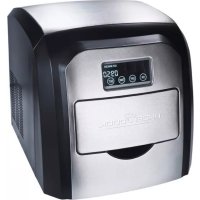
PCEWB 1007 - Ice machine PROFICOOK - Free user manual and instructions
Find the device manual for free PCEWB 1007 PROFICOOK in PDF.



| Product type | Ice cube maker |
| Brand | ProfiCook |
| Model | PCEWB 1007 |
| Power supply | 220-240 V~, 50 Hz |
| Current consumption | 0.68 A |
| Ice cube production | 10-15 kg / 24 h |
| Water tank volume | Approx. 1.8 L |
| Refrigerant | R600a / 23 g |
| Net weight | Approx. 10.85 kg |
| Protection class | I |
| Climate class | T |
| Main functions | Ice making, timer programming, touch screen, full and water shortage detection |
| Included parts | Ice cube maker, filling glass, ice scoop, replacement seal for drain valve |
| Maintenance and cleaning | Clean the housing and interior with a damp cloth and a diluted vinegar solution; clean the ice container with a mild detergent |
| Residual water drainage | Yes, via drain valve if not used for a long time |
| Safety | Use only potable water without additives; wait 2 hours after transport before first use; do not block ventilation openings; do not repair yourself |
| Troubleshooting | Common problems: no power supply, noisy compressor, ice cubes too small or too large, flashing indicator light; detailed solutions in the manual |
| Disposal | Do not dispose of with household waste; take to a municipal recycling center |
Frequently Asked Questions - PCEWB 1007 PROFICOOK
User questions about PCEWB 1007 PROFICOOK
0 question about this device. Answer the ones you know or ask your own.
Ask a new question about this device
Download the instructions for your Ice machine in PDF format for free! Find your manual PCEWB 1007 - PROFICOOK and take your electronic device back in hand. On this page are published all the documents necessary for the use of your device. PCEWB 1007 by PROFICOOK.
USER MANUAL PCEWB 1007 PROFICOOK
Thank you for choosing our product. We hope you will enjoy using the appliance.
Symbols in these Instructions for Use
Important information for your safety is specially marked. It is essential to comply with these instructions in order to avoid accidents and prevent damage to the machine:

WARNING:
This warns you of dangers to your health and indicates possible injury risks.

CAUTION:
This refers to possible hazards to the machine or other objects.

NOTE: This highlights tips and information.
Contents
Overview of the Components ....3
General Notes......40
Special Safety Instructions for this Appliance.....40
Intended Use 42
Supplied Parts 42
Unpacking the Appliance....42
Overview of the Components....42
Operation 42
Location 43
Mains Power Connection ....43
Using the "Touchscreen"......43
Set Time and Timer 43
Check the Timer Setting 43
Activate/Deactivate Timer....43
Making Ice Cubes....43
Stop Ice Cube Production ....43
Indicator Lamp (Ice cube tray full) 44
Indicator Lamp (Water refill) 44
Cleaning and Maintenance 44
Ice Cube Container (6) 44
Casing and Interior 44
Drain Residual Water (4) 44
Storage....45
Troubleshooting....45
Technical Data....45
Disposal 46
Meaning of the "Wheelie Bin" Symbol....46
General Notes
Read the operating instructions carefully before putting the appliance into operation and keep the instructions including the warranty, the receipt and, if possible, the box with the internal packing. If you give this device to other people, please also pass on the operating instructions.
- The appliance is designed exclusively for private use and for the envisaged purpose. This appliance is not fit for commercial use.
- Do not use it outdoors. Keep it away from sources of heat, direct sunlight, humidity (never dip it into any liquid) and sharp edges. Do not use the appliance with wet hands. If the appliance is humid or wet, unplug it immediately.
- When cleaning or putting it away, switch off the appliance and always pull out the plug from the socket (pull the plug itself, not the lead) if the appliance is not being used and remove the attached accessories.
- Do not operate the machine without supervision. If you leave the room you should always turn the device off. Remove the plug from the socket.
- The device and the mains lead have to be checked regularly for signs of damage. If damage is found the device must not be used.
- Use only original spare parts.
- In order to ensure your children's safety, please keep all packaging (plastic bags, boxes, polystyrene etc.) out of their reach.

WARNING:
Do not allow small children to play with the foil.
There is a danger of suffocation!
Special Safety Instructions for this Appliance

WARNING:
- Only use drinking water without additives! Additives remain in the water circuit and contaminate the appliance.

WARNING:
- Do not close or seal the vents in the housing.
- Do not damage the refrigerant circuit.
- In case of interruption of operation: To speed up the defrosting do not use mechanical devices or other means.

CAUTION:
Wait at least 2 hours when using the appliance for the first time or after transport so that the refrigerant can sink. Otherwise the compressor may become damaged.
• Always transport and store the appliance upright.
- Do not place the appliance on or directly next to heat sources such as ovens, radiators, etc.
- Place the appliance on a stable, horizontal, and level surface. Maintain a gap of at least 15 cm to walls or objects.
- Do not try to repair the appliance on your own. Always contact an authorized technician. If the supply cord is damaged, it must be replaced by the manufacturer, its service agent or similarly qualified persons in order to avoid a hazard.
- This appliance can be used by children aged from 8 years and above and persons with reduced physical, sensory or mental capabilities or lack of experience and knowledge if they have been given supervision or instruction concerning use of the appliance in a safe way and understand the hazards involved.
• Children shall not play with the appliance.
- Cleaning and user maintenance shall not be made by children without supervision.
- Follow the instructions in the chapters “Cleaning and Maintenance” and “Disposal”.
Intended Use
It is intended for use in the household and in similar applications, such as:
• In personal kitchen areas in shops, offices and other work areas;
- By guests in hotels, motels and other accommodation;
• In bed and breakfast accommodation;
- In agriculture.
It is not intended for the following use :
• In catering and similar wholesale use.
Supplied Parts
1 Ice cube maker
1 Fill cup (Measuring beaker)
1 Ice shovel
1 Replacement seal for drain valve
Unpacking the Appliance
- Remove the device from its packaging.
- Remove all packaging materials like foils, filling materials, cable holders, and carton packaging.
- Check the scope of deliveries for completeness.
- If there are missing parts or obvious damage, do not use the device. Return it to your retailer immediately.

NOTE:
There may still be dust or production remains on the device. We recommend that you clean the device as described under "Cleaning and Maintenance".
Overview of the Components
Figure A
1 Housing
2 Water tray (inside the appliance)
3 Ventilation openings
4 On/off switch
5 Residual water drain valve
6 Water tank (inside the appliance)
7 Ice cube container
8 Display and touch screen ("Touchscreen" interface)
Figure B
| Shown on Display | Meaning |
| ON Start | making ice cubes |
| OFF Interrupt / finish making ice cubes | |
| TIME Time / Show / confirm timer | |
| SET | Time / Change / activate / deactivate timer |
TIME  | Programmed switch-on time |
TIME  | Programmed switch-off time |
 | Ice cube tray full |
 | Water refill |
 | Rotating display: Ice cube being made Flashing display: Fault |
Operation

CAUTION:
Please observe a waiting period of 2 hours before initial operation and after moving the appliance for the refrigerant to settle; otherwise the compressor can be damaged.
Location
- Place the device on a flat, water-resistant surface.
- Make sure that the placement allows sufficient air circulation for the appliance.
Mains Power Connection
- Be sure the voltage of the appliance (rating plate) corresponds with the mains voltage before connecting to mains power supply.
- Ensure that the on / off switch (4) on the back of the appliance is on the "O" (off) setting.
- Connect the appliance to a properly installed wall outlet.
- Switch the appliance on using the On / Off switch. A signal tone will sound.
Using the "Touchscreen"
The appliance is operated through the touchscreen. Touch the displayed buttons ON/OFF/TIME/SET, gently with your finger to execute the functions.
Set Time and Timer
i NOTE:
- Execute the settings in rapid succession and within a few seconds. If you do not enter anything for 3 seconds, the appliance will automatically cancel input mode. The times set thus far are saved.
- You can only program the timer through setting the time.
- Touch TIME on the display. You are now in input mode. The display to be set will flash.
Sequence for setting the time:
- current hour
- current minute
- TIME ON Switch-on hour
- TIME ON Switch-on minute
- TIME OFF Switch-off hour
- TIME OFF Switch-off minute
Setting the time:
- To change the time, touch SET once or several times.
• Always confirm your setting with TIME.
Check the Timer Setting
If you want to display the programmed switch-on and switch-off time, touch TIME several times in succession.
Activate/Deactivate Timer
- Touch SET. The display is activated:
-
TIME ON
-
TIME OFF
-
TIME and TIME

• To deactivate the timer, touch SET again.
Making Ice Cubes
i NOTE:
- For hygienic reasons do not use the ice cubes from the first cycle.
- The first few ice cubes will be small depending on the water temperature and ambient temperature. The ice cubes will only grow larger in the following cycle.
- For best results, aim for a water temperature of between 7 °C and 20 °C as well as an ambient temperature of between 16 °C and 25 °C.
- Due to fast freezing the ice cubes can look "milky". This is the air trapped in the water and does not influence the quality of the ice cubes.
-
If you want clear ice cubes, use chilled drinking water which has firstly been boiled.
-
Refer to figure A on page 3. Pull the ice cube tray about half way.
- Using the supplied measuring beaker as a guide, pour at least 0.8 ℓ drinking water, to a maximum of 1.8 ℓ, into the water tank through the ice cube tray.
i NOTE:
- You can also pull out the ice cube tray completely. By doing so you pour the drinking water directly into the water tank.
-
The MAX mark can be found on the water tank.
-
Close the ice cube tray.
-
Start ice cube production by touching ON on the display. The indicator lamp ⚙ rotates. An ice cube making cycle lasts between 6 and 18 minutes. Keep the ice cube tray closed during ice cube making.
i NOTE:
If you have activated the switch-on time beforehand, manual start will not function. The appliance starts automatically with the ice cube making.
Stop Ice Cube Production
Touch OFF on the display to stop ice cube production.
i NOTE:
- If you have activated the switch-off time beforehand, the appliance automatically finishes ice cube making.
- If operation is manually interrupted, water which is no longer needed is fed back to the water tank. Only then will the appliance stop. Half-finished ice cubes remain suspended on the cooling rods. As soon as it is sufficiently thawed, it will fall off and drop into the ice cube tray.
Indicator Lamp 📋 (Ice cube tray full)
The temperature sensor stops the ice cube production as soon as the ice cube container is full. The indicator lamp lights up and a beep tone sounds.
i NOTE:
When removing the ice cube tray, some water will drip through the holes onto the floor.
- Remove the ice cubes with the supplied ice cube scoop.
- The indicator lamp 📌 turns off and a few moments later ice cube production starts again.
Indicator Lamp 📄 (Water refill)
The indicator lamp turns on if the water tank is nearly empty and a beep tone sounds. Ice cube production is automatically halted.
- Empty the ice cube tray.
- Refill with potable water as described in chapter "Make ice cubes". Since there may still be water in the appliance, check the MAX mark in the water tank.
- Close the ice cube tray.
- Touch ON on the display, to restart ice cube production. The indicator lamp 📋 turns off.
Cleaning and Maintenance
WARNING:
- Switch off the device before cleaning and disconnect the mains plug.
- Never immerse the appliance in water to clean it. Doing so may lead to electric shock or fire.
CAUTION:
- Do not use wire brushes or other abrasive implements.
- Do not use harsh or abrasive cleaning agents.
- Do not use chemicals, acids, petrol or oil products.
i NOTE:
- For hygienic reasons exchange the water in the tank after 24 hours.
- Remove the ice cube tray after use. If the water tank remains open no mould or bacteria can form.
Ice Cube Container (6)
Remove the ice cube container and clean it with a mild detergent under running warm water.
Casing and Interior
- Clean casing and interior with a damp cloth.
- Use a diluted solution of vinegar and water.
Drain Residual Water (4)
Drain the residual water if the appliance is not in use for a longer period of time. Rest the appliance on a table edge. Hold a bowl under the residual water drain valve.
- Turn the residual water drain valve anti-clockwise to drain off the rest of the water.
- Close the residual water drain valve after the residual water has been drained.
Storage
- We recommend that you keep the appliance in the original packaging if you do not intend using it for long periods.
• Always keep the appliance out of the reach of children in a dry, well-ventilated place.
Troubleshooting
| Problem Possible Cause Solution | ||
| No function. No power | supply. Use the on / off switch (4) to turn | the applianceon. |
| Test the socket with another appliance. | ||
| Plug in the mains plug correctly. | ||
| Check the main circuit breaker. | ||
| The appliance is faulty. Contact our service center or a specialist. | ||
| Compressor noisy. Mains power supply too low. Turn the appliance off and check the mains power supply. | ||
| Indicator lamp flashes. | Water refill. Refill water | → “Making Ice Cubes”. |
| The ice cubes are too small. | Surrounding temperature is too high. Place the appliance in a cooler location.Make sure there is adequate air circulation around the appliance. | |
| The water temperature is too high. | Stop the ice production. Drain some water and refill cold water (max. 20 °C). | |
| Smaller ice cubes are normal during the first production cycles. | ||
| Ice cubes are too large and stick together. | Water temperature or ambient temperature too low. | Stop ice cube production.Drain off some water and refill with lukewarm water (max. 35 °C). |
| The symbol flashes. | The water tray is blocked by oversized ice cubes. | Use the on / off switch (4) to turn off the appliance. Wait until the ice cubes are loosened.Switch the appliance on again. Use ON to restart. |
Technical Data
Model: PC-EWB 1007
Voltage supply: 220 - 240 V\~, 50 Hz
Power input: 0.68A
Ice cube production: 10-15 kg/24 Std.
Water tank volume: .... approx. 1.8 Liters
Refrigerant: R600a/23 g
Propellant: C5H10
Protection class: I
Climate class: T
Net weight: .... approx. 10.85 kg
The right to make technical and design modifications in the course of continuous product development remains reserved.
This device has been tested according to all relevant current CE guidelines, such as electromagnetic compatibility and low voltage directives, and has been constructed in accordance with the latest safety regulations.
Disposal
Meaning of the "Wheelie Bin" Symbol
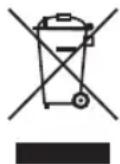
The appliance contains a flammable refrigerant. The following instructions must be strictly observed.
Take care of our environment, do not dispose of electrical appliances via the household waste.
Dispose of obsolete or defective electrical appliances via municipal collection points.
Your municipality provides you with information about collecting points.
Instrukcja obsługi
CTC Clatronic Sp. z o.o