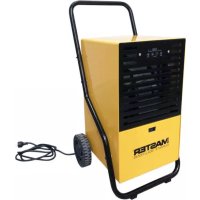
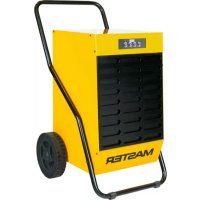
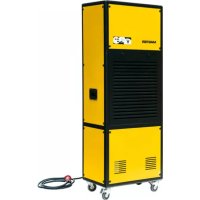
DH 711 - Humidifier Master - Free user manual and instructions
Find the device manual for free DH 711 Master in PDF.



| Product type | Dehumidifier |
| Brand | Master |
| Model | DH 711 |
| Power supply | 230 V ~ 50 Hz |
| Power consumption | 250 W (at 27°C, 60% RH) |
| Dehumidification capacity | 10 L/day (at 30°C, 80% RH) |
| Refrigerant | R-134a, 100 g (GWP = 1300) |
| Operating temperature range | 5 °C to 35 °C |
| Dimensions (L × D × H) | 27 × 33 × 50 cm |
| Net weight | 15 kg |
| Water tank | Removable, with level indicator and automatic shut-off when full |
| Continuous drainage | Possible via hose (diameter 6 mm) |
| Filters | Dust filter and activated carbon filter (washable or replaceable) |
| Fan speeds | 2 speeds: High (Hi) and Low (Lo) |
| Adjustable hygrostat | Yes, with MAX position for continuous operation |
| Indicator lights | Power and tank full (red light) |
| Safety | Automatic shut-off when tank is full, tilt protection (wait 1 hour after transport) |
| Maintenance and cleaning | Wipe the body with a soft cloth; clean the filters regularly |
| Recommended uses | Basements, cellars, laundry rooms, garages, bathrooms, etc. |
Frequently Asked Questions - DH 711 Master
User questions about DH 711 Master
0 question about this device. Answer the ones you know or ask your own.
Ask a new question about this device
Download the instructions for your Humidifier in PDF format for free! Find your manual DH 711 - Master and take your electronic device back in hand. On this page are published all the documents necessary for the use of your device. DH 711 by Master.
USER MANUAL DH 711 Master
BG N3CuyABAHABb3dYX NHCTPyKlIy 3A yNOTPEBA
CZ ODVLHCOVAC VZDUCHU NAVOD K OBSLUZE
YcTpoIcTBOTO He N3BbPwBa HnKaKBa DeHocT.
He e Jn qntbpa 3ambpceH?
He ca nBxoJa 3a BCMyKBaHe Ha Bb3DyX IIN N3XoJa 3a Bb3DyX 6nOKupaHn?
He e Jn BnaXHocTtHa Bb3dyxA DoCTaTbYHO HnCKa?
EeKTHBHOCTTa Ha ycTPOIcTBOTe MaJka.
- Ima Jn OTBopeHn IpO3OpuN vBpaTu?
- HЯма Ли ИЗTOчнК reHepираш ВИСОКA ВлжноCT Ha Вьзduixa?
BentnlaTopa Ha ypea He pa6oTu.
He e Jn 6Jokpuan qnlTbpa?
Tbpe cHJen H yM.
- YcTpoIcTBOTe e HecTa6nHNo I e NpDdaJeHO Ha Bn6paun?
- PaBHa Iи e NOBbPxHOCCTTa nOД ypeda?
He ce onnBaTe camocToTeJHo da peMOHTnpaTe nn pa3rno6BaTe yCTpoiCTBOTo.
PODEKOVÁNÍ!
OLULISED OHUTUSJUHISED
DIAGNOSTICAR Y ELIMINAR LOS PROBLEMAS
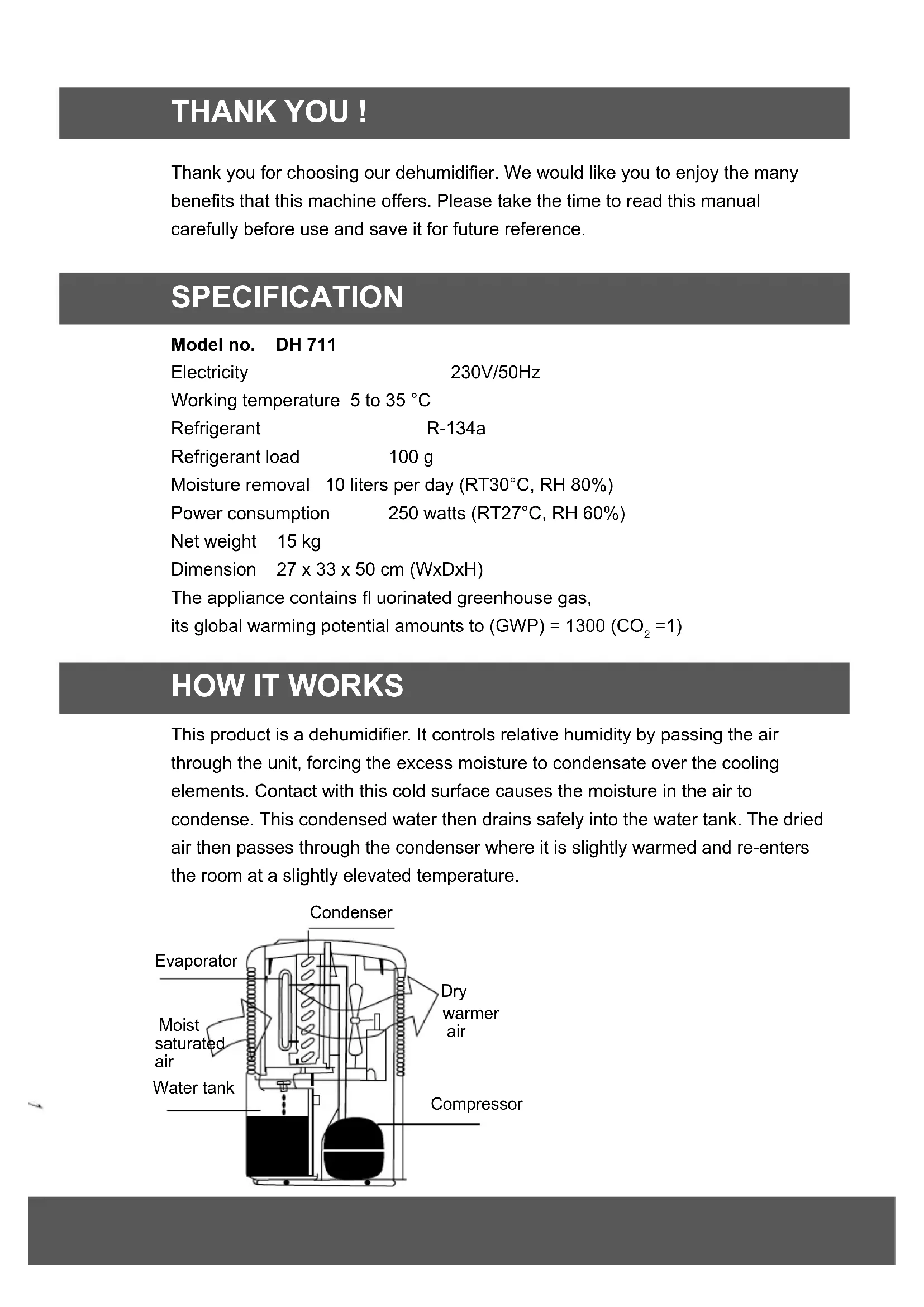
Thank you for choosing our dehumidifier. We would like you to enjoy the many benefits that this machine offers. Please take the time to read this manual carefully before use and save it for future reference.
SPECIFICATION
Model no. DH 711
Electricity
230V/50Hz
Working temperature 5 to 35^
Refrigerant
R-134a
Refrigerant load
100g
Moisture removal
10 liters per day (RT30°C, RH 80%)
Power consumption
250 watts (RT27°C, RH 60%)
Net weight 15 kg
Dimension
27× 33× 50cm WxDxH
The appliance contains fluorinated greenhouse gas,
its global warming potential amounts to (GWP) = 1300(CO_2 = 1)
HOW IT WORKS
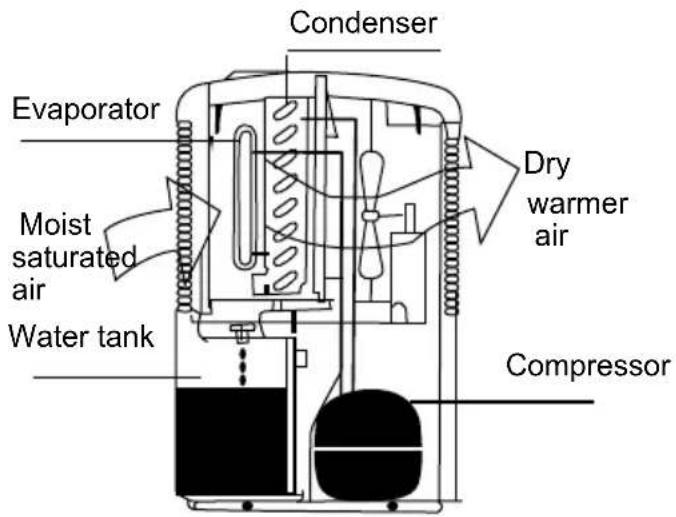
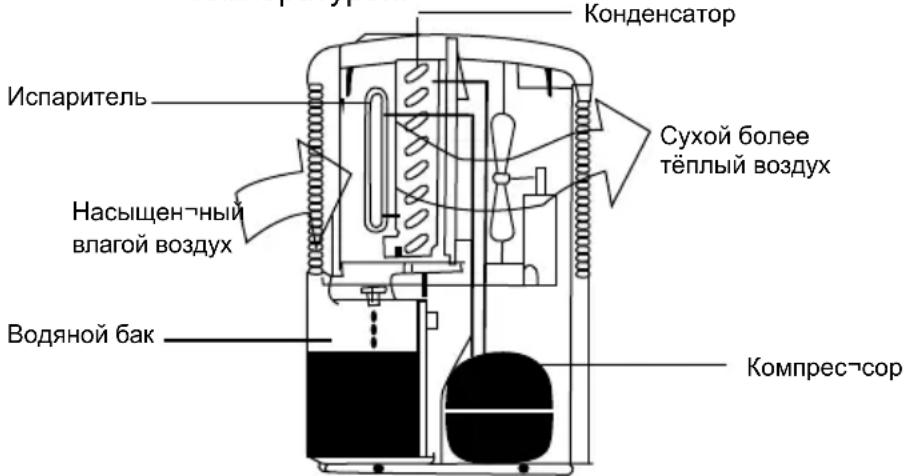
This product is a dehumidifier. It controls relative humidity by passing the air through the unit, forcing the excess moisture to condensate over the cooling elements. Contact with this cold surface causes the moisture in the air to condense. This condensed water then drains safely into the water tank. The dried air then passes through the condenser where it is slightly warmed and re-enters the room at a slightly elevated temperature.
WHERE TO USE
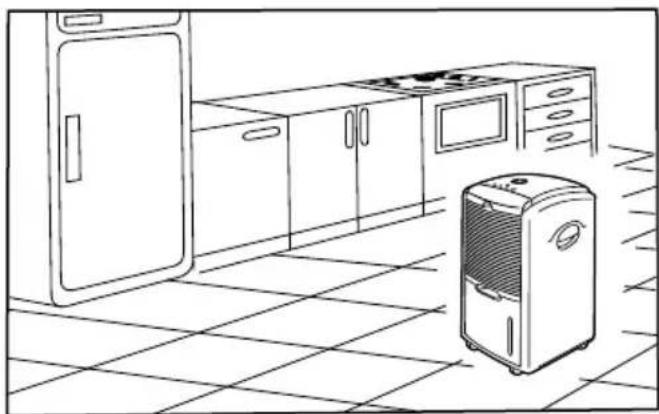
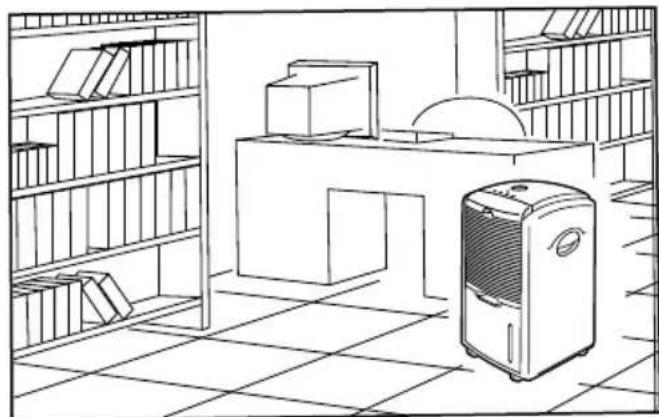
This is a dehumidifier designed to remove humidity from the air, creating a healthy and comfortable environment. It is suitable for use in BASEMENTS, CELLARS, STORAGE ROOMS, CLOSETS, UTILITY ROOM, KITCHENS, LIBRARIES, GALLERIES, VAULTS, COMPUTER ROOMS, ARCHIVES, LIVING ROOMS, BEDROOMS ...
IMPORTANT SAFEGUARDS
- Always keep the unit in vertical position.
- Leave the unit to stand for one hour before connecting to the mains supply after transport or when it has been tilted (e.g. during cleaning).
- Allow a free space of 15cm around the unit.
- Keep all foreign objects away from the air intake or output openings.
- Keep the unit away from heaters or other heat-producing equipment.
- Never pour or spray water over the unit.
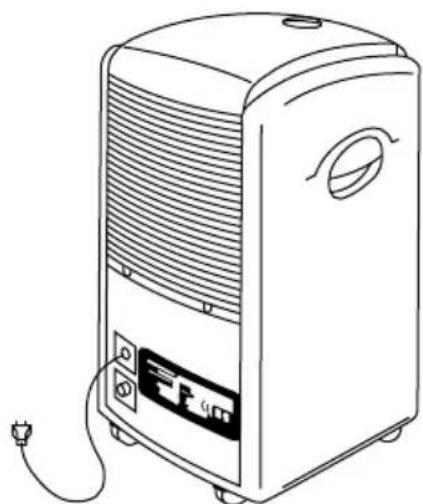
The mains supply must conform with the specification shown on the rating label.
-
Never use the plug to start and stop the unit. Always use switch on the control panel.
-
Before moving the unit, first switch off, then unplug and empty the water tank.
-
Clean the air filter if it becomes contaminated: the unit is most effective when the fi Iter is clean.
-
Don't use bug sprays or other flammable cleaners on the unit.
-
When the unit breaks down, please turn the unit off, and then pull the plug.
-
If the supply cord is damaged, it must be replaced by an approved service representative or a similar qualified person in order to avoid a hazard.
-
This appliance is not intended for use by persons (including children) with reduced physical, sensory or mental capabilities, or lack of experience and knowledge, unless they have been given supervision or instruction concerning use of the appliance by a person responsible for their safety. Children should be supervised to ensure that they do not play with the appliance.
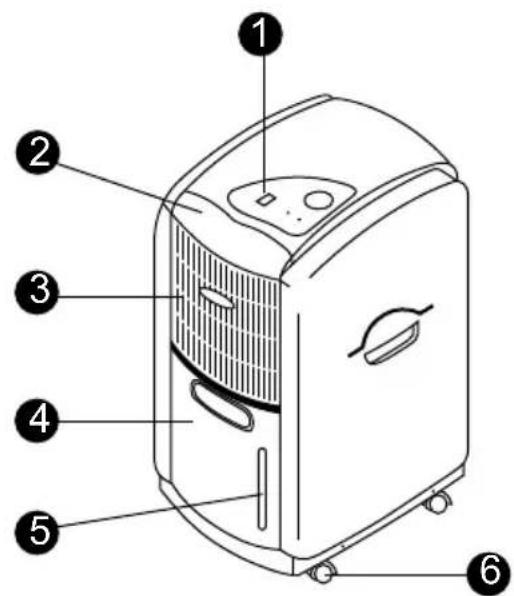
PARTS IDENTIFICATION: DH 711
Body
- Control panel
2.Filter - Air vent
- Water tank
- Water level indicator
- Caster
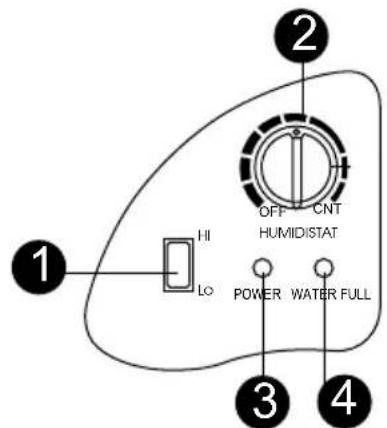
Control panel
- Speed switch
- Humidity controller
- Power indicator
- Water full indicator
OPERATION
Plug the unit into a correct mains socket.
(Pleasesereferto thereatinglabelattherearsideoftheunit.)
The power indicator should be on now.
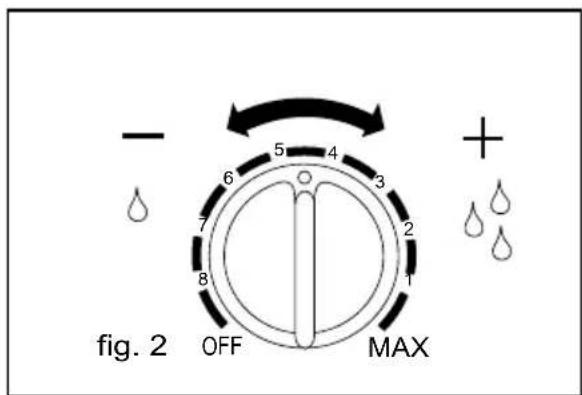
- Set the humidistat to required humidity level or 'MAX' for continuous working.
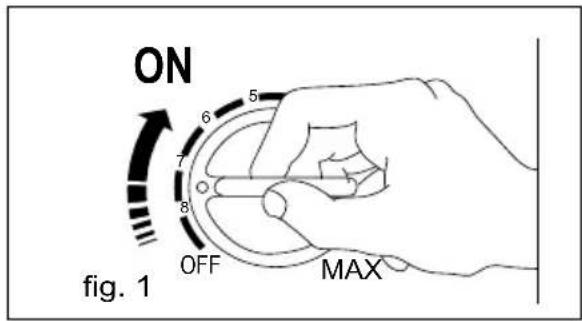
- The intensity of the humidity extraction is increased clockwise.
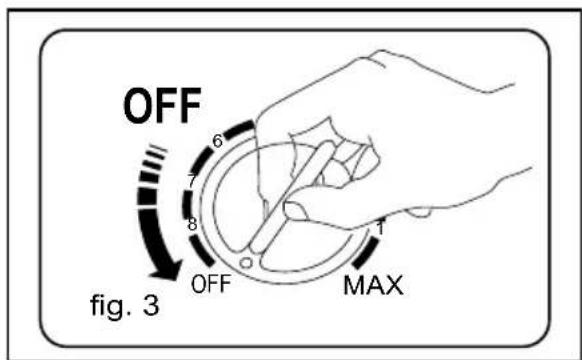
- To turn off the unit, turn the switch to position 'OFF'.
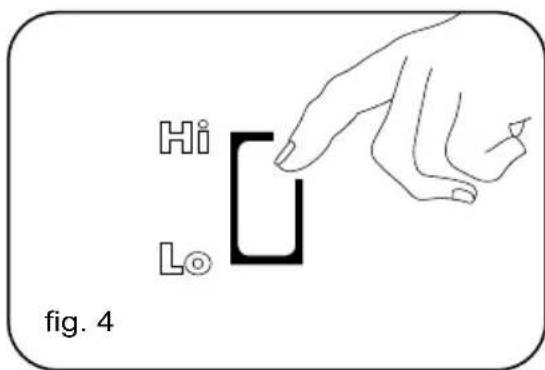
- This dehumidifier features a twin speed fan. In normal condiiton, set the speed to 'Hi'. Once you need quieter operation, set the speed to 'Lo'.
EMPTING THE WATER TANK
When the water tank is full, the unit will switch off automatically and the 'Water Full' indicator will turn into red. At this time, please empty the water as follow:
- Grasp the attached handle, pull the water tank slightly up and then pull lightly out for easy removal.
- After the water is emptied, push the water tank back into space.
Note! If the tank doesn't position well, the 'Water Full' indicator will remain in red light.
Optional: For long time operation, please refer to the following:
- Remove the water cap from the rear cabinet. Connect the drain hole A with a water tube of diameter 6 mm. (fig. 4, 5)
- Pull out the water tank, put the water cap of the rear cabinet on the drain hole B found in the compartment. (fig. 6)
- Ensure the water will always drain away freely and the hose will remain in place.
- Put back the water tank. (fig. 7)
- Note: In very cold weather conditions, precautions should be taken to prevent the drainage pipe from freezing.
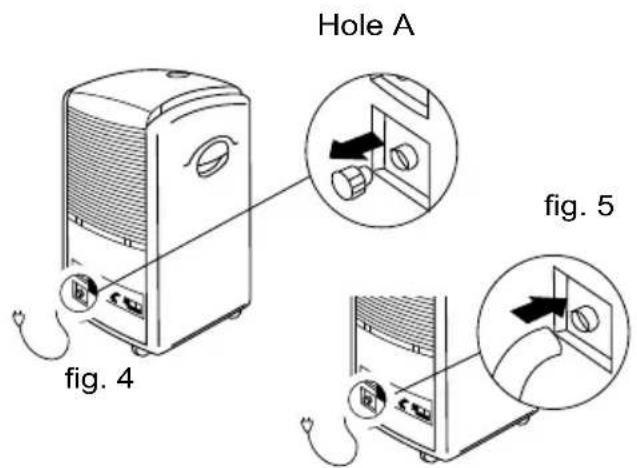
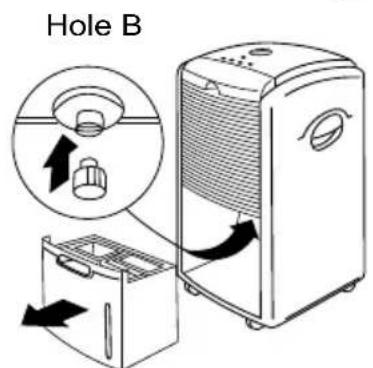
fig. 6
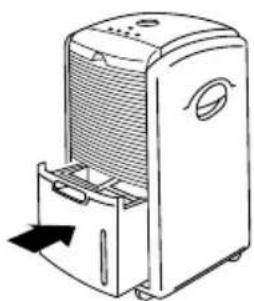
fig. 7
MAINTENANCE
Always unplug the unit from the mains before carrying out any maintenance or cleaning of the unit.
CLEANING THE BODY
- Use soft cloth to wipe the unit clean.
- Don't ever use volatile chemicals, gasoline, detergents, chemically treated cloths, or other cleansing solutions. These all could possibly hurt the cabinet.
CLEANING THE AIR FILTER
This dehumidifier is equipped with 2 filters:
- Anti-dust filter
- Activated carbon filter (for capturing the particles of dust suspended in the air and preventing the production of bacteria.)
ANTI-DUST FILTER
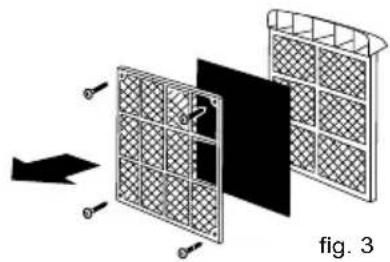
- Extract the filter holder, remove the active carbon filter. (fig. 1 & fig. 3)
- Use a vacuum cleaner or tap the filter lightly for easy cleaning. If the filter is particularly dirty, use warm water with a small amount of medium strength. (fig. 2)
- Make sure the filter is completely dry before replacing.
- Do not expose the filter to sunlight.
ACTIVE CARBON FITLER
The active carbon filter placed under the
anti-dust filter is not washable. Its life span is
variable and depends on the ambient conditions where the unit is used. The filter should be checked periodically and replaced if necessary.
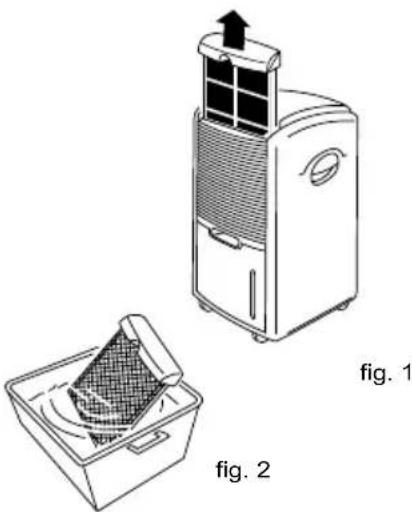
fig.1
STORAGE
If not use the unit for an extended period of time. Please
- Turing the unit off, unplug and tidy AC cord.
- Completely empty the water tank and wipe it clean.
- Clean the ANTI-DUST filter.
- Cover the unit and store where it will not receive direct sunlight.
PROBLEM SHOOTING
Before calling for service, check the following:
The unit doesn't run
- Is the unit plugged in?
- Is house electrical circuit on?
Is the water full indicator in red?
(If so, the water is full or the tank doesn't position well.)
Is the room temperature below 5^ ?
The unit seems to do nothing.
Is the filter dusty, contaminated?
Is the air intake or output blocked up?
Is the room humidity already quite low?
The unit seems to do little.
- Are too many windows or doors open?
- Is there something in the room producing lots of humidity?
The unit's fan doesn't seem to be revolving.
Is the filter blocked up?
Too noisy
- Is the unit positioned unevenly so as to create vibration?
Is the floor underneath the unit uneven?
NEVER TRY TO REPAIR OR DISMANTLE THE PRODUCT YOURSELF.
ZAHVALJUJEMO VAM!
PROBLEMI, CAUSE, PROVVEDIMENTI
Apparatet stoyer for mye
YdaJIeHHe BnaJXHOCTn 10IITpOBBdeHb(OT 30^ ,OB 80%
IopTe6JIeMa MoUHocTb 250BT (OT 27^ OB 60%
YnCTbI BEC 15Kr
Pa3Mepbl 27x33x50cm(UxΓxB)
* 3TN daHHbIe MOryT OTnNuYaTbcr No TEXHnueckm npuHnAm.
Дя 6олee BBICOKOТоHOCTN CM. nacnopTHyTO Ta6nUky Ha yCTpoICTBe
YctaHObKa cOePjNt TOpNCbI TeNnHbI r3,ero Ko3ΦnCneHT
rno6aIbHoro nToenJIeHnA coCTaBnAeT (GWP) = 1300 (CO_2 = 1)
KAK PAEBOTAET YCTPOICTBO
3TO yCTpoIcTBO YBJIeTcOcUHInTeJIeM BO3dYxa. YCTpoIcTBo ynpaBJIeT OTHOCHTbHO BnaxKHOCTbIO, npOnyckA Bo3dYx Upe3 c6a N 3actabJra
I3JIuHIOBbAaXHOCTb KOHDeHCnPOBaTbcra Ha OXJaIOUxN 3JeMeHTax.
KoHTaKT C XOJIoHoi NOBepxHOCTbIO npNBOiT K KOHDeHcauIN CoepeXaueiCra
B BO3dyxE BnA. 3aTeM nOlyuHBmnc KOnHeHcT CTeKaET B CneuaIbHbI
BODHO6aK.OcyuHbI BO3dyX npoxoNT 3aTeM uepe3 KOHdeHcTOp, rDe OH CnERka NODorpeBaetcN BbIXoNT n3 yCTpOiCTBa C HeCKoJIbKO NOBbIeHHoH
TempepaTypo.
Ipeed Tem, KaK BbI3BaTb peMOHTbI nepcoHaJI npOBepbTe cJeDyUoee:
YcTpoIcTBo He pa6oTaE
- YCTPOINCTBO He BKJIHOUEHO B Cetb
- Поберытей салчпснряжени влелкторецдома
- INДИКATOP nepenONHeHЯ BOdIHO 6aKa CBETTCa KpaCHbIM UBeTOM (Ecni Da, To IIn6o 6ak nOJIhB, II6o OH HeNpaBnIbHO BCTaBJeH B yCTpoIcTBO
TeMnepaTpya B nOmeueHn HnKe 5^
Noxoxe, yTo yCTpoNCTBO He BbINONHReT CBOX qyHKn
-Фильтпьлбн布局ИЗгязHHы
- PpOBeBpTe, He 6IoknpoBaH nI B03dyxo3a6Op
BnaXHoCTb B NOMeUeHn yKe Ha IOBOJbHO Hn3KOM yPOBHe
Noxoxe, yTo 3ΦΦeKTHBHOCTb pa6Otbl ycTpoIcTBA oYeHb Hn3KaJ.
- OTkpbITo CnHsKOM MHOr DBepe Nn OKOH
BnomeHn HaxoNTcMHO yCTPOINCTB, CNOco6CTByIOxN NOBbIeHNIO BnaXHOCTN BO3dyxa.
Noxoxe, yTo BeHTnIaTOp ycTpOuCTb a He BpaauaTeTc.
DÔLEŽITÉ BEZP EČNOSTné PO KYNY
10 nɪtpiB Ha deHb (RT 30°C, RH 80%)
250 Bt (RT 27°C, RH 60%)
JaKIO npncTpiH He BnKOpNCTOBycTbC npOTaROM TpNbAHorO yacy, cnId:
Bumkhny npncptpi, BiKIOHTN Ioro BiD MepeXi XnBHeHn i NOUcTtN npoBi3MiHHOrO cTpymy.
- Bnntn 3 pe3epByapa BCIO BODy i Bnteptn Ioro.
-ПочирTN ПРOTИПЛOBИФДЛБТР.
- Hakpintu npictpi i nomicttu nofo y mici, 3axnuehomy BiD dii npramoro coHraHOro npomHHa.
BnBJIeHHI I yCyHeHHH HecnPABHOCTeH
IepH hIX 3BepHyTnca Do cepBicHO ueHTpy, cIiD nepeBipNTn HacTynnHi MOxJIbI npuHH HeCnpaBHOCTeH:
PnnctpiH He BMkaetbca
PnnctpiH He BnKohye KoDHOJii.
- Φльър зашиленьй або зашиденьи?
Bxià6o Bnxid noBITpr3a6nokOBaHi?
BoNoricb npMmIeHHBKe IOCTaTHbO Hn3bKa?
Hn3bka eΦeKTHBHiCt bpo60Tu npucTpoU.
- BiDyuHeNo 3aHaITo 6aRaTo BIKoN Ta DBepei?
- Y npimiuHHi npaue npicpi, knn cnpuHHoe Bncoky BoNorictb?
BentnlaTOp npncptpo He o6epTaecbca.
- Φиьтр 3a6лokobанн?
3aHaITo BnCOKn pIBeHb IyMy.
- Hectiike noIIOKeHHn pncToH, 0o BnKInKae KOnBaHH.
-ПдлoraHaMicui po3MiueHnnpictpoipipha?
3a6bOpHeNo 3dIiChHOBaTH cAmocTiHi cnpo6n peMOHTy a6o dEmoHTaxy npncTpoIO
BG-NxBpnaHe Ha BaaHr cTap ype
KoratoToaCNmboHn3aDpaKaHaKaΦa36oknyke nocTaBHeBbpyx DaedHO Hndelne, ToBa 03HaHabA, He HndelneTeNo nanaTnpa Pa7popeBinte Ha EbponeckDaHpeKTHBa 2002/96/EC.
- BcNn enektpueckn n enekponnn n3dennr Tp8ba da ce n3xbprrt ot dneH0 onbnte 0ntabu, b onpeeneHH 3a ceta cbopjkeHH, noocohn O dtbpkabHnte mmeCTHNE oprann.
- PpaBnHTo 3X6bpnaHe Ha Baun ypeI ne NOMORHe 3a npeDorBpaTBAHe Ha Bb3MOxH HErAraHBn NocJeMn 3a OKONHATA CpeJa Y OBeEwKOTo 3dpabe
-3a no-noop6ha HnΦopmaa 3a nXbpynHTo Ha BaaH CTap ypeD ce o6bPheTe KbM Baata O6hHa, cnyk6Bte 3a cb6puane Ha OTnaDbu nn Mm Mara3Ha, OTkbDEto CTE Kynnn CBOy np
CZ - Likvidace staredho produktu
GB - Disposal of your old product
You product is designed and manufactured with high quality materials and components, which can be recycled and reused.
- When this crossed-out wheeled bin symbol is attached to a product it means the product is covered by the European Directive 2002/96/EC.
- Please inform yourself about the local separate collection system for electrical and electronic products.
- Please act according to your local rules and do not dispose of your old product with your normal household waste. The correct disposal of your old product will help prevent potential negative
GR-Aroppn rou raoiou nplovroc
To npiov oac eivai oxediaouevo kai kataokeuaouevo anu kai ouotankauunrnci tointac. ta onia umopoov va avakukawovkai vnaavaxnaiouoov.
-OTav eva troov unaoe to ouBolo rou pooxofoou diaIauuuvou kadoa anopuawv. onuaivei on troiov kalotar aotnv EupmaKn 02/96/EC
- Papakaoué EvneepwOeite oxetikä μe To exuipto totiko ouatnuaouaotnc nAekptikovkai nAektpovikv Tpojovtow.
- Ppapakaoue npae touc tomikouk kavoviaouk kui np atoppinertet ta talai npolovta oac jie oikia atoppmuata. H owat n atoppyn twv malaw npolovnu 8a Bonheoi anr atorponn apnyikow ouvetienov oto pbiobov kui ny aepwunu uia
HU-Regl termekeneke ldobasa
GB EC DECLARATION OF CONFORMITY
HR EC DEKLARACIJA O SUKLADNOSTI
HU EK MEGFELELOSEGI NYILATKOZAT
PL DEKLARCAJ ZGODNOSCI WE
RO DECLARATIA DE CONFORMITATE UE
RU DEKJIAPAUN COOTBETCTBNEC
SE EU's STANDARDEKLARIATION
SIESIZJAVAO SKLADNOSTI
SK ES VYHLÁSENTE O SULADE
UAJEKJIAPAIIBIIOBIDHOCTIC
2006/95/EC, 2004/108/EC
BG H Hopm CZ A normami DE und Normen DK og standarder EE ja normidele ES y las normatives FI ja nomit FR et aux normes
GB and norms HR i standarde HU es szabvanyoknak IT e norme LT ir nomas LV un normam NL en normen NO og normer
PL i normy RO si normele cerute RU n hopm SE och normer SI in normami SK a normami UA i hopm
EN 60335-1/A13:2008, EN 62233 :2008, EN 60335-2-40/A1 :2006
EN 55014-1 :2000/A2 :2002, EN 55014-2 :1997/A1 :2001
EN 61000-3-2 :2000, EN 61000-3-3:1995/A1 :2001
MASTER
C
Gadki: 12.04.2011
4512-008/11
Stefano Verani
CEO MCS Group
MCS Italy S.p.A.
Via Tione, 12
37010 Pastrengo,
(VR) Italy
MCS Central Europe Sp. z o.o.
ul. Magazynowa 5a
62-023 Gadjki, Poland
MCS Russia LLC
ul. Transportnaya 22 v1 2,
142802, Stupino, Moscow region, Russia
MCS China LTD
Unit A1, No. 1515, Jinshao Rd.
Baoshang Industrial Zone,
Shanghai, 200949, China
www.mcsgl.com

- YcTpoIcTBOTO He N3BbPwBa HnKaKBa DeHocT.
- EeKTHBHOCTTa Ha ycTPOIcTBOTe MaJka.
- BentnlaTopa Ha ypea He pa6oTu.
- Tbpe cHJen H yM.
- PODEKOVÁNÍ!
- OLULISED OHUTUSJUHISED
- DIAGNOSTICAR Y ELIMINAR LOS PROBLEMAS
- SPECIFICATION
- HOW IT WORKS
- WHERE TO USE
- IMPORTANT SAFEGUARDS
- PARTS IDENTIFICATION: DH 711
- Body
- Control panel
- OPERATION
- EMPTING THE WATER TANK
- Optional: For long time operation, please refer to the following:
- MAINTENANCE
- CLEANING THE BODY
- CLEANING THE AIR FILTER
- ANTI-DUST FILTER
- ACTIVE CARBON FITLER
- STORAGE
- PROBLEM SHOOTING
- The unit doesn't run
- The unit seems to do nothing.
- The unit seems to do little.
- The unit's fan doesn't seem to be revolving.
- Too noisy
- ZAHVALJUJEMO VAM!
- PROBLEMI, CAUSE, PROVVEDIMENTI
- Apparatet stoyer for mye
- KAK PAEBOTAET YCTPOICTBO
- YcTpoIcTBo He pa6oTaE
- Noxoxe, yTo yCTpoNCTBO He BbINONHReT CBOX qyHKn
- Noxoxe, yTo 3ΦΦeKTHBHOCTb pa6Otbl ycTpoIcTBA oYeHb Hn3KaJ.
- Noxoxe, yTo BeHTnIaTOp ycTpOuCTb a He BpaauaTeTc.
- DÔLEŽITÉ BEZP EČNOSTné PO KYNY
- BnBJIeHHI I yCyHeHHH HecnPABHOCTeH
- PnnctpiH He BMkaetbca
- PnnctpiH He BnKohye KoDHOJii.
- Hn3bka eΦeKTHBHiCt bpo60Tu npucTpoU.
- BentnlaTOp npncptpo He o6epTaecbca.
- 3aHaITo BnCOKn pIBeHb IyMy.
- BG-NxBpnaHe Ha BaaHr cTap ype
- CZ - Likvidace staredho produktu
- GB - Disposal of your old product
- GR-Aroppn rou raoiou nplovroc
- HU-Regl termekeneke ldobasa
- 2006/95/EC, 2004/108/EC
- MCS Italy S.p.A.
- MCS Central Europe Sp. z o.o.
- MCS Russia LLC
- MCS China LTD
Brand : Master
Model : DH 711
Category : Humidifier