D912S Libra+ - Doorbells FRIEDLAND - Free user manual and instructions
Find the device manual for free D912S Libra+ FRIEDLAND in PDF.



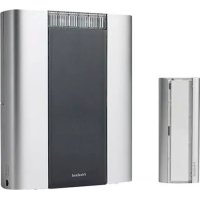
| Product Type | Wireless doorbell with chime and push button |
| Brand | Friedland |
| Model | D912S Libra+ |
| Chime Power Supply | 3 LR6 (AA) alkaline batteries |
| Push Button Power Supply | 1 CR2032 button cell battery |
| Battery Life (Chime) | Approximately 12 months (5 activations/day) |
| Battery Life (Button) | Approximately 18 months (5 activations/day) |
| Range without Obstacles | 100 meters |
| Radio Frequency | 868 MHz |
| Sound Level | 80 dBA at 1 meter (typical) |
| Number of Tunes | Multiple programmable melodies |
| Visual Indicators | 3 icons (front door, back door, alert) |
| Volume Adjustment | Wheel behind the sliding window |
| Protection Rating (Chime) | IP3x |
| Protection Rating (Button) | IP55 |
| Operating Temperature (Chime) | 0 °C to 40 °C |
| Operating Temperature (Button) | -10 °C to 40 °C |
| Warranty | 2 years |
| Package Contents | Chime, wall bracket, push button with CR2032 battery, chime wire, screws, wall plugs, adhesive bracket |
| Converter Function | Compatible with wired push buttons, door/window contacts, infrared detectors |
Frequently Asked Questions - D912S Libra+ FRIEDLAND
User questions about D912S Libra+ FRIEDLAND
0 question about this device. Answer the ones you know or ask your own.
Ask a new question about this device
Download the instructions for your Doorbells in PDF format for free! Find your manual D912S Libra+ - FRIEDLAND and take your electronic device back in hand. On this page are published all the documents necessary for the use of your device. D912S Libra+ by FRIEDLAND.
USER MANUAL D912S Libra+ FRIEDLAND
D912S Libra+ 100m portable chime with Push/Converter
Bedienungsanleitung
Libra + 100m Portable chime with push/converter
Installation and Use
Checking pack contents.. .Pg.2
Safety.
Quick start.
Open the bell push/converter.. .Pg.3
Fit the push battery.
Fit the chime battery.
Sliding window . Pg. 4
Use of icons . Pg. 5
Programming procedures
Recall function . Pg. 6
Chime sounds
Mount bell push
Chime position
Push/Converter function . Pg. 7
Typical connections . Pg. 8
Troubleshooting. Pg. 9
Specifications.. 11
Disposal and recycling.
Guarantee.
Declaration
Libra + 100m Portable chime with push/converter
Thank you for choosing this Friedland product. Please use the following instructions to ensure correct installation and use. Keep these notes in a safe place for future reference.
Checking pack contents
Unpack your chime kit and identify the following parts:
Chime
- Chime bracket
- Bell push/converter
CR2032 battery for bell push
- 2 x fixing screws for push
- Bell wire (for use with a wired push)
- 2 × fixing screws for chime
- 2 × wall plugs
Adhesive pad
You will need:
A 4mm cross-head screwdriver
A small flat bladed screwdriver
A 6mm masonry drill
- 3 x LR6 'AA' Alkaline batteries
Safety
Before proceeding with the installation, please note the following safety warnings:
- Always follow the manufacturer's advice when using power tools and wear suitable protective equipment (e.g. safety goggles) when drilling holes etc.
- Before drilling holes in walls, check for hidden electricity cables and water pipes, the use of a cable/pipe locater maybe advisable if in doubt.
- When connecting the landscape push/converter to other manufacturers' equipment, check manuals and if necessary consult the manufacturer regarding suitability for the intended use.
Quick start
The bell push supplied with this kit is pre-programmed to operate with the chime. You need to do the following to get started:
- Open the bell push
- Fit the push battery
- Fit the chime batteries
- Check the volume setting
When you operate the bell push, the chime will sound and the 1st icon will flash. If you have additional pushes or you want to assign a different icon to your push, you will need to follow the programming procedure.
Open the bell push/converter remove nameplate
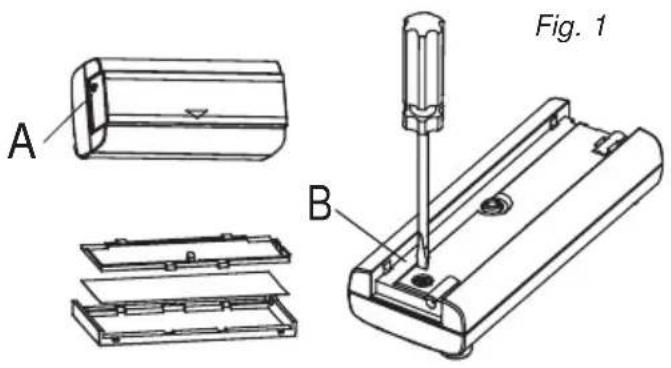
Using a ball point pen press at point A shown in fig 1 Remove the name plate. If desired, you can prise apart the two halves of the name plate and write on the card. Undo the retaining screw B and remove the back of the push.
To fit the push/converter battery
Insert the CR2032 coin cell. Ensure the face marked +^ is uppermost (Fig. 2).
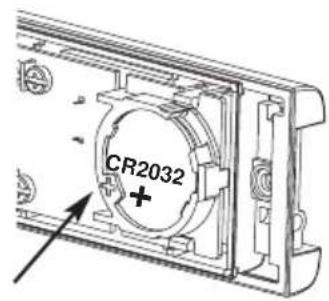
Fig. 2
Fit the chime batteries
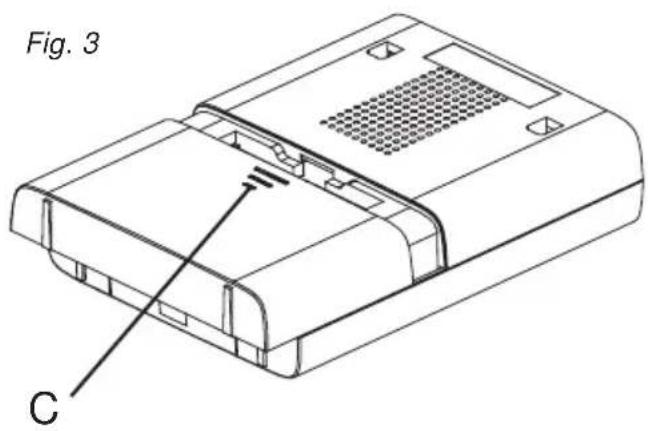
To remove the chime battery cover, press at point C and slide the cover back 5mm then lift off. Insert 3 x LR6 'AA' Alkaline batteries (not supplied). Observe polarity as marked inside the battery compartment (Fig. 3).
Volume control
The volume control is behind the sliding window on the front of the chime. Initially, set the control to mid-point. After you have tested your system, adjust to the desired volume.
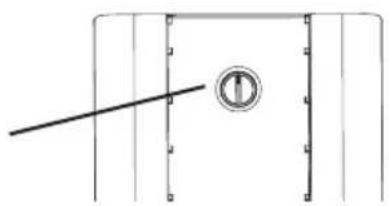
Fig. 4
Volume control
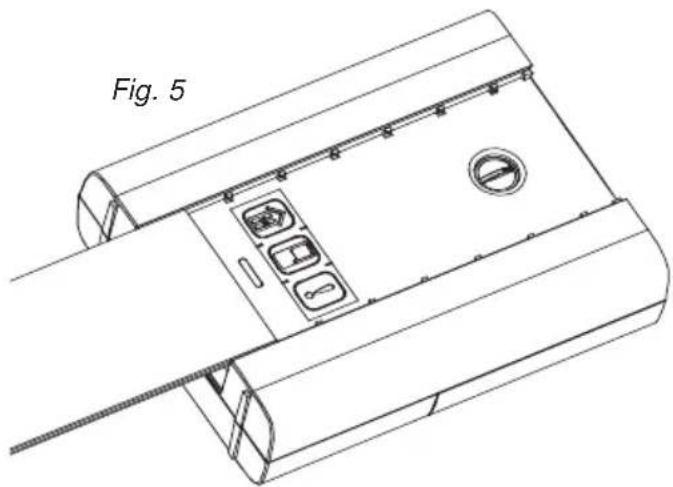
Sliding window
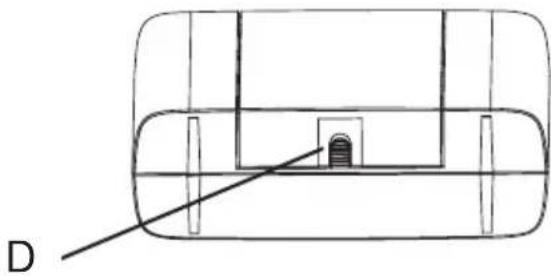
Release the catch D and slide open the window (Fig. 5).
Use of icons
In addition to the chime sounds, your chime has a visual indication to show which device has activated it. An icon will illuminate when the chime is activated by a bell push or another compatible device. The chime supports 3 icons:

Main door
Back door

Alert symbol
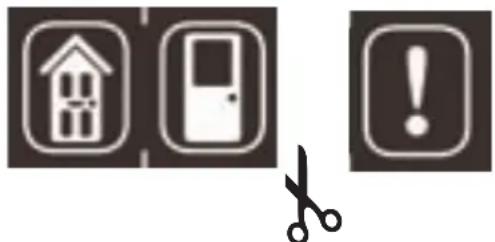
The 'Main door' and 'Back door' icons are usually used for bell pushes. The other icon is intended for use with other compatible devices, such as PIR movement detectors and Telephone ring detector. Icons numbered 1 to 3 are also included. The Icons are self-adhesive, supplied in strips of 3. They can be changed, if required, by opening the sliding window of the chime and gently peeling off the strips.
If desired, the strips can be cut into individual icons and fixed to the chime in a different order.
Use the Programming procedure to change the icon associated with a push.
Programming procedure
Learn mode
To enable your chime to learn the identity of your bell push:
- Press the button and keep it pressed. Each Icon will light in turn. When the Icon you want is lit, release the button.
- While the Icon you have selected is lit, operate your push. The chime will sound. The Icon will flash.
Unlearn procedure
If you want to remove a push from the chime's memory:
- Press the button and keep it pressed. Each Icon will light in turn. When the Icon associated with the push to be un-learnt is lit, release the button.
- Press and hold down both & buttons, until a 'beep' sound is heard.
Changing the tune
Changing the tune
Operate the push. While the icon is flashing, press the button. Press the button again and the tune will change. Repeat until the tune you want plays.
Recall function
A short push of the button will flash the icon that was last in use.
Chime sounds
To hear the chime sounds without operating the bell push, press the button. Press the button again and the tune will change.
Mount the bell push
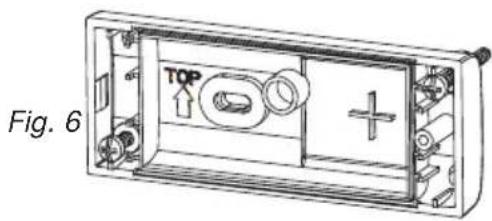
Mount using either the double sided adhesive pad, or the screws provided, (see Fig 6). Test your push before fixing. Avoid fixing to metal structures.
Chime position
The Chime can be free standing or wall mounted using the wall bracket provided. If wall mounting is preferred, screw the bracket to the wall (see Fig 7). The Chime hooks onto the wall bracket as illustrated.
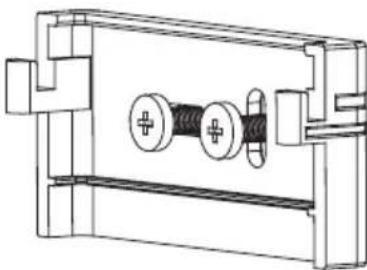
Fig. 7
Push/Converter functions
The bell push in this kit can be used as a stand-alone wirefree push. Additionally, it can be used to interface with an existing wired doorbell system or any of the following:
A standard wired bell push
A lit bell push and transformer
- A door or window contact
- Any device with N/O or N/C, voltage free contacts
Any device which generates appropriate control signals < 24 (AC or DC)
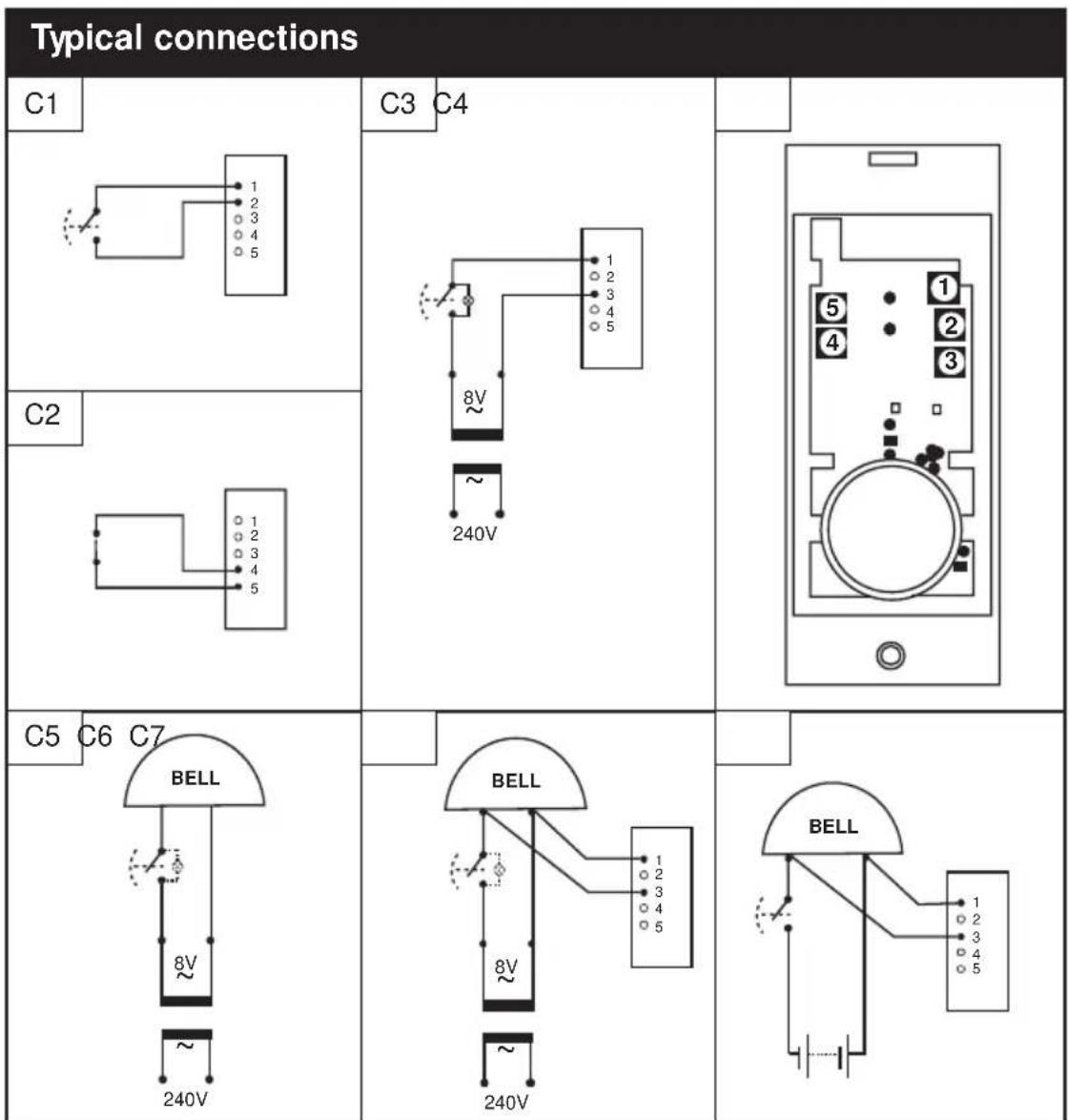
See typical connections (C1-7)
Important Note: Additional wiring can be brought into the push through the grommet in the back of the push. Once the grommet has been pierced or removed, we recommend that the push is mounted indoors.
| Diagram | Applications Operation | |
| C1 wired bell | push or 'normally open' switch/contacts | when switch is closed, chime will sound |
| C2 door/wind | dow contact, 'normally closed' switch/contacts | when switch is opened, chime will make an 'ALERT' sound |
| C3 a lit push | (with transformer) when switch is closed, chime will sound | when switch is closed, chime will sound |
| C4 landscape | push/converter - terminal positions | |
| C5 a typical | wired bell or chime circuit - transformer powered | |
| C6 converter | connected to a wired bell or chime circuit - transformer powered | when push is operated, Libra+ chime will sound |
| C7 converter | connected to a wired bell or chime circuit - battery powered | when push is operated, Libra+ chime will sound |
| Troubleshooting |
| A 'beep' sound is heard in learn mode... · The push you are programming has already been learnt by the chime. · If you want to change the icon associated with the push, use the un-learn procedure, then programme the push again. |
| Two 'beep' sounds are heard after the normal chime sound... · This indicates a low battery in the bell push that activated the chime. Fit a new battery, type CR2032. |
| When the bell push is operated, the amber confidence light does not turn on, or is only on for a short time... · In normal operation, the amber light will turn on for 1 second. When the battery is weak, the light will only turn on for a short time. Fit a new battery, type CR2032. |
| The chime does not work... · Check that the batteries are the correct type, 3 x LR6 'AA' cells. Only use alkaline batteries. · Check that the batteries are fitted correctly. · The chime could be out of range of the bell push. Try the chime in a different location. · The chime might not have learnt the identity of the bell push. Follow the programming procedure. |
| The chime does not sound... · Check that the volume control is not at the minimum setting. |
| Range is reduced... · Metal structures, including uPVC door frames can reduce the range of the product. Avoid mounting the push or chime on or near metal structures. · Other equipment can cause radio interference that affects your chime. · Walls and ceilings will reduce the range. · Weak batteries will reduce range. Replace every 12–18 months. In cold conditions (below 5°C), batteries may need to be replaced more often. |
| Troubleshooting cont.... |
| Amber light flashes... ·When the chime battery is low, an amber light will flash every 5 seconds. Fit new batteries in the chime, type 3 x LR6 ‘AA’ cells. Only use alkaline batteries. |
| When the push/converter function is used, the chime does not operate... ·Ensure that the wiring to the push is correct. ·Check that the correct terminals have been used and that screws are tightened. |
| Chime/Push does not work with my older Libra equipment... ·Libra + is not compatible with the earlier Libra system. ·Only use accessories marked Libra + |
Specifications
| Specification | Chime | Bell push |
| Operating Temperature | 0 to 40°C | -10 to 40°C |
| Range (open feild) | 868 MHz | 868 MHz |
| RF Frequency – UK/Europe | 100 m | 100 m |
| Sound Level (typical) | 80dBA @ 1m | |
| RF Power | - | <10 mW |
| Battery Type | LR6 | CR2032 |
| Battery Life (5 activations/day) | 12 Months | 18 Months |
| IP Rating | IP3x | IP55 |
Guarantee
Friedland guarantees this product for 2 years from the date of purchase. Proof of purchase is required; this does not affect your statutory rights. If you require further information about our product, call the Friedland helpline on 01268 563066.
Disposal & Recycling
Batteries and waste electrical products should not be disposed of with household waste. Please recycle where these facilities exist. Check with your local authority or retailer for recycling advice.
Declaration
Novar ED&S hereby declares that this product is in compliance with the essential requirements and other relevant provisions of the Radio and Telecommunications Terminal Equipment (R&TTE) directive, 1999/5/EC.
Friedland, The Arnold Centre, Paycocke Road, Basildon, Essex, SS14 3EA
www.friedland.co.uk
Friedland, The Arnold Centre, Paycocke Road, Basildon, Essex, SS14 3EA www.friedland.co.uk
Friedland, The Arnold Centre, Paycocke Road, Basildon, Essex, SS14 3EA www.friedland.co.uk
Libra + 100M Draadloze deurbelset + Draadloze belknop/omvormer
Installatie
Specifications . Pg. 44
Friedland, The Arnold Centre, Paycocke Road, Basildon, Essex, SS14 3EA
www.friedland.co.uk
Friedland, The Arnold Centre, Paycocke Road, Basildon, Essex, SS14 3EA www.friedland.co.uk