D930S Libra+ - Doorbells FRIEDLAND - Free user manual and instructions
Find the device manual for free D930S Libra+ FRIEDLAND in PDF.



| Product type | Wireless push button for door chime |
| Brand | Friedland |
| Model | D930S Libra+ |
| Power supply | 1 CR2032 battery (included) |
| Battery type | CR2032, 3V |
| Maximum range | Up to 150 meters in open field |
| Main functions | Wireless transmission, orange verification LED, compatible with Libra+ chimes |
| Mounting | By screws or adhesive pad provided |
| Dimensions (approx.) | 60 x 60 x 25 mm |
| Weight (approx.) | 30 g |
| Operating temperature | -20°C to +50°C |
| Box contents | Push button, CR2032 battery, 2 screws, adhesive pad |
| Compatibility | Only with Libra+ chimes (D931S, D932S, D933S) |
| Installation | Open with flat screwdriver, insert battery, fix with screws or adhesive |
| Safety | Do not mount on metal structures; use safety glasses when drilling |
| Maintenance | Replace battery every 12 to 18 months |
| Troubleshooting | Short LED: low battery; double beep after chime: low battery; no sound: check volume or programming |
| Repairability / Spare parts | CR2032 battery replaceable |
| Disposal | In accordance with local recycling guidelines |
| Warranty | Friedland manufacturer warranty |
Frequently Asked Questions - D930S Libra+ FRIEDLAND
User questions about D930S Libra+ FRIEDLAND
0 question about this device. Answer the ones you know or ask your own.
Ask a new question about this device
Download the instructions for your Doorbells in PDF format for free! Find your manual D930S Libra+ - FRIEDLAND and take your electronic device back in hand. On this page are published all the documents necessary for the use of your device. D930S Libra+ by FRIEDLAND.
USER MANUAL D930S Libra+ FRIEDLAND
Installation and Use
Contents
Checking pack contents..... Pg. 2
Safety......
Quick start......
Open push..... Pg. 3
Fit battery ....
Mount push ....
Troubleshooting..... Pg. 4
Specifications..... Pg. 5
Disposal and recycling......
Guarantee......
Declaration......
Libra+ Push
Thank you for choosing this Friedland product. Please use the following instructions to ensure correct installation and use. Keep these notes in a safe place for future reference.
Checking pack contents
Unpack your push and identify the following parts:
- Bell push
• CR2032 battery for bell push - 2 x fixing screws for push
- Adhesive pad
You will need:
• A 4mm cross-head screwdriver
• A small flat bladed screwdriver
Quick start
You need to do the following to get started:
- Open the bell push
- Fit the push battery
Follow the programming procedure for your Libra+ chime.
Safety
Before proceeding with the installation, please note the following safety warnings:
- Always follow the manufacturer's advice when using power tools and wear suitable protective equipment (e.g. safety goggles) when drilling holes etc.
- Before drilling holes in walls, check for hidden electricity cables and water pipes, the use of a cable/pipe locater maybe advisable if in doubt.
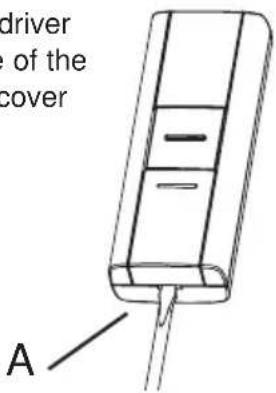
Open the bell push
Insert a flat bladed screwdriver into the slot A at the base of the push. Carefully lever the cover and base apart (Fig. 1).
Fig. 1
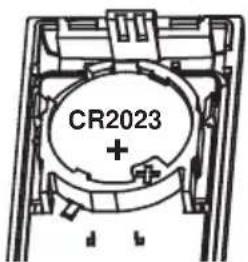
Tofit the push battery
Insert the CR2032 coin cell. Ensure the face marked ‘+’ is uppermost (Fig. 2).
Fig. 2
Mount the bell push
Mount using either the double sided adhesive pad, or the screws provided (see Fig 3). Test your push before fixing. Avoid fixing to metal structures.
Fig. 3
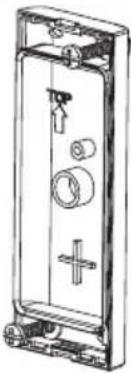
| Troubleshooting |
| A ‘beep’ sound is heard in learn mode...The push you are programming has already been learnt by the chime.If you want to change the icon associated with the push, use the un-learn procedure, then programme the push again. |
| Two ‘beep’ sounds are heard after the normal chime sound...This indicates a low battery in the bell push that activated the chime. Fit a new battery, type CR2032. |
| When the bell push is operated, the amber confidence light does not turn on, or is only on for a short time...In normal operation, the amber light will turn on for 1 second. When the battery is weak, the light will only turn on for a short time. Fit a new battery, type CR2032. |
| The chime does not work...Check that the batteries are the correct type. Only use alkaline batteries.Check that the batteries are fitted correctly.The chime could be out of range of the bell push. Try the chime in a different location.The chime might not have learnt the identity of the bell push. Follow the programming procedure. |
| The chime does not sound...Check that the volume control is not at the minimum setting. |
| Range is reduced...Metal structures, including uPVC door frames can reduce the range of the product.Avoid mounting the push or chime on or near metal structures.Other equipment can cause radio interference that affects your chime.Walls and ceilings will reduce the range.Weak batteries will reduce range. Replace every 12 –18 months. In cold conditions (below 5°C), batteries may need to be replaced more often. |
| Push does not work with my older Libra equipment ...Libra + is not compatible with the earlier Libra system.Only use accessories marked Libra+. |
Specifications
| Specification Bell push | |
| Operating Temperature -10 to 40°C | |
| RF Frequency – UK/Europe 868MHz | |
| RF Power <10mW | |
| Battery Type CR2032 | |
| Battery Life (5 activations/day) | 18 months |
| IP Rating IP55 | |
Declaration
Novar ED&S hereby declares that this product is in compliance with the essential requirements and other relevant provisions of the Radio and Telecommunications Terminal Equipment (R&TTE) directive, 1999/5/EC.
Disposal & Recycling
Batteries and waste electrical products should not be disposed of with household waste. Please recycle where these facilities exist. Check with your local authority or retailer for recycling advice.
Guarantee
Friedland guarantees this product for 2 years from the date of purchase. Proof of purchase is required; this does not affect your statutory rights. If you require further information about your product, call the Friedland helpline on 01268 563066.

Libra + Funktaster
Inbetriebnahme
Friedland, The Arnold Centre, Paycocke Road, Basildon, Essex, SS14 3EA
www.friedland.co.uk
Libra + belknop
Installatie
Fig. 1
Friedland, The Arnold Centre, Paycocke Road, Basildon, Essex, SS14 3EA www.friedland.co.uk
Libra + Pulsante
Friedland, The Arnold Centre, Paycocke Road, Basildon, Essex, SS14 3EA
www.friedland.co.uk
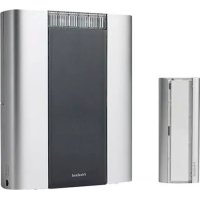
Brand : FRIEDLAND
Model : D930S Libra+
Category : Doorbells