Butler 2900c - Phone TOPCOM - Free user manual and instructions
Find the device manual for free Butler 2900c TOPCOM in PDF.


User questions about Butler 2900c TOPCOM
0 question about this device. Answer the ones you know or ask your own.
Ask a new question about this device
Download the instructions for your Phone in PDF format for free! Find your manual Butler 2900c - TOPCOM and take your electronic device back in hand. On this page are published all the documents necessary for the use of your device. Butler 2900c by TOPCOM.
USER MANUAL Butler 2900c TOPCOM
This product is in compliance with the essential requirements and other relevant provisions of the R&TTE directive 1999/5/EC. The Declaration of conformity can be found on :
http://www.topcom.net/support/cedeclarations.php
GB The features described in this manual are published with reservation to modifications.
NL De in deze handleiding beschreiben möglichkheden worden gepubliciceerd onder voorbehoud van wijzigingen.
F Les possibités décrites dans ce manuel sont publiées sous réserve de modifications.
Die in dieser Bedienungsanleitung umschreibenen Mänglichkeiten, werden vorbehaltlich Änderungen publiziert.
ES Las caracteristicas descriñas en este manual puede ser objeto de futuras modificaciones.
5 Funktionerna ienna braksanvisning publiceras med reservation for andringar.
DK Vi forbeholder os retten til ændringer af de specifikationer, der er beskrevet i dette brugsanvising.
N Funksjoner beskrevet i deutsche manualen kan endres uten naermere informasjon.
SF Tassohjekirjassa julkaissut tiedot voivat muuttua ilman ennakkoilmoitusta.
- BUTTONS
- DISPLAY 6
- INSTALLATION 7
- BATTERY LOW INDICATION 8
- OPERATION 8
5.1 Register to a Topcom B29xx/2800/2820 base 8
5.2 Removing a handset 9
5.3 Outgoing calls 10
5.4 Incoming calls 10
5.5 Activate/deactivate hands free function 10
5.6 Programming memory numbers 10
5.7 Calling a memory number 11
5.8 Mute function 11
5.9 Setting the volume 11
5.10 Out of range warning 11
5.11 Setting the ring volume and melody 11
5.12 Key lock 12 - CALL TRANSFER AND INTERCOM BETWEEN TWO HANDSETS 12
6.1 Call transfer and conference call during an external call 12
6.2 Internal call (intercom) 12 - TOPCOM WARRANTY 13
- TROUBLESHOOTING 13
- TECHNICAL DATA 14
- DEFAULT SETTINGS 14
SAFETY INSTRUCTIONS
- Only use the charger plug supplied. Do not use other chargers, as this may damage the battery cells.
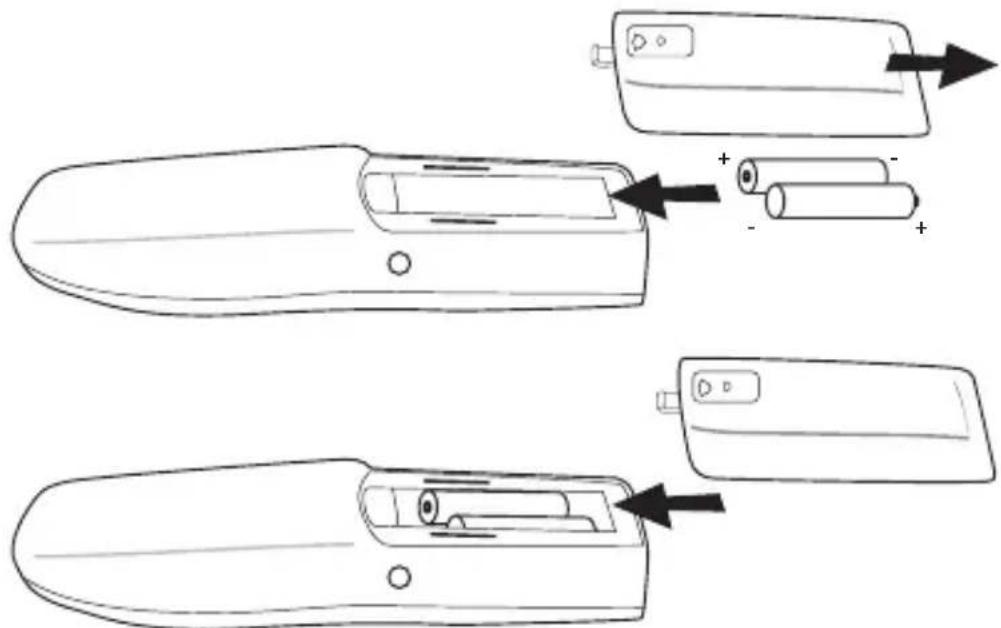
- Only insert rechargeable batteries of the same type. Never use ordinary, non-rechargeable batteries. Insert rechargeable batteries so they connect to the right poles (indicated in the battery compartment of the handset).
- Do not touch the charger and plug contacts with sharp or metal objects.
- The operation of some medical devices may be affected.
- The handset may cause an unpleasant buzzing sound in hearing aids.
- Do not place the basic unit in a damp room or at a distance of less than 1.5m away from a water source. Keep water away from the handset.
- Do not use the telephone in environments where there is a risk of explosions.
- D ispose of the batteries and maintain the telephone in an environment-friendly manner.
- As this telephone cannot be used in case of a power cut, you should use a mains-independent telephone for emergency calls, e.g. a mobile phone.
- This telephone uses rechargeable batteries. You have to dispose of the batteries in an environment friendly manner according to your specific country regulations.

NiMH

CLEANING
Clean the telephone with a slightly damp cloth or with an anti-static cloth. Never use cleaning agents or abrasive solvents.
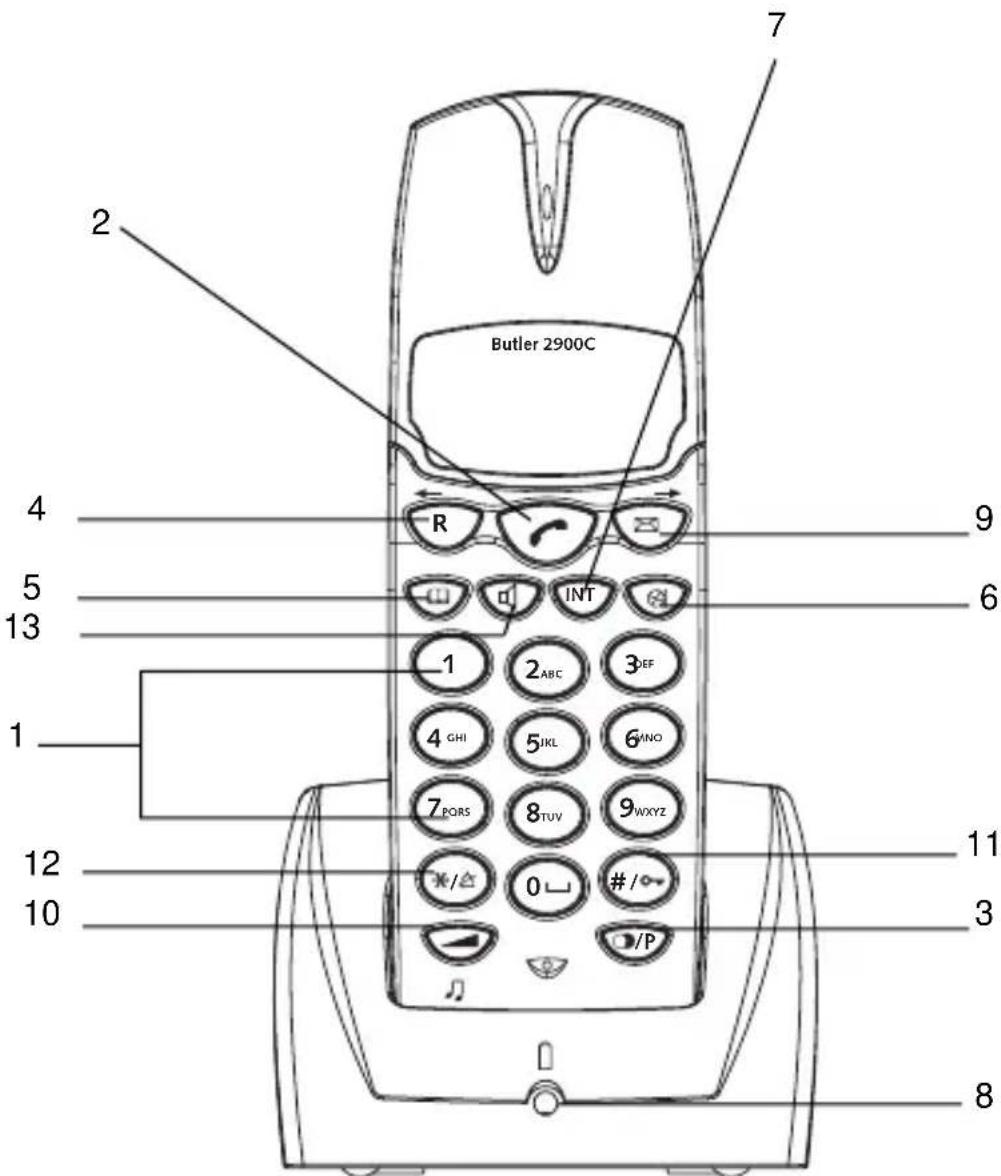
1. BUTTONS
1 Numerical buttons
2 L i ne button
3 Redial / Pause button
4 F Iash R/ScRl
5 Memory button
6 Mute button
7 Int button Int
8 Charge indicator (LED)
9 Call log/Scroll
10 Volume/melody button
11 Key lock
12 Ringer ON/OFF
13 Handsfree
2. DISPLAY
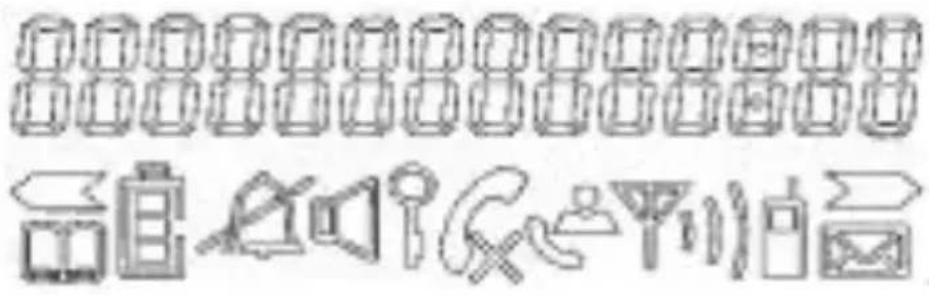
| ICON: MEANING: |
| You are online |
| New numbers in call list |
| Rechargeable battery level indicator |
| The antenna indicates the quality of reception. The antenna blinks when the handset is out of range! |
| Microphone is muted |
| Memory records are being retrieved or set up |
| The keypad is locked |
| There are more digits on the left |
| There are more digits on the right |
| During hands free |
| When ring buzzer is turned off |
| There are new messages in your voice mail |
| During internal call |
| HS-x x = handset number |
3. INSTALLATION
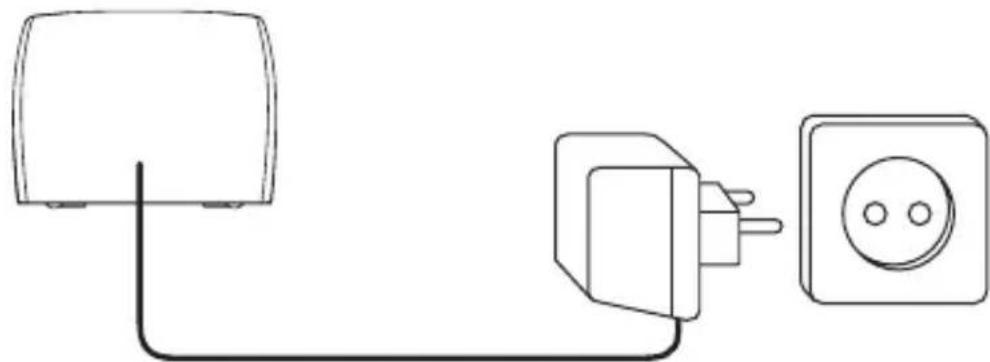
- Connect the AC adaptor to the electric socket
- I nsert 2 rechargeable batteries (AAA) inside the battery compartment of the handset...
Put the handset on the charger. The red Charge LED will lit as long as the handset is on the charger. Charge the handset for a period of 24 hours before using the handset for the first time. To extend the battery life time, discharge the batteries completely from time to time. As soon as the handset emits a warning tone or when the battery icon is empty, you have to put it back on the charger unit for charging.
4. BATTERY LOW INDICATION
When the battery is empty, the handset no longer carries out operations. When a battery is completely empty and you have put the handset on the base unit for a short period of time, the Battery symbol will appear to be fully charged but this is actually not the case. The battery capacity will decrease rapidly. We advise you to put the handset on the base unit for 12 hrs so that it can be recharged completely.
Full battery
Empty battery
When you are in the middle of a conversation and the battery is almost empty, the handset will emit a warning signal. Place the handset on the base unit to charge.
5. OPERATION
5.1 REGISTER TO A TOPCOM B29XX/2800/2820 BASE
You can subscribe 5 handsets to one base unit. By default, each handset is subscribed as handset 1 on the base unit upon delivery (base unit 1). !!! You only need to subscribe the handset if: !!!
- The handset subscription has been removed from the base unit (e.g. for reinitialisation)
- You want to subscribe a different handset to this base unit.
The underlined procedure is only applicable to a Topcom Butler 29xx, 2900, 2920 handset and base unit!!
Keep the Paging key on the base unit pressed for 10 seconds until the Line/Charge indicator
on the base unit begins to blink rapidly. The Line/Charge indicator will blink rapidly
for one minute. During this minute, the base unit is in register mode and you must do the
following to subscribe the handset:
- Press and hold the and -key for 3 sec.
The following will appear on the display:
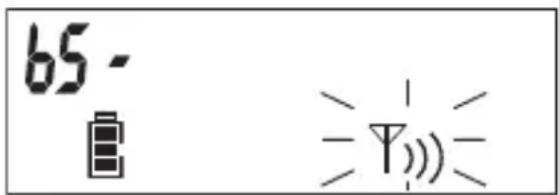
- Enter the number of the base unit you would like to subscribe the handset to (1-4)
- The unit will start searching for the base and when found it will ask to enter the pin code (4 digits):
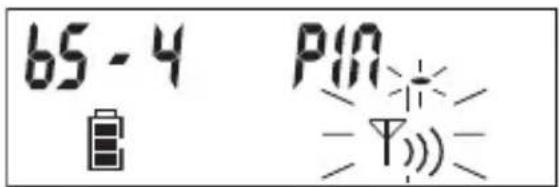
- Enter the base pin code (0000). If the pin is wrong, the handset will restart the searching for the base.
- W hen the handset is registered, it will show 'HS' followed by the handset number.
5.2 REMOVING A HANDSET
You can remove a handset from a base to allow another handset to be registered:
- Press and hold the mute and radial key for 3 sec.
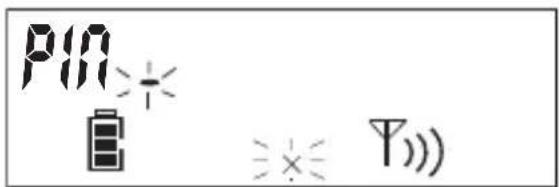
- Enter the pin code (0000). If the pin is wrong, the handset will go
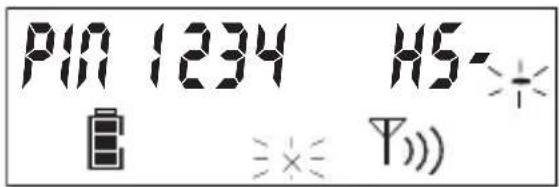
back to standby.
- Enter the handset number (1-5) you want to remove
- The unit will go back to standby is the removal is successfully. If not, it will ask again to enter the handset number
Remark: You can only remove existing handsets and others then the one you are using
5.3 OUTGOING CALLS
5.3.1 Making a phone call
- Press the Line button. You will hear the dial tone.
- Enter the desired telephone number.
- Press the Line button when you want to terminate the call.
5.3.2 Call setup with dial preparation
- Enter the desired telephone number. An incorrect number can be corrected by means of the Mute button. When you haven't pressed a button for 10 seconds, the number you've already entered will disappear and the handset returns to standby mode.
- Press the Line button. The number will be dialled automatically.
- Press the Line button when you want to terminate the call.
5.4 INCOMING CALLS
- W hen a call comes in, the handset will start to ring. The LED on the base will blink.
- Press the Line button to answer the incoming call.
5.5 ACTIVATE/DEACTIVATE HANDS FREE FUNCTION
This function allows you to communicate without having to pick up the handset. When you are on the phone, press the Hands free key to activate the hands free function.
Press the same button to deactivate the hands free function.
Note : When you are calling in hands free mode and you want to change the volume, press the Volume button .
Attention !! When you use the hands free function for a long time, the batteries will be empty more quickly!
5.6 PROGRAMMING MEMORY NUMBERS
You can program 10 indirect numbers (of max. 25 digits) in the phone's memory.
- Press and hold the Memory button until the -icon appears on the display.
- Enter the telephone number you wish to store.
- Press the Memory button again to confirm.
- Enter the memory location (0-9) where you want to store the number.
- You will hear a confirmation tone and the -icon will disappear.
Remarks :
If you wish to insert a pause, press the Redial/Pause button
/ on the location where you want a pause of 3 sec.
5.7 CALLING A MEMORY NUMBER
- Press the Memory button, followed by the number of the memory location (0-9).
- Press the Line button. The memory number will be dialled automatically.
- Press the Line button when you want to terminate the call.
5.8 MUTE FUNCTION
It is possible to deactivate the microphone during a conversation. Now you can speak openly without being heard by your correspondent.
- Press the Mute button during a conversation. The microphone will be deactivated. The MUTE symbol appears on the display.
- Press the Mute button again when you want to continue the conversation.
5.9 SETTING THE VOLUME
During a conversation you can set the volume by pressing the Volume button. You can set the volume alternatively in Hi, Medium and Low.
Note: The hands free receiver volume is also adjustable as above described!
5.10 OUT OF RANGE WARNING
When the handset is out of the working range of the base unit during a conversation, the unit will emit a warning signal to warn the user that he has to move closer towards the base unit.
5.11 SETTING THE RING VOLUME AND MEODY
5.11.1 Handset melody
- Press and hold the melody button until the current melody is heard.
- Select the desired melody (1-9) by means of the scroll keys or by entering a number (1 - 9).
- Press again to confirm the setting
5.11.2 Handset ring volume
- Press the volume button in standby
- The handset will ring in the current volume
- Press 1-5 or use the scroll keys to select the desired volume
- Press '0' to turn the volume OFF
Remark:
- You can turn the ringer volume of each individual handset ON or OFF by simply press and hold the key in standby.
- The base unit will never ring!
5.12 KEY LOCK
When the keypad is locked, pressing any key will have no effect during standby (except holding the okey).
- Press and hold the key
- appears on the display and the keypad is locked
- Press and hold the key again to unlock the keypad
When there is an incoming call, you can still answer the call by pressing the Line button During the call, the keypad functions as normal. When the call is ended, the keypad will be locked again
6. CALL TRANSFER AND INTERCOM BETWEEN TWO HANDSETS
!!! These functions only work when more than one handset (like a duo/twin version) is registered to the base!!!
6.1 CALL TRANSFER AND CONFERENCE CALL DURING AN EXTERNAL CALL
- During an external call, press the INT key followed by the number (1 - 5) of the other handset.
-
The other handset will start to ring:
-
When the other handset takes the line you can talk internally.
If you hang up, the external line will be connected with the other handset.
If you press and hold the INT key for 3 seconds you can talk with the 2nd handset and external line at the same time (conference call)
-
Or press the INT key again to return to the external call.
-
Press the Line button to end the call.
6.2. INTERNAL CALL (INTERCOM)
- In standby press the INT key followed by the number (1-5) of the other handset.
- The other handset will start to ring. You can stop the ringing by pressing the Line button
- If the other handset answers the call by pressing the Line button you can talk internally.
- Press the Line button to end the call.
7. TOPCOM WARRANTY
- This equipment comes with a 24-month warranty. The warranty will be honoured on presentation of the original bill or receipt, provided the date of purchase and the unit type are indicated.
- During the time of the warranty Topcom will repair free of charge any defects caused by material or manufacturing faults. Topcom will at its own discretion fulfil its warranty obligations by either repairing or exchanging the faulty equipment.
- Any warranty claims will be invalidated as a result of intervention by the buyer or unqualified third parties.
- Damage caused by inexpert treatment or operation, and damage resulting from the use of non-original parts or accessories not recommended by Topcom is not covered by the warranty.
- The warranty does not cover damage caused by outside factors, such as lightning, water and fire, nor does it apply if the unit numbers on the equipment have been changed, removed or rendered illegible.
Note: Please do not forget to enclose your receipt if you return the equipment.
8. TROUBLESHOOTING
| PROBLEM POSSIBLE CAUSE SOLUTION | ||
| No Display Batteries not charged Check the position of the batteries | ||
| Recharge the batteries | ||
| No dialling tone Telephone cable not properly connected | Check the connection of the telephone cable | |
| Volume of conversation partner too low | Adjust the volume during the conversation by pressing the volume key | |
| Handset ringer volume too low | Adjust the ringer volume | |
9. TECHNICAL DATA
Range: up to 300m in open space
up to 50m in buildings
Dialling options:DTMF(tone)and Pulse
Batteries: 2 × 1.2V , 600 mAh AAA Type NiMH
rechargeable
Max. standby time: approx. 120 hours
Max. talk time: 13 hours
Ambient temperature: +5^ C to +45^ C
Permitted relative air humidity: 25 to 85%
Power supply base adapter: 220/230V, 50 Hz
Memories 10 indirect with max. 25 digits
10. DEFAULT SETTINGS
Flash time 100 ms
Ring volume Level 3
Ring melody Ringer 8
The CE symbol indicates that the unit complies with the essential requirements of the R&TTE directive.
5.10 BUITEN BEREIK-WAARSCHUWING
Bel melodie Melodie 8
4. INDICATION DE NIVEAU FAIBLE DES PILES
Quand you tellephonez,
-
Or press the INT key again to return to the external call.
-
Press the Line button to end the call.
6.2 APPEL INTERNE (INTERCOM)
type NiMH rechargeables
When the battery is empty, the handset no longer carries out operations. When a battery is completely empty and you have put the handset on the base unit for a short period of time, the Battery symbol will appear to be fully charged but this is actually not the case. The battery capacity will decrease rapidly. Wir empfehlen Ihnen, den Handapparat für 12 Stunden in der Basisstation zu{lassen, so dass er wieder komplett aufgeladen wird.
- Batterie voll

- Batterie leer

5.2 ABMELDEN EINES HANDAPPPARATES
5.2 HUR MAN KOPPLAR FRAN ETT HANDSET
5.7 RING UPP MED HJALP AV KORTNUMMER
- Or press the INT key again to return to the external call.
5.3 UDGÄENDE SAMTaler
Note: Please do not forget to enclose your receipt if you return the equipment.
Opringning DTMF (tone) & Pulse
Batterier: 2 × 1,2V , 600 mAh AAA type
NiMh genopladelig
Maks. standbytid: ca. 120 timer
Maks. samtaletid: 13 timer
5.6 PROGRAMMERE MINNENUMMER
Du kan programmere 10 indirekte nummer (på maks. 25 siffer) i Telefonens minne.