Diet scale 200 - Kitchen scales TOPCOM - Free user manual and instructions
Find the device manual for free Diet scale 200 TOPCOM in PDF.


| Product type | Kitchen scale |
| Brand | Topcom |
| Model | Diet Scale 200 |
| Maximum capacity | 3 kg |
| Accuracy | 1 g or 0.1 oz |
| Weight units | g, kg, oz, lb/oz |
| Power supply | 4 AAA batteries (non-rechargeable, 1.5 V) |
| Number of food codes | 476 |
| Memory | 99 records |
| Main functions | Weighing, calculation of nutritional values (kcal, kJ, protein, fat, carbohydrates, cholesterol, BF), tare, meal accumulation |
| Display | LCD screen |
| Operating temperature | 0 °C to +40 °C |
| Maintenance | Cleaning with a slightly damp or antistatic cloth, without abrasive detergents |
| Safety | Do not immerse, do not expose to excessive humidity, do not disassemble |
| Auto-off | After 60 seconds of inactivity |
Frequently Asked Questions - Diet scale 200 TOPCOM
User questions about Diet scale 200 TOPCOM
0 question about this device. Answer the ones you know or ask your own.
Ask a new question about this device
Download the instructions for your Kitchen scales in PDF format for free! Find your manual Diet scale 200 - TOPCOM and take your electronic device back in hand. On this page are published all the documents necessary for the use of your device. Diet scale 200 by TOPCOM.
USER MANUAL Diet scale 200 TOPCOM
1.1 Intended Purpose
The Diet Scale is a powerful and easy-to-use electronic scale with a modern design. Based on the measured weight, you can easily know the energy, protein, fat, carbohydrate or cholesterol of the food. The value of each food can be accumulated to get a total nutritional value of each meal.
1.2 Safety advice
- Always read the safety instructions carefully.
- Follow the basic safety precautions for all electronic equipment when using this Scale.
- Keep this User's Manual for future reference.
- This unit is not waterproof. Don't expose this product to rain or moisture.
-
Lay this equipment on a reliable flat surface before setting it up.
If any of the following situation arises, get the equipment checked by a service technician: -
The equipment has been exposed to moisture.
- The equipment has been dropped and damaged.
- The equipment has obvious sign of breakage.
-
Do not place the basic unit in a damp room at a distance of less than 1.5m away from a water source. Keep water away from the telephone.
-
Don't disassemble this scale. The scale doesn't contain any parts that can be repaired by the user.
- Use the scale only for its intended purpose.
2 BUTTONS/LED (See folded cover page)
- Memory number
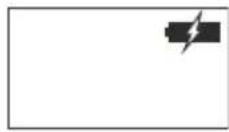
- Low battery indication
- Tara button
- Numeric key pad
- Function key pad
-
On/Off button
-
Weight mode
- Weight / Nutrition value
- Food code
- Total icon
- Memory icon
3 Installation
Put batteries in the battery compartment to activate the display :
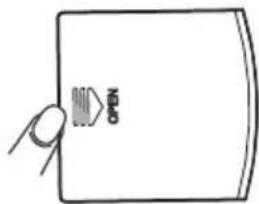
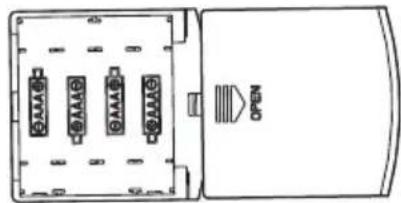
- Open the battery compartment at the bottom of the unit.
- Insert the 4 enclosed AAA non - rechargeable batteries (1,5V-SUM4).
- Close the battery compartment.
Do not short-circuit & dispose of in fire. Remove the batteries if this device is not going to be used for a long period.
4 Simple operation
- Press the On/Off - button (6). The LCD display will show all segments for 2 seconds before entering weight mode.
- Place the product on the scale platform (maximum 3Kg). The weight is displayed.
If you use a bowl to weigh product, it should be placed on the scale platform before switching on. If you forgot to do so, press the Tarra button to eliminate the weight of the bowl.
! If you remove the bowl, the scale will display a negative reading.
- Press the On/Off - button (6) to turn the scale Off or it will turn off automatically in idle mode after 60 seconds.
5 Advanced operation
5.1 Function key pad
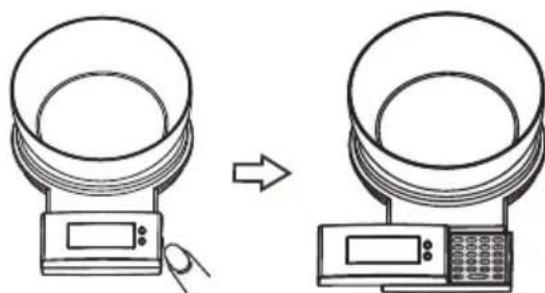
- Open the cover by pressing the cover to the left.
The function key pad (5) is shown.
5.2 Weighing unit
- Press the 'g/oz/WT'- button to switch the weight unit between gram (g), kilogram (kg), ounce (oz) and pound (lb/oz).

5.3 Get nutritional information
- Press the 'On/Off' - button (6). The LCD display will show all segments for 2 seconds before entering weight mode.
- Place the product on the scale platform (maximum 3Kg). The weight is displayed.
- Press the 'g/oz/WT'- button to switch the weight unit between 'gram (g), kilogram (kg), ounce (oz) and Ounce (lb/oz).
- Search for the 3 - digit food code from the food code list.
- Enter the food code using the numeric key pad (4). Press the 'C/MC' - button when you have entered the wrong code.
- Press one of the next function keys to see the nutritional information:
KCAL Kilo Calories
KJ Kilo Joules
Prot Number or proteines (g)
Fat Fat content (g)
Carb Carbohydrate (g)
Chol Cholesterol value (mg)
BE Bread value
(1BE = 12g Carbohydrate)
5.4 Total nutrition value
If you wish to know the total nutrition value per meal or per day, you can save the values for all foods weighted.
- Enter the food code of the first ingredient.
- Put the first ingredient on the scale. The weight is displayed.
- Press the M + µ - button to save it in the memory. M01' will be displayed.
- Press the 'C/MC' - button to clear the first food code.
- Enter the second food code.
- Weight the second food and press the M + - button to save. 'M02' will be displayed.
- Repeat previous steps to accumulate all values (Maximum 99 records can be stored).
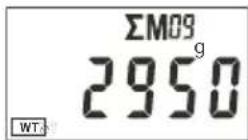
- When all ingredients have been weighted, press the 'MR' - button. The total weight is displayed.
- Press one of the next function keys to see the total nutrition values of your meal.
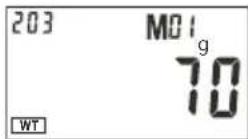
KCAL Kilo Calories
KJ Kilo Joules
Prot Number or proteines (g)
Fat Fat content (g)
Carb Carbohydrate (g)
Chol Cholesterol value (mg)
BE Bread value
(1BE = 12g Carbohydrate)
To erase the total value, press the 'C/MC' - button once the total value is displayed.
ΣM09
2950
6 Error codes
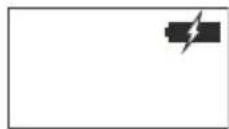
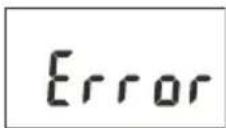
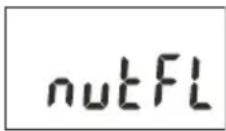
Replace the batteries
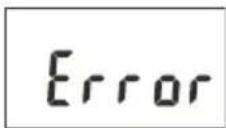
Overload (The weight is over 3kg)
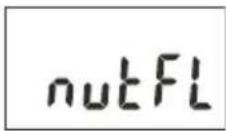
Nutrition value overflow (Maximum Limit 199999)
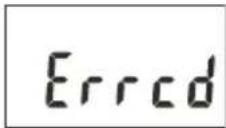
Food code exceeds 476
7 Technical data
| Number of food codes | 476 |
| Maximum weight capacity | 3kg or 6,6lb |
| Weight units | g, kg, oz, lb/oz |
| Operation temperature | 0°C ~ +40°C |
| Graduation | 1g or 0,1oz |
| Memory | 99 records |
| Battery | 4 x AAA (Not rechargeable) |
8 Cleaning
Clean the telephone with a slightly damp cloth or with an anti-static cloth. Never use cleaning agents or abrasive solvents.
9 Disposal of the device (environment)
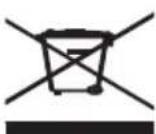
At the end of the product lifecycle, you should not throw this product into the normal household garbage but bring the product to a collection point for the recycling of electrical and electronic equipments. The symbol on the product, user guide and/or box indicate this. Some of the product materials can be re-used if you bring them to a recycling point. By reusing some parts or raw materials from used products you make an important contribution
to the protection of the environment. Please contact your local authorities in case you need more information on the collection points in your area.
Batteries must be removed before disposing of the device.
Dispos of the batteries in an environmental manner according to your country regulations.
10 Topcom warranty
10.1 Warranty period
The Topcom units have a 24-month warranty period. The warranty period starts on the day the new unit is purchased.
Consumables or defects causing a negligible effect on operation or value of the equipment are not covered.
The warranty has to be proven by presentation of the original purchase receipt, on which the date of purchase and the unit-model are indicated.
10.2 Warranty handling
A faulty unit needs to be returned to a Topcom service centre including a valid purchase note.
If the unit develops a fault during the warranty period, Topcom or its officially appointed service centre will repair any defects caused by material or manufacturing faults free of charge.
Topcom will at its discretion fulfill its warranty obligations by either repairing or exchanging the faulty units or parts of the faulty units. In case of replacement, colour and model can be different from the original purchased unit.
The initial purchase date shall determine the start of the warranty period. The warranty period is not extended if the unit is exchanged or repaired by Topcom or its appointed service centres.
10.3 Warranty exclusions
Damage or defects caused by incorrect treatment or operation and damage resulting from use of nonoriginal parts or accessories not recommended by Topcom are not covered by the warranty.
The warranty does not cover damage caused by outside factors, such as lightning, water and fire, nor any damage caused during transportation.
No warranty can be claimed if the serial number on the units has been changed, removed or rendered illegible.

This product is in compliance with the essential requirements and other relevant provisions of the directive 89/336/EEC.
The Declaration of conformity can be found on: http://www.topcom.net/cedeclarations.php
http://www.topcom.net/cdeclarations.php
Chol Cholesterinwert (mg)
BE Proteinheit
(1 BE = 12 g Kohlenhydrate)
Chol Cholesterinwert (mg)
BE Proteinheit
(1 BE = 12 g Kohlenhydrate)
http://www.topcom.net/cdeclarations.php
Chol Colesterol (mg)
Chol Colesterol (mg)
http://www.topcom.net/cdeclarations.php
Fedt Fedtindhold (g)
Carb Kulhydrat (g)
Chol Kolesterolvaerdi (mg)
BE Brødvaerdi
Fedt Fedtindhold (g)
Carb Kulhydrat (g)
Chol Kolesterolvaerdi (mg)
BE Brødvaerdi
(1BE = 12g kulhydrat)
Du sletter den samle de vardi ved at trykke pa C/MC'-knappen, nar den samle de vardi vises.
6 Fejlkoder
Udskift batterierne
http://www.topcom.net/cdeclarations.php
1 Før对不起 gangs bruk
1.1 Tiltenkt bruk
Chol Kolesterolverdi (mg)
BE Brødverdi
(1 BE = 12 g karbohydrater)
5.4 Totaln aeringsinnhold
Hvis du vil vite totaln næringsinnhold per maltid ell er per dag, kan du lagre verdiene for alle matvarer du veier.
Chol Kolesterolverdi (mg)
BE Brødverdi
(1 BE = 12 g karbohydrater)
http://www.topcom.net/cdeclarations.php
Chol Colesterol (mg)
Chol Colesterol (mg)
Chol Tjun xoIaonotepoIaIc (mg)
BE Δiαt p oφi k nαiα ω µi o u
YtepofoTwaT (to bapoc 3kg)
OKwOIKoC Tpoopimou EeTepva To 476
7 TeXVIkα δεδομενα
http://www.topcom.net/cdeclarations.php
IapaHTnJeIcTBtBteJIbHaToIbKO npHnHnOpHnHaTobapHOrO YeKa C yKa3aHHo DaToH NOKyNkN I MoJIbU YoCTpoIcTBA.
10.2 TapaHTnHoe 6cIyXnBaHne
HeicnpabHoe yctpoNCTBO doJxHO 6bITb DOCTaBneHO B cepBnchbI ueHTp KOMpaHm Topcom BmecTe c DOKyMeHTOM, NOdTBePxxDaIOUcIM erO NOKyNkY.
B cnyuae BO3HKnHOBeHHn HEnoJaKn B TeueHne rapaHTnHoro nepnoDa KOMnaHn Topcom nIe yNoJHomOueHHbI CepBnCHbI cHTp npOn3BeDeT 6ecPnAThbI peMOHT IIO6bIX NOBpeXdEHN, Bbl3BaHHbIX DeΦeKTAM MATEpNaIOB IIN IPOUN3BODCTBEHHbIM 6paKOM.
KoMaHnTopcM B noJHO Mepe BbIIOJIHReT B3aTbIe Ha c6raPantuHbIe o6aTeJIbCTBa, OcyueCTBnRA peMOHT uIN 3aMeHy BblUeDiJero n3 CTPOR u3deJInu INn erO deTaIe. B cnUyae 3aMeHbI CBeT N MoDJIb MOrTy OTnUHaTbCr OT npNo6peTeHHoro paHee n3dJIInr.
ДeИСВиЕ rapaHTи ONpeDEJIeTcЯ DaToI nepBOHaJaIbHoi NOKyIKN. ГаразньипярnoД He npOДпБаETcB Cnyae 3amEhbl IIN peMOHTa n3dJIInB KOMpaHnN Topcom IIN ee yIPOJHOMOueHHbIX cepBnCHbIX ueHTpax.
10.3 NckJIIOUeHnI n3 rapaHTnHbIX o6raTeJbCTB
DeiCTBHe rapaHTn He paCnpocTpaHReTcHa NOBpeXdeHn Hn HEnOJaKn, KOTOpbIe BO3NKnBcNeDCTBHe HApUWeHn npaBn 3KcnPyaTaun nI6o npImeHn DeTaJe n npHaDneXHOCTe CTOpOHnX n3rTOBnteJ, He peKOMeHNDoBaHHbIX KOMpAHne Topcom.
TapaHTnHe paCnpocTpahReTcH NaOBpeXdEHHa, BbI3BaHHbIe BHeUHM BO3dEICTBnEM (HaIpIMep, pa3PdOM MOHN, NOnaDaHnEM Bnarn NIn BO3rOpAHnEM), a TaKKe Ha NobpeXdEHHa, BO3HKnUne npN TpaHCnOPTnOBke.
TapaHTnHe npmehreTcB cnUyae n3MeHnry, ydaJIeHnI INn Hepa36OpuBOCTn cepHOrO Homepa n3deJInr.

ДанhoeиЗдени COOTBETCTBYeT OCHOHBIM Tpe6OBaHnM И npOuHM OTHOCaUMcK ДанHomу BONpocy NOLOXeHnM AnpeKTnBbI 89/336/EEC. ДекларцИо O COOTBeTCTBnM MoxHo HauTN 3deCb: http://www.topcom.net/cdeclarations.php
http://www.topcom.net/cdeclarations.php
RETURN WITH YOUR DEFECT PRODUCT
(Original Proof of Purchase has to be attached to this return card to be valid for warranty)



- 1.1 INTENDED PURPOSE
- 1.2 SAFETY ADVICE
- 2 BUTTONS/LED (SEE FOLDED COVER PAGE)
- 3 INSTALLATION
- 4 SIMPLE OPERATION
- 5 ADVANCED OPERATION
- 5.1 FUNCTION KEY PAD
- 5.2 WEIGHING UNIT
- 5.3 GET NUTRITIONAL INFORMATION
- 5.4 TOTAL NUTRITION VALUE
- 6 ERROR CODES
- 7 TECHNICAL DATA
- 8 CLEANING
- 9 DISPOSAL OF THE DEVICE (ENVIRONMENT)
- 10 TOPCOM WARRANTY
- 10.1 WARRANTY PERIOD
- 10.2 WARRANTY HANDLING
- 10.3 WARRANTY EXCLUSIONS
- 6 FEJLKODER
- 1 FØR对不起 GANGS BRUK
- 1.1 TILTENKT BRUK
- 5.4 TOTALN AERINGSINNHOLD
- 7 TEXVIKΑ ΔΕΔΟΜΕΝΑ
- 10.2 TAPAHTNHOE 6CIYXNBAHNE
- 10.3 NCKJIIOUEHNI N3 RAPAHTNHBIX O6RATEJBCTB
Brand : TOPCOM
Model : Diet scale 200
Category : Kitchen scales