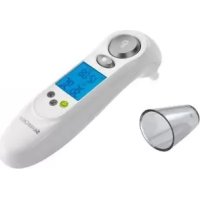
PTSI 9 A1 - Medical thermometer SILVERCREST - Free user manual and instructions
Find the device manual for free PTSI 9 A1 SILVERCREST in PDF.



| Product type | Non-contact infrared thermometer |
| Brand | SilverCrest |
| Model | PTSI 9 A1 |
| Use | Non-contact surface temperature measurement |
| Measuring range | -40°C to +220°C (-40°F to +428°F) |
| Accuracy (T > 0°C) | ±2°C or ±2% of reading |
| Accuracy (T < 0°C) | ±3°C or ±3% of reading |
| Measurement technology | Infrared |
| Built-in laser | Class 2, 650 nm, < 1 mW |
| Measuring distance | Ratio 8:1 (distance/diameter of measured area) |
| Display | Digital display with backlight |
| Temperature unit | Switchable °C/°F |
| Main functions | Continuous measurement, temperature drift detection, visual and audible alarm, reference value, adjustable difference threshold |
| Power supply | 1 x 9V block battery (6F22/6LR61) |
| Dimensions (L x H x D) | Approx. 18 x 12 x 4.2 cm |
| Weight (without battery) | Approx. 167 g |
| Operating temperature | 0°C to 40°C |
| Permissible humidity | ≤ 75% non-condensing |
| Cleaning | Soft, dry cloth; compressed air for the sensor and laser output |
| Safety | Class 2 laser: do not look into the beam, do not point at people or animals |
| Included accessories | Device, 9V battery, instruction manual |
| Warranty | 3 years |
| After-sales service (France) | Tel.: 0800 919270, e-mail: kompernass@lidl.fr |
| Auto-off | After approx. 60 seconds of inactivity |
Frequently Asked Questions - PTSI 9 A1 SILVERCREST
User questions about PTSI 9 A1 SILVERCREST
0 question about this device. Answer the ones you know or ask your own.
Ask a new question about this device
Download the instructions for your Medical thermometer in PDF format for free! Find your manual PTSI 9 A1 - SILVERCREST and take your electronic device back in hand. On this page are published all the documents necessary for the use of your device. PTSI 9 A1 by SILVERCREST.
USER MANUAL PTSI 9 A1 SILVERCREST
INFRARED TEMPERATURE PROBE PTSI 9 A1
GB IE
INFRARED TEMPERATURE PROBE
Operating instructions
SE
INFRARÖD TERMOMETER
Bruksanvisning
FR BE
APPAREIL DE MESURE DE TEMPÉRATURE À INFRAROUGE
Mode d'emploi
DE AT CH
INFRAROT-TEMPERATUR-MESSGERÄT
Bedienungsanleitung
FI
INFRAPUNALÄMPÖMITTARI
Käyttöohje
DK
INFRAR∅D-TERMOMETER
Before reading, unfold the page containing the illustrations and familiarise yourself with all functions of the device.
FI
GB/IE Operating instructions Page 1
| FI | Käyttöohje | Sivu | 17 |
| SE | Bruksanvisning | Sidan | 33 |
| DK | Betjeningsvejledning | Side | 49 |
| FR/BE Mode d'emploi Page 65 | |||
| NL/BE Gebruiksaanwijzing Pagina 81 | |||
| DE/AT/CH | Bedienungsanleitung | Seite | 97 |
Index
Introduction 2
Copyright. 2
Limited liability....2
Intended use 2
Warnings used 3
Safety....4
Interaction with batteries 5
Basic Safety Instructions. 5
Initial use 6
Items supplied and transport inspection. 6
Disposal of the packaging 7
Inserting / Replacing the battery 7
Operating components 8
Handling and operation 8
Preparing the appliance 8
Switching the appliance on / off 8
Selection of the Temperature Unit 9
Measuring the temperature 9
Indicating a temperature deviation .....10
Setting reference values 10
Selection of the size of difference 10
Scanning a temperature deviation .....11
Example of application 11
Battery indicator 11
Troubleshooting 12
Malfunction causes and remedies 12
Cleaning 13
Storage 13
Disposal 13
Disposal of the appliance 13
Disposing of the batteries 14
Appendix 14
Technical data 14
Information regarding the EG Declaration of Conformity ..... 15
Warranty 15
Service 16
Importer 16
GB IE
Introduction
Congratulations on the purchase of your new appliance!
You have clearly decided in favour of a quality product. This operating manual is a component of this product. It contains important information in regard to safety, use and disposal. Before using the product, familiarise yourself with all of these operating and safety instructions. Use the product only as described and only for the specified areas of application. Retain these instructions for future reference. In addition, pass these documents on, together with the product, to any future owner.
Copyright
This documentation is copyright protected.
Any copying or reproduction, including as extracts, as well as the reproduction of images, also in an altered state, is only permitted with the written authorisation of the manufacturer.
Limited liability
All technical information, data and instructions for connection and operation contained in these operating instructions correspond to the latest available at the time of printing and, to the best of our knowledge, take into account our previous experience and know-how. No claims can be derived from the details, illustrations and descriptions in these operating instructions. The manufacturer assumes no responsibility for damage caused by failure to comply with these operating instructions, improper use, incompetent repairs, making unauthorised modifications or for using unauthorised replacement parts.
Intended use
This infrared temperature probe is used for the contact-less measurement of surface temperatures in the range of -40^ to +220^ ( -40^ - 428^ ) and comparison of the measured temperatures with a previously acquired reference value.
The measurement is possible in either °C or °F. The measurement is made by means of infrared technology. Thereby, the surfaces of objects can be continuously measured and the temperature variations are displayed optically, acoustically and in colour. The integrated laser-beam pointer may only be used for locating the measurement point within the scope of temperature measurement. The appliance is intended exclusively for domestic use. Do not use the appliance for commercial or industrial applications. Use the appliance only in a dry environment or indoors. This appliance is not intended for any other use or for uses beyond those detailed. Claims of any kind for damage resulting from unintended use will not be accepted. The operator alone bears the liability.
Warnings used
In these extant operating instructions the following warning notices are used:

DANGER
A warning at this risk level indicates a threateningly dangerous situation.
In the event that the dangerous situation is not avoided it could lead to death or serious physical injury.
▶ Comply with the directives in this warning to avoid the risks of death or serious physical injury.

WARNING
A warning at this risk level indicates a potentially dangerous situation.
If the dangerous situation is not avoided it could lead to personal injuries.
▶ Comply with the directives in this warning to avoid personal injuries.
GB IE
IMPORTANT
A warning at this risk level indicates potential property damage.
If the situation is not avoided it could lead to property damage.
▶ Comply with the directives in this warning to avoid property damage.
NOTICE
▶ A notice indicates additional information that may assist you in the handling of the appliance.
Safety
In this section you will receive important safety information regarding the handling of the appliance. This appliance complies with the statutory safety regulations. Incorrect usage can lead to injuries and property damage.
WARNING
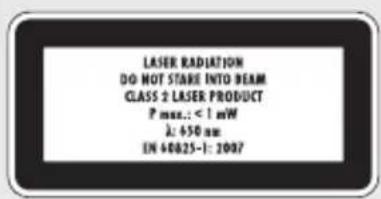

natural_image
Warning symbol with a black triangle and radiating lines inside, no text or numbers present.This appliance contains a Class 2 laser.
NEVER direct the laser beam at people or animals.
NEVER look directly into the laser. The laser can cause serious eye damage.
▶ Do NOT direct the laser beam at strongly reflective materials. Reflected laser beams are also dangerous.
▶ All adjustments intended to increase the laser power are forbidden. There is also a risk of personal injury!
▶ No liability will be accepted for damage resulting from manipulation of the laser equipment or from non-compliance with this safety information.

DANGER
Do not use the appliance at locations with a risk of fire or explosion, e.g. close to fl ammable fluids or gases.
GB IE
Interaction with batteries

WARNING
Risks from improper use! The risk of explosions and leakages exists!
For the safe handling of batteries, comply with the following safety instructions:
▶ Do not throw batteries into a fi re.
▶ Never short-circuit batteries.
▶ Do not attempt to recharge batteries.
▶ Regularly check the condition of the batteries. Leaking battery acid can cause permanent damage to the appliance. Special caution should prevail when handling damaged or leaking batteries. There is also a risk of personal injury! Wear protective gloves.
▶ Store batteries in a place inaccessible to children. If a battery is swallowed, seek medical attention IMMEDIATELY.
▶ If you do not intend to use the appliance for an extended period, remove the batteries.
Basic Safety Instructions
For safe handling of the appliance comply with the following safety instructions:
■ Before use check the appliance for visible external damage. Do not take into operation an appliance that is damaged or has been dropped.
- Do not make any changes or modifications to the appliance yourself.
GB IE
This appliance may be used by children aged 8 over and by persons with reduced physical, sensory or mental capabilities or lack of experience and knowledge, provided that they are under supervision or have been told how to use of the appliance safely and are aware of the potential risks. Children must not play with the appliance. Cleaning and user maintenance tasks must not be carried out by children unless they are supervised.
■ Protect the appliance against moisture and the penetration of liquids.
■ Do not operate the appliance in the vicinity of open flames (e.g. candles).
■ Avoid direct sunlight.
Initial use

DANGER
Damage to property and injuries to people may occur when taking the appliance into use!
▶ Packaging material should not be used as a play thing. There is a risk of suffocation!
Items supplied and transport inspection
The appliance is delivered with the following components as standard:
• Infrared Temperature Probe
- 9 V Block battery
• This operating manual
NOTICE
▶ Check the contents to ensure everything is available and for signs of visible damage.
If the items supplied are incomplete, or damaged due to defective packaging or transportation, contact the Service Hotline (see section Service).
Disposal of the packaging
The packaging protects the appliance against transport damage. The packaging materials are selected from the point of view of their environmental friendliness and disposal technology and are therefore recyclable.

The recirculation of packaging into the material circuit saves on raw material and reduces the amount of waste generated. Dispose of packaging material that is no longer needed as per the regionally established regulations.
Inserting / Replacing the battery
The appliance needs a 9 V battery to operate.
- Open the battery compartment on the underside of the handle.
Insert the battery, complying with the specified polarities given on the battery compartment cover, into the battery compartment 7.
◆ Close the battery compartment cover. The battery compartment lid must audibly engage.
GB IE
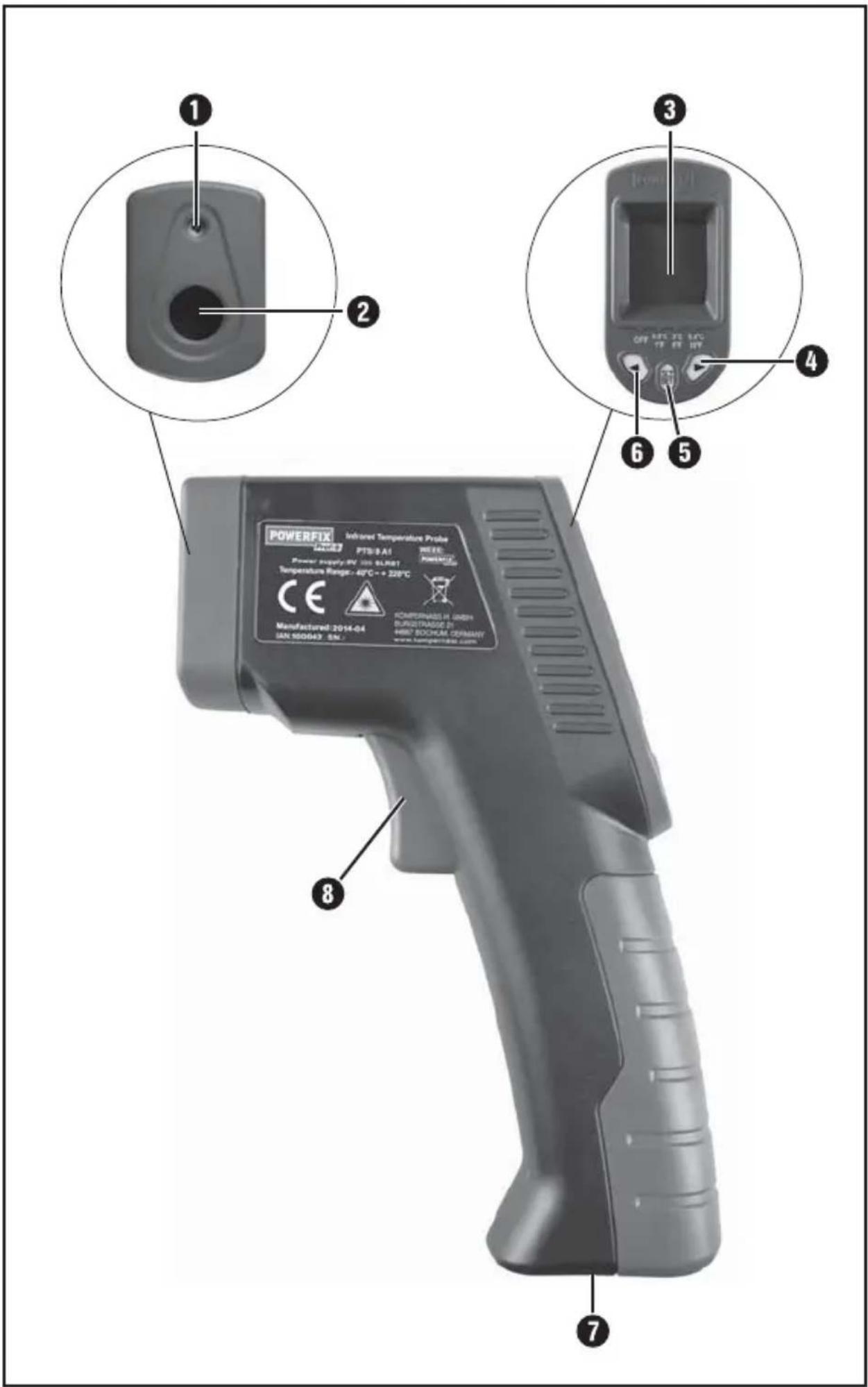
Operating components
① Laser-beam exit opening
② Infrared sensor
3 Display
4 Button
5 Button °C/°F/SET
6 Button
7 Battery compartment
8 Measuring button
Handling and operation
In this chapter you will receive important information for the handling and operation of the appliance.
Preparing the appliance
The appliance is ready for use after inserting the battery.
Grasp the handle of the appliance so that the index finger can operate the measuring button 8 and the thumb can operate the buttons 4 - 6 The appliance is suitable for left and right handers.
Switching the appliance on / off
- Press the measuring button 8 to switch the appliance on. The display 3 lights up and a brief signal tone is heard.
- Press and hold the button °C/°F/SET5 or approx. 3 seconds to switch the appliance off. Two brief signal tones will be heard.
If the appliance is not currently in use, the back light of the display ③ switches off after approx. 15 seconds. After approx. 60 seconds the appliance switches off automatically, two short signal tones notify this.
Selection of the Temperature Unit
After switching on, the default temperature unit is shown as degrees Celsius (°C).
Briefly press the button °C/°F/SET 5 to switch to the unit of degrees Fahrenheit (°F).
Briefly press the button °C/°F/SET 5 again to switch back to the unit of degrees Celsius (°C).
Measuring the temperature
- Press the measuring button 8 and point the laser dot on the spot to be measured.
Whilst the measuring button ⑧ is pressed, the temperature is measured and in the display ③ "SCAN" is shown.
After releasing the measuring button ⑧ the last measured temperature is indicated on the display ③ and the laser dot is switched off.
To obtain the most accurate measurement, please note the following:
The determined temperature is the average temperature of the measured area. These increases in the ratio of 8:1, the further away the appliance is from the object being measured.
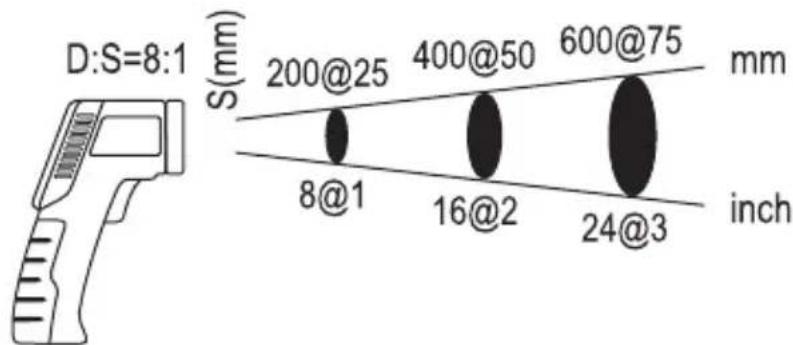
other
| Segment | Height (mm) | | ------- | ----------- | | 8@1 | 200@25 | | 16@2 | 400@50 | | 24@3 | 600@75 |D = Distance, S = Surface
The target object must be greater than the measuring surface of the appliance. The smaller the target object is, the less the distance between appliance and target object must be.
■ Select the smallest possible distance to the surface being measured.
GB IE
Aim the appliance as perpendicularly as possible to the surface being measured.
- Do not measure in dusty, smoky or steamy atmospheres. Do not measure through transparent materials, such as glass or plastics.
In the event of extreme temperature fluctuations allow the appliance to adjust to the ambient climatic conditions for about 30 minutes before measuring.
Indicating a temperature deviation
A temperature deviation is the difference between a predetermined reference value and a measured temperature. The deviations are shown as figures and by using coloured indicator on the display. In addition, they will also be pointed out by an acoustic signal.
Setting reference values
- Press the measuring button 8 and point the laser dot on the spot to be referenced. The temperature is shown in the display 3.
Now press, while holding the measuring button 8 the button °C/°F/SET 5 to accept the temperature value as a reference value. The reference temperature is shown in the display 3 next to the indicator REF.
Selection of the size of difference
On the appliance you can now set at which temperature difference ( T ) the colour display and the acoustic signal should respond.
Press, while the reference value is being shown in the display 3, the button ▶ 4 the button to set the desired temperature difference (ΔT).
| OFF | 0.5°C1°F | 3°C5°F | 5.5°C10°F |
Lower temperature threshold = Reference temperature - T Upper temperature threshold = Reference temperature + T
Scanning a temperature deviation
Press the measuring button 8 and point the laser dot on the spot to be measured. The temperature is shown in the display 3.
While scanning, hold the measuring button down and move the laser dot slowly and continuously over the surface to be measured. The temperature deviations between the reference and measurement values are presented as follows:
| Colour display | Signal tone Result |
| Red fast | |
| Green not available | Upper temperature threshold exceeded |
| Within the temperature threshold | |
| Blue slow | |
| Lower temperature threshold not reached |
Example of application
For example, to check the penetration of cold air into an interior through a window, first scan the temperature around the frame immediately adjacent to the closed window. Select the warmest part of the frame as a reference temperature and then, for example, a temperature difference of 3^ C/ 5^ F.
Now scan again, evenly, all around the frame directly next to the window. A possible ingress of cold air of more than 3^ K difference is indicated by the blue colour display and by a slow signal tone sequence.
Battery indicator
A battery icon appears in the display ③ when the battery voltage is too low.
Insert a new battery as described in the section "Inserting/Replacing the battery".
GB IE
NOTICE
▶ With a low battery the accuracy of the temperature display is limited.
Troubleshooting
In this section you will receive important information for the localisation and remedying of malfunctions.
Malfunction causes and remedies
The following table will help with localising and remedying minor malfunctions:
| Defect Possible cause Solution | ||
| The display 3is blank. | The battery is incorrectly inserted. | Insert the battery as per the markings on the battery cover. |
| The battery is discharged. | Insert a new battery. | |
| In the display 3appears the Indicator „ErOL”. | The measured temperature is too low. | Repeat the measurement at a different location. |
| In the display 3appears the Indicator „ErOH“. | The measured temperature is too high | Repeat the measurement at a different location. |
NOTICE
▶ If you cannot resolve the problem with the above steps, please contact Customer Support (see section Service).
Cleaning
IMPORTANT
Damage to the appliance
▶ When you are cleaning the appliance ensure that no moisture gets inside it, so as to avoid irreparable damage.
▶ Do not use chemical or abrasive cleaning materials. They could damage the housing.
◆ Clean the appliance with a soft dry cloth.
Clean the laser exit opening and the infrared sensor with a gentle flow of air. For heavier soiling, remove it with a slightly damp cotton swab. Do not exert any excessive pressure!
Storage
If you do not intend to use the appliance for an extended period, remove the battery and store it in a clean, dry place away from direct sunlight.
Disposal
Disposal of the appliance

Do not dispose of the appliance in your normal domestic waste. This product is subject to the provisions of the European Directive 2012/19/EU WEEE (Waste Electrical and Electronic Equipment).
Dispose of the appliance through an approved disposal centre or at your community waste facility.
Pay heed to the currently applicable regulations. In case of doubt, please contact your waste disposal centre.
GB IE
Disposing of the batteries
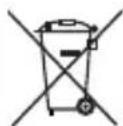
Batteries may not be disposed of with household waste. All consumers are statutorily obliged to dispose of batteries at a collection site in their community / city district or at a retail store. This obligation is intended to ensure that batteries are disposed of in an environmentally safe manner. Only hand in batteries that are fully discharged.
Appendix
Technical data
| Power supply | 1 x 9 V Block battery (6F22/6LR61) |
| Temperature measurement range -40°C up to +220°C | |
| Measurement accuracy for T > 0°C | ± 2°C respectively ± 2 % of measured value |
| Measurement accuracy for T < 0°C | ± 3°C respectively ± 3 % of measured value |
| Laser class 2 | |
| Wave length (λ) 650 nm | |
| Output power (Pmax) < 1 mW | |
| Operating temperature 0°C up to 40°C | |
| Air humidity (no condensation) | ≤75% |
| Dimensions : | approx. 18 x 12 x 4.2 cm |
| Weight without battery approx. 167 g | |
Information regarding the EG Declaration of Conformity
With regard to conformity with essential requirements and other relevant provisions, this device complies with the guidelines of EN 61326-1, EN 61326-2-2, EN 61010-1 as well as EN 60825-1.
The complete original Declaration of Conformity can be obtained from the importer.

GB IE
Warranty
The warranty for this appliance is for 3 years from the date of purchase. The appliance has been manufactured with care and meticulously examined before delivery. Please retain your receipt as proof of purchase. In the case of a warranty claim, please make contact by telephone with our Customer Service Department. Only in this way can a post-free despatch for your goods be assured.
NOTICE
The warranty covers only claims for material and manufacturing defects, but not for transport damage, wearing parts or for damage to fragile components, e.g. buttons or batteries.
This product is for domestic use only and is not intended for commercial use. The warranty is void in the case of abusive and improper handling, use of force and internal tampering not carried out by our authorised service branch.
Your statutory rights are not restricted in any way by this warranty. The warranty period is not extended by repairs made under the warranty. This applies also to replaced and repaired parts. Damages and defects extant at the time of purchase must be reported immediately after unpacking, resp. no later than two days after the date of purchase. Repairs made after the lapse of the warranty period are subject to charge.
GB IE
Service
GB Service Great Britain
Tel.: 0871 5000 720 (£ 0.10/Min.)
E-Mail: kompernass@lidl.co.uk
IAN 100042
IE Service Ireland
Tel.: 1890 930 034
(0,08 EUR/Min., (peak))
(0,06 EUR/Min., (off peak))
E-Mail: kompernass@lidl.ie
IAN 100042
Hotline availability: Monday to Friday 08:00 - 20:00 (CET)
Importer
KOMPERNASS HANDELS GMBH
BURGSTRASSE 21
44867 BOCHUM
GERMANY
www.kompernass.com
Sisällysluettelo
Johdanto....18
Tekijänoikeudet 18
natural_image
Warning symbol with a black triangular triangle containing a black starburst and radiating lines (no text or numbers)KOMPERNASS HANDELS GMBH
BURGSTRASSE 21
44867 BOCHUM
GERMANY
www.kompernass.com
Välja diff erensstorlek 42
Skanna en temperaturavvikelse 43
natural_image
Warning symbol with black triangle and radiating lines, no text or numbers presentVälja diff erensstorlek
KOMPERNASS HANDELS GMBH
BURGSTRASSE 21
44867 BOCHUM
GERMANY
www.kompernass.com
Indholdsfortegnelse
Indledning 50
Ophavsret 50
natural_image
Warning symbol with a black triangle, white background, and a central black starburst (no text or numbers)$$ D = \text { Distance (afstand) }, S = \text { Surface (overfl ade) } $$
KOMPERNASS HANDELS GMBH
BURGSTRASSE 21
44867 BOCHUM
GERMANY
www.kompernass.com
Sommaire
Introduction 66
natural_image
Warning symbol with a black triangle and radiating lines, no text or numbers present$$ D = \text { Distance }, S = \text { Surface } $$
KOMPERNASS HANDELS GMBH
BURGSTRASSE 21
44867 BOCHUM
GERMANY
www.kompernass.com
Inhoud
Inleiding 82
Auteursrecht 82
natural_image
Warning symbol with black triangle and radiating lines, no text or numbers presentKOMPERNASS HANDELS GMBH
BURGSTRASSE 21
44867 BOCHUM
GERMANY
www.kompernass.com
Inhaltsverzeichnis
Einleitung 98
Urheberrecht....98
natural_image
Warning symbol with black triangle and radiating lines, no text or numbers presentKOMPERNASS HANDELS GMBH
BURGSTRASSE 21
44867 BOCHUM
DEUTSCHLAND/GERMANY
www.kompernass.com
Last Information Update · Tietojen tila · Informationsstatus
Tilstand af information · Version des informations · Stand van de informatie