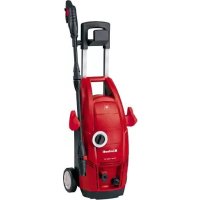
TCHP 1538 PC - Vacuum Cleaner EINHELL - Free user manual and instructions
Find the device manual for free TCHP 1538 PC EINHELL in PDF.



| Product Type | High Pressure Cleaner |
| Brand | Einhell |
| Model | TCHP 1538 PC |
| Weight | 7.5 kg |
| Power Supply | 220-240 V~50 Hz, 1500 W |
| Working Pressure | 7.5 MPa (75 bar) |
| Water Flow Rate | 6.3 l/min |
| Max. Water Supply Pressure | 0.6 MPa (6 bar) |
| Protection Class | II / double insulation |
| Main Functions | High-pressure cleaning, rotary nozzle, flat/pencil nozzle, detergent tank, patio cleaner |
| Included Accessories | Gun, extension, high pressure hose, detergent tank, rotary nozzle, flat/pencil nozzle, patio cleaner |
| Maintenance | Clean regularly with a damp cloth, check water suction filter, drain the unit after each use, clean the nozzle with the provided needle |
| Safety | Mandatory hearing protection and safety goggles, do not direct the jet at people, animals or electrical equipment, use only cold or lukewarm water (max. 60°C) |
| Wear Parts | Carbon brushes, lance, hose |
| After-Sales Service | Contact after-sales service for repairs and spare parts, register the defect at www.isc-gmbh.info |
| Warranty | 24 months from date of purchase |
| Intended Use | Private household for cleaning vehicles, machines, buildings, facades, etc. |
Frequently Asked Questions - TCHP 1538 PC EINHELL
User questions about TCHP 1538 PC EINHELL
0 question about this device. Answer the ones you know or ask your own.
Ask a new question about this device
Download the instructions for your Vacuum Cleaner in PDF format for free! Find your manual TCHP 1538 PC - EINHELL and take your electronic device back in hand. On this page are published all the documents necessary for the use of your device. TCHP 1538 PC by EINHELL.
USER MANUAL TCHP 1538 PC EINHELL
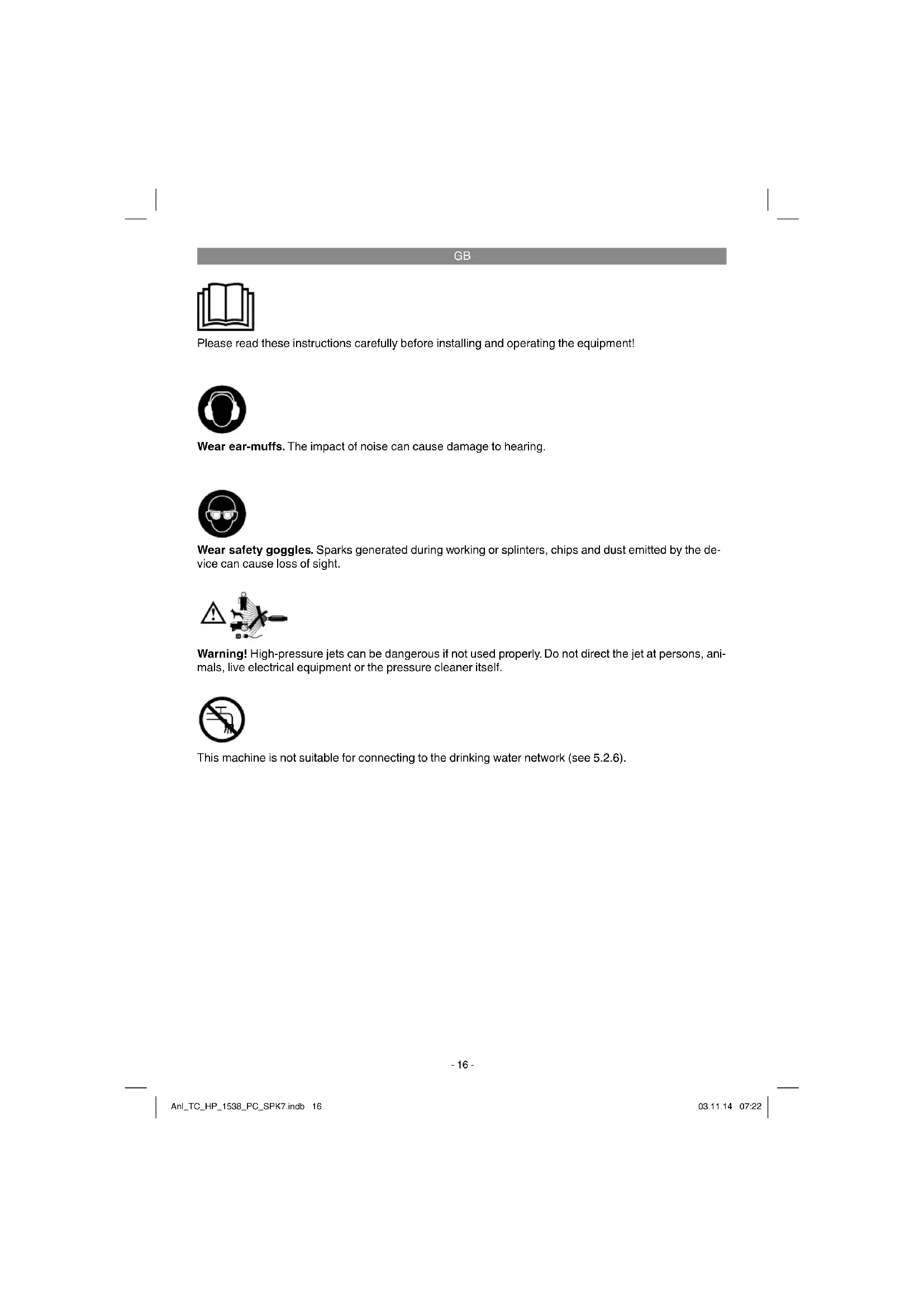
Please read these instructions carefully before installing and operating the equipment!

Wear ear-muffs. The impact of noise can cause damage to hearing.

Wear safety goggles. Sparks generated during working or splinters, chips and dust emitted by the device can cause loss of sight.

Warning! High-pressure jets can be dangerous if not used properly. Do not direct the jet at persons, animals, live electrical equipment or the pressure cleaner itself.

This machine is not suitable for connecting to the drinking water network (see 5.2.6).
GB
Danger!
When using the equipment, a few safety precautions must be observed to avoid injuries and damage. Please read the complete operating instructions and safety regulations with due care. Keep this manual in a safe place, so that the information is available at all times. If you give the equipment to any other person, hand over these operating instructions and safety regulations as well. We cannot accept any liability for damage or accidents which arise due to a failure to follow these instructions and the safety instructions.
1. Safety regulations
The corresponding safety information can be found in the enclosed booklet.
Danger!
Read all safety regulations and instructions. Any errors made in following the safety regulations and instructions may result in an electric shock, fire and/or serious injury.
Keep all safety regulations and instructions in a safe place for future use.
2. Layout and items supplied
2.1 Layout (Fig. 1-2)
-
Connector for high-pressure hose
-
Handle
- Accessory mount
- On/Off switch
- Water inlet connector
- Pressure cleaner
- Power cable
- Gun
- Extension
- Cleaning agent container
- Setting wheel
- Quick connection system
- Rotating nozzle
- Point / wide jet nozzle
- High-pressure hose
- Terrace cleaner
17.Rotor
A. Nozzle cleaning pin
2.2 Items supplied
Please check that the article is complete as spcifi ed in the scope of delivery. If parts are missing, please contact our service center or the nearest branch of the DIY store where you made your purchase at the latest within 5 work days after purchasing the article and upon presentation of a valid bill of purchase. Also, refer to the warranty table in the warranty provisions at the end of the operating instructions.
- Open the packaging and take out the equipment with care.
- Remove the packaging material and any packaging and/or transportation braces (if available).
Check to see if all items are supplied. - Inspect the equipment and accessories for transport damage.
If possible, please keep the packaging until the end of the guarantee period.
Danger!
The equipment and packaging material are not toys. Do not let children play with plastic bags, foils or small parts. There is a danger of swallowing or suffocating!
Gun
- Extension
High-pressure hose
- Cleaning agent container
Rotating nozzle
- Point / wide jet nozzle
Terrace cleaner
- Original operating instructions
- Safetyinstructions
3. Proper use
The pressure cleaner is designed to clean vehicles, machines, buildings, facades, etc. in the private sector.
The equipment is to be used only for its prescribed purpose. Any other use is deemed to be a case of misuse. The user / operator and not the manufacturer will be liable for any damage or injuries of any kind caused as a result of this.
Please note that our equipment has not been designed for use in commercial, trade or industrial applications. Our warranty will be voided if the machine is used in commercial, trade or industrial
GB
businesses or for equivalent purposes.
4. Technical data
| Rated voltage/frequency: ...220-240 V ~ 50 Hz Power consumption: 1500 W Rated pressure: 7.5 MPa (75 bar)* |
| Permissible pressure: ... max. 11.0 MPa (110 bar) |
| Rated flow rate: 6.3 l/min |
| Max. water inlet pressure: 0.6 MPa (6 bar) |
| Protection class: II /回 |
| Weight: 7.5 kg |
- The rated pressure depends on the accessories used with the pressure washer.
Danger! Sound and vibration
Sound and vibration values were measured in accordance with EN 60335-2-79.
| LpA sound pressure level | 81 dB(A) |
| KpA uncertainty | 3 dB |
| LwA sound power level | 96 dB(A) |
| KwA uncertainty | 3 dB |
Wear ear-muff s.
The impact of noise can cause damage to hearing.
Total vibration values (vector sum of three directions) determined in accordance with EN 60335-2-79.
Vibration emission value a_h ≤ 2.5 m/s^2 K uncertainty = 1.5 m/s²
The specified vibration value was established in accordance with a standardized testing method. It may change according to how the electric equipment is used and may exceed the specified value in exceptional circumstances.
The specified vibration value can be used to compare the equipment with other electric power tools.
The specified vibration value can be used for initial assessment of a harmful effect.
Keep the noise emissions and vibrations to a minimum.
Only use appliances which are in perfect working order.
Service and clean the appliance regularly.
Adapt your working style to suit the appliance.
Do not overload the appliance.
- Have the appliance serviced whenever necessary.
- Switch the appliance off when it is not in use.
- Wear protective gloves.
Caution!
Residual risks
Even if you use this electric power tool in accordance with instructions, certain residual risks cannot be rules out. The following hazards may arise in connection with the equipment's construction and layout:
- Lung damage if no suitable protective dust mask is used.
- Damage to hearing if no suitable ear protection is used.
- Health damage caused by hand-arm vibrations if the equipment is used over a prolonged period or is not properly guided and maintained.
5. Before starting the equipment
Before you connect the equipment to the mains supply make sure that the data on the rating plate are identical to the mains data.
Warning!
Always pull the power plug before making adjustments to the equipment.
5.1 Using the equipment correctly
The pressure cleaner must be stood on a level, stable surface.
It is recommended that you adopt the correct operating position every time you use the equipment, with one hand on the gun and the other on the lance.
- Never direct the water jet at electrical lines or the equipment itself.
So that the pump does not suffer any damage when it is not in use, a small amount of leakage from the pump is normal.
- Never use the machine in potentially explosive areas under any circumstances!
The operating temperature must be between +5 and +60^
GB
- Do not cover or modify the lance or the spray nozzles in any way.
The pressure cleaner is designed to be used with cold or lukewarm water (max. 60^) higher temperatures can damage the pump. - Do not use water that is dirty, gritty or contains any chemical products, as these could impair operation and shorten the life of the equipment.
Caution: Risk of explosion
Do not spray flammable liquids.
Warning
Water that has passed through the non-return valve is not drinkable.
Warning
If cleaning agent gets into contact with your skin or into your eye, rinse immediately with lots of clean water. Then consult a doctor or follow the steps described on the safety data sheet or provided by the manufacturer of the cleaning agent.
5.2 Assembly
5.2.1 Assembling the equipment (Fig. 1)
Push the accessories holder (2) onto the high-pressure cleaner (5). The holder can be used for space-saving storage of the gun (8), the extension (9) and the high-pressure hose (15).
Note! Before using the pressure cleaner, make sure that the high-pressure hose is completely unwound.
5.2.2 Fitting the attachments (Fig. 2)
Before you use the high-pressure cleaner (5) you must first fasten the extension (9) to the gun (8) by pushing and twisting.
Then push the rotating nozzle (13) or the cleaning agent container (10) onto the extension (9) by means of the quick connection system.
Rotating nozzle
To remove particularly stubborn dirt, use the rotating nozzle (13).
Solid cone / fl at fan lance (14)
The shape of the water jet can be changed from solid cone to fl at fan by turning the nozzle (Fig. 8).
Cleaning agent container
You can adjust the quantity of cleaning agent you want to add by turning (+ / - ) on the setting wheel (11). We recommend using the cleaning agent sparingly.
5.2.3 Fitting the handle (Fig. 5)
Push the handle (1) onto the pressure washer (5) and secure it using the 4 screws (long thread).
5.2.4 Assembling the terrace cleaner (Figs. 6-9)
Insert the extension for the terrace cleaner (16) into the recess provided.
Then turn the terrace cleaner (16) over and insert the two screws (short thread). Then place the rotor (17) on the terrace cleaner (16) and secure this by inserting the clip.
You can then attach the terrace cleaner (16) to the extension (8) using the quick-lock system (12).
5.2.5 Connecting the high-pressure hose (Fig. 3/4)
Connect the high-pressure hose (15) to the gun (8) and the high-pressure cleaner (5).
Note:
The connections for the high-pressure hose and the accessories are equipped with a quick connection system (12). To connect, simply push the hose or the accessory onto the respective connection. To remove, simply actuate the quick connection system (12) and you can remove the hose or the accessory.
Each time before fitting, always check that the quick connection system (12) is correctly engaged. Do this by pulling briefly on the hose or the accessory.
5.2.6 Water inlet connector (Fig. 1/4)
The connection for the water inlet (4) is equipped with a connector for standard hose coupling systems. Plug the hose coupling on the supply hose (min. 1 / 2^n ) to the water inlet connector (4).
Always use a reinforced hose with a standard coupling for the water inlet. The hose should be at least 6m in length. (Not supplied)
A backflow preventer must be installed between the drinking water and the pressure cleaner! Ask your local plumber about this.
GB
5.2.7 Electrical connections (Fig. 1)
Before you connect the equipment to the power supply make sure that the data on the rating plate are identical to the supply voltage.
If you use any extension cables, make sure that they are suitable for outdoor use and have large enough wires: 1 - 10m:1.5mm^2 10 - 30m:2.5mm^2
- Insert the power plug on the power cable (6) into the socket outlet.
6. Operation
The equipment consists of an assembly with a pump, which is encased in a shock absorbing housing. For an optimal working position the equipment comes with a lance and a non-slip gun, whose shape and configuration comply with the applicable regulations.
6.1 Using for the first time
Once you have completely assembled the pressure cleaner and made all the connections, proceed as follows:
Open the water inlet. Press safety pin, a (Fig. 2) on the spray gun and pull back trigger lever, b (Fig. 2) in order to bleed the trapped air out of the equipment.
Turn on the equipment by switching the On/Off switch (Fig. 1/3) to "ON". Now activate the trigger lever (b).
To turn off, release the trigger lever (b). The equipment will then go into standby. As soon as you press the trigger lever (b) again, the pressure cleaner will restart.
To turn off the pressure cleaner completely, set the On/Off switch (Fig. 1/3) to "OFF".
6.2 Using cleaning agent
- Fill the cleaning agent container (10) with suitable cleaning agent.
The cleaning agent will be added automatically in low-pressure mode.
Note:
Use only cleaning agents which are expressly suitable for high-pressure cleaners.
6.3 Holder for the gun/accessories (Fig. 1)
The gun and accessories can be kept in the provided accessories holder (2) in order to save space when not in use.
7. Replacing the power cable
Danger!
If the power cable for this equipment is damaged, it must be replaced by the manufacturer or its after-sales service or similarly trained personnel to avoid danger.
8. Cleaning, maintenance and ordering of spare parts
Danger!
Always pull out the mains power plug before starting any cleaning work.
8.1 Cleaning
- Keep all safety devices, air vents and the motor housing free of dirt and dust as far as possible. Wipe the equipment with a clean cloth or blow it with compressed air at low pressure.
We recommend that you clean the device immediately each time you have finished using it.
Clean the equipment regularly with a moist cloth and some soft soap. Do not use cleaning agents or solvents; these could attack the plastic parts of the equipment. Ensure that no water can seep into the device.
8.2 Maintenance
8.2.1 Testing the water intake filter
Periodically check the intake filter in order to prevent clogging, which could jeopardize operation of the pump.
To do this, unscrew the coupling for the water inlet hose from the device and clean the exposed inlet sieve under running water.
8.2.2 Long periods of nonuse (electric pump)
The machine should be fully emptied of water each time after use. This requires you to switch on the equipment without a connected water supply and to press the trigger lever (b) (max. 1 min.) until no more water emerges. Then you must switch
GB
off the equipment.
If the device is not used for an extended period of time, lime deposits will begin to form in the electric pump, which in turn can lead to starting difficulties.
8.2.3 Cleaning the nozzle (Fig. 11)
Use the nozzle cleaning pin supplied (A) to clean clogged nozzles.
8.3 Ordering replacement parts:
Please quote the following data when ordering replacement parts:
Type of machine
Article number of the machine
- Identification number of the machine
- Replacement part number of the part required For our latest prices and information please go to www.isc-gmbh.info
9. Transport
Before transporting the equipment to a different location, remove all connections. The equipment is then free for transport.
10. Disposal and recycling
The unit is supplied in packaging to prevent its being damaged in transit. This packaging is raw material and can therefore be reused or can be returned to the raw material system.
The unit and its accessories are made of various types of material, such as metal and plastic. Defective components must be disposed of as special waste. Ask your dealer or your local council.
11. Storage
Store the equipment and accessories out of children's reach in a dark and dry place at above freezing temperature. The ideal storage temperature is between 5 and 30^ . Store the electric tool in its original packaging.
GB
12. Possible causes of failure
| Fault Cause | Remedy | |
| The equipment does not work | - No electrical voltage at the equipment - The cross section of the extension cable is not large enough and/or the extension cable is too long - The mains voltage is lower than that specified - The pump is frozen | - Check the fuse, power cable and power plug and have them replaced by qualified personnel if necessary - Use extension cables with larger cross sections and/or use shorter extension cables - Contact the power supply company if necessary - Check and thaw if necessary |
| The motor starts but there is no pressure build-up | - The water intake fi liter is clogged - Air intake in the water inlet - The discharge nozzle is too large - Water cock closed | - Clean the water intake fi liter (see 8.2.1) - Check the supply hose and hose connectors and replace if necessary - Check and replace if necessary - Turn open the water cock. |
| The operating pressure is irregular | - Air intake in the water inlet - Check the supply hose and hose connectors and replace if necessary | |
GB

For EU countries only
Never place any electric power tools in your household refuse.
To comply with European Directive 2012/19/EC concerning old electric and electronic equipment and its implementation in national laws, old electric power tools have to be separated from other waste and disposed of in an environment-friendly fashion, e.g. by taking to a recycling depot.
Recycling alternative to the return request:
As an alternative to returning the equipment to the manufacturer, the owner of the electrical equipment must make sure that the equipment is properly disposed of if he no longer wants to keep the equipment. The old equipment can be returned to a suitable collection point that will dispose of the equipment in accordance with the national recycling and waste disposal regulations. This does not apply to any accessories or aids without electrical components supplied with the old equipment.
The reprinting or reproduction by any other means, in whole or in part, of documentation and papers accompanying products is permitted only with the express consent of the iSC GmbH.
Subject to technical changes
GB
Service information
We have competent service partners in all countries named on the guarantee certificate whose contact details can also be found on the guarantee certificate. These partners will help you with all service requests such as repairs, spare and wearing part orders or the purchase of consumables.
Please note that the following parts of this product are subject to normal or natural wear and that the following parts are therefore also required for use as consumables.
| Category Example | |
| Wear parts* Carbon brushes, lance, hose | |
| Consumables* | |
| Missing parts |
- Not necessarily included in the scope of delivery!
In the effect of defects or faults, please register the problem on the internet at www.isc-gmbh.info. Please ensure that you provide a precise description of the problem and answer the following questions in all cases:
Did the equipment work at all or was it defective from the beginning?
- Did you notice anything (symptom or defect) prior to the failure?
What malfunction does the equipment have in your opinion (main symptom)?
Describe this malfunction.
GB
Warranty certificate
Dear Customer,
All of our products undergo strict quality checks to ensure that they reach you in perfect condition. In the unlikely event that your device develops a fault, please contact our service department at the address shown on this guarantee card. You can also contact us by telephone using the service number shown. Please note the following terms under which guarantee claims can be made:
- These guarantee conditions regulate additional guarantee services. Your statutory guarantee claims are not affected by this guarantee. Our guarantee is free of charge to you.
- Our guarantee only covers defects suffered by the device which have been verifiably caused by a material or manufacturing fault and is limited to the rectification of such defects or the replacement of the device at our discretion.
Please note that our devices are not designed for use in commercial, trade or professional applications. A guarantee contract will not be created if the device has been used by commercial, trade or industrial business or has been exposed to similar stresses during the guarantee period.
-
The following are not covered by our guarantee:
-
Damage to the device caused by a failure to follow the assembly instructions or due to incorrect installation, a failure to follow the operating instructions (for example connecting it to an incorrect mains voltage or current type) or a failure to follow the maintenance and safety instructions or by exposing the device to abnormal environmental conditions or by lack of care and maintenance.
-
Damage to the device caused by abuse or incorrect use (for example overloading the device or the use or unapproved tools or accessories), ingress of foreign bodies into the device (such as sand, stones or dust, transport damage), the use of force or damage caused by external forces (for example by dropping it).
-
Damage to the device or parts of the device caused by normal or natural wear or tear or by normal use of the device.
-
The guarantee is valid for a period of 24 months starting from the purchase date of the device. Guarantee claims should be submitted before the end of the guarantee period within two weeks of the defect being noticed. No guarantee claims will be accepted after the end of the guarantee period. The original guarantee period remains applicable to the device even if repairs are carried out or parts are replaced. In such cases, the work performed or parts fitted will not result in an extension of the guarantee period, and no new guarantee will become active for the work performed or parts fitted. This also applies if an on-site service is used.
- Please report the defective device on the following internet address to register your guarantee claim: www.isc-gmbh.info. If the defect is covered by our guarantee, then the item in question will either be repaired immediately and returned to you or we will send you a new replacement device.
Of course, we are also happy offer a chargeable repair service for any defects which are not covered by the scope of this guarantee or for units which are no longer covered. To take advantage of this service, please send the device to our service address.
Also refer to the restrictions of this warranty concerning wear parts, consumables and missing parts as set out in the service information in these operating instructions.
F

Pression admissible: ... max. 11,0 MPa (110 bar)
5.2.5 Raccordement tuyau haute pression (figure 3/4)
Chere cliente, cher client,
5. Pre puštanja u pigeon
Pre ukljucivanja proverite odgovaraju li podaci na tipskoj plocici podacima o mrezi. Upozorenje!
Pre negro počnete da podesavate uredaj, iz-vucite utikač iz uticnice.
5.1 Ispravno korišćenje uredaja
Evaakrih h avakkawon avi ia iotpoi
O iokntnc nKtiknc ukeun unxpeout ai vti n tioptpnc va uuaaai ot wotn avakkwn oepintwnouevuexieva xnoiounoei ouokeh. H naia ouokeun motei va npaxwnei o ketpo n tiopocn kukiw uokewv me tv evvoia twv evikwv voowavakkwn kai diaxepionc anoBantw. Aev oupiapaudvovta ta tujmuata nauw ouokewy ka ta bonntka otoxie xaupic nktipka eaptnmuata.
H avatunwnn nooiaaonnte aannc npoohns avanapayyn ntc teknpiowns n aaawv
deltaoyntikw vou avadepovtal ota npoiovta, akoun kai anooaogatika, enitpenetai mvo e
pntn ouykataeon tnsc GmbH.
Me eiuulaaen Teyivkowpontonnoeaw
GR
Evnpwon yia to epbiC
5.2.2 MoHTaH Ha HactaBnTe/HaKpaHHnUte (ΦnR. 2)
IpeHnNoCTaBHeToHaOcHtNTeJI3aBHCHO HnaIraHe(5)Ha-HanpeJ,ype3BMbKBAHe n NocpeCTBOM 3aBpTaHe yDhNHTeJIrT (9) TpaBa Da ce 3aKpeHn BpXy NcTOJeTa (8). Cne ToBa np6ByaTe potOpHata DHO3a (13) nnCbDa 3a NoHCTBaUcpeCTBa (10)c NOMoTu Ha cNCTeMaTa 3a 6bp3o CbPb3BaHe BpXy yDblNHTeJIa (9).
PotopHaI03a
H3noI3BaIte potopHaTa IIO3a npn OOCeHO yNOpTN 3AmbpcBaHnA (13).
JaHceta ToCHOBa/WHPOHa cTpyr (14)
IocpeCTBOM 3aBbPtaHe Na IIO3aTa TOUKObaCTpy MoKe Da ce IpOMeHn B NIOCKa CTPy (1306p.8).
Cb3a nouchBaun cpeCTBa
Ye3 3aBpTaHe (+/-) Ha perynpaTo KOJeMoXeTe Da perynPaTe pNHMeCte Ha noHCTBaTO cpeCTBO. IpeOpBvBaMe Bn o6ae Da bopate BNHaHr NkOHOMHcO c noHCTBaTO cpeCTBO.
5.2.3 MoHTaH pbKoXBaTHa (fHr.5)
PpynbpyTaTe pBkoXBaTHaTa (1) Bbpxy npncnoc6beHneTo 3a NoocTbaHe NOp BnCOKo Hanahe (5) n a3akpenete C 4 BNHTa (dbI).
5.2.4 MoHTaH Ha npncnoc6neHHeTo 3a NoHCTBaH He Tepacn (Hr.6-9)
HaTnCHeTe yIbIKNHKeIe Ha npncnocOBeHHeTo 3a noNCTBaHe Ha Tepacn (16) B npdeBnDEnHn 3a ceIra npope3.
BG
3aBbptTe CNEI TOBA npncnocoblenHeTo 3a noHCTBaHe Ha Tepacn (16) n 3aBHHTe Dbata BnHTA (KbcN).BnoCleDCTBne NoCTabete potopa (17) BbpynpncnocoblenHeTo 3a noHCTBaHe HA Tepacn (16) n ro 3akpenete Upe3 BMbkBaHe HA CHO6Hte.
CneTobAMoHTeaNocTaBnTe npncoc6bHeHTo3aNoHCTBaHeHaTepacn (16)nocpeDcTBOMCNCTeMaTa3a6bp30 cbbp3BaHe(12)Bbpxy ydbJNHTen8.
5.2.5 Cbpb3BaHe Ha Mapkya 3a BncoHo Hanahe (fur. 3/4)
CbbpkeTe Mapkya 3a BnCOKo HanaRahe (15) 3a INCTOJIeta (8) n 3a ONUCTNTeJRA 3a BnCOKo HanaRahe (5).
Yka3aHHe:
N3BODNTe 3a Mapkya 3a BnCOKo HaNrahe pecn. npHaJdEeKHOCTne ca OobpyBaHn cbc CnCTema 3a 6bp30 CbP3BaHe (12), c ceI MOHTaX NpOCTO np6yTaIe Mapkya pecn. OOBpyBaHeto BpXy CbOTBeTHn H3BOD.C ceI N3BaJDAne, CnCTemata 3a 6bp30 CbP3BaHe (12) cAmo TpA6Ba Da Ce 3aDeHCTBa HmApHyT pecn. OOBpyBaHeto MoKe Da Ce n3BaDi. Ppei BceKMOHTaX npOBepRaIte oae, daNN CnCTemata 3a 6bp30 CbP3BaHe (12) e npaBnHNo FHKcnpaHa. 3a CEJa npDpPaNe tJeKO MpaKyau pecn. OOBpyBaHeto.
5.2.6 N3BOD 3a 3axpaHbaun Mapny (fnpypa 1/4)
HbOt3a3axpaHbaunmaPky(4)e
obpyBaHcBcCbeDnHTeneH eIemEHT3a
CTaHapTHN CNTeMHa HnyHyn3Ha MapHyH.
TbXte HnyHryHa Ha 3axpaHbaunmaPky
(MH.01/2") B H3bOda(4).
MeHny nIteHaTbOda nNoocCTBaUcTO CpeCDBO NOBnCOKo HnlaRaHe Tp6Ba Da ce INCTaIIpa Tpb6eHnpeKbcBaH! NOnuTaTe 3a ueTb BaNn BODonpoBOnHk.
5.2.7 Cbbp3BaHe KbmeleKtpnuechaTa MPeka (fHrypa 1)
-
PnpDn Da BkHOnHTyepeDa, npOBepeTe daJIa daHHnte Ha fa6pnHata TaBeJka OTOBapRT Ha daHHnte Ha MPeHaTa.
Horato n3no13BaTe yBnHnTeHN HaBeN, npOBepe DaIte Ta Ca IOXoJaN 3a H3no13BaHe Ha OTKPto N daIIMaT DocTaTbUHO HAppeHOb CeeyHne Ha KInlaTa: 1-10 M:1.5 MM2 10-30 M:2,5 MM2 -
Πьхнete uenceela Ha 3axpaHbauЯ Ka6eI B KOHTaKTA.
6.06cIyHbAne
UpeBcCe CbCTOOn OT KOHCTpyKTHBnA rpyna c NOMna, KORTo e NOKPNTa C ydapoyctOnHOB KOpNyc. UpeBt e ObOpYBaH C NaHcTe aC yDOb6en 3a XBaIaHe NcTOnet 3a ONTImaIHO paBoTHo NIOJKeHne, YHrTO φOpMa I ObOpYBaHe OTROBapRT Ha aKtYaNHTe npEINCaHnA.
6.1 NycaHe Bekcnoataua
Horato CTe MOHTnpaJIu BOOcTpmyKaTa H3zraNo HCTe H3nblHNI BcNCHCcbp3BaHn,MOKETe Da H3BbPwNTe CLeDHNTE DeEChTBn:
OTbOpTe nOdaBaHTo Ha BODaTa. HAtNCHeTe fncnpaun6oT, a"(fNpyra 2) Ha nCTOneta ndpbNHte Ha3ad NocTa b"(fNpyra 2), 3a da h3ne3Bb3dyxbT OTypeda.
BkIOHETe ypea, KaTO nOCTaBHTe npEKBIOUBATeIa 3a BKIOUBaHE/IN3KIOUBAHe (fNpya 1/3) Ha no3nIa "ON".
3a da n3KIOHHTe yepa,OCBO6OTe IocTa (b). YpeBt npemHHaba B cTeH6ba peXHM.CeI KaTO 3aDeiCTBaTe IocTa (b), BOoCTpykata ce BKIOHBA OTHOBO.
3a da n3KIOUHTe BOOCTpyKaTa HnBJIHO, NOCTABNTpeBHKIOUHTBaTeIra 3a BKNIOUHaBe/ n3KIOUHaBe (fHpya 1/3) Ha no3nIur,“OFF"
6.2 N3noJ3BaHe Ha nouchTbaa npenapat
HantbHHe pe3epBoapa 3a noNCTBaun npenapat (10) cbc cbOTBETnN noNCTBaun npenapat.
CmecBaHToHaNoUcTBAuIy npenapat Ce H3BbPbBa aBTOMaTHHO pNpEHXM Ha pa6ota C HNCHO HAIraHe.
Yka3aHHe:
H3noJ3BaIte cAmo NOUcTBAuCi CpEcdTBA, KOHTO H3pNHO Ca NDOXODAa 3a OCHCTeJIIN 3a BNCOKO HAJIraHe.
BG
6.3 NocTAbHn 3a nHcToJeta/ npHaAdJeKHOCTHTe (fMyrpa1)
3a da He 3aemat MACTO NCTOEtbT IN
PnHaIeHxHcOTHe, MoKeTe da HcBxaHBAte
B PpeBnEHNHeTe 3a cJI Ta NoCTaBKn.
7.CMaHa Ha MpeKOBnCbeHNHTeJIeH npoBODHH
OnachOCT!
Ako mpeKOBnT cbeDNHTeH npOBOHNHa To3H YpeD ce NOBpEn,TO ToT Tpa6Ba Dace CMeHN OT pON3BOINTeN IIN OT HerOBaTacepBN3Ha cnyk6a 3a ObcnykBaHe KaIneHTInIINOT NoD6HO KBAJIINΦuPAnHO NJIe,3a Da CEh36ErHaT N3JaarHn HA onaCHOCT.
8.ПоистВанe,поДрьЖнaн норьчHa Ha pe3epBnЧаctN
Onachoct!
PpeBnBCNHNDeHOCHTNO NOOHCCTBAHe 13dbpBaIte IeCenela.
8.1 NocHTBaHe
No Bb3MOHHOCT NOdIbPkaHte 3aunTHHTe yctpoiCTBa, BEHTINaUOHNHTe npope3n I KOPpyca Ha DBiratela 6e3 npax n 3aMbpcBAHn. NocHTepeJa C uNCTa KbpaHaIo Ro o6dyXaTe CbC CbCTeH Bb3DyX pIn HNCIO HAJIraHe.
- PpenopbUBaMe Bn da nouchteBaTe ypeDa DnpeHTHO cneB BCRA ynotpe6a.
-ПочнCTBaIteуpeda peEOBHO CBlaJHaNbPnaиMaJIHO KaJIeB canyH.HeN3NoI3BaIteNoUcTBAuIN npEnapaTNnIpa3TBOpHTeIN;TeMOrAT da pa3raDAtnIaCTMacCBNe TaCtNoуpeda.BHIMABAite3aTOBa BbB BbTpEshOCHTTaHaypeda Da He nOnaDHe BOda.
8.2 PdApbHnKa
IpeenuaTbaHTo NnI npR BnI pa3mHOxHaBaHe Ha DOkyMeHTaun I cBnpOBoNDteHN DOkyMeHTn Ha npOyKTIne, CbIO Taka H a Yactn E dOnyCTHMO Camo C n3pnuHOTc bflacne Ha iSC Gmb/HCH Tm6X/.
3anaeHO e npaBTo 3a H3BpWbAHe Ha TexHneckn npomeHH
BG
HΦopMaun OTHOCHO 6cnyHbHeTo
BbB BCnHKn DbpKaBn, KOnto Ca yIOnMeHaTn B rapaHNoHHaTa KapTa, Hne pa3noIarame C KOMNEHTHN B O6cLyKbAHeTo napThbOpN, YNtO KOHTaKTn Ie HamePte B rapaHNoHHaTa KapTa. CbIe Ta ca Ha BaWe pa3noJIOKeHHe 3a BCaKaBb BnCepBn3Hn pa60TN KaTO peMOHT, HabABHe Ha pe3epBnH nI3HocBaUe Ce qAcTn IIN Cha6dJaBaHe C KOHCymaTHBn.
HeoHMOe da ce B3eMe NOB BHIMAHne,Ye CJIeHNTE HaTn To3N npOyKt NpOJIeHaT Ha eCTeCTBeHO 3HOCBAHe IIN TaKOBa BCJeCDTBHe HA yIOTpe6aTa Hm peCn. CJIeHNTE HaCTn Ca HeoXoHMn KaTO KOHCymATNB.
| Кaterория Пrimер | |
| Износваши се части* | Вълесови чеки, ланцета, маркуч |
| Консу matини матерни/Kонсу matини* | |
| Линсваши части |
*He Ce BKNKUyBaT 3aDbIbJNHTeJIHOB DIOCTABeHnKOMPJIeKT!
PnHedocTaBunNnDeEeKTH BmMOJIM Da yBeDomITE 3a CnyaHa N DeEeHT B INHTepHET Ha WwW. isc-gmbh.info.MoJI, o6bpHete BnHMaHne Ha ToHOTo ONCaHne Ha DeEeKTA N BB BCEKn CnyaI OTROBOpTe 3a CEJIHa HcNeDHNTE BbnpOci:
- YpeBbT pa60tHnIe Bce HnIeΦeKbTc e I npOBnB C aMTo HaHaIo?
Heio HanpaBnlo Ln Bn e BneuatJeHne npedn da ce npoBn deeKtBT (nHnkaun 3a deeKtA)?
CnopeBac B KaKBO ce CbCTOn DeFeKTbT Ha ypeJa (OCHOBHa HnHnKaun)? OnnweTe DeFeKeTa.
BG
TapaHcNoHHa KapTa
YBaKaemKJIneHTN,
HaunTe npdykTn noJeKaT Ha cTpor KaueCTBEN KOHTpO. B clya, Ye BbnpEn ToBa TOni UpeN HKORA He FyHnUOHnpa 6e3ynpeHNO, To MHOro CbKaJABaMe 3a ToBA n Bu MoINM da Ce o6bPhe Te KbM Hauata cepBn3Ha cLyj6a Ha aDpeca, NocOeH Ta3n rapaHIOHHa KapTa. C yD0BONCTBne Cme Ha Baape p3noHOHeNe CbIo No TEleFOHa NocOeHnTEleFOHn HOpE 3a O6cLyKBaHe. OTHCNO npedraBBaHTo HA rapaHIOHn pPeTeHn E b Cnla CneDHOTO:
GB explains the following conformity according to EU directives and norms for the following product
Notified Body: Notified Body
Reg.No
2000/14/EC_2005/88/EC
Annex V
Annex VI
Noise: measured L_WA = 94 dB (A); guaranteed L_WA = 96 dB (A)
P=1,5KW; L/0=cm
Notified Body:
2004/26/EC
Emission No.:
Standard references: EN 60335-1; EN 60335-2-79; EN 62233; EN 55014-1; EN 55014-2; EN 61000-3-2; EN 61000-3-3
Subject to change without notice
Archive-File/Record: NAPR009875
Documents registrar: Daniel Protschka
Wiesenweg 22, D-94405 Landau/Isar
EH 11/2014 (01)