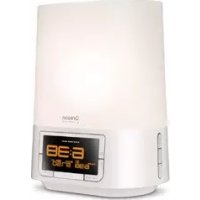
USER MANUAL WS902 OREGON SCIENTIFIC
Sunrise Wake-up Clock
Model: WS902
USER MANUAL
Sunrise Wake-up Clock
Model: WS902
USER MANUAL
CONTENTS
Contents 1
Introduction 2
Overview 2
Front View. 2
Bottom View 2
LCD Display 2
Getting Start 2
Replacing Lamp. 2
Connect to Power Source 3
Clock. 3
Manually Set Clock 3
Radio. 3
Soothing Nature Sounds. 3
Adjust Volume 3
Alarm. 3
Alarm with Wake up Light. 4
Sleep Timer 4
Reading Lamp. 4
Play Music. 4
LCD Backlight. 4
Reset. 4
Specifications 4
Main Unit. 4
Troubleshooting 5
Precaution 6
EU-Declaration of Conformity 6
About Oregon Scientific 6
INTRODUCTION
Thank you for selecting the Oregon Scientific TM Sunrise Wake-up Clock
Our body clock is often not in sync with the demands and rhythm of modern life.
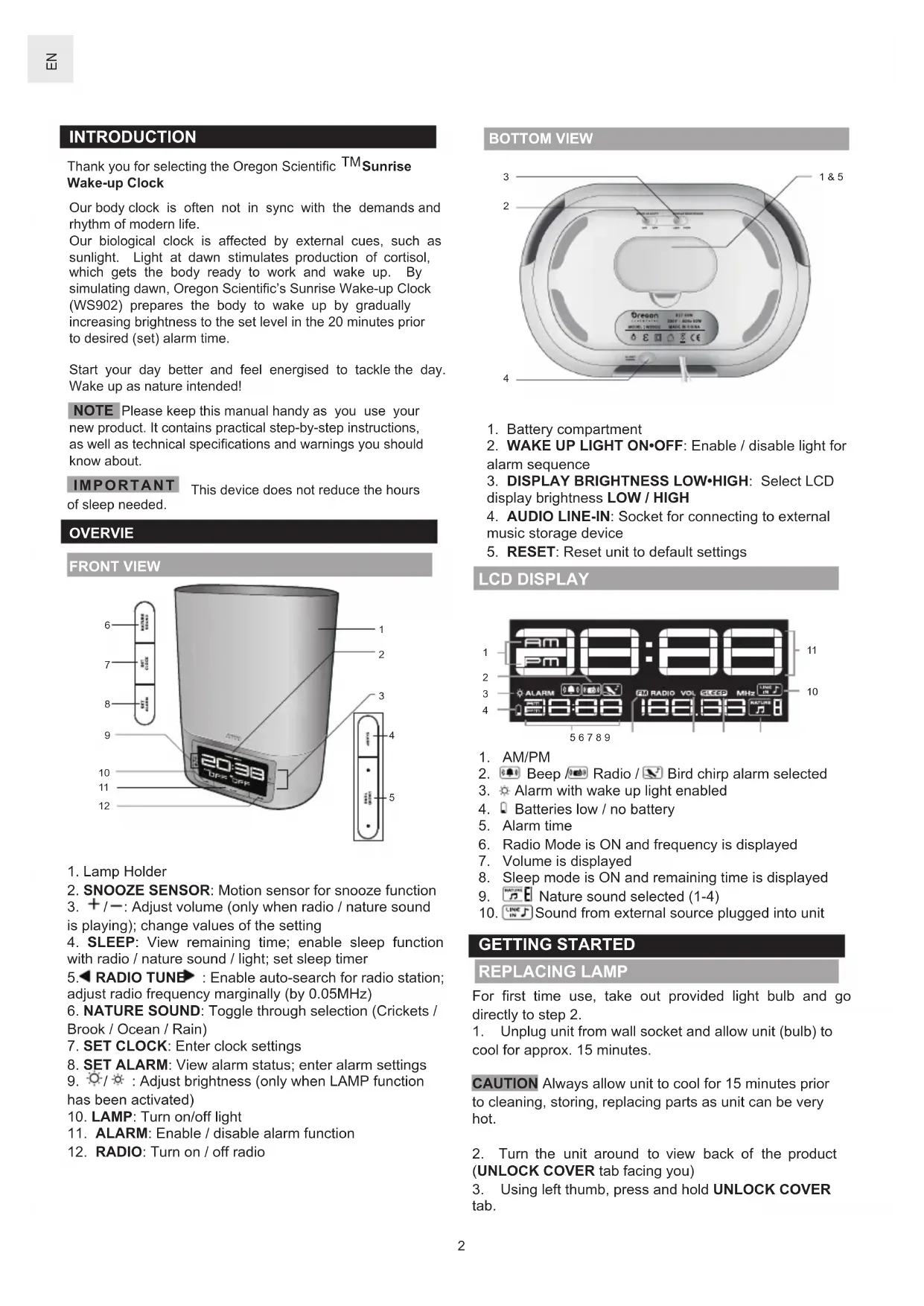
Our biological clock is affected by external cues, such as sunlight. Light at dawn stimulates production of cortisol, which gets the body ready to work and wake up. By simulating dawn, Oregon Scientific's Sunrise Wake-up Clock (WS902) prepares the body to wake up by gradually increasing brightness to the set level in the 20 minutes prior to desired (set) alarm time.
Start your day better and feel energised to tackle the day. Wake up as nature intended!
NOTE Please keep this manual handy as you use your new product. It contains practical step-by-step instructions, as well as technical specifications and warnings you should know about.
IMPORTANT This device does not reduce the hours of sleep needed.
OVERVIE
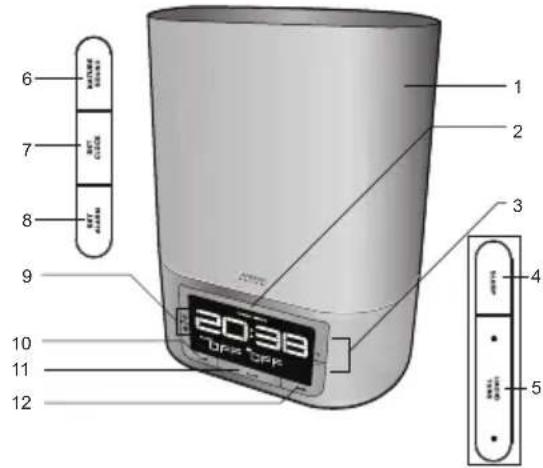
FRONT VIEW
- Lamp Holder
- SNOOZE SENSOR: Motion sensor for snooze function
- +/--: Adjust volume (only when radio / nature sound is playing); change values of the setting
- SLEEP: View remaining time; enable sleep function with radio / nature sound / light; set sleep timer
- RADIO TUNE: Enable auto-search for radio station; adjust radio frequency marginally (by 0.05MHz)
- NATURE SOUND: Toggle through selection (Crickets / Brook / Ocean / Rain)
- SET CLOCK: Enter clock settings
- SET ALARM: View alarm status; enter alarm settings
- / : Adjust brightness (only when LAMP function has been activated)
- LAMP: Turn on/off light
- ALARM: Enable / disable alarm function
- RADIO: Turn on / off radio
BOTTOM VIEW
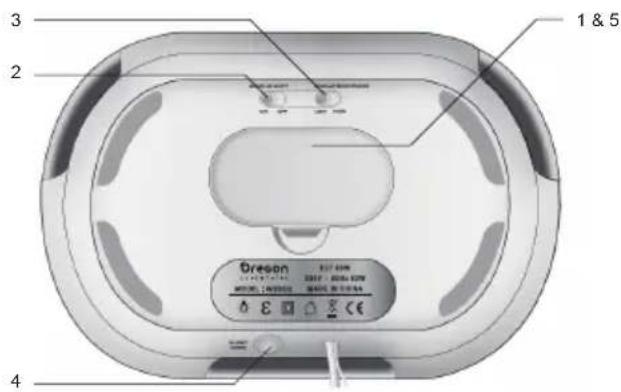
- Battery compartment
- WAKE UP LIGHT ON-OFF: Enable / disable light for alarm sequence
- DISPLAY BRIGHTNESS LOW·HIGH: Select LCD display brightness LOW / HIGH
- AUDIO LINE-IN: Socket for connecting to external music storage device
- RESET: Reset unit to default settings
LCD DISPLAY
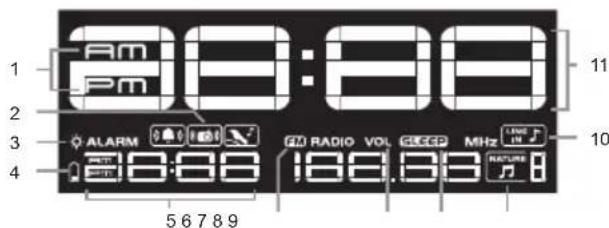
- AM/PM
- Beep Radio / Bird chirp alarm selected
- Alarm with wake up light enabled
- Batteries low / no battery
- Alarm time
- Radio Mode is ON and frequency is displayed
- Volume is displayed
- Sleep mode is ON and remaining time is displayed
- Nature sound selected (1-4)
- Sound from external source plugged into unit
GETTING STARTED
REPLACING LAMP
For first time use, take out provided light bulb and go directly to step 2.
- Unplug unit from wall socket and allow unit (bulb) to cool for approx. 15 minutes.
CAUTION Always allow unit to cool for 15 minutes prior to cleaning, storing, replacing parts as unit can be very hot.
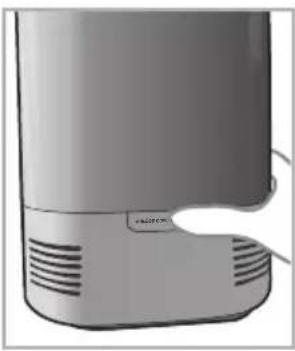
- Turn the unit around to view back of the product (UNLOCK COVER tab facing you)
-
Using left thumb, press and hold Unlock COVER tab.
-
While continuously pressing on UNLOCK COVER tab, place right hand around the side of the product. Push in the side of the cover (area above tab and hook) and lift up to release cover.
(Left handed individuals can use right thumb and left hand if more comfortable).
- Unscrew old light bulb.
- Screw in new light bulb.
- Holding cover, with the top part at a slight angle away from you, align the 2 front plastic tabs to the allotted space.
- Tilt cover down and towards you until lamp covers clicks back into place.
NOTE This unit uses 60 W light bulbs. The built-in protection feature will automatically shut down the unit when the temperature inside the lamp cover is too high. Remove the power plug from the socket, and only plug in again after unit has cooled down sufficiently.
IMPORTANT Please allow this unit to cool until the temperature inside is within a safe range.
CONNECT TO POWER SOURCE
Memory backup:
- Remove the battery compartment cover.
- Insert the batteries (2xAAA), matching the polarities.
- Replace the battery compartment cover.
NOTE Batteries should not be exposed to excessive heat such as sunshine or fire.
Before selecting a location to place the unit, consider the following:
- Ensure there is approximately 15cm between unit and closest object, such as walls or other objects.
- Ensure there is at least 40~cm space above the top of the unit for ventilation purposes.
- Ensure distance between unit location and wall socket is not longer than the power cord itself.
Batteries serve as a back-up power supply. To fully utilize all features, plug into wall socket.
To completely disconnect from power, the unit should be disconnected from the wall socket.
NOTE The main unit should not be exposed to wet conditions. No objects filled with liquid, such as vases, should be placed on the main unit.
CLOCK
MANUALLY SET CLOCK
- Press SET CLOCK to enter setting mode.
- Press + or - to change the settings or press and hold
+/- to rapidly change the settings.
- Press SET CLOCK to confirm and move to next setting.
The settings order is: 12/24 hr format, time.
RADIO
To activate / deactivate radio:
Press RADIO to turn radio on / off.
To set radio station:
- Press RADIO to turn radio on.
- Press and hold RADIO TUNE to auto search or press RADIO TUNE to manually select frequency.
For your convenience, the volume and radio frequency will be stored in memory for the next time radio is turned on.
SOOTHING NATURE SOUNDS
NOTE Deactivate radio first. RADIO OFF will be displayed on screen.
To activate / deactivate soothing sounds:
- Press NATURE SOUND to play sounds.
- Press NATURE SOUND repeatedly to select desired sound (1-4) or to turn sound off.
ADJUST VOLUME
To adjust volume:
- Press + / - when radio or nature sound is turned on.
TIP Press and hold +1 to rapidly adjust volume.
ALARM
To set the alarm:
- Press SET ALARM to enter setting mode.
- Press +1 to change the settings or press and hold + - to rapidly change the settings.
- Press SET ALARM to confirm and move to next setting.
- Repeat steps 2-3 for all setting options.
The settings order is: time, alarm sound (select from beep / radio / bird sound).
NOTE If radio alarm is selected, radio will play for 60 minutes at set alarm time at maximum volume level.
If bird sound alarm is selected, bird sound will gradually increase in volume to maximum and play for 2 minutes at set alarm time.
To activate/deactivate alarm:
Press ALARM.
- - - indicates alarm function has been disabled.
To silence the alarm:
- Wave your hand up to 8 cm (3 inches) in front of the SNOOZE SENSOR to silence it for 8 minutes ( will continue flashing to indicate snooze function has been activated)
ALARM WITH WAKE UP LIGHT
To activate/deactivate wake up light:
- Slide WAKE UP LIGHT switch to ON / OFF.
When wake up light has been activated, will be displayed next to ALARM on the LCD screen.
NOTE Light will fade-in (gradually increase in brightness to maximum) 20 minutes prior to set alarm time. Light will stay on (even after SNOOZE has been activated) after set alarm time for 60 minutes.
SLEEP TIMER
To adjust sleep timer setting:
- Turn on desired option:
| OPTION | PRESS: |
| Radio | RADIO |
| Light | LAMP |
| Nature sound | NATURE SOUND |
- Press SLEEP to activate.
- Press SLEEP repeatedly to change the sleep timer setting (120, 90, 60, 30, 15, 0 min).
After 5 seconds of inaction, the timer will automatically be confirmed and set.
TIP Press SLEEP again to change sleep timer (120, 90, 60, 30, 15, 0 min).
NOTE Ensure radio or sound and/or light has been selected to activate sleep timer.
NOTE If light option has been chosen for sleep timer, light will fade out.
READING LAMP
To turn on / off light:
Press LAMP.
To adjust level of brightness:
Press to increase or decrease brightness.
TIP Press and hold / to rapidly change level of brightness (1-20).
For your convenience, the level of brightness will be stored in memory for the next time reading lamp is turned on.
NOTE Do not look directly at the light.
PLAYING MUSIC
Using a cable, plug one end to your music storage device and one end to AUDIO LINE-IN located at the back of unit.
When cable has been successfully connected, will be displayed on the LCD screen and sound will emit from speakers.
LCD BACKLIGHT
To adjust brightness:
- Slide DISPLAY BRIGHTNESS switch to LOW / HIGH.
RESET
- Remove and reinsert the batteries.
- Press RESET to return to the default settings.
SPECIFICATIONS
| TYPE | DESCRIPTION |
| MAIN UNIT |
| L x W x H | 257 x 199 x 140 mm
(10.12 x 7.84 x 5.51 in) |
| Weight 386 g (13.6 oz) | without battery |
| FM | 87.5 to 108 MHz |
| Power | Input: AC 230V 50Hz
(EU version)
Input: AC 100-120V 50/60Hz
(US/Canada/Japan version)
2 x UM-4 (AAA) 1.5V batteries
(for backup) |
NOTE
- Connection type of the switch:
- Range of lamp load: (Lamp) 20W - 60W
- The apparatus shall not be exposed to dripping or splashing.
- To be completely disconnect the power input, the mains plug of apparatus shall be disconnected from the mains.
- The mains plug of apparatus should not be obstructed OR should be easily accessed during intended use.
- No naked flame sources such as lighted candles should be placed on the apparatus.
TROUBLESHOOTING
The below table lists out some of the problems you could encounter. If you are unable to solve the problem, contact the Customer Care Centre in your country. Contact us via www2.oregonscientific.com/service/support.asp
| Problem Possible cause | Use Solution / Remarks | |
| The unit does not work | Power supply? Ensure plug has been properly inserted into the wall socketEnsure there is no power failure. Check by connecting another appliance to the wall socket | |
| The unit does not work | Normal use This is normal as the light bulb generates heat. However, ensure there is enough ventilation and vents are not covered as this can pose a fire hazard. | |
| When setting functions, the unit does not respond | Normal use Press RESET at the base of the unit or remove and reinsert plug into wall socket. The appliance will then be reset to factory default settings. | |
| The light does not work | Light intensity is too low? Press to increase light intensityAlarm function disabled? Ensure alarm time is displayed on LCD screen. Press ALARM to enable.Light bulb is defective? Replace the light bulb. Unscrew and screw in the light bulb again. | |
| Lamp does not turn on again immediately after it has been switched off | Normal operations Allow 3 seconds for the lamp to dim. Please wait until the lamp reaches the preset intensity level | |
| No sound when the alarm goes on | Alarm function disabled? Ensure alarm time is displayed on LCD screen. If - - - is displayed, press ALARM to enable.Radio is defective? If radio has been selected for alarm mode, check that radio works. Press RADIO after you disable the alarm or press ALARM. | |
| The radio is defective / produces a crackling sound | Positioning of external antenna?Change position of external antenna if necessary.Broadcast signal is weak?Press RADIO TUNE No search for the correct signal. | |
| Alarm did not activate today, but it did yesterday | Alarm function disabled? Ensure alarm time is displayed on LCD screen. If - - - is displayed, press ALARM to enable.Power failure? Perhaps there was a power failure which lasted longer than the capacity of the back up system? The display will show an incorrect time and alarm will be 00:00. Do settings again. | |
| The light wakes me too early / late | Location of unit is not suitable?It is recommended that the unit is not placed too far and not lower than your head while in a sleeping position. Make sure the light is not blocked by bed, duvet or pillow. | |
| Snooze does not work | Distance? Wave your hand in front of the SNOOZE SENSOR at a distance range of approx. 1cm to 8cm (0.5 to 3 in). | |
| LCD backlight is too weak to see | Display brightness?Slide DISPLAY BRIGHTNESS to HIGH. | |
| There is no sound after plugging to an external source | External device? Make sure external device is playing.Connection?Make sure cable is firmly connected with the external device and the unit. | |
PRECAUTIONS
- Do not subject the unit to excessive force, shock, dust, temperature or humidity.
- Do not cover the ventilation holes with any items such as newspapers, curtains etc.
- Remove dust regularly with a dry cloth. Accumulated dust poses a potential fire hazard.
- Do not immerse the unit in water. If you spill liquid over it, dry it immediately with a soft, lint-free cloth.
- Do not clean the unit with abrasive or corrosive materials.
- Do not tamper with the unit's internal components. This invalidates the warranty.
- Only use fresh batteries. Do not mix new and old batteries.
- Images shown in this manual may differ from the actual display.
- When disposing of this product, ensure it is collected separately for special treatment.
- Placement of this product on certain types of wood may result in damage to its finish for which Oregon Scientific will not be responsible. Consult the furniture manufacturer's care instructions for information.
- The contents of this manual may not be reproduced without the permission of the manufacturer.
- Do not dispose old batteries as unsorted municipal waste. Collection of such waste separately for special treatment is necessary.
- Please note that some units are equipped with a battery safety strip. Remove the strip from the battery compartment before first use.
NOTE The technical specifications for this product and the contents of the user manual are subject to change without notice.
NOTE If the external flexible cable or cord of this luminair is damaged, it shall be exclusively replaced by manufacturer or his service agent or a similar qualified person in order to avoid hazard.
NOTE For indoor use only.
Visit our website (www.oregon scientific.com) to learn more about Oregon Scientific products. If you're in the US and would like to contact our Customer Care department directly, please visit: www2.oregonscientific.com/service/support.asp For international inquiries, please visit: www2.oregon scientific.com/about/international.asp


COUNTRIES RTTE APPROVAL COMPLIED
All EC countries, Switzerland
and Norway
ABOUT OREGON SCIENTIFIC
Hereby, Oregon Scientific, declares that this Sunrise Wake-Up Clock (Model: WS902) is in compliance with EMC directive 2004/108/EC. A copy of the signed and dated Declaration of Conformity is available on request via our Oregon Scientific Customer Service.
FCC STATEMENT
This device complies with Part 15 of the FCC Rules. Operation is subject to the following two conditions: (1) This device may not cause harmful interference, and (2) This device must accept any interference received, including interference that may cause undesired operation.
WARNING Changes or modifications not expressly approved by the party responsible for compliance could void the user's authority to operate the equipment.
NOTE This equipment has been tested and found to comply with the limits for a Class B digital device, pursuant to Part 15 of the FCC Rules. These limits are designed to provide reasonable protection against harmful interference in a residential installation.
This equipment generates, uses and can radiate radio frequency energy and, if not installed and used in accordance with the instructions, may cause harmful interference to radio communications. However, there is no guarantee that interference will not occur in a particular installation. If this equipment does cause harmful interference to radio or television reception, which can be determined by turning the equipment off and on, the user is encouraged to try to correct the interference by one or more of the following measures:
Reorient or relocate the receiving antenna.
- Increase the separation between the equipment and receiver.
- Connect the equipment into an outlet on a circuit different from that to which the receiver is connected.
- Consult the dealer or an experienced radio / TV technician for help.
MANUALLY SET CLOCK
The following information is not to be used as contact for support or sales. Please call our customer service number (listed on our website at www.oregonscientific.com), or on the warranty card for this product) for all inquiries instead.
We
Name: Oregon Scientific, Inc.
Address: 19861 SW 95th Ave., Tualatin,
Oregon 97062 USA
declare that the product
Product No.: WS902
Product Name: Sunrise Wake-Up Clock
Manufacturer: iPM Concepts Limited
Address: Block C, 9/F, Kaiser Estate,
Phase 1, 41 Man Yue St.,
Hung Hom, Kowloon, Hong Kong
is in conformity with Part 15 of the FCC Rules. Operation is subject to the following two conditions: 1) This device may not cause harmful interference. 2) This device must accept any interference received, including interference that may cause undesired operation.
Orologio Sunrise Wake-up
Modello: WS902
MANUALE PER L'UTENTE
INDICE
Index 1
All EC countries, Switzerland

and Norway
Appareil Principal 4
Depannage 5
Precautions 6
Europe-Declaration de Conformite 6
A Propos D'Oregon Scientific. 6
REVEILLEZ-VOUS NATURELLEMENT
All EC countries, Switzerland

and Norway
A PROPOS D'OREGON SCIENTIFIC
www2.oregon scientific.com/about/international.asp.
Weckuhr „Sunrise“
Modell: WS902
All EC countries, Switzerland
CH
and Norway
UBER OREGON SCIENTIFIC
www2.oregonscientific.com/about/international.asp.
All EC countries, Switzerland

and Norway
SOBRE OREGON SCIENTIFIC
All EC countries, Switzerland
CH
and Norway
SOBRE A OREGON SCIENTIFIC
Visite nousso site (www.oregonscientific.com.br) para saber mais sobre os produits Oregon Scientific.
All EC countries, Switzerland

and Norway
OVER OREGON SCIENTIFIC
Bezoek onsite website (www.oregonscientific.com) ommeer
All EC countries, Switzerland CH
and Norway
OM OREGON SCIENTIFIC