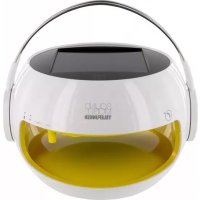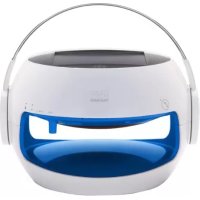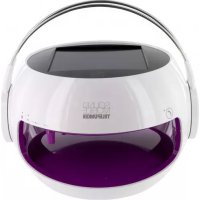
TDBS500V - Docking station TELEFUNKEN - Free user manual and instructions
Find the device manual for free TDBS500V TELEFUNKEN in PDF.



| Product Type | Docking station / Solar Bluetooth speaker |
| Brand | Telefunken |
| Model | TDBS500V |
| Dimensions | 21.7 x 19.2 x 19.7 cm |
| Weight | Approximately 1.40 kg |
| Power supply | Built-in rechargeable LiFePO4 3.2 V battery + solar panel |
| Battery capacity | 1 x 3.2 V LiFePO4 |
| Battery life | Approximately 8 to 10 hours at maximum volume |
| Charge time (USB) | Approximately 5 hours |
| Charge time (solar) | Approximately 10 hours in direct sunlight |
| Output power | 3 W |
| Connectivity | Bluetooth 2.1 with EDR; USB port (charging only) |
| Bluetooth range | Up to 10 meters |
| Frequency response | 100 Hz - 20 kHz |
| Water resistance | IP44 |
| Operating temperature | -10°C to +60°C; relative humidity 0-90% non-condensing |
| Main features | Bluetooth music playback, hands-free function for calls, 2 microphones, automatic LED lighting with twilight sensor, built-in solar panel |
| Included accessories | USB cable, user manual |
| Care and cleaning | Clean the solar panel with a soft cloth (no microfiber), no abrasive products |
| Safety | Do not open, do not expose to heat sources, do not listen at high volume, keep out of reach of children |
| Warranty | 24 months (battery: 6 months) |
| Manufacturer | SOPEG, Burospace 2, route de Gisy BP 24, 91571 BIEVRES Cedex, France |
Frequently Asked Questions - TDBS500V TELEFUNKEN
User questions about TDBS500V TELEFUNKEN
0 question about this device. Answer the ones you know or ask your own.
Ask a new question about this device
Download the instructions for your Docking station in PDF format for free! Find your manual TDBS500V - TELEFUNKEN and take your electronic device back in hand. On this page are published all the documents necessary for the use of your device. TDBS500V by TELEFUNKEN.
USER MANUAL TDBS500V TELEFUNKEN
we make your sound mobile
wireless via Bluetooth® SOLAR SPEAKER hands-free kit water resistant
Inhaltsangabe
Vorwort 4
Geräteübersicht 5
Kurzanleitung 6
Product designed by Winchance.

Consumer Electronics
Burospace 2
Route de Gisy
BP24
91571 BIEVRES Cedex
FRANCE
Jean-Tony LEAC
PDG/CEO


TELEFUNKEN
Garantiekarte
Produktdaten
Modell:
Seriennummer:
Kaufdatum:
Besitzerdaten
Name:
Telefonnummer:
Adresse:
Land:
E-Mail:
Fehlerbeschreibung:
TELEFUNKEN
www.telefunken-digital.com
TELEFUNKEN
Bedienungsanleitung
DE
Operation Manual
GB
we make your sound mobile
wireless via Bluetooth® SOLAR SPEAKER hands-free kit water resistant
Table of contents
Preface 4
Equipment Overview 5
Short Guide 6
Notes on Handling 7
Description of the device 8
Scope of Delivery 8
SoundMobile Special Features 8
Loudspeaker Operation 9
Telephone Calls with SoundMobile 11
Bluetooth 12
Optional Accessories 12
Power and Battery 13
USB Connection 13
Notes 14
Specifications 15
Notes on Disposal 16
Warranty 17
CE-Certificate 18
Warranty Card 19
Preface
This operation manual serves to assist you with using your solar loudspeaker
as intended
and in a safe manner.
The respective device is hereinafter referred to as SoundMobile
This operation manual addresses those, who
set up
- operate
clean and
dispose of
the loudspeaker.
The operation manual's various elements have been marked with defined design features. This enables you to easily determine whether it involves
normal text,
numbers or
steps.
Equipment Overview
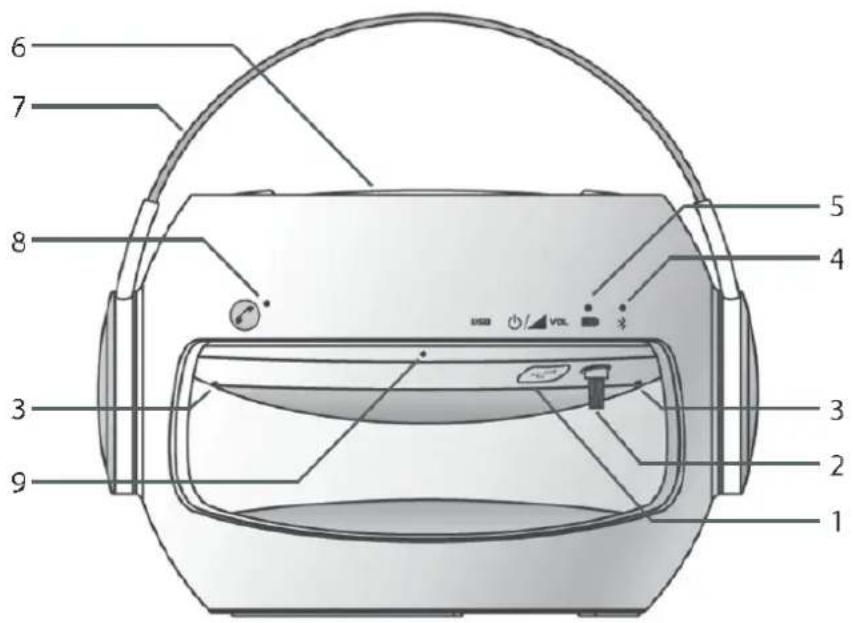
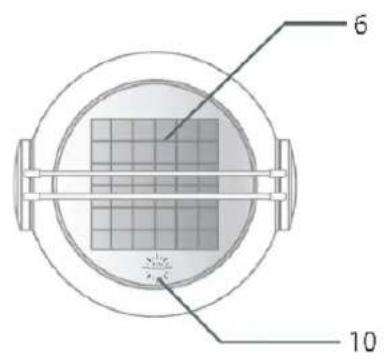
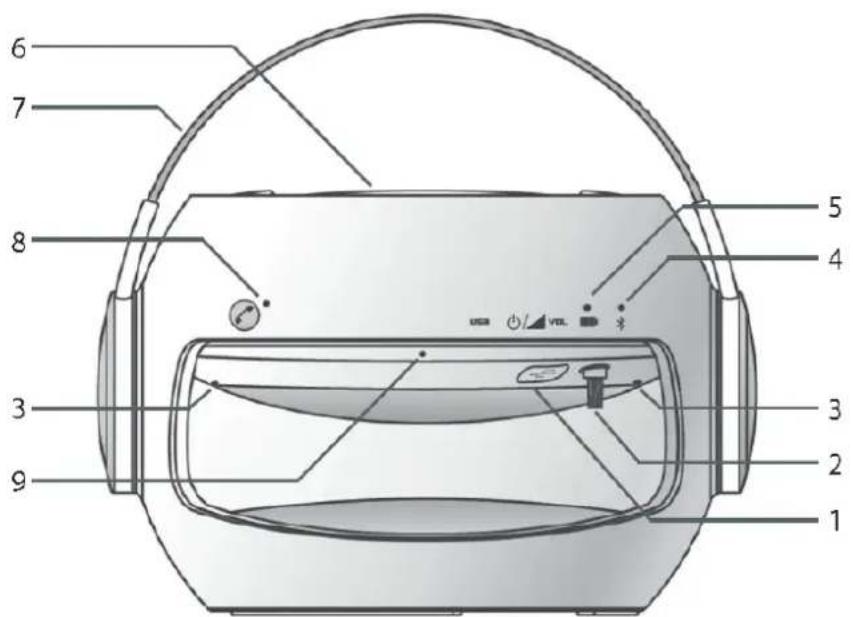
[1] USB port
[2] On/Off button & volume control & title select button
[3] 2 LED lights (yellow/orange) incl. twilight sensor
[4] Bluetooth® control indicator lamp
[5] Battery control indicator lamp
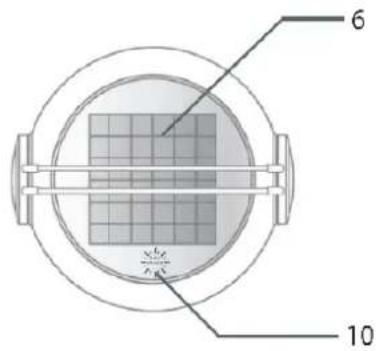
[6] Solar panel
[7] Handle
[8] Telephone button
[9] 2 high-sensitivity microphones on the front and back
[10] Sun power display
Short Guide
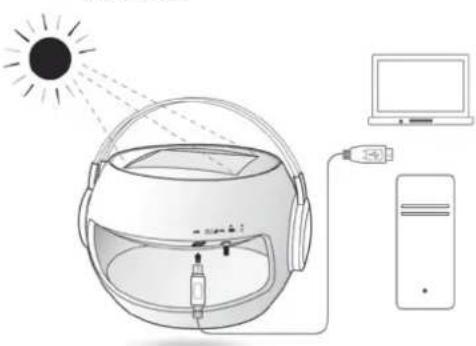
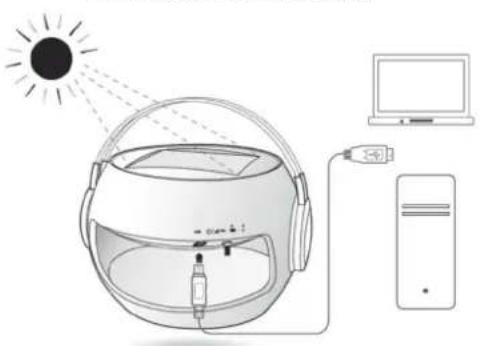
[1] Charge your SoundMobile before first use (see p. 9).
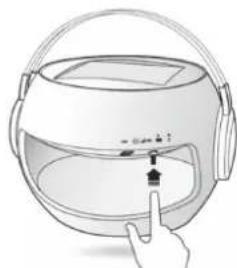
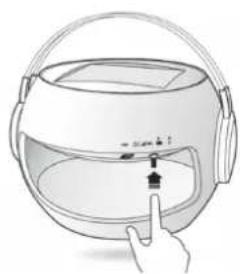
[2] In order to switch the device on, press the On/Off button (which also serves as volume control & title select button). The Bluetooth® display will flash in blue color.
[3] Activate the Bluetooth connection on your output device. When first connecting via Bluetooth, the password (Code: 2633) is to be entered in your output device.
Please note: The code request does not apply if the version of your Bluetooth® connection to the output device is higher than 2.0.
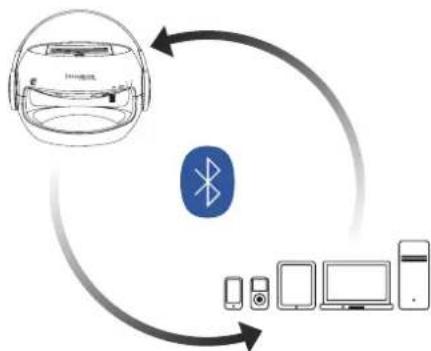
If your SoundMobile is connected to a mobile telephone, the music will be muted when incoming phone calls are received. In order to take the phone call, please use your SoundMobile's telephone button (see p. 11).
Notes on Handling
DE
GB
FR
IT
ES
RU
Please ensure to carefully read all safety notes and keep them for future reference. Generally ensure to comply with the warnings and notes provided herein.
Safety notes - caution!
Generally do not attempt to repair a defective device. Always refer to one of our customer service stations.
- Do generally not open the solar loudspeaker – this is reserved to professionals.
- Ensure foreign bodies such as pins, coins, etc. not to enter the SoundMobile's interior.
- Ensure not to place open fire such as lit candles on the solar loudspeaker.
- Never leave children unattended when using SoundMobile. In order not to risk your own safety and the safety of third parties, ensure all maintenance is performed by qualified personnel.
- Do not listen to music at high volume. This may result in permanent hearing damage.
Risk of suffocation!
Keep packaging and parts thereof out of the reach of children. Films and other packaging materials pose the risk of suffocation.
SoundMobile Installation Site
- Ensure not to install the unit nearby equipment that generates strong magnetic fields.
- Do not place any heavy objects onto the solar loudspeaker.
Description
Scope of Delivery
Please ensure that all of the accessory parts on the list below are present:
Solar loudspeaker
USB cable
Operation manual
SoundMobile Special Features
Your SoundMobile is a high-performance, convenient, and flexible device. Since the solar loudspeaker is charged by solar energy, it features various additional usage options in combination with Bluetooth-compatible devices such as iPod®, iPhone®, iPad®, mobile phones, MP3 Players, PC, notebooks or tablet PCs, and game consoles.
In absence of sunlight the solar loudspeaker may be charged via power grid by using the USB cable (requires an adaptor, which is not included with the scope of delivery but is sold as accessory item, see p. 12).
If charged by the grid, the charging time amounts to approx. 5 hours; charging by direct solar radiation will require about 10 hours (depending on on-site radiation intensity).
Caution: Charging by solar radiation may cause the solar panel to heat up-risk of injury!
At fullcharge and maximum volume, the solar loudspeaker's operating time will amount to approx. 8 hours.
In order to facilitate the experience of great sounds completely off-grid and independent from cable, SoundMobile offers the ideal option of connecting a Bluetooth-compatible output device.
A charge status display provided on SoundMobile serves to inform you on its current charge status.
Description
DE
GB
FR
IT
ES
RU
Loudspeaker Operation
We recommend charging the solar loudspeaker for at least 2 hours prior to initial use by using the USB cable included with the scope of delivery (required adaptor is not included with the scope of delivery, see p.12).
Self-evidently, the solar loudspeaker may also be charged by using direct sunlight. However, please note the respectively extended charge time.
In order to switch on the solar loudspeaker, please press the on/off button. The display will light up green as soon as the solar loudspeaker has been switched on. Bluetooth® connection will be displayed by blue signal.
Now activate Bluetooth on the output device.
Allow your output device to search for the solar loudspeaker (M5 + type series number).
Connect both devices. Upon initial connection, you will be requested to enter a code. Please enter code 2633. (It is also indicated on the label at the bottom of your SoundMobile).
Please note: The code request does not apply if the version of your Bluetooth® connection to the output device is higher than 2.0.
If you connect the device to the solar loudspeaker later, you will not have to enter the code again. You will only have to activate Bluetooth on your output device and switch on the solar loudspeaker in order to link both devices. Successfully established connection will be indicated by a brief acoustic signal.
Description
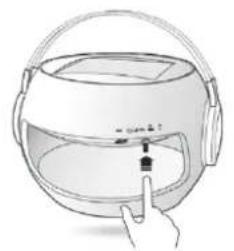
[1] Press On/Off
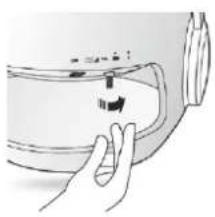
[2] Turn the control in order to adjust the volume.
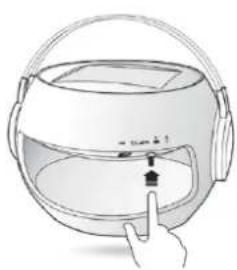
[3] By briefly pressing the controller you can make a title selection:
Press 3x = last track
Press 2x = next track
Press 1 x = pause
(press the button again for continuing the track)
When disconnecting your output device from the solar loudspeaker, please deactivate the output device's Bluetooth® function. The devices' disconnection will be indicated by a brief acoustic signal.
In order to facilitate access by another out - put device, please cut off any Bluetooth connection activated on SoundMobile to any linked devices first. You may then switch to an alternative output device.
Your SoundMobile will switch off automatically when not being connected to any other device for 10 minutes or longer.
The respective settings (play / pause / telephone / volume / play forward and back) can also be made at your output device.
Description
DE
GB
FR
IT
ES
RU
Telephone calls with SoundMobile
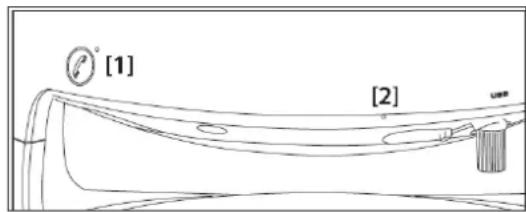
Your SoundMobile has been equipped with a particularly convenient call answering function. If your solar loudspeaker has been connected to your mobile phone via Bluetooth and there is an incoming call while you are listening to music etc., the music will fade down automatically, and the solar loudspeaker will play the ring tone.
You can then optionally directly phone via your SoundMobile.
With incoming telephone calls, simply press the telephone button on your solar loudspeaker.
Two high-sensitive microphones and the speaker installed in the solar loudspeaker enable you to speak and listen to the caller as usual, without having to hand-hold your mobile phone.
In order to end the call, either press the Telephone button on SoundMobile again or press the replace button on your mobile phone.
At the end of the call, the music will be replayed without the need of making any further settings.
As long as your mobile phone and the solar loudspeaker are linked to each other via Bluetooth, you may also make outgoing phone - calls via the solar loudspeaker. In order to do so, just dial the requested number directly on your mobile phone - you can then speak and listen via SoundMobile.
If incoming calls are being received, the LED next to the solar loudspeaker's telephone button will flash in green; if phone calls are made via solar loudspeaker, the LED will be on uninterrupted.
Depending on the status (incoming phone call, currently made phone call), a green or blue LED will be on uninterrupted!
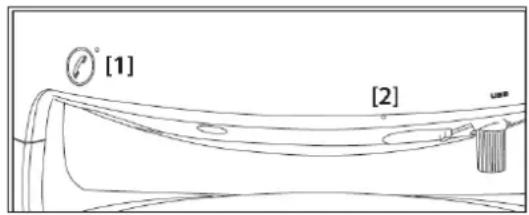
[1] Incoming call: LED flashes green. Ongoing phone call: continuously lit LED.
[2] High-sensitive microphone on front and back side
Description
Bluetooth
Please ensure the distance between your output device and the SoundMobile does not exceed 10 meters. Bluetooth® 2.1 and an EDR module have been integrated with your solar loudspeaker.
LED lights / twilight sensor
The integrated LED lights will be switched on automatically by the twilight sensor. The lighting is permanently.
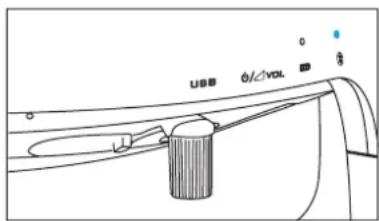
Bluetooth® control lamp
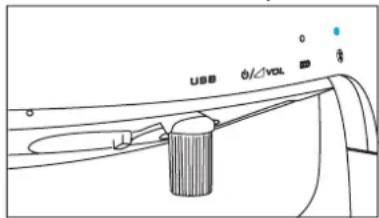
If the Bluetooth control lamp is neither on nor flashing, there is no current connection.
A blue flashing lamp indicates the device is searching for
an active Bluetooth connection.
An uninterrupted blue lit lamp indicates that the SoundMobile is connected to an output device via Bluetooth.
Every time the solar loudspeaker is connected to or disconnected from an output device by Bluetooth, it will generate a brief acoustic signal.
Optional Accessories:
In case the output device you intend to connect to the solar loudspeaker should not be equipped with Bluetooth, respective accessories serving to connect your output device to the solar loudspeaker are commercially available.
USB Bluetooth adaptor / USB Bluetooth dongle (connection via USB interface)
Audio Bluetooth® adaptor (connection via audio frequency interface)
USB adaptor (all-purpose power supply unit output: DC 5V-1A; connected to grid and via USB cable)
Description
DE
GB
FR
IT
ES
RU
Power and Battery
The solar loudspeaker has been equipped with an integrated rechargeable 3.2V LiFePO4 battery, which is temperature-resistant from -10^ to +60^ . The solar panel of
SoundMobile has exclusively been designed for this loudspeaker. If fully charged, the solar loudspeaker's operating time is approx. 8-10 hours.
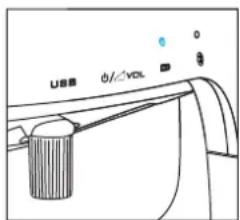
Battery control lamp
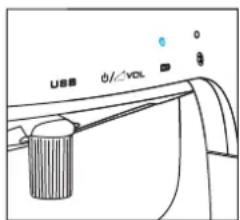
Green light: The battery charge status exceeds 80%
Yellow light: The battery status is 20% to below 80%
Red light: battery charge status drops below 20%
Charging
The color displayed by the battery control lamp serves to inform you on the current charge status of SoundMobile.
Connect SoundMobile to the grid or charge it with solar energy directly.
The changing colors will indicate the respectively current charge status.
Red-reflecting: below 20%
Yellow-reflecting: 20 - 80%
Green-flashing: over 80%
When fully charged a green light appears.

The display "Sun Power" (flashing in green) serves to indicate the solar loudspeaker's charging of by solar radiation.
USB Connection
- Your solar loudspeaker has been equipped with USB port. It offers the opportunity of charging your SoundMobile independent from solar radiation by deploying appropriate adaptors (for accessories, please refer to page 12).
Open the USB cover flap, and plug the USB cable into the USB port.
If necessary, connect the cable to the corresponding adaptor (not included with the scope of delivery, see accessories on p. 12).
Notes
In daytime, please ensure to place SoundMobile in a manner, which allows for full sunlight absorption in order to guarantee full battery charge.
Please note: if charged by solar energy, the solar panel may heat up. Caution: Risk of injury!
Please ensure to always keep the solar panel clean. Clean it as required and do not use any aggressive abrasives or similar but a soft cloth only (no microfiber cloth).
- Linking the solar loudspeaker to more than one audio device at once is infeasible. Please always cut off active Bluetooth® connection at the output device first. You can then switch to an alternative output device.
Please ensure the maximum distance between solar loudspeaker and output device not to exceed approx. 10 meters. Sound interferences might be caused by too far distances and/ or possible obstacles between output device and solar speaker.
- Sounds are exclusively transferred by Bluetooth. Consequently, the solar loudspeaker can only be used in combination with suchlike devices. In case you wish to link additional devices (e.g. laptop, PC, etc.), which are not equipped with Bluetooth, respective adapters are available on the market (see p. 12).
Specifications
DE
GB
FR
IT
ES
RU
Dimensions 21.7 x 19.2 x 19.7 cm
Distributor
Weight approx. 1,40kg
SOPEG
Bluetooth 2.1
Burospace 2, route de Gisy
BP 24
Compatible Bluetooth® profile A2DP (Advanced Audio Distribution Profile)
91571 BIEVRES Cedex
FRANCE
USB connection Yes
Service-Hotline:
Output power 3W
assistance@sopeg.fr
Battery 1x3.2V LiFePO4
Frequency range 100 Hz - 20 KHz
Ambient conditions -10°C to +60°C
0-90% relative humidity
non-condensing
LED class 1
wwwTelefunken-digital.com

- Technical modifications and errors reserved.
All dimensions and weights are approximate values.
Any and all names of mentioned companies, institutions, or brands are
(registered) trademarks, held by their respective owners.
Product designed by Winchance.
Directives and standards:
product complies with CE Identification Directive.
Notes on Disposal
Important note on waste disposal:
Your product employs batteries, which cannot be disposed of in normal domestic waste. Please inform yourself on your local applicable law regarding the separate collection of batteries. Proper disposal of batteries serves to prevent negative effects on environment and health.
Disposal of packaging
In delivery, your new product was protected by its packaging. Please contribute and dispose of the package in an environmentally friendly manner. For more information on advanced waste disposal methods, please contact your local distributor or waste disposal facility.
Disposal of device
Waste equipment is not without value. Environmentally responsible waste disposal serves to recover precious raw materials. Your local authorities will inform you on the device's environmentally friendly and proper disposal. Please ensure to remove the batteries prior to the device's disposal.
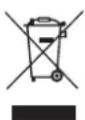
At the end of its useful life, this product may not be disposed via normal household waste, but is to be delivered to a collection point for recyclable electrical and electronic devices, as indicated by the symbol on the product, its directions for use or packaging. All materials employed are recyclable in accordance with their identification. By ensuring its re-use, material utilization, or other forms of waste equipment utilization you contribute to environmental protection.
Warranty
DE
GB
FR
IT
ES
RU
Red Tools GmbH & Co. KG guarantees this product to be basically free from material and manufacturing defects under common conditions of use.
Guarantee Term
RedTools Germany GmbH & Co. KG grants a guarantee of 24 months on this product. The respective term starts with the purchase day. Any and all warranty claims shall be subject to the purchaser submitting the present guarantee card and an invoice showing the purchase date. If applicable, the guarantee term for the integrated rechargeable battery is six (6) months under common conditions of use.
How to raise guarantee claims
In order to raise guarantee claims, please contact our Customer Service Center within the guarantee term by calling the
Service-Hotline
assistance@sopeg.fr
www.telefunken-digital.com.
Please ensure to provide us with the following information:
In case our Customer Service Center identifies product defects or malfunction under common conditions of use within the guarantee term caused by material or manufacturing defect (see exclusions), you will be requested to prepare the product for free repair. The product is to be packed for safe transport. In order to prove the product is still within the guarantee term, please enclose a copy of the proof of purchase (this guarantee card plus your receipt). This non-transferable guarantee applies to first-time buyers only.
Before shipping the product for guarantee claims
Please ensure to save all data, secret, proprietary or private information stored in the product and/or on data/sound carriers, and to remove the latter from the device. RedTools Germany GmbH & Co. KG shall not assume any liabilities whatsoever for damage or loss to or of data and/or data/audio carriers stored on or in a product delivered to the Customer Service authorized by RedTools Germany GmbH & Co. KG for repair.
Exclusions
Under this guarantee, RedTools Germany GmbH & Co. KG shall not be obliged to provide guarantee services if RedTools Germany GmbH & Co. KG identifies by testing or examining the product returned to RedTools Germany GmbH & Co. KG for repair that alleged defects or malfunctions do not exist or are caused by incorrect use, negligence, inappropriate maintenance, unauthorized attempts to open, repair, or modify the product, improper installation, use of customer-owned software, viruses, causes beyond the intended use, accident, fire, lightning, power failure, or any other natural disaster.
The present guarantee shall lapse if:
- The product has been modified or repaired by an unauthorized person;
- Its serial number has been changed or removed;
- The guarantee stamp has been destroyed or changed; or
-
- The guarantee term has expired.
Important note
Apart from the claims hereunder, you are entitled to all legal consumer rights based on material defects and defects of title. The present guarantee shall in no form whatsoever limit respective rights.
CE-Certificate
EC Declaration of Conformity:
We declare under our sole responsibility that this product conforms to the following standards or normative documents.
Solar Loudspeaker Sound Mobile / MU-802
EN 301 357-2 V1.4.1 (2008-11)
EN 301 489-9 V1.4.1 (2007-11)
EN 301 489-1 V1.8.1 (2008-04)
EN 50371:2002
Guideline: 1999/5/EC
Splash-proof "IP44"
EN 60529:1991/A1:2000
Battery
Corresponds to directive 2006/66/EC
Bievres 2012/04/16


Burospace 2
Route de Gisy
BP24
91571 BIEVRES Cedex
FRANCE
Jean-Tony LEAC
PDG/CEO


TELEFUNKEN
Warranty Card
Product Data
Type:
Serial number:
Purchase date:
Owner Information
Name:
Phone number
Adress
Country
E-Mail:
Defect specification
www.telefunken-digital.com
TELEFUNKEN
www.telefunken-digital.com
TELEFUNKEN
Bedienungsanleitung
Operation Manual
DE
GB
we make your sound mobile
wireless via Bluetooth® SOLAR SPEAKER hands-free kit water resistant
Sommaire
Avant-propos 4
Product designed by Winchance.
La directive: 1999/5/EC
we make your sound mobile
wireless via Bluetooth® SOLAR SPEAKER hands-free kit water resistant
Summario
Prefazione 4
Product designed by Winchance.
Certificate: 1999/5/EC
we make your sound mobile
wireless via Bluetooth® SOLAR SPEAKER hands-free kit water resistant
Indices
Prólogo 4
we make your sound mobile
wireless via Bluetooth® SOLAR SPEAKER hands-free kit water resistant
Copepknne
PpeunocnoBne 4
063op 06opydOBaHn85
KpaTKoe BBeDeHne 6
Yka3aHnno nCnObl3OBAHNO7
OncanHe np6opa 8
06beMIOCTABK 8
SoundMobile OChOBHbIe XapaKTepeNCTnKn 8
3KcnnyaTaunn nnHaMnka 9
TeneoHHbIe 3BOHKn c SoundMobile 11
Bluetooth 12
DOnonHnTeBHeIe Akceccyapb1 12
IITaHne n 6aTape 13
USB coeHneHne 13
Приимechanical 14
Cneunkaaenn 15
PpmeaHn o6 ytnnaaun 16
TapaHTn 17
CE-ceptnФикAT 18
KapTa rapaHTn 19
Ppeinocobne
HaHna HNCTpyKunno Kcnnyataa nn DaetcBamn 06barchenu nCNOJb3ObaHHn COHHeHOro DnHaMnKa.
No Ha3HaueHnIO
BHaJExHOM 6e30nacHom npRJaKe.
CoOTBeTCTByIOUe yCTpOINCTBO B daJIbHeIWeM 6yJeT Ha3bIBaTbCra SoundMobile.
DaHHa HNCTpyKuIN NO EKnIyatauIN NOJIe3Ha TEM, KTO
yCTaHaBJIuBaET
NCNoB3yeT
yTnIn3npyeT
COJHHeuBIn DnHaMnK.
Pa3nHbIe 3neMeHTbI B pyKOBoCTBe nO 3KnIyatauIN 6blIn OTmueHebl KaK 3neMeHTbIC ONpeJeHHbIM KOHCTpyKTNBbIM OOC6eHHoCTaM.NTO N03BOJIeT ONpeJeNTb, PpeCTaBJIe HIN 3TO
06bIyHbI TEKCT,
Uncna nn
→ Wārīn.
063op 66opydOBaHn
[1] USB nopt
[2] KhoIIKa BkI/BbIKI (KOTOPa TaKke CnyKIn IJIpeRyIINPOBKn 3Byka N Bbl6opa Ha3BaHnA)
[3] 2 cBeToJIOHbIe JAMNoKn (XeJIaTər / opaHKeBa) BKN. dATyNK TeMHOTbl
[4]Индкатогаяламночka КотюгьBluetooth®
[5]ИнданаTopнаялamnoчka KOHTponlaЗapядк
[6] ColnHeuHa nHaenb
[7]IeHTnΦkaTOp
[8] KhoIIKa TeIeΦoHa
[9] 2 BbICOKOyBCTBnTeJBhBix MmKpOoHa CnepeDn C3aDn
[10] DnCpIeN coJIneHou HHeprn
KpaTkoe BVeJeHne
[1] Ipepe npBbIM nCnoJIb3OBAHnEm 3apAInTe BaS SoundMobile (cm pnc.9).
[2]ДяВКЛIOUeHЯ npi6opa haXMMTe KHOKNy BKn/BbIKN (KOTOPa TAKKe CnyKNT IЯ peryJINPOBKn 3Byka N BbI6opa Ha3BaHЯ).ДиCnNei Bluetooth® 3arOpNTc rHHIM ZEBTOM.
[3] AKTNBpyNe CoeHHeHne Bluetooth Ha BaWem yCTPOINCTBe BbIBOda. Korda Bbl nepBbI pa3 noDCoeDInHReTe Bluetooth, BBeDnTe napoIb (KoI: 2633) Ha BaWEM yCTPOINCTBe BbIBOda.
IpimueaHe:Ko3aipoca He npimehnertc, ecnn BepcnBawero Bluetooth -coedHnHa yctpoCTBe BBbOda 6onbwe, yem 2.0.
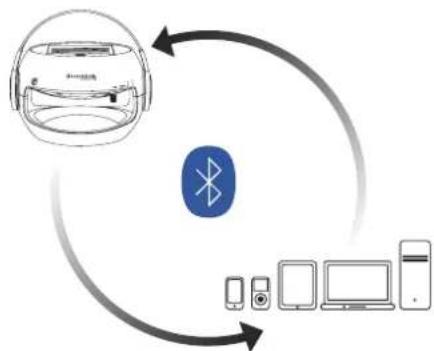
EcnBauSoundMobile noCoeHHeK Mo6nIbHomy TeleOHy, BO BpemBAxOJaIero BbI3Oba 6yJeT 3ByaTb CneuaJIbHaMy3bIka.ДЯTORO,yTO6bl npINrTa BxOJaIuB bI3OB BocNoJIb3yIteCb KHOJKOI TeleOHa Ha BaWeM SoundMobile (cm cTp.11).
Yka3aHnno nCNoB3OBaHnO
PoxkanyIcTa, BHNMaTeNbHO npOuHTaIe BCE yka3aHnno TExNKe 6e3oNaChocTn u CoXpaHnIe Nx dJaNbHeJwero nCNoJIb3OBAHnHa. CObIIOJaItepeDynpexKdEHHaYka3aHnB DaHHO IHCTpyKcHn INCTpyKcHn.

PpimueaHn no 6e3oNachoctn - octopoxkHo!
He nItaTeCb OtpeMoHTnpoBaTb HncnpaBHOe yctpoCTBO.Bcerda o6paauaTeCb Cnyk6y cepBnca.
He nbTaIteCb OTKpbIBaTb COJIHeUHbI DNHaMVK, 3TO MoKeT DeNaTb TOJbKO IpoOecCNOHaI.
IpeoTbpaaTe nonaHaHne pyrnx npEmTOB BHytpbSoundMobile, Takx KaK 6ynaBKn, MoHeTbN T..
He cTaBbTe CBeuN COTKpbITbIM ORHEM Ha NOBepXHOCTb dHaMuKa.
Bo BpemnncnoB3oBaHnSoundMobile He octabnTe pAnom dTee 6e3 npncMoTpa.
Bo n36ekahne pncka co6cTBeHHoH 6e30nacHocTu 6e30nacHocTN TpeTbNX IIN, y6eDnTEcb, YTO BCE o6cnjXuBaHne OcyueCTBJIeTcra KBaIuΦnUPOBaHHbIM nepcoHaJOM.
He cnyuwaIte My3bky Ha 6oNbWoI rPOMKocTn.3To MoXeT npNBecTn K Heo6paTMOMy NOBpeXdeHIO cnYxa.

Onachoctb ydyubla!
XpaHnTe ynaKOBKn nix qacTn B MecTe, HeNoCTynHom dIaIeTei. IpeHKn i npyrne ynaKOBouhble MaTePnaJIbI CO3daIOT pNCK ydyuWeHn.
SoundMobile MecTo ycTaHOBKn
Y6eInTeCb, yTo npu6Op ycTaHOBJIeH B MeCTe C He6oJbIIM MaHHeTnueCKM NOJeM.
He cTaBbTe TaXeJIbe IpeMMeTbI Ha IOBePxHOcTb dHaAMKa.
Onncahne
06bem noCTaBkn
Poxayncta, y6eintecb, yTO BCE HIXKepeuNCneHHbIe.
yactn HaxoJrTcB ynaKOBke:
CoJIHeuHbI dINHaMnK
USB wHyp
HCTpyKUINo npmHeHHIO
SoundMobile OchOBhbe xapaKtepuCTnKn
Bau SoundMobile RaBnaeTc BblcOKonpOn3BOUnteHbIM, yD06hBM IN rN6KMM yCTpoiCTBOM. TaK KaNHaMnK 3apraKaTeCOT CONHeuHOJ 3HePmN, 3TO daet emy pa3NJHbIe DIOJIHNTEHBHbIE ONUN NcONlb3OBAHnR KOM6Naun c Bluetooth 念 COBMeCTMbIMuYCTPOINCTBAMn, TaKMn KaK IPod 念 ,IPhone 念 ,MO6NbHbIe TelefoHbI, MP3-llepbl, PIK, HoYt6yKn nnPiAnHeTbI PIK nIrPoBbIe npicTabKn.
PnOTcyTCTBm COJHeuHOro CBeta CoJHeuHbIM DnHaMnK MoKeT 3apKaTbCra Upe3 3JeKtpnueckyIO CeTb C NOMOuBIO USB shypa (Tpe6yETcAaNTep, KOtOpB H He BXoIIT B KOMNKeT NoCTaBKn, npOJaETcKaK DoONHHTeNbHbI aKceccyap, cm. cTp.12).
Bpem 3apdkn,ecnn 3apjkaTb uepe3 cetb: npn6n.5 yacob. Bpem 3apdkn,ecnn 3apjkaTb nO npramo coJneHnoi padnaaun: npn6n.10 yacob.
Ipeynpexdne: CoHneHbIe 6aTapeu ropnue BO BpeM 3apAnOT CoHcHbIX Lyuei, npNKoCHOBHeN MOryT NOBLeyb TpaBMbl!
C noJHo 3apAikO u MaKcImaJIbHbIM O6beMOM, BpeMa pa60tby CoJIHeuHOrO dHAmNKa COCTaBnIeT OK.8 YacOB.
ДяТоуTO6bI HacnaIITbcra BbICOKOKaYeCTBeHHbIM 3ByKOM NOJIHOCTbIO aBTOHOMHbIM N He3aBNCUMbIM OT Ka6ene,SoundMobile npednaraet ndealhBbI BapnaHT NOkNIOUeHnK Bluetooth -coBMeCTuMbIM yCTpoiCTBaM BbIBOda.
Dncnnen oTo6paKeHn 3apAnHa SoundMobile cnJXnT DnnyeONOMHeNcoCToHn3apAnB daHHbMOMeHT.
Onncahne
3KcnnyataaJnHaMnka
Mby peKomeHnyem 3apJxKaTb COJIHeYHbI DnHaMnK, NO KpaHne Mepe 3a 2 Yaca Do HauJa NcNoIb3OBAHn, NcNoIb3yra Ka6eNb USB, KOtOpB IBXoIT B KOMnIeKT NoCTaBKn (Tpe6yeTca aadTep, KOtOpB He BXoIT B KOMnIeKT NoCTaBKn, CM. cTp.12).
Pa3yMeTcC oINHeuHbI dHnHaMnK MoKe TAKKe 3apKaTbcra NOMOuBIO pRmBIX cONHeuHbIX Lyuei. Tem He MeHee, 6paTnte BHNMaHne, COOTBeTCTBeHHo yBeInuNBAeTcBpeMa3apAkn.
TTO, T06bl nepeKIOUHTbca Ha cOnHeHbI dHaMK, HaxMnte KHOkY Bk/Byk. Ha dncnlee 3arOpITc3eHaeJaAMNoUka KaTolbKO dHaMK 6ydet nOdkIOueh. Bluetooth coeHNHeHne oTo6paXaETcHa dncnlee CINHM UBeTom.
TenepbakTNBpyTe Bluetooth Ha yctpoNCTBe BbBOda.
IopoJxIte Do Tex nop noka yctpoiCTBO BbIOJa He pacno3Haet coNHeuHbI dHAMK. (M5 + cepnHbI Homep).
IodcoeHInHe 06a yctpoiCTBa.ДЯ n3HaaybHoro IodcoeHHeHn y Bac 6ydt 3anpoWeH KOD. IoxaanyIcTa, BBeHInTe KoD 2633.
I IpnmeaHne: Ko3 3anpoca He npimehreTc, ecn BepcnBaawero Bluetooth- coeHNHeHna Ha yctpoiCTBe BBIOda 6oJIbIwe, Yem 2.0.
IpimechnE: KaoKdoHOHOBo ycTpoiCTBa BbIOda, NODKNIOyeHHoro BnepBbie, Heo6xOIMo BBecTN KoD CoeINHeHn.
EcnBb yke Npoknouaun coNHeuHbI DnHaMnK Do 3Toro, Bam He Hado ChObA BBOuNTb KOD. Bam TOnbKO HaO aKTNBupoBaTB Bluetooth Ha yCTpoiCtBe BblOda n NpOKJIIOUHTb COJHeuHbI DnHaMnK DnTORO, YTO6bl NpOcEduHHTb Oba yCTpoiCtBA. UdaHoe coeDInHeHne 6ydet CoNPoBOXdTaBcKOPOTKIM CnIHAlOM.
Onncahne
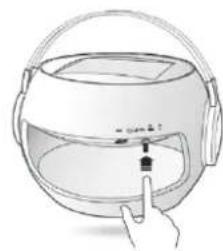
[1]HaxMTe BkJ/BbKn
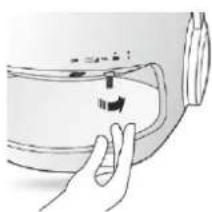
[2] NobeprHnte peryIaTOp Dnra TOrO, uTo6bI OTpeRyIuPoBaTb rpOMKoCTb.
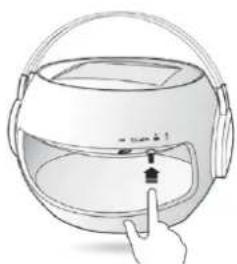
[3] KOpOTKnM HaKaTneM KOHTpOJIpepa Bbl MoKeTe Bbl6paTb Ha3BaHHe:
HaKMTe 3x=nocneHnTpek HaKMITE 2x=cneNyIOuN Tpek HaKMITE 1x=nay3a
(HaKMnTe KhoNkY CHOBA
IIN BO3O6HOBNeHnR
BOcPOn3BeHeHnTpeKa)
Pn OTKIOUeHn yCTPOINCTBa BbIBOa OT COHHeHOro DnHAMKa, NOXaIyNCTa, OTKIOUHTe Bluetooth 念 OT yCTPOINCTBa BbIBOa.OTcoEINHeHne 6yET cOpBOxDaTbcR KOPOTKIM CnIHAlOM. BawSoundMobile OTKIOUHTcra ABtOMaTueCKn,ecnB TeueHm 10 MInHyT nnn 6OJee He 6yDet nOcOeHNHeK dpyromy yCTPOINCTBy.
ДлгTORO,чTO6blO6JIerHTbIOCTynIpyrIM yCTPOINCTBOM BbBOda,poKJIyNCTa,BNEpByIO Opepeb OTKJIIOHTe IIO6bIe Bluetooth -coEINHeHnA kTNIBPyEmble Ha SoundMobile.BblMOKeTe 3aTEMnepeKIIIOHTbcHa aJIbTePHaTINBbIe YCTPOINCTBa BbBOda.
CoOTBcTCTByUOuNe yCTaHOBKn (BOCnpOn3BeDeHne / NaY3a / TeJeFOH/ rPOMKoCTb / NepeMOTka BnpePeN Ha3aD) MOryT TaKKe OcyuEcTBJrTbCn Ha BaWEm YCTPOINCTBE BBIODa.
Onncahne
TeneoHHbIe 3BOHKn cSoundMobile
Bau SoundMobile 6bln Ochaueh Oco6eHNO ydo6hoi yHKuene OTBeTa Ha Bb3OB. Ecnn BaW DnHaMVK 6bln IoKloucen K TanefoHy uepe3 Bluetooth N B To BpeM, KaK Bbl Cnyaete My3bIKy Bam NoCTynIN BXOJaIIN 3BOHOK, My3bIKA OCTaHOBUTcA BTOMaTHueCKN, N Bbl YCbIbIwTe 3BOHOK pHHToHa. Bbl MoKeTe PpHrTb Bbl3OB, He OTCoEINHra TelefoH ot SoundMobile.
TTO,TO6bIOTBETnTBHaBXOJaN3BOHOK,POCTO HAXMITEKHONKyTeleOHaDNHAMKe.
BaBbICOKOyCBTBeHbIX MKNpOoHa N BCTpoEHbIMnHaMKIIO3BOJAT Bam ROBOpNTb IN CJIbIaTb, KaK npNobHyOM TeJeOHHOM 3BOHKe.
→Пин haKaTnK HONKn TeNeΦOHa Ha coJIHeyHOMДИHAmIke ChOBA nII INI Пин haKaTn K HONKn C6pOca HaBaIeM Mo6nIbHOM TeNeΦOHe, Bbl3OB 3aBepWNTcR.
Iocne TOrO, KaK BbI3OB 6yJeT 3aBepWeH, My3bIka BHOBBBO306HOBUNCTc6e3DOnONHHTenbHbIX HAcTpOeK.
BTO BpemKa Ka Baw TelefoH NOdKIOueH K DnHaMky uepe3 Bluetooth, Bbl TaKke MoKeTe OcyueeCTBnTb NcXoJaIe NblOBoC NOMOuBcOJHeUHOrO DnHaMka. Ia 3tOrO Heo6xOIMMo HApTaB HOpE Ha TelefoHe, 3aTEM Bbl MoKeTe RoBOpuTb N CnyuAubc NOMOuBcSoundMobile.
EcnHJxHO pInHb BXOJaun 3BOHOK, CBeTOIOOHbI KpaH praOM c KhoKoT TeJeOHa Ha COJIHeuHOM DnHAMKe 3aROpNTc 3eJeHbIM CBeTom, eCIN HxKHO npOn3BecTN NCxoJaun Bbl3OB, CBeTOIOHna JAmNoKa ropnt HepepbIBHO.
B 3aBnCmOCTOn CTAtyCa (BXoJusN Bbl3OB, 3BOHOK B HactoIuee Bpem) 3eneHa NIN CUNHЯ CBETOINOHAn JAMnOuKa 6ydt RopeT HepepbIBHO!
[1] BxOJaIyN BbI3OB: CBeTOnIOHHa JAMNoUka 3aRopaETcJ 3eJIeHbIM UBeTOM. 3BOHOK B HAcToJUee BpeMJI: CBTeODIOHHa JAMNOUka rOpNT HeIpepbIBHO.
[2] BbICOKOyBCTBnTeHbHmMKpOoOH Cpeepu n c3aDn
Onncahne
Bluetooth
Poxayncta, y6eHntecb, yTO paCCToHne MeKdy
yCTpoiCBOM BbIBOda n SoundMobile He npebblaaet
10 MeTPOB. Bluetooth 2.1 u MoDyIb EDR 6bln
NoDcoEINHeHb K BaWemy CoNHeuHMy DnHaMnKy.
CbeToIOIOHbIe IaMNoUKN/ DaTUnB TEMHOte
HITerpnpoBaHHbIe CBeToDnOHDhIe IaMNoUKn 6ydyT BKIOuABycABTomAtNuCeCKN C NOMOUsBIO DaTuNka B TEMHOte. OcbueHHe NpOncxOHT Ha NOCTOARHHO IHCHOBe.
Bluetooth® lamnoka KOHTpOJa
EcnbluethoJnAMIOUka KOHTPOJI He BkIIOUeHa NHe TropNT,3NaHT CoeINHeHHe OTCyTCTByET.
CnHra lamnoUka roBOpuT o TOM, yTo yCTpoiCTBO uIeT Bluetooth coeDInHeHne.
HenpepbIBHO ropuaa cHnna JAMnOuKa yKa3bIbaeT, YTO SoundMobile noKluueH KycTroBcTBy BbIBoJa uepez Bluetooth
Kakdbi pa3, KOrda coJHeHbI dInHaMnK noKJIoueH nn OTKIOUeH OT yCTpoIcTba BbIBOa NO Bluetooth , OH 6yDet n3dAbatb KOpOTKn 3ByKOBoCnHAn.
DOnonHnTeIbHbIe akceccyapbl:
B cnyuae, ecn yctpoiCTBO BbIBOda K KOtOpomy Bbl NpOKIIOuAeTe cONHeuHbI DNHaMnK He npIDepxNBAET Bluetooth, DocTyHbI COOTBeTCTByUoune DoonHNHTeNbHbIe akceccyapbl INa NpOcOeDInHeHn.
USBBluetoothaantep/USBBluetooth3aunTHa 3aŋyka (noocenHeHneyepe3 USB nHTepceic)
- Aydno Bluetooth® aanTep (nodknueHne uepe3 aydno nHTepceuc cactoBi)
USB aanTep (BbXoD yHnBepcaIbHoro 6noka nntaHNC DC 5V-1 A, noKkIouaetcK cetn u cepe3 USB-ka6eb)
Onncahne
Питанneизаряда
ConHeHbI dHaMnK OChaueH KOMJIeKChbIM nepe3apXaIOUIm 3.2V LiFePO4 3apJNbIM yCTpoiCTBOM, KOtOpoe IMeET XapOpnoHocTb OT -10 Do+60°C. NaHeb BaWero SoundMobile 6bIa 3KCKIIIO3NBO CMOeINPOBaHa Dn DaHHoro dHaMnKa. POnHOCTbIO 3apJxehHoe ycTpoiCTBO pa6OtaEOT 8do 10 YacOB.
JaMnoUka KOHTpOJa3apAKn
3eHbCBet 3apka6atapennpebbwaert 80%
XeNTbI CBET 3apJaKa 6aTapeN ot 20%do 80%
KpaChbI CBET KpaChbI CBET=3apJaKa 6aTapeHnke 20%
3apnka
UBeT JAMNoCuK KOHTpOJa Hd 3apJkOu CnyKt DnIy ONOBueHn COCToHn 3apJdkn SoundMobile B daHHbIMOMeHT.
IopcoeHnTeSoundMobileKceTnnn3apxkaTe c nOMOuBIO npMbxCOnHeuHbix Lyuei
CmeHauuuecraBbTa 6ydyT HhOpMnpoBaTb Bac O COCTOaHN 3apAKn.
Kpacna BCnblka: Hxke 20%
KeTTaB BCnblka: 20 - 80%
3eJehaB BCnbiUka: 60nbse 80%
RU Pn noHn 3apJke 6aTapei, noBntc 3eHeh CBET.

Dncnne "Sun Power" (Mngaoun 3enehblm cnjxnt nna 063NaueHna 3apdKn dHaMKa OT cOnHeuHO paNaauu.
USB coeHneHne
BaW coJHeHbI dHaMnK 6bl OcHaUeH USB nOpTOM.3To DaET BaM BO3MOXHOCTb 3apJxKaTb BaW SoundMobile He3aBcIMo OT coJIeHNo paJaauu npN pOMOu NODxoJaux aAnTePOB (yTO Kacaetcakceccayop,cm.cTp.12)
OTKpoTe Knanan KpbIuKu USB n nodknOHTe USB uHyp K npTy USB.
→ Pn Heo6xOJIMOCTN NOKJIIOHTe Ka6eb K COOTBeTCTBYIOUIm aanTepaM (He BXoNT B KOMNNEKT NOCTABKN, CM. akceccyapbl Ha ctp. 12).
PpmeaHn
B DHeBHOe Bpemy y6eINTecb, yTO BaS SoundMobile HaxoNTcB MeCTe,IOCTynHom dIg nonadaHn coNHeuHbIX Lyyei, yTo6bl oBeCneuBaJacb nonHa3apraKa 6atapen.
IpmeaHne: CoHeHna naHeB HarpeBaetc BO BpeM 3apAdkn OT coHeuHOJ 3eprnn. BhImaHne!
PoxaIyIcTa, y6eIITecb, yTO NOBepxHocTb COJIHeuHOI naHEn Bcerda YIcTaI. IpoTnpaIte ee no Mepe Heo6xoIMOCtN H E NcNoJb3yIte arpeccNBhIE a6pa3nHBbIe YIcT8Ie CpeDCTBa, TOnbKO MArKyo TKaHb (He n3 MmKpOBOLOKOH).
OndHOBpeMeHHoe NOKJIIOUeHne COJIHeuHOro INHaMnKa K HeCKoJIbKIM ayDnO yCTpoIcTBam ABJIaETCa HeDonyctUmblm.
→ IoxaIyIcTa, y6eIITecb, yToMaKcMmaJIbHoe paCtOHaHe MExdy COJIHeuHbIM DInHaMnKOM N BbIXoDhbIM ycTpoIcTBOM He npeBblIaet OK. 10 MeTpOB. 3ByKObIe NOMEXMOrYT 6bITb BB3BaHbI CINUkOM DaJIeKIM paCCTOHaHem I / INN BO3MOXHbIM npePrtCTBIAmM MExdy YcTPOIcTBOM BbIBOda N COJIHeuHbIM DInHaMnKOM.
3Byk nepedaeTcNCKJIIOUHTeJIbHO uepe3 Bluetooth°. BcneCTBNe 3Toro, coJIHeuHbI dINHaMnK MoXeT 6bITb NCNoJIb3OBAH TOJbKO B COUeTaHN C NOIo6HbIMy yCTpoiCTBaMn. B cIyuae, ecIn Bbl XOTnte NODKNIOHTb DOnONHtEJIbHbIye CTpoiCTBa (HAnpImep, HoY6yK, PIK n T.d.), KOTOpBle He OCSaUeHbI Bluetooth°, COOTBeTCTBYIOUne aJaNTePbI DoCTyNHbI Ha pbIHKe (CM. cTp.12).
Cneunkauu
DE
GB
FR
IT
ES
RU
InpkeTnBbI HOpMbI: npOdyKT COOTBeTCTByeT Tpe6oBaHnA M InpkeTnBbI NdeHTnΦuKaun CE.
*TexHnueckne N3MeHeHnN OOn6Kn npEoTbpaUeHbI. Bce pa3MepbI N Bec nMeIO Tnp6n3ntBbIbe 3NaueHn..
BceHa3BaHn yNOMaHybIX npedpnpTm, ypeKeJdHn, nnn 6peHOB (3apeHcTpnpoBaHHbIX) IMeIOT TOBAPHbIe 3NaKn I BAJIHOITc co6CTBeHHOCTbIO COOTBeTcTBYIOUX BnaJeIbueB.
Iin3aH npodykTa BbInonHeh Winchance.
PpmeaHnO6yTnN3aun
Baxhno npumeyaHne no yTuIn3aun OTxOIOB:
DaHHbI npOyKT nCNoB3yET aKKMyJrTOpbl, KOtOpbl He MOrTy 6bItb yTnIn3uPoBaHbIC HOpMaJIbHBIMN 6bITOBbIMN OTxOaMn. PoXaNyIcTa, nOnyUHe nHΦopMaunIO o IOKaJIbHbIX npaBnAax B OTHoWeHN pa3dJeBHorO c6opa 3apAnhBix ycTroPoiCTB. PpaBnIBHa yTnIn3aunr AKKMyJrTOpOB CnyKrt dJa ppeDToBpaSeHnna HeraTINBHO BO3dEICTBnHa OKpyKaIOUyIO cpey N 3dOpOBbe.
Ytnn3aun ynaKOBKn
B KOMPJIeK T BAsero npOdykTa TaKke BXoJIT erO yNaKOBKa. POnxanyIcTa, yTnIn3npyIte yNakOBky 3KoIorHuecku cNCTbIM cNoC6oM. Bolee NoDpo6HyU INΦOpMaIIO O nepeDoBbIX MeToaX yTnIn3aCm OTXoOB Bbl MoKeTe NOnyUHTb,CB3aBUnCb C BAsIM MeCTbIM dNCTpN6bIOTOpOM.
Ytun3aun yctpoiCTBa
OTXoDbI 6OpyDObaHn HMeIOT 3HaueHne. 3KoJIoRnueckan yTUN3aun OTOxODOB Cnyknt Dnpekynpaun dparoueHHoro cbipb.Baun MeCThie BnaCTn 6ydyt INΦOpMupoBaTB Bac06 3KoJOrnueckn UcTOnu npabNbHOy TUN3aun yCTpOInCTB. Ioxaanycta, nepey TUN3auney UcTPOINCTBa, n3BLeKeNTe 6atapen.
B KOHcE cPoka NcNoJb3OBAHn, 3OT npOyKt He MoKeT 6bTb yTNIN3NPOBaH C NOMOuIbO 6bUHbIX 6bTObX OTxOIOB, HO dONJIeH 6bITb DOCTaIBHe B PnpeMnbl NyHK TnepepaOToKn 3JIeKTPnuCeCKOrO INeKTPoHNrO BOpyOBAHn, Ha YTO yKa3bIbae CTMB0N HA npOyKte, Ero INCTpyKuIN NO pIIMeHeHIO IIN yNAkOBke. Bce MaTepaNAb, POJNeKAT nepepaOToK B COOTBCTBm C IN XeHTnFpKaIaIe. ObScNEuB erO NobTpHorO NcNoJb3OBAHn, INcNoJb3OBAHn MaTepNaA uIN dpYrNX φOpM yTInN3aCIN OTxOIOB oOpdyOBaHn CnOCo6CTByIOT 3aUNTE OkpyKaIoSeI cpebl.
TapaHTn
Red Tools GmbH & Co. KG rapaHTnpyET, 7TO npOdyKm8 dyet doCTOnHOro KaueCTBa n 6e3 deEkeTob npn HopMaIbHbIX ycIOBmX NcIObn3OBAHnR.
YcnoBra rapaHTn
Red Tools GmbH & Co. KG npedocabnet rapaHTnIOB TeueHne 24 mecaeb Ha taKoro pOpa npdykuuio.3OT cPOK hauHnaeTcO dHn npno6peHnnpdykuuin. Bce kanoobbl no NOBOy kaueCTBa npdyukui n npocsb a npdeocabntb rapaHTnHoe oCcnkybaHne doXHHb 6bTb cOpBOxDeHb YekOM, B KOTOPm yka3aHa data npno6peTeHN. RapaHTnHa haTaapeHo coCTABnet 6 (MeCTb) MecaeB npn HopMaIbHbIX yCLOBHX NCIOJIb3OBAHN.
Ppoc6a npedocTaNb rapaHTnHoe 0cbnyKBAHne
OcuyeeTbIeTcnyTEM KOHTaTc HauWM CepBnCHbIM cHTpOM IOPraeYINHH
CTpaHa
assistance@sopeg.fr
www.telefunken-digital.com
y6eHTecb, yTO npEOCTaBnHn HAM cNeDyOuYIO nHFOpMaunIO:
1.CepnHbH HOpEpyCTpoCTBa (ecnN mMeetc)
2. DeTaNbHoe ONnCaHne NOJOMKn.
B cnyae, ecn haimc cepbncbim ceHtpm 6ydt npoBeDeHa dnaarHoctnka, KOtopa nokkctet, yTO pONOMKa ABnTcER pe3yIbTaTOM HEKOTOPO deEeKTA MaTePnAla (CM. NCKNUOeHn), To BAM 6ydt npdeOCTABNEo 6ecnnatHOe CepBCHOE oC6nyKBAHHe B cnyae, ecn else He nCTek cPOK rapaHTm. TpaHCnoptnpOBKa npOdyKun taKke 6ydt 6ecnATNa, BAM 6ydt HeoXoJIMo npINIOKHTb Yek, NOITBepKJaIoUc POK NOKKN, nRAPANTHbT anOH. TobAp, npO6pTeHHb co BTOpbIX pyK, rapaHTNHomOy 0cbNyJBAHNo H ne OJNeKNT.
D0OTnpaBHeHnYcTpoIcTBaHa rapaHTnHoe 6CnyKuBaHne
IpoKanynta,y6eHNTecb,TOBnpbiOpe INHa CbEmhbx HocmTeJnx He CoxpaHeHa BaaIaMnHAAINKOHPhiEHHaNbHbA NfOpMauny, ydaIITBE CbeMhBe HocmTeJn. Red Tools Germany Gmb&Co.KG He Hecet OTBcTBeHHOCTH 3aYtePIO INN NOpBeKdHeMe DAHbX, COxApaHEHNbHX HA HocmTeJnx INM B cAMoY cTPOIcTB, DOCTABLeHOM B CEHTP rapAHnHOro OcCnykBaHnB R cIeNx pEMoHTA.
UckloueHna
IIO danHOr rapaHTn, Red Tools Germany GmbH & Co. KG He npedocabHre rapaHTnHO 0cbnykBAHN, ccnl Red Tools Germany GmbH & Co. KG npnpoBedeHH dnaHcOCTNK ObAPyKBAeTcA, TTO npodykua, Bo3BaPaeHH B Red Tools Germany GmbH & Co. KG c cebIbpopeMOHaThe he JAEJIETc HENCnpABHO, YTO yka3AHbHe KJNEHOTm HEnoIaKn He cyueCTByOT NIN Bl3BaHb NOnblTKAMc CAMOToTeBnHO rpoMeHTaYcPOCTbA, a Toke IIObIMn HnpeDyCMOTpeHHbIMN INCHPTyUeJeDeCTBUNMn. CUYtaun opc-MaKApTa KToke HE BKNLOuAOTcB UncloNOBOOBnpEOCTaBHeHrApaHTnHO 0cbNyKBAHNA.
TapaTHN HeDenCTBnTeNbHa,ecn:
1.YCTPOINCTBO NOIeXaIPOMOHTy CTOPOHMMIICOM;
2.Бын удален Ил m3MeHEn cepинь Homep;
3. 5blya ydaIeHa nnN m3MeHeHa rapaHTnHaa neaTb; nn
4. Bbien cpoK rapaHTn.

PnmuMeaHne:
KpOme Bcex BbIepepeueCnHbIx rapAHTmHbX cnyaeb, KIneHT TaKe MoKeT npBbIyIbI NIO6Ie npTeEH3mB PAMKAX Cpebl 3auNTb I pAB NOTBtEna. HactoaragapAraHTHN ee cNOBMA H B KOEM Cnyae He doJIKNb OOrpaHNUBA Tb COOTBETCTBYUQIIne npBa KNHeHTa.
CE-ceptuΦnkaT
EC-CeptnnKKat COOTBetCTBNA:
Mbl 3aBnem, noi Hauy co6CTbeHHyIO OTBeTCTBeHHOCTb, HTO daHoe n3dennecooTBeTCTByET CneDyUIM CTaHApTaM OH NIN HOpMaTHBbIX DOKymeHTOB.
ConneHnA rPomKorOBopuTeB Sound Mobile/MU-802
EN 301 357-2 V1.4.1 (2008-11)
EN 301 489-9 V1.4.1 (2007-11)
EN 301 489-1 V1.8.1 (2008-04)
EN 50371:2002
PykoOIOCTBO:1999/5/EC
BdoHepoHuaemoctb "IP44"
EN 60529:1991/A1:2000
AakkymnyTop
COOTBeTCTByeT DnpeKtNbE2006/66/EC
Bièvres, 16/04/2012


Burospace 2
Route de Gisy
BP24
91571 BIEVRES Cedex
FRANCE
Jean-Tony LEAC
PDG/CEO


TELEFUNKEN
KapTa rapaHTm
HopmauO npodykTe
Tun:
CepinHbH Homep:
Data nokynk:
HOpMaunO BnaJeBue
NMR
Homep Tenefoha
Ampes
CtpaHa
E-Mail:
CneunkaaH enonadaK
www.soundmobile.de
TELEFUNKEN
www.telefunken-digital.com