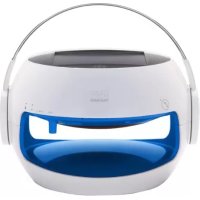
TDBS500U - Docking station TELEFUNKEN - Free user manual and instructions
Find the device manual for free TDBS500U TELEFUNKEN in PDF.



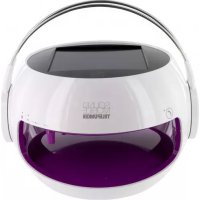
| Product type | Docking station / Solar speaker (SoundMobile) |
| Brand | Telefunken |
| Model | TDBS500U / MU-802 |
| Dimensions (L x W x H) | 21.7 x 19.2 x 19.7 cm |
| Weight | Approximately 1.40 kg |
| Power supply | Integrated rechargeable LiFePO4 3.2 V battery |
| Charging via | Integrated solar panel or USB mains adapter (not included) |
| Charging time (mains) | Approximately 5 hours |
| Charging time (solar) | Approximately 10 hours in direct sunlight |
| Battery life | Approximately 8 hours at maximum volume |
| Output power | 3 W |
| Bluetooth version | Bluetooth 2.1 with EDR |
| Bluetooth range | Up to 10 meters |
| Pairing code | 2633 (for Bluetooth versions ≤ 2.0) |
| Main functions | Bluetooth audio playback, hands-free calling, solar charging, twilight LED lighting |
| Microphones | 2 ultra-sensitive microphones (front and back) |
| Light indicators | Bluetooth (blue), battery (green/yellow/red), Sun-Power, Heat LED |
| Water resistance | IP44 (splash resistant) |
| Cleaning | Solar panel: soft cloth (non-microfiber) without abrasive products |
| Safety | Do not open, do not expose to heat sources, keep out of reach of children |
| Warranty | 24 months (battery: 6 months) |
| After-sales service | 0892 70 50 44 (€0.337/min) or assistance@sopeg.fr |
Frequently Asked Questions - TDBS500U TELEFUNKEN
User questions about TDBS500U TELEFUNKEN
0 question about this device. Answer the ones you know or ask your own.
Ask a new question about this device
Download the instructions for your Docking station in PDF format for free! Find your manual TDBS500U - TELEFUNKEN and take your electronic device back in hand. On this page are published all the documents necessary for the use of your device. TDBS500U by TELEFUNKEN.
USER MANUAL TDBS500U TELEFUNKEN
natural_image
Line drawing of a sound mobile telefunken device with headband and front panel (no text or symbols on the device itself)we make your sound mobile
wireless via Bluetooth® SOLAR SPEAKER
hands-free kit water resistant
Inhaltsangabe
Vorwort 4
Geräteübersicht 5
Kurzanleitung 6
natural_image
Illustration of a hand interacting with a helmet and headset, showing a finger pointing at the interior (no text or symbols)natural_image
Illustration of a hand interacting with a helmet and ear area, showing a finger pointing at the lid (no text or symbols present)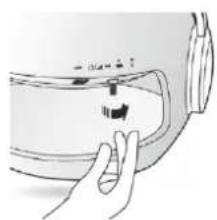
natural_image
Illustration of a hand pressing down on a curved mechanical component (no text or symbols visible)
natural_image
Illustration of a hand interacting with a white helmet and headset, showing a finger pointing at the lens (no text or symbols present)Aufladung
Product designed by Winchance.
Entsorgungshinweise
Consumer Electronics
Burospace 2
Route de Gisy
BP24
91571 BIEVRES Cedex
FRANCE
Jean-Tony LEAC
PDG / CEO

CE _12
TELEFUNKEN®
Garantiekarte
Produktdaten
Modell:
Seriennummer:
Kaufdatum:
Besitzerdaten
Name:
Telefonnummer:
Adresse:
Land:
E-Mail:
Fehlerbeschreibung:
TELEFUNKEN®
www.telefunken-digital.com
TELEFUNKEN®
Bedienungsanleitung
DE
Operation Manual
GB
natural_image
Line drawing of a sound mobile telefunker head with headphones and display screen (no text or symbols on the device itself)we make your sound mobile
wireless via Bluetooth® SOLAR SPEAKER
hands-free kit water resistant
Table of contents
Preface 4
Equipment Overview 5
Short Guide 6
Notes on Handling 7
Description of the device 8
Scope of Delivery 8
SoundMobile Special Features 8
Loudspeaker Operation 9
Telephone Calls with SoundMobile 11
Bluetooth® 12
Optional Accessories 12
Power and Battery 13
USB Connection 13
Notes 14
Specifications 15
Notes on Disposal 16
Warranty 17
CE-Certificate 18
Warranty Card 19
Preface
This operation manual serves to assist you with using your solar loudspeaker
■ as intended
■ and in a safe manner.
The respective device is hereinafter referred to as SoundMobile
This operation manual addresses those, who
■ set up
■ operate
clean and
■ dispose of
the loudspeaker.
The operation manual's various elements have been marked with defined design features. This enables you to easily determine whether it involves
normal text,
numbers or
→ steps.
Equipment Overview
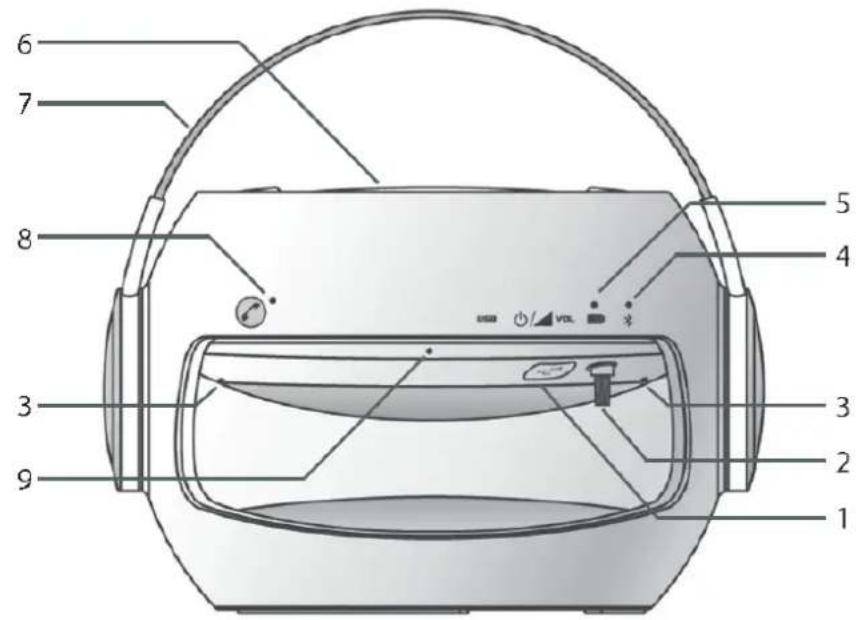
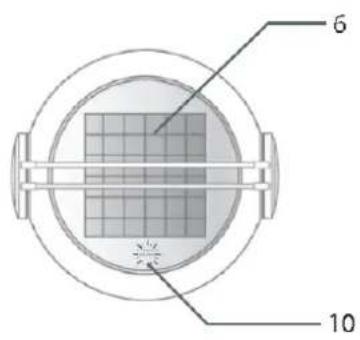
[1] USB port
[2] On/Off button & volume control & title select button
[3] 2 LED lights (yellow/orange) incl. twilight sensor
[4] Bluetooth® control indicator lamp
[5] Battery control indicator lamp
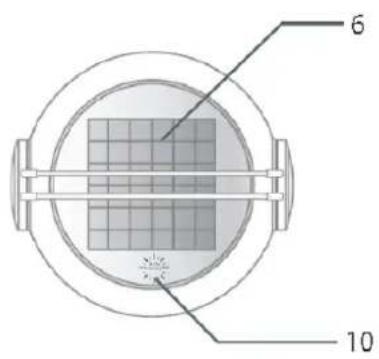
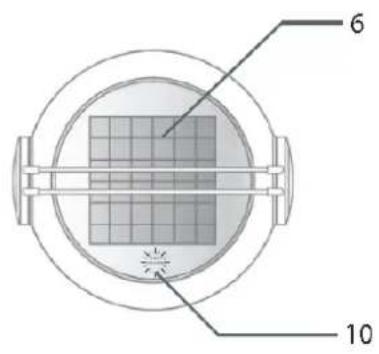
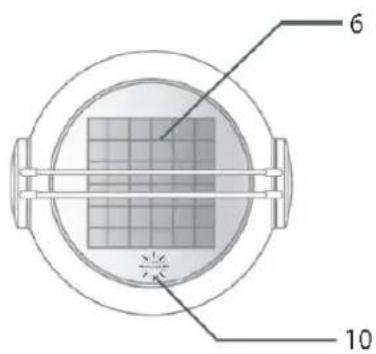
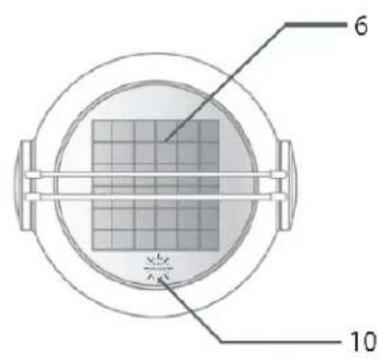
[6] Solar panel
[7] Handle
[8] Telephone button
[9] 2 high-sensitivity microphones on the front and back
[10] Sun power display
Short Guide
[1] Charge your SoundMobile before first use (see p. 9).

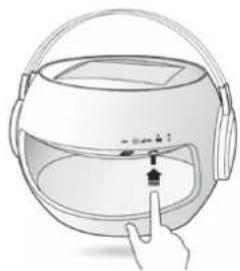
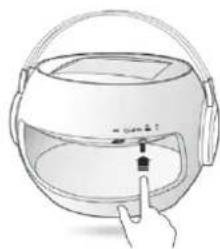
[2] In order to switch the device on, press the On/Off button (which also serves as volume control & title select button). The Bluetooth® display will flash in blue color.
natural_image
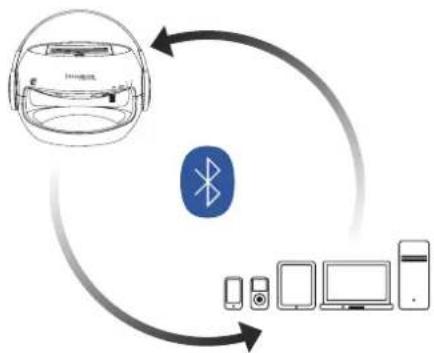
Illustration of a person interacting with a helmet and headset, showing a finger pointing to the hood (no text or symbols present)[3] Activate the Bluetooth connection on your output device. When first connecting via Bluetooth ^® , the password (Code: 2633) is to be entered in your output device.
Please note: The code request does not apply if the version of your Bluetooth® connection to the output device is higher than 2.0.
flowchart
graph TD
    A["Smart Home Device"] --> B["Bluetooth"]
    B --> C["Mobile Phone"]
    B --> D["Smart Computer"]
    B --> E["Desktop"]
If your SoundMobile is connected to a mobile telephone, the music will be muted when incoming phone calls are received. In order to take the phone call, please use your SoundMobile's telephone button (see p. 11).
Notes on Handling
Please ensure to carefully read all safety notes and keep them for future reference. Generally ensure to comply with the warnings and notes provided herein.
Safety notes - caution!
■ Generally do not attempt to repair a defective device. Always refer to one of our customer service stations.
- Do generally not open the solar loudspeaker – this is reserved to professionals.
- Ensure foreign bodies such as pins, coins, etc. not to enter the SoundMobile's interior.
■ Ensure not to place open fire such as lit candles on the solar loudspeaker.
■ Never leave children unattended when using SoundMobile. In order not to risk your own safety and the safety of third parties, ensure all maintenance is performed by qualified personnel.
- Do not listen to music at high volume. This may result in permanent hearing damage.
Risk of suffocation!
Keep packaging and parts thereof out of the reach of children. Films and other packaging materials pose the risk of suffocation.
SoundMobile Installation Site
■ Ensure not to install the unit nearby equipment that generates strong magnetic fields.
- Do not place any heavy objects onto the solar loudspeaker.
Description
Scope of Delivery
Please ensure that all of the accessory parts on the list below are present:
■ Solar loudspeaker
USB cable
■ Operation manual
SoundMobile Special Features
Your SoundMobile is a high-performance, convenient, and flexible device. Since the solar loudspeaker is charged by solar energy, it features various additional usage options in combination with Bluetooth®-compatible devices such as iPod®, iPhone®, iPad®, mobile phones, MP3 Players, PC, notebooks or tablet PCs, and game consoles.
In absence of sunlight the solar loudspeaker may be charged via power grid by using the USB cable (requires an adaptor, which is not included with the scope of delivery but is sold as accessory item, see p. 12).
If charged by the grid, the charging time amounts to approx. 5 hours; charging by direct solar radiation will require about 10 hours (depending on on-site radiation intensity).
Caution: Charging by solar radiation may cause the solar panel to heat up-risk of injury!
At fullcharge and maximum volume, the solar loudspeaker's operating time will amount to approx. 8 hours.
In order to facilitate the experience of great sounds completely off-grid and independent from cable, SoundMobile offers the ideal option of connecting a Bluetooth ^® -compatible output device.
A charge status display provided on SoundMobile serves to inform you on its current charge status.
Description
Loudspeaker Operation
We recommend charging the solar loudspeaker for at least 2 hours prior to initial use by using the USB cable included with the scope of delivery (required adaptor is not included with the scope of delivery, see p. 12).
Self-evidently, the solar loudspeaker may also be charged by using direct sunlight. However, please note the respectively extended charge time.
In order to switch on the solar loudspeaker, please press the on/off button. The display will light up green as soon as the solar loudspeaker has been switched on. Bluetooth® connection will be displayed by blue signal.
Now activate Bluetooth® on the output device.
Allow your output device to search for the solar loudspeaker (M5 + type series number).
Connect both devices. Upon initial connection, you will be requested to enter a code. Please enter code 2633. (It is also indicated on the label at the bottom of your SoundMobile).
Please note: The code request does not apply if the version of your Bluetooth® connection to the output device is higher than 2.0.
If you connect the device to the solar loudspeaker later, you will not have to enter the code again. You will only have to activate Bluetooth® on your output device and switch on the solar loudspeaker in order to link both devices. Successfully established connection will be indicated by a brief acoustic signal.
Description
natural_image
Illustration of a hand interacting with a helmet and a device, no text or symbols present[1] Press On/Off

natural_image
Illustration of a hand pressing down on a curved object with a handle (no text or symbols)[2] Turn the control in order to adjust the volume.

natural_image
Illustration of a hand interacting with a smart home device (no text or symbols visible)[3] By briefly pressing the controller you can make a title selection:
Press 3 x = last track
Press 2 x = next track
Press 1 x = pause
(press the button again for continuing the track)
When disconnecting your output device from the solar loudspeaker, please deactivate the output device's Bluetooth® function. The devices' disconnection will be indicated by a brief acoustic signal.
In order to facilitate access by another out - put device, please cut off any Bluetooth® connection activated on SoundMobile to any linked devices first. You may then switch to an alternative output device.
Your SoundMobile will switch off automatically when not being connected to any other device for 10 minutes or longer.
The respective settings (play / pause / telephone / volume / play forward and back) can also be made at your output device.
Description
Telephone calls with SoundMobile
Your SoundMobile has been equipped with a particularly convenient call answering function. If your solar loudspeaker has been connected to your mobile phone via Bluetooth® and there is an incoming call while you are listening to music etc., the music will fade down automatically, and the solar loudspeaker will play the ring tone.
You can then optionally directly phone via your SoundMobile.
With incoming telephone calls, simply press the telephone button on your solar loudspeaker.
Two high-sensitive microphones and the speaker installed in the solar loudspeaker enable you to speak and listen to the caller as usual, without having to hand-hold your mobile phone.
In order to end the call, either press the Telephone button on SoundMobile again or press the replace button on your mobile phone.
- At the end of the call, the music will be replayed without the need of making any further settings.
As long as your mobile phone and the solar loudspeaker are linked to each other via Bluetooth®, you may also make outgoing phone - calls via the solar loudspeaker. In order to do so, just dial the requested number directly on your mobile phone - you can then speak and listen via SoundMobile.
If incoming calls are being received, the LED next to the solar loudspeaker's telephone button will flash in green; if phone calls are made via solar loudspeaker, the LED will be on uninterruptedly.
Depending on the status (incoming phone call, currently made phone call), a green or blue LED will be on uninterruptedly!
![[1] [2]](/content/2026/02/385213/images/5205c5167fde2c4b1c1e0a10af62a7aba6a006af924d37a2ccdd01442ad9384f.jpg)
[1] Incoming call: LED flashes green. Ongoing phone call: continuously lit LED.
[2] High-sensitive microphone on front and back side
Description
Bluetooth®
Please ensure the distance between your output device and the SoundMobile does not exceed 10 meters. Bluetooth ^® 2.1 and an EDR module have been integrated with your solar loudspeaker.
LED lights / twilight sensor
The integrated LED lights will be switched on automatically by the twilight sensor. The lighting is permanently.
Bluetooth® control lamp
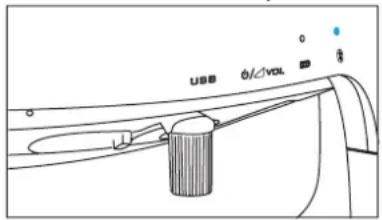
If the Bluetooth® control lamp is neither on nor flashing, there is no current connection.
■ A blue flashing lamp indicates the device is searching for
an active Bluetooth ^® connection.
- An uninterruptedly blue lit lamp indicates that the SoundMobile is connected to an output device via Bluetooth®.
- Every time the solar loudspeaker is connected to or disconnected from an output device by Bluetooth ^ , it will generate a brief acoustic signal.
Optional Accessories:
In case the output device you intend to connect to the solar loudspeaker should not be equipped with Bluetooth ^® , respective accessories serving to connect your output device to the solar loudspeaker are commercially available.
■ USB Bluetooth® adaptor / USB Bluetooth® dongle (connection via USB interface)
■ Audio Bluetooth® adaptor (connection via audio frequency interface)
■ USB adaptor (all-purpose power supply unit output: DC 5V-1A; connected to grid and via USB cable)
Description
Power and Battery
The solar loudspeaker has been equipped with an integrated rechargeable 3.2V LiFePO4 battery, which is temperature-resistant from -10 C to +60°C. The solar panel of
SoundMobile has exclusively been designed for this loudspeaker. If fully charged, the solar loudspeaker's operating time is approx. 8 -10 hours.
Battery control lamp
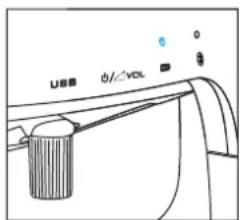
■ Green light: The battery charge status exceeds \~ 80%
■ Yellow light: The battery status is \~ 20% to below \~ 80%
■ Red light: battery charge status drops below \~ 20%
Charging
The color displayed by the battery control lamp serves to inform you on the current charge status of SoundMobile.
Connect SoundMobile to the grid or charge it with solar energy directly.
The changing colors will indicate the respectively current charge status.
Red-flashing: below \~ 20%
Yellow-flashing: 20 - 80%
Green-flashing: over \~ 80 %
When fully charged a green light appears.

The display „Sun Power“ (flashing in green) serves to indicate the solar loudspeaker's charging of by solar radiation.
USB Connection
- Your solar loudspeaker has been equipped with USB port. It offers the opportunity of charging your SoundMobile independent from solar radiation by deploying appropriate adaptors (for accessories, please refer to page 12).
→ Open the USB cover flap, and plug the USB cable into the USB port.
If necessary, connect the cable to the corresponding adaptor (not included with the scope of delivery, see accessories on p. 12).
Notes
In daytime, please ensure to place SoundMobile in a manner, which allows for full sunlight absorption in order to guarantee full battery charge.
Please note: if charged by solar energy, the solar panel may heat up. Caution: Risk of injury!
Please ensure to always keep the solar panel clean. Clean it as required and do not use any aggressive abrasives or similar but a soft cloth only (no microfiber cloth).
- Linking the solar loudspeaker to more than one audio device at once is infeasible. Please always cut off active Bluetooth® connection at the output device first. You can then switch to an alternative output device.
Please ensure the maximum distance between solar loudspeaker and output device not to exceed approx. 10 meters. Sound interferences might be caused by too far distances and/or possible obstacles between output device and solar speaker.
■ Sounds are exclusively transferred by Bluetooth®. Consequently, the solar loudspeaker can only be used in combination with suchlike devices. In case you wish to link additional devices (e.g. laptop, PC, etc.), which are not equipped with Bluetooth®, respective adapters are available on the market (see p. 12).
Specifications\*
Dimensions 21.7 x 19.2 x 19.7 cm
Weight approx. 1,40 kg
Bluetooth ^® 2.1
Compatible Bluetooth® profile A2DP (Advanced Audio Distribution Profile)
USB connection Yes
Output power 3 W
Battery 1 x 3.2V LiFePO4
Frequency range 100 Hz - 20 KHz
Ambient conditions -10 °C to +60 °C
0-90% relative humidity
non-condensing
LED class 1
CE
Directives and standards:
product complies with CE Identification Directive.
Distributor
SOPEG
Burospace 2, route de Gisy
BP 24
91571 BIEVRES Cedex
FRANCE
Service-Hotline:
assistance@sopeg.fr
www.telefunken-digital.com
* Technical modifications and errors reserved.
All dimensions and weights are approximate values.
Any and all names of mentioned companies, institutions, or brands are
(registered) trademarks, held by their respective owners.
Product designed by Winchance.
Notes on Disposal
Important note on waste disposal:
Your product employs batteries, which cannot be disposed of in normal domestic waste. Please inform yourself on your local applicable law regarding the separate collection of batteries. Proper disposal of batteries serves to prevent negative effects on environment and health.
Disposal of packaging
In delivery, your new product was protected by its packaging. Please contribute and dispose of the package in an environmentally friendly manner. For more information on advanced waste disposal methods, please contact your local distributor or waste disposal facility.
Disposal of device
Waste equipment is not without value. Environmentally responsible waste disposal serves to recover precious raw materials. Your local authorities will inform you on the device's environmentally friendly and proper disposal. Please ensure to remove the batteries prior to the device's disposal.
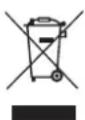
At the end of its useful life, this product may not be disposed via normal household waste, but is to be delivered to a collection point for recyclable electrical and electronic devices, as indicated by the symbol on the product, its directions for use or packaging. All materials employed are recyclable in accordance with their identification. By ensuring its re-use, material utilization, or other forms of waste equipment utilization you contribute to environmental protection.
Warranty
Red Tools GmbH & Co. KG guarantees this product to be basically free from material and manufacturing defects under common conditions of use.
Guarantee Term
RedTools Germany GmbH & Co. KG grants a guarantee of 24 months on this product. The respective term starts with the purchase day. Any and all warranty claims shall be subject to the purchaser submitting the present guarantee card and an invoice showing the purchase date. If applicable, the guarantee term for the integrated rechargeable battery is six (6) months under common conditions of use.
How to raise guarantee claims
In order to raise guarantee claims, please contact our Customer Service Center within the guarantee term by calling the
Service-Hotline
assistance@sopeg.fr
www.telefunken-digital.com.
Please ensure to provide us with the following information:
In case our Customer Service Center identifies product defects or malfunction under common conditions of use within the guarantee term caused by material or manufacturing defect (see exclusions), you will be requested to prepare the product for free repair. The product is to be packed for safe transport. In order to prove the product is still within the guarantee term, please enclose a copy of the proof of purchase (this guarantee card plus your receipt). This non-transferable guarantee applies to first-time buyers only.
Before shipping the product for guarantee claims
Please ensure to save all data, secret, proprietary or private information stored in the product and/or on data/sound carriers, and to remove the latter from the device. RedTools Germany GmbH & Co. KG shall not assume any liabilities whatsoever for damage or loss to or of data and/or data/audio carriers stored on or in a product delivered to the Customer Service authorized by RedTools Germany GmbH & Co. KG for repair.
Exclusions
Under this guarantee, RedTools Germany GmbH & Co. KG shall not be obliged to provide guarantee services if RedTools Germany GmbH & Co. KG identifies by testing or examining the product returned to RedTools Germany GmbH & Co. KG for repair that alleged defects or malfunctions do not exist or are caused by incorrect use, negligence, inappropriate maintenance, unauthorized attempts to open, repair, or modify the product, improper installation, use of customer-owned software, viruses, causes beyond the intended use, accident, fire, lightning, power failure, or any other natural disaster.
The present guarantee shall lapse if:
- The product has been modified or repaired by an unauthorized person;
- Its serial number has been changed or removed;
- The guarantee stamp has been destroyed or changed; or
-
- The guarantee term has expired.

Important note
Apart from the claims hereunder, you are entitled to all legal consumer rights based on material defects and defects of title. The present guarantee shall in no form whatsoever limit respective rights.
CE-Certificate
EC Declaration of Conformity:
We declare under our sole responsibility that this product conforms to the following standards or normative documents.
Solar Loudspeaker Sound Mobile / MU-802
EN 301 357-2 V1.4.1 (2008-11)
EN 301 489-9 V1.4.1 (2007-11)
EN 301 489-1 V1.8.1 (2008-04)
EN 50371:2002
Guideline: 1999/5/EC
Splash-proof "IP44"
EN 60529:1991/A1:2000
Battery
Corresponds to directive 2006/66/EC
Bièvres 2012/04/16

SOPEG
Consumer Electronics
Burospace 2
Route de Gisy
BP24
91571 BIEVRES Cedex
FRANCE
Jean-Tony LEAC
PDG / CEO


TELEFUNKEN®
Warranty Card
Product Data
Type:
Serial number:
Purchase date:
Owner Information
Name:
Phone number
Adress
Country
E-Mail:
Defect specification
www.telefunken-digital.com
TELEFUNKEN®
www.telefunken-digital.com
TELEFUNKEN®
Bedienungsanleitung
Operation Manual
DE
GB
natural_image
Line drawing of a sound mobile telefunker device with headband and front panel (no text or symbols on the device itself)we make your sound mobile
wireless via Bluetooth® SOLAR SPEAKER
hands-free kit water resistant
Sommaire
Avant-propos 4
natural_image
Illustration of a hand interacting with a helmet and ear area, showing a finger pointing at the lock (no text or symbols present)natural_image
Illustration of a hand interacting with a helmet and a device, no text or symbols presentnatural_image
Illustration of a hand pressing down on a curved object with a handle (no text or symbols)natural_image
Illustration of a hand interacting with a helmet and headset (no text or symbols visible)■ Lumière verte
Product designed by Winchance.
La directive: 1999/5/EC
natural_image
Line drawing of a sound mobile telefunker head with front and back views (no text or symbols on the device itself)we make your sound mobile
wireless via Bluetooth® SOLAR SPEAKER
hands-free kit water resistant
Sommario
Prefazione 4
natural_image
Illustration of a hand interacting with a helmet and ear area, showing a finger pointing at the lock (no text or symbols present)natural_image
Illustration of a hand interacting with a helmet and a finger pointing at the front panel (no text or symbols)natural_image
Illustration of a hand pressing down on a curved mechanical component (no text or symbols visible)natural_image
Illustration of a hand interacting with a smart home device (no text or symbols visible)Product designed by Winchance.
natural_image
Line drawing of a sound mobile telefunker head with front and back views (no text or symbols on the device itself)we make your sound mobile
wireless via Bluetooth® SOLAR SPEAKER
hands-free kit water resistant
Índice
Prólogo 4

natural_image
Illustration of a hand interacting with a smart helmet and a small device inside (no text or symbols)natural_image
Illustration of a hand interacting with a helmet and a device, no text or symbols present[1] Pulsar On/Off

natural_image
Illustration of a hand pressing down on a curved object with a handle (no text or symbols)natural_image
Illustration of a hand interacting with a smart home device (no text or symbols visible)Consumer Electronics
Burospace 2
Route de Gisy
BP24
91571 BIEVRES Cedex
FRANCE
Jean-Tony LEAC
PDG / CEO

CE _12
TELEFUNKEN®
Tarjeta de Garantía
Datos del Producto
Tipo:
Número de serie:
Fecha de compra:
natural_image
Line drawing of a sound mobile telefunker head with front and back views (no text or symbols on the device itself)we make your sound mobile
wireless via Bluetooth® SOLAR SPEAKER
hands-free kit water resistant
Содержание
Предисловие 4
natural_image
Illustration of a hand interacting with a helmet and headset, showing a finger pressing a button (no text or symbols present)natural_image
Illustration of a hand interacting with a helmet and a finger pointing at the front panel (no text or symbols)[1] Нажмите Вкл/Выкл

natural_image
Illustration of a hand pressing down on a curved mechanical component (no text or symbols visible)natural_image
Illustration of a hand interacting with a smart home device (no text or symbols visible)Consumer Electronics
Burospace 2
Route de Gisy
BP24
91571 BIEVRES Cedex
FRANCE
Jean-Tony LEAC
PDG / CEO


TELEFUNKEN®
Карта гарантии
- wireless via Bluetooth® SOLAR SPEAKER
- Inhaltsangabe
- Aufladung
- Entsorgungshinweise
- TELEFUNKEN®
- Garantiekarte
- Operation Manual
- Table of contents
- Preface 4
- Notes 14
- Preface
- Equipment Overview
- Short Guide
- Notes on Handling
- Safety notes - caution!
- Risk of suffocation!
- SoundMobile Installation Site
- Description
- Scope of Delivery
- SoundMobile Special Features
- Loudspeaker Operation
- Telephone calls with SoundMobile
- Bluetooth®
- LED lights / twilight sensor
- Optional Accessories:
- Power and Battery
- Battery control lamp
- Charging
- USB Connection
- Notes
- Specifications\*
- CE
- Notes on Disposal
- Important note on waste disposal:
- Disposal of packaging
- Disposal of device
- Warranty
- Guarantee Term
- How to raise guarantee claims
- Service-Hotline
- assistance@sopeg.fr
- Before shipping the product for guarantee claims
- Exclusions
- The present guarantee shall lapse if:
- Important note
- CE-Certificate
- EC Declaration of Conformity:
- Solar Loudspeaker Sound Mobile / MU-802
- Battery
- Warranty Card
- Sommaire
- Sommario
- Índice
- Tarjeta de Garantía
- Содержание
- Карта гарантии
Brand : TELEFUNKEN
Model : TDBS500U
Category : Docking station