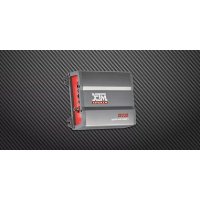
X1000D - Car stereo MTX Audio - Free user manual and instructions
Find the device manual for free X1000D MTX Audio in PDF.




User questions about X1000D MTX Audio
0 question about this device. Answer the ones you know or ask your own.
Ask a new question about this device
Download the instructions for your Car stereo in PDF format for free! Find your manual X1000D - MTX Audio and take your electronic device back in hand. On this page are published all the documents necessary for the use of your device. X1000D by MTX Audio.
USER MANUAL X1000D MTX Audio
X1000D - amplifier owner's manual
Introduction
Thank you for choosing an MTX XTHUNDER Amplifier to power your car audio system. Each MTX XTHUNDER amplifier is CEA2006 certified which means you have a 100% guarantee that your amplifier will deliver every Watt it is rated at.
Specifications
Ratings:
- CEA2006 certified Power Output: 700 watts RMS at 4 ohm and ≤ 1% THD+N
- CEA2006 certified Power Output: 1000 watts RMS at 2 ohm and ≤ 1% THD+N
• Signal-to-Noise Ratio (1 watt): >75dB
• THD+Noise (Distortion) (1 watt) : ≤ 1%
• Frequency Response (-3dB): 20Hz-200Hz
• Maximum Input Signal : 5V
• Maximum Sensitivity : 200mV
• Dimensions : 315mm x 210mm x 50mm
• Crossover : Low pass 24dB 40Hz-200Hz - Subsonic filter: variable 20Hz-50Hz
• High level input connection

text_image
INPUT L CH ① R CH ② HI INPUT GAIN 3 1 1-1J 4 REMOTE GAIN 5 SUBSONIC 6 LPF 7 SPEAKER FUSE 9 POWER REM +BAIT 10 11 12 GNDInput/output panel layout
-
RCA input jacks – These RCA input jacks are for use with source units that have RCA or Line level outputs. A source unit with a minimum level of 200mV is required for proper operation.
The use of high quality twisted pair cables is recommended to decrease the possibility of radiated noise entering the system. -
Speaker level inputs - This input will allow the amplifier to operate from source units with speaker-level outputs. Output speaker leads from the source unit should be tied directly to the wire harness provided with the amplifier.
**Note: When speaker level inputs are used, a remote turn on wire must used to switch the amplifier on and off.**
-
Gain control – This control is used to match the input sensitivity of the amplifier to the particular source unit that you are using. The operating range varies from 200mV gain fully clockwise to 5V input gain fully counter clockwise.
-
Input selection switch - This switch, is used to match the amplifier's input to the source unit's or DSP unit's output. If your source unit or DSP unit has a mono output you can select: Mono L or Mono R as your input connection, if your source unit or DSP unit has a stereo output you need to select SUM for input now both RCA inputs of the amplifier are active and the stereo signal will be converted into a mono signal by the amplifier.
- EBC port - For connecting the included External Bass Control. A remote bass control so the bass can be adjusted from the driver's seat.
- Subsonic filter control - This control is used to select the desired (high pass) subsonic filter frequency. The subsonic filter protects the subwoofer(s) against too low frequencies that can damage the subwoofer(s).
- Low pass x-over frequency control - This control is used to select the desired low pass x-over frequency. The frequency can be adjusted between 40Hz and 200Hz.
- Speaker Terminals – Be sure to observe speaker polarity through the system. Failing to wire the speakers in proper phase could result in a loss of bass response and/or poor overall sound quality.
Caution: The X1000D amplifier is not recommended for loads below 2 ohms.
- Fuse - For convenience, all MTX XTHUNDER amplifiers utilize ATC type fuses. For continued protection in the event that a fuse blows, replace the fuse only with the same value.
Caution: The power fuse on the amp is for protecting the amp against overdrive. To protect the vehicle's electrical system, an additional fuse is required within 30cm of the battery on the 12V+ cable.
-
Power Terminal – This is the main power input for the amplifier and must be connected directly to the positive terminal of the car battery for the amplifier to operate properly. Use caution when running this cable through the vehicle. Try to avoid running this cable along side the input RCA cables, antenna cabling, or other sensitive equipment as the large amount of current flowing through this cable can induce noise into your system. It is also very important to have a tight connection to ensure maximum performance. We recommend to use 10mm2 or larger power wire with the MTX XTHUNDER X1000D amplifier.
-
Remote Terminal – The Amplifier can be turned on by applying 12 volts to this terminal. Typically this voltage is supplied by a wire from the source unit marked "remote" or "electric antenna".
-
Ground Terminal – A good quality ground is required for your Amplifier to operate at peak performance. A short length of cable the same gauge as your power cable should be used to attach the ground terminal directly to the chassis of the vehicle. Always scrape or sand any painted surfaces to expose bare metal where the ground wire will attach.
X1000D - amplifier owner's manual
Installation & Mounting
Any deviation from the connection specifications recommended may cause serious damage to the amplifier, speakers and/or vehicle electrical system. Please double-check the connection before turning the system on.
- Disconnect the vehicle's negative battery connection.
- Determine the mounting place for your MTX XTHUNDER amplifier. Keep in mind that there needs to be sufficient air flow across the heatsink of the amplifier to ensure proper cooling. Mark the mounting holes of the amplifier and drill the holes to mount your amplifier. Before drilling any holes make sure that all vehicle wires, gas lines, brake lines, gastank etc. are clear and will not interfere with the installation. Mount your MTX XTHUNDER amplifier.
-
Run a positive power cable from the vehicle's battery through the firewall using a grommet or firewall bushing to avoid damage to the cable from sharp edges of the firewall. Run the cable through the interior of the vehicle and connect the end to the amplifier's +BATT terminal. Leave the cable disconnected from the battery. Note : Use only proper gauge wire for both positive and negative connections for optimum performance.
-
Install a circuit breaker or fuse within 30cm of the battery. This effectively lowers the risk of severe damage to you or your vehicle in case of a short circuit or accident. Make sure the circuitbreaker is switched off or the fuse is taken out of the fuse holder until all connections are made. Now connect your positive power cable to the positive battery terminal of the battery
-
Find a good ground source on the vehicle's chassis and remove the paint to reveal bare metal at the contact point. Attach the ground wire to that contact point and connect the other end of the ground wire to the GND terminal of your MTX XTHUNDER amplifier.
-
Connect a Remote Turn-on wire from your source unit to your MTX XTHUNDER amplifier's Remote terminal. If your source unit does not have a dedicated Remote Turn-on lead, you may connect to the source unit's Power Antenna lead.
-
Connect RCA cables from your source unit to your MTX XTHUNDER amplifier's RCA input jacks. If RCA (low level) output is not available, connect the included speaker (high level) connector to the speaker wires from the source unit.
-
Connect your speakers to your MTX XTHUNDER amplifier's speaker terminals using 4mm2 minimum speaker cable.
-
Double-check all the previous installation steps, in particular, the wiring and component connections. If everything is in order, reconnect the vehicle's negative battery connection, switch your circuitbreaker on or place your fuse in the fuse holder and begin adjusting your amplifier.
Note: Be sure that the Gain Level on the amplifier is turned all the way down (counter clockwise) before proceeding with adjustments.
Adjusting the gain
- Turn the gain control on the amplifier all the way down (counter clockwise).
- Turn up the volume control on the source unit to approximately 3/4 of maximum.
- Adjust the gain control on the amplifier until audible distortion occurs.
- Adjust the gain control down until audible distortion disappears.
- The amplifier is now calibrated to the output of the source unit.
Trouble Shooting
PROBLEM CAUSE SOLUTION
No LED indication No +12V at remote connection Supply +12V to remote terminal
No +12V at Power connection Supply +12V to terminal
Insufficient ground connection Verify ground connection
Blown power fuse Replace fuse
LED on, no output Volume on source unit off Increase volume on source unit
Speaker connections not made Make speaker connections
Gain control on amplifier off Turn up gain
Output distorted Source unit volume set too high Lower source unit volume
Amplifier gain set too high Lower amplifier gain
Balance reversed Speakers wired L + R reversed Wire speakers with correct orientation
RCA inputs reversed Reverse RCA input
Bass is weak Speakers wired out of phase Wire with correct phase
Blowing fuses Excessive output levels Lower volume
Amplifier defective Return for service
Introduction
PROBLÈMES CAUSES SOLUTIONS
PROBLEMA CAUSA SOLUZIONE
PROBLEMA CAUSA SOLUÇÃO
PROBLEEM OORZAAK OPLOSSING
Owner's Manual X1000D
© 2006 MTX. All rights reserved.
MTX, Thunder, and XTHUNDER
are trademarks of Mitek.
Designed and Engineered in the U.S.A.
Due to continual product development, all specifications are subject to change without notice.
MTX Audio, 4545 East
Baseline Rd., Phoenix, AZ 85042 U.S.A.