BD18RC T1 - Radio BLACK & DECKER - Free user manual and instructions
Find the device manual for free BD18RC T1 BLACK & DECKER in PDF.



| Product type | Radio charger for NiCd and NiMH batteries |
| Brand | Black & Decker |
| Model | BD18RC T1 |
| Input voltage | 18 V DC |
| Charger output voltage | 11.4 V AC |
| Mains power supply | 230 V AC, 50 Hz |
| Total weight | 1.9 kg |
| Battery pack weight | 0.8 kg (NiCd/NiMH) |
| Battery capacity | 1.5/1.7 Ah (NiCd), 1.5 Ah (NiMH) |
| Charging time | First charge: 9 h; subsequent charges: 3 to 6 h |
| Radio bands | AM, FM |
| Main functions | AM/FM radio, battery charger, MP3 player (AUX), bass boost |
| Display | LCD screen with bass boost icon and frequency |
| Auxiliary input | 3.5 mm jack socket for MP3 player (inside flap) |
| Antenna | FM telescopic antenna |
| Charging temperature | Between 4°C and 40°C |
| Intended use | Domestic, charging Black & Decker batteries and radio reception |
| Care and cleaning | Clean with a damp cloth without solvent; do not immerse |
| Safety | Double insulation, do not open, do not expose to water or temperatures >40°C |
| Spare parts and repairability | Repairable parts only by a Black & Decker authorized technician; no user-serviceable parts |
| Warranty | 24 months against defects in materials or workmanship |
Frequently Asked Questions - BD18RC T1 BLACK & DECKER
User questions about BD18RC T1 BLACK & DECKER
0 question about this device. Answer the ones you know or ask your own.
Ask a new question about this device
Download the instructions for your Radio in PDF format for free! Find your manual BD18RC T1 - BLACK & DECKER and take your electronic device back in hand. On this page are published all the documents necessary for the use of your device. BD18RC T1 by BLACK & DECKER.
USER MANUAL BD18RC T1 BLACK & DECKER
English 4
Deutsch .9
Francais 14
Italiano 19
Nederlands ...24
Espanol 29
Portugues ....34
Svenska 39
Norsk 44
Dansk 49
Suomi .54
Eλληνικα ....58
ENGLISH
Intended use
Your Black & Decker radio charger has been designed for charging Black & Decker NiCd and NiMh batteries and for playing radio transmissions. This product is intended for consumer use only.
Safety instructions
Warning! When using battery-powered appliances, basic safety precautions, including the following, should always be followed to reduce the risk of fire, leaking batteries, personal injury and material damage.
Read all of this manual carefully before using the appliance.
The intended use is described in this manual. The use of any accessory or attachment or the performance of any operation with this appliance other than those recommended in this instruction manual may present a risk of personal injury.
Retain this manual for future reference.
Using your appliance
Always take care when using the appliance.
This appliance is not intended for use by young or infirm persons without supervision.
The appliance is not to be used as a toy.
Use in a dry location only. Do not allow the unit to become wet.
Do not immerse the appliance in water.
Do not open body casing. There are no user-serviceable parts inside.
Do not operate the appliance in explosive atmospheres, such as in the presence of flammable liquids, gases or dust.
To reduce the risk of damage to plugs and cords never pull the cable to remove the plug from a socket outlet.
After use
When not in use, the appliance should be stored in a dry, well ventilated place out of the reach of children.
Children should not have access to stored appliances.
When the appliance is stored or transported in a vehicle it should be placed in the boot or restrained to prevent movement following sudden changes in speed or direction.
The appliance should be protected from direct sunlight, heat and moisture.
Inspection and repairs
Before use, check the appliance for damaged or defective parts. Check for breakage of parts, damage to switches and any other conditions that may affect its operation.
Do not use the appliance if any part is damaged or defective.
Have any damaged or defective parts repaired or replaced by an authorised repair agent.
Never attempt to remove or replace any parts other than those specified in this manual.
Additional safety instructions - batteries and chargers
Batteries
Never attempt to open for any reason.
Do not expose the battery to water.
Do not expose the battery to heat.
Do not store in locations where the temperature may exceed 40^ .
Charge only at ambient temperatures between 4^ and 40^ .
Charge only using the charger provided with the tool.
When disposing of batteries, follow the instructions given in the section "Protecting the environment".
Chargers
Use your Black & Decker charger only to charge the battery in the tool with which it was supplied. Other batteries could burst, causing personal injury and damage.
Never attempt to charge non-rechargeable batteries.
Have defective cords replaced immediately.
Do not expose the charger to water.
Do not open the charger.
Do not probe the charger.

The charger is intended for indoor use only.
Electrical safety

This charger is double insulated; therefore no earth wire is required. Always check that the power supply corresponds to the voltage on the rating plate.
If the supply cord is damaged, it must be replaced by the manufacturer or an authorised Black & Decker Service Centre in order to avoid a hazard.
Features
This appliance includes some or all of the following features:
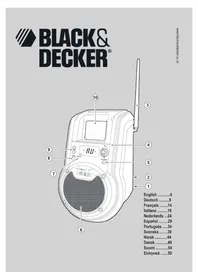
ac Power adaptor receptacle (rear of unit)1.
Charging port (rear of unit)2.
Antenna3.
Power on/off, volume control4.
Bass selector5.
Speaker6.
Charging indicator7.
AM/FM/AUX selector8.
Station selector buttons9.
MP3 player door10.
Mode indicator11.
Bass boost indicator12.
Station frequency 13.
ac Power adaptor (not shown)
Battery pack (not included)
Use
Battery cap information
Battery storage and carrying caps are provided for use whenever the battery is out of the tool or charger. Remove cap before placing battery in charger or tool.
Charging the Power Pack
Warning! Battery shall not be exposed to excessive heat such as sunshine, fire or the like.
The radio charger should be used in a well ventilated area only.
The radio charger is designed to use standard household 230 Vac.
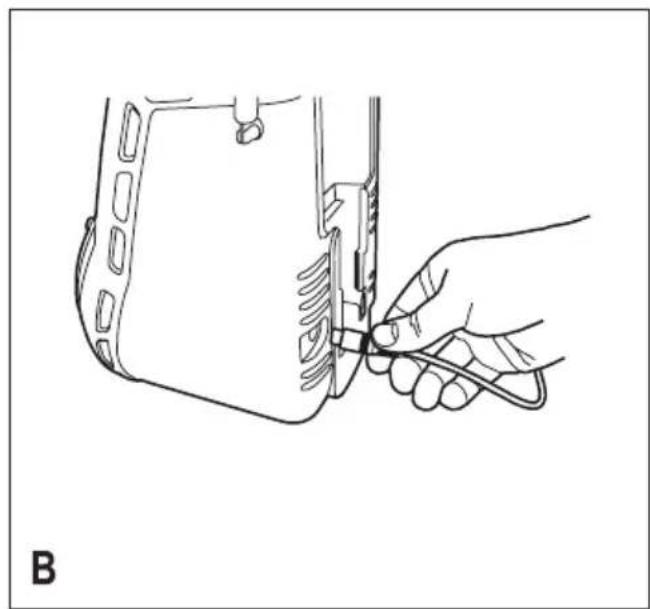
Insert the plug of the power adaptor into the radio charger as shown in Figure B. Insure that the charger plug is correctly aligned with the radio socket before pushing to full depth.
Plug the power adaptor into any standard 230 Vac electrical outlet.
NOTE: Do not charge by means of an engine generator or DC power source. Use only 230 Vac.
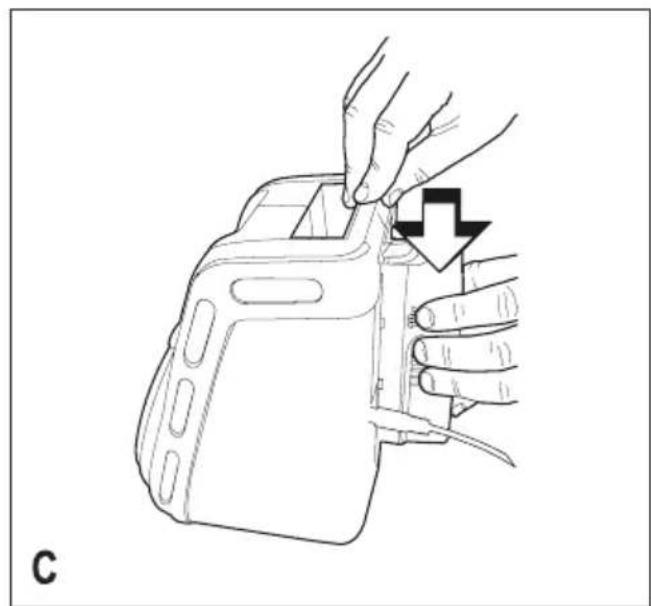
Slide the power pack into the back of the unit as shown in Figure C. Make sure the power pack is fully seated in the port and let the pack charge initially for 9 hours. After the initial charge, under normal usage, your power pack should be fully charged in 3 to 6 hours.
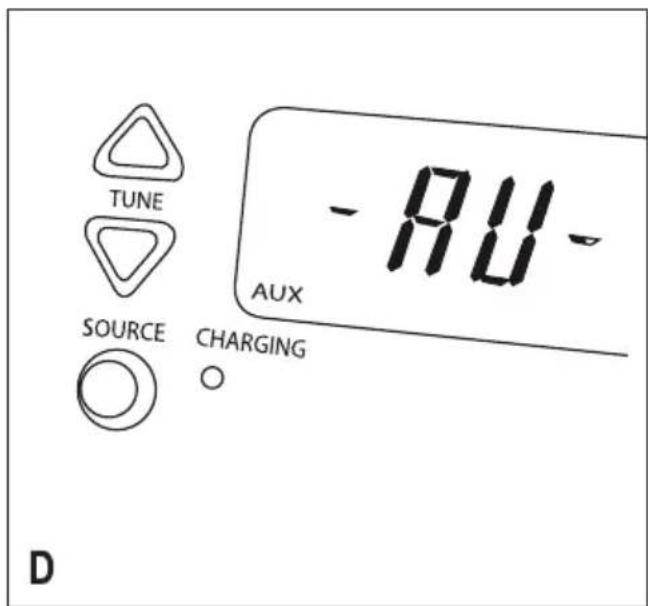
The amber charger light on the radio face (fig. D) will light indicating that the charging process has started.
Important charging notes
After normal usage, your power pack should be fully charged in 3 to 6 hours. If the pack is run-down completely, it may take up to 9 hours to become fully charged. Your power pack was sent from the factory in an uncharged condition. Before attempting to use it, you must charge for at least 9 hours.
DO NOT charge the power pack in an air temperature below 4^ or above 40^ . This is important and will prevent serious damage to the power pack. Longest life and best performance can be obtained if power packs are charged when air temperature is about 25^ .
While charging, the charger may hum and become warm to touch. This is a normal condition and does not indicate a problem.
If the power pack does not charge properly:
-
Check current at receptacle by plugging in a lamp or other appliance.
-
Check to see if receptacle is connected to a light switch which turns power off when you turn out the lights.
Move charger and battery pack to a surrounding air temperature of 4^ to 40^ . -
Check to see that the amber charging indicator light is lit on the face of the unit.
- If the receptacle, surrounding temperature and charging indicator light are OK, and you do not get proper charging, take or send the power pack and radio charger to your local Black & Decker Service Centre
The power pack should be recharged when it fails to produce sufficient power on jobs which were easily done previously. DO NOT CONTINUE using pack in a depleted condition.
The power pack will reach optimum performance after being cycled 5 times during normal usage. There is no need to run the pack down completely before recharging. Normal usage is the best method of discharging and recharging.
The exposed charging contacts of the radio charger can be accidentally shorted by foreign material. Foreign materials of a conductive nature such as, but not limited to, steel wool, aluminium foil, or any build up of metallic particles should be kept away from radio charger cavities. Unplug radio charger before attempting the clean it.
ENGLISH
Maintenance stage
The trickle charge feature of the radio charger allows the power pack to remain in the charger and ready for use. With the power adaptor connected to standard household current, the amber charging indicator light will glow constantly. The radio charger will keep the power pack fully charged. A power pack will slowly lose its charge when kept out of the charger.
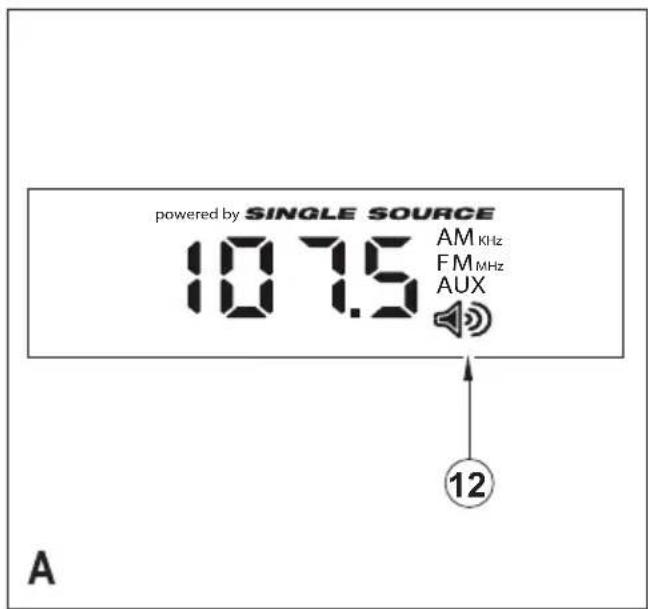
Using the radio (figs A & E)
The radio can be used with the power adaptor connected to standard household current or a fully charged power pack inserted into the charging port.
The radio charger should be used in a ventilated area only.
On/off/volume
Turn the On/Off/Volume Control knob (4) clockwise to turn the power on.
The LCD screen will illuminate. Adjust volume by turning knob to desired level.
The LCD screen will turn off after 10 seconds if no additional buttons are pressed.
Mode selection
Press the AM/FM/AUX selector button (8) to select an AM or FM station. Rotate the antenna upward if the radio is tuned to an FM station. If reception is poor, rotate antenna in all directions until reception improves. For AM stations try rotation the radio.
Radio tuning
Press the Station Selector buttons (9) up or down to change station frequency.
Press and hold the Station Selector buttons (9) up or down to scan frequencies. It will lock the channel automatically as the receiving signal becomes strong enough.
Bass boost
Press the BASS BOOST button (5) while the unit is on to activate the BASS function. Press again to cancel this function. When this function is activated, the Bass Boost icon (12) on the LCD screen will illuminate.
Low battery indicator
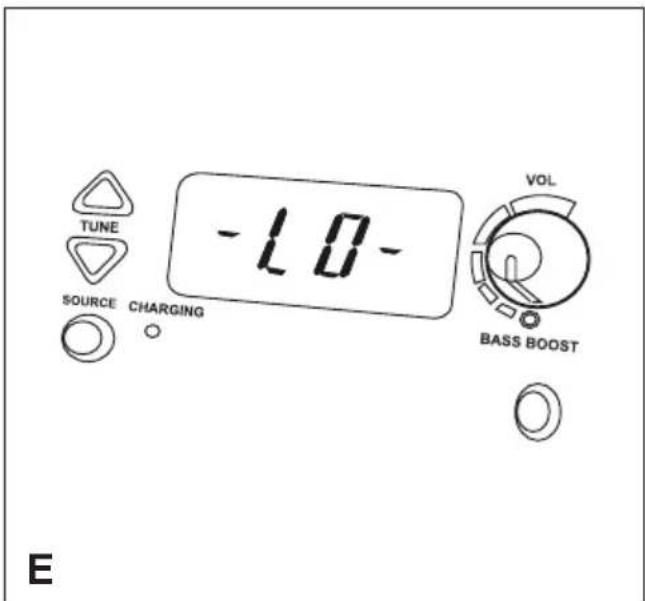
When battery power is fully discharged, radio will automatically turn off and 'LO' will appear on the screen as shown in Figure E. Either replace discharged battery with fully charged unit or plug radio into wall outlet.
Important radio notes
The BD18RC radio charger is an 18 Volt only product and will not accept power packs of different voltages.
Reception will vary depending on location and strength of radio signal.
AM reception may be clearer when powered by a battery.
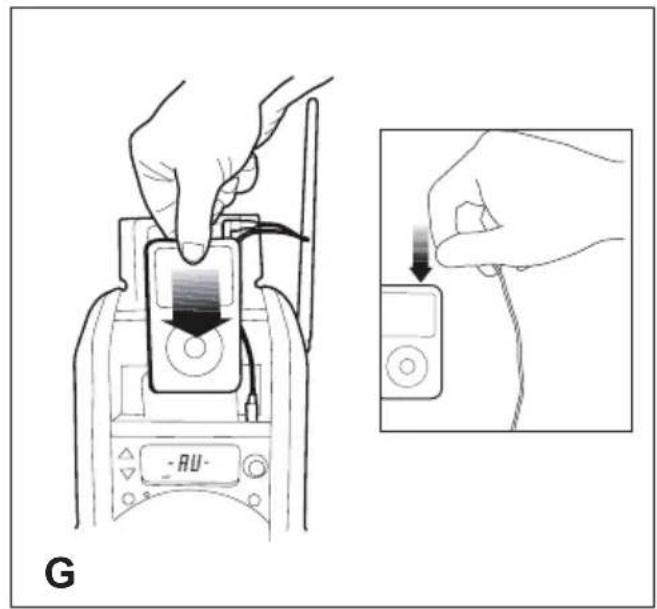
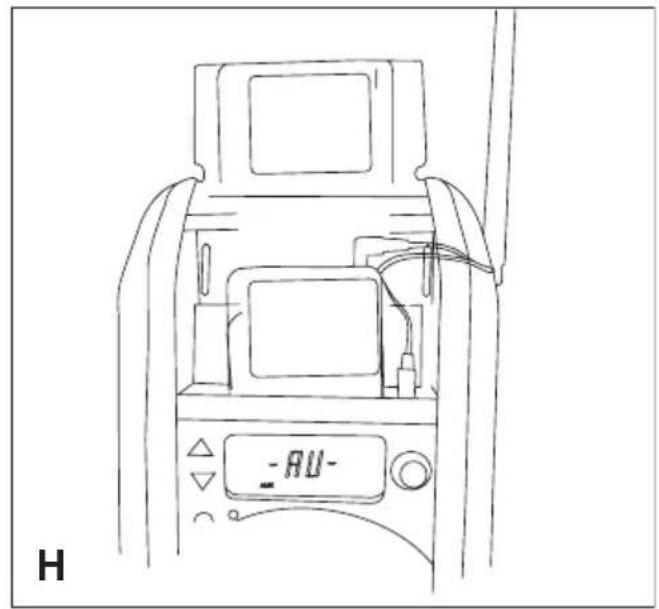
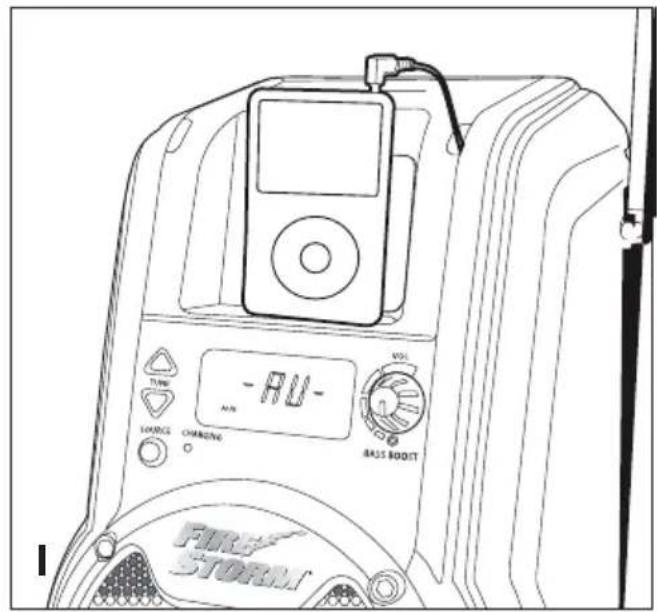
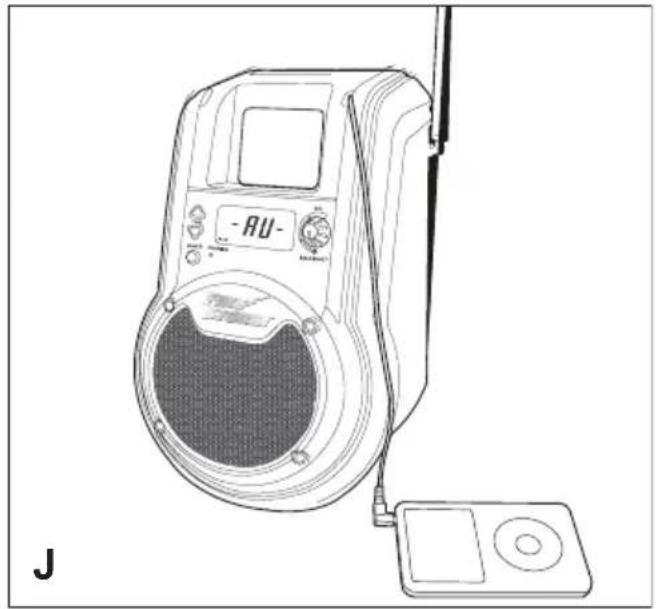
Using the AUX feature (figs F, G, H, I & J)
With the power adaptor connected to standard household current or a fully charged power inserted into the charging port of the radio charger:
Turn the ON/Off/Volume control knob (4) clockwise to turn the power on.
Press the AM/FM/AUX Selector button (8) until the 'AUX' icon appears on the display.
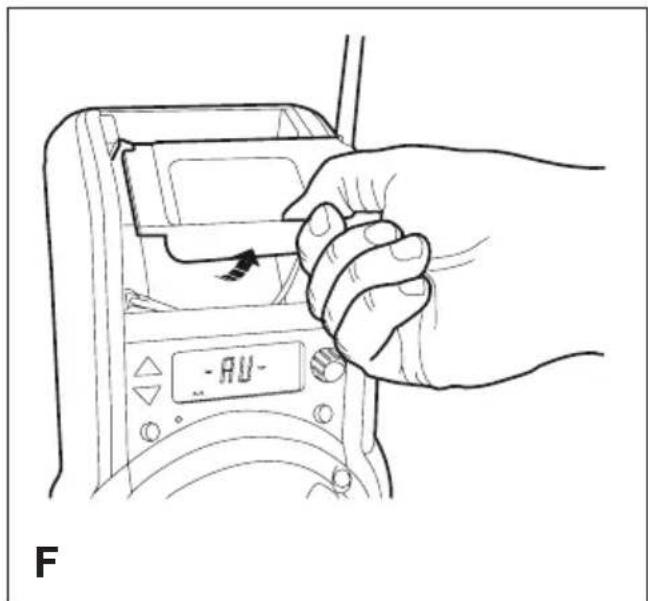
Open the MP3 play door (10) (see fig. F). CAUTION: Compartment not water tight.
Connect the jack plug located inside the door to the MP3 player as shown in fig. G. The device can be used in three different ways:
Stored inside the foam compartment with the door - open or closed (fig. H)
Seated on the ledge with the door closed (fig. 1) -
- Seated on a table or hard surface with the door closed (fig. J)
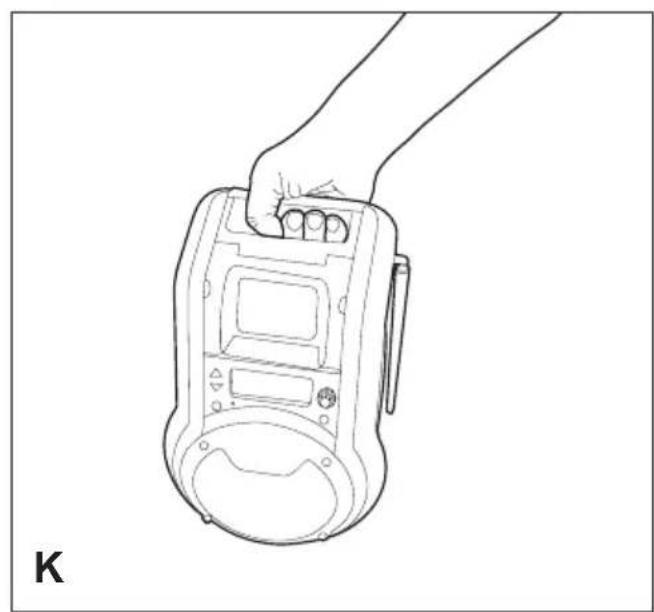
Carrying the radio charger
Figure K shows the recommended way to carry the radio charger.
Storing the power adaptor
The power adaptor can be stored in the cavity in the back of the unit and held in place by the attached bungee cord.
Maintenance
Your Black & Decker tool has been designed to operate over a long period of time with a minimum of maintenance.
Continuous satisfactory operation depends upon proper tool care and regular cleaning.
Warning! Before performing any maintenance or leaning of the tool, unplug the unit form the power supply.
From time to time wipe the tool with a damp cloth. Do not use any abrasive or solvent-based cleaner. Do not immerse the tool in water.
Protecting the environment

Separate collection. This product must not be disposed of with normal household waste.
Should you find one day that your Black & Decker product needs replacement, or if it is of no further use to you, do not dispose of it with household waste. Make this product available for separate collection.

Separate collection of used products and packaging allows materials to be recycled and used again. Re-use of recycled materials helps prevent environmental pollution and reduces the demand for raw materials.
Local regulations may provide for separate collection of electrical products from the household, at municipal waste sites or by the retailer when you purchase a new product.
Black & Decker provides a facility for the collection and recycling of Black & Decker products once they have reached the end of their working life. To take advantage of this service please return your product to any authorised repair agent who will collect them on our behalf.
You can check the location of your nearest authorised repair agent by contacting your local Black & Decker office at the address indicated in this manual. Alternatively, a list of authorised Black & Decker repair agents and full details of our after-sales service and contacts are available on the Internet at: www.2helpU.com
Batteries

Black & Decker batteries can be recharged many times. At the end of their useful life, discard batteries with due care for our environment.
Do not short-circuit the battery terminals.
Run the battery down completely, then remove it from the tool.
NiCd and NiMH and Lithium Ion, batteries are recyclable.
Place the battery in a suitable packaging to ensure that the terminals cannot be short-circuited. Take them to any authorised repair agent or a local recycling station.
Technical data
| BD18RC | ||
| Input voltage Vdc 18 | ||
| Output voltage Vac | 11.4 | |
| Weight | kg | 1.9 |
| Battery | NiCd | NiMH | |
| Voltage | Vdc | 18 | 18 |
| Capacity | Ah | 1.5/1.7 | 1.5 |
| Weight | kg | 0.8 | 0.8 |
| Charger | ||
| Voltage | Vac | 230 |
| Approx charging time | h | 6-9 |
| Weight | kg | 0.5 |
EC declaration of conformity
BD18RC
Black & Decker declares that these products conform to:
EN60065, 2006/95/EEC
The undersigned is responsible for compilation of the technical file and makes this declaration on behalf of Black & Decker.
Kevin Hewitt
Director of Consumer Engineering
Spennymoor, County Durham DL16 6JG
United Kingdom
01-06-2008
ENGLISH
Guarantee
Black & Decker is confident of the quality of its products and offers an outstanding guarantee. This guarantee statement is in addition to and in no way prejudices your statutory rights. The guarantee is valid within the territories of the Member States of the European Union and the European Free Trade Area.
If a Black & Decker product becomes defective due to faulty materials, workmanship or lack of conformity, within 24 months from the date of purchase, Black & Decker guarantees to replace defective parts, repair products subjected to fair wear and tear or replace such products to ensure minimum inconvenience to the customer unless:
The product has been used for trade, professional or hire purposes;
The product has been subjected to misuse or neglect;
The product has sustained damage through foreign objects, substances or accidents;
Repairs have been attempted by persons other than authorised repair agents or Black & Decker service staff.
To claim on the guarantee, you will need to submit proof of purchase to the seller or an authorised repair agent. You can check the location of your nearest authorised repair agent by contacting your local Black & Decker office at the address indicated in this manual. Alternatively, a list of authorised Black & Decker repair agents and full details of our after-sales service and contacts are available on the Internet at:
www.2helpU.com
Please visit our website www.blackanddecker.co.uk to register your new Black & Decker product and to be kept up to date on new products and special offers. Further information on the Black & Decker brand and our range of products is available at www.blackanddecker.co.uk
Director of Consumer Engineering
Spennymoor, County Durham DL16 6JG
Bouton On/Off/Volume
Spennymoor, County Durham DL16 6JG
Royaume-Uni
01-06-2008
Garantie
Spennymoor, County Durham DL16 6JG
Kevin Hewitt
Regno Unito
01-06-2008
Garanzia
Director of Consumer Engineering
Spennymoor, County Durham DL16 6JG
Verenigd Koninkrijk
01-06-2008
Garantie
Spennymoor, County Durham DL16 6JG
Reino Unido
01-06-2008
Garantia
Director of Consumer Engineering Spennymoor, County Durham DL16 6JG, Storbritannien 01-06-2008
Garanti
Vekselströmadapter (ikke vist)
Spennymoor, County Durham DL16 6JG
Storbritannia
1.6.2008
Garanti
Black & Decker er trygg pa kvaliteten til sineprodukter og tilbyr en enestaende garanti. Denne garantierkleringenkommen i tillegg til dine lovbestemte rettigheter, og er ikke i konflikt med disse. Garantien er gyldig i EU- og EFTA-medlemsstatene.
Indikator for lav batterispending
Director of Consumer Engineering Spennymoor, County Durham DL16 6JG, Storbritannien 01-06-2008
Garanti
Director of Consumer Engineering Spennymoor, County Durham DL16 6JG,
Spennymoor, County Durham DL16 6JG
Hvωενo Baσιλει
01-06-2008
Eyyunon
H Black & Decker eivai oiyoupn yia nvyoiotnta twv npoiovtwv tnc kai npexei onmuavtik nyuon. H napouoa ypaattyn eyyunon aotalei npo0eTo dikaiomega caq kai dev znuiwvei ta vouima dikaiwpatra oac. H eyuunon ioxuei evtos ncs etikpateiaac twv Kpatuw Meawv ts Eupwntaikns Evwong kai nC Eupwntaikns Zwng ELeuhepww Suvaalayw.
