EasyManual
RA1570SB - Receiver ROTEL - Free user manual and instructions
Find the device manual for free RA1570SB ROTEL in PDF.



User questions about RA1570SB ROTEL
0 question about this device. Answer the ones you know or ask your own.
Ask a new question about this device
Download the instructions for your Receiver in PDF format for free! Find your manual RA1570SB - ROTEL and take your electronic device back in hand. On this page are published all the documents necessary for the use of your device. RA1570SB by ROTEL.
USER MANUAL RA1570SB ROTEL
Important Safety Instructions
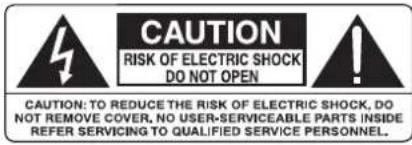
WARNING: There are no user serviceable parts inside. Refer all servicing to qualified service personnel.
WARNING: To reduce the risk of fire or electric shock, do not expose the unit to moisture or water. Do not expose the unit to dripping or splashing. Do not place objects filled with liquids, such as vases, on the unit. Do not allow foreign objects to get into the enclosure. If the unit is exposed to moisture, or a foreign object gets into the enclosure, immediately disconnect the power cord from the wall. Take the unit to a qualified service person for inspection and necessary repairs.
Read all the instructions before connecting or operating the component.
Keep this manual so you can refer to these safety instructions.
Heed all warnings and safety information in these instructions and on the product itself. Follow all operating instructions.
Clean the enclosure only with a dry cloth or a vacuum cleaner.
Do not use this unit near water.
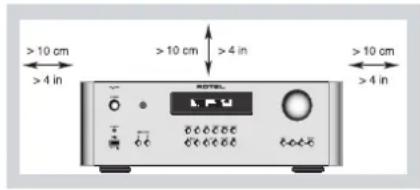
You must allow a minimum 10 cm or 4 inches of unobstructed clearance around the unit.
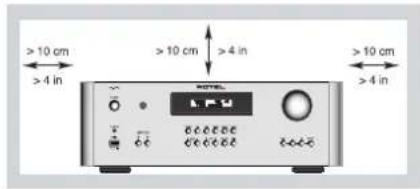
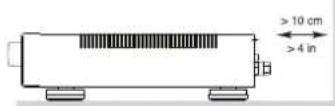
Do not place the unit on a bed, sofa, rug, or similar surface that could block the ventilation openings. If the unit is placed in a bookcase or cabinet, there must be ventilation of the cabinet to allow proper cooling.
Keep the component away from radiators, heat registers, stoves, or any other appliance that produces heat.
WARNING: The rear panel power cord connector is the mains power disconnect device. The apparatus must be located in an open area that allows access to the cord connector.
The unit must be connected to a power supply only of the type and voltage specified on the rear panel. (USA: 120 V/60Hz, EC: 230V/50Hz)
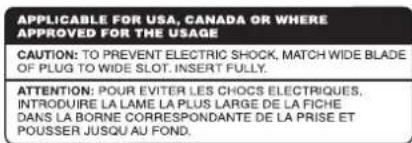
Connect the component to the power outlet only with the supplied power supply cable or an exact equivalent. Do not modify the supplied cable. A polarized plug has two blades, with one wider than the other. A grounding plug has two blades plus a third grounding prong. These are provided for your safety. Do not defeat grounding and/or polarization safety provisions. If the supplied plug does not fit your outlet, please consult an electrician for replacement of the obsolete outlet. Do not use extension cords.
The main plug of the power cordset is a disconnect device of the apparatus. In order to completely disconnect the apparatus from the supply mains, the main plug of the power cordset should be unplugged from the mains (AC) outlet. The standby LED indicator will not be lit up to show the power cord is unplugged. The disconnect device shall remain readily operable.
Do not route the power cord where it will be crushed, pinched, bent, exposed to heat, or damaged in any way. Pay particular attention to the power cord at the plug and where the cord exits the back of the unit.
The power cord should be unplugged from the wall outlet during a lightning storm or if the unit is to be left unused for a long period of time.
Use only accessories specified by the manufacturer.
Use only with a cart, stand, rack, bracket or shelf system recommended by Rotel. Use caution when moving the unit in a stand or rack to avoid injury from a tip-over.
Use Class 2 wiring for speaker connections to ensure proper installation and minimize the risk of electrical shock.
Immediately stop using the component and have it inspected and/or serviced by a qualified service agency if:
The power supply cord or plug has been damaged
- Objects have fallen or liquid has been spilled into the unit
The unit has been exposed to rain
The unit shows signs of improper operation
- The unit has been dropped or damaged in any way
The batteries in the remote control should not be exposed to excessive temperature such as sunshine, fire or other heat sources.
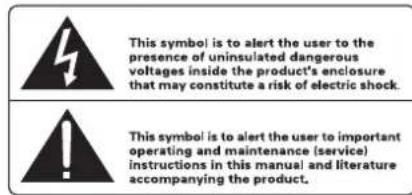
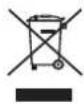
Rotel products are designed to comply with international directives on the Restriction of Hazardous Substances (RoHS) in electrical and electronic equipment and the disposal of Waste Electrical and Electronic Equipment (WEEE). The crossed wheelie bin symbol indicates compliance and that the products must be appropriately recycled or processed in accordance with these directives.
This symbol means that this unit is double insulated. An earth connection is not required.

Place the unit on a on a fixed, level surface strong enough to support its weight. Do not place it on a moveable cart that could tip over.

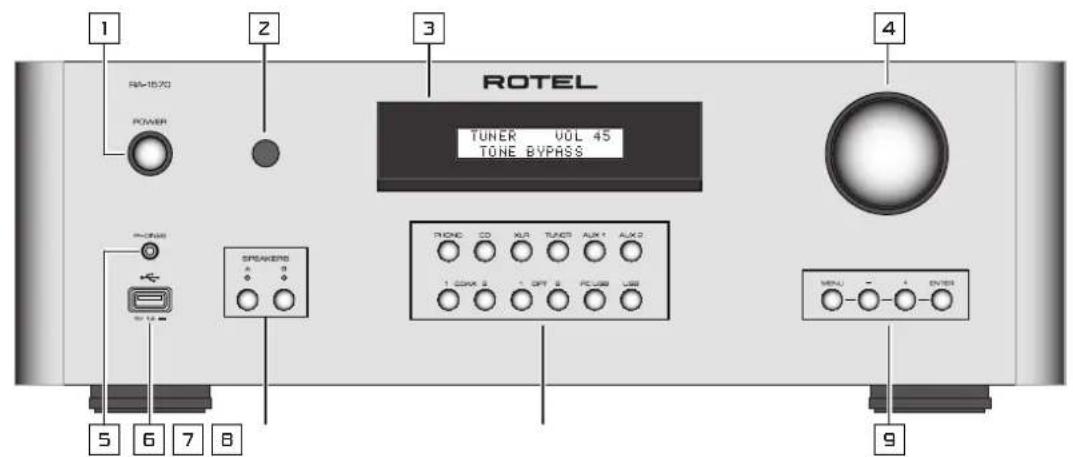
Figure 1: Controls and Connections Commandes et Branchements Bedienelemente und Anschlisse Controles y Conexiones
Bedieningselementen en aansluitingen
Controllie connessioni
Kontroller och ansluitninger
Oprahby npablenya pa3bembl
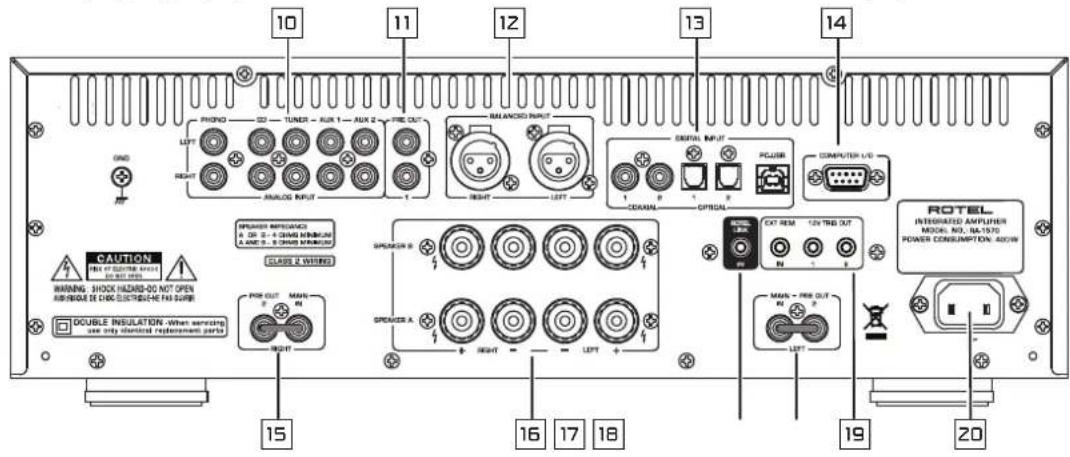
Figure 2: RR-AX92 Remote Control
Telecommande infrarouge RR-AX92
Fernbedienung RR-AX92
Mando a Distancia RR-AX92
Afstandsbediening RR-AX92
Telecomando RR-AX92
RR-AX94 fjarrkontroll
Пульт Ду RR-AX92
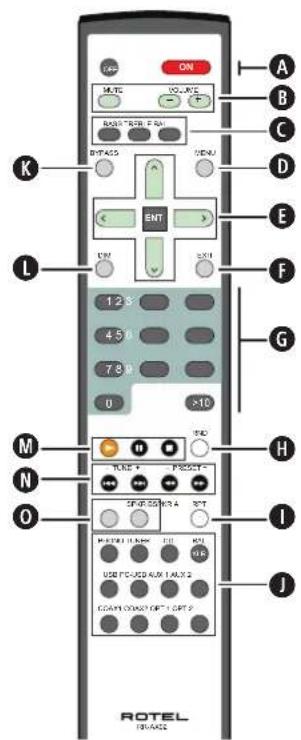
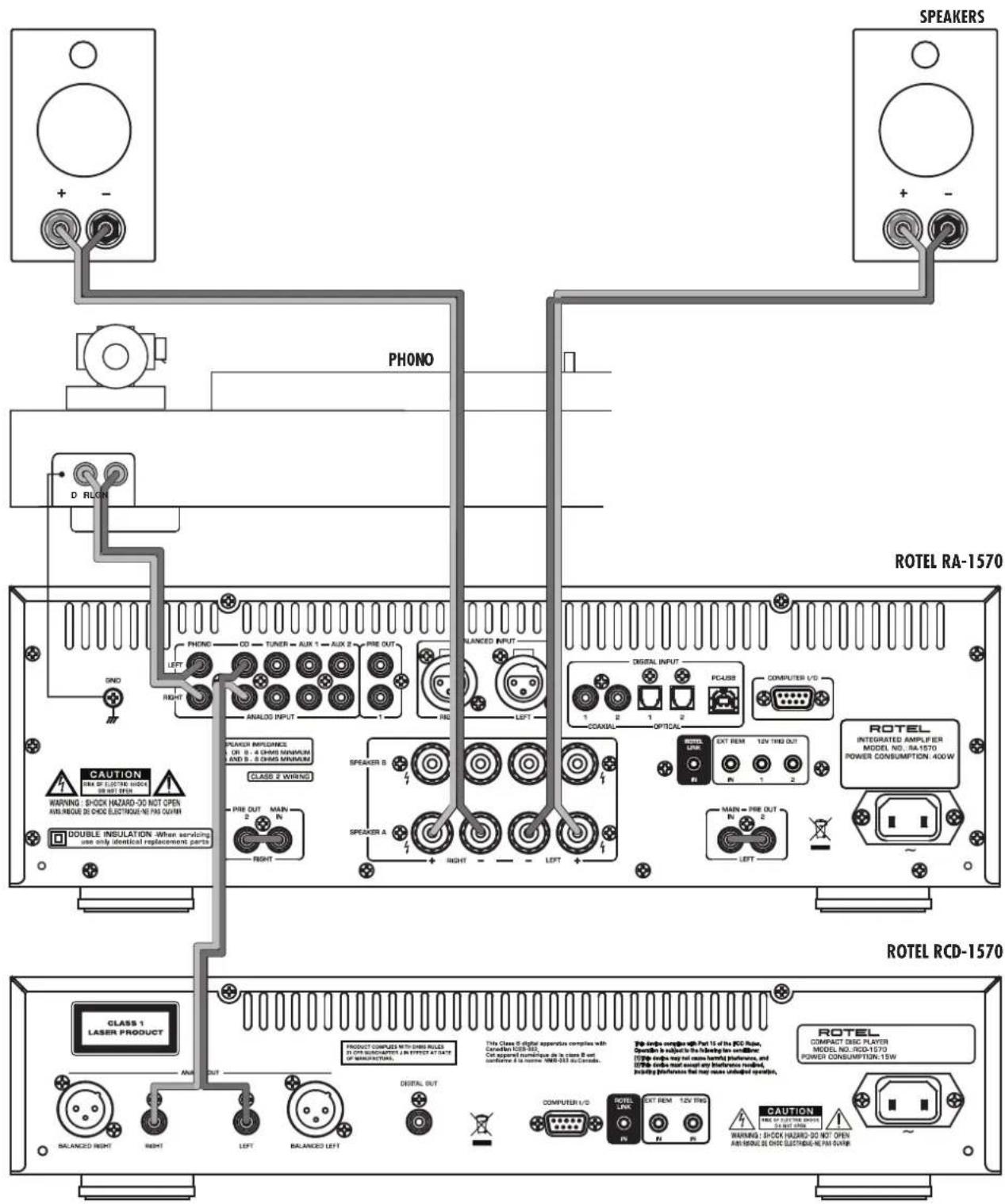
Figure 3: Analog Input and Speaker Output Connections Branchements des entrées analogiques et sorties enceintes acoustiques Analoger Eingang und Anschluss eines Lautsprecherpaares Conexiones de Entrada Analógicas y de Salida a las Cajas Acústicas
Analoge ingangen leuidsprekeruitgangen
Collegamenti ingressi analogici ed uscite diffusori
Ansluttingar for hoge tare och analoga ingangar
IopcoeHHeHne NCTOuHKnOB CnHana Ha
aHaJorOBbIe BXoDbI n AkyctNuecknx CnCTEM
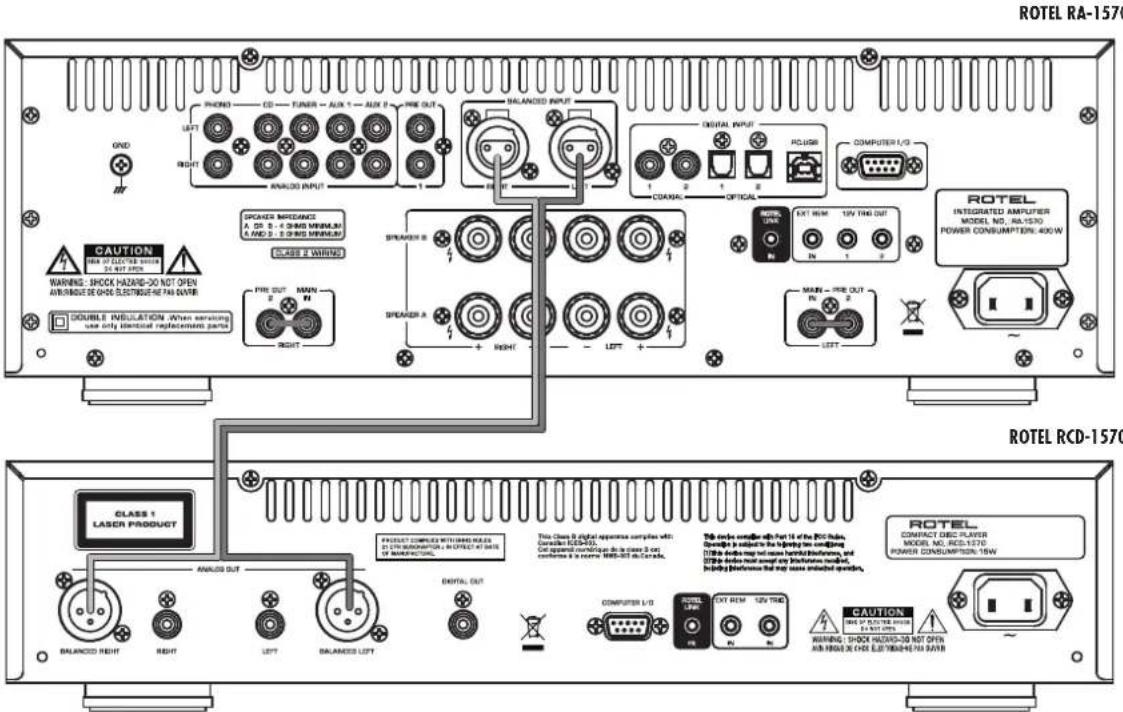
Figure 4: Balanced (XLR) Inputs Branchements des entreses symétriques (XLR) Symmetrische Eingänge (XLR) Entradas Balanceadas (XLR)
Gebalanceerde ingangen (XLR)
Ingressi analogici bilanciati (XLR)
Bilanserade ansluttingar (XLR)
Baanchbte (XLR) BXOdbI
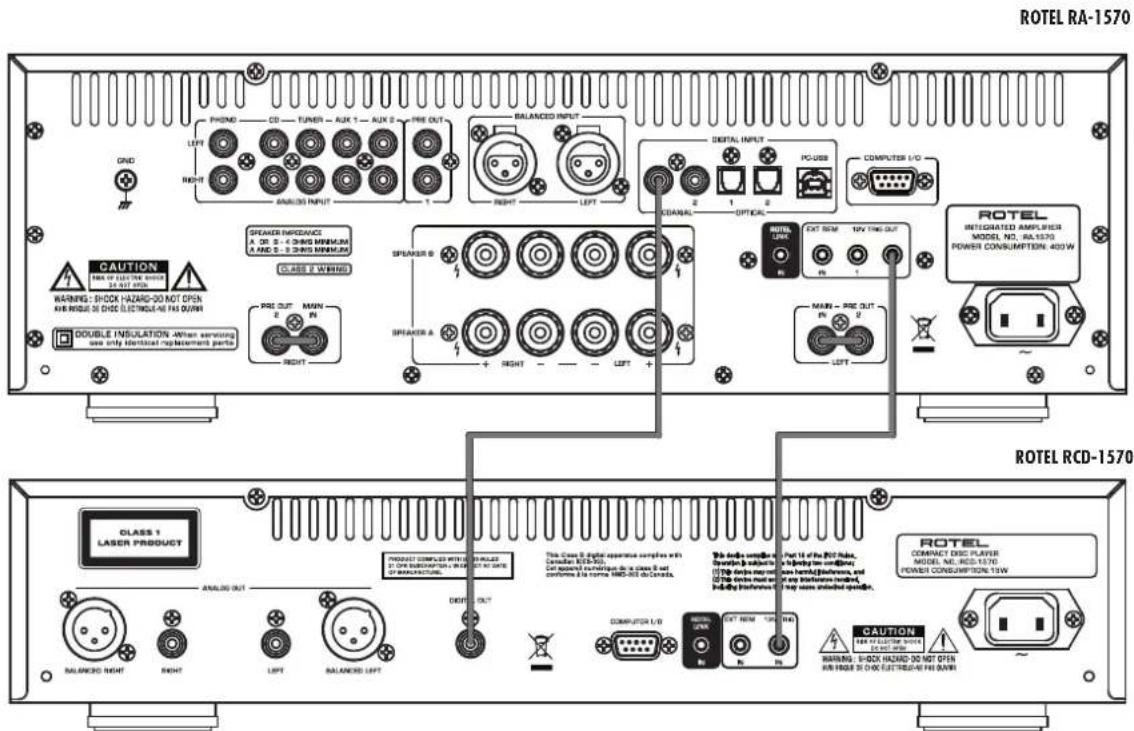
Figure 5: Digital Input and 12 Volt Trigger Out Connections Enfrees numériques et Branchements des sorties trigger 12 V Digitaleingang und 12V TRIG OUT-Anschlisse Entrada Digital y Conexiones de Salida para Serial de Disparo de 12 Voltios
Digitale ingangen en 12V-triggeruitgangen
Collegamenti ingressi digitali e segnali Trigger 12 V
Ansluiningar for digitala ingangar och 12-volts styrsignaler
UΦροBoB BxOД N BbIXoD 12-B TpRrRepHOro CmHana
Important Notes
When making connections be sure to:
Turn off all the components in the system before hooking up any components, including loudspeakers.
Turn off all components in the system before changing any of the connections to the system.
It is also recommended that you:
Turn the volume control of the amplifier all the way down before the amplifier is turned on or off.
Remarques importantes
Important Safety Instructions 2
Figure 1: Controls and Connections 3
Figure 2: RR-AX92 Remote Control 3
Figure 3: Analog Inputs and Speaker Output Connections 4
Figure 4: Balanced (XLR) Inputs 5
Figure 5: Digital Input and 12 Volt Trigger out Connections 5
Important notes 6
About Rotel. 7
A Word About Watts 7
Getting Started 8
A Few Precautions 8
Placement 8
Cables 8
The RR-AX92 Remote Control 8
Remote Control Batteries 8
AC Power and Control 8
AC Power Input 8
Power Switch and Power Indicator 1 9
12V Trigger Connection 9
Input Signal Connections 9
Phono Input and Ground Connection
Line Level Inputs 9
Balanced (XLR) Inputs 12
Digital Signal Inputs 9
Preamp Outputs 11 9
Preamp / Power Amp Jumpers 15 18 9
Speaker Outputs 15 10
Speaker Selection 10
Speaker Wire Selection 10
Polarity and Phasing 10
Speaker Connection 16 10
Phone Output 10
Remote Sensor 2 10
Display 3 10
Front USB Input 10
Bluetooth Connection 10
Audio Controls 10
VOLUME Control 10
Balance Control 10
Tone Control Bypass 11
BASS and TREBLE Tone Controls 11
Function Control 11
PC-USB Input 11
Computer I/O Connector 14 11
Rotel Link 11
EXT REM IN Jack 11
Protection Circuit 11
Settings Menu 11
Troubleshooting 12
Power Indicator Is Not Illuminated 12
Fuse replacement 12
NoSound 12
Specifications. 13
About Rotel
Our story began over 50 years ago. Over the decades, we have received hundreds of awards for our products and satisfied hundreds of thousands of people who take their entertainment seriously - like you!
Rotel was founded by a family whose passionate interest in music led them to manufacture high-fidelity components of uncompromising quality. Through the years, that passion has remained undiminished and the family goal of providing exceptional value for audiophiles and music lovers, regardless of their budget, is shared by all Rotel employees.
Rotel's engineers work as a close team, listening to, and fine tuning, each new product until it reaches their exacting musical standards. They are free to choose components from around the world in order to make that product the best they can. You are likely to find capacitors from the United Kingdom and Germany, semiconductors from Japan or the United States, while toroidal power transformers are manufactured in Rotel's own factory.
We all have concerns about our environment. And, as more and more electronics are produced and later discarded, it is especially important for a manufacturer to do all it can to engineer products that have a minimum negative impact on landfill sites and water tables.
At Rotel, we are proud to do our part. We have reduced the lead content in our electronics by using special ROHS solder, while our new Class D (not digital) amplifiers are up to five times more efficient than our legacy designs and still deliver power and performance. These products run cool, give minimum wasted energy, are good for the environment and give better sound too.
Finally, we have printed this manual on recycled paper stock.
While we understand that these are small first steps, they are still important ones. And we continue to pursue new methods and materials for a cleaner and greener manufacturing process. All of us at Rotel thank you for buying this product. We are sure it will bring you many years of enjoyment.
A Word About Watts
This amplifier's power output is quoted as 120 watts for each channel, when both channels are operating together at full power. Rotel has chosen to specify the power output in this way because, in Rotel's experience, it gives the truest value of the receiver or amplifier's power capability.
When comparing specifications for different products, you should be aware that power output is often specified in other ways, so you may not be comparing like with like. For example, the power output may be quoted with only one channel operating, giving a higher maximum figure.
A loudspeaker's impedance rating indicates the electrical resistance or load it offers when connected to the amplifier, usually 8 ohms or 4 ohms. The lower the impedance, the more power the speaker will need. In effect, a 4 ohm speaker will require twice as much power as an 8 ohm speaker.
However, Rotel amplifiers are designed to work into any speaker impedance between 8 and 4 ohms, and with all the channels working up to their full power. Because Rotel designs are optimized for use with all channels operating together, Rotel is able to specify the true power output for both channels.
Getting Started
Thank you for purchasing the Rotel RA-1570 Stereo Integrated Amplifier. When used in a high-quality music audio system, it will provide years of musical enjoyment.
The RA-1570 is a full featured, high performance component. All aspects of the design have been optimized to retain the full dynamic range and subtle nuances of your music. The RA-1570 has a highly regulated power supply incorporating a Rotel custom-designed toroidal power transformer and custom-made slit foil capacitors. This low impedance power supply has ample power reserves, which enables the RA-1570 to easily reproduce the most demanding audio signals. This type of design is more expensive to manufacture, but it is better for the music.
The printed circuit boards (PCB) are designed with Symmetrical Circuit Traces. This insures that the precise timing of the music is maintained and faithfully recreated. The RA-1570 circuitry uses metal film resistors and polystyrene or polypropylene capacitors in important signal paths. All aspects of this design have been examined to ensure the most faithful music reproduction.
The main functions of the RA-1570 are easy to install and use. If you have experience with other stereo systems, you shouldn't find anything perplexing. Simply plug in the associated components and enjoy.
A Few Precautions
WARNING: To avoid potential damage to your system, turn off ALL the components in the system when connecting or disconnecting the loudspeakers or any associated components. Do not turn the system components back on until you are sure all the connections are correct and secure. Pay particular attention to the speaker wires. There must be no loose strands that could contact the other speaker wires, or the chassis of the amplifier.
Please read this manual carefully. In addition to basic installation and operating instructions, it provides valuable information on various RA-1570 system configurations as well as general information that will help you get optimum performance from your system. Please contact your authorized Rotel dealer for answers to any questions you might have. In addition, all of us at Rotel welcome your questions and comments.
Save the RA-1570 shipping carton and all enclosed packing material for future use. Shipping or moving the RA-1570 in anything other than the original packing material may result in severe damage to your amplifier.
Fill out and send in the owner's registration card packed with the RA-1570. Also be sure to keep the original sales receipt. It is your best record of the date of purchase, which you will need in the event warranty service is ever required.
Placement
Like all audio components that handle low-level signals, the RA-1570 can be affected by its environment. Avoid placing the RA-1570 on top of other components. Also avoid routing audio signal cables near power cords. This will minimize the chance it will pick up hum or interference.
The RA-1570 generates heat as part of its normal operation. The heat sinks and ventilation openings in the amplifier are designed to dissipate this heat. The ventilation slots in the top cover must be open. There should
be 10cm (4 inches) of clearance around the chassis, and reasonable airflow through the installation location, to prevent the amplifier from overheating.
Remember the weight of the amplifier when you select an installation location. Make sure that the shelf or cabinet can support it. We recommend installing the RA-1570 in furniture designed to house audio components. Such furniture is designed to reduce or suppress vibration which can adversely affect sound quality. Ask your authorized Rotel dealer for advice about component furniture and proper installation of audio components.
The RA-1570 is supplied with an RR-AX92 remote control and must be placed where the infrared signal from the remote can reach the front panel Remote Sensor.
Cables
Be sure to keep the power cords, digital signal cables and regular audio signal cables in your installation away from each other. This will minimize the chance of the regular audio signal cables picking up noise or interference from the power cords or digital cables. Using only high quality, shielded cables will also help to prevent noise or interference from degrading the sound quality of your system. If you have any questions see your authorized Rotel dealer for advice about the best cable to use with your system.
The RR-AX92 Remote Control
Some functions can be done with either the front panel controls, or the supplied RR-AX92 remote control. When these operations are described, the square call out numbers refer to the main unit, while the encircled letters refer to the remote control.
NOTE: The remote control can be used to operate the basic functions of Rotel tuners and CD players. Remote control keys labeled GMM can be used to operate CD or Tuner functions in your system. For the remote to operate properly, make sure both the remote and the CD or Tuner are both in same remote code.
Remote Control Batteries
Two UM-4/AAA size batteries (supplied) must be installed before the remote control can be used. To install the batteries, remove the cover on the back of the RR-AX92. Install the batteries as shown in the illustration in the battery well. Test the control for proper operation, then replace the cover. When the batteries become weak the remote control won't operate the RA-1570 consistently. Installing fresh batteries should eliminate the problem.
AC Power and Control
AC Power Input
Because of its relatively high power rating, the RA-1570 can draw considerable current. Therefore, it should be plugged directly into a 2-pin polarized wall outlet. Do not use an extension cord. A heavy duty multi-tap power outlet strip may be used if it (and the wall outlet) is rated to handle the current demanded by the RA-1570 and all the other components connected to it.
Your RA-1570 is configured at the factory for the proper AC line voltage in the country where you purchased it (either 120 volts AC or 230
volts AC with a line frequency of either 50Hz or 60Hz . The AC line configuration is noted on a decal on the back panel.
NOTE: Should you move your RA-1570 to another country, it is possible to reconfigure your amplifier for use on a different line voltage. Do not attempt to perform this conversion yourself. Opening the enclosure of the RA-1570 exposes you to dangerous voltages. Consult a qualified service person or the Rotel factory service department for information.
NOTE: Some products are intended for sale in more than one country and as such are supplied with more than one AC cord. Please only use the one appropriate for your country/region.
If you are going to be away from home for an extended period of time such as a month long vacation, it is a sensible precaution to unplug your amplifier (as well as other audio and video components) while you are away.
POWER Switch and Power Indicator
Press the front panel Power Switch button, to turn the unit on. The Power Indicator light is illuminated when the unit is on. Press Power Switch button again to turn the unit off.
When the power switch is in the ON position, the remote control ON and OFF buttons may be used to activate the RA-1570. In Standby mode the power LED remains lit, but the display is turned OFF.
12V TRIGGER Connection
Some audio components can be turned on automatically when they receive a 12V turn on "signal". The two 12V Trigger Outputs of the RA-1570 provide the required signal. Connect compatible components to the RA-1570 with a conventional 3.5mm mini plug cable. When the RA-1570 is in turn off mode, the trigger signal is interrupted, so the components controlled by it are turned off.
NOTE: If you are using other units in the series with Rotel link, please use the Rotel Link connection to turn the units on or off. Do not connect both the Rotel Link and 12V trigger cables. The 12V trigger's power on or off features will override the Rotel Link features.
Input Signal Connections
See Figure 3,4,5
NOTE: To prevent loud noises that neither you nor your speakers will appreciate, make sure the system is turned off when you make any signal connections.
Phono Input and Ground Connection (GND)
See Figure 3
Plug the cable from the turntable into the appropriate left and right phono inputs. If the turntable has a "ground" wire, connect it to the screw terminal to the left of the Phono inputs. It will help prevent hum and noise.
Line Level Inputs
See Figure 3
The CD, Tuner, and Aux inputs of the amplifier are analog "line level" inputs. These inputs are for connecting components such as CD players or other audio playback devices with an analog audio output.
The left and right channels are clearly labeled and should be connected to the corresponding channels of the source component. The Left connectors are white, the Right connectors are red. Use high quality RCA cables for connecting input source components to the RA-1570. Ask your authorized Rotel dealer for advice about cables.
Balanced (XLR) Inputs [2]
See Figure 4
A pair of balanced XLR inputs accept audio signals from CD player, Blu-ray player or other source components with XLR outputs.
NOTE: You should choose only one method of ananlog connection from a source component to RA-1570. Do not connect both the RCA and XLR outputs of a source component to the RA-1570 at the same time.
Digital Signal Inputs 13
See Figure 5.
There are two sets of digital inputs labeled COAX 1 and 2, OPT 1 and 2. Connect the COAXIAL or OPTICAL PCM outputs of your source component into these sockets. The digital signals will be decoded and played by the amplifier. The unit is capable of decoding PCM signals up to 24 bit, 192kHz .
Preamp Outputs
The amplifier has a set of preamp outputs labeled PREOUT 1. The signal from the source selected with the Function Selector is always available from these outputs. Typically the PREOUT 1 output is used to provide a signal to another integrated amplifier or power amplifier, which is used to drive remote speakers.
NOTE: Changes to the settings of the Volume, Balance or Tone controls affect the signal from the Preamp Outputs.
Preamp / Power Amp Jumpers 15 18
These connectors, labeled "Pre Out 2" and "Main In", are normally connected by a set of solid metal jumper connectors. They provide a convenient insertion point for virtually any type of signal processor. To use these connectors, pull out the jumper connectors. Using high quality cables, connect the "Pre Out 2" connectors to the inputs of the signal processor. Connect the outputs of the signal processor to the "Main In" connectors.
Speaker Outputs 16
See Figure 3
The RA-1570 has two sets of speaker outputs, labeled SPEAKER A and SPEAKER B. The speaker outputs are controlled by the switch on the front panel and the buttons on the remote control.
Speaker Selection
If only one set of speakers will be used at any given time, the speakers may have an impedance as low as 4 ohms. If there are times when both the A and B speakers will be used, all the speakers should have an impedance of 8 ohms or more. Speaker impedance ratings are less than precise. In practice, very few loudspeakers will present any problems for the RA-1570. See your authorized Rotel dealer if you have any questions.
Speaker Wire Selection
Use insulated two-conductor stranded wire to connect the RA-1570 to the speakers. The size and quality of the wire can have an audible effect on the performance of the system. Standard speaker wire will work, but can result in lower output or diminished bass response, particularly over longer distances. In general, heavier wire will improve the sound. For best performance, you may want to consider special high-quality speaker cables. Your authorized Rotel dealer can help in the selection of cables for your system.
Polarity and Phasing
The polarity – the positive/negative orientation of the connections – for every speaker and amplifier connection must be consistent so all the speakers will be in phase. If the polarity of one connection is reversed, bass output will be very weak and stereo imaging degraded. All wire is marked so you can identify the two conductors. There may be ribs or a stripe on the insulation of one conductor. The wire may have clear insulation with different color conductors (copper and silver). There may be polarity indications printed on the insulation. Identify the positive and negative conductors and be consistent with every speaker and amplifier connection.
Speaker Connections 16
Turn off all the components in the system before connecting the speakers. The RA-1570 has color-coded binding post type speaker connectors on the back panel. These connectors accept bare wire, connector lugs, or dual banana type connectors. (except in European Community countries where their use is not permitted)
Route the wire from the RA-1570 to the speakers. Give yourself enough slack so you can move the components to allow access to the speaker connectors.
If you are using dual banana plugs, connect them to the wires and then plug into the backs of the binding posts. The thumbscrews of the binding posts should be screwed in all the way (clockwise).
If you are using terminal lugs, connect them to the wires. If you are attaching bare wires directly to the binding posts, separate the wire conductors and strip the insulation from the end of each conductor. Be careful not to cut into the wire strands. Unscrew (turn counterclockwise) the binding post. Place the connector lug or wire around the binding post shaft. Turn the binding post clockwise to clamp the connector lug or wire firmly in place.
NOTE: Be sure there are no loose wire strands that could touch adjacent wires or connectors.
PHONES Output 5
The Phones output allows you to connect headphones for private listening. This output accommodates standard stereo phone (1/8") plugs. Plugging in a set of headphones does not cut off the signal to the speakers. Use the Speaker Selector to turn off the speakers. The settings of the Function Selector determines which source is heard.
NOTE: Because the sensitivity of speakers and headphones can vary widely, always reduce the volume level before connecting or disconnecting headphones.
Remote Sensor 2
This remote sensor window receives IR commands from the remote control. Please do not block this sensor.
Display 3
The front panel display shows the source selected, volume level and tone settings.
Front USB Input
The front USB input can be connected to a iPod, iPhone, MP3 players or a Bluetooth dongle (supplied) for wireless streaming. With iPod or iPhones, simply plug the device into the front USB and select USB function from the source selector. The iPod, iPhone remains active. Search and play tracks as usual and the music will be played through the Rotel system.
Bluetooth Connection
Insert the supplied Bluetooth Dongle into the front USB for wireless streaming via Bluetooth, from your device (i.e. mobile phones) to the amplifier. From your mobile device, look for "Rotel Bluetooth" and connect to it. Connection is normally automatic, but if prompted for a password, please press "0000" then press ENT (if necessary) on the remote and your device.
Audio Controls
VOLUME Control
Turn the controls clockwise to increase the volume, or counter clockwise to decrease the volume. From the remote control press the volume + or - key to turn the volume up or down. Press the MUTE key to completely mute the volume.
BALANCE Control
The Balance Control adjusts the left-to-right balance of the sound output. The factory default is the center position or "0". To change the balance from the front panel, press the MENU key to toggle the front display to BALANCE SETTING mode. Then press the -or + keys on the front panel to change the value to LEFT or RIGHT. The value can change from L15
to R15. From the remote, press the BAL key to access the BALANCE SETTING menu, then press the LEFT or RIGHT key to adjust. When finished, press the EXIT key to exit the menu.
Tone Control Bypass 1
Bass and Treble Control (Tone Control) circuits are bypassed at factory default to ensure the purest possible sound. The front display will show TONE BYPASS. To turn on the tone control, press the BYPASS key on the remote control. From the front panel press the MENU key to toggle to the Bypass control then press the + or - keys to turn bypass on or off.
Bass and Treble Controls
Set the Bass or Treble controls from the front panel by pressing the MENU key to toggle to either the Bass or Treble Setting menu. Then press the - or + key to adjust the value. The Bass and Treble values range from -10 to +10. From the remote control, press the Bass or Treble key, then press the LEFT or RIGHT keys on the remote to adjust the value.
A properly setup high-performance audio system produces the most natural sound with little or no adjustment of the tone controls. Use these controls sparingly. Be particularly careful when turning the controls up as this increases the power output in the bass or treble range, increasing the load on the amplifier and speakers.
NOTE: Setting the Bass and Treble controls do not automatically turn on the tone control. To turn on tone control, refer to previous section Tone Control Bypass.
NOTE: Tone Bypass, Bass, Treble and Balance settings are temporary and not saved after power off. To make permeant changes please see Settings Menu.
Function Control
The Function control selects the input signal source. From the front panel or remote press the corresponding input key to select the source to listen to.
PC-USB Input 13
Connect this input using the supplied USB cable to the USB socket of your computer.
NOTE: You will need to install the USB driver located on the CD supplied with the RA-1570 onto your computer to allow it to send audio to the RA-1570 via USB.
NOTE: Upon successful installation of the driver, you may need to select the ROTEL audio driver from the audio/speaker setup of your computer.
Computer I/O Connector 14
The RA-1570 can be controlled via RS232 for integration with automation systems. The COMPUTER I/O input accepts a standard straight DB-9 Male-to-Female cable.
For additional information on the connections, software, and operating codes for computer control of the RA-1570, contact your authorized Rotel dealer.
ROTEL LINK
This 3.5 mm stereo mini-jack (labeled ROTEL LINK IN) can optionally attach to Rotel network enabled products with ROTEL LINK OUT connections. This allows the attached Rotel products to communicate with each other and be controlled via the Rotel Remote App (available for download on the iTunes® store).
EXT REM IN Jack 19
This 3.5mm mini-jack receives command codes from industry-standard infrared receivers via hard-wired connections. This feature could prove useful when the unit is installed in a cabinet and the front-panel sensor is blocked. Consult your authorized Rotel dealer for information on these external repeaters and the proper wiring of a jack to fit the mini-jack receptacle.
Protection Circuit
The amplifier has both thermal and over-current protection circuitry that protects the amplifier against damage in the event of extreme or faulty operating conditions. The protection circuits are independent of the audio signal and have no impact on sonic performance. Instead, the protection circuits monitor the temperature of the output devices and shut down the amplifier if temperatures exceed safe limits.
Most likely, you will never see this protection circuitry in action. However, should a faulty condition arise, the amplifier will stop playing and will display "AMP PROTECTION" on the front panel
If this happens, turn the amplifier off. Let it cool down for several minutes, and attempt to identify and correct the problem that caused the protection circuitry to engage. When you turn the amplifier back on, the protection circuit will automatically reset.
In most cases, the protection circuitry activates because of a fault condition such as shorted speaker wires, or inadequate ventilation leading to an overheating condition. In very rare cases, highly reactive or extremely low impedance speaker loads could cause the protection circuit to engage.
If the protection circuitry triggers repeatedly and you are unable to isolate and correct the faulty condition, contact your authorized Rotel dealer for assistance in troubleshooting.
Settings Menu
You can access the settings menu from the front panel by pressing the MENU button or the MENU button on the remote. You can change the value of the selected option by pressing the +/- key on the front panel or LEFT/RIGHT key on the remote. Step through the sub-menus by pressing the MENU key on the front panel or MENU button on the remote.
- Tone Control: TONE BYPASS ON/OFF, BASS level and TREBLE levels can be changed to desired settings. Press the ENTER key on the front panel or ENT on the remote to toggle between the tone setup options.
(For more information on Tone Control refer to the Tone Control Bypass, Bass and Treble control sections)
NOTE: These settings are stored permanently even after the RA-1570 is powered off.
BALANCE: Change left/right balance (For more information on Balance sections)
NOTE: These settings are stored permanently even after the RA-1570 is powered off.
- DIMMER: Dims the display in 7 steps. This can also be temporary changed using the DIM button on the remote control.
NOTE: These settings are stored permanently even after the RA-1570 is powered off.
- ROTEL LINK RCD, selects how the CD player is connected to the amplifier, either CD (analog), COAX1 or COAX2. CD is the factory default.
- POWER ON MAX VOLUME: This sets the maximum volume level when the unit is turned ON. "45" is the factory default.
- Fixed Gain: Configures a Fixed Volume level for a specified input. To enable this feature press the +/- keys to select the desired fixed volume level for Aux 1, Coax 1, Optical 1, PC-USB or USB. When enabled and the input with a Fixed Volume is selected, the Volume level will immediately be set to the specified level.
Valid settings include: VARIABLE, FIXED 1-95, FIXED MAX.
NOTE: The Volume knob on the front panel and Volume +/- keys on the IR remote are disabled when the volume is Fixed. To disable this feature set the Fixed Volume level to "Variable".
- AUX1 VOL: VARIABLE (disabled) is factory default.
- COAX1 VOL: VARIABLE (disabled) is factory default.
- OPT1 VOL: VARIABLE (disabled) is factory default.
- PC-USB VOL: VARIABLE (disabled) is factory default.
- USB VOL: VARIABLE (disabled) is factory default.
- PC-USB AUDIO CLASS: Change supported PC-USB Audio Class of the attached device.
NOTE: Some computers attached to the PC-USB do not support USB Audio Class 2.0 and do not support 24/192 audio playback. If needed the PC-USB can be configured for USB Audio Class 1.0. Please consult your computer operating system for details.
- Software Version : This shows the current software version loaded into the amplifier.
- FACTORY DEFAULT: This sets the unit back to the original state as when it left the factory. Press the + key on the front panel or Right key on the remote control to select
then press the "ENTER" key on the front panel or "ENT" on the remote control.
Troubleshooting
Most difficulties in audio systems are the result of incorrect connections, or improper control settings. If you encounter problems, isolate the area of the difficulty, check the control settings, determine the cause of the fault and make the necessary changes. If you are unable to get sound from the RA-1570, refer to the suggestions for the following conditions:
Power Indicator Is Not Illuminated
The Power Indicator ring around the power button and the basic items in the Display window should be illuminated whenever the RA-1570 is plugged into the wall power outlet and the POWER switch is pushed in. If it does not light, test the power outlet with another electrical device, such as a lamp. Be sure the power outlet being used is not controlled by a switch that has been turned off.
Fuse Replacement
If another electrical device works when plugged into the power outlet, but the Power Indicator still will not light when the RA-1570 is plugged into the wall outlet, it indicates that the internal power fuse may have blown. If you believe this has happened, contact your authorized Rotel dealer to get the fuse replaced.
No Sound
Check the signal source to see if it is functioning properly. Make sure the cables from the signal source to the RA-1570 inputs are connected properly. Check the wiring between the RA-1570 and the speakers.
Specifications
Continuous Power Output 120 watts/channel
(20-20 kHz, < 0.03%, 8 ohms)
Total Harmonic Distortion (20Hz-20kHz) < 0.03% at rated power, 1/2 power, or 1 watt
Intermodulation Distortion (60 Hz:7 kHz, 4:1) < 0.03% at rated power, 1/2 power or 1 watt
Frequency Response:
Phono Input 20Hz-20kHz, ±0.5dB
Line Level Inputs 10Hz-100kHz, +1, -3dB
Damping Factor (20Hz-20kHz, 8 ohms) 180
Input Sensitivity / Impedance
Phono Input (MM) 2.25mV / 68k ohms
Line Level Inputs (RCA) 285mV / 100k ohms
Line Level Inputs (Balanced) 570mV / 50k ohms
Input Overload
Phono Input 30mV
Line Level Inputs 4V
Preamplifier Output / Impedance 1.5V/470 ohms
Signal to Noise Ratio (IHF "A" weighted)
Phono Input 80dB
Line Level Inputs 100dB
Digital Section
Frequency Response 10Hz-95kHz (±3.0dB, Max)
Signal to Noise Ratio (IHF "A" weighted) 100 dB
Input Sensitivity/Impedance 0 dBfs / 75 ohms
Preout Level/Impedance 1.2 V/470 ohms (at -20 dB)
USB/iPod Digital Signals WAV, MP3, WMA (up to 48kHz 16 bit)
Coaxial/Optical Digital Signals (up to 192kHz 24 bit)
PC-USB USB Audio Class 1.0
up to 24 bit/96kHz
USB Audio Class 2.0
up to 24 bit/192kHz*
*Driver installation required
Power Requirements:
USA: 120 Volts, 60 Hz
EC: 230 Volts, 50 Hz
Power Consumption 400 watts
Standby Power Consumption < 0.5 watts
Dimensions (W× H× D) 431x144x350mm
(17×5 7/8×13³/4 ins)
Front Panel Height 3U (132.6mm, 5/4 ins)
Weight (net) 13kg, 28.7 lbs.
All specifications are accurate at the time of printing.
Rotel reserves the right to make improvements without notice.
Rotel and the Rotel Hi-Fi logo are registered trademarks of The Rotel Co, Ltd., Tokyo, Japan.
"Made for iPod," and "Made for iPhone," means that an electronic accessory has been designed to connect specifically to iPod or iPhone, respectively, and has been certified by the developer to meet Apple performance standards. Apple is not responsible for the operation of this device or its compliance with safety and regulatory standards. Please note that the use of this accessory with iPod, or iPhone may affect wireless performance.
iPhone, iPod, iPod classic, iPod nano, and iPod touch are trademarks of Apple Inc., registered in the U.S. and other countries.
Made for

Branchement trigger 12 V [19]
Ajustements Graves/Aigus
Entree Phono 2.5mV/68 kOhms
Dimensions (L, H, P)
431× 144× 350mm
17"×5 7/8"×13/4
Pre Out/Main In 15 18 27
Pre Out/Main In 15 18
m = 311 ;
m = 311
Conector Computer I/O 14 37
Toma ROTEL LINK 37
TomaEXTREMIN 37
Conector Computer I/O 14
(hasta 16 bits/48 kHz)
Senales Digitales Coaxiales/Opticas PCM Lineal S/PDIF
(hasta 24 bits/192 kHz)
PCUSB USB Audio Class 1.0
(hasta 24 bits/96 kHz)
USB Audio Class 2.0
(hasta 24 bits/192 kHz)*
GELDT VOOR VS, CANADA OF WAAR
GOEDGEKEURD VOOR GEBRUIK
WAARSCHUWING: OM ELEKTRISCHE SCHOKKEN TE VOORKOMEN DIENT U HET BREDE UITEINDE VAN DE PLUG MET DE BREDE SLEUF TE COMBINEREN. VOLLEDIG INSTEKEN.
ATTENTION: POUR EVITER LES CHOCS ELECTRIQUES, INTRODUIRE LA LAME LA PLUS LARGE DE LA RICHE
DANS LA BORNE CORRESPONDANTE DE LA PHOTOSPOUSSER JUSQU AONF.

Computer I/O-connector 14 45
Rotel-Link 17 46
Computer I/O-connector 14
[fino a 24 bit/96 kHz]
USB Audio Class 2.0
[fino a 24 bit/192 kHz]
Pre Out/Main In-bygel 15 18
IPEOCTEPEXHEHNE:INn CHNIXEHNA ONaCHOCTN Bo3rOpAHHHnnnpoAeHHN3NEKTPuYcKHM TOKOM He nOBeBpeRtte DAnHbI nnapat BO3eJCTBnIO DOxJIy INn BnAr. He OynckaTe NOnanADHHN NOcTOPOHHN NpEIMETOB BHytpb KpOpya.EcnBHytpb Kopnyca NOana BNara INn NOcTOPOHHN NpEIMET,HEMeDNeHHBOBHe BUNKy UHNpya NHTAHNA M pOzEtKN. IOCTabBe nnapat KKBAMnHupOBAHMOcneuaMnCNYd OCMOTPA HOBMOKHOPOEMONTA.
PepkeJeemnoCoeHHaBnappatNynpabHbM,npoHTHe BCE NcHTpyKm. CoXpaHnte pykoOCTBO no EKnnyatauIN DnAanBHeHwero HcNoB30BaHn.
06paatae BHMMAHne Ha npedeoctepexeHHy, yka3aHbIe H Kaopnyce aannapata N BaDHOM pykoBOCTBe. YnpabnIte annapatom B COOTBETCBN CnHCTpyKJAMM.
CoxpaHHTe pyKOBoDcTbO no KcNpyaTuHN dIaNbHeHwero NcIOb3OBaHn.
Pon3B0Dte OUMCTky KOpnya TOnbko cyxohTkAhbO HnH nbIeCOOM.
HeHcnonb3yIte3To yCtpoICTBO B6n3H BObl.
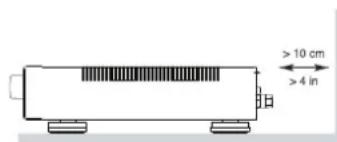
OCTabTe He MeHHee 10 cm CBO6oDHoro IpoCtpaHCTBa BOKpy annapata dIg o6ecneHn HpKynuHn Bo3dyxa.
He ctabte annapat Ha Kpobatb, DnBaH, KOBep HnnoDobhyo MaKpyo NobepxHoctb, KOTOPa MoTeT 3arOpOHTb BEHTMIAIOHMBeOTBepCTHA. EOn annapat BCTpanBaETCBuKaΦnn Dpyro Kopnyc,3OT KopnycDoJenHen BeHTmIMPOBaTbCn Dn o6ecneHEn OXnaJckHEnaIappata.
Depknte annapat noanbwe oT padnatoPob OTONHNN, 6oBpebaTeN, neeynnno6bx npytnx yctpoiCTB, Bbldienraoux TENNO.
PNEIOCTEPEKHEH: CTeBOM pa3bem Ha 3aHaen Naeenn PnpHa3Haen dJa 6bCTPOrO oTOcoEnHeHHy UcTPOiCTBa OJIeKTPnuecko CETN. YCTPOICTBO IOnKHO oecneMHBaTb CBO6OHNIOOCTyN K3aHaen Naeenn, UTo6bI cTeB0u Ka6eNb MoKHO 6blO 6bIcTO pBoBdEPHyTb.
Ceteboe HanpajxHeHKe KOTOpMy NOIcoeHnAeTcAnnapaT, DOnJXHO COoTBETCTBOBAtb Tpe6oBaHnAM, yKa3aHHbM Ha 3aDHe nAnen annapata.(LUA:120B,60Tc,EC230B,50Tc)
NoqoeMHnIe KOMnoHENTKINTHaOuEpo3eTKe TOnbKO npn NOMoUc cTeBOrO WUnpa H3 KOMnIeKTA NOCTABKN, INN eFO TOnHOrO 3KBNAeHTA. He nepeDEnbIbaIte NOCTABNEmbI uHyp. NoPraHIOBAnHbI WtKeep MeMeT DBA HOKeBBX KOtAKTa, OdMn H3 KOTOpBX UHe pArTO. 3a3EMnHOuIe WtKeep MeMeET DBA HOKeBBx KOtAKTa N TpeTm 3a3EMnHOuIe Wtbp. OH o6ecneuBaIbAT Bauy Bo6eONaCHocTb. E OTKa3bBaIbTeCb ot MEP 6eONaCHocTb, PneDcSTABNEmbIX 3a3EMnHOuIM Mnn NoPraHOBANHbIM WtKeep. Ecn NoCTABNEmbI WtKeep He nOxHOIT KBAWei po3eTKe, O6pATNECb K3NeKTPKHy dAmehbY cTapeBueW po3eTK. He cnONb3yTe YdNHInHTNB tNaHua.
OCHOBHn BnKcTeBOro 5hpy CnyKnI DnI OTKIOUeHH annapata O T ctn. IINaONHO OTKIOUeHH N3dennr OITNtAIOUe CTH, BnIKy CeTbO Ka6eJIeDyETOCoeHNrTbOT cTeBOn Po3eTN NpeMeHHOrO ToKa.CBTOnIOHb INHdkatop KJdyEro pekmLaLED He 6yETropetb, noka3bBa, yTO cTeBOn 5hnpOTknIOueH.
3Ta cTeBaB Bnka DoJnKa 6bIb NerKo DcTyHa.
He npoknabIbIaTe ceteBoI shyp TaM, rde OH moKet 6bITb p3dABIneH, nepeKaT, kpyueH, nOdBepRHTB03JeCTBHO TeNla NIN NOBPEKJEN KaKHM-NH6 CnoC6oM. ObaaaiTe oco6oe BHNMaHne Ha ceteBoI shyp B6nH3m TKepeKa I TaM, rde OH BXoDIT B3ADHIO NaHeJIb yCTpoIHCTBA.
CetEBoI uHyp cneyET OCoEHNHTb OT CtenHOH pO3eTKB B Bpemra rpo3blnncnnp6Op octabne HncnObn3yeMbIM nnTeBhoB eBpMa.
Mncnbsyte tonbko npHnadneKnoctn, yka3aHhble npOnBodntenm.
MnOlb3yIe ToBko TeneKxy, NoCTabKy, CToKy, KpOnHtEHN HIN NOnKy ChTEmbl, peKoMeHDoBaHN Ho KOMNaHHe RoTe. BybTe octopoxKnI npi nepemeueHH npu6ba Ha NoCTabKe HIN CTKe BO H36eKaHaNe PAeHHa OT opNpOKnDbHaBHn.
IcnoB3yIte Ka6eIM C3aunTOi Class 2 npn noCoeHNHeHHN KOHOH K KneMmAM yCNHTeJI Pn o6ecneHnHa nDeKHO H0JIaUM M MMmM3aU pckA yDpa 3NeKTpueCTOB.
HemedneHno npkepatne HcNoB3OBaHHe KOMnOHeTa n nepeaTe Ha o6cnEoBaHHe u/nn 06CnyKbAHa KBAHnHnPobAHHO pEmOHTHOpraHn3aueeCN:
Cetebo shyup nn stkep 6bI noBpeKdH.
BHytpb np6opa ypoHnn npedMeTbI Hn npoHnn KNDKoCTb.
- Pn60p no6bIaBn IOd JoxdE.
-Пиббор demohctprpyetпзнakи Нермальноа60tBJ.
- Pn6boppyoHnn nnnoBpeDnHIO6bIM npyHM cnooc6om.
Batape BnybTe He cneyet noDBeprTa 4pe3MeHomy HarpBy coNHeuHbIM CBETOM, NCTOCHKAMM ORTH T.I.

BHIMAHNE
ANOCHTCILP.NAPEXHARM 1. NAPEXE KEECKM TOROM

SHIMAHIE: DRII YINHUAHINBAI BACCHOTNIOPAKENHI 3EETPHENCKSH TOKOJI, HE CHMAMATE EEPHHNOI KAI HAOHAI BILYI BYTNHET CHTAECT, DOCTHINIAOCECABKANBAN NBOITATOIRE, DORSETE DE CUSONYIBAHE KBAI NOVIPBEHCHNNO MACTPE.
JIUL CUA KAHABH I BAPYX CTPAH, JAE YCTPOXCTBO ODOSEPHO K MNCNOL308A
CAUTION: TO PREVENT ELECTRIC SHOCK, MATCH WIDE BLADE OF PLUG TO WIDE SLOT. INSERT FULY.
ATTENTION: POUR EVITER LES CHOCES ELECTRIQUES, INTRODUIRE LA LAME LA PLUS LARGE DE LA FICRE DANS LA BORNE CORRESPONDANTE DE LA PRISÉ ET POUSSER JUSQU AU FOND.

036BapexekhenMOJIHN M BAPHOCTOPOHENHE TpeYORHNIHKI PBNDYPNDEBET NIOBHOTERAI O HANHEMI BHNYT KOPNYCA KEDENIAN HONJIOPOBAHHORA PABNPKHIN, BENEHNHOKO KOTOPORO MOKET CO3BADABIT BOACHTB NOPAKHENY CHUYOBeka JIeKTPNCKEKTM KOKOM.

0360apkehne BOKNIIATONHORO 3naka B pabHOCTOPOHEM TEPYIOHNKGE hpeynyIeKaedt no3b0aetan O nAHINH b cponBo8kDaouoe annapat DOJKMYTHAUMBBAHIXM NCHOTKYMQ NOcKNPTAYQIMs TAEHNKHOENMOE O6yJNKBHIMO.
PpOdyKbI Rotel cnpoeKTHPOBaHb TaK, 4TOb6 Co0tBeCTB0BaT Tpe6oBaHHM MeKdyHApOdbHbIX npeKTHN B OOrpaHueHHo npMeHeHHa BpeHbIX BeUeCTB B 3NeKtpOTexHHueCKOM N 3NeKtpOHOM o6OpyOBaHH (Restriction of Hazardous Substances - RoHS), TaKx No o6paueHHo C OTnyKBHMM CBoi CpOK 3NeKtpOTexHHueCKHM N 3NeKtpOHbHM o6OpyOBaHHem (Waste Electrical and Electronic Equipment - WEEE). M3o6paXeHne nepepeKHyTORO Mycophoro 6aKaHa Konecax O3Haayet TaKx To, 4TO 3TN PpOdyKbI DOnkHb 6bTb BTopnHc HcONb3oBAHb (peuHKnnpoBAhbl Hnn Jx e 6pa6oTaHb B COOTBeCTBN CynomAHyTbIMn BbIe dapeKTHBaHH.

3T0CNMBON 03Naayae,TOYcTPOIcTB0HMeET DBOHYIOI3OJIaIIO.3aEMnHe He Tpe6yeTcA.

yctahabnBaIte yctpoCTBO Ha poBHyO, rohp3oHTaBHyO nobepXHOCTb, cnoocHyO BblpeKtaB erO Bec. He CTabTe erO Ha noDnBxHyIO TeJeKKy, KOtopa MoKet ONpOKHyTcR.

Copepkanhe
Pcynok 1: OprAhbIy npaBneHn npa3beMbl 3
Pcynok2:IyblTyRR-AX923
Pcynok 3:IpoCooeHHeMe MTOUHKOB CnHaJa Ha aHaNoRObBb BXOdbN AkyCTuueCKHX CNCTeM 4
PcnyHK4:BalaHCHbIe(XLR)BXOdbS
Pcynok5:UfpoBovBxOaNbBxOa12-BTprrrephoroCmHana 5 BaxHbIe3aMeuHaHn6
Baxkhhe Hnctpykun no 6e3onacnoctn 66
OKOMnAHmROTEL. 67
HeckoJIbKO CIOB O MOUHOCTH B BaTTax 67
Iepbte 68
HeKoToPbIe IpeDocToPoJxHcOCTn 68
Pazmeuen 68
Kabenn 68
IyR-AX92. 68
YcTaHOBKa 6aTapeB nyIbT 69
IHTAHHe yCmHTeN uynpaBnHeHne 69
Pa3bEm dIa cTeBoro shHpa 69
BbiknouateInb nntaHm HndkaTOp nntaHn 1 69
IIOdoeHHeHH 12-B Tprrrrephoro Cnrrana 69
IopcoeHHeHE BxOHNbIX CnHAnOB 69
BxOД npoHrpBaTeR rpaMnactHOK «Phono» [10] n KJEMMa 3a3EmneHn (GND) 69
BxOdyIINHeHoro yOpBn69
BaJahnchbHe (XLR) BxOdbI 69
UΦpOBe BxOaB1 13 70
BbIXoI npEynHnTeN 11 70
IpeMbYkH peKHMob Preamp / Power Amp 15 18 70
IpoIcoeMHHeHne akyCTnuecknx CnCTem 16 70
Bb6opakyctuuecknx CNTem 70
Bb6opakcyteckoro ka6ena 70
Ponpa3npobKa 70
IIOcOeHHeHne akyCTnuecknx Kabenei 16
BbIXoHaHayuHnKPhones 5 70
IaTnK nIbTa 2 71
Dmcnnne 71
USB BxOHa napeHne nane 71
IopcoenHeHneK Bluetooth 71
Aydno perynipobkn 71
PerynTrop rpmKoCTH VOLUME48 71
PerynTop 6ana hca BALANCE 71
06xpeynpoboktem6pa TONE Control Bypass 71
PeryrnapbTeM6paBASSN TREBLE 71
Cenektop Bxodob Function Control 71
Bxod PC-USB 71
Pa3bem KOMblpoTePhoro HHTeppeCa-Computer I/O [14] 71
UHaROTEL-LINK 72
Pa3beMEXTREMIN-BXoJ3neKtpueckoroCunHanaDuctaHIOHOHOynpabEnHa 19.72
Cxema 3auntbI 72
MeHIO HAcTpoEK 72
06HapyKeHn HcTpaHeHne HeCnPaBHOCTeI 73
HeCBETTCAHDKKATOPNTAHNA 73
3aMeHa npedoxpaHnten 73
Her3byka 73
TexHmueckne xapaKTepeHCTNK 74
OKompanHnROTEL
IcTOpHnHaWeiKOMNaHnHauaIacbNoTn50JeH3aJ.3a npOeUHne DecaTIneTMyI NOLyuNN CoTHN HArpaD 3a HaWi nPoNyKTb I CdeNaI ChACTINBbIMn COTHN TbcryIOJe, KOTOpBle OTHOCrK CBOUM pa3BNeueHnM BONJIe cepBe3HO-TaK JxE,KAK B!
KOMnHnRotel 6bIa OCHOBaHa CemeCTBOM, yB CTpaCTb K My3bIke npOIMNa CTpeMHeHne co3dAbTa hi-fi KOMnoHEtbl 6eCKOMnpOMCCHORKaueCTBA. 3a MHOrne rOdbI 3Ta CTpaTb HmUyTb He ocA6na, n no CeN DeHb 6ouaJr EJIb -BbIpyckaTb IPOdyKTb NCKIOHTeBHOI CEHHOCTN Dnay AyINOΦINOB INIooNTeNe My3bIKN, He3aBUCmO To INx ΦHnHaCobBX BO3MOXHOCTe, pa3dJeTcra BcEMn COtpydnkamn Rotel.
HnHexepb Rotel pa6oTaIcKaedunHaKOMaHa, npocnyuBna uTsaTeNbHO doBoa KaJdb HOBBI npOdyKT Do TAKORO ypOBnCobepseHCTBa, KOrda OH 6ydet yOdBnetBOPaTb ux cTporIM My3bikabHbM cTaNapTAM. Im npedoctabHe CBO6Oba Bblbopa KomNKeKtyUoHIN NO BCemy Mpy, YTO6bl CdelaT bannapat KAc moXHO LyuWe. BepoTHO, BblcmOKeTe HaNTB HauHInx annapatax OT6OpHbIE KOHNecHcatOpbl n3 BeNko6pnTaHm n IepMaHm, noynpoBODnKn n3 JnoHnN n CUSA, Ondako TopoJaBbHbe CInNoBte TpaHcΦopMaTopbl Mbln3rotABnBaem Ha co6CTBeHHom 3aBoDE ROTEL.
BceMbI 3ab0TUMc8o6xpaHe OkpykaIOe Cpebl. IIO Mepe TOrO, KaK Bce 6bIwe 3JIeKToHHbIX UCTPOICTB MIMPe BbIyCKaETcA, a NocLe OKOHuaHIN cPoka Cnykb6 bbl6paCbIAeTcA, dIra IpnO3BOdntEa Oco6eHNO BaxHO npi KOHCTpyIpOBaHN IIpoOyKTOB CdeJaTB BCE Bo3MOXHOe, YTObI OHnHaHOCUNI MNHMalbHbYuep6 3emJe N I NCTOCHNKAM BObl.
MbB KOMpaHn RoteI, ropDmC BcOIM BknaOm B 6ouee Dno. Bo- nepBbIX, Mb cokpatuN coepjA Hne CBNHa C BcOe 3nEKTPOHnke, 3a CHTNCIOB3OBAHn npnOra, oTBeauioero Tpe6OBAHnR MOHS, BO-BTOpBix, hns HOBte ycnnten, pa6oTAooNE B KnaCe D, IMeOT BnTePo 6oee bICOKK N.P.D., Yem PnpDbIyUe pa3pa60TKn, pnp OOnHakOBoBBxOHDmouchctn k aueCTBe 3ByaHn. Ipoo6Hbe npOdyKtbp npakTNueckn He bIeJIoT TeNa, He pacTaPauBaIOT noncy THeprnIOXopoIN C Toynk 3peHnO xpaHbOkpykaioeu Cpebl N Bdo6aBok Lyuye 3ByaT.
HaKoHeu, daJe 3Tu INCTpykUIO MbI OTneuataHn Ha bymare, nOnyuHenHO n3 BToPnHbIX pecypcoB.
MbI noHmAmE, yTo 3To MaJIeBkMe WArn Bnepe,IHO OHnOueHb BaXhbl.BebMbI npoJOnJxMaE NOnCKN HOBbIX MeTOBD IMATEpMaNoB IIN60ee UcCTbIX INdpyKeCTBeHHbIX K OkpyKaJIoUe CpeDe TexHOJIorUeCeKnx IpouceccOB. BceMbI, cotpydNHKn KOMNaHN ROTEL, 6laNoIapIM Bac 3a NOKynk 3Toro n3dEInna.MbI yBepHeB, yTO OHO DoCTaBNT Bam MHOrONETyDOBOJIbCTBnA.
HeckoIbko CIOB O MOUHOCn B BaTTax
BbIXOHa MaHIOCTb YcUNITeNa CoCTaBnAET 120 BT Ha KaHaN, npN oBOxN OHOBpeMeHHo pa6oTaOuXn HA NoIHyIO MoUb KaHAnax. KOMNAHr peunna N3MepaTb BbIXOHyIO MOHOCt b MeHHo TaKIM MeTOJOM NOTOM, yTO NO onBy Rotel, TOnbKO OH Daet nCTINHHyO UcEHky BO3MOXHOCTe peCINBepnnyUCNUNTeNa.
CpaBnBaIaHbIe BTexHmuecknx xapaKTePncTikax pa3nUHbIX npOdyKTOB, HxJHO IMTeB B BNy, YTO BbXoJHaM OMOHcTb YaCTO I3MepeTcR COBCEM DpyrIM CnOCOB, TAK YTO, BO3MOxH0, Bbl NItAeTecb CpaBnITb MekDy co6oI COBepWeHHo pa3HbIe Beu.
Haipumep, BbIXoHnA MoOHOCTb MOKeT 6bIb npINBeHa TOnbKO Ia OHDoro pa6OtaIOe KAna, YTO IO3BOJAE TNOUYHTb 60JeE BbICOKN NOKa3aTeJIb MAKcIMaJIbHOH MOUHOCTN.
IMnpeHaC akyctnuecknx CNTem noka3bBAeT, KaKOBo 3neKtpnuecko. cOponTOBHeHne Hn Harpy3ka, noKnIOuHaMaHa Ha BixO yCNITeNa, n 06bHuO hpaPABHETc8 OM nN4 OMa. YEm Hxke IMpeHaC, Tem 6bn7aMoUHCTb NOTpe6yETcIra KONOH.K.BpeynbTaTe, akyctnueckna CNTema o cCONpOTNBHeHmE 4 OM hXkDaETcB yCNITeB BBOe 6bnSe MoUHOCTN, CHM 8-OMHA AC.
OHaKo yCInnten RoteI cnpoeKtnpoBaHbI TaK, tO6bI pa6oTaB C IIO6bIMMnpeAHHCOM KOHOHOK -OT 8 OM Do 4OM, npN Bcex KaHAnax OJHOBPeMeHBOBdAHOUHX NOLHYO MOUHOCTb. INaKK KOnHCTpyKuIN RoTeI ONTmIMn3pOBAHIDnICNoB3OBAHnco BcEMn OJHOBPeMeHHOpa6ToIoUzMMnKaHaJIAMn, Rotel moKeT yKa3bIbTaH nCTNHHy IOUHOCT bIra o60x KaHaIIOB.
PepBbIe warn
Blaorapn Bac 3a nokny nHTerpnpoBaHoro cTepeo ycnntenr RoTe RA-1570.BcoCTabe BbICOKOkaueCTBeHHo ayDIOOCNTeMbI OH 6yETdoCTabTb Bam yDOBOJbCTBne MHOrne roDbI.
RA-1570 - NOHNOyHKUHOHaJIbHbI KOOMHOENT C OTNUHbIMn pa6OuMM XapAKTepNCTKAMn. Bce acNeKTbI ero KOHCTpyKUnn ONTNMUN3IPOBAHbI dIN NOUYeHHa NOHOrO DnHAMUeCKOR DaNA3OHa N nepeJaun ToHauWix HooHCOBMy3bIKn. BbcOKOCTaBnHbN IcTOOHKNITAHNA RA-1570 BKJIOuayet B c68 fnpMeHHbI TopoAnJaBHy TpaHCfOpMaTOp Rotel n 3aKa3Hbe KOnHeHCaTopbI c nepFopnpOBaHHo FONbGro. 3TOT INCTOHKn 6ObLaadE H3KM BbxOxDHM COnPOTNBLeHNEM N 6ObnWM 3anACOM N MOUHOCTN, NO3BOJIAUQUM RA-1570 BocpON3BODNTb CaMbIe CLOXHbIe ayDINO CnIHaNbl. CTOnMOCTb M3rTOBLeHHa DAHHo KOHCTpyKUnn Bblwe, HO OHA IMeET PpenMYueCTBa C TOKIN 3peHHa My3bIKn.
Dopoxkne neaTHbix nIAT ycunnteY paCNOJKeHb cmmMeTpHuO.3To 06ecnueBaET ToHoe CoBIOHeN BpeMeHHbX npAmeTPOB My3bIKaBHO CnRHa. B CnRHaNB Hom TpaTe PnpMeHbM eTALONNEHOUHbte Pe3tOcbpy I NOINCTPPOBOBIE NII NOnIPoPNIeHOBBie KOHcHcTObl KaJbIy ENEMEHT CXeMbIOBeprAnCA TuaTeBHOmy PaCCMOPTeHIO, YTO6bl Do6HbCBMAKcIMaJIbHO DOCTOBEPHO BOCpON3BeDEHMy3bIKu.
Kpome toro, RA-1570 mMeet He3aBnCmblc CeIeKTopb BxOob dnn PnpocnyuBaHnHa 3aNcB.3To No3BOnAeT Bam CnyuTa b OIN HCTOCHNK n OIOHOBpeMeHHO 3aNcBbAtb DpyroJ.
RA-1570 npocB hacpoKe n kcnpyataun. Ecn Bby yke menn deLo co ctepeocnctema, y Bac He Bo3HKnHe Hkaknx BOpcoB. PpocTo NOkHHTe OCTaBbIe KOMNoHEt bHaCJaXdAitcBc.
HeKoTOpbIe IpeDooCTOpOxHocTH
PIMMEAHHE: Bo u36exahue nobpexdeHue kOMnoHeHMOB cucmembl BCE noocdoehuue u omcoedunehue npou3bOume npu BkIOUeHHom numahuu. Ipexde yem BkIOUaMb numaHue, y6edumecb, ymo coedunehue bInonHehbl npauBho u HadeJHO. OcOboe BHumae ydenume KOLOHOHN pOBoAM. He doJXHOOCmabamcbra "paIoxMaueHHbx"KUN, Komopbie mozym zamkhymbc mExdy coboi unu ha Kopnyc ycunumena.
IoxaJyNyCTa, BHIMATEbH No PPOuTITe DaHHoe pykoBOIDCTBO. KpOme 6a3OBbIX HNCTpyKcH N O yCTAHOBKe I paBote, OHO daET Bam ceHHyIO NHOpMaCNO pa3NnHbIX KOHfNtypauNax CnCTem Ha 6a3e RA-1570 n o TOM, kAc ONTHMnIPoBaTBeroXapakTePncTNI. ECLIN BO3NHkyTBONpOcbI, obaTATNECB K ATOPN3OBAHHomY DmNepy Rotel. KpOME TORO, BCE mbl, cotpyHNKn RotoBb OTBeNTb Ha Baun BonPoCbI npHnHTb Baun 3ameAHAH.
CoxpaHnTe Kopo6ky RA-1570 n BCE octaIbHbIe ynaKOBouHbIe MaTePnAbl, YTO6bI BdaIbHeNWeM IMeTb BO3MOXHOCTb BOCIOJIb3OBA TbCBcIMM. TpaHCnOpTnpOBka RA-1570 BHe 3aBODcKo ynaKOBKn MoXeT Bb3BaTb cepbe3HbIe NOBpeXdEHHy cYNNTeIe.
O63aTeIbHcOxpaHInTe Yekn rapaHTnHbTaNHO.3To rnaBhbleDOKymENTbl, yOCTOBepaIOUe DaTy NOKynK, B Cnyae o6paueHn 3a rapaHTnHbIM o6CnykBaHnEM.
PazMeuHne
Kak n BCE KOMnoHENTb, o6pa6aTbBAIOUne cna6bIe 3neKtpuecknCnRHaB, RA-1570 noDBepKeH BnHHIO OKpykaHOe Cpebl n DpyrOBO6OpyOBaHn. CTapaNTecb He CTaBtB RA-1570 HaDpyRn KOMnoHETbNHe npoklaDbBaTcRHaBbHbIe Ka6en pRdOM co shypamn NITAHn. 3TO CH3NT BEPOARTHOCTB NOMx.
B npocece Hopmaibho pa60bRA-1570 BbIeJenrTeNIO.PaiaTobpIbeHTINIAIOHbte OTBepCTnIpeHa3NaueHbI IraO TBOJa 3TOrO TENa. He3aropaxBaIte BEHTINIAIOHbte OTBepCTnHa BepXHe KpbIwke.OctabTe He Mehee 10 Cm Cbo6OHOro pocTpaHCTBa BOKpyr Kopnyca u ObecneYbTeIOCTaTOUHb BO3DyXoo6MeH, YTO6bI yCunNTenb He neperpeBanc.
POMHNTe o BEce ycunnten, KORda Bb6npeTe MeTo dna erO yCTaHOBKn. Y6eJntecb, cTO nONKa nnN NOCTABKa DOCTAOUHO npOHa, YTO6b bYbIepXaTBeC aannapata.PekOMeHNyEM NcONb3OBaTB CNEuAIN3NpOBAHHyo Me6En bIaayIO KOmnoHEtOB.Takar Me6eJIb paccHTaHa Na ODAbnHeHne BV6paUN, BNIAIOueHa KaueCTBO 3BYKOBCPON3BEdHIn. O6paTITecb K aBOTOpIN3OBAHOMy DnInepy Rotel 3a COBETOn No npABINbHOMy Bb6opy Me6eIN dNa KOMNOHEtOB IN no npABINbHOH IN xCTaHOBKe.
RA-1570 noctabneta c npbTom RR-AX92, n dojkeh 6bty yctahOBneh TaK, TTO6b INHpapacnb CnHAn OT NpTa MOr IeKo DoCTNb DaTHnKa Ha nepeDHei naHEn yCnnnten.
Ka6eJn
HHypb nHTAHn, uΦpObIe n aHaIorOBbl eayno Ka6e nn DOnKHe HaxoITbcraKa moXHO daJIbSe dpyr OT dpyra. B 3TOM clyae MeHbwe WaHCOB, yTO aHaIorOBbl cUrhAN 6ydtarpa3HEn Wymom N nomExAMNOT CINOBbIXuΦpObBIX Ka6enei. C ToJ xe ZcIbIO nCnONb3yTe TOnko BBCOKOKaueCTBeHHBe 3KpaHnPOBaHHBe Ka6eN. ObpaNTecb K BaWemy ABTopn3OBaHHOMy DNInepy Rotel 3a COBtAmn No BblbOpy cambix LyuHnx Ka6enei dnn CnONb3OBaHHB BAWei ayINO cnCTeme.
IyIbT Iy RR-AX92
HeKOTOpbIe onepaun ynpabneHn moKHO bblonHtB kAc npinraemoro nylTa RR-AX91, TaN C nepeDne HnaneHn. PnOncaHn TAKx onepaun B KBaDpaTHbIX cKo6kaxyka3bIAoTc CsbIOuHbE Homepa opraHOB ynpabneHn Ha nepeDne HnaneHn, a B KpykoKx -Ha nyIbTe.
INPMEYAHNE: C nybma RR-AX92 moKHO ynpabnmb ochoBbmu fyHKuMa muHepoB u CD-nneepo Rotel. Khonku nuIbma, o603aueHHbe Ha pucyHKax bkyBaMu G H M MoKHO uCnoJb3Oamb dny npaBHeu mIOhepom u CD-nneepom b aeaue cuCmeMe. Mmbo Nyb m pa6oman npabunbHo, ydoCmoepebmec, umo u nybM, u CD-nneep unu muHep ucNoJIb3yOM odUn u mom keHa6Op KoDo8 KomAnD.
YctahOBka 6aTapeB nynbT
Дебатуарейки Tипа UM-4/AAA (npinlarakotc)нужно установпь поддсплбзвимпельт.Дл nx yctahOBк ChIMNTE Kpbiшky Ha 3adneс ссторе RR-AX92.YctahOBNTe 6aTupeB,ВOTceke,Kak nokazaoHa pucynke. Поберп te pa60tocno6hocb, a 3atem bCTabTe Kpbiшky Ha MeTo. Korda 6aTupeB parpЯжны,пльт pa6oTaet c RA-1570 HeyctочИBO. YstahOBka CBexnx 6aTupeekdoJxha yctpaHnTb 3ty np6nemy.
BxOdbI NHeHOro ypOBHa
CM.puc.3
3To BXOdb CD, TUNER, AUX nHHeHoro yPObHr. OHn npEHa3NaueHbI nIra noDcoeHNHeHHaHAnorOBbIX bXIOOB CD-npOurpBbTaTeNei, KaccetNbIX dEk, TIOHEPOBaIHO N.T.I. Ctepeo obOpyIDobAHnA, a TaKke aHAnorOBOro BbIXOda DpyrNx ycTpoCTB.
BxOdbI neBoro n npaBoro KaHAnOB nomuehbln dOnKhbI npDcoeHNrTbck K COOTBeCTByIOUIM KaHaAM KOMPOHEHTA-ICTOUYHka.ΓHe3do neBoro KaHaJIa 6enoe, npBoro - Kpachoe.ДЯnpoCoeHHeHnK RA-1570 nCNoJb3yTe BbICOKKaueCTBeHHbIe Ka6eni co WTeKePamn RCA.BaW ABTopIN3OBAHbHI DInep Rotel moKet nOmoHb Bam B BBIope COOTBeCTByIOUnx Ka6eni dNBAwe cnCTembl.
BaanchbIe (XLR) BxOdbI
CM.puc.4
Papa 6anaHcbix XLR BxOoB npnHmaeT ayDIO CnHnbl ot CD-nneepob, Blu-ray nneepob nn Dpyrnx KOMNHOHTOB C XLR BbXoAMn.
PIMMEYAHNE: Cnedyem ucnonb3oamb monbo ooun cnoc6 ananoozofo zo coeunehu ucmouhukc rA-1570. He nooceduune oohopemehno oba bixoda umouhuka -RCA u XLR K RA-1570.
UΦpObIe BXoIbI 13
CM.puc.5
ImeetcBbKomnIeKtauuΦpObBxBxOoB,ob03HaueHhbixCOAX1n2,n OPT 1 n2. PoCoedunHte Koakcnabhble COAXIAL nnonontueckne OPTICAL PCMbIXoDbBaWeroNCTouHnKa K3Tm pa3bemam.LuΦpObBe CnHaNb6ydt JeKDnpOBaHbN o6paOtaHb yCnNTeJeM.YCnNTeB MoXeT JeKDnpOBaTB PCmCnHaNb cpa3peHennmdo24nt,192Kt.
BbIXoDbI npeducnnte1 11
Ycunntenb ochaen Bbixoamn kackada npedeynen HN PREOUT 1. Ha 3tnx BbxodaxnpdeyninTEnBcerda npncytCTbyet CnHnHnCTOHNka, Bbl6panHoro B daHHbM MOMENT nI npocnyuINBaHnCeJeKTopom BXoOB.ObchyHO 3TN Bbxodb PREOUT 1 noCoednHOTcKdpyromy nHTerpnpobAHOMy cunnteno IIn yCunnteIO MOHOCn, NITaOSeMy KONOHKn B dpyroKOMHaTe.
PnPMe4AHVE:Pezyarnmopbyepomkocnu,6ana hcaumembpaBnuaHmHaCu2Han, nocmynaiouui Ha bixoobnpedycunumena.
IpeMbyKn peKIMOB Preamp/ PowerAmp 15 18
Pa3bembl, cMapknupOBkO "Pre Out 2" n "Main In", o6bHNO coeHNHeBToNCTbIMn nepMbUckAmn. OHH npEcdtabIOT c6oB yO6Hoe cpeCTBOdIy BCTABKN pnoecccopa CnHAnOB npakTNUeCKn IIO60r Tnna. Dnra TorO uTObIX NcNoJIb3OBAtB, BbInBe npEBuKKn. C nomouJbKab6eneB bVicOKOrKaueCTBa coeHNHTe pa3bembl "Pre Out 2" coBXODm npoecccopa CnHAnOB.A BbXoDbI npoecccopa noaIte Ha pa3bembl "Main In".
IopcoeHHeHne akyctnuecknx CNTem 16
CM.puc.3
RA-1570 nMeet DBe napbI bIXoOB Ha KOLOHKn, oO3HaueHbix SPEAKER A n SPEAKER B. 3Tu bIXoDbI Ha KOLOHKn KOHTpOINpyOTc nepeKlnouaTelem [7] Ha nepedne naHEni nn KHOINKaMn ① Ha npIbTe.
Bb60 apkyctnuecknx cnTeM
Ecnn B IIO60MOMeHT 6yET NcONb3OaTbC TaNbKO OHa npa KOnOHok, TO OHN MOrTy IMTe bIMNeJaHC 4 OMa. Ecnn Jx e OndHOBpeMeHHo MOrTy pa6oTaB Dba KomIJIeKTA AC: A n B, TOrda IIO6aI N3 akCTnuecknx CnCTem dOnJHa IMTe bIMNeJaHC 8 OM nIIi BvIe. NaOpTHe 3NaueHnE HmNeJaHCA AC, KaK IpabInlo, OChb Pnp6bn3nteNbHi. Tem He MeHee, Ha npakTKe ToNko OChb HemHOrne AC MOrTy PnpctabNtB np6bemy nRA-1570. IpOKoHcyTbTpNyTeCb BaAM mABTOpN3OBAHHbIM DnIepom Rotel, ecnyBa BC0HNKIN BonPocbl.
Bb16op akyctueckoro kaebna
IcnoB3yIte I3oIinpoBaHHbI dByxnpoBODHOCKpyeHHbI Ka6eIbI pyncoeHNHeY cunInTeRA-1570 KAkyCTNueckm CNTEmAM. Pa3Mep IN KaueCTBO npoBOA IMeHOT 3aMeTHoe HA cIyX BINHHE Ha npaMeTpbI CNCTeMbI. CtAndapThbI akyCTNueckm Ka6eIb6yJed pa6oTaB, HO MOKeT pInBecTu K ChnKeHIO rPOMKoCTn INI Ocna6BeHNO Hn3KHX qACTOT, OcObeHNo HA 6OnbIXx pacCToHnIX. B O6Ie CMyae, 6Oone TOnCTbI Ka6eB yNyUyHaET 3ByuHHe. DnI HA nUYuXx NapaMeTPOB, Bbl MoKeTe npImeHHT CneuaNBHe
akctnueckne Kaebnn BbICOKOTo KaeeCTBa. BaawABTOINOBAHNdy INep Rotel MoKET NOMOyB Bam BBbOpe COOTBETCTBYUONX KaeJeI DnA Baaew CNTEmbl.
Ponpaoctbn pa3npOBka
PonpHocb nnn noJoxnTeBna/OpntaTeNbHa opneHTaCn coeHNHeHH
Ig KaKdoT rPOMKOBOOpNTE DaONXh b6bTB cOrlacOBaHb, YTObB BCE
akCTNuueckne CnCTeMb 6bIn B 03e. Ecn nolpHocb odHOcoeHNHeHH
no Own6Ke cDenahA o6paTHo, 3ByuHHe Hn3Knx uactOT 6yJeT ouHeB
cNa6bIM, a ctepeo Kaptna DeprapnpyET. Bce akctnuueckne Ka6enn
npomapKnPOBaHb, yTO6b bbl Morn OTNnHT bBA npOBDnHa. 3To moKet
6bTB nOLOca IIN pNfeneH He HA 3Olaunm ODHoro npOBDnHa. Ka6enb moKet
ImTe bNo3paHyIO 3OlaunC npOBDnKaMn pa3Horo Ubeta (MeHbI
n cepe6pcTbI). 3To MOrTy 6bIt N MeKN NoJpHocTn, HaneuTaHHbe Ha
nO3Olaun. OnpeJennte NOLOXnTeBhbl n OTOpuATeNBH bpOBDnHKn
corlacyt e KaJdbIM pa3BeMOM rPOMKOBOOpNTe N ycNtTeN.
IopcoeHHeHne akyctuuecknx ka6enei
BbIIOUHTe BCE KOMNoHENTb B BaWe ayDnO cnCTeme, npEke Yem NOIDCOEOHNrTb KOLOHNK. YcUNTeNb RA-1570 IMeET BINTOBBe KJIEMMbIC cZEBTOBm MapKnPOBKOHa 3aDHei NaHEnn. 3Tu pa3BeMbI npHIMaIOT 3aUHcHbI pOBoN HnHakOHeuHKN Tnna «NONaTKN”. (Ha pbHKx HeEBPonecknx Ctpan, pa3BeMbI npHIMaIOT TaKKe DBOHbIe «BaHbI»).
PpONoXnTe npOBoA ot ycunnteRA-1570 K KONoHkAm. OcTaBtpe nce68doCTaTOChb3aIac, YTO6bIMeTB BO3MOxHocTb nepMeueHnKOMnoHeHTOB C cEnbIO DoCTyNA K pa3bEmam rPOMKOROBOpNTeNE.EcnnBblnpmHeRePeBa3bEmbl-6aHaHb》,npncOeHNHTN K PpOBoAMn3aTEM BCTaBtBe Bpa3bEmbl DnI rPOMKOROBOpNTeNE. 3aXmMbIe BTyknPa3bEMOB rPOMKOROBOpNTeNE dONJXhbl 6bItb 3aBnHHeHb H BA CIO DInHy (no cacobO CTpenKe).
Ecnn Bblncnolb3yeTe 工 nataKn》,cMOHTnpyIte nx Ha npoBoda.EcnBb npincoeinnrete 3aunuennhe Ka6en HENOCpeCTBeHHO K pa3bemam rpoMKOROBOpnteJe,OTdInTe npoBDHKN u CHMNTE N3OJLIO C KOHca kaxdOro npoBoda. BybTe BHNMaTeNbHbU, YTO6bHe NOBpeNTb TOkONpOBOAunne Jxnb. OTBnHTne (npoTb uacobO CTpeKn) 3axmHyIO Btynk pa3bemaPROMKOROBOpnteJa.PacnoOnjTe HAKOHeYNK BOKpyr OCN Btynk, ININ pocynbTe oroneHbI npoBOD B OTBepCTNE B OCN. 3abEPHTe BtynkNo yacobO CTpeKe, TTO6bHaexHo 3aΦHKpObaTb HakoHeHNK ININ npoBod.
PIMMEYAHNE: y6edumecb, ymo omdelbHbIe (pa3noXmaeHHbIe) Xunbl npo0da He kacamccoceDhx npo0do8 unu pa3bemO6.
BbIXoHaHayuHnKnPhones
BbIXo Phones no3BONIeT no4KnIOuHTb HayWNIK dIy ININBnDyAalbHOrO npocnyuBaHn. K 3ToMy rHe3dy no4coEHNHJOTcStaHApTHe btepeoHayWNIK co wTekepom 1/8 IIOHa. Ecn y hayWNIKOB dpyroJ WTekep, nCOnb3yIne nepexoHNK. IIOCoEHNHe HAYWNIKOB He oTKIOUaET 3Byk B KOLOHkax. DnA 3TOrO BOCNtB3yInTEcB cSeKTopOM AC.B HayWNIKNoCTynaet CInHAnOT NCTOCHKA, COOTBeCTByUoiN NOLOKeHHIO cSeKTopa BXoDOB.
PIMMEYAHNE: NockoIbky uecmbumelbHocmb konohok u hayuHkoB MoKem cunbHO omluamcbcra, 8ce2da nepeod nodcoeduneHuem u omcoeduneHuem HayuHkoB yMehbaume epomKocmb.
Датунknпуньт a 2
DaTnK BOCnPnHMAeTnHΦpaKpAcBHe CnTHaJIbI DCtAHUHOHHOrO ynpBaJIeHnO tnybTa. He 3aropaxkBAJte erO, nHaue nybT He 6ydt pa6oTaTb.
Ducnnei 3
IcnneHa nepedn haennoka3bBaet bibpaHHb nctouHK,ypoBeHb rpoMKocTN uCTaHOBKN Tem6pa.
USB BXoI Ha nepeDnei paHeI 6
Ha Bxod USB Ha nepedne nahen moHNO noDcoeHNHTb IPod, iPhone, MP3 nleepby nn aadantep Bluetooth (npnlaraeTc) IIN 6ecnpoBDHO npnema NOTOKOBORO ayno. Bau IPod nn iPones npocTo NOKNIOHTE K φoHTaBbOMy pa3bemy USB N bbl6epnte BXoNBHM CENEKTOPOM fHKUHO USB. iPod, iPhone octAOTc AKTNBHMn npn NOKJIQUEHm. NsHTe n 3aynckaiTe TpeKn KaK O6bHuN, My3bKa 6yJET BOCpON3BOuNTbcr Ypees ayno ciCTemy Rotel.
PerynTop rpoMkOCTN VOLUME
YTO6bI NOBbICNTb rPOMKocTb, NOBepHITe peryIaTOp VOLUME no cacoBoi CTpeKe, YTO6bI NoHn3ntb -npOTNB aCOoBc TcpeKn. Ha npyIbe TnoIb3yIteCb KhoNkAMnVolume + n-dJaIONoBbIeHn I NOnHKeHn I rPOMKocTn. HaxmaiTe Ha KhoNkY MUTE DnI NaONHO npRnLyHne 3Byka.
PeryarnTop6aHcBa BALANCE
PerynTop Balance hactpaBae6baHcNleBoro npaboroKaHAnOB.3aObckoe nonoJenHe 3TOr opeyIraTopa-cpeJhee uIN "0".ДЯ nImMeHEn86aHaHca bpeJeHn naHEnu,naKmTe KhoNkY MENU 9,уTO6bI nepeKInuOHT dncJIeB B pexim HAcTpOKn BALANCE SETTING.3aTe mHaKImaTe KhoNkLEFT nIN RIGHT HapeJeHne nAHeu, yTO6bI uImMeHntb HacTpOKn LEFT nIN RIGHT. 3haeHHe 6bAHaCa MoKeT MeHrtbcraOT L15 Do R15.Ha nyIbTe HaxMnte KhoNky BAL 门店DocTyBa MEmHO BALANCE SETTING,3aTe mHaKImaTe KhoNk LEFT nIN RIGHT 门店 HAcTpOKn 6bAHaHa.3aKOHnB HacTpOKn, HaxMnte KhoNkEXIT Dnla BbIXOda n3 MeHIO.
06xod perynnpobok tem6pa TONE Control Bypass
No ymouanHIO cxmbpeynpOBKn Bass n Treble (Tone Control) 6xOaTcnaDIOCTNKeHHCaMOrO uCToTe 3BvauHnHa DnCnneBbBOBDTCaHAnCb TONE BYPASS. YTo6bI BkIOuHTb peynpOBKn TEM6pa, HaxMMte KhoNky BYPASS Ha npIbTe. Ha pOHTaJIbHO nAHeHn HaxKMaIe KhoNky MENU 9 YTo6bI nepeKIOuHTbCB B PexIM Bypass, a3aTEM HaxKMaIe Te KhoNkn -nn +dR BkIOUeHHn Nn BBKIOUeHHn PexIMa 6xOdapeYrNpOBOK TM6pa.
Pernyatopbi Tem6pa BASS u TREBLE
Bo3MOXHbIe BapMaHTbIyCTaHOBOK: VARIABLE, FIXED 1-95, FIXED MAX.
PIMMEYAHNE:PykaVolumeHa nepeheu naHenu u Khonku Volume + / - Hanybme He 6ydyum paobommbcnu bknouen pekum Fixed.Дг omknouhenura 3mou fynkuu ycmahOBume napamemp Fixed Volume 8 noJooHeue "Variable".
AUX1 VOL: VARIABLE (otKIOueH) 3aBOckay yCTaHOBka no yMOUHaHIO.
COAX1 VOL: VARIABLE (OTKNIUOHe) 3aBODCKa yCTaHOBA KNo yMOuHaHIO.
- OPT1 VOL: VARIABLE (otknioueH) 3abOcka yCTaHObKa NO yMOnuHaHIO.
PC-USBVOL:VARIABLE (OTKIOUeH) 3aOoCKa yCTaHOBka NO yMOJuaHIO.
- USB VOL: VARIABLE (OTKIOUeH) 3aBODCKa yCTaHOBka no yMOJuaHIO.
- PC-USB AUDIO CLASS: cMeHa noDJePknBaemoro nHTepeIcom PC-USB Klacca Audio dna noKnIOueHHoro yCTpoIcTa.
PIMMEUHHE: HekomopbIe KOMMbIomepbI, noCoeduHeHHbIe no PC-USB, He noDepxuaIOM USB Audio Class 2.0 u Bocnpou3BedeHue fOpmama 24/192 ayduo.Ecnu3mo Heo6xoMo,PC-USB MoKHO cKoHfUzypuOaMb dra USB Audio Class 1.0. Iodpo6HocMu moKHO y3hamb B onucauu onepaUohHou cuCmembI.
- Software Version: noka3bIbaert TekuIyIO BepCIO PO, 3arpyKeHHoro BycnilTeB.
- FACTORY DEFAULT: Bo3bpaaaet yctahOBkyn ycuiNTeY K nCXoHOMy COCTOHHIO, KOrda OH b6bl BByuIeH N3 4a6pNIK. HaxMMTE KhoNky + key Ha nepeHnei naHEn IIN Right Ha nyIbTe IIN Bb6opa
, a 3aTeM HaxMMTE KhoNky "ENTER" Ha nepeHnei naHEn IIN KhoNky Right Ha nyIbTe IIN Bb6opa , a 3aTeM HaxMMTE KhoNky "ENTER" Ha nepeHnei naHEn IIN KhoNky "ENT" nyIbTe.
06napxkeHne n yctpaHne HeNCnpaBHOCTeI
BolbunHCTBO HeNoJADK B ayDIOscntEmax npOnxOoJNT I3-3a HnPaBnBbXbX coeHNHeHNI HnpBaBnBbX yCTaHOBOK oPraHOB ynpAbeHnE. Ecn, HecMOtprHa TtateBHyI npOBepky coeHNHeHNI UyCTaHOBOK, Bbl He MoKeTe doBbCBAByKa ot RA-1570, npocMToPi nepeCTabJeHHbHn HnKe cIncok.
He CBETTCNDAKATOP NNTAHNA
Korda Bnka shypa nitaHra RA-1570 BCTabnaHa B ceteByo po3eTkU n Haxat BbIKIOuOATEB POWER, donKeH CBETbc KOnbueBOH INIkaTOp NtAHn OCHOBHe 3JeMeHTb DcNlEe.EcH OH He CBETcH, npOBepbTe HAnmne HapJxGHe B ceteBOH po3eTKAppyHM 3NeKtpOpnp6Opom, Hapmep, lamno. Y6edntcB, Yo po3eTKa HE KOHTpOINpyeTC KaKMnbo BbIKIOuAtenM, KOToBb B daHHb MOMENT BbIKIOueH.
3aMeHa npedoxpaHHTeTn
Ecn npyto 3nKtpnp6op,poKnIOUeHNb KToTKe po3Te,pa6oTaet, a RA-1570-HET,BO3MOxHO,peperopen BHyTpEHNI ppeOxAHTeB npoiRpbBaTeN. B 3OM cnyae 6pAITecb BAIBTOHOBAHHy cpeBcHHy cnxy6y Rotel.
Het 3Byka
y6eHNTecb,yTO nCTOuHnK CnHana HOPMaJIbHO yHKNUOHpyET. IPOBepbTe Ka6eHNI, NOcOeHNJIOUe BxOa RA-1570 K nCToHnK cynHana; y6eHTecb, 4TO CELEKTop BXoDOb YCTaHOBnB HnyHoe nIoXKeHne. IPOBepbTe TaKke NoCeoHHeHNE RA-1570 K AC.
TexHnueckne xapaKTepeNtIKN
HomHanbHa BixOHa MaOHcTb, HnP. 120 Br/kaHAn
(20Γu-20KΓu<0,03%,Hg8OM)
06pme rapmoHueckne mkaeHnTHD <0,03% npH HOMHaHbHO
(20T-20KMOHOCTN,1/2MOHOCTUNI 1BT
HHTepmoyunohhme MCkaxehn(60r:7K4:1)<0,03% npHOMHaJIbHOH MOUHOCTM
1/2MOHOCHTUNIIN1BT
Yactothar xapaktepnctwnka
BxqD Phono 20T-15K+0,5
JIINHeHbIe BxOdb10T-100Kf+1-3d6
JemnHr-phiKTop (20U-20KU,8OM) 180
Bx. 4yBC7BNTeHbHOCTb/UMTeDAHC
Phono (MM) 2.25 MB/68 kOM
JIINHeHbI BxOaR (RCA) 285 MB/100 kOM
JIHHeHbI BxOaD (6anaHcHbU) 570 MB/50 KOM
Nepperpyka nno 8xoy
Phono (MM) 30 MB
JIHHeHbI BxOa4B
Bixio nppeycnwnen/nnnne
1.5 MB/470 OM
OTHOHHe CHTHAn/yym (IHF 838eueHHoe no kpuoou "A")
Phono (MM) 80 d5
JIHHeHbI BxOa 100
Udpobar ceku
DanaonHacrT
10T-95Kt±3.0D(Max)
OthouheHme Cmharuym (IHFAaeeu.)
100
Bxogdhycbvmbnbohocb/mmpeanc
0 dBfs/75 OM
Bixo npnycnntenmne
USB Audio Class 2.0 (no 24 6mT/192K)*
Tpe6yeercaYctaHOBka dpaIbepa
Tpe6000nnnK3eNktppnnnnn
CWA: 120B,60FJ
EC: 230B,50Fg
Notpe6nreMaM MOHOCb
400BT
Fappanl (U X B X I)
431×144×350MM
Bbicota nepeHnahan
3U (132.6 MM)
Macca HETTO
13K
BceTexnueckne xapaKTepeCTMKN COOTBeTCTByIOT DeNCTBNTeNbHOCTN Ha daTy ⅢdAHH.
KomnaHra Rotel octabniet 3a co6o npabo moepn3npobTa n3dneia 6e3 npedapntelbHor yBedeomneHn.
Rotel n norotn Rotal HiFi - 3to 3apertncnpoBaHbIe TOproBble MapKn
Rotel Co., Ltd. Tokyo, Japan.
Ilorotnbl "Made for iPod" (Дпя pa6obtbc iPod) u "Made for iPhone" (Дпя pa6obtbcOBmecthOc iPhone) O3HauaOT,уTO daHHOe3NeKTPoHHOeYCTPOCTBO 6bIIO pa3pa6oTaHO dЯ coeHHeHIMN UMeHNO CycTpoiCTBaAM iPod u iPhone COOTBeCTBeHHO, a TAKKe 6bIIO cepTuФицPoBaHO pa3pa6oTuKOM KAc COOTBeCTByUOSe cTAHApTAM KOMNaHIMu Apple. KomnaHIMu Apple He Hecet OTBETCTBeHHOCTa pa6oTy daHHOrO yCTpoiCTBa, a TAKKe 3a erO coOTBeCTBNE CTaHApTAM 6e3OpNaChOCTn INpyHM HopMaTUBam. O6paNTte BHNMaHne, yTO nCNoIb3OBaHIne 3TORO yCTpoiCTBa COBMecTHO c iPod nIN iPhone MoKET NOBnIbIb Ha pa6oTy beCnpBoDHOJ CETn.
iPhone, iPod, iPod classic, iPod nano n iPod touch -этο troproье маркn Apple Inc., зерпстрированые B СWA n pyruхстрах.
Made for

ROTEL
The Rotel Co. Ltd.
Tachikawa Bldg. 1F.,
2-11-4, Nakane, Meguro-ku,
Tokyo, 152-0031
Japan
Rotel of America
54 Concord Street
North Reading, MA 01864-2699
USA
Phone: +1 978-664-3820
Fax:+1978-664-4109
Rotel Europe
Dale Road
Worthing, West Sussex BN11 2BH
England
Phone: +44 (0)1903 221 761
Fax: +44 (0)1903 221 525
Rotel Deutschland