
RA971 MKII - Receiver ROTEL - Free user manual and instructions
Find the device manual for free RA971 MKII ROTEL in PDF.



| Product type | Integrated stereo amplifier |
| Brand | Rotel |
| Model | RA-971MKII |
| Output power | 60 W per channel into 8 ohms (20-20000 Hz, THD < 0.03%) |
| Total harmonic distortion | < 0.03% at full power, half power or 1 watt |
| Frequency response | 10 Hz - 100 kHz (±3 dB) |
| Signal-to-noise ratio | 95 dB (A-weighted IHF) |
| Input sensitivity / Impedance | 160 mV / 33 kΩ |
| Minimum speaker impedance | 4 ohms (one pair), 8 ohms (two pairs) |
| Power supply | 115 V or 230 V, 50/60 Hz (depending on version) |
| Dimensions (W x H x D) | Estimated: 430 x 120 x 370 mm |
| Weight | Estimated: 10 kg |
| Inputs | 6 line inputs (CD, Tuner, Tape 1/2, Aux, etc.) |
| Outputs | 2 pairs of speakers (Direct and Remote), 6.35 mm headphone jack, preamp outputs |
| Tone controls | Bass and treble, ±6 dB at 100 Hz / 10 kHz, bypassable |
| Main functions | Independent listening/recording selectors, standby, speaker selection |
| Maintenance | Cleaning according to manufacturer's recommendations; do not block ventilation openings |
| Safety | Disconnect before any connection; do not open (risk of electric shock); use appropriate wall outlet |
| Spare parts and repairability | No user-serviceable parts; contact an authorized Rotel dealer |
| General information | High-end design: toroidal transformer, slit-foil capacitors, symmetrical circuits |
Frequently Asked Questions - RA971 MKII ROTEL
User questions about RA971 MKII ROTEL
0 question about this device. Answer the ones you know or ask your own.
Ask a new question about this device
Download the instructions for your Receiver in PDF format for free! Find your manual RA971 MKII - ROTEL and take your electronic device back in hand. On this page are published all the documents necessary for the use of your device. RA971 MKII by ROTEL.
USER MANUAL RA971 MKII ROTEL
CAUTION: TO REDUCE THE RISK OF ELECTRIC SHOCK, DONOT REMOVE COVER. NO USER-SERVICEABLE PARTS INSIDE.REFER SERVICING TO QUALIFIED SERVICE PERSONNEL.
APPLICABLE FOR USA, CANADA OR WHERE APPROVED FOR THE USAGE
CAUTION: TO PREVENT ELECTRIC SHOCK, MATCH WIDE BLADE OF PLUG TO WIDE SLOT. INSERT FULLY.
ATTENTION:POUR EVITER LES CHOCSELECTRIQUES, INTRODUIRE LA LAME LA PLUS LARGE DE LA FICHE DANS LA BORNE CORRESPONDANTE DE LA PRISE ET POUSSER JUSQU AU FOND.

This symbol is to alert the user to the presence of uninsulated dangerous voltages inside the product's enclosure that may constitute a risk of electric shock.

This symbol is to alert the user to important operating and maintenance (service) instructions in this manual and literature accompanying the product.
WARNING:
There are no user serviceable parts inside. Refer all servicing to qualified service personnel.
WARNING:
To reduce the risk of fire or electrical shock, do not expose the unit to moisture or water. Do not allow foreign objects to get into the enclosure. If the unit is exposed to moisture, or a foreign object gets into the enclosure, immediately disconnect the power cord from the wall. Take the unit to a qualified service person for inspection and necessary repairs.
Read all the instructions before connecting or operating the unit. Keep this manual so you can refer to these safety instructions.
Heed all warnings and safety information in these instructions and on the product itself. Follow all operating instructions.
Clean the unit only with a dry cloth or a vacuum cleaner.
You must allow 10cm, or 4 inches, of unobstructed clearance around the unit. Do not place the unit on a bed, sofa, rug, or similar surface that could block the ventilation slots. If the unit is placed in a bookcase or cabinet, there must be sufficient clearance around the unit and ventilation of the cabinet to allow proper cooling.
Keep the unit away from radiators, heat registers, stoves, or any other appliance that produces heat.
The unit must be connected to a power supply only of the type and voltage specified on the rear panel of the unit.
Connect the unit to the power outlet only with the supplied 2-pin polarized power supply cable or an exact equivalent. Do not modify the supplied cable in any way. Do not attempt to defeat grounding and/or polarization provisions. The cable should be connected to a 2-pin polarized wall outlet, matching the wide blade of the plug to the wide slot of the receptacle. Do not use extension cords.
Do not route the power cord where it will be crushed, pinched, bent at severe angles, exposed to heat, or damaged in any way. Pay particular attention to the power cord at the plug and where it exits the back of the unit.
The power cord should be unplugged from the wall outlet if the unit is to be left unused for a long period of time.
Immediately stop using the unit and have it inspected and/or serviced by a qualified service agency if:
The power supply cord or plug has been damaged.
- Objects have fallen, or liquid has been spilled, into the unit.
The unit has been exposed to rain.
The unit shows signs of improper operation
The unit has been dropped or damaged in any way
Place the unit on a fixed, level surface strong enough to support its weight. Do not place the unit on a moveable cart that could tip over.

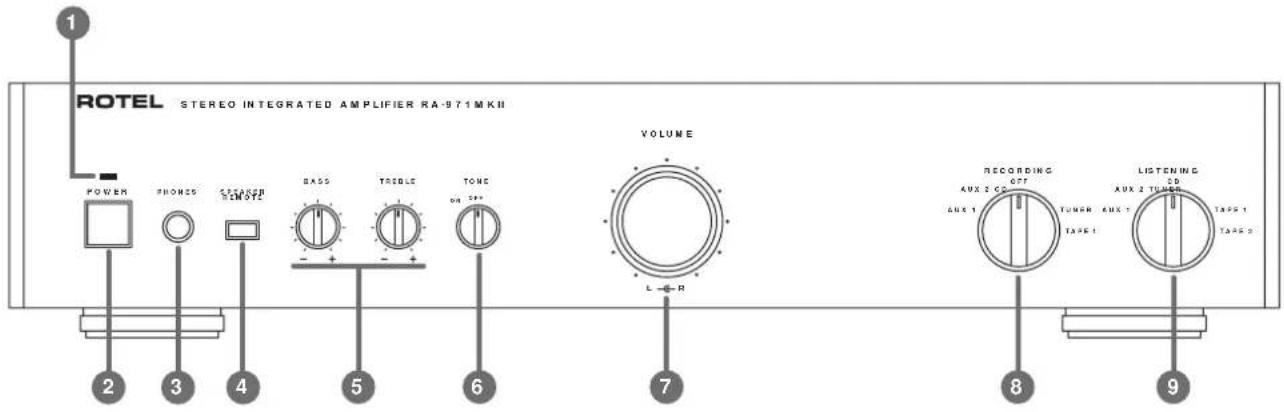
Figure 1: Controls and Connections
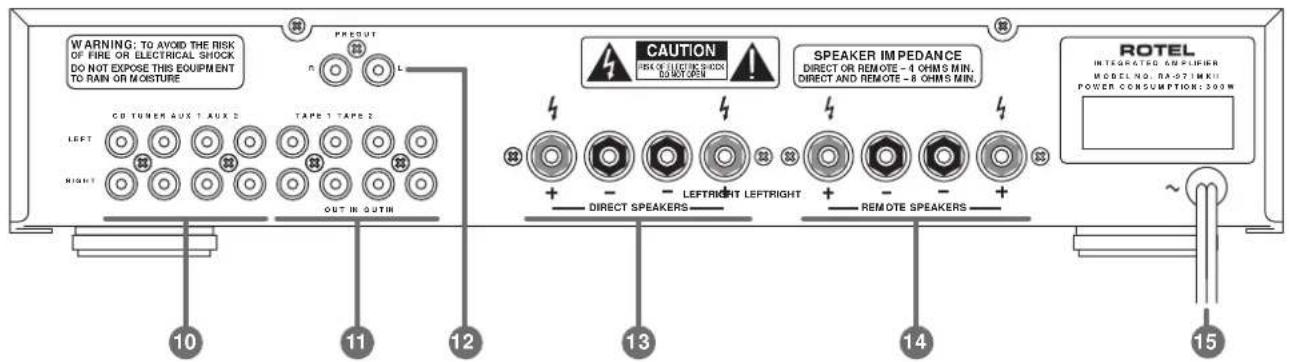
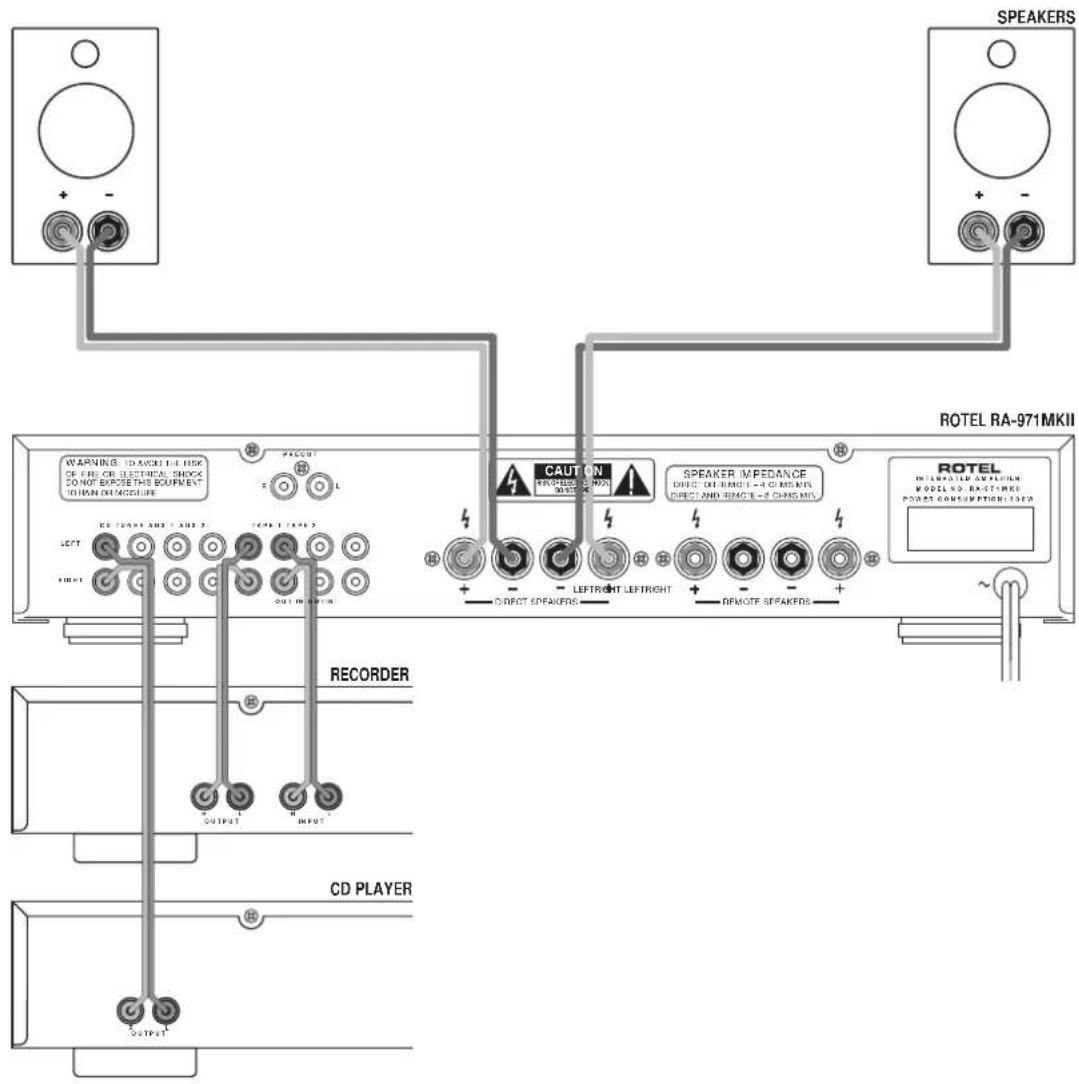
Figure 2: Signal Input and Speaker Output Connection
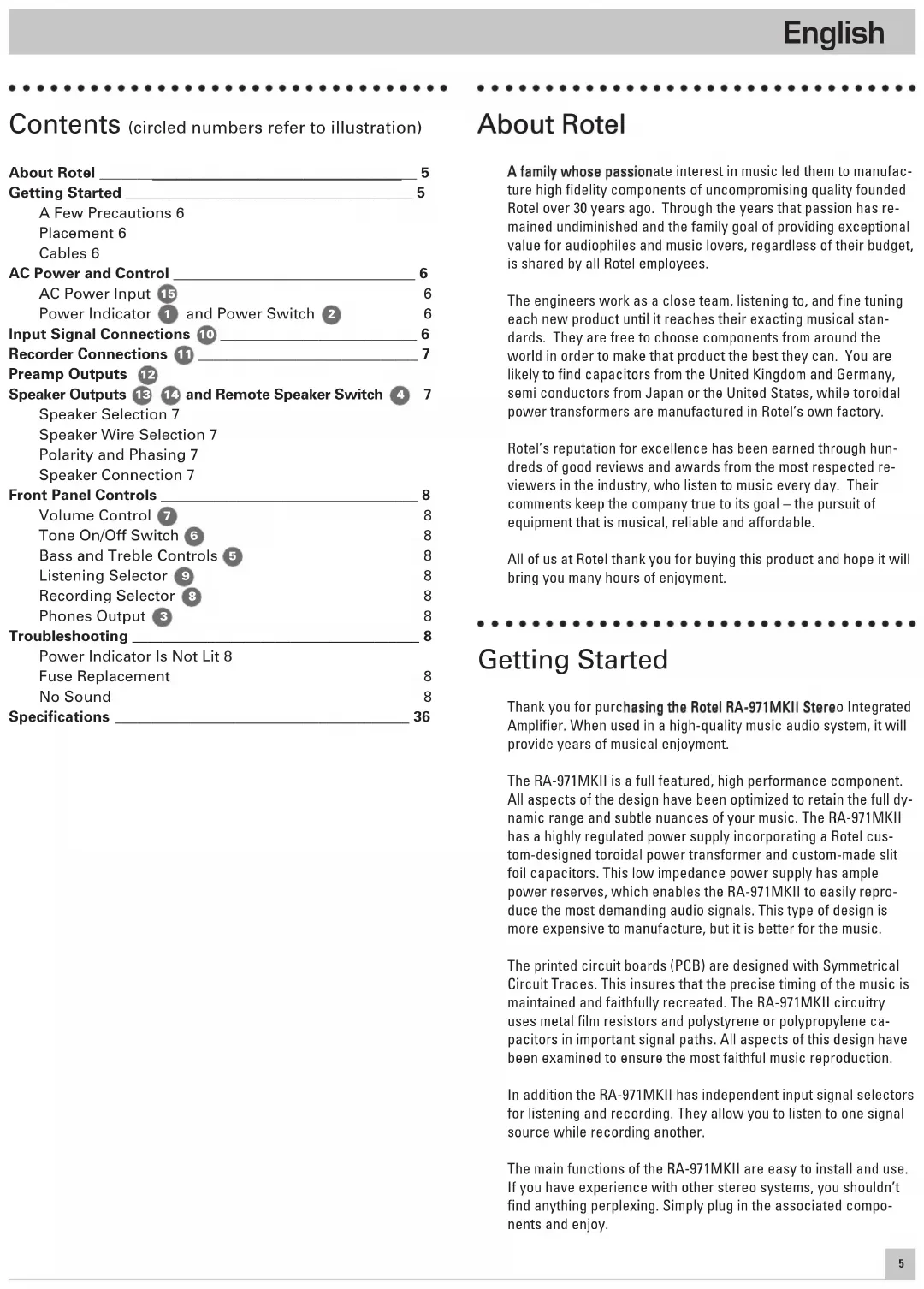
Contents (circled numbers refer to illustration)
About Rotel 5
Getting Started 5
A Few Precautions 6
Placement 6
Cables 6
AC Power and Control 6
AC Power Input 15
Power Indicator 1 and Power Switch 2
Input Signal Connections 10 6
7
Preamp Outputs 12
Speaker Outputs 13 14 and Remote Speaker Switch 4 7
Speaker Selection 7
Speaker Wire Selection 7
Polarity and Phasing 7
Speaker Connection 7
Front Panel Controls 8
Volume Control 7
Tone On/Off Switch 6 8
Bass and Treble Controls 5
Listening Selector 8
Recording Selector 8
Phone Output 3 8
Troubleshooting 8
Power Indicator Is Not Lit 8
Fuse Replacement 8
No Sound 8
Specifications 36
About Rotel
A family whose passionate interest in music led them to manufacture high fidelity components of uncompromising quality founded Rotel over 30 years ago. Through the years that passion has remained undiminished and the family goal of providing exceptional value for audiophiles and music lovers, regardless of their budget, is shared by all Rotel employees.
The engineers work as a close team, listening to, and fine tuning each new product until it reaches their exacting musical standards. They are free to choose components from around the world in order to make that product the best they can. You are likely to find capacitors from the United Kingdom and Germany, semi conductors from Japan or the United States, while toroidal power transformers are manufactured in Rotel's own factory.
Rotel's reputation for excellence has been earned through hundreds of good reviews and awards from the most respected reviewers in the industry, who listen to music every day. Their comments keep the company true to its goal - the pursuit of equipment that is musical, reliable and affordable.
All of us at Rotel thank you for buying this product and hope it will bring you many hours of enjoyment.
Getting Started
Thank you for purchasing the Rotel RA-971MKII Stereo Integrated Amplifier. When used in a high-quality music audio system, it will provide years of musical enjoyment.
The RA-971MKII is a full featured, high performance component. All aspects of the design have been optimized to retain the full dynamic range and subtle nuances of your music. The RA-971MKII has a highly regulated power supply incorporating a Rotel custom-designed toroidal power transformer and custom-made slit foil capacitors. This low impedance power supply has ample power reserves, which enables the RA-971MKII to easily reproduce the most demanding audio signals. This type of design is more expensive to manufacture, but it is better for the music.
The printed circuit boards (PCB) are designed with Symmetrical Circuit Traces. This insures that the precise timing of the music is maintained and faithfully recreated. The RA-971MKII circuitry uses metal film resistors and polystyrene or polypropylene capacitors in important signal paths. All aspects of this design have been examined to ensure the most faithful music reproduction.
In addition the RA-971MKII has independent input signal selectors for listening and recording. They allow you to listen to one signal source while recording another.
The main functions of the RA-971MKII are easy to install and use. If you have experience with other stereo systems, you shouldn't find anything perplexing. Simply plug in the associated components and enjoy.
A Few Precautions
WARNING: To avoid potential damage to your system, turn off ALL the components in the system when connecting or disconnecting the loudspeakers or any associated components. Do not turn the system components back on until you are sure all the connections are correct and secure. Pay particular attention to the speaker wires. There must be no loose strands that could contact the other speaker wires, or the chassis of the amplifier.
Please read this manual carefully. It provides information on how to incorporate the RA-971MKII into your system as well as information that will help you get optimum sound performance. Please contact your authorized Rotel dealer for answers to any questions you might have. In addition, all of us at Rotel welcome your questions and comments.
Save the RA-971MKII shipping carton and all enclosed packing material for future use. Shipping or moving the RA-971MKII in anything other than the original packing material may result in severe damage to your amplifier.
Fill out and send in the owner's registration card packed with the RA-971MKII. Also be sure to keep the original sales receipt. It is your best record of the date of purchase, which you will need in the event warranty service is ever required.
Placement
Like all audio components that handle low-level signals, the RA-971MKII can be affected by its environment. Avoid placing the RA-971MKII on top of other components. Also avoid routing audio signal cables near power cords. This will minimize the chance it will pick up hum or interference.
The RA-971MKII generates heat as part of its normal operation. The heat sinks and ventilation openings in the amplifier are designed to dissipate this heat. The ventilation slots in the top cover must be open. There should be 10cm (4 inches) of clearance around the chassis, and reasonable airflow through the installation location, to prevent the amplifier from overheating.
Remember the weight of the amplifier when you select an installation location. Make sure that the shelf or cabinet can support it. We recommend installing the RA-971MKII in furniture designed to house audio components. Such furniture is designed to reduce or suppress vibration which can adversely affect sound quality. Ask your authorized Rotel dealer for advice about component furniture and proper installation of audio components.
Cables
Be sure to keep the power cords, digital signal cables and regular audio signal cables in your installation away from each other. This will minimize the chance of the regular audio signal cables picking up noise or interference from the power cords or digital cables. Using only high quality, shielded cables will also help to prevent noise or interference from degrading the sound quality of your system. If you have any questions see your authorized Rotel dealer for advice about the best cable to use with your system.
AC Power and Control
AC Power Input 15
Because of its relatively high power rating, the RA-971MKII can draw considerable current. Therefore, it should be plugged directly into a 2-pin polarized wall outlet. Do not use an extension cord. A heavy duty multi-tap power outlet strip may be used if it (and the wall outlet) is rated to handle the current demanded by the RA-971MKII and all the other components connected to it.
Your RA-971MKII is configured at the factory for the proper AC line voltage in the country where you purchased it (either 115 volts AC or 230 volts AC with a line frequency of either 50Hz or 60 Hz). The AC line configuration is noted on a decal on the back panel.
Note: Should you move your RA-971MKII amplifier to another country, it is possible to reconfigure it for use on a different line voltage. Do not attempt to perform this conversion yourself. Opening the enclosure of the RA-971MKII exposes you to dangerous voltages. Consult a qualified service person or the Rotel factory service department for information.
If you are going to be away from home for an extended period of time such as a month-long vacation, it is a sensible precaution to unplug your amplifier (as well as other audio and video components) while you are away.
Power Indicator 1 and Power Switch 2
Push in the Power Switch button to turn the RA-971MKII on. The Power Indicator light is illuminated when the RA-971MKII is on. Press and release the Power Switch button again to turn the RA-971MKII off.
Input Signal Connections 10
[See Figure 2 for input connection illustration.]
The RA-971MKII has conventional RCA type input connectors, the type found on nearly all audio equipment.
Note: To prevent loud noises that neither you nor your speakers will appreciate, make sure the system is turned off when you make any signal connections.
All the inputs of the RA-971MKII are "line level" inputs. These are appropriate for connecting components such as CD players, Hi Fi or NICAM Stereo video cassette recorders, tuners for audio or video, Laser Disc players or the analog output from a CD ROM drive. If you want to use a phonograph with the RA-971MKII, an external phono equalizer, such as the Rotel RQ-970BX must be used.
The Left and Right channels are clearly labeled and should be connected to the corresponding channels of the source component. The Left RCA connectors are white, the Right connectors are red. Use high quality RCA cables for connecting input source components to the RA-971MKII. Ask your authorized Rotel dealer for advice about cables.
Recorder Connections 1
[See Figure 2 for recorder connection illustration.]
The Tape 1 and Tape 2 inputs and outputs can be connected to any record/playback device that accepts standard line level analog input and output signals. Typically that will be a conventional tape recorder.
When connecting a recorder to the RA-971MKII remember that the outputs of the recorder must be connected to the tape inputs of the RA-971MKII. Similarly the tape outputs of the RA-971MKII must be connected to the inputs of the recorder. As with other sources be sure to connect the Left and Right channels of each device to the proper channels on the associated components. Use high quality connecting cables to prevent loss of sound quality.
Preamp Outputs 12
The RA-971MKII has a set of preamp outputs. The signal from the source selected with the Listening Selector is always available from these outputs. Typically these outputs are used to provide a signal to another integrated amplifier or power amplifier, which is used to drive remote speakers
Speaker Outputs 13 14 and Remote Speaker Switch 4
The RA-971MKII has two sets of speaker outputs, labeled "Direct" 13 and "Remote" 14. The Direct outputs are directly connected to the amplifier output circuitry - there are no switches in the signal path. This ensures the purest possible sound. The Remote outputs are controlled by the Remote Speaker switch 4 on the front panel. Speakers connected to the Direct outputs are always heard. Speakers connected to the Remote outputs are active only when the Remote Speaker switch is pushed in.
Note: If there are times when you will want to turn off the speakers, such as when you want to listen with headphones, the speakers should be connected to the Remote output terminals. This will enable you to control the speakers with the Remote Speaker switch.
Speaker Selection
If only one set of speakers will be connected to the RA-971MKII, the speakers may have an impedance as low as 4 ohms. If speakers will also be connected to the Remote speaker outputs, all the speakers should have an impedance of 8 ohms or more. Speaker impedance ratings are less than precise. In practice, very few loudspeakers will present any problems for the RA-971MKII. See your authorized Rotel dealer if you have any questions.
Speaker Wire Selection
Use insulated two-conductor stranded wire to connect the RA-971MKII to the speakers. The size and quality of the wire can have an audible effect on the performance of the system. Standard speaker wire will work, but can result in lower output or diminished bass response, particularly over longer distances. In general, heavier wire will improve the sound. For best performance, you may want to consider special high-quality speaker cables. Your authorized Rotel dealer can help in the selection of cables for your system.
Polarity and Phasing
The polarity - the positive/negative orientation of the connections - for every speaker and amplifier connection must be consistent so all the speakers will be in phase. If the polarity of one connection is reversed, bass output will be very weak and stereo imaging degraded. All wire is marked so you can identify the two conductors. There may be ribs or a stripe on the insulation of one conductor. The wire may have clear insulation with different color conductors (copper and silver). There may be polarity indications printed on the insulation. Identify the positive and negative conductors and be consistent with every speaker and amplifier connection.
Speaker Connection
Turn off all the components in the system before connecting the speakers. The RA-971MKII has color-coded binding post type speaker connectors on the back panel (except in European Community countries where their use is not permitted). These connectors accept bare wire, connector lugs, or dual banana type connectors.
Route the wire from the RA-971MKII to the speakers. Give yourself enough slack so you can move the components to allow access to the speaker connectors.
If you are using dual banana plugs, connect them to the wires and then plug into the backs of the binding posts. The thumbscrews of the binding posts should be screwed in all the way (clockwise).
If you are using terminal lugs, connect them to the wires. If you are attaching bare wires directly to the binding posts, separate the wire conductors and strip the insulation from the end of each conductor. Be careful not to cut into the wire strands. Unscrew (turn counterclockwise) the binding post thumbscrews. Place the connector lug or wire around the binding post shaft. Turn the thumbscrews clockwise to clamp the connector lug or wire firmly in place.
Note: Be sure there are no loose wire strands that could touch adjacent wires or connectors.
Front Panel Controls
Volume Control 7
The Volume control is actually two separate controls. The smaller inner knob controls the right channel, the larger outer knob controls the left channel. The control knobs are "friction connected", so both controls normally operate together. Turn the controls clockwise to increase the volume, or counterclockwise to decrease the volume.
The two controls can be operated separately by holding one control knob while turning the other. Normally this is necessary only to compensate for channel balance problems in the program material.
Tone On/Off Switch 6
When the Tone Switch is in the Off position the Bass and Treble Control (Tone Control) circuits are bypassed to ensure the purest possible sound. Leave the Tone Switch in the Off position unless you want to use the Tone Controls. Turn the Tone Switch to the On position if you want to adjust the Tone Controls.
Bass and Treble Controls 5
When the Tone Switch is in the On position, turning the Bass and Treble Controls adjusts the tone balance of the sound. Turn the Controls clockwise to increase the bass or treble output. Turn the Controls counterclockwise to decrease the bass or treble output.
A properly set up high-performance audio system produces the most natural sound with little or no adjustment of the tone controls. Use these controls sparingly. Be particularly careful when turning the controls up (clockwise). This increases the power output in the bass or treble range, increasing the load on the amplifier and speakers.
Listening Selector 9
The setting of the Listening Selector controls which of the input signals goes to the main outputs and onto the power amplifier or, more simply, which source is heard.
Recording Selector 8
The setting of the Recording Selector controls which of the input signals goes to the record outputs. When you are not recording, the Recording Selector should be set to the Off position to minimize the chance of interference from other components in the system.
Having a separate Recording and Listening selector adds a significant degree of flexibility in how you can use the RA-971MKII. For example by setting the Record Selector to CD and the Listening Selector to Tuner you could record a CD onto a tape while listening to the tuner.
There is no Tape 2 position on the Recording Selector. Consequently, if you wish to duplicate ("dub") a recording from one recorder to another, the source unit must be connected to Tape 1 input. Set the Recording Selector to Tape 1. Connect the unit recording the signal to the Tape 2 output.
3 Phones Output
The Phones output allows you to connect headphones for private listening. This output accommodates standard stereo phone (1/4^) plugs. If your headphones have another type of plug, such as a 1/8^ mini-plug, you will need an adapter plug. Contact your authorized Rotel dealer, to get the correct adapter plug. Note: Plugging in a set of headphones does not cut off the signal to the outputs. The power amplifier will continue to receive a signal and the speakers will continue to play.
Troubleshooting
Most difficulties in audio systems are the result of incorrect connections, or improper control settings. If you encounter problems, isolate the area of the difficulty, check the control settings, determine the cause of the fault and make the necessary changes. If you are unable to get sound from the RA-971MKII refer to the suggestions for the following conditions:
Power Indicator Is Not Lit
The Power Indicator should be lit whenever the RA-971MKII is plugged into the wall power outlet and the Power Switch is pushed in. If it does not light, test the power outlet with another electrical device, such as a lamp. Be sure the power outlet being used is not controlled by a switch that has been turned off.
Fuse Replacement
If another electrical device works when plugged into the power outlet, but the Standby Indicator still will not light when the RA-971MKII is plugged into the wall outlet, it indicates that the internal power fuse may have blown. If you believe this has happened, contact your authorized Rotel dealer to get the fuse replaced.
No Sound
Check the signal source to see if it is functioning properly. Make sure the cables from the signal source to the RA-971MKII inputs are connected properly. Be sure the Listening Selector is set to the proper input. Check the wiring between the RA-971MKII and the speakers.
ATTENTION :
EEN LAATSTE WAARSCHUWING:
Continuous Power Output 60 watts/ch
(20-20 kHz, < 0.03%, 8 ohms)
Total Harmonic Distortion (20Hz-20kHz) < 0.03% at rated power,
1/2 power or 1 watt
Intermodulation Distortion (60 Hz: 7 kHz, 4:1) < 0.03% at rated power,
1/2 power or 1 watt
Frequency Response - all inputs 10Hz-100kHz, +1, -3dB
Damping Factor (20-20,000 Hz, 8 ohms) 150
Input Sensitivity / Impedance 160 mV / 33 kOhms
Input Overload 5 V
Preamplifier Output / Impedance 1V / 470 ohms
Tone Controls-Bass/Treble ± 6 dB at 100Hz / 10kHz
Signal to Noise Ratio (IHF "A" weighted) >95 dB
Power Requirements
USA Version 115 Volts, 60 Hz
European Version 230 Volts, 50Hz
Power Consumption 300 Watts
Dimensions (W× H× D)
440 × 92 × 347 mm
173/8×55/8×1311/16"
6.5 kg, 14.3 lbs.
All specifications are accurate at the time of printing.
Rotel reserves the right to make improvements without notice.
Technische Daten
Consummation 300 watts maximum
Dimensions (L× H× P)
Poids (net)
S
230 volts, 50 Hz (Europe)
440× 92× 347mm
6.5 kg
North Reading, MA 01864-2699
USA
Phone: +1 978-664-3820
Fax: +1 978-664-4109
Rotel Europe
Meadow Road
Worthing, West Sussex BN11 2RX
England
Phone: +44 1903-524-813
Fax: +44 1903-524-831
Rotel Deutschland
Kleine Heide 12
- APPLICABLE FOR USA, CANADA OR WHERE APPROVED FOR THE USAGE
- WARNING:
- Contents (circled numbers refer to illustration)
- About Rotel
- Getting Started
- A Few Precautions
- Placement
- Cables
- AC Power and Control
- AC Power Input 15
- Power Indicator 1 and Power Switch 2
- Input Signal Connections 10
- [See Figure 2 for input connection illustration.]
- Recorder Connections 1
- [See Figure 2 for recorder connection illustration.]
- Preamp Outputs 12
- Speaker Outputs 13 14 and Remote Speaker Switch 4
- Speaker Selection
- Speaker Wire Selection
- Polarity and Phasing
- Speaker Connection
- Front Panel Controls
- Volume Control 7
- Tone On/Off Switch 6
- Bass and Treble Controls 5
- Listening Selector 9
- Recording Selector 8
- Phones Output
- Troubleshooting
- Power Indicator Is Not Lit
- Fuse Replacement
- No Sound
- ATTENTION :
- EEN LAATSTE WAARSCHUWING:
- Technische Daten
Brand : ROTEL
Model : RA971 MKII
Category : Receiver