MC 4409 CDMP3 - Hi-fi system AEG - Free user manual and instructions
Find the device manual for free MC 4409 CDMP3 AEG in PDF.



| Product type | Compact hi-fi system |
| Brand | AEG |
| Model | MC 4409 CDMP3 |
| Power supply | 230 V, 50 Hz |
| Output power | 100 W PMPO |
| Protection class | II |
| FM radio bands | 87.5 – 108.0 MHz |
| AM radio band | 522 – 1620 kHz |
| Supported audio formats | Audio CD, MP3 (CD-R, CD-RW) |
| Cassette player | Yes (playback and recording) |
| USB port | Yes (audio file playback, limited compatibility) |
| Memory card reader | SD/MMC |
| Equalizer | Presets: Classic, Rock, Pop, Jazz, Pass |
| Remote control | Infrared, 2 R6 "AA" 1.5 V batteries (not included) |
| Headphone jack | 3.5 mm stereo jack |
| Special functions | Timer, Sleep, repeat, random playback, ESP (anti-shock) |
| Display | LCD screen, 12h/24h mode |
| FM antenna | Flexible antenna, built-in AM antenna |
| Care and cleaning | Unplug before cleaning; use a slightly damp cloth without additives |
| Warranty | 24 months from date of purchase |
Frequently Asked Questions - MC 4409 CDMP3 AEG
User questions about MC 4409 CDMP3 AEG
0 question about this device. Answer the ones you know or ask your own.
Ask a new question about this device
Download the instructions for your Hi-fi system in PDF format for free! Find your manual MC 4409 CDMP3 - AEG and take your electronic device back in hand. On this page are published all the documents necessary for the use of your device. MC 4409 CDMP3 by AEG.
USER MANUAL MC 4409 CDMP3 AEG
natural_image
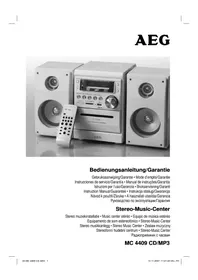
Exterior view of a white audio recording device with two speakers, a USB audio recorder, and a remote control (no visible text or symbols on main objects)Overview of the Components ...... Page 3
Instruction Manual...... Page 48
Technical Data Page 53
Guarantee Page
FRANÇAIS
JEZYK POLSKI
Sommaire
D-47906 Kempen/Germany

SD/MMC-Card-gleuf (9)
10 Touche MEM/CLK-ADJ (mémoire/heure)
Ranhura cartão SD/MMC (9)
(nedover/oppover album)
6 MEMORY/CLK-ADJ knapp
7 RANDOM knapp (tilfeldig avspilling)
Spille inn kassetter
General Safety Instructions
Read the operating instructions carefully before putting the appliance into operation and keep the instructions including the warranty, the receipt and, if possible, the box with the internal packing.
- To avoid the risk of fire or an electric shock, you should not expose the device to rain or moisture. Consequently, do not use the device in the immediate vicinity of water - for example near a bath tub, a swimming pool or in a damp cellar.
- Use the device only for the intended purpose.
- Only connect the device at a properly installed plug socket. Pay attention that the specified voltage corresponds to the voltage of the plug socket.
- When using external mains supply, pay attention to the correct polarity and voltage. Always place the batteries in the correct direction.
- Assemble the device in such a way that the available ventilation openings are not covered.
- Never open the housing of the device. Incorrect repairs can constitute a considerable risk for the user. Should the device become damaged, in particular the mains supply cable, do not operate the device any longer, but rather have it repaired by an expert. Check the mains supply cable regularly for damage.
- For safety reasons a broken or damaged mains lead may only be replaced by an equivalent lead from the manufacturer, our customer service department or a similar qualified person.
- If the device is not used for a longer period, remove the plug connector from the plug socket or take out the batteries.
These symbols may be found on the machine and are intended to indicate the following:

The lightning symbol should advise the user of parts in the inside of the device which carry dangerously high voltage levels.

The symbol with an exclamation mark should advise the user of important operation or maintenance instructions in the accompanying documentation.
Devices bearing this symbol work with a „class 1 laser“ for tracing the CD. The built-in safety switches should prevent the user being exposed to dangerous laser light, which is invisible to the human eye, when the CD compartment is opened.
Under no circumstances should these safety switches be bypassed or manipulated, as this could result in a danger of exposure to the laser light.
Children
- In order to ensure your children's safety, please keep all packaging (plastic bags, boxes, polystyrene etc.) out of their reach.
Caution! Do not allow small children to play with the foil as there is a danger of suffocation!
- To protect children from the dangers posed by electrical appliances, make sure that the cable is hanging low and that children do not have access to the appliance.
Special safety information
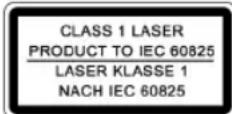
This device works with a class 1 laser.
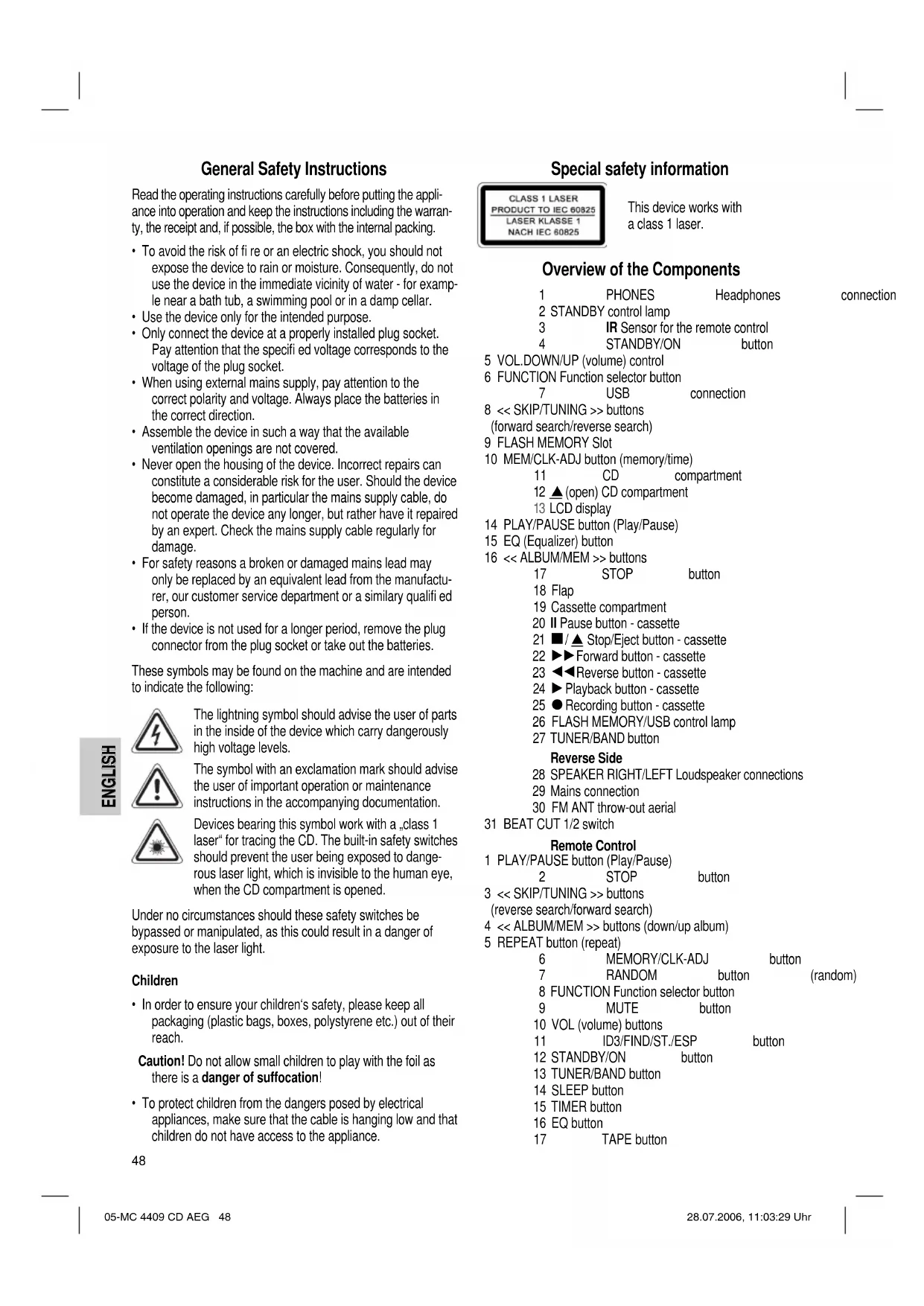
Overview of the Components
| 1 | PHONES | Headphones | connection |
| 2 | STANDBY control lamp | ||
| 3 | IR Sensor for the remote control | ||
| 4 | STANDBY/ON | button | |
5 VOL.DOWN/UP (volume) control
6 FUNCTION Function selector button
7 USB connection
8 << SKIP/TUNING >> buttons (forward search/reverse search)
9 FLASH MEMORY Slot
10 MEM/CLK-ADJ button (memory/time) 11 CD compa 12 ▲(open) CD compartment 13 LCD display
14 PLAY/PAUSE button (Play/Pause)
15 EQ (Equalizer) button
16 << ALBUM/MEM >> buttons
17 STOP button
18 Flap
19 Cassette compartment
20 II Pause button - cassette
21 ■/▲ Stop/Eject button - cassette
22 ▶▶Forward button - cassette
23 ◀◀Reverse button - cassette
24 ▶ Playback button - cassette
25 ● Recording button - cassette
26 FLASH MEMORY/USB control lamp
27 TUNER/BAND button
Reverse Side
28 SPEAKER RIGHT/LEFT Loudspeaker connections
29 Mains connection
30 FM ANT throw-out aerial
31 BEAT CUT 1/2 switch
Remote Control
1 PLAY/PAUSE button (Play/Pause)
2 STOP button
3 << SKIP/TUNING >> buttons
search/forward search)
4 << ALBUM/MEM >> buttons (down/up album)
5 REPEAT button (repeat)
| 6 | MEMORY/CLK-ADJ | button | |
| 7 | RANDOM | button | (random) |
| 8 | FUNCTION Function selector button | ||
| 9 | MUTE | button | |
10 VOL (volume) buttons
11 ID3/FIND/ST./ESP button
12 STANDBY/ON button
13 TUNER/BAND button
14 SLEEP button
15 TIMER button
16 EQ button
17 TAPE button
Start-up of the device/Introduction
- Read the operating instructions thoroughly before the start-up!
- Select an appropriate location for the device, e.g. a dry, flat, non-slip surface on which the device can be easily operated.
- Make sure that the device is adequately ventilated!
- Connect the loudspeakers to the back of the music centre to the sockets market „Speaker RIGHT and LEFT“ (28).
- Insert the plug into a properly installed 230 V, 50 Hz power socket. Please ensure that the mains voltage corresponds to the information on the type plate.
Setting the Time (in Standby Mode)
- Keep the MEM/CLK-ADJ button (10/6) pressed down. The words „24 HOUR“ appear in the display.
- Use the << SKIP/TUNING >> buttons (8/3) to choose between the 24 hour and 12 hour display. Press the MEM/CLK-ADJ button (10/6) to confirm.
Note: The following appears in the case of the 12 hour display
AM = in the morning, PM = in the afternoon/evening.
- Press the << SKIP/TUNING >> buttons (8/3) to set the hours. Keep the button pressed down until the desired hour is reached. Press the MEM/CLK-ADJ button (10/6) to confirm.
- Press the << SKIP/TUNING >> (8/3) button in order to set the minutes. Keep the button pressed down until the desired minutes are reached.
- Press the MEM/CLK-ADJ button (10/6) again to store the time.
Remote Control Batteries (not supplied)
- Open the lid of the battery compartment on the back of the remote control.
- Insert 2 batteries of type R6 „AA“ 1,5 V. Ensure that the polarity is correct (see the floor of the battery compartment)!
- If the remote control is not used for a prolonged period, remove the batteries in order to prevent battery acid leaking.
- Different battery types or new and used batteries must not be used together.
Warning: batteries are not to be disposed of together with domestic wastes. Dispose of the used batteries at the relevant collection bin or at your dealer's.
Never throw batteries into the fire.
CD deck transport protection
Please open the CD compartment (11) by pressing the ▲ (open) button (12). Remove the transport protection from the CD player if present before use.
General Operation
STANDBY/ON (4/12)
Switch the device to the standby mode with the STANDBY/ON button (the time is displayed). If this button is pressed once more, the device switches on again.
Volume (5/10)
This is used to set the individual volume. The letters „VOL“ and a figure appear in the display (13). This corresponds to the volume that has been set as far as „VOL 30“ or „VOL 00“.
PHONES Headphone Socket (1)
Please use headphones with a 3.5 mm stereo jack plug; these should be inserted into the headphone socket. The loudspeakers are then switched off.
Infrared remote control
For operating the music centre from a distance of up to 5 metres without a lead. If the range of the remote control is reduced, the batteries have to be replaced. During operation ensure that there is nothing blocking the direct line between the remote control and the sensor (3) on the machine.
USB Connexion (7)
This device has been developed in accordance with the latest technical developments in the USB fi eld. Unfortunately the large number of different types of USB storage media on offer today makes it impossible to guarantee full compatibility with all USB storage media. For this reason there may be problems in rare cases with playing back from USB storage media. This is not a malfunction of the device.
- In order to switch on the device please press the STANDBY/ON switch (4/12).
- Now press the FUNCTION button (6/8) to select the CARD-USB mode.
- Connect a USB storage medium (the control lamp (26) lights up in red).
- Press PLAY/PAUSE (14/1) to play back the music data.
For operating instructions please see the section "Playing CDs/MP3s".
Note:
• The FIND function is restricted.
- With the SD/MMC card inserted it is not possible to switch over to the USB connection.
Important: Before removing the USB storage medium, switch the device to TUNER operation using the TUNER/BAND button (27/13).
SD/MMC Card Slot (9)
- If you would like to play back data on an SD/MMC card please insert it into the opening provided.
- Now press the FUNCTION button (6/8) to select the CARD-USB mode (the control lamp (26) lights up in green).
- Press PLAY/PAUSE (14/1) to play back the music data.
For operating instructions please see the section "Playing CDs/MP3s".
Note: The FIND function is restricted.
Listening to the Radio
- Press the TUNER/BAND button (27/13) to select between FM or MW.
$$ \mathrm{VHF} = \mathrm{FM}, \text { Medium wave } = \mathrm{MW(mono)} $$
- Tune in to the desired station with the help of the << SKIP/TUNING >> buttons (8/3).
- The FM.ST control lamp ((ST)) (in the display) only lights up if the selected station is being received in stereo quality. If reception is too weak and there is noise on the station being received, this lamp will fl icker. Try to improve reception by turning and bending or twisting and altering the length of the antenna (30). In the case of FM stations you can use the ID3/FIND/ST./ESP button (11 on the remote control) to switch between MONO and STEREO reception. Where reception is bad we recommend switching to MONO.
- An aerial is integrated into the device for the reception of AM stations. The machine can be aligned to the station by turning it. In this frequency band programs are transmitted in „mono“ only.
- If you have found the desired station, press the MEM/CLK-ADJ button (10/6). The word PRG lights up and the station memory number fl ashes.
- In order to select the program location, press the << ALBUM/MEM >> buttons (16/4).
- To store this position, press the MEM/CLK-ADJ button (10/6). Please note that the programme storage location must be entered within five seconds as the procedure is then cancelled.
To select a stored station press the << ALBUM/MEM or ALBUM/MEM >> button.
Note: By pressing the TUNER/BAND button (27/13) you can also switch over to radio mode.
Cassette Operation
Playing Cassettes
- Press the FUNCTION button (6/8) repeatedly until the word „TAPE“ appears in the display.
- Press th ▪ / ▲ stop/eject button (21) to open the cassette compartment (19).
- Push a recorded audio cassette, with the tape downwards and the listening side facing forwards, into the compartment (full reel to the left). Then close the cassette compartment (19) again.
- Press the▶ playback key (24) to listen to the tape.
- With the ▪/ ▲stop/eject key you can stop playback.
- Wind the tape forwards or backwards if necessary in the direction of the arrow keys
$$ \blacktriangleright \blacktriangleright = \text { forwards } (2 2), \blacktriangleleft \blacktriangleleft = \text { reverse } (2 3). $$
- Always press the ■/▲ stop/eject key (21) when changing the direction or stopping the tape. This prevents damage to the machine and the tape.
- If the ▪/ ▲ stop/eject button is pressed again the flap of the cassette compartment opens.
- In order to interrupt playback briefl y, press the II pause button (20). Pressing again continues playback.
Note: By pressing the TAPE button (17 on the remote control) you can also switch over to cassette mode.
Recording Cassettes
- Insert an audiocassette with the side on which you wish to record facing forwards (full reel on the left). Ensure that the cassette is not copy-protected (the copy protection tab on the top narrow side of the cassette must not have been removed).
- Select the recording source with the FUNCTION button (6/8) and then start this source. The sound source which you are listening to is the one from which the recording is made. The recording level is controlled automatically. Any changes to the sound and volume do not affect the recording.
- Please press the ● record button (25) (the ▶ playback button is automatically pressed down at the same time). Recording now begins. All previous recordings are automatically erased.
- The recording can be interrupted briefly using the II pause key (20), or stopped by means of the ■ / ▲ stop/eject button (21).
Playing CDs/MP3
This is how you play a CD
-
Press the FUNCTION button (6/8) repeatedly until „CD“ appears in the display.
-
In order to open the CD compartment (11), press the ▲ (open) button (12).
-
Insert an audio CD with the printed side facing upwards on to the central cone so that the CD clicks into place and then close the lid of the CD compartment.
4. AUDIO CDs:
In the display the symbols "Cd" and "ESP" appear together with the number of tracks and the total playing time. Press the PLAY/PAUSE button (14/1) to play back the CD. The CD is played from the first track onwards. The track currently being played and the time that has elapsed are shown in the display.
CDs in MP3 Format:
In the display the symbols "STOP" and "ESP" appear together with the number of folders e.g. 04 and the total number of tracks. Press the PLAY/PAUSE key (14/1) to play the CD. The CD is played back from the fi rst track onwards and from the fi rst folder. The song currently being played and the time that has elapsed are shown in the display. With the << ALBUM/MEM or ALBUM/MEM >> (16/4) you can select the individual folders.
- To remove a CD, press the STOP key (17) (2 on the remote control), open the CD deck with the ▲ (open) key (12) and take out the CD carefully.
Always keep the CD deck closed.
Note:
- If a disc is inserted incorrectly or no disc is inserted, the letters „CD READ“, and „NO DISC“ appear in the display.
- Playback of CDs produced by the user cannot be guaranteed due to the large variety of software and CD media available.
Description of the CD buttons
PLAY/PAUSE (14/1)
You can briefly interrupt and resume playback using this button. The playing time that has elapsed flashes in the display. Pressing again continues playback.
$$ < < \text { SKIP / TUNING } > > (8 / 3) $$
With an audio CD or a CD in MP3 format playing:
With SKIP/TUNING >> (8/3) you can jump to the next or previous track etc. If the button is kept pressed down, the machine starts to search through the tracks.
The << SKIP/TUNING button (8/3) can be used as follows:
Press once = This starts the current track again from the beginning.
Press twice = This jumps back to the previous track.
Press three times = This plays the song before etc. If the button is kept pressed down, the machine starts to search through the tracks.
Note: When the music search is activated for MP3, USB or FLASH MEMORY, the sound is muted.
In radio mode:
To tune the desired radio station.
STOP (17/2)
The CD stops.
MUTE (9 on the remote control)
Used for switching off the sound immediately. The word „MUTE“ fl ashes in the display (13). To cancel this function, press the MUTE key again.
EQ (16)
(Preset equalizer function). Various sound modes are available (CLASSIC, ROCK, POP, JAZZ, PASS).
ID3/FIND/ST./ESP (11 on the remote control)
In FM radio mode:
To change between STEREO and MONO.
For an audio CD:
ESP (Anti-Shock Function)
It fills the 10-second electronic memory to protect against the jumping of the CD. If the player is jolted, the CD music data is read out continuously from an intermediate memory (not in MP3 mode). Reading errors are corrected subsequently in the intermediate memory. After the player has been switched on this appears in the display to show that the anti-shock function has been activated and the memory is being charged. Press the ID3/FIND/ST./ESP button if you want to deactivate this function.
For a CD in MP3 format:
You can search for the content on the CD (if burned on the MP3) as follows:
Press once: The name of the first track with the initial „A“ is shown in the display. If the word „A-NONE“ appears there is no track available with the initial „A“. With the << SKIP/TUNING >> buttons (8/3) it is possible to select the first track of the following initial “A-Z” and “0-9”. With the PLAY/PAUSE button the first track with the selected initial is played back.
Press twice: The track of the first folder appears in the display. Use the << SKIP/TUNING >> buttons (8/3) to select the desired folder and press the PLAY/PAUSE button. Playback begins with the first track of this folder.
Press three times: The display changes to normal operation.
REPEAT (5 on the remote control)
Press once: (the emits a fixed light). The current track is repeated continuously.
Press twice: (the ⬇ ALL emits a fixed light). The whole CD is played continuously.
Press three times: all functions are cancelled. The normal play mode is resumed.
Only for CDs in MP3 format
Press once: the current track is repeated continuously (appears in the display).
Press twice: the whole CD is played continuously (ALL appears in the display).
Press three times: the selected folder of the MP3 CD is repeated continuously (ALBUM appears in the display). With the << ALBUM/MEM >> buttons (16/4) you can select the individual folders.
Press four times: the function is deactivated and the CD is played in the normal mode.
RANDOM (7 on the remote control)
Press once: the display (13) contains the word RNDM, ESP and the track number that is to be played first. All tracks are played back in random order.
Press twice: the function is deactivated and the CD is played in the normal mode.
<< ALBUM/MEM (16/4)
For a CD in MP3 format:
Press this button during playback to change to a folder further down. The display, e.g. 01, flashes briefly. Then the MP3 CD begins to play back automatically.
In radio mode:
To tune the desired radio station.
ALBUM/MEM >> (16/4)
For a CD in MP3 format:
Press this button during playback to change to a higher folder. See the above paragraph for the following step.
In radio mode:
To tune the desired radio station.
Note: Some keys are to be found both on the device itself and on the remote control. Keys with the same designation have the same function.
SLEEP (14 on the remote control)
With the device switched on this sets the period in 10-minute steps from 90 to 10 minutes after which the device switches to standby. Press the button repeatedly until the required duration is shown in the display. With this function activated the word SLEEP appears in the display. The device switches off automatically after the set time.
In order to call up the remaining time press the SLEEP button. This time can also be subsequently shortened or switched off again (00 Min).
Timer (15 on the remote control)
You can set the device so that it switches on and off again at a certain time.
- Keep the TIMER button pressed down until „ON“ appears in the display. The hours fi gure begins to fl ash.
- Use the << SKIP/TUNING >> buttons (8/3) to select the switch-on time (hours).
- Press the TIMER button and use the << SKIP/TUNING >> buttons (8/3) to select the switch-on time (minutes).
- When the TIMER button is pressed the word „OFF“ appears in the display. The hours fi gure begins to fl ash.
- When setting the switch-off time, please proceed in the same way as described above.
- Press the TIMER button and use the << SKIP/TUNING >> button (8/3) to select in which mode the radio should switch on (TUNER or CD).
- Press the TIMER button and use the << SKIP/TUNING >> buttons (8/3) to select the switch-on volume VOL.
- Press the TIMER button again. The settings are shown in the display briefly one after the other and then the device switches back to the normal display. "appears in the display and the timer is activated.
In order to deactivate the timer, briefly press the TIMER button. The word "disappears from the display."
Programmed Play
This can be used to program any desired sequence of tracks.
- Press the STOP key (17/2).
52
-
Press the MEM/CLK-ADJ key (10/6). „00 P-01“ (memory location) appears in the display (13) together with the abbreviation PRG. In MP3 format the number of the file (00) fl ashes, while the track number (000), the word PRG and the memory storage number P-01 are shown. Use the << SKIP/TUNING >> buttons (8/3) to select the desired track and then press the MEM/CLK-ADJ button (10/6) again. The display changes to memory slot P-02.
-
Select the next track with the << SKIP/TUNING >> key and press the MEM/CLK-ADJ key again. Repeat the procedure until all the desired tracks are selected. In MP3 format first select the folder. Press the MEM/CLK-ADJ button and then select the desired track.
-
Press the PLAY/PAUSE key (14/1). The playback starts. The first track number selected appears in the display. The words „Cd“, „ESP“ and „PRG“ appear in the display. Press this button to pause briefly the playback.
-
Press once the STOP key (17/2) to stop the playback while retaining the program. The PRG control lamp goes out.
-
To resume the playback of the program press first the MEM/CLK-ADJ key once and then the PLAY/PAUSE key.
-
To delete the program (in stop mode) first press the MEM/CLK-ADJ button and then the STOP button.
The device stops automatically once the entire sequence of programmed tracks is completed. The PRG control lamp goes out. The programmed order of tracks remains in the memory until you change to a different mode, remove the CD from the CD compartment or switch off the device.
It is also possible to combine the programmed tracks with the REPEAT function. After you have programmed and started the device, please press the REPEAT button (5) up to three times and then you can use the functions as described under „REPEAT“.
Playing back Music in MP3 Format
With this device it is possible to play back pieces of music in MP3 format. The device also supports all standard CD types: CD, CD-RW, CD-R.
This machine of is able to play MP3 CDs. Up to 200 tracks can be compressed and stored on these CDs. Your machine detects an MP3 CD automatically (the total number of tracks and MP3s appears in the display). If you would like to play one of these CDs, proceed as described under „Playing CDs/MP3“. Tracks can be programmed as described under „Playing Back Programmed Tracks“.
Please note:
There are a number of different recording and compression methods, as well as quality differences between CDs and self-recorded CDs.
Furthermore, the music industry does not adhere to fixed standards (copy protection).
For these reasons it is possible that in rare cases there are problems with the playback of CDs and MP3 CDs. This is not a malfunction of the device.
Cleaning and Maintenance
• Always remove the mains plug before cleaning the machine.
- Any marks on the surface can be wiped off with a slightly damp cloth without any additives.
Technical Data
Model: ....MC 4409 CD/MP3
Power supply: 230 V, 50 Hz
Output rating: 100 W PMPO
Protection class: II
Radio section:
Frequency ranges: FM 87,5 \~ 108,0MHz ..... AM 522 \~ 1620 kHz
This device has been tested according to all relevant current CE guidelines, such as electromagnetic compatibility and low voltage directives, and has been constructed in accordance with the latest safety regulations.
Subject to technical changes without prior notice!
Guarantee
The device supplied by our Company is covered by a 24 month guarantee starting on the date of purchase (receipt).
During the life of the guarantee any fault of the device or its accessories ascribable to material or manufacturing defects will be eliminated free of charge by repairing or, at our discretion, by replacing it. The guarantee services do not entail an extension of the life of the guarantee nor do they give rise to any right to a new guarantee!
Proof of the guarantee is provided by the proof of purchase. Without proof of purchase no free replacement or repair will be carried out.
If you wish to make a claim under the guarantee please return the entire machine in the original packaging to your dealer together with the receipt.
Defects to consumables or parts subject to wearing as well as cleaning, maintenance or the replacement of said parts are not covered by the guarantee and hence are to be paid!
The guarantee lapses in case of unauthorized tampering.
After the expiry of the guarantee
After the expiry of the guarantee repairs can be carried by the competent dealer or repair service against the payment of the ensuing costs.

Meaning of the "Dustbin" Symbol
Protect our environment: do not dispose of electrical equipment in the domestic waste.
Please return any electrical equipment that you will no longer use to the collection points provided for their disposal.
This helps avoid the potential effects of incorrect disposal on the environment and human health.
This will contribute to the recycling and other forms of reutilisation of electrical and electronic equipment.
Information concerning where the equipment can be disposed of can be obtained from your local authority.