EasyManual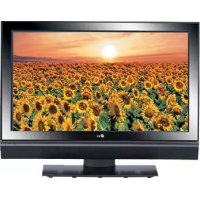
37LC25R - Television LG - Free user manual and instructions
Find the device manual for free 37LC25R LG in PDF.



User questions about 37LC25R LG
0 question about this device. Answer the ones you know or ask your own.
Ask a new question about this device
Download the instructions for your Television in PDF format for free! Find your manual 37LC25R - LG and take your electronic device back in hand. On this page are published all the documents necessary for the use of your device. 37LC25R by LG.
USER MANUAL 37LC25R LG
1 cover-on 9/30/97 4:31 PK Page 1
LG Electronics Inc.
LCD TV | PLASMA TV | OWNER'S MANUAL

text_image
LCD TV | PL OWNER'S MA LCD TV MODELS PLASM 37LC2R+ 42PC- 42LC2R+ 42PC- 37LC25R+ 50PC- 42LC25R+ 37LC3R+ 42LC3R+ 32LB2R+ 37LB2R+ 42LB2R+ 47LB2R+ Please read this manual carefully before Retain it for future services. Record recorded number and serial number over the next attached on the back of this information to your dealer whenLCD TV | PLASMA TV OWNER'S MANUAL
LCD TV MODELS PLASMA TV MODELS
Please read this manual carefully before operating your set.
Retain it for future.
Record model number and serial number of the set.
on the label attached on the back cover and quote
This information to your dealer when you require service.
LG Electronics Inc.
Extended Owner's Manual that contains advanced features of these LG TV-sets is located on CD-ROM in electronic version.
To read it You need to open chosen files by using Personal Computer (PC) equipped with CD-ROM drive.
P/NO: MFL30503401 (0610-REV04)
Printed in Korea
SAFETY INSTRUCTIONS
- Please read these safety precautions carefully before using the product.
• In this manual, the illustration may be somewhat different from your product because it is just example to help the instruction.
WARNING If you ignore the warning message, you may be seriously injured or there is a possibility of accident or death.
CAUTION If you ignore the caution message, you may be slightly injured or the product may be damaged.
Precaution in Installing the Product
WARNING

Keep away from heat sources like electrical heaters.
- Electrical shock, fire, malfunction or deformation may occur.
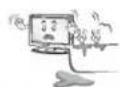
Do not use the product in damp place such as a bathroom or any place where it is likely to get wet.
- This may cause a fire or could give an electric shock.
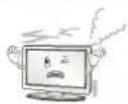
If you can smell smoke or other odors or hear a strange sound unplug the power cord and contact the service center.
- If you continue to use without taking proper measures, electrical shock or fire can occur.
CAUTION
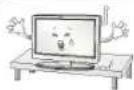
Install the product on a flat and stable place that has no risk of dropping the product.
- If the product is dropped, you may be injured or the product may be broken.
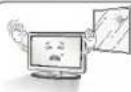
Keep the product away from direct sunlight.
- The product can be damaged.
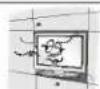
Do not place the product in a built-in installation such as bookcase or rack.
- Ventilation required.
Electrical Power Related Precautions
WARNING
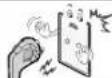
Make sure to connect the power cable to the grounded current.
- You may be electrocuted or injured.
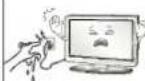
Do not touch the power plug with wet hands. Additionally, it the cord pin is wet or covered with dust, dry the power plug completely or wipe dust off.
- You may be electrocuted due to excess moisture.

During a thunder or lightning storm, unplug the power cable or signal cable.
- You may be electrocuted or a fire can break out.
CAUTION
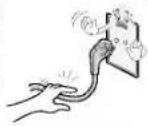
Protect the power cord from physical or mechanical abuse, such as being twisted, kinked, pinched, closed in a door, or walked upon. Pay particular attention to plugs, wall outlets, and the point where the cord exits the appliance.
Precautions in Moving the Product
WARNING
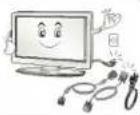
Make sure to turn off the product.
Make sure to remove all cables before moving the product.
- You may be electrocuted or the product can be damaged.
CAUTION
Do not shock the product when moving it.
- You may be electrocuted or the product can be damaged.
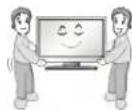
Make the panel face forward and hold it with both hands to move.
- If you drop the product, the damaged product can cause electric shock or fire. Contact with the service center for repair.
Precautions in Using the Product
WARNING
Do not disassemble, repair or modify the product at your own discretion.
- Fire or electric shock accident can occur.
- Contact the service center for check, calibration or repair.
To reduce the risk of fire or electric shock, do not expose this apparatus to rain or moisture.
Apparatus shall not be exposed to dripping or splashing and no objects filled with liquids, such as vases, shall be placed on the apparatus.
CAUTION
Refer all servicing to qualified service personnel. Servicing is required when the apparatus has been damaged in any way, such as power supply cord or plug is damaged, liquid has been spilled or objects have fallen into the apparatus, the apparatus has been exposed to rain or moisture, does not operate normally, or has been dropped.
INTRODUCTION
CONTROLS
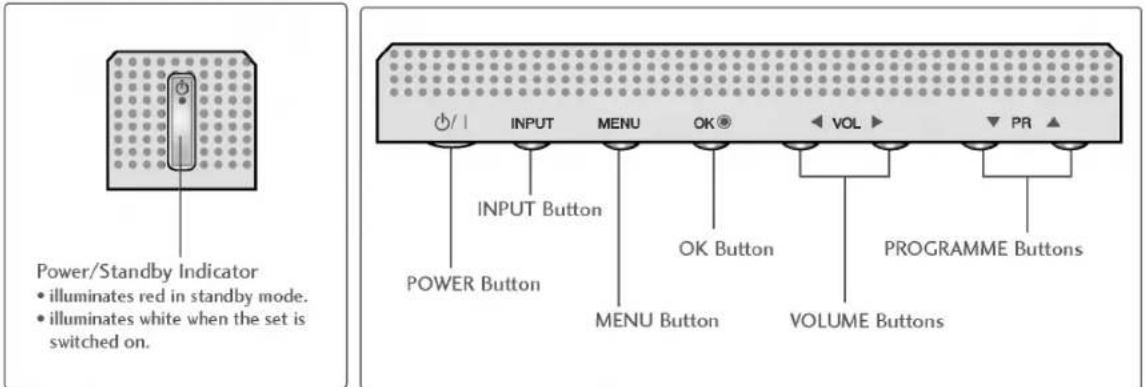
This is a simplified representation of the front panel. Here shown may be somewhat different from your TV.
Front Panel Controls
text_image
Power/Standby Indicator • illuminates red in standby mode. • illuminates white when the set is switched on. INPUT Button POWER Button MENU Button OK Button VOLUME Buttons PROGRAMME Buttons PR ▲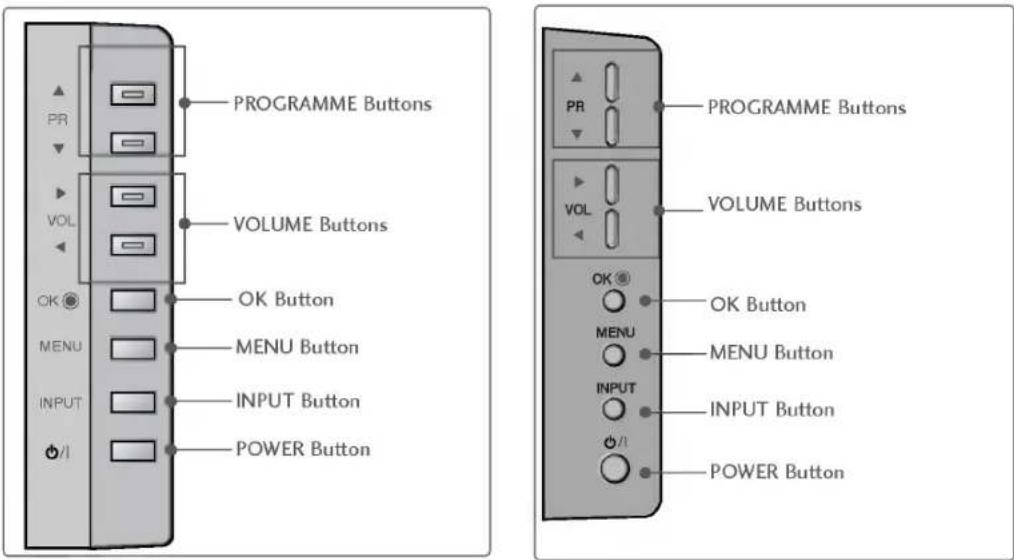
text_image
PROGRAMME Buttons VOLUME Buttons OK Button MENU Button INPUT Button POWER Button PROGRAMME Buttons VOLUME Buttons OK Button MENU Button INPUT Button POWER Button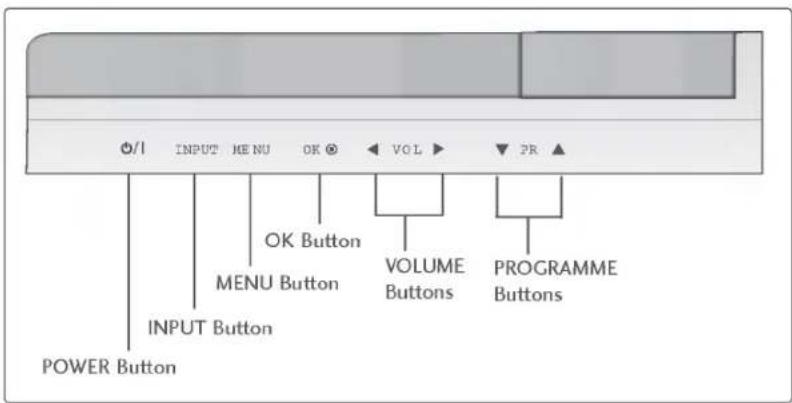
text_image
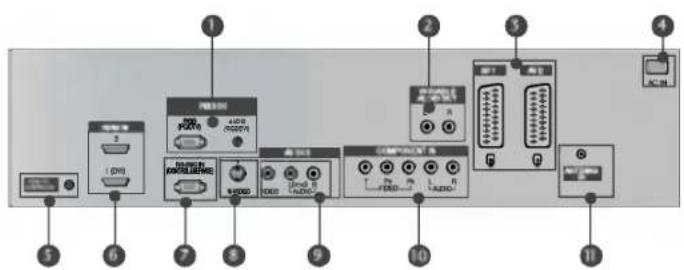
I INPUT MENU OK VOL PR OK Button MENU Button VOLUME Buttons PROGRAMME Buttons POWER Button INPUT ButtonCONNECTION OPTION
This is a simplified representation of the back panel. Here shown may be somewhat different from your TV.
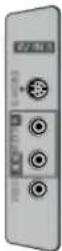
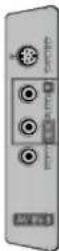
Back Connection Panel
text_image
Diagram of computer interface panel with labeled ports and connectors, showing connections from ports 1 to 11.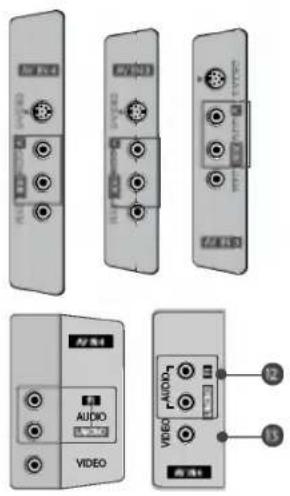
1 RGB/Audio Input
Connect the monitor output from a PC/DTV to the appropriate input port.
2 Variable Audio Output
Connect an external amplifier or add a subwoofer to your surround sound system.
3 Euro Scart Socket (AV1/AV2)
Connect scart socket input or output from an external device to these jacks.
4 Power Cord Socket
This TV operates on an AC power. The voltage is indicated on the Specifications page. Never attempt to operate the TV on DC power.
5 Remote Control Port
6 HDMI Input
Connect a HDMI signal to HDMI IN.
Connect DVI(VIDEO) signal to HDMI/DVI port with DVI to HDMI cable.
7 RS-232C Input(CONTROL&SERVICE)Port
Connect the serial port of the control devices to the RS-232C jack.
8 S-Video Input
Connect S-Video out from an S-VIDEO device.
9 Audio/Video Input
Connect audio/video output from an external device to these jacks.
10 Component Input
Connect a component video/audio device to these jacks.
11 Antenna Input
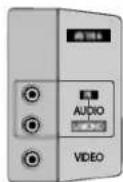
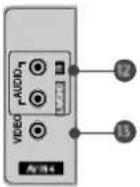
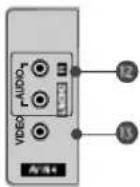
12 AUDIO Input
Connections are available for listening stereo sound from an external device.
13 VIDEO Input
Connects the video signal from a video device.
INTRODUCTION
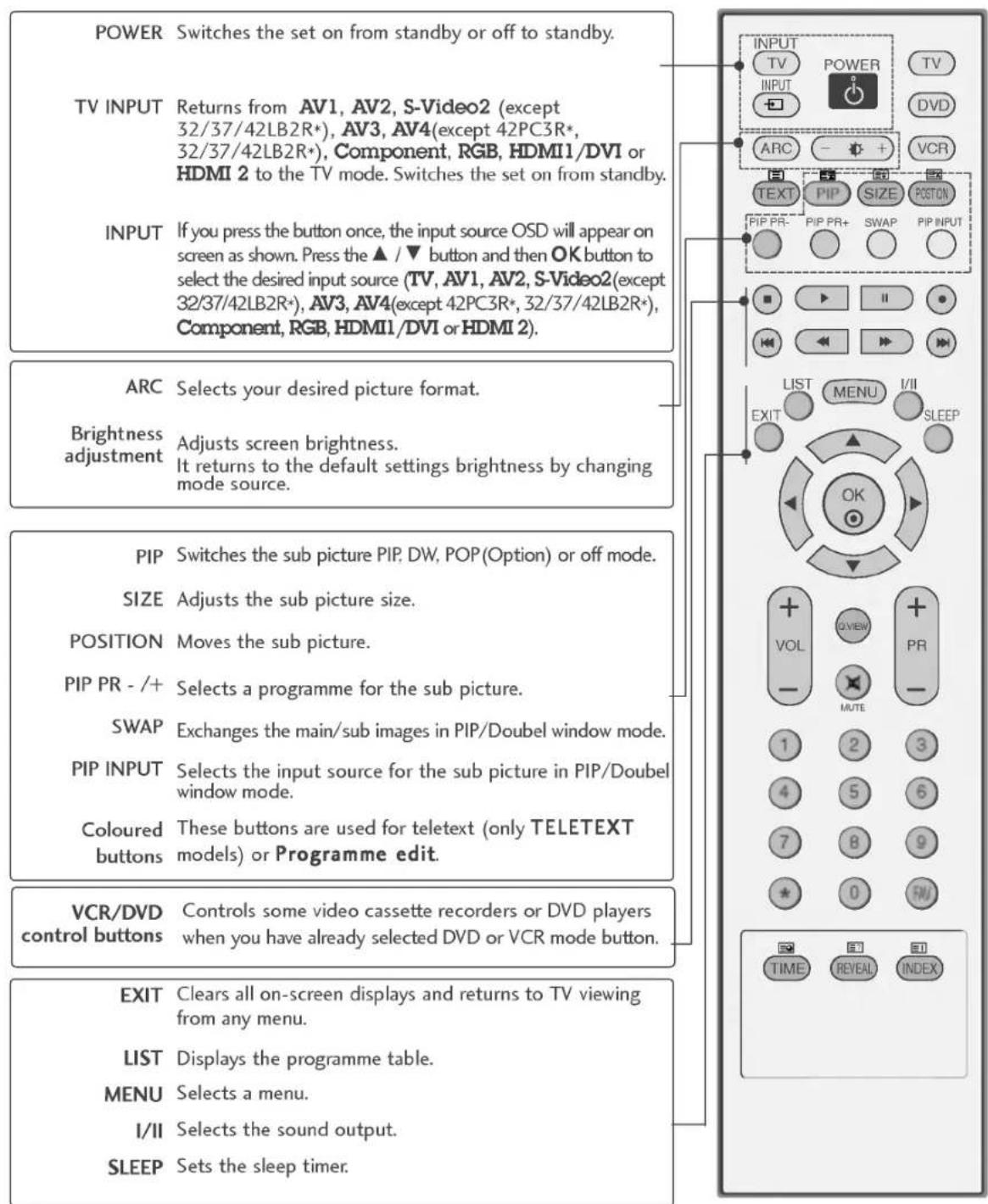
REMOTE CONTROL KEY FUNCTIONS
text_image
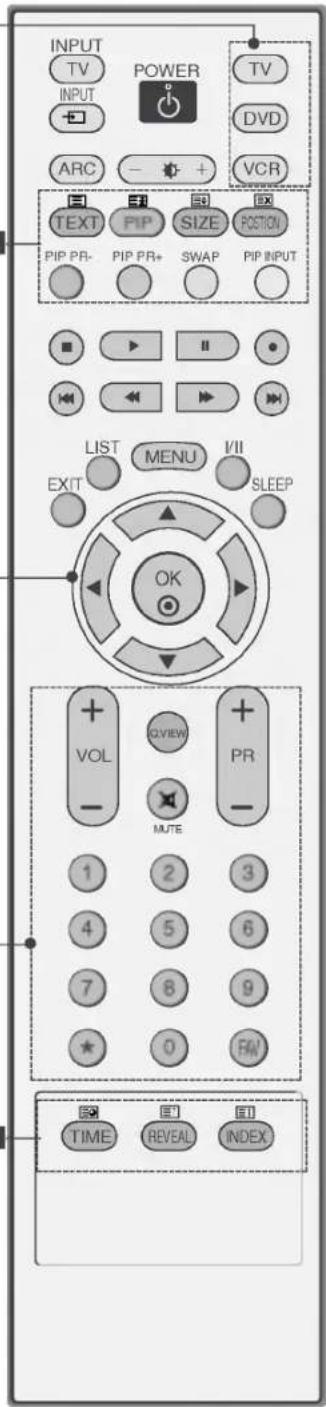
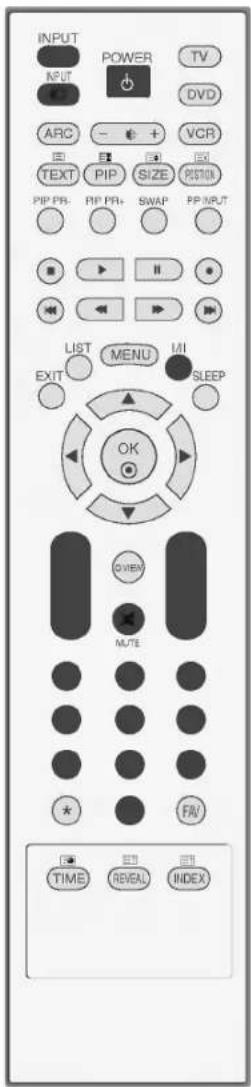
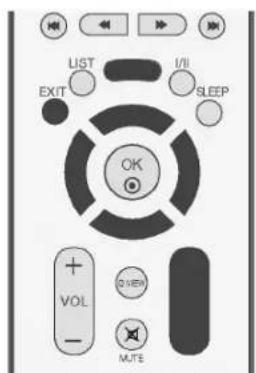
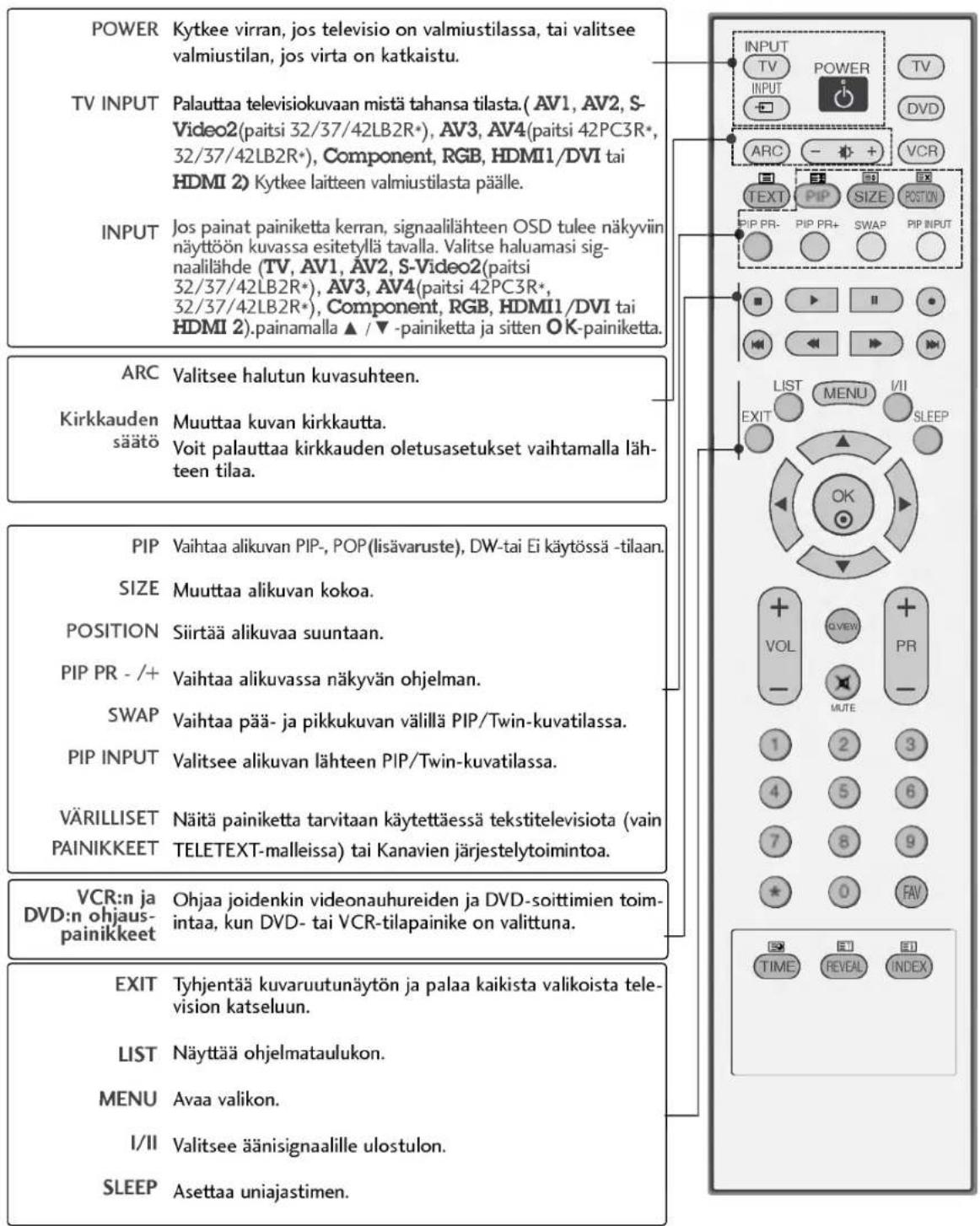
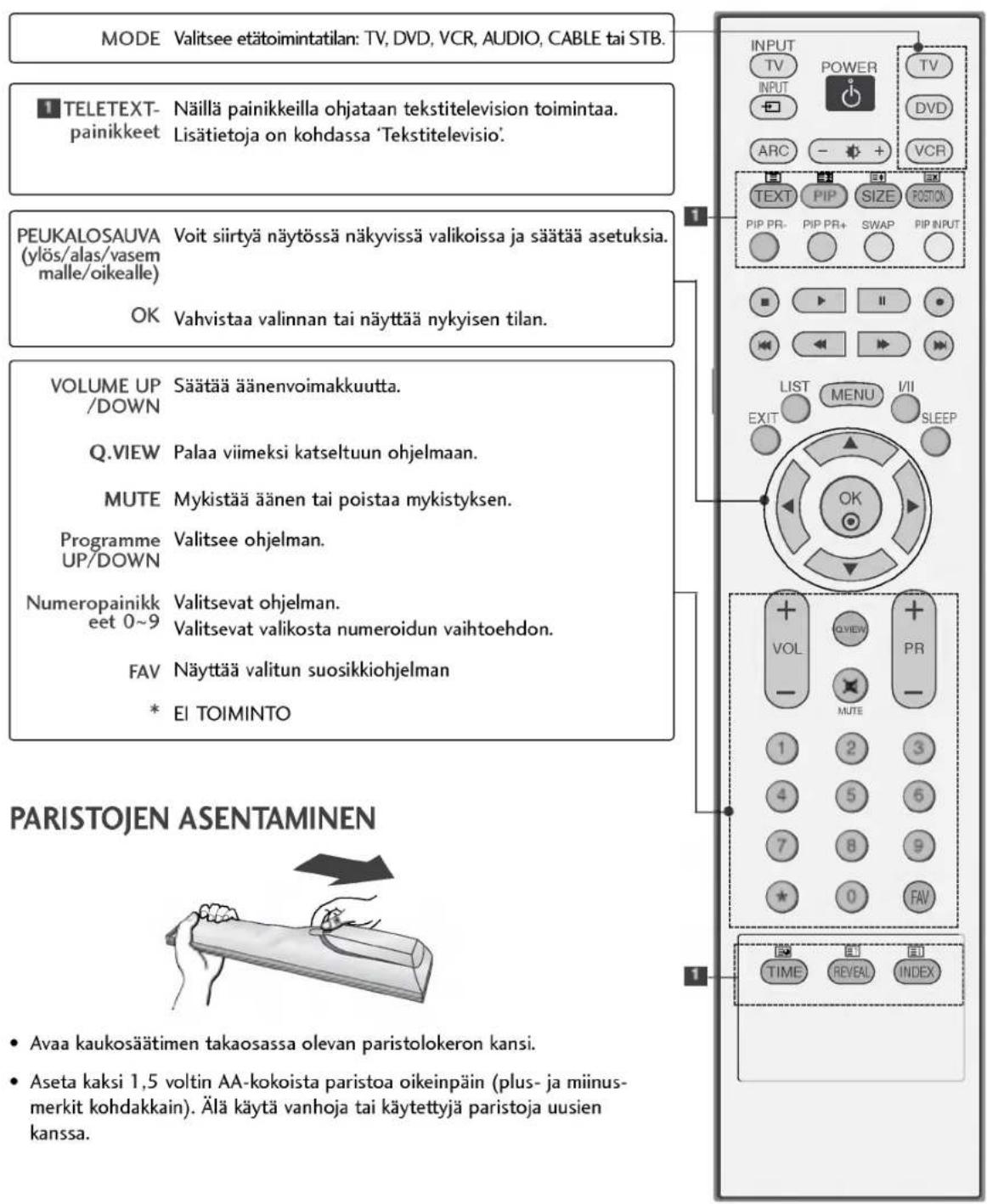
POWER Switches the set on from standby or off to standby. TV INPUT Returns from AV1, AV2, S-Video2 (except 32/37/42LB2R*), AV3, AV4(except 42PC3R*, 32/37/42LB2R*), Component, RGB, HDMI1/DVI or HDMI 2 to the TV mode. Switches the set on from standby. INPUT If you press the button once, the input source OSD will appear on screen as shown. Press the ▲ / ▼ button and then OK button to select the desired input source (TV, AV1, AV2, S-Video2(except 32/37/42LB2R*), AV3, AV4(except 42PC3R*, 32/37/42LB2R*), Component, RGB, HDMI1/DVI or HDMI 2). ARC Selects your desired picture format. Brightness adjustment Adjusts screen brightness. It returns to the default settings brightness by changing mode source. PIP Switches the sub picture PIP, DW, POP(Option) or off mode. SIZE Adjusts the sub picture size. POSITION Moves the sub picture. PIP PR -/+ Selects a programme for the sub picture. SWAP Exchanges the main/sub images in PIP/Doubel window mode. PIP INPUT Selects the input source for the sub picture in PIP/Doubel window mode. Coloured These buttons are used for teletext (only TELETEXT buttons models) or Programme edit. VCR/DVD Controls some video cassette recorders or DVD players when you have already selected DVD or VCR mode button. EXIT Clears all on-screen displays and returns to TV viewing from any menu. LIST Displays the programme table. MENU Selects a menu. I/II Selects the sound output. SLEEP Sets the sleep timer.MODE Selects the remote operating modes.
1 TELETEXT These buttons are used for teletext. BUTTONS For further details, see the 'Teletext' section.
THUMBSTICK Allows you to navigate the on-screen menus and adjust the system settings to your preference. (Up/Down/Left Right) OK Accepts your selection or displays the current mode.
VOLUME UP /DOWN Adjusts the volume.
Q.VIEW Returns to the previously viewed programme.
MUTE Switches the sound on or off.
Programme Selects available programmes. UP/DOWN
0\~9 number Selects a programme. button Selects numbered items in a menu. FAV Displays the selected favourite programme. * No function
INSTALLING BATTERIES
natural_image
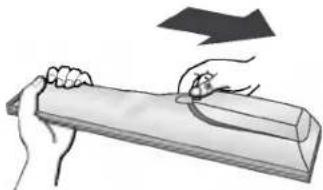
Illustration of hands holding a cylindrical object with a curved line, no text or symbols present- Open the battery compartment cover on the back side and insert the batteries with correct polarity.
- Install two 1.5V alkaline batteries of AA type. Don't mix used batteries with new batteries.
text_image
INPUT TV POWER TV INPUT ARC + + VCR TEXT PIP SIZE BOX PIP PR- PIP PR+ SWAP PIP INPUT LIST MENU VII EXIT SLEEP OK VOL QVIEW PR - MUTE 1 2 3 4 5 6 7 8 9 0 F& TIME REVEAL INDEXINSTALLATION
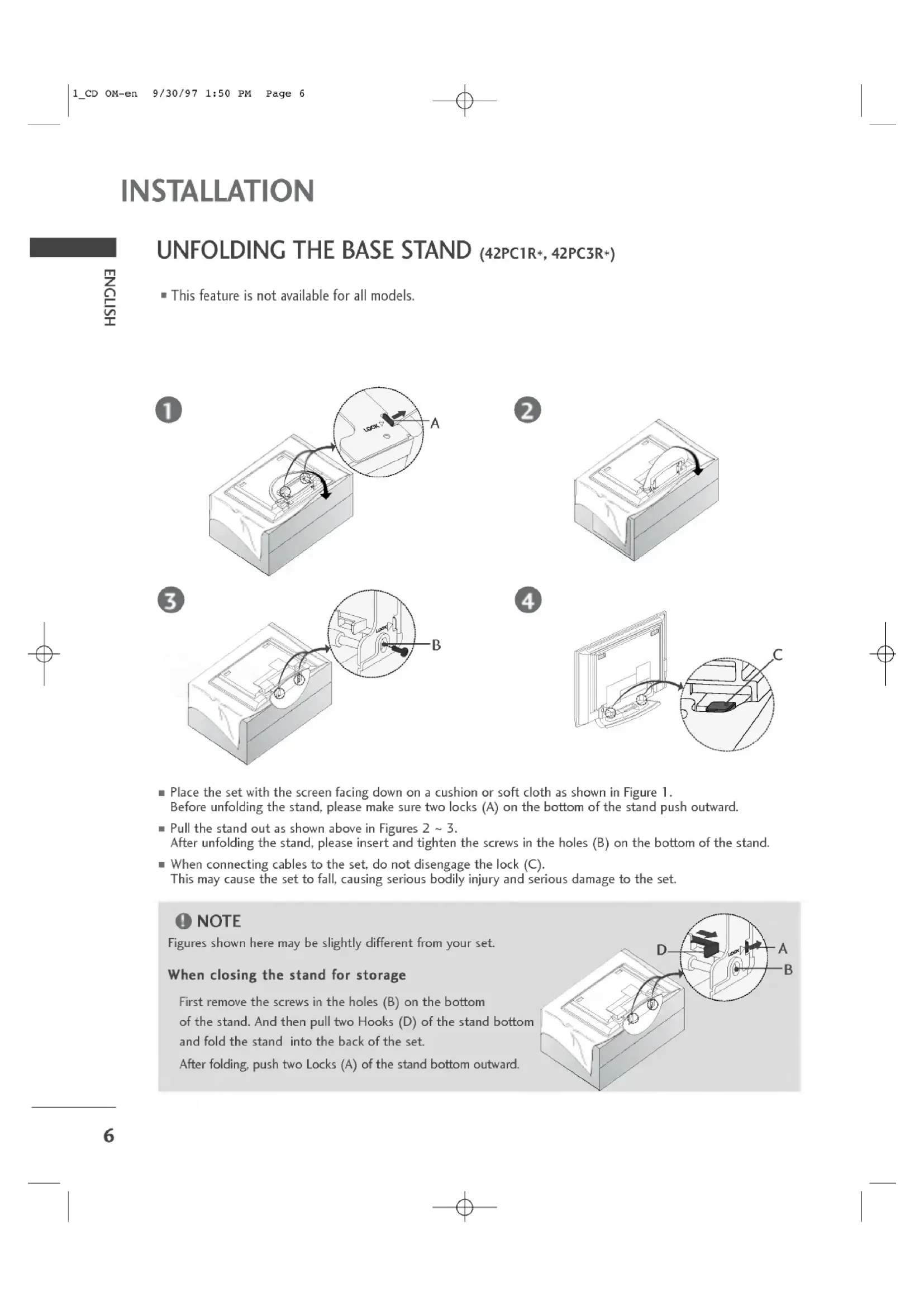
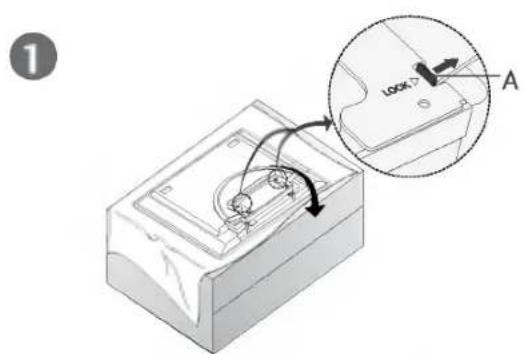
UNFOLDING THE BASE STAND (42PC1R\*, 42PC3R\*)
■ This feature is not available for all models.
text_image
1 A2
natural_image
3D diagram of a mechanical component with a curved arrow indicating rotation (no text or symbols)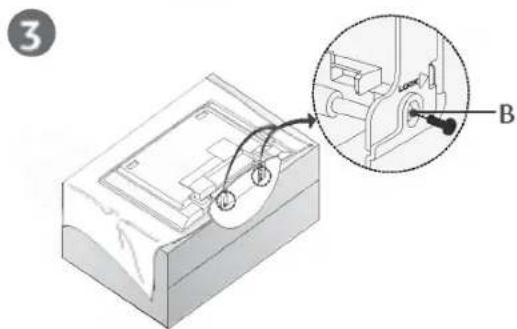
text_image
3 B4
natural_image
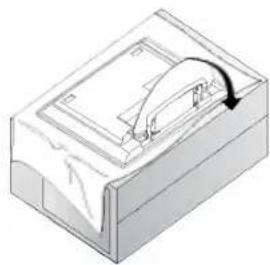
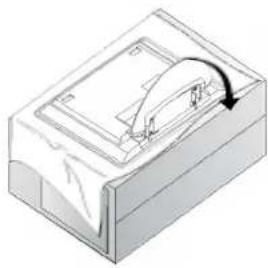
Diagram showing a device being inserted into a car's front panel, with an inset close-up highlighting the component (no text or symbols present)■ Place the set with the screen facing down on a cushion or soft cloth as shown in Figure 1. Before unfolding the stand, please make sure two locks (A) on the bottom of the stand push outward.
- Pull the stand out as shown above in Figures 2 \~ 3.
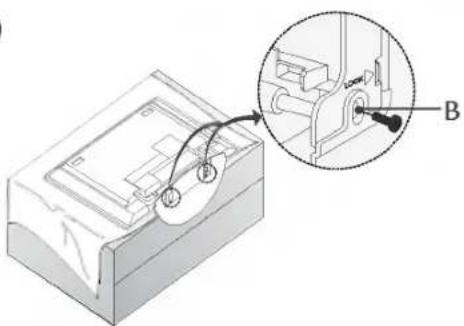
After unfolding the stand, please insert and tighten the screws in the holes (B) on the bottom of the stand.
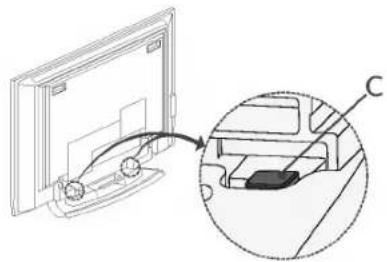
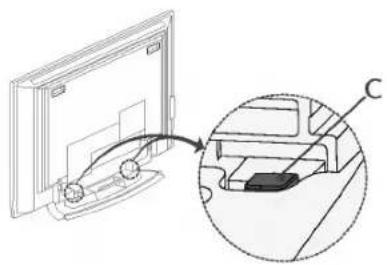
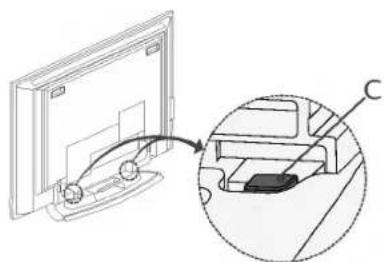
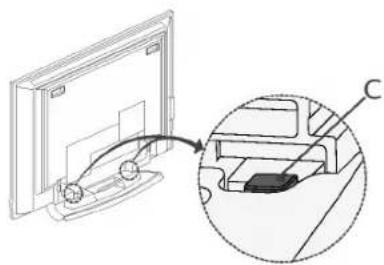
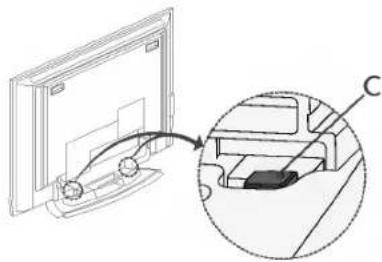
■ When connecting cables to the set, do not disengage the lock (C).
This may cause the set to fall, causing serious bodily injury and serious damage to the set.
NOTE
Figures shown here may be slightly different from your set.
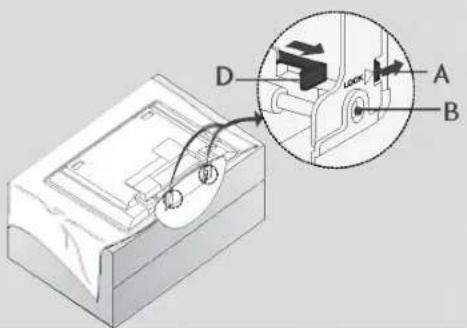
When closing the stand for storage
First remove the screws in the holes (B) on the bottom of the stand. And then pull two Hooks (D) of the stand bottom and fold the stand into the back of the set.
After folding, push two Locks (A) of the stand bottom outward.
text_image
Technical diagram of a mechanical device with labeled components A, B, and D, showing internal components and assembly.HOW TO JOIN THE PRODUCT ASSEMBLY TO THE WALL TO PROTECT THE SET TUMBLING
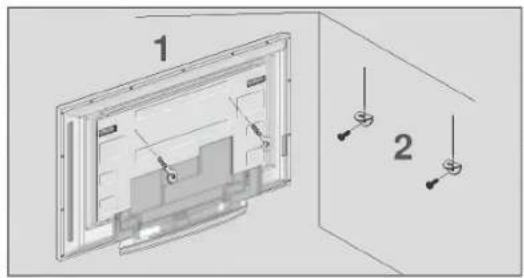
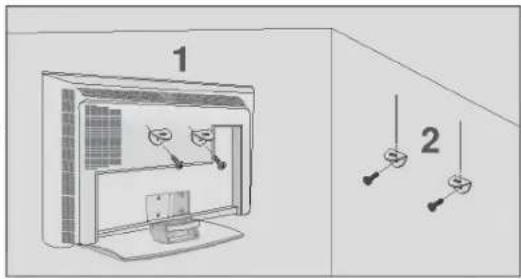
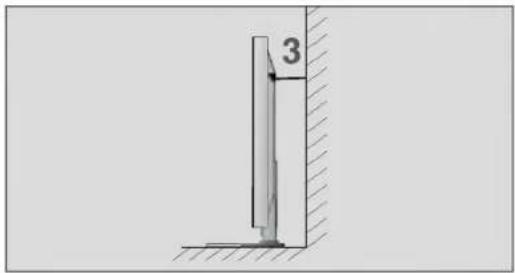
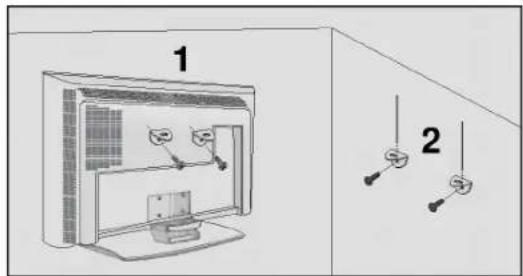
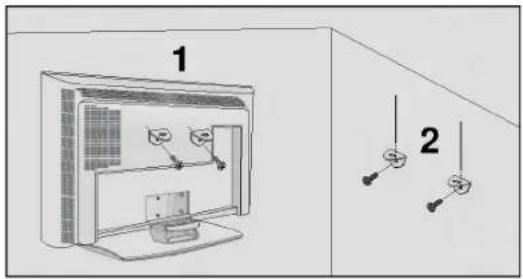
- Set it up close to the wall so the product doesn't fall over when it is pushed backwards.
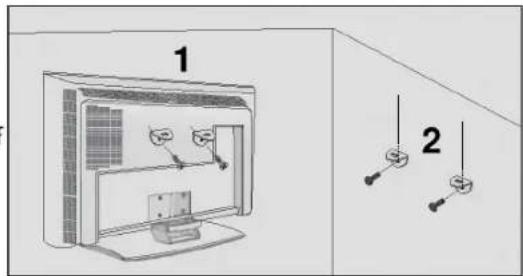
The instructions shown below is a safer way to set up the product, which is to fix it on the wall so the product doesn't fall over when it is pulled in the forward direction. It will prevent the product from falling forward and hurting people. It will also prevent the product from damage caused by fall. Please make sure that children don't climb on or hang from the product.
text_image
1 2or
text_image
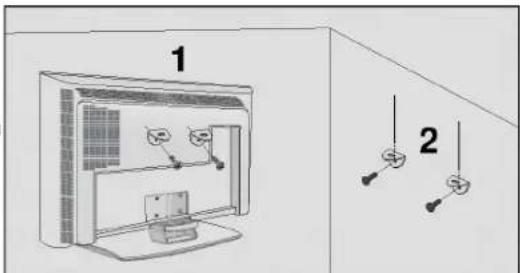
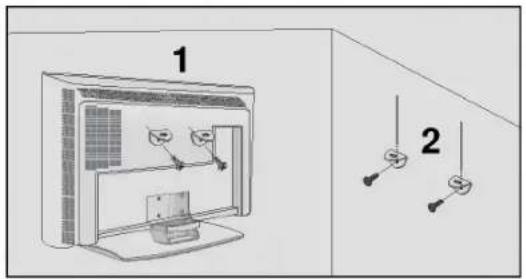
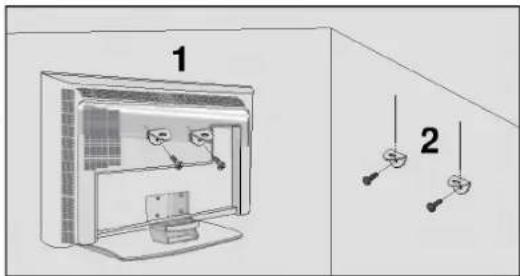
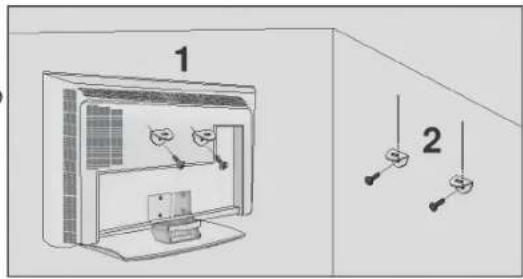
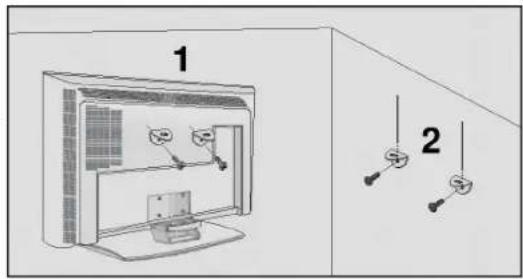
1 21 Use the eye-bolts or TV brackets/bolts to fix the product to the wall as shown in the picture. (If your product has the bolts in the eye-bolts position before inserting the eye-bolts, loosen the bolts.) * Insert the eye-bolts or TV brackets/bolts and tighten them securely in the upper holes.
2 Secure the wall brackets with the bolts (not provided as parts of the product, must purchase separately) on the wall. Match the height of the bracket that is mounted on the wall.
text_image
33 Use a sturdy rope (not provided as parts of the product, must purchase separately) to tie the product. It is safer to tie the rope so it becomes horizontal between the wall and the product.
NOTE
▶ When moving the product to another place undo the ropes first.
▶ Use a product holder or a cabinet that is big and strong enough for the size and weight of the product.
▶ To use the product safely make sure that the height of the bracket that is mounted on the wall is same as that of the product.
INSTALLATION
STAND INSTALLATION
■ The TV can be installed in various ways such as on a wall, or on a desktop etc.
■ The TV is designed to be mounted horizontally.
GROUNDING
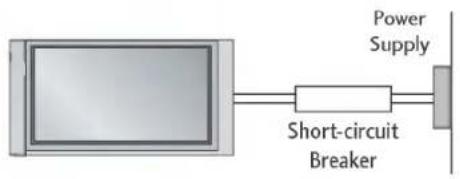
Ensure that you connect the earth ground wire to prevent possible electric shock. If grounding methods are not possible, have a qualified electrician install a separate circuit breaker. Do not try to ground the unit by connecting it to telephone wires, lightening rods, or gas pipes.
text_image
Power Supply Short-circuit BreakerDesktop Pedestal Installation
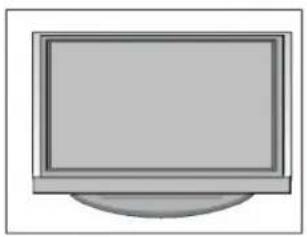
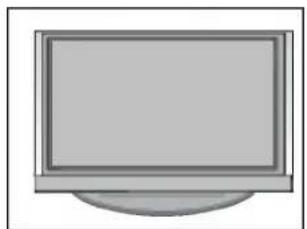
For proper ventilation, allow a clearance of 4" on each side and from the wall.
natural_image
Simple illustration of a flat-screen monitor with no text or symbols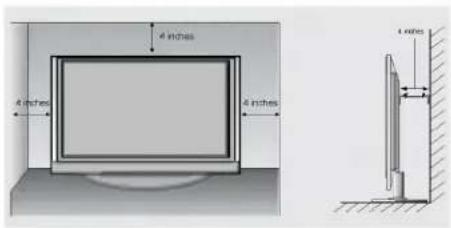
text_image
4 inches 4 inches 4 inches 4 inchesWall Mount: Horizontal installation
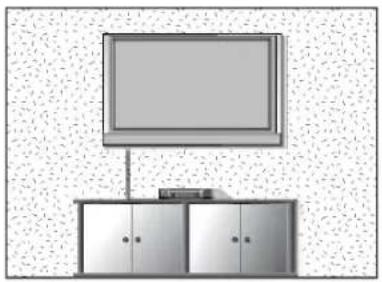
For proper ventilation, allow a clearance of 4" on each side and from the wall. Detailed installation instructions are available from your dealer, see the optional Tilt Wall Mounting Bracket Installation and Setup Guide.
natural_image
Simple line drawing of a TV setup with a monitor and two cabinets (no text or symbols)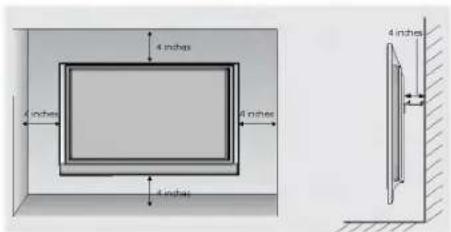
text_image
4 inches 4 inches 8 inches 4 inches 4 inches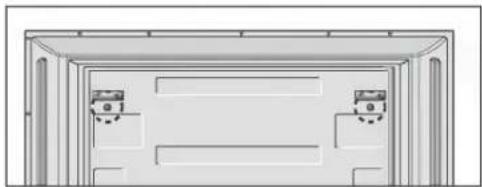
natural_image
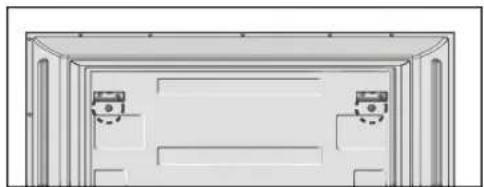
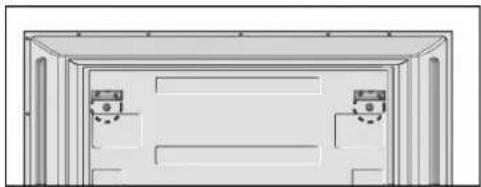
Simple line drawing of a door frame with two doors and a seat, no text or symbols presentRemove two screws of the backside of the set before installing the wall mounting bracket.
CONNECTIONS & SETUP
■ To prevent the equipment damage, never plug in any power cords until you have finished connecting all equipment.
ANTENNA CONNECTION
■ For optimum picture quality, adjust antenna direction.
■ An antenna cable and converter are not supplied.
Multi-family Dwellings/Apartments (Connect to wall antenna socket)

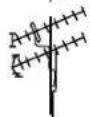
VHF Antenna
UHF Antenna
Wall Antenna Socket

Outdoor Antenna

Single-family Dwellings /Houses
(Connect to wall jack for outdoor antenna)
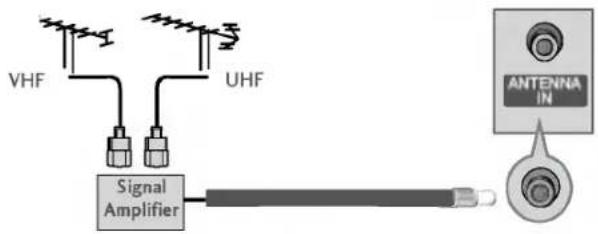
■ In poor signal areas, to get better picture quality, install a signal amplifier to the antenna as shown to the right.
■ If signal needs to be split for two TVs, use an antenna signal splitter for connection.
text_image
VHF UHF Signal Amplifier ANTENNA INCONNECTIONS & SETUP
TURNING THE TV ON
If your TV will be turned on, you will be able to use its features.
Turning on the TV
1 First, connect power cord correctly.
At this moment, the TV switches to standby mode.
■ In standby mode to turn TV on, press the ⏻/1 , INPUT,
PR ▲ / ▼ button on the TV or press the
POWER, TV, INPUT, PR +/-, Number(0\~9) button on
the remote control and then the TV will switch on.
Volume Adjustment
1 Press the VOL +/- button to adjust the volume.
2 If you want to switch the sound off, press the MUTE button.
3 You can cancel this function by pressing the MUTE, VOL +/- or I/II button.
Programme selection
1 Press the PR +/- or NUMBER button to select a programme number.
text_image
INPUT POWER TV DVD ARC - + VCR TEXT PIP SIZE POTTON PIP PR- PIP PR+ SWAP PP INPUT LIST MENU LII EXIT SLEEP OK O VIEW M/TE FA/ TIME REVEAL INDEXNOTE
▶ If you intend to be away on vacation, disconnect the power plug from wall power outlet.
On-Screen Menu Language / Country Selection
Installation guide menu appears on TV screen when it is turned on for the first time.
1 Press the ▲ / ▼ / ◀ / ▶ button and then, OK button to select your desired language.
2 Press the ▲ / ▼ / ◀ / ▶ button and then, OK button to select your country.
* If you want to change Language/ Country selection
1 Press the MENU button and then use ▲ / ▼ button to select the Special menu.
2 Press the ▶ button and then use ▲ / ▼ button to select Language. The menus can be shown on the screen in the selected language.
Or, Press the ▶ button and then use ▲ / ▼ button to select Country.
3 Press the ▶ button and then use ▲ / ▼ button to select your desired language or country.
4 Press the OK button
5 Press the EXIT button to return to normal TV viewing.
NOTE
If you don't finish set up Installation Guide by pressing EXIT button or time out of OSD (On Screen Display) display, it will continuously appear until completing set up whenever the set is turned on.
▶ If you select wrong local country, the teletext may not appear correctly on the screen and some problem may happen during teletext operation.
▶ Arab and Hebrew are added to Country of Installation Guide according to the countries which using Arab and Hebrew languages.
SPECIAL FUNCTIONS
TELETEXT
Teletext (or TOPtext) is an optional function, therefore only a setwith the teletext system can receive the teletext broadcast.
Teletext is a free service broadcast by most TV stations which gives up-to-the-minute information on news, weather, television programmes, share prices and many other topics.
The teletext decoder of this TV can support the SIMPLE, TOP and FASTEXT systems. SIMPLE (standard teletext) consists of a number of pages which are selected by directly entering the corresponding page number. TOP and FASTEXT are more modern methods allowing quick and easy selection of teletext information.
Switch on/off
Press the TEXT button to switch to teletext. The initial page or last page appears on the screen.
Two page numbers, TV station name, date and time are displayed on the screen headline. The first page number indicates your selection, while the second shows the current page displayed.
Press the TEXT or EXIT button to switch off teletext. The previous mode reappears.
SIMPLE Text
Page selection
Enter the desired page number as a three digit number with the NUMBER buttons. If during selection you press a wrong number, you must complete the three digit number and then re-enter the correct page number.
2 The PR+/- button can be used to select the preceding or following page.
TOP Text
The user guide displays four fields-red, green, yellow and blue at the bottom of the screen. The yellow field denotes the next group and the blue field indicates the next block.
■ Block / group / page selection
-
With the blue button you can progress from block to block.
-
Use the yellow button to proceed to the next group with automatic overflow to the next block.
-
With the green button you can proceed to the next existing page with automatic overflow to the next group. Alternatively the PR+ button can be used.
-
The red button permits to return to previous selection. Alternatively the PR-button can be used.
■ Direct page selection
Corresponding to the SIMPLE teletext mode, you can select a page by entering it as a three digit number using the NUMBER buttons in TOP mode.
FASTEXT
The teletext pages are colour coded along the bottom of the screen and are selected by pressing the corresponding coloured button.
Page selection
-
Press the ☑I INDEX button to select the index page.
-
You can select the pages which are colour coded along the bottom line with the same coloured buttons.
-
Corresponding to the SIMPLE teletext mode, you can select a page by entering its three digit page number with the NUMBER buttons in FASTEXT mode.
-
The PR+/- button can be used to select the preceding or following page.
TV MENU
ON SCREEN MENUS SELECTION AND ADJUSTMENT
Your TV's OSD (On Screen Display) may differ slightly from what is shown in this manual.
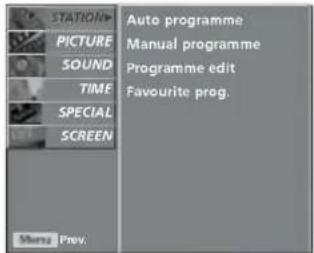
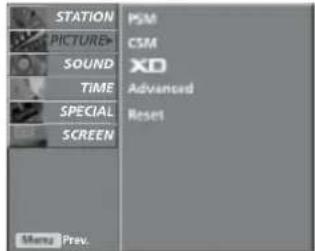
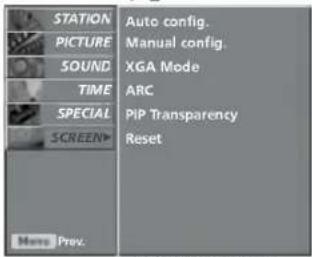
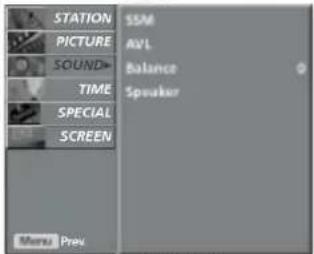
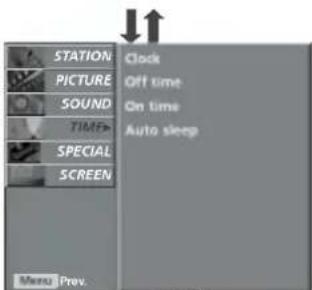
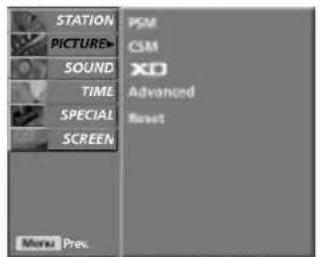
1 Press the MENU button and then ▲ / ▼ button to display each menu.
2 Press the ▶ button and then ▲ / ▼ button to select a menu item.
3 Change the setting of an item in the sub or pull-down menu with ◀/▶ button. You can move to the higher level menu by pressing the OK or MENU button.
text_image
STATION PICTURE SOUND TIME SPECIAL SCREEN Auto programme Manual programme Programme edit Favourite prog. Menu Prev.
text_image
STATION PICTURE SOUND TIME SPECIAL SCREEN Menu Prev. PSM CSM XD Advanced ResetPICTURE menu
↓↑
STATION menu
↓↑
text_image
STATION PICTURE SOUND TIME SPECIAL SCREEN Auto config. Manual config. XGA Mode ARC PIP Transparency Reset More Prev.SCREEN menu
text_image
STATION PICTURE SOUND TIME SPECIAL SCREEN SSM AVL Balance Speaker Menu PrevSOUND menu
↓↑
text_image
STATION PICTURE SOUND TIME SPECIAL SCREEN Menu Prev. Clock Off time On time Auto sleep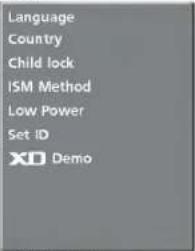
text_image
Language Country Child lock ISM Method Low Power Set iD XO DemoSPECIAL menu
TIMÉ menu
NOTE
a. The OSD (On Screen Display) function enables you to adjust the screen status conveniently since it provides graphical presentation.
b. In this manual, the OSD (On Screen Display) may be different from your TV's because it is just example to help the TV operation.
(The OSD mainly use pictures for the 42/50PC1R*, 42PC3R*.)
c. In the teletext mode, menus are not displayed.
d. In some models, XGA will display on the SCREEN menu.
e. It's not available to use ISM Method and Low Power in LCD TV models.
f. It's available to use Index in 32/37/42/47LB2R+.
TV MENU | Setting up TV stations
AUTO PROGRAMME TUNING
Up to 100 TV stations can be stored by programme numbers (0 to 99). Once you have preset the stations, you will be able to use the PR +/- or NUMBER buttons to scan the stations you have programmed.
Stations can be tuned using automatic or manual modes.
All stations that can be received are stored by this method. It is recommended that you use auto programme during installation of this set.
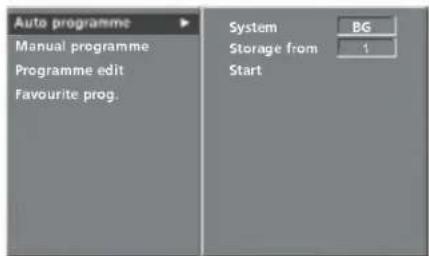
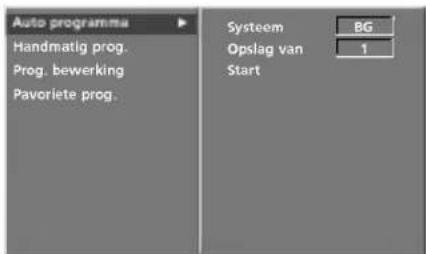
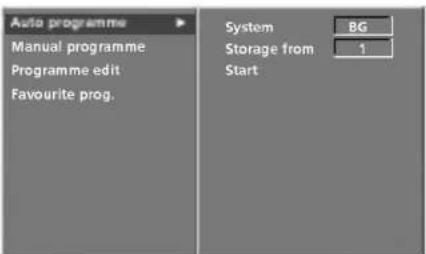
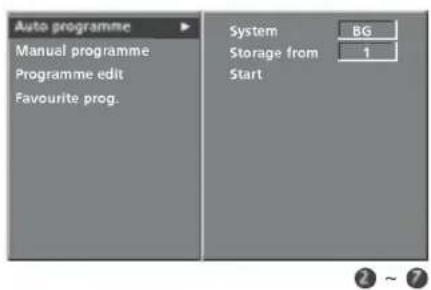
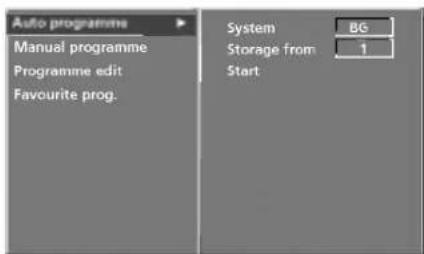
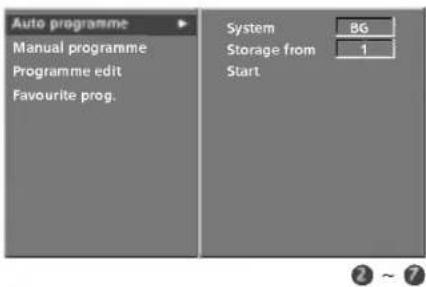
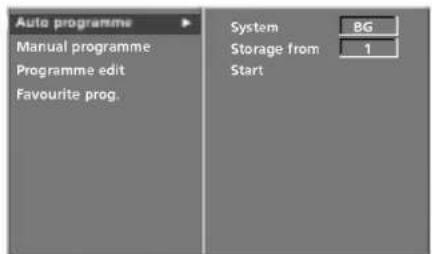
1 Press the MENU button and then ▲ / ▼ button to select the STATION menu.
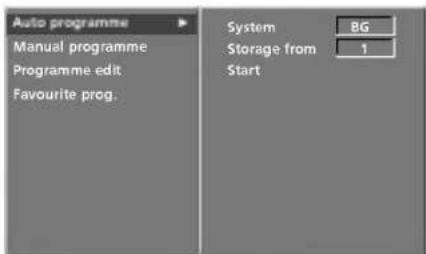
2 Press the ▶ button and then ▲ / ▼ button to select Auto programme.
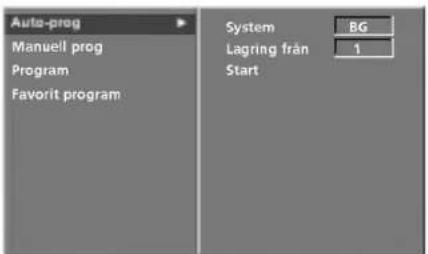
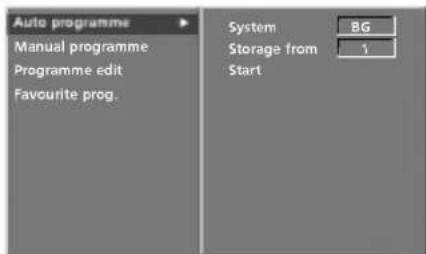
3 Press the ▶ button and then ▲ / ▼ button to select System.
4 Press the ◀/▶ button to select a TV system menu; L : SECAM L/L' (France)
BG : PAL B/G, SECAM B/G (Europe / East Europe / Asia / New Zealand / M.East / Africa / Australia)
I : PAL I/II (U.K. / Ireland / Hong Kong / South Africa)
DK : PAL D/K, SECAM D/K (East Europe / China / Africa / CIS)
M : (USA / Korea / Philippines) (option)
5 Press the ▲ / ▼ button to select Storage from.
6 Press the ◀/▶ button or NUMBER buttons to select the beginning programme number. If you use NUMBER buttons, any number under 10 is entered with a numeric '0' in front of it, i.e.'05' for 5.
7 Press the ▲ / ▼ button to select Start.
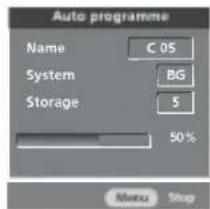
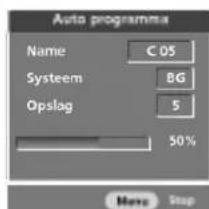
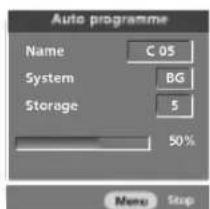
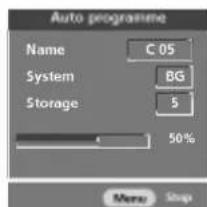
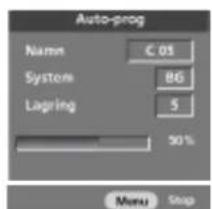
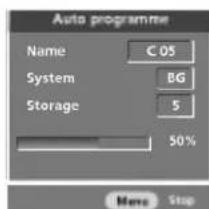
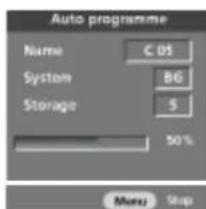
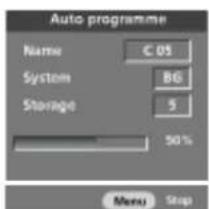
8 Press the ▶ button to begin auto programming. All receivable stations are stored. The station name is stored for stations which broadcast VPS (Video Programme Service), PDC (Programme Delivery Control) or TELETEXT data. If no station name can be assigned to a station, the channel number is assigned and stored as C (V/UHF 01-69) or S (Cable 01-47), followed by a number.
To stop auto programming, press the MENU button. When auto programming is completed, the Programme edit menu appears on the screen. See the Programme edit section to edit the stored programme.
9 Press the EXIT button to return to normal TV viewing.
text_image
LIST I/II EXIT SLEEP OK + VOL - Q/VIEW M/TE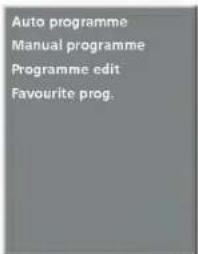
text_image
Auto programme Manual programme Programme edit Favourite prog.①
text_image
Auto programme Manual programme Programme edit Favourite prog. System Storage from Start BG 1②\~⑦
text_image
Auto programme Name C OS System BG Storage 5 50% Menu StopB
APPENDIX
TROUBLESHOOTING CHECKLIST
| The operation does not work normally. | |
| The remote control doesn’t work | Check to see if there is any object between the product and the remote control causing obstruction.Are batteries installed with correct polarity (+ to +, - to -)?Correct remote operating mode set: TV, VCR etc.?Install new batteries. |
| Power is suddenly turned off | Is the sleep timer set?Check the power control settings. Power interruptedNo broadcast on station tuned with Auto off activated. |
| The video function does not work. | |
| No picture & No sound | Check whether the product is turned on.Try another channel. The problem may be with the broadcast.Is the power cord inserted into wall power outlet?Check your antenna direction and/or location.Test the wall power outlet, plug another product's power cord into the outlet where the product's power cord was plugged in. |
| Picture appears slowly after switching on | This is normal, the image is muted during the product startup process. Please contact your service center, if the picture has not appeared after five minutes. |
| No or poor color or poor picture | Adjust Color in menu option.Keep a sufficient distance between the product and the VCR.Try another channel. The problem may be with the broadcast.Are the video cables installed properly?Activate any function to restore the brightness of the picture. |
| Horizontal/vertical bars or picture shaking | Check for local interference such as an electrical appliance or power tool. |
| Poor reception on some channels | Station or cable product experiencing problems, tune to another station.Station signal is weak, reorient antenna to receive weaker station.Check for sources of possible interference. |
| Lines or streaks in pictures | Check antenna (Change the direction of the antenna). |
APPENDIX
| The audio function does not work. | |
| Picture OK & No sound | ■Press the VOL +/- button.■Sound muted? Press MUTE button.■Try another channel. The problem may be with the broadcast.■Are the audio cables installed properly? |
| No output from one of the speakers | ■Adjust Balance in menu option. |
| Unusual sound from inside the product | ■A change in ambient humidity or temperature may result in an unusual noise when the product is turned on or off and does not indicate a fault with the product. |
| There is a problem in PC mode. (Only PC mode applied) | |
| The signal is out of range. | ■ Adjust resolution, horizontal frequency, or vertical frequency.■ Check the input source. |
| Vertical bar or stripe on background & Horizontal Noise & Incorrect position | ■ Work the Auto configure or adjust clock, phase, or H/V position. |
| Screen colour is unstable or single colour | ■ Check the signal cable.■ Reinstall the PC video card. |
To view the User's guide on the CD-ROM
To view the User's guide on the CD-ROM, Adobe Acrobat Reader must be installed on your PC.
The "ACRORD" folder on the CD-ROM contains the installation programs for them.
If you want to install those programs, Open the "My Computer"→Open the "LG"→Open the "ACRORD"
→ double-click your language.
To view the User's guide
The User's guide files are included in the supplied CD-ROM.
Load the supplied CD-ROM into the CD-ROM drive of your PC.
After a while, the web page of the CD-ROM will open automatically.(for Window only)
If the web page does not appear automatically, open the User's guide file directly.
Open the "My computer" → Open the "LG" → Open the "index.htm" file.
MAINTENANCE
Early malfunctions can be prevented. Careful and regular cleaning can extend the amount of time you will have your new TV. Be sure to turn the power off and unplug the power cord before you begin any cleaning.
Cleaning the Screen
Here's a great way to keep the dust off your screen for a while. Wet a soft cloth in a mixture of lukewarm water and a little fabric softener or dish washing detergent. Wring the cloth until it's almost dry, and then use it to wipe the screen.
2 Make sure the excess water is off the screen, and then let it air-dry before you turn on your TV.
Cleaning the Cabinet
■ To remove dirt or dust, wipe the cabinet with a soft, dry, lint-free cloth.
■ Please be sure not to use a wet cloth.
Extended Absence
CAUTION
If you expect to leave your TV dormant for a long time (such as a vacation), it's a good idea to unplug the power cord to protect against possible damage from lightning or power surges.

text_image
Life's Good LGnatural_image
3D diagram of a mechanical component with an arrow indicating direction (no text or symbols)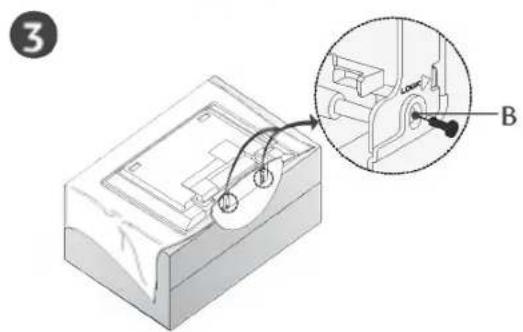
text_image
3 B4
natural_image
Diagram showing a device with a cable or connector inserted into a panel, with an inset close-up highlighting the component (no text or symbols present)text_image
Technical diagram showing a mechanical assembly with labeled components A, B, and D, including a magnified inset view.SICHERE ANBRINGUNG DES PRODUKTS AN DER WAND
natural_image
Technical diagram showing a vertical structure with a numbered label '3' and hatched ground, no readable text or symbols present.natural_image
Simple illustration of a computer monitor with no text or symbols on its screen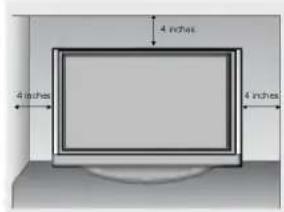
text_image
4 inches 4 inches 4 inches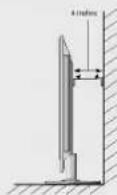
Wandmontage: Horizontale Lage
natural_image
Simple line drawing of a TV setup with a monitor, cabinet, and cable (no text or symbols)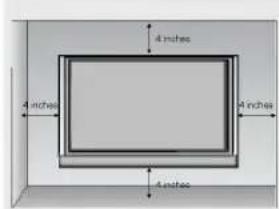
text_image
4 inches 4 inches 4 inches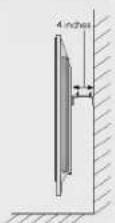
natural_image
Architectural line drawing of a two-story building facade with doors and windows (no text or symbols)text_image
INPUT NPUT POWER TV DVD ARC - + VCR TEXT PIP SIZE RISTON PIP PRI PIP PRI+ SWAP PIP INPUT LIST MENU I/II EXIT SLEEP OK Q VIEW MUTE TIME REVEAL INDEXHINWEIS
text_image
Life's Good LGLCD-tv | Plasma-tv
GUIDE DE L'UTILISATEUR
MODÈLES DE TV MODÈLES DE TV
LCD Plasma
37LC2R* 42PC1R*
42LC2R* 42PC3R*
37LC25R* 50PC1B*
42LC25R*
37LC3R*
42LC3R*
32LB2R*
37LB2R*
42LB2R*
47LB2R*
text_image
Diagram of electronic device rear panel with labeled ports and connectors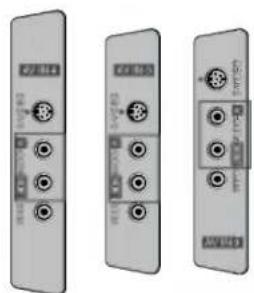
natural_image
Three identical gray electronic device modules with ports and connectors, shown from different angles (no visible text or symbols)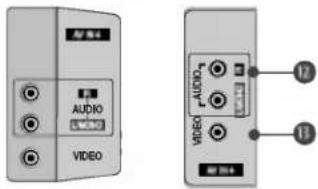
text_image
AUDIO VIDEO 12 13natural_image
Diagram of a mechanical device with a curved arrow indicating rotation or movement (no text or symbols)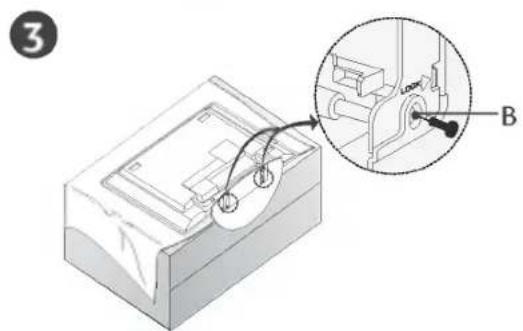
text_image
3 B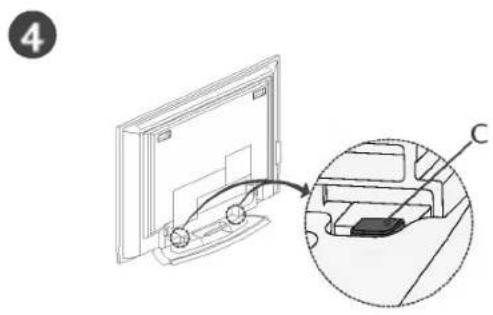
text_image
4 Ctext_image
Technical diagram showing a mechanical assembly with labeled components A, B, and D, including a magnified inset view.COMMENT FIXER LE SYSTÈME DE MONTAGE AU MUR POUR ÉVITER LA CHUTE DU TÉLÉVISEUR
natural_image
Simple line drawing of a vertical monitor mounted on a wall, with no text or symbols present.natural_image
Simple illustration of a flat-screen computer monitor (no text or symbols)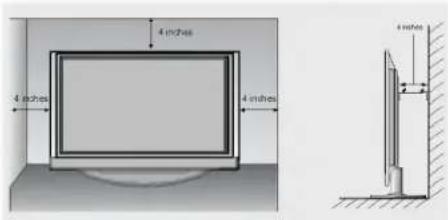
text_image
4 inches 4 inches 4 inchesnatural_image
Interior view of a modern office or library with a large TV mounted on top, connected to a cabinet (no visible text or symbols)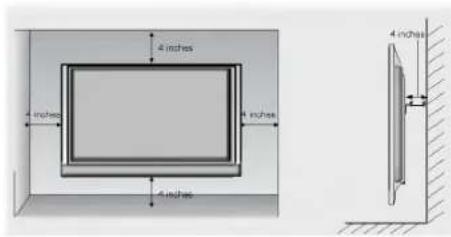
text_image
4 inches 4 inches 4 inches 4 inches 4 inches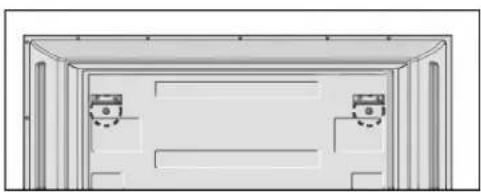
natural_image
Simple line drawing of a two-panel door frame with no text or symbolstext_image
INPUT POWER TV DVD ARC - + VCR TEXT PIP SIZE POSTON PIP PR PIP PR+ SWAP PP INPUT LIST MENU I/II EXIT SLEEP OK QVIEW MUTE FRY TIME REVEAL INDEX! REMARQUE
L : SECAM L/L' (France)
text_image
LIST EXIT SLEEP OK VOL - OVER MUTE
text_image
Life's Good LGTV LCD | TV AL PLASMA ISTRUZIONI PER L'USO
MODELLI DI TV LCD MODELLI DI TV AL
text_image
Diagram of electronic device panel labels with Chinese annotations, showing various ports and indicators.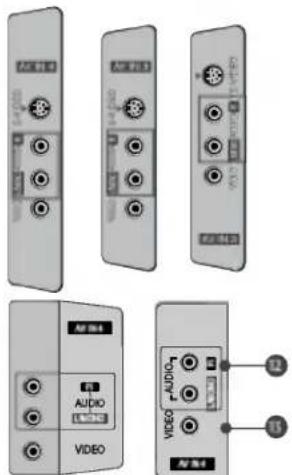
text_image
AUDIO VIDEO Display 4 12 11natural_image
Illustration of hands holding a cylindrical object with a downward arrow indicating motion (no text or symbols)text_image
1 Lock? A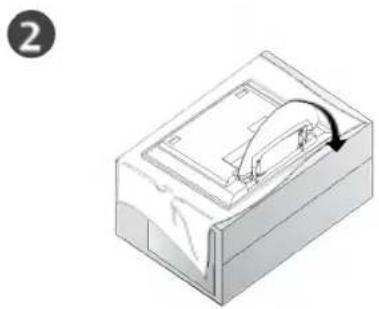
natural_image
Isometric illustration of a mechanical device with a curved arrow indicating rotation (no text or symbols)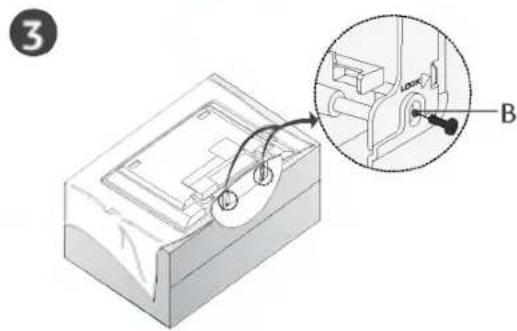
text_image
Technical diagram showing a mechanical assembly with labeled component B, including an inset view of a close-up detail.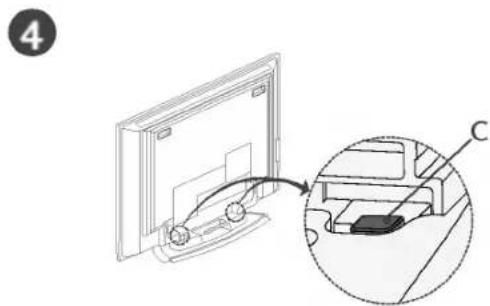
natural_image
Diagram showing a monitor mounted on a base with an inset close-up of its internal components (no text or symbols)text_image
Technical diagram showing a mechanical assembly with labeled components A, B, and D, including a magnified inset view.METODI DI COLLEGAMENTO A PARETE DEL GRUPPO PRODOTTO PER EVITARE EVENTUALI CADUTE DELL'IMPIANTO
natural_image
Technical line drawing of a vertical structural component with a numbered label '3' and hatched base (no text or symbols beyond the number)natural_image
Simple illustration of a flat-screen computer monitor (no text or symbols)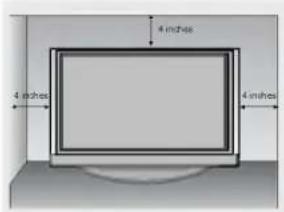
text_image
4 inches 4 inches 4 inches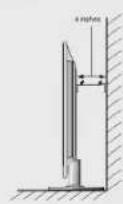
natural_image
Interior view of a modern office or library with a large TV mounted on top and a cabinet at the bottom (no visible text or symbols)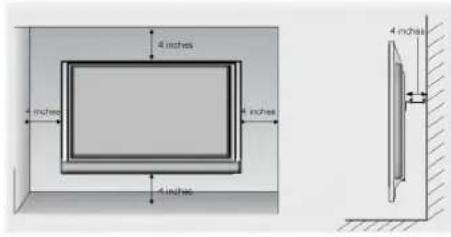
text_image
4 inches 4 inches 4 inches 4 inches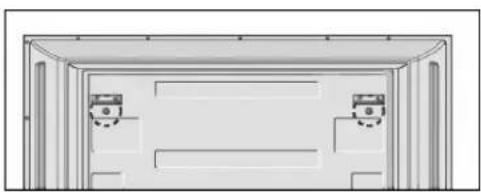
natural_image
Architectural elevation diagram showing two doors mounted on a wall (no text or symbols)text_image
Life's Good LGTELEVISOR | TELEVISOR LCD | DE PLASMA MANUAL DEL USUARIO
| MODELOS DE TELEVISORES LCD | MODELOS DE TELEVISORES DE PLASMA |
| 37LC2R* | 42PC1R* |
| 42LC2R* | 42PC3R* |
| 37LC25R* | 50PC1R* |
| 42LC25R* | |
| 37LC3R* | |
| 42LC3R* | |
| 32LB2R* | |
| 37LB2R* | |
| 42LB2R* | |
| 47LB2R* |
text_image
Diagram of computer interface panel with labeled components including USB drive, audio jack, and display units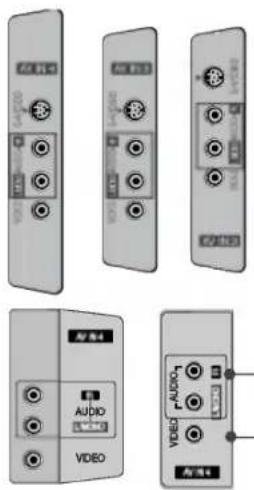
text_image
60 R-1 AUDIO VIDEO Audio4 AUDIO3 AUDIO4 AUDIO3natural_image
Diagram of a mechanical device with a curved arrow indicating rotation or movement (no text or symbols)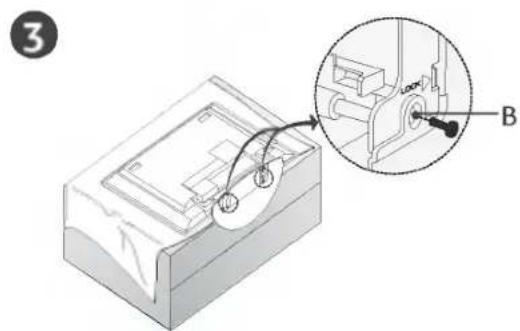
text_image
3 B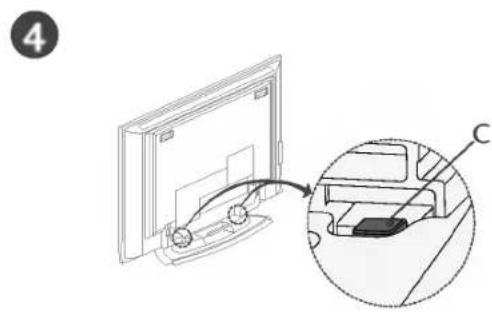
text_image
4 Ctext_image
Technical diagram of a mechanical device with labeled components A, B, and D, showing internal structure and directional arrows.CÓMO UNIR EL MONTAJE DEL PRODUCTO A LA PARED PARA EVITAR QUE SE VUELQUE
natural_image
Technical line drawing of a vertical support structure with a numbered label '3' and hatched ground surface (no text or symbols beyond the label)natural_image
Simple illustration of a computer monitor with blank screen and base (no text or symbols)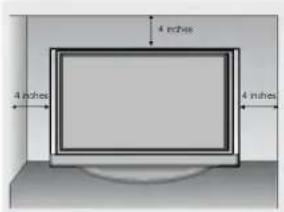
text_image
4 inches 4 inches 4 inches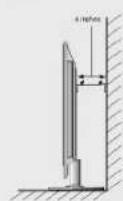
natural_image
Simple line drawing of a TV setup with a monitor, cabinet, and cable (no text or symbols)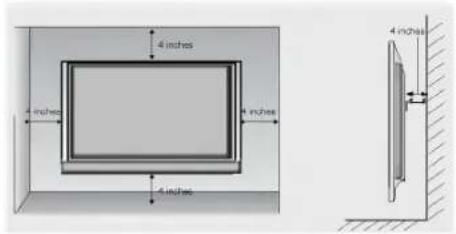
text_image
4 inches 4 inches 4 inches 4 inches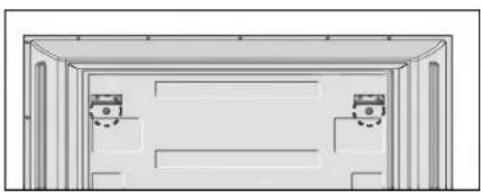
natural_image
Simple line drawing of a two-panel door frame with no text or symbolstext_image
LIST EXIT VII SLEEP OK + VOL - GIVE MAJE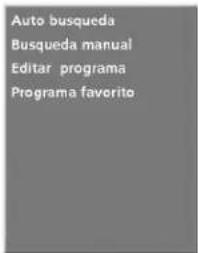
text_image
Life's Good LGTV LCD | TV PLASMA MANUAL DE INSTRUÇÕES
MODELOS DE TV LCD MODELOS DE TV
37LC2R* PLASMA
42LC2R* 42PC1R*
37LC25R* 42PC3R*
42LC25R* 50PC1R*
37LC3R*
42LC3R*
32LB2R*
37LB2R*
42LB2R*
47LB2R*
text_image
Diagram of electronic device panel labels with icons and numbers, showing connections between ports like USB, audio, and display units.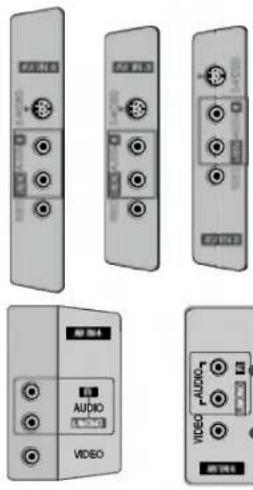
text_image
Image showing multiple labeled electronic devices including audio and video ports with Chinese labels.natural_image
Isometric line drawing of a mechanical component with a curved arrow indicating rotation (no text or symbols)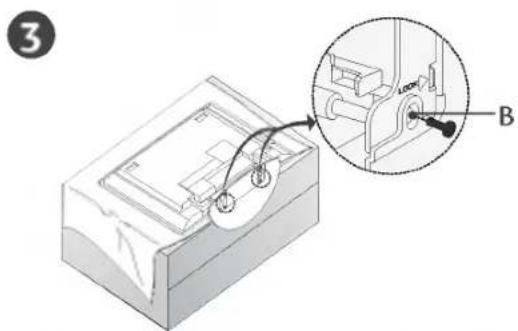
text_image
Technical diagram showing a mechanical assembly with labeled component B and an inset detail view4
natural_image
Diagram showing a monitor with cable routing and a magnified inset of the device (no text or symbols)text_image
Technical diagram of a mechanical device with labeled components A, B, and D, showing internal structure and assembly.text_image
Diagram showing a TV mounted panel with labeled parts and two numbered arrows indicating assembly or installation steps.ou
text_image
1 2natural_image
Technical line drawing of a vertical mechanical component mounted on a wall, with no visible text or symbols.natural_image
Simple illustration of a flat-screen monitor with no text or symbols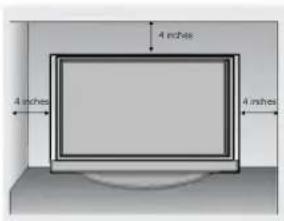
text_image
4 inches 4 inches 4 inches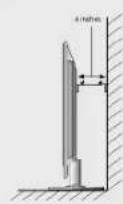
natural_image
Illustration of a TV setup with a monitor, cabinet, and cable (no text or symbols)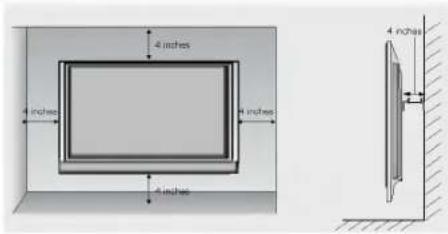
text_image
4 inches 4 inches 4 inches 4 inches 4 inches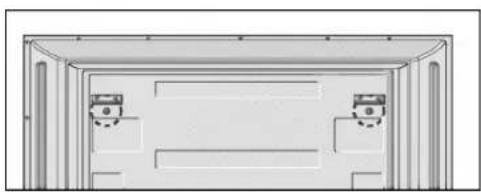
natural_image
Simple line drawing of a room with two doors and a ceiling structure (no text or symbols)Remova os dois parafusos da parte posterior do televisor antes de instalar o suporte de parede.
text_image
Life's Good LGWAARSCHUWING CAUTION
text_image
Diagram of electronic device panel labels with Chinese annotations for components like audio, video, and display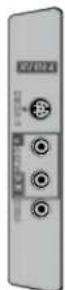
text_image
Technical diagram of a device with labeled components A, B, and D, showing internal structure and assembly.BEVESTIGING VAN HET PRODUCT AAN DE MUUR OM OMVALLEN VAN HET PRODUCT TE VOORKOMEN
text_image
Diagram showing two views of a TV or DVD with labeled components and directional arrows indicating viewing direction.of
text_image
1 2natural_image
Technical diagram showing a vertical structure with a numbered label '3' and hatched ground, no readable text or symbols present.natural_image
Simple illustration of a computer monitor with no text or symbols on its screen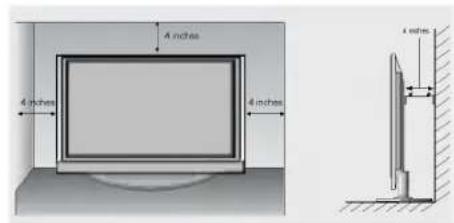
text_image
4 inches 4 inches 4 inchesWandmontage: horizontale installatie
natural_image
Interior view of a modern TV setup with a mounted monitor and cabinet (no visible text or symbols)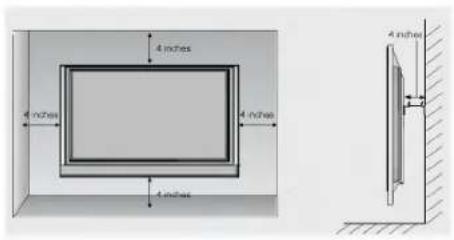
text_image
4 inches 4 inches 4 inches 4 inches 4 inches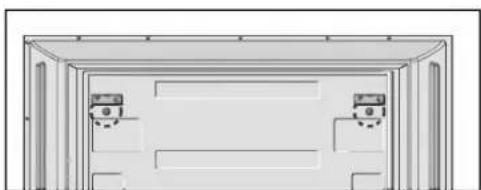
natural_image
Simple line drawing of a door frame with two doors and a small meter (no text or symbols)text_image
KANAAL BEELD SOUND TUD EXTRA SCHERM SSM AVL Balms 0 Speaker Name Prev↓↑
text_image
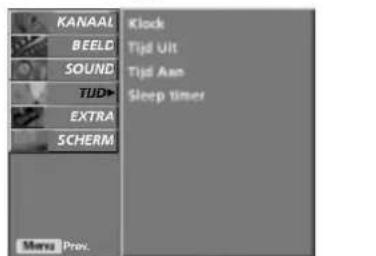
KANAAL BEELD SOUND TUD EXTRA SCHERM Menu Prev. Clock Tijd Ult Tijd Aan Sleep TimerHet menu TIJD
! OPMERKING
text_image
LIST EXIT L/I SLEEP OK VOL - MPIE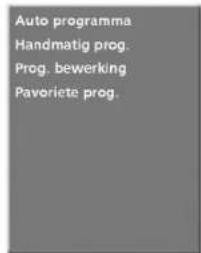
text_image
Auto programma Handmatig prog. Prog. bewerking Pavoriete prog.①
text_image
Auto programma Handmatig prog. Prog. bewerking Pavorlete prog. Systeem Opslag van Start BG 12\~7
text_image
Auto programma Name C OS Systeem BG Opslag 5 50% Move StopN
BIJLAGE
CONTROLELIJST BIJ PROBLEMEN
text_image
Life's Good LGTHΛΕΟΡΑΣΗ LCD ■ THΛΕΟΡΑΣΗ PLASMA
ΟΔΗΓΙΕΣ ΧΕΙΡΙΣΜΟΥ
MONTEΛΑ
MONTELA
THΛΕΟΡΑΣΕΩΝ LCD
THΛΕΟΡΑΣΕΩΝ
37LC2R*
PLASMA
42LC2R*
42PC1R*
37LC25R*
42PC3R*
42LC25R*
50PC1R*
37LC3R*
42LC3R*
32LB2R*
37LB2R*
42LB2R*
47LB2R*
natural_image
3D diagram of a mechanical component with a curved arrow indicating rotation or movement (no text or symbols)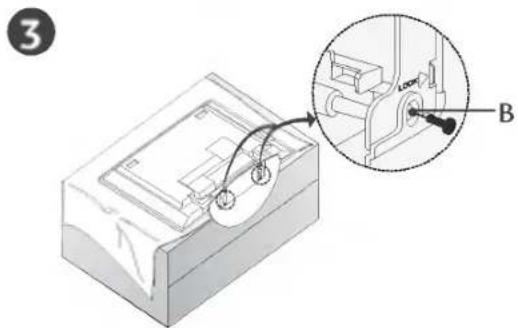
text_image
3 B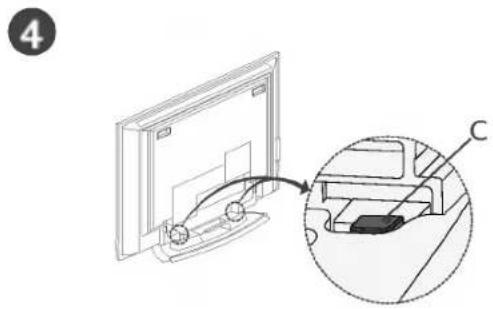
text_image
4 Ctext_image
Technical diagram of a device with labeled components A, B, and D, showing internal structure and directional arrows.text_image
Diagram showing a 3D TV panel with labeled components and two numbered parts, likely illustrating a layout or installation.ή
text_image
1 2natural_image
Technical diagram showing a vertical structural component with a numbered label '3' and hatched background (no text or symbols beyond the number)natural_image
Simple illustration of a computer monitor with no text or symbols on its screen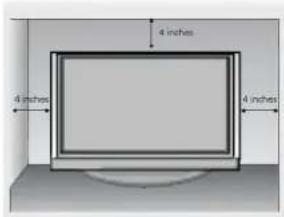
text_image
4 inches 4 inches 4 inches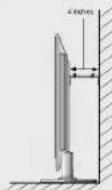
natural_image
Interior view of a modern TV setup with a mounted monitor and two cabinet doors (no visible text or symbols)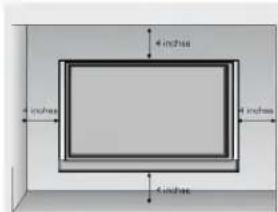
text_image
4 inches 8 inches 4 inches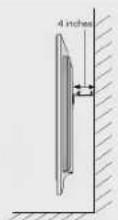
natural_image
Simple line drawing of a door frame with two doors and a wall-mounted device (no text or symbols)text_image
LIST EXIT I/II SLEEP OK + VOL - O VEM MUTEtext_image
Life's Good LGLCD TV | PLAZMA TV HASZNÁLATI ÚTMUTATÓ
LCD TV-TÍPUSOK PLAZMA TV-
37LC2R* TIPUSOK
42LC2R* 42PC1R*
37LC25R* 42PC3R*
42LC25R* 50PC1B*
37LC3R*
42LC3R*
32LB2R*
37LB2R*
42LB2R*
47LB2R*
text_image
Diagram of electronic device rear panel with labeled ports and connectors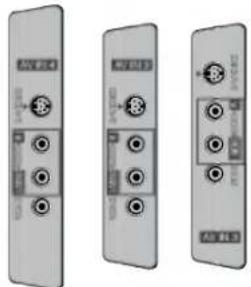
natural_image
Three identical grayscale images of electronic devices with ports and connectors, no visible text or symbols.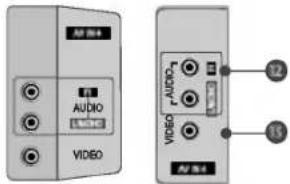
text_image
AV 324 AUDIO LPG VIDEO LPG AUDIO OSMA AV 34RGB-/audiobemenet
natural_image
Illustration of two hands holding a wooden plank with a downward arrow indicating force or motion (no text or symbols)text_image
Technical diagram showing a mechanical assembly with labeled components A, B, and D, including a magnified inset view.text_image
Diagram showing two views of a mounted device with labeled parts, including a panel and two switches.vagy
text_image
1 2natural_image
Technical line drawing of a vertical support structure with a numbered label '3' and hatched ground surface (no text or symbols beyond the label)natural_image
Simple illustration of a flat-screen computer monitor (no text or symbols)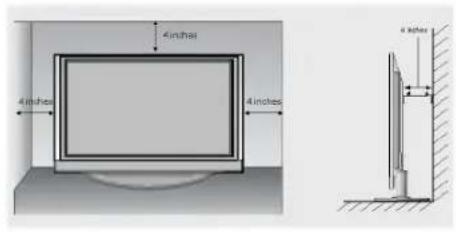
text_image
4 inches 4 inches 4 inchesnatural_image
Simple line drawing of a TV setup with a monitor, cabinet, and cable (no text or symbols)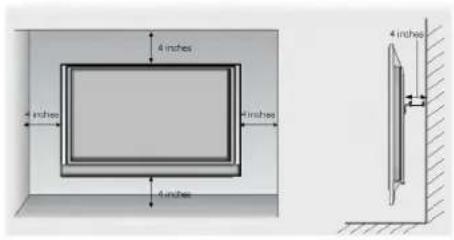
text_image
4 inches 4 inches 6 inches 4 inches 4 inches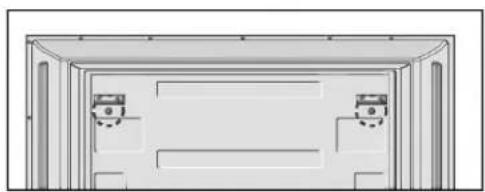
natural_image
Architectural cross-section diagram of a two-story building facade with windows and doorways (no text or symbols)text_image
Life's Good LGTELEWIZOR | TELEWIZOR
LCD | PLAZMOWY
INSTRUKCJA OBSŁUGI
MODELE TELEWIZORÓW MODELE TELEWIZORÓW
LCD PLAZMOWYCH
37LC2R* 42PC1R*
42LC2R* 42PC3R*
37LC25R* 50PC1B*
42LC25R*
37LC3R*
42LC3R*
32LB2R*
37LB2R*
42LB2R*
47LB2R*
text_image
Diagram of electronic device panel labels with numbered components and function buttons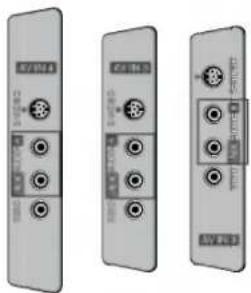
natural_image
Three identical grayscale electronic device modules with ports and connectors, shown from different angles (no visible text or symbols)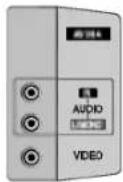
1 Wejście RGB/Audio
natural_image
Diagram of a mechanical device with an arrow indicating rotation or movement (no text or symbols present)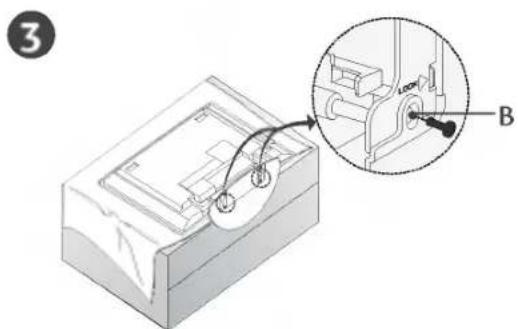
text_image
Technical diagram showing a mechanical assembly with labeled component B and an inset view of a mechanical component.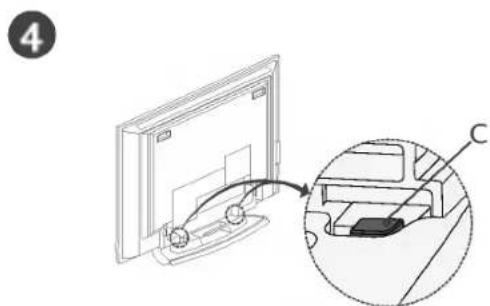
text_image
4 Ctext_image
Technical diagram showing a mechanical assembly with labeled components A, B, and D, including a magnified inset view.natural_image
Simple illustration of a computer monitor with no text or symbols on its screen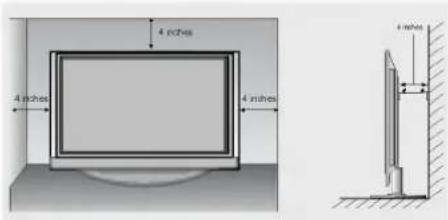
text_image
4 inches 4 inches 4 inches 4 inchesnatural_image
Interior view of a modern office or library with a large TV mounted on top, connected to a cabinet (no visible text or symbols)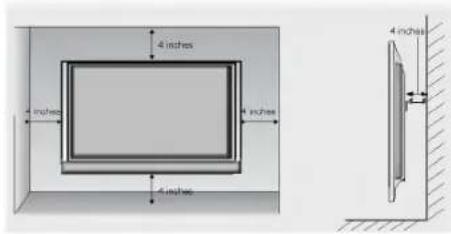
text_image
4 inches 4 inches 4 inches 4 inches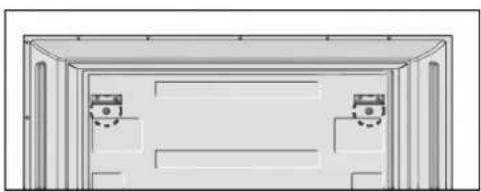
natural_image
Simple line drawing of a two-panel door frame with no text or symbolstext_image
Life's Good LGTelevizor | Plazmový LCD | televizor UŽIVATELSKÁ PŘÍRUČKA
text_image
Diagram showing labeled electronic device ports and connectors with numbered labels from 1 to 13.1 Vstup RGB / Audio
natural_image
Illustration of hands holding a cylindrical object with an arrow indicating upward motion (no text or symbols)natural_image
Circular diagram with directional arrows and a central 'OK' button, no readable text or symbols beyond the label



1
4
7
*
2
5
B
0
3
6
9
FW
F
TIME
目
REVEAL
EI
INDEX
natural_image
3D diagram of a mechanical component with internal structure and curved arrow indicating motion (no text or symbols)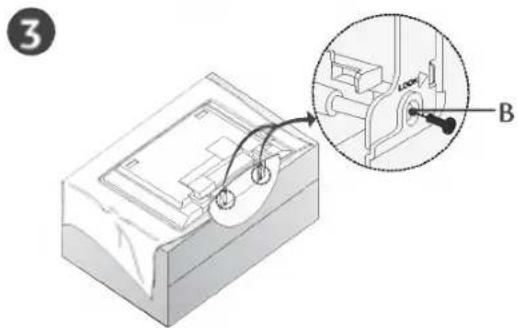
text_image
3 B4
natural_image
Diagram showing a device being inserted into a panel, with an inset close-up highlighting the component (no text or symbols present)text_image
Technical diagram showing a mechanical assembly with labeled components A, B, and D, including a magnified inset view.natural_image
Simple line drawing of a vertical wall-mounted device with a labeled component '3' and hatched base (no text or symbols beyond the label)natural_image
Simple illustration of a flat-screen computer monitor (no text or symbols)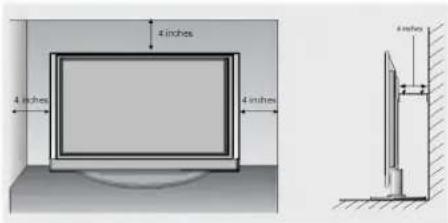
text_image
4 inches 4 inches 4 inches 6 inchesnatural_image
Interior view of a modern office or library with a large TV mounted on top, connected to a cabinet (no visible text or symbols)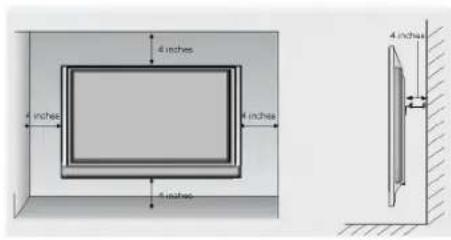
text_image
4 inches 4 inches 4 inches 4 inches 4 inches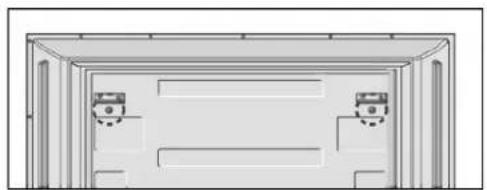
natural_image
Architectural line drawing of a two-story building facade with windows and doorways (no text or symbols)text_image
Auto programme Manual programme Programme edit Favourite prog.①
text_image
Auto programme Manual programme Programme edit Favourite prog. System Storage from Start BG 12\~7
text_image
Auto programme Name C OS System BG Storage 5 50% Menu StopB
DODATKY
text_image
Life's Good LGLCD | Plazmové TV | TV UŽÍVATELŠKÁ PRÍRUČKA
text_image
Diagram of electronic device rear panel with labeled ports and connectors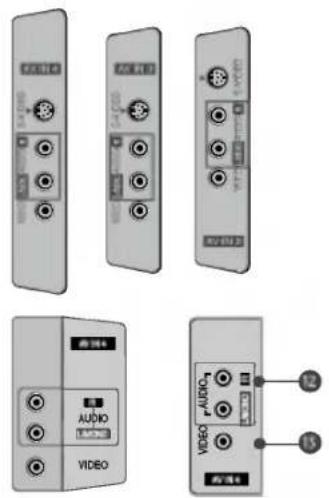
text_image
Diagram showing various audio and video device modules with labels like 'AUDIO' and 'VIDEO'1 Vstup RGB/Audio
natural_image
Diagram of a mechanical device with a curved arrow indicating rotation or movement (no text or symbols)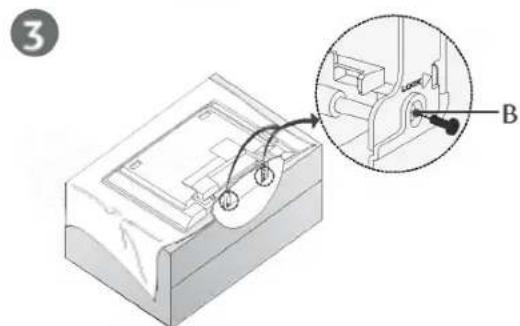
text_image
3 B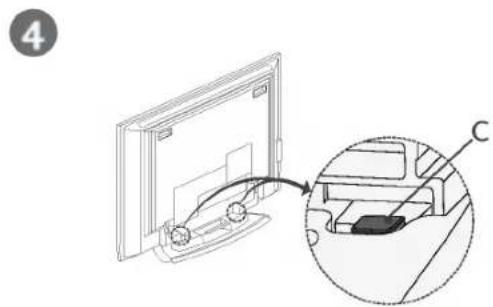
text_image
4 Ctext_image
Technical diagram of a device with labeled components A, B, and D, showing internal structure and assembly.MONTÁŽ TELEVÍZORA NA STENU AKO OCHRANA PRED PREVRÁTENÍM
text_image
Diagram showing a 3D TV panel with labeled components and two numbered parts, likely illustrating a layout or installation.alebo
text_image
1 2natural_image
Simple illustration of a flat-screen computer monitor (no text or symbols)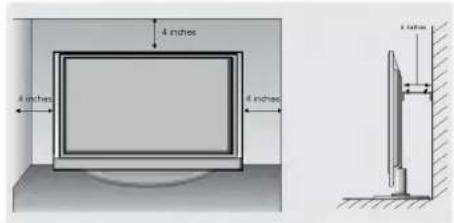
text_image
4 inches 4 inches 4 inchesnatural_image
Interior view of a modern office or library with a large TV mounted on top, flanked by two cabinets (no visible text or symbols)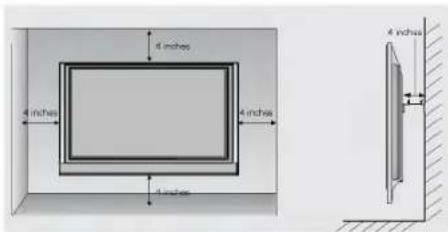
text_image
4 inches 4 inches 4 inches 4 inches 4 inches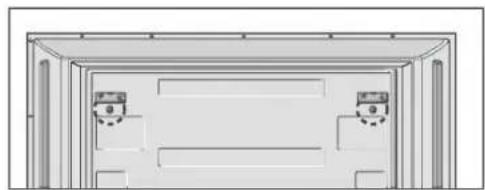
natural_image
Architectural cross-section diagram of a two-story building facade with windows and doorways (no text or symbols)NASTAVENIE TELEVÍZNYCH STANÍC
text_image
LIST EXIT I/O SLEEP OK VOL - Q VIEW MUTE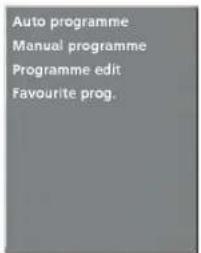
text_image
Auto programme Manual programme Programme edit Favourite prog.1
text_image
Auto programme Manual programme Programme edit Favourite prog. System BG Storage from 1 Start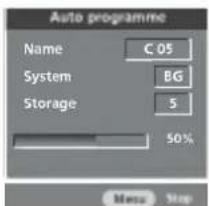
text_image
Auto programme Name C 05 System BG Storage 5 50% Menu Stop⑧
DODATOK
ZOZNAM RIEŠENÍ PROBLÉMOV
Produkt nefunguje normalne.
text_image
Life's Good LGtext_image
Diagram of electronic device panel labels with Chinese and English text, showing various ports and indicators.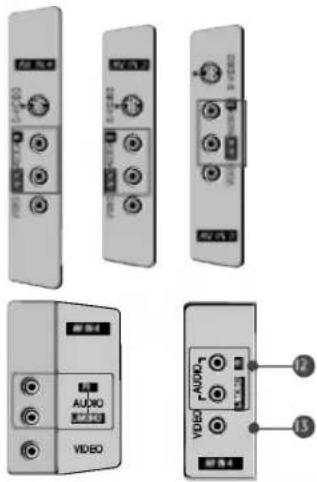
text_image
Diagram showing various audio and video device modules with labeled ports and connectors1 Intrare RGB/Audio
natural_image
Illustration of hands holding a cylindrical object with a curved line, no text or symbols presentnatural_image
3D diagram of a mechanical device with a curved arrow indicating rotation or movement (no text or symbols)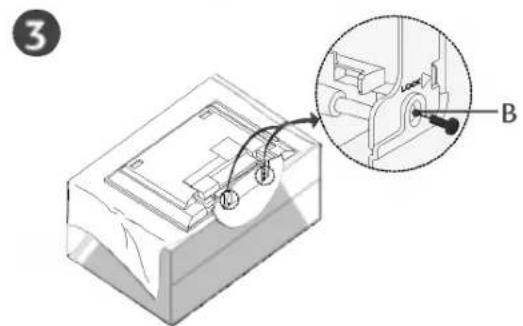
text_image
3 B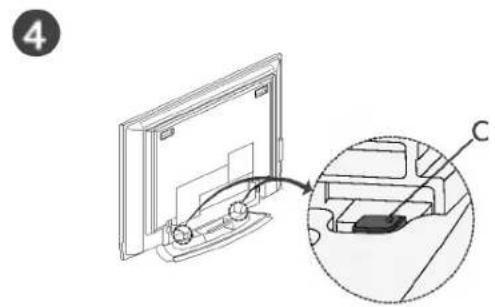
natural_image
Diagram showing a computer monitor with an inset close-up of its internal components (no text or symbols present)text_image
Technical diagram of a device with labeled components A, B, and D, showing internal structure and directional arrows.MODUL DE FIXARE AL PRODUSULUI DE PERETE PENTRU A PREVENI CĂDEREA
natural_image
Illustration of a flat-screen monitor mounted on a circular base (no text or symbols visible)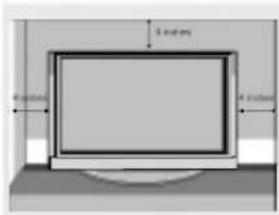
text_image
5 inches 4 inches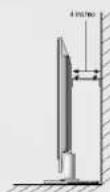
natural_image
Interior view of a television set with a mounted TV and two cabinet (no visible text or symbols)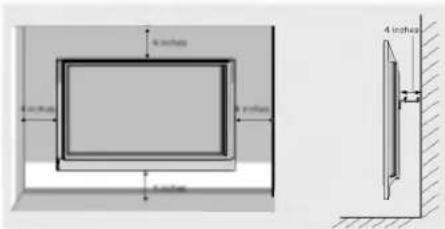
text_image
4 inches 4 inches 4 inches 4 inches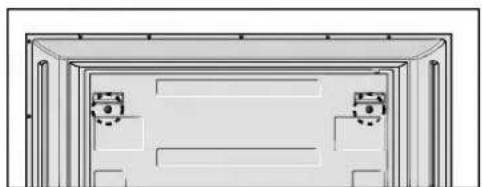
natural_image
Architectural floor plan showing two room layouts with windows and doorways (no text or labels)BG: PAL B/G, SECAM B/G (Europe / East Europe / Asia / New Zealand / M.East / Africa / Australia)
I : PAL I/II (U.K. / Ireland / Hong Kong / South Africa)
DK : PAL D/K, SECAM D/K (East Europe / China / Africa / CIS)
L: ŠECAM L/L' (France)
M : (USA / Korea / Philippines) (option)
text_image
Auto programme Manual programme Programme edit Favourite prog.①
text_image
Auto programmes Manual programme Programme edit Favourite prog. System Storage from 1 Start2\~7
text_image
Auto programme Name C 05 System BG Storage 5 50% Menu StopH
ANEXĂ
REZOLVAREA PROBLEMELOR
text_image
Life's Good LGtext_image
Diagram of electronic device panel with labeled ports and connectors, showing connections from ports 1 to 11.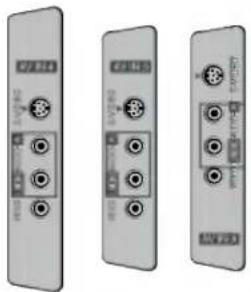
natural_image
Three identical gray electronic device modules with ports and connectors, shown from different angles (no visible text or symbols)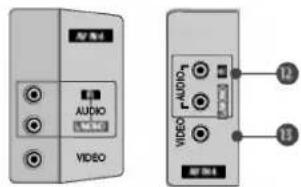
text_image
AUDIO VIDEO 12 13natural_image
Illustration of a mechanical device with a curved arrow indicating rotation or movement (no text or symbols)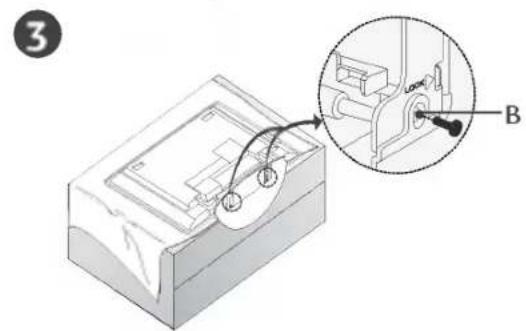
text_image
3 B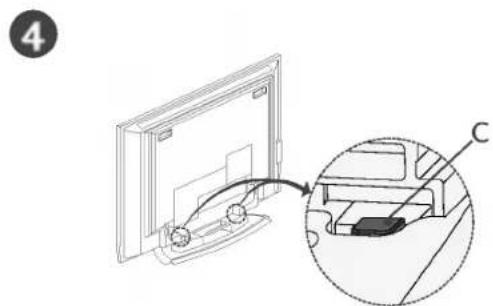
text_image
4 Ctext_image
Technical diagram of a mechanical device with labeled components A, B, and D, showing internal structure and assembly.natural_image
Illustration of a flat-screen computer monitor with no visible text or symbols on the screen or casing.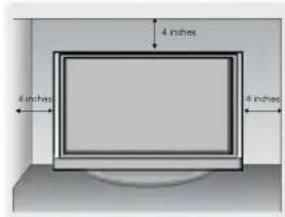
text_image
4 inches 4 inches 4 inches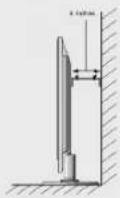
natural_image
Interior view of a modern office or library with a large TV mounted on top, connected to a cabinet (no visible text or symbols)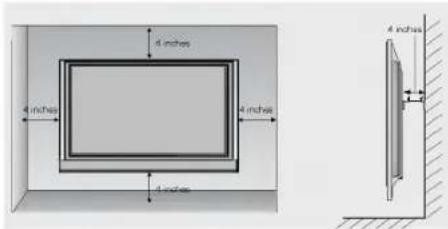
text_image
4 inches 4 inches 4 inches 4 inches 4 inches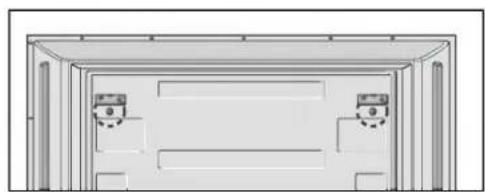
natural_image
Architectural diagram of a two-story building facade with doorways and windows (no text or symbols)a. The OSD (On Screen Display) function enables you to adjust the screen status conveniently since it provides graphical presentation.
b. In this manual, the OSD (On Screen Display) may be different from your TVXs because it is just example to help the TV operation.
Auto programme
Manual programme
Programme edit
Favourite prog.
text_image
Auto programme Manual programme Programme edit Favourite prog. System Storage from Start BG 1 2 ~ 7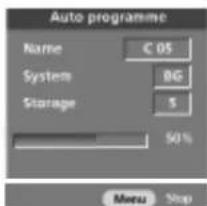
text_image
Auto programme Name C OS System BG Storage 5 50% Menu StopB
ПРИЛОЖЕНИЕ
text_image
Life's Good LGLCD-TV | PLASMA-TV BRUKSANVISNING
text_image
Diagram of electronic device panel labels with numbered components and connection points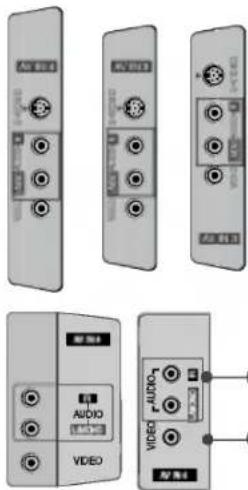
text_image
Image showing multiple device labels including audio, video, and audio/video ports with Chinese labels.1 RGB/Audio-ingång
text_image
INPUT TV POWER TV INPUT + - ARC - + VCR TEXT PIP SIZE POSTON PIP PR- PIP PR+ SWAP PIP INPUT LIST MENU I/II EXIT SLEEP OK VOL D:\VIEW PR - MUTE TIME REVEAL INDEXFJÄRRKONTROLLFUNKTIONER
natural_image
Illustration of hands holding a cylindrical object with a downward arrow indicating motion (no text or symbols)text_image
INPUT TV INPUT ARC POWER TV DVD VCR TEXT PIP SIZE POSTON PIP PR- PIP PR+ SWAP PIP INPUT LIST MENU I/II EXIT SLEEP OK VOL OVIEW PR MUTE TIME REVEAL INDEXINSTALLATION
MONTERING AV FOT (42PC1R\*, 42PC3R\*)
text_image
Technical diagram showing a mechanical component with an inset view labeled 'LOCK' and point 'A'2
natural_image
Diagram of a mechanical component with a curved arrow indicating rotation or movement (no text or symbols present)3
natural_image
Technical illustration of a mechanical assembly with a magnified inset showing a component labeled B (no text or symbols present)4
natural_image
Diagram showing a computer monitor connected to a device with an arrow indicating the process (no text or symbols present)text_image
Technical diagram showing a mechanical assembly with labeled components A, B, and D, including a magnified inset view.HUR PRODUKTEN MONTERAS PÅ VÄGGEN FÖR ATT FÖRHINDRA ATT DEN VÄLTER
text_image
Diagram showing a 3D panel assembly with labeled parts and two numbered annotations.eller
text_image
1 2natural_image
Technical line drawing of a vertical structural component with a numbered label '3' and hatched base (no text or symbols beyond the label)natural_image
Simple illustration of a computer monitor with no text or symbols on the screen or casing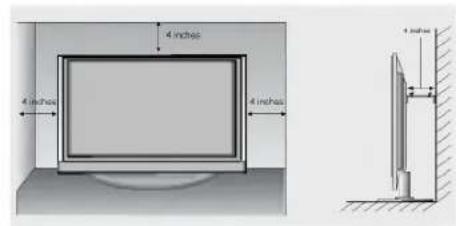
text_image
4 inches 4 inches 4 inches 4 inchesVäggmontering: Horisontell installation
natural_image
Simple line drawing of a TV setup with a monitor, cabinet, and cable (no text or symbols)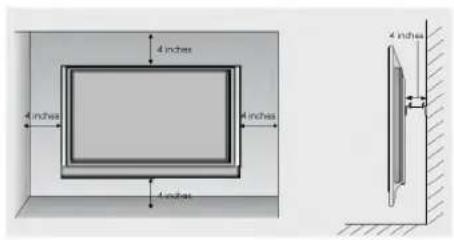
text_image
4 inches 4 inches 4 inches 4 inches 4 inches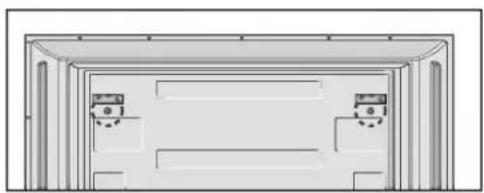
natural_image
Architectural diagram of a two-story building facade with windows and doorways (no text or symbols)< enbart 42PC1R\*, 42PC3R\*>
text_image
LIST I/II EXIT SLEEP CK VOL MUTE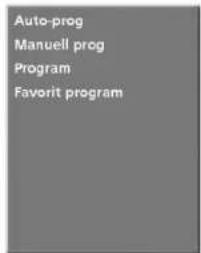
text_image
Auto-prog Manuell prog Program Favorit program①
text_image
Auto-prog Manuell prog Program Favorit program System LG Start BG 12\~7
text_image
Auto-prog Name C 01 System 86 Lagring 5 90% Menu StopB
BILAGA
CHECKLISTA FÖR FELSÖKNING
CHECKLISTA FÖR FELSÖKNING
text_image
Life's Good LGLCD-TV | PLASMA-TV BRUKERHÅNDBOK
LCD-TV PLASMA-TV
MODELLER MODELLER
37LC2R* 42PC1R*
42LC2R* 42PC3R*
text_image
Diagram of electronic device panel labels with numbered components and connection points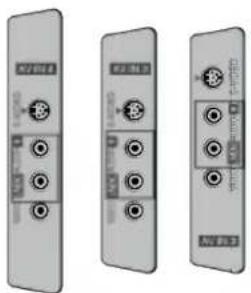
natural_image
Three identical grayscale electronic device modules with circular ports and indicator lights, shown from different angles (no text or symbols visible)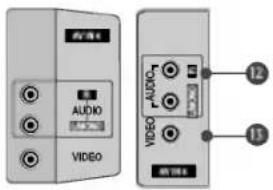
natural_image
Diagram of a mechanical device with a curved arrow indicating rotation or movement (no text or symbols)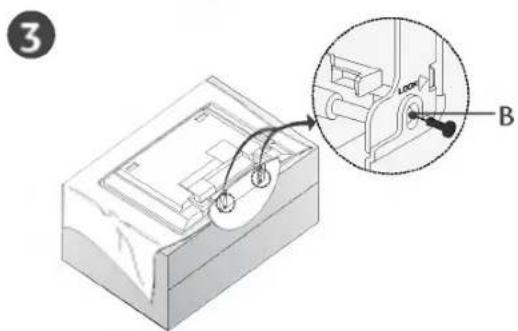
text_image
3 B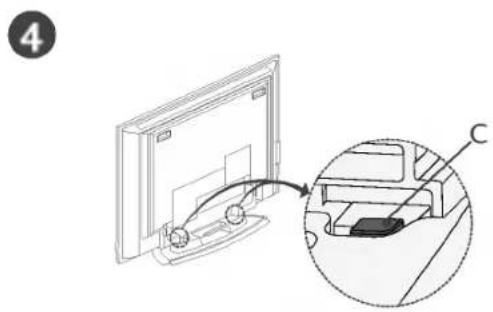
natural_image
Diagram showing a computer monitor with an inset close-up of its internal components (no text or symbols)text_image
Technical diagram of a device with labeled components A, B, D and an inset showing a mechanical assembly with a lock mechanism.SLIK FESTER DU APPARATET FORSVARLIG TIL VEGGEN
text_image
Diagram showing two views of a TV or DVD wall-mounted device with labeled components and mounting hardware.eller
text_image
1 2natural_image
Illustration of a flat-screen computer monitor with no visible text or symbols on the screen.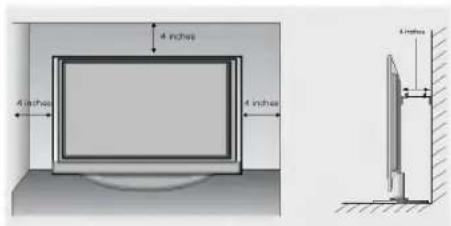
text_image
4 inches 4 inches 4 inchesVeggmontering: Loddrett installering
natural_image
Simple line drawing of a TV setup with a monitor, cabinet, and stand (no text or symbols)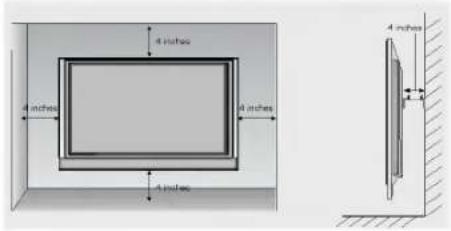
text_image
4 inches 4 inches 8 inches 4 inches 4 inches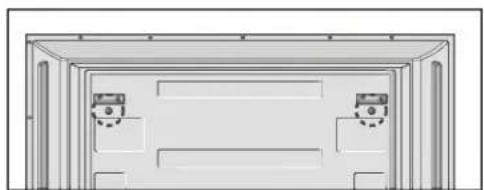
natural_image
Architectural elevation diagram showing two doors with doors placed at the front (no text or symbols)Ta ut de to skruene på baksiden av apparatet før veggmonteringsbraketten monteres.
KOBLINGER OG OPPSETT
text_image
INPUT POWER TV DVD ARC VCR TEXT PIP SIZE POTIO PIP PR PIP PR4 SWAP PIP INPUT LIST MENU I/II EXIT SLEEP OK VIEW MUTE FAV TIME REVEAL INDEXMERK
text_image
Life's Good LGLCD-tv | Plasma-tv ETJENINGSVEJLEDNING
LCD-TV PLASMA-TV
MODELLER MODELLER
37LC2R* 42PC1R*
42LC2R* 42PC3R*
37LC25R* 50PC1R*
42LC25R*
37LC3R*
42LC3R*
32LB2R*
37LB2R*
42LB2R*
47LB2R*
text_image
Diagram of electronic device rear panel with labeled ports and indicators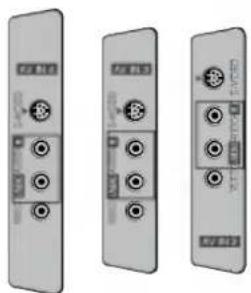
natural_image
Three identical grayscale electronic device modules with ports and connectors, shown from different angles (no visible text or symbols)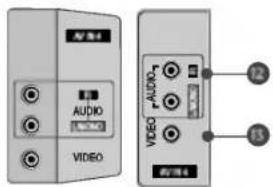
text_image
AUDIO VIDEO AUDIO VIDEO LEDnatural_image
Illustration of hands holding a cylindrical object with a downward arrow indicating motion (no text or symbols)natural_image
Diagram of a mechanical device with a curved arrow indicating rotation or movement (no text or symbols present)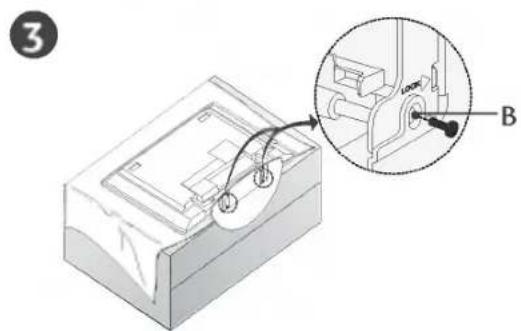
text_image
3 B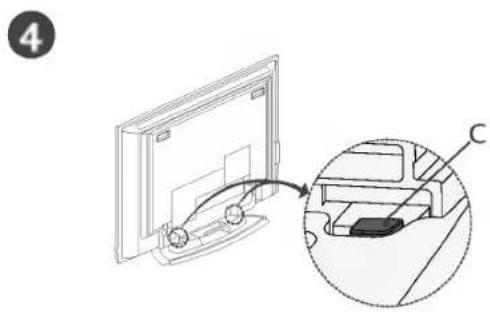
natural_image
Diagram showing a monitor mounted on a cable with an inset view of the cable being inserted (no text or symbols present)text_image
Technical diagram of a mechanical device with labeled components A, B, and D, showing internal structure and assembly.SÅDAN PLACERES PRODUKTET TÆT PÅ VÆGGEN, SÅ DET IKKE RISIKERER AT FALDE NED
text_image
Diagram showing two labeled components of a TV or DVD wall panel, with numbered parts and electrical connections.eller
text_image
1 2For proper ventilation, allow a clearance of 4" on each side and from the wall.
natural_image
Simple illustration of a flat-screen computer monitor (no text or symbols)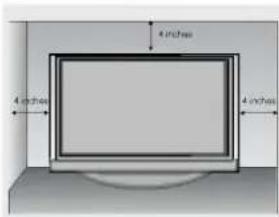
text_image
4 inches 4 inches 4 inches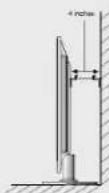
Vægmontering: Vandret installation
natural_image
Interior view of a modern office or library with a large TV mounted on top, connected to a cabinet (no visible text or symbols)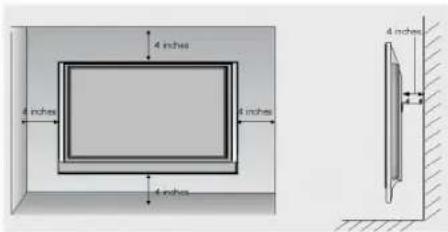
text_image
4 inches 4 inches 4 inches 4 inches 4 inches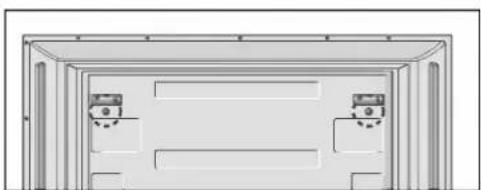
natural_image
Diagram of a door frame with two wall-mounted casings (no text or symbols)text_image
Life's Good LGLCD- PLASMAT TELEVISIO ELEVISIO KÄYTTÖOHJE
text_image
Diagram of electronic device panel with labeled components and numbered parts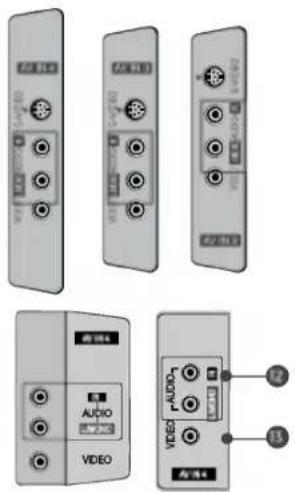
text_image
Diagram showing various electronic device modules with labels like Audio, Video, and Audio4, alongside a separate panel with numbered connections.1 RGB-/äänitulo
KAUKOSÄÄTIMEN NÄPPÄINTOIMINNOT
KAUKOSÄÄTIMEN NÄPPÄINTOIMINNOT
natural_image
Diagram of a mechanical device with a curved arrow indicating rotation or movement (no text or symbols present)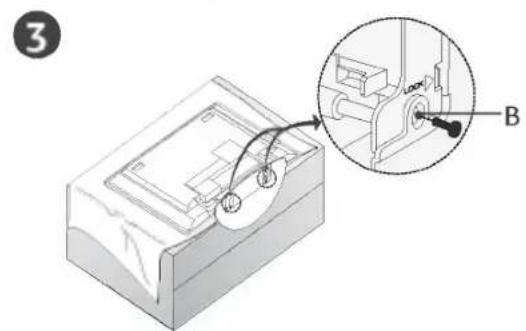
text_image
3 B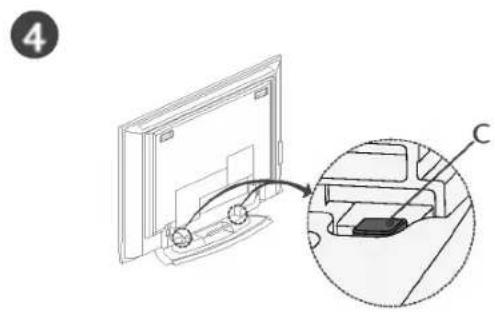
natural_image
Diagram showing a computer monitor with an inset close-up of its internal components (no text or symbols)text_image
Technical diagram of a mechanical device with labeled components A, B, D and directional arrows indicating movement or assembly.natural_image
Technical line drawing of a vertical structural component with a numbered label '3' and hatched base (no text or symbols beyond the number)natural_image
Illustration of a flat-screen computer monitor with a blank screen (no text or symbols)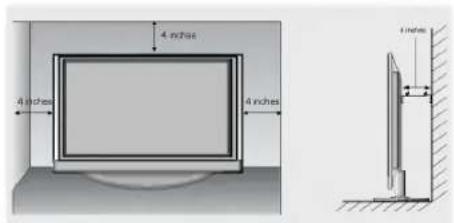
text_image
4 inches 4 inches 4 inches 4 inchesnatural_image
Simple line drawing of a TV setup with a monitor, cabinet, and cable (no text or symbols)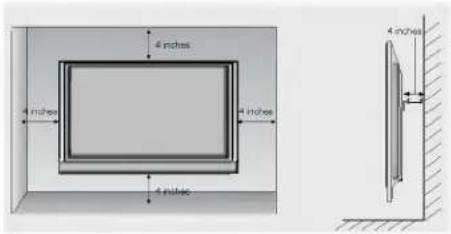
text_image
4 inches 4 inches 4 inches 4 inches 4 inches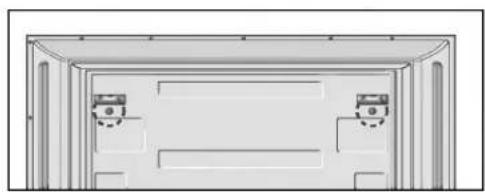
natural_image
Architectural line drawing of a two-story building facade with windows and doorways (no text or symbols)
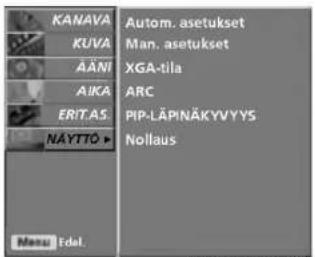
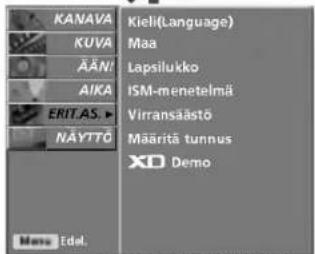
PICTURE(KU VA)-valikko
text_image
KANAVA KUVA AÄNI AIKA ERIT.AS NÄYTTÖ ▶ Autom. asetukset Man. asetukset XGA-tila ARC PIP-LÄPINÄKYVYYS Noillaus Menu Edel.
SCREEN(NÄY TTÖ)-valikko
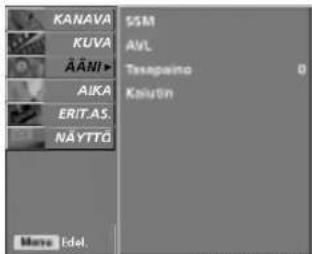
text_image
KANAVA KUVA ÄÄNI▶ AIKA ERIT.AS. NÄYTTÖ SSM AVL Tesspeito Kaiutin More Idel.
SOUND(ÄÄ
NI)-valikko
text_image
Life's Good LGLCD- | PLASMA TELER | TELER KASUTUSJUHEND
text_image
Diagram of electronic device panel labels with Chinese annotations for ports, connectors, and functions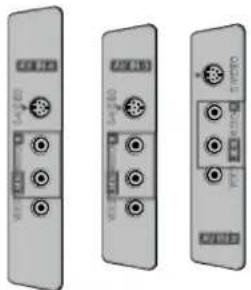
natural_image
Three identical gray electronic device modules with ports and connectors, shown from different angles (no visible text or symbols)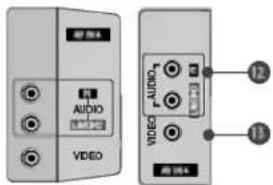
text_image
VDD AUDIO VIDEO 12 11natural_image
Illustration of hands holding a cylindrical object with an arrow indicating downward motion (no text or symbols)text_image
Technical diagram showing a mechanical assembly with labeled parts A, B, D and directional arrows indicating motion or movement.KUIDAS KINNITADA TOODE SEINALE NII, ET SEE ALLA EI KUKUKS
natural_image
Technical line drawing of a vertical structural component with a labeled dimension '3' (no text or symbols beyond the label)natural_image
Simple illustration of a flat-screen monitor with no text or symbols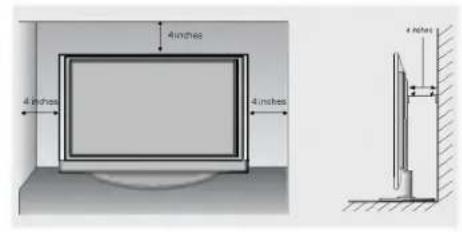
text_image
4 inches 4 inches 4 inches 4 inchesSeinapaigaldus Horisontaalpaigaldus
natural_image
Simple diagram of a TV setup with a monitor, cabinet, and tower (no text or symbols)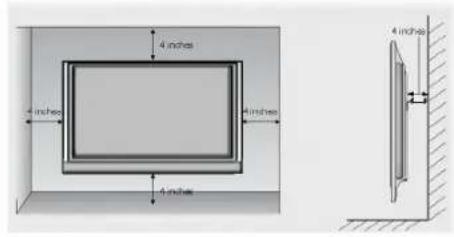
text_image
4 inches 4 inches 4 inches 4 inches 4 inches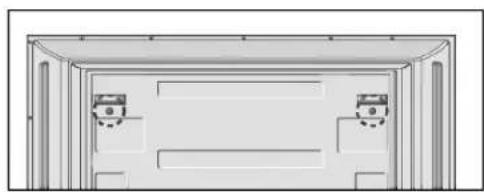
natural_image
Architectural cross-section diagram of a two-story building facade with windows and doorways (no text or symbols)text_image
LIST EXIT I/II SLEEP OK VOL - MUTE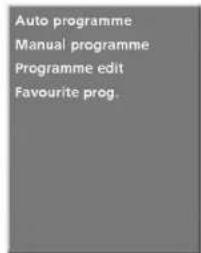
text_image
Auto programme Manual programme Programme edit Favourite prog.①
text_image
Auto programme Manual programme Programme edit Favourite prog. System Storage from Start BG 12\~7
text_image
Auto programme Name C OS System BG Storage 5 50% More StopB
LISA
TÖRKEOTSINGU KONTROLL-LOEND
Avage "My computer" -> avage "LG" -> avage"index.htm" fail.
HOOLDUS
text_image
Life's Good LGtext_image
Diagram of electronic device panel with labeled ports and connectors, numbered 1 to 11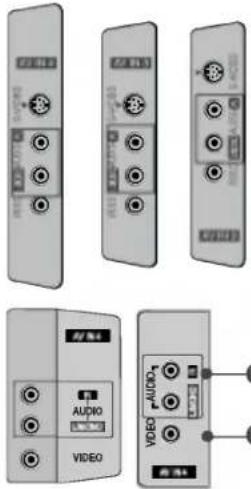
text_image
Image showing multiple electronic device modules with labels like AUDIO, VIDEO, and audio portsnatural_image
Illustration of hands holding a wooden ruler with an arrow indicating motion (no text or symbols)natural_image
Isometric illustration of a mechanical device with a curved arrow indicating rotation (no text or symbols)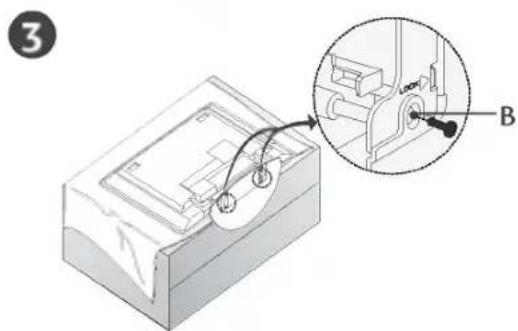
text_image
3 B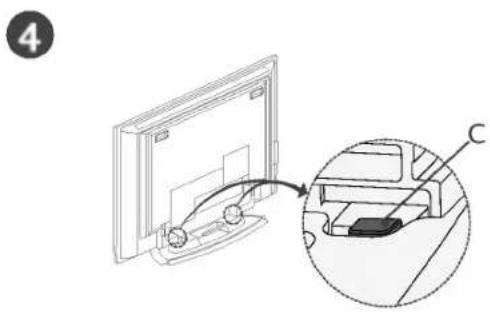
natural_image
Diagram showing a monitor with an inset view of a printer or printer (no text or symbols present)text_image
Technical diagram showing a mechanical assembly with labeled parts A, B, and D, including a magnified inset view.KAIP PRITVIRTINTI TELEVIZORIŲ PRIE SIENOS, KAD JIS NENUKRISTŲ
natural_image
Technical line drawing of a vertical mechanical component with a numbered label '3' and hatched base (no text or symbols beyond the label)natural_image
Illustration of a flat-screen computer monitor with no visible text or symbols on the screen or casing.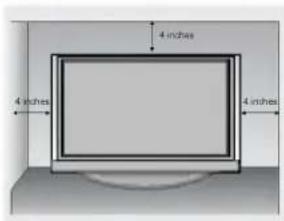
text_image
4 inches 4 inches 4 inches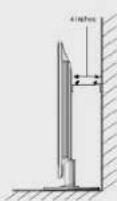
natural_image
Simple line drawing of a TV setup with a monitor, cabinet, and cable (no text or symbols)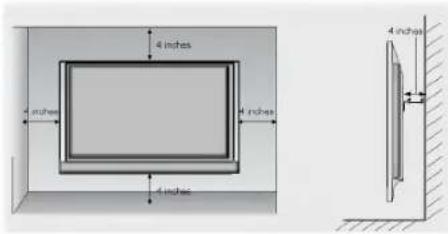
text_image
4 inches 4 inches 4 inches 4 inches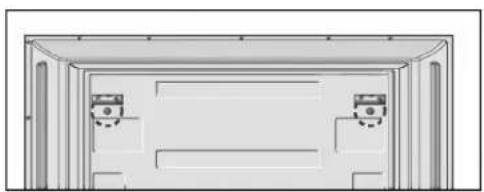
natural_image
Simple line drawing of a room with two doors and a ceiling structure (no text or symbols)text_image
INPUT POWER TV DVD ARC + VCR TEXT PIP SIZE KSTON PIP PTR PIP PTR SWAP PP INPUT LIST MENU IUI EXIT SLEEP OK CVIEW MUTE FAV TIME REVEA INDEX! PASTABA
STATION (stoties) meniu

text_image
STATION PICTURE SOUND TIME SPECIAL SCREEN PSM CSM XO Advanced Reset Menu Presa. The OSD (On Screen Display) function enables you to adjust the screen status conveniently since it provides graphical presentation.
b. In this manual, the OSD (On Screen Display) may be different from your TV's because it is just example to help the TV operation.
text_image
LIST EXIT SLEEP OK VOL - MUTE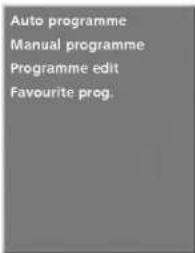
text_image
Auto programme Manual programme Programme edit Favourite prog.①
text_image
Auto programme Manual programme Programme edit Favourite prog. System 8G Storage from 1 Start② \~ ⑦
text_image
Auto programme Name C OS System 8G Storage 5 50% Menu StopB
PRIEDAS
TRIKČIŲ DIAGNOSTIKOS KONTROLINIS LAPAS
text_image
Life's Good LGTelevizors ar škidro kristālu displejů (LCD TV)
Televizors ar plazmas displeju (plazmas TV)
text_image
Diagram of electronic device panel with labeled ports and indicators, including I/O ports, I/Os, and AC input.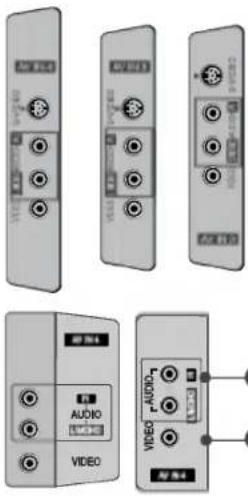
text_image
Image showing multiple electronic device modules with labels like audio, video, and control buttons1 RGB/Audio ieeja
Atbilstošajam ieejas portam pievienojiet datora monitora izeju.
natural_image
Isometric illustration of a mechanical device with a curved arrow indicating rotation (no text or symbols)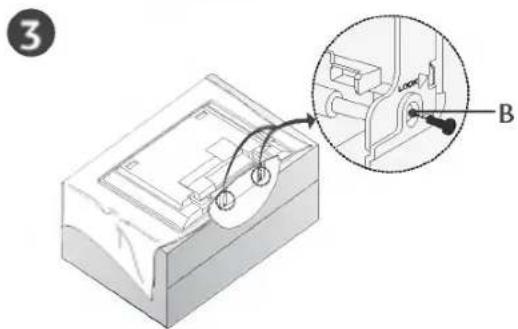
text_image
3 B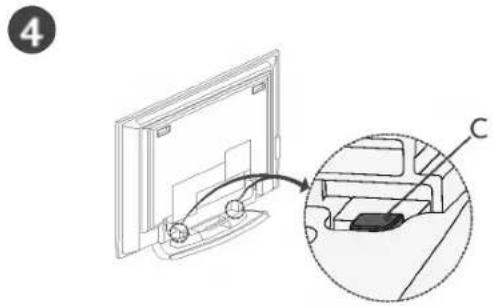
natural_image
Diagram showing a device with an inset close-up of its internal components (no text or symbols)text_image
Technical diagram showing a device with labeled components A, B, and D, including a magnified inset view of the internal structure.KĀ PIESTIPRINĀT TELEVIZORA KOMPLEKTU PIE SIENAS, LAI TAS NENOKRISTU
natural_image
Simple line drawing of a vertical wall-mounted device with a labeled component '3' and a base, against a hatched wall (no text or symbols beyond the label)natural_image
Simple illustration of a flat-screen monitor with no text or symbols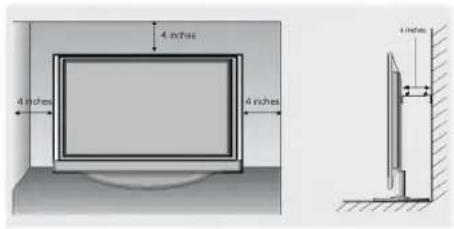
text_image
4 inches 4 inches 4 inches 1 inchnatural_image
Simple line drawing of a TV setup with a monitor, cabinet, and cable (no text or symbols)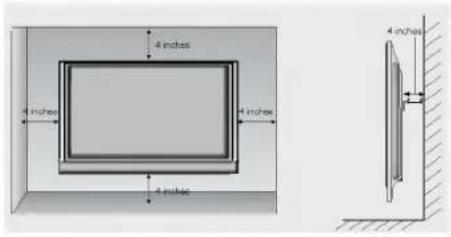
text_image
4 inches 4 inches 4 inches 4 inches 4 inches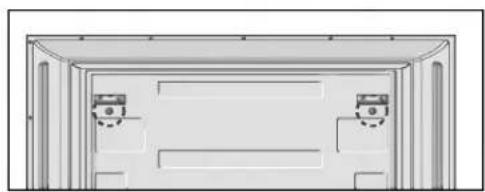
natural_image
Architectural line drawing of a two-story building facade with windows and doorways (no text or symbols)text_image
LIST EXIT MI SLEEP OK + VOL - QVIEW MUTE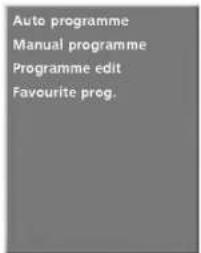
text_image
Auto programme Manual programme Programme edit Favourite prog.①
text_image
Auto programme Manual programme Programme edit Favourite prog. System BG Storage from 1 Start2\~7
text_image
Auto programme Name C 0% System BG Storage 5 50% Menu StopB