SLS 693 - Speaker CLATRONIC - Free user manual and instructions
Find the device manual for free SLS 693 CLATRONIC in PDF.


| Brand | Clatronic |
| Model | SLS 693 |
| Product type | 5.1 channel home cinema system |
| Power supply | 230 V, 50 Hz |
| Frequency range (transmitter/receiver) | 2400 ~ 2483.5 MHz |
| Number of channels (receiver) | 16 |
| Indoor range | Approx. 30 m |
| Audio processing | Digital, 44.1 kHz / 16 bits |
| Audio inputs | 2CH RCA, 5.1CH RCA, 3.5 mm jack (transmitter) |
| Speaker outputs | Front L/R, Center, Surround L/R, Subwoofer |
| Remote control functions | Mute, master volume, subwoofer/center/surround adjustments |
| Remote control battery type | 2 x AAA / LR3 1.5 V (not included) |
| Wireless transmission | 2.4 GHz between transmitter and receiver |
| Output impedance (receiver) | < 1 kOhm |
| Max. input level | 4 V pp |
| Warranty | 24 months |
| Safety instructions | Do not expose to moisture, do not open the motor unit, use a socket in good condition |
| Maintenance | Clean with a dry cloth, unplug before cleaning |
| Included accessories | Power cable, audio cables, remote control, transmitter, receiver, manual |
Frequently Asked Questions - SLS 693 CLATRONIC
User questions about SLS 693 CLATRONIC
0 question about this device. Answer the ones you know or ask your own.
Ask a new question about this device
Download the instructions for your Speaker in PDF format for free! Find your manual SLS 693 - CLATRONIC and take your electronic device back in hand. On this page are published all the documents necessary for the use of your device. SLS 693 by CLATRONIC.
USER MANUAL SLS 693 CLATRONIC
L, R, C, LS, RS: 5 x 40 W PMPO
Subwoofer: 300 W PMPO
Rauschabstand: 60 dB
FST:
Sender
L, R, C, LS, RS: 5 x 40 W PMPO
Subwoofer: 300 W PMPO
Rapport signal / bruit: 60 dB
FST:
Émetteur
Alimentation: DC 5 V
Canaux: 16
L, R, C, LS, RS: 5 x 40 W PMPO
L, R, C, LS, RS: 5 x 40 W PMPO
Subwoofer: 300 W PMPO
Distanza fruscio: .60 dB
FST:
Trasmettitore
General safety instructions
To avoid the risk of fire or an electric shock, you should not expose the device to rain or moisture. Consequently, do not use the device in the immediate vicinity of water - for example near a bath tub, a swimming pool or in a damp cellar.
Use the device only for the intended purpose.
Only connect the device at a properly installed plug socket. Pay attention that the specified voltage corresponds to the voltage of the plug socket.
When using external mains supply, pay attention to the correct polarity and voltage. Always place the batteries in the correct direction.
Assemble the device in such a way that the available ventilation openings are not covered.
Never open the housing of the device. Incorrect repairs can constitute a considerable risk for the user. Should the device become damaged, in particular the mains supply cable, do not operate the device any longer, but rather have it repaired by an expert. Check the mains supply cable regularly for damage.
For safety reasons a broken or damaged mains lead may only be replaced by an equivalent lead from the manufacturer, our customer service department or a similar qualified person.
If the device is not used for a longer period, remove the plug connector from the plug socket or take out the batteries.
These symbols may be found on the machine and are intended to indicate the following:

The lightning symbol should advise the user of parts in the inside of the device which carry dangerously high voltage levels.

The symbol with an exclamation mark should advise the user of important operation or maintenance instructions in the accompanying documentation.
Special safety information
- In order to ensure your children's safety, please keep all packaging (plastic bags, boxes, polystyrene etc.) out of their reach.
Caution! Do not allow small children to play with the foil as there is a danger of suffocation!
Installation
- Remove all devices from the packing and replace the internal packaging material back in the box.
- Retain the packaging if possible during the entire guarantee period!
- Do not insert the plug of the subwoofer into the socket until all loudspeakers and connections have been correctly made!
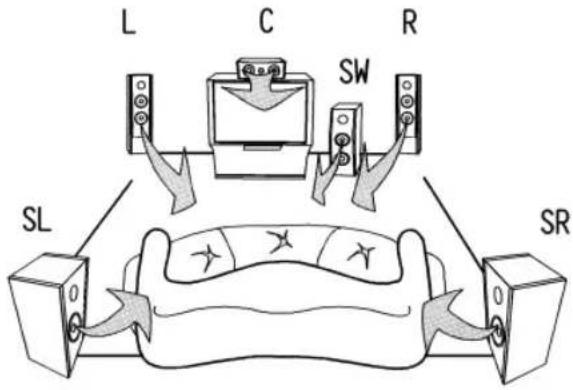
For optimum installation of the loudspeakers, please follow the instructions below:
Connection
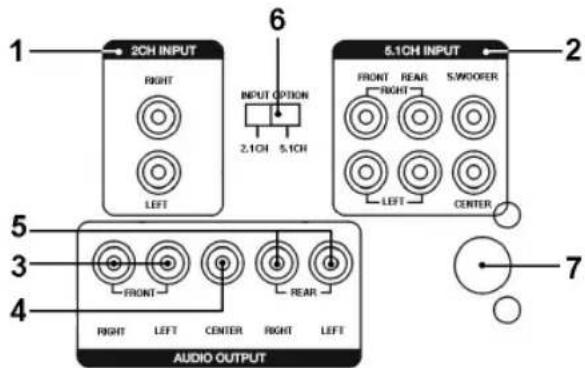
Note: Please ensure that the plug connections are firm. Bad connections may lead to poor sound quality.
1 2CH INPUT
Used for connecting an external sound source via cinch (e.g. hi-fi video recorder).
2 5.1CH INPUT
Used for connecting an external sound source to a 5.1 output (e.g. DVD player).
3 FRONT RIGHT/LEFT
Right and left output for connecting the front
loudspeakers (front left channel, front right channel).
4 CENTER
Output for connecting the center loudspeaker (centre channel).
5 REAR RIGHT/LEFT
Output for connecting the right and left surround loudspeakers (surround right speaker, surround left speaker).
6 2.1CH/5.1CH switch
This switches between the 2.1 CH input and the 5.1 CH input.
7 Mains lead
Note: The switch for turning the device on and off is located on the front of the device (not shown).
Correct connection is as follows:
When you have connected all loud speakers and devices as described you can insert the mains plug of the subwoofer into a correctly installed 230 volt, 50 hertz power socket.
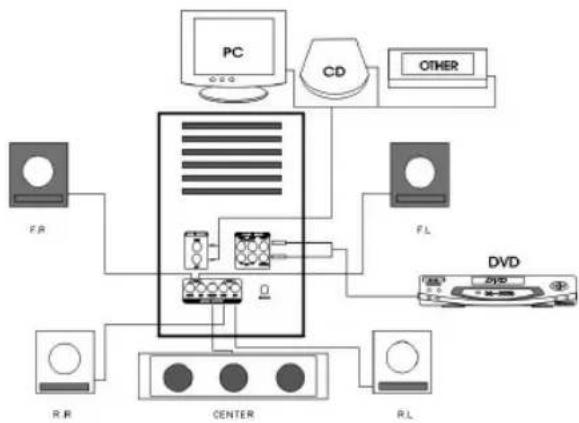
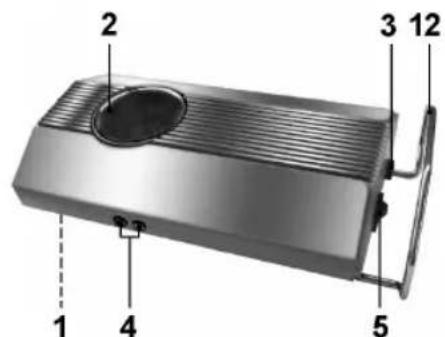
Optional Connection of the Rear or Front Loudspeakers to the Transmitter
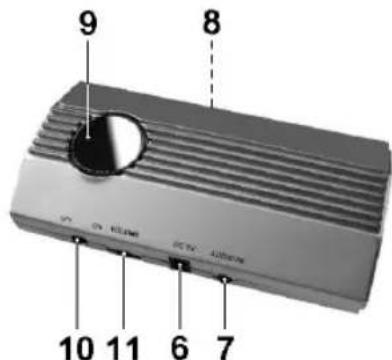
1 SCAN
Button for activating the channel search
2 Standby control lamp
3 AC 230 V / 50 Hz
Mains lead
Loudspeaker output (right/left)
5 POWERON/OFF
On/off switch
6 DC 5V IN Connection socket
7 AUDIO IN
3.5 mm jack socket audio input
8 FREQUENCY SELECT Button
For resetting the channel
9 POWER Control lamp
10 ON/OFF
On/off switch
11 VOLUME
Volume control
12 Foot
General Information
The audio signals are sent from the transmitter to the receiver. The range within buildings is approximately 30m . The range may be less, depending on the ambient conditions.
The audio signals are transmitted in the 2.4 GHz range.
- Compression-free high sound quality with 0.5 ms delay time.
The audio signals are processed digitally at a sampling rate of 44.1 KHz and 16 bits.
- If the transmission is affected by interference or poor reception, the device activates the muting function (see section on "Poor Reception Quality").
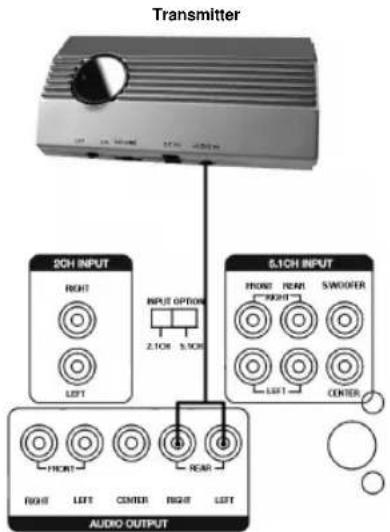
Connecting the Transmitter
- Connect the 3.5mm jack plug to the AUDIO IN socket on the transmitter.
- Then connect the cinch plugs to the AUDIO OUTPUT REAR RIGHT/LEFT of the subwoofer.
Note: It is possible to connect the front loudspeakers instead. In this case connect the cinch plugs to the AUDIO OUTPUT FRONT RIGHT/LEFT connections.
- Insert the power pack into the 5V DC connection provided and then into a correctly installed 230V/50Hz power socket.
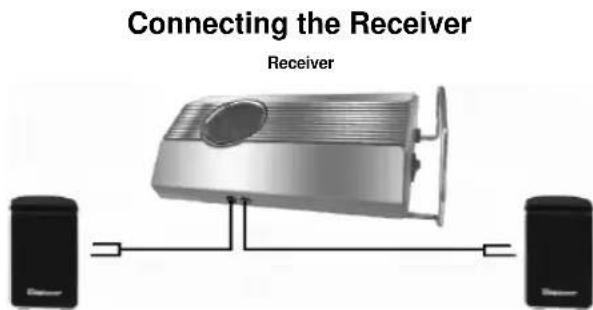
- Connect the surround or front loudspeakers to the R OUT / L OUT (right/left) of the receiver.
- Insert the mains lead into a nearby socket and switch the receiver on.
Note: With the VOLUME control (11) you can individually adjust the volume of the loudspeakers connected to the receiver.
Channel Adjustment
- Press the FREQUENCY SELECT button on the bottom of the transmitter. Then please press the SCAN button on the receiver.
- When the SCAN button is pressed again the next channel is selected.
- Changing the channel setting may also be necessary in cases where reception is not perfect.
Rectifying Faults
No Audio Transmission
- Has the mains adapter/mains lead being inserted? Check the connection on both the transmitter and the receiver.
- Is the receiver switched on? Turn the receiver on with the mains switch located on the rear of the device.
Is the transmission source switched on? - Walls and ceilings reduce the range.
- Check the connections on the connected devices.
- Check whether the signal source (e.g. DVD player) is set to surround playback.
Poor Reception Quality
- Turn the transmitter and receiver again so that they face one another.
- Change the position of the transmitter and receiver a little.
- Poor reception may result from interference from other radio-transmitting devices such as cordless or mobile telephones or CB radio.
Remote Control
Inserting the Batteries (not supplied)
- Open the lid of the battery compartment on the back of the remote control.
-
Insert 2 batteries of type LR3,AAA ^a 1.5V. Please ensure that the polarity is correct (see the fll oor of the battery compartment or the inscription on the outside)!
-
If the remote control is not used for a prolonged period, remove the batteries in order to prevent battery acid leaking.
- Different battery types or new and used batteries must not be used together.
Warning: batteries are not to be disposed of together with domestic wastes. Dispose of the used batteries at the relevant collection bin or at your dealer's.
Never throw batteries into the fire.
When the remote control is used, care should be taken that there are no objects between the remote control and the central loudspeaker. (e.g. table, chair, etc.). These objects prevent the infrared beam of the remote control from reaching the receiver of the central loudspeaker. It is then not possible to control the television with the remote control.
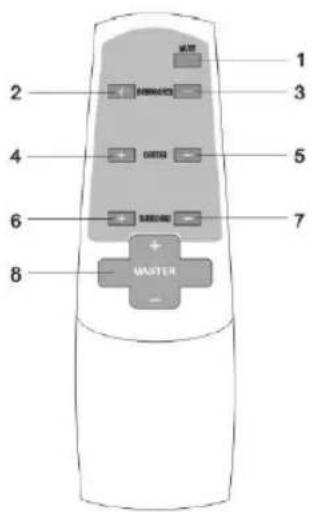
1 MUTE
With this button you can switch off the loudspeakers without changing the volume (the operating status LED of the subwoofer fl ashes).
Note: When switching off this function ensure that the overall volume is not set to maximum!
2 SUBWOOFER +
With this button you can increase the volume of the subwoofer.
3 SUBWOOFER -
With this button you can decrease the volume of the subwoofer.
4 CENTER +
With this button you can increase the volume of the center.
5 CENTER -
With this button you can decrease the volume of the center.
6 SR+
With this button you can increase the volume of the surround loudspeaker.
7 SR-
With this button you can decrease the volume of the surround loudspeaker.
8 MASTER +/-
- Switch on your sound source (e.g. DVD player) and start it.
- Switch on the subwoofer with the on/off switch on the front of the device.
- Switch on the input source using the 2.1 CH/5.1 CH switch.
- With the MASTER +/- regulator on the remote control you can set the overall volume.
- By pressing the buttons 2 to 7 on the remote control you can set the volume of the center, surround and subwoofer loudspeakers.
- To stop operation, turn off the subwoofer with the on/off switch.
Technical Data
Model: SLS 693
Power supply: 230 V, 50 Hz
Power outputs
L,R,C,LS,RS: 5x40WPMPO
Subwoofer: 300 W PMPO
Signal-to-noise ratio: 60 dB
FST:
Transmitter
Power supply: DC 5 V
Channels: 16
Frequency range: 2400 ~ 2483,5 MHz
Input level: 4 V pp (max.)
Output impedance: 10 kOhm
Receiver
Power supply: 230 V, 50 Hz
Channels: 16
Frequency range: 2400 ~ 2483,5 MHz
Output impedance: <1 kOhm
Crosstalk R/L: 15 dB
This device has been tested according to all relevant current CE guidelines, such as electromagnetic compatibility and low voltage directives, and has been constructed in accordance with the latest safety regulations.
Subject to technical changes without prior notice!
Guarantee
The device supplied by our Company is covered by a 24 month guarantee starting on the date of purchase (receipt).
During the life of the guarantee any fault of the device or its accessories *) ascribable to material or manufacturing defects will be eliminated free of charge by repairing or, at our discretion, by replacing it. The guarantee services do not entail an extension of the life of the guarantee nor do they give rise to any right to a new guarantee!
Proof of the guarantee is provided by the proof of purchase. Without proof of purchase no free replacement or repair will be carried out.
If you wish to make a claim under the guarantee please return the entire machine in the original packaging to your dealer together with the receipt.
*) Damage to accessories does not mean automatic free replacement of the whole machine. In such cases please contact our hotline. Broken glass or breakage of plastic parts are always subject to a charge.
Defects to consumables or parts subject to wearing (e.g. motor pistons, kneading blades, drive shafts, spare remote control, spare toothbrushes, saw blades, etc.) as well as cleaning, maintenance or the replacement of said parts are not covered by the guarantee and hence are to be paid!
The guarantee lapses in case of unauthorized tampering.
After the expiry of the guarantee
After the expiry of the guarantee repairs can be carried by the competent dealer or repair service against the payment of the ensuing costs.

Meaning of the "Dustbin" Symbol
Protect our environment: do not dispose of electrical equipment in the domestic waste.
Please return any electrical equipment that you will no longer use to the collection points provided for their disposal.
This helps avoid the potential effects of incorrect disposal on the environment and human health.
This will contribute to the recycling and other forms of reutilisation of electrical and electronic equipment.
Information concerning where the equipment can be disposed of can be obtained from your local authority.
In many EU countries the disposal of electrical and electronic equipment in the domestic waste is prohibited from August 13, 2005 on.
In Germany from March 23, 2006 on.
L, R, C, LS, RS: 5 x 40 W PMPO
Subwoofer: 300 W PMPO