BSS 7002 - Speaker CLATRONIC - Free user manual and instructions
Find the device manual for free BSS 7002 CLATRONIC in PDF.


User questions about BSS 7002 CLATRONIC
0 question about this device. Answer the ones you know or ask your own.
Ask a new question about this device
Download the instructions for your Speaker in PDF format for free! Find your manual BSS 7002 - CLATRONIC and take your electronic device back in hand. On this page are published all the documents necessary for the use of your device. BSS 7002 by CLATRONIC.
USER MANUAL BSS 7002 CLATRONIC
natural_image
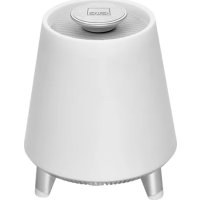
White conical-shaped electronic device with a circular top and three legs, no visible text or symbols on the body.CE
Alcance:....aprox. 15 metros
Thank you for choosing our product. We hope you enjoy using the device.
Symbols in these Instructions for Use
Important information for your safety is specially marked. It is essential to comply with these instructions in order to avoid accidents and prevent damage to the machine:

WARNING:
This warns you of dangers to your health and indicates possible injury risks.

CAUTION:
This refers to possible hazards to the machine or other objects.

NOTE: This highlights tips and information.
General Safety Instructions
Read the operating instructions carefully before putting the appliance into operation and keep the instructions including the warranty, the receipt and, if possible, the box with the internal packing. If you give this device to other people, please also pass on the operating instructions.
- To avoid the risk of fire or electric shock, you should not expose the device to rain or humidity. Do not use the device near water (e.g. bathroom, swimming pool, humid cellars).
- Do not use the unit in extremely hot, cold, dusty, or damp places.
- The unit is designed solely for private use and its intended purpose. This unit is not designed for commercial use.
- Make sure that the power cable is not bent, pinched, or comes into contact with heat sources.
- Make sure that the power cable is not a tripping hazard.
- The power supply unit is only suitable for use in dry rooms.
- Never touch the power supply unit or the cable with wet hands.
- Only connect the power supply unit to a properly installed wall outlet. Ensure that the listed voltage matches the voltage of the wall outlet. Also ensure that the output current, voltage and the polarity of the power supply unit match the information on the connected device.
- Avoid covering the device's vent openings.
- Never cover the vent holes with objects, such as magazines, tablecloths, curtains etc.
- This appliance shall not be exposed to dripping or splashing water and that no object filled with liquids such as vases shall be placed on apparatus.
-
Open sources of fire, such as e.g. burning candles may not be placed onto the unit.
-
Never open the device's case. Improper repairs can cause severe danger to the user. If the device or particularly the power cord is damaged, don't use the device any further and have it repaired by a qualified specialist. Check the power cord regularly for damage.
- If you do not use the device for a long period of time, pull the power supply unit from the wall socket and/or remove the batteries.
- Disconnect the unit from the power supply for cleaning or if a fault occurs.

CAUTION:
Do not open the device! There are no serviceable parts inside the device.
These symbols may be found on the machine and are intended to indicate the following:

The lightning symbol should advise the user of parts in the inside of the device which carry dangerously high voltage levels.

The symbol with an exclamation mark should advise the user of important operation or maintenance instructions in the accompanying documentation.
Children and Frail Individuals
- In order to ensure your children's safety, please keep all packaging (plastic bags, boxes, polystyrene etc.) out of their reach.

WARNING:
Do not allow small children to play with the foil. There is a danger of suffocation!
- This device is not intended to be used by individuals (including children) who have restricted physical, sensory or mental abilities and / or insufficient knowledge and/or experience, unless they are supervised by an individual who is responsible for their safety or have received instructions on how to use the device.
- Children should be supervised at all times in order to ensure that they do not play with the device.
Overview of the Components
1 Control knob "multifunction"
2 Indicator lamp
3 Lamp shade
4 Button (Switch device or illumination on / off)
5 DC 12V power adapter socket
6 AUX-IN jack
7 5V 1A-USB charging socket
8 Built-in microphone
Start-Up of the Device / Introduction
- Choose a suitable location for the device. Suitable would be a dry, level, non-slip surface.

CAUTION:
Do not carry the device by the control knob!
- Sensitive surfaces may be protected by plastic foil. Remove this foil.
Power Supply
- Make sure the grid voltage corresponds to the figures on the rating plate.
- Insert the grid plug into a properly installed three prong socket.
- Connect the device with the plug connector by inserting its plug into the "DC 12 V---" jack of the device.

CAUTION:
- Only use the supplied power adaptor for this device. Do not use for other devices.
- Only use power adaptor with 12 V (⊖←⊕), other adaptors may cause damage to the device.

NOTE:
Disconnect from mains power supply during longer periods of non-use.
USB Charging Socket
You can charge your smartphone through this jack. Use the USB cable of your smartphone for the connection.

NOTE:
- Due to the different smartphone types that are offered today, and their different charging capacities, the loading duration is dependent on the smartphone used and its operating condition.
- Due to the design only a power supply of 1 A can be ensured. Devices such as tablets PCs that need charging currents of up to 2500mA , cannot be charged.
- A playback of audio-files through this connector is not possible.
App Information
You can also download the appropriate app to this device on your smartphone or tablet PC. The app gives you additional control options (amongst others, 3 alarm times and a sleep timer).
The iLink app is available for android and iOS. Scan the corresponding QR code to go directly to the download.

NOTE:
Depending on the provider, downloading the app may require payment.

Google Play App Store

Important Note for Operation via App
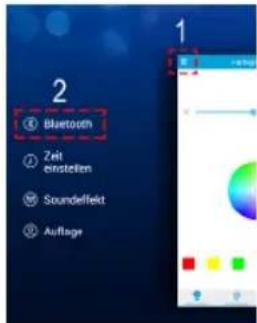
Once you are connected as described in the chapter "Playing Back Music Files" "Wireless via Bluetooth" you must connect the app with the device.
- Open the app.
- Click on the icon menu (1).
- Select the menu item for the Bluetooth connection (2).
- Should the device not appear in the list, click the search icon
-
Connect the app with the device by clicking on "BSS 7002".
-
Now you can operate the device using the app.
The operation described in this manual refers to the handling on the device.
Switching the Device On / Off
- Press and hold the ⏻ button for about 3 seconds to turn the device on.
- To turn the device off, press and hold the button again for about 3 seconds.
Indicator Lamp (2)
The indicator lamp changes its colour according to the operating mode.
| Colour of the indicator lamp | Operating mode |
| Flashes blue In Bluetooth pairing | mode |
| Lit blue Bluetooth connection | exists |
| Lit red In AUX-IN mode |
Change Colour of Light Mood
You have the possibility to choose between 6 different colour variants and an automatic colour change.
- Switch on the device.
- Repeatedly press and release the control knob to select the desired colour.

NOTE:
With the 7th colour selection, the illumination automatically changes between the 6 colour variations.
- Turn the control knob to adjust the intensity of the selected colour. This is only possible within 2 seconds after selecting the colour. To change the intensity later, briefly press the control knob once. Now you have another 2 seconds to change the intensity.
You can also turn off the illumination:
- Press the ⏻ control knob briefly to turn off the illumination.
- To restore the illumination, press the ⏻ button briefly again.

CAUTION:
You can not replace the LED lamps.
Playing Back Music Files
You have two possibilities to play back your own music files with the device: via cable connection or wireless via Bluetooth.
By Cable
Important! The following sequence must be followed when using the AUX-IN mode. For technical reasons, the device switches to AUX-IN mode only when an audio cable is inserted. (Audio cable not included in the scope of delivery)
- Switch on the device.
- Connect the 3.5 mm stereo cable to an external audio source. If required, use a suitable adapter (not included).
- Insert the other end of the cable into the AUX-IN jack on the unit. The device switches automatically to the AUX-IN mode.
- Start the playback of your audio source. Listen to the sound playback via the speaker.

NOTE:
If possible, adjust the volume of the external unit to a comfortable level.
- Use the control knob to adjust the volume. When the maximum adjusted volume is reached beeps are heard from the speaker. If necessary, increase the volume on the playback device.

NOTE:
You can switch off the sound quickly (mute).
- Keep the control knob pressed for 3 seconds for this purpose. Playback will thereby not be stopped.
-
To turn on the sound again press and hold down the control knob for 3 seconds.
-
For the further procedure, please refer to the user manual of the external audio source.
- Do you no longer want to use the AUX-IN mode? Remove the audio cable from the AUX-IN jack.
Wireless via Bluetooth
Bluetooth involves a technology for wireless radio connection of devices over a short distance. Devices with Bluetooth standard are transmitting between 2.402 and 2.480 GHz in the ISM band (Industrial, Scientific and Medical). Interference can be caused for example by WLAN-networks, DAB radios, cordless phones, or microwave ovens which work on the same frequency band.
This device offers you the possibility to use a Bluetooth-enabled device. The functional radius is limited to approx. 15 metres depending on the surroundings and the unit used. If your playing device supports the A2DP profile (Advanced Audio Distribution Profile) and has a music-player function, then you can also wirelessly transfer music to the device. The A2DP profile involves a multi-vendor Bluetooth profile. By streaming, stereo-audio signals are wirelessly transferred between the playing device (source) and the receiving device. To be able to remotely control the source, the playback device must support the AVRCP profile (Audio Video Remote Control Profile.
Due to the different device manufacturers, models, and software versions, a full functionality cannot be guaranteed.
Logging on Devices (Pairing)
Before you listen to music via the unit, you must pair the devices.

NOTE:
Make sure no cable is connected to the AUX-IN socket. The Bluetooth function is muted automatically if an audio cable is connected.
- Ensure, that the Bluetooth function is activated in your player (e.g. mobile phone). For this, refer to the operation manual of your player.
- Switch on the device. The indicator lamp (2) will flash blue. This indicates that the unit is in pairing mode.
- Choose the Bluetooth menu in your player and register the device in your player. For this, refer to the operation manual of your player. The device "BSS 7002" will show in your player as a selection.

NOTE:
- Connect only one playback device at once with the speaker to ensure a trouble-free operation.
- Because of the many available playback devices (smartphones, tablets, etc.) available today, it cannot be excluded that the speaker may be paired with multiple devices (multipoint / double pairing). In the case of multipoint / double pairing, the app functions may be limited.
-
While pairing your devices, please make sure that no other playback device with activated Bluetooth is nearby.
-
Now enter the password "0000" in your player, depending on the device manufacturers, model, and software version.
Once the connection is successful, acknowledgment tones can be heard from the speaker and the indicator light glows blue. For the further procedure, please refer to the user manual of the playback unit. If possible, adjust the volume of the external unit to a comfortable level.
i NOTE:
- Depending on the device manufacturer, you need to perform the registration (PAIRING) again to connect the devices.
- In case of problems with the registration of a replay device (e. g. multipoint / double pairing), deactivate the WiFi- / and mobile data function in your playback device.
- The Bluetooth compatibility cannot be ensured for devices (e.g. mobile phones) getting released in the future.
- To ensure an optimal connection, make sure that the battery of your player is completely charged.
- Some of the mobile phone brands have an energy-saving mode. Deactivate the energy-saving mode as it can otherwise result in problems during the data transfer through Bluetooth.
- To be able to transfer audio data, Bluetooth needs to stay activated in your player. Observe the operation manual of your player.
- If a mobile phone on which you are playing music receives a call, the music will be interrupted. Press the control knob to take the call. The sound is transmitted via the speaker. Speak towards the microphone or transfer the call to your mobile phone. When doing this, please refer to the fade-in on the display of your mobile phone. After you have terminated the phone call, the playback will resume.
• Automatic connection
If supported by your player (e. g. mobile phone), the devices will be connected automatically. The prerequisite for this is:
- The devices were already connected with each other. - Bluetooth is activated in your player.
-Please make sure that no other devices with activated Bluetooth are nearby.
If the automatic connection does not work, turn the loudspeaker off and then on again. Now you can connect the devices manually to each other again.
Description of the Bluetooth Operation
i NOTE:
- Not all the functions may be supported depending on the playback device.
- Depending on the device, you must start the music app on your playback device beforehand.
Adjust Volume
Use the control knob to adjust the volume. When the maximum adjusted volume is reached beeps are heard from the speaker. If necessary, increase the volume on the playback device.
Pause Playback
- Keep the control knob pressed for about 2 seconds to pause playback.
- Keep the control knob pressed again for about 2 seconds in order to continue playback.
Answer / End Call in Bluetooth Mode
- Press the control knob briefly to take the call.
• To end the call, briefly press the control knob again.
i NOTE:
Music playback stops during an incoming call. After ending the call, music playback continues.
Cleaning
CAUTION:
- Do not immerse the device in water.
- Do not use a wire brush or other abrasive objects.
-
Do not use any caustic or abrasive cleaning agents.
-
Remove the plug before cleaning.
- Clean the appliance with a slightly humid cloth without any additives.
Troubleshooting
| ProblemCause | Solution | |
| The unit does not work. | The unit is blocked and "hangs". | Disconnect the mains plug for approximately 5 seconds. Then switch the unit back on. |
| No audio signal via the Bluetooth connection. | Speaker is not paired to the audio source. | Check whether a connection exists. If necessary, pair the speaker again to the audio source. |
| Volume too low. Increase the volume on the speaker. | ||
| Audio cable connected to the AUX-IN socket. | Disconnect the audio cable. | |
| Speaker cannot be connected. | Pairing does not work. | Check whether the audio source supports the A2DP protocol. |
| Audio source is switched off. | Switch on the audio source. | |
| Bluetooth is switched off at the audio source. | Switch on the Bluetooth function in the audio source. | |
| Bluetooth version is not supported. | Use a different play-back unit. | |
Technical Data
Model: BSS 7002
Power supply:DC 12V
Power consumption: 23 W
Protection class:....III
Net weight: .... approx. 1,09 kg
External Power Adaptor
Protection class:......II
Input: AC 100-240V, 50/60Hz
Output: DC 12V/2A
Polarity:
Bluetooth
Bluetooth support: V4.0
Maximum radio-frequency power transmitted: 2.5 mW
Range: approx. 15 meters
Transmitting frequency: 2.402 - 2.480 GHz
Protocols: A2DP/AVRCP
The right to make technical and design modifications in the course of continuous product development remains reserved.
Notice of directive conformity
Hereby, CTC Clatronic International GmbH declares that the radio equipment type BSS 7002 is in compliance with Directive 2014 2014/53/EU.
The full text of the EU declaration of conformity is available at the following internet address: www.sli24.de
In the "Download" area, please enter the model name BSS 7002.
Tested for operation in Great Britain.
Disposal
Meaning of the "Dustbin" Symbol
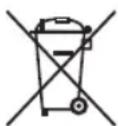
Protect our environment: do not dispose of electrical equipment in the domestic waste.
Please return any electrical equipment that you will no longer use to the collection points provided for their disposal.
This helps avoid the potential effects of incorrect disposal on the environment and human health.
This will contribute to the recycling and other forms of re-utilisation of electrical and electronic equipment.
Information concerning where the equipment can be disposed of can be obtained from your local authority.
Instrukcja obsługi
CTC Clatronic Sp. z o.o
Ul. Brzeska 1
45-960 Opole