EC 7012 - Speaker CLATRONIC - Free user manual and instructions
Find the device manual for free EC 7012 CLATRONIC in PDF.


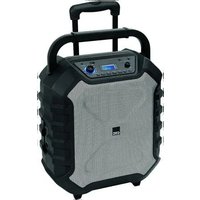
| Product Type | Portable speaker with karaoke function |
| Brand | Clatronic |
| Model | EC 7012 |
| Power supply | AC 100-240 V~ 50/60 Hz |
| Built-in battery | 12 V, 4000 mAh, rechargeable |
| Charging time | Approx. 5.5 hours |
| Battery life | Up to 10 hours |
| Power consumption | 36 W |
| Protection class | II |
| Net weight | Approx. 7 kg |
| Bluetooth | Version 2.1+EDR, range approx. 15 m, protocols A2DP/AVRCP |
| Max RF power | 2.5 mW |
| Transmission frequency | 2.402 - 2.480 GHz |
| Audio inputs | AUX IN (3.5 mm jack), USB, microphone (2 x MIC) |
| Outputs | Built-in speaker |
| Display | Yes, displays modes and information |
| Equalizer | ROCK, BASS, FLAT, POP, CLASSIC, JAZZ |
| Karaoke function | Yes, with two microphone inputs and microphone volume control |
| USB playback modes | Single track repeat, folder repeat, random repeat, etc. |
| Included accessories | 1 microphone, 1 power cord |
| Ventilation | Free space of at least 30 cm around the device |
| Operating temperature | Avoid very humid, dusty, cold or hot places |
| Maintenance | Clean with a slightly damp cloth without additives |
| Warranty | Keep the receipt and provided warranty |
Frequently Asked Questions - EC 7012 CLATRONIC
User questions about EC 7012 CLATRONIC
0 question about this device. Answer the ones you know or ask your own.
Ask a new question about this device
Download the instructions for your Speaker in PDF format for free! Find your manual EC 7012 - CLATRONIC and take your electronic device back in hand. On this page are published all the documents necessary for the use of your device. EC 7012 by CLATRONIC.
USER MANUAL EC 7012 CLATRONIC
natural_image
Exterior view of a black and silver portable electronic device with control panel and buttons (no visible text or symbols)DEUTSCH
Inhalt
Bedienungsanleitung
Thank you for choosing our product. We hope you enjoy using the device.
Symbols in these Instructions for Use
Important information for your safety is specially marked. It is essential to comply with these instructions in order to avoid accidents and prevent damage to the device:

WARNING:
This warns you of dangers to your health and indicates possible injury risks.

CAUTION:
This refers to possible hazards to the device or other objects.

NOTE: This highlights tips and information.
General Safety Instructions
Read the operating instructions carefully before putting the device into operation and keep the instructions including the warranty, the receipt and, if possible, the box with the internal packing. If you give this device to other people, please also pass on the operating instructions.
- To avoid the risk of fire or electric shock, you should not expose the device to rain or humidity. Do not use the device near water (e.g. bathroom, swimming pool, humid cellars).
- Do not use the device in extremely hot, cold, dusty, or damp places.
- Keep the device away from heat, direct sunlight and sharp edges.
- The device is designed solely for private use and its intended purpose. This device is not designed for commercial use.
- Make sure that the power cable is not bent, pinched, or comes into contact with heat sources.
- Make sure that the power cable is not a tripping hazard.
- Never touch the mains plug or the cord with wet hands.
- Do not use the device with wet hands.
- Always connect the device to a properly installed plug socket. Be sure the device voltage corresponds to the grid voltage.
- The mains plug must always be easily accessible.
- Avoid covering the device's vent openings. Keep a minimum distance of 30 cm around the device for sufficient ventilation.
- Never cover the vent holes with objects, such as magazines, tablecloths, curtains etc.
- This device shall not be exposed to dripping or splashing water and that no object filled with liquids such as vases shall be placed on apparatus.
-
Open sources of fire, such as e.g. burning candles may not be placed onto the device.
-
Never open the device's case. Improper repairs can cause severe danger to the user. If the device or particularly the power cord is damaged, don't use the device any further and have it repaired by a qualified specialist. Check the power cord regularly for damages.
- The device needs to be examined regularly for signs of damage or material fatigue. If damage is noticed, the device may no longer be used.
- Pull the power plug from the socket if the device will be out of use for long periods.
- Pull the power plug from the socket for cleaning or in the case of a fault.
These symbols may be found on the device and are intended to indicate the following:

The lightning symbol should advise the user of parts in the inside of the device which carry dangerously high voltage levels.

The symbol with an exclamation mark should advise the user of important operation or maintenance instructions in the accompanying documentation.
Children and Frail Individuals
- In order to ensure your children's safety, please keep all packaging (plastic bags, boxes, polystyrene etc.) out of their reach.

WARNING:
Do not allow small children to play with the foil. There is a danger of suffocation!
- This device is not intended to be used by individuals (including children) who have restricted physical, sensory or mental abilities and / or insufficient knowledge and/or experience, unless they are supervised by an individual who is responsible for their safety or have received instructions on how to use the device.
- Children should be supervised at all times in order to ensure that they do not play with the device.
Special Safety Information

WARNING:
Avoid damage to your hearing with volume that is too high.
Special Safety Information Concerning the Built-in Battery

CAUTION:
- Risk of explosion in case of improper replacement of the battery. Replace only by the same or an equivalent type.
- Do not expose the built-in battery to hard impacts or pressures.
Overview of the Components
1 Extendable handle
2 Carrying handle
3 Display
4 USB port
5 AUX IN port
6 VOLUME control (Volume)
7 POWER ON/OFF switch
8 AC \~ power cord connection
9 ▶ button (Play / Pause / Pairing)
10 button (Next music file)
11 Button (Previous music file)
12 EQ/ECHO button (Equaliser/Microphone echo)
13 FOLD./10+ button
14 P-MODE button (USB playback mode)
15 FUNCTION/ button
16 Indicator lamp CHARGE (Battery is charging)
17 MIC VOL Regler (Microphone volume)
18 MIC 2 Buchse (Microphone input)
19 MIC 1 Buchse (Microphone input)
20 Indicator lamp PAIR (Bluetooth)
Scope of Delivery (not shown)
1 x Microphone
1 x Mains cable
First Use of the Device
- Choose a suitable location for the device. Suitable locations are dry, even and antislip surfaces on which you may operate the device easily.
- Make sure there is proper ventilation for the device!
- Sensitive surfaces such as the display may be protected by plastic foil. Remove this foil.
Power Supply
- Make sure the grid voltage corresponds to the figures on the rating plate.
- Connect the supplied power cord with the AC \~ connection.
- Insert the mains plug to a properly installed socket.
i NOTE:
- The charging of the battery begins as soon as the power plug is inserted into the socket.
- Disconnect from mains power supply during longer periods of non-use.
Battery Operation
It is possible to operate this device with the built-in battery.
General Information
- Charge the battery completely before you use it to operate the device.
-
Avoid fully discharging the battery.
-
Charge the battery completely after each use.
- As soon as the indicator lamp CHARGE (16) lights red, the battery must be charged.
Charging the Battery
- Connect the supplied power cord with the AC \~ connection.
- Connect the mains plug to a properly installed socket.
- The indicator lamp CHARGE (16) lights red and the battery is being charged.
- When the battery has been charged completely, the indicator lamp CHARGE lights green.
Depending on the battery's capacity charging can take up to 6 hours.

CAUTION:
Never leave the device unattended during charging.
i NOTE:
- The charging time varies according to battery use.
- If the device is out of use for a long period of time, charge the battery at least once every 4 to 8 weeks. The battery will also constantly discharge when switched off.
General Operation
Switch the Device On / Off
i NOTE:
- Set the POWER switch to position "ON". The lighting around the VOLUME control illuminates.
After approx. 15 minutes without signal or with very poor signal, the device will automatically switch to standby. Press the button FUNCTION /☐ to use the device again. - To turn off the device completely, set the POWER switch to position "OFF". Disconnect the mains plug from the socket.
Volume
Use the VOLUME control to adjust the volume as desired.
Select the Operating Mode
Repeatedly press the FUNCTION ⏻ button to select the desired operating mode.
$$ \mathrm{USB} \rightarrow \text { Bluetooth } \rightarrow \text { AUX } $$
Sound Settings
If you press the EQ / ECHO button repeatedly, you can select between the different sound modes. Choose one of the following settings: ROCK, BASS, FLAT, POP, CLASSIC, JAZZ.
i NOTE:
- The device always starts with the setting "ROCK".
- If necessary, adjust the EQ settings on your playback device in order to generate a better sound.
Microphone Operation
You may switch on the microphone for the Karaoke function during any playback mode.
Using the Microphone
i NOTE:
- In order to prevent an acoustic "build-up", turn the MIC VOL control anticlockwise to the left-hand stop. Only then plug the microphone cable into the jack.
-
Due to the high power amplifier of the device, any noise will also be strengthened through the microphone. This is not a malfunction of the device!
-
Connect the microphone with the port MIC 1 or MIC 2.
- Slide the switch on the microphone upward in the direction "ON".
- Adjust the microphone volume with the MIC VOL control.
- Use the EQ / ECHO button to generate echo effects. Press and hold the button for about 2 seconds to turn the feature on or off. "ECHO" appearing in the display indicates the activated function.
- Turn off the microphone when you do not use it. Slide the switch downward in the direction "OFF".

CAUTION:
To avoid audio feedback (sharp whistling sound), use the microphone outside of the speaker's reverberation distance.
Playing Back Music Files
You can play back your own music files in three ways: Via cable, cordless via Bluetooth, or via the USB port.
By Cable (Cable not included)
- If required, use a suitable adapter (not included). Connect the external device as follows:
- Connect to the AUX IN socket using a 3.5 mm stereo jack plug cable.
- Use the FUNCTION / ⏻ button to select AUX mode.
- Start the playback of your audio source. Listen to the sound playback via the speaker.
- For the further procedure, please refer to the user manual of the external audio source.
i NOTE:
If possible, adjust the volume of the external device to a comfortable level.
Playing Back Music via Bluetooth
Bluetooth involves a technology for wireless radio connection of devices over a short distance. Devices with Bluetooth standard are transmitting between 2.402 and 2.480 GHz in the ISM band (Industrial, Scientific and Medical). Interference can be caused for example by WLAN-networks, DAB radios, cordless phones, or microwave ovens which work on the same frequency band.
This device offers you the possibility to use a Bluetooth-enabled device. The functional radius is limited to approx. 15 metres depending on the surroundings and the device used.
In order to transfer music wirelessly, your player must support the A2DP profile (Advanced Audio Distribution Profile). To be able to remotely control the source, the playback device must support the AVRCP profile (Audio Video Remote Control Profile. Due to the different device manufacturers, models, and software versions, a full functionality cannot be guaranteed.
Logging on Devices (Pairing)
Before you listen to music via the device, you must pair the devices.
- Ensure, that the Bluetooth function is activated in your player (e.g. mobile phone). For this, refer to the operation manual of your player.
- Select the BLUETOOTH mode using the FUNCTION / ⏻ button. The control lamp PAIR (20) will blink blue. This signalizes that the device is in pairing mode.
- Choose the Bluetooth menu in your player and register the device in your player. For this, refer to the operation manual of your player. The device "CTC EC 7012" will show in your player as a selection.
i NOTE:
- Only one playback device can be connected with the device at one time. If the device is already connected with another playback device, the device will not appear in the BT selection menu.
-
To disconnect an existing Bluetooth connection, hold the ▶/button pressed. The control lamp PAIR (20) flashes blue.
-
Now enter the password "0000" in your player, depending on the device manufacturers, model, and software version.
After successful pairing, the control lamp PAIR (20) lights up blue. For the further procedure, please refer to the user manual of the playback device. If possible, adjust the volume of the external device to a comfortable level.
i NOTE:
- Depending on the device manufacturer, you need to perform the registration (PAIRING) again to connect the devices.
- In case of problems with the registration of a replay device, deactivate the WiFi- / and mobile data function in your playback device.
- The Bluetooth compatibility cannot be ensured for devices (e.g. mobile phones) getting released in the future.
- To ensure an optimal connection, make sure that the battery of your player is completely charged.
i NOTE:
- Some of the mobile phone brands have an energy-saving mode. Deactivate the energy-saving mode as it can otherwise result in problems during the data transfer through Bluetooth.
- To be able to transfer audio data, Bluetooth needs to stay activated in your player. Observe the operation manual of your player.
- If a mobile phone on which you are playing music receives a call, the music will be interrupted. However, the sound is not played back by the device. After you have ended the call, the devices are connected to each other again and playback continues.
Playing Music via USB
This device has been developed in line with the latest technical advances in the USB field. The wide range of different USB storage devices of all types which are currently on the market, unfortunately do not allow us to guarantee full compatibility with all USB storage devices. For this reason, in rare cases there may be problems in playing back files from USB storage devices. This is not a malfunction of the device. Only use commercially available USB sticks.
- Press the FUNCTION / ⏻ button repeatedly until "USB" is shown on the display.
- Connect a USB storage device directly into the port. After that, “—” appears in the display. Playback will automatically start after a few seconds.
For operation, please refer to the section "Description of the Control Buttons (BT/USB)".
i NOTE:
- The device detects an USB flash drive that has been already used. The playback starts with the most recently played song.
- Always directly connect a USB storage medium to the USB port to prevent any malfunctions.
- The USB port ist not designed for charging external devices.
- Please note: The USB port is only intended for playing music from USB sticks. It only provides a low power (100 mA) power supply. The USB port is not suitable for using external 2.5" hard drives with start-up currents of up to 1100 mA. In order to play music from your smartphone, iPod or iPhone, connect the designated AUX IN socket.
CAUTION:
Switch the device to a different operating mode before you remove the USB storage device.
Description of the Control Buttons (BT / USB)
i NOTE:
Depending on your playback device, not all functions might be supported.
▶‖/×(9)
You can pause and continue music playback. Press again to continue playback.
(11)
Press once = Restart of the song from the beginning. (Not during USB-mode)
Press twice = This jumps back to the previous track.
Press three times = This plays the song before etc.
When you hold down the button in USB mode, a music search is started.
▶▶I (10)
- Press to skip to the next song and the following songs.
- When you hold down the button in USB mode, a music search is started.
P-MODE (14) (only during USB operation)
Press once = “ 📄 ” appears in the display. The current song will be played repeatedly.
Press twice = “ → FOLDER “ appears in the display. The selected folder will be played repeatedly.
Press three times = “ ⇌ ” appears in the display. All songs will be played repeatedly.
Press four times = "RAND" appears in the display. All songs will be played in random order.
Press five times = All functions are deactivated and the device continues normal playback.
FOLD. / 10 (13) (only during USB operation)
- Press the button to skip 10 tracks. Provided there are more than 10 songs available.
- Press and hold this button to switch to the next folder. Playback starts from the selected folder.
Cleaning
CAUTION:
Do not immerse the device in water.
- Disconnect the mains plug before cleaning.
- You may wipe off external stains, using a slightly damp cloth without any additives.
Troubleshooting
| ProblemCause | Solution | |
| The device cannot be operated. | The device is blocked and “hangs”. | Switch the device off and disconnect the power plug from the socket for about 5 seconds. Then switch the device on again. |
| No sound. Volume is too low. Increase the volume. | ||
| No audio signal during bluetooth connection. | The device is not registered with the audio source. | Ensure that there is a connection. Register the device with the audio source again, if necessary. |
| Volume too low. Increase the volume on the device. | ||
| Increase the volume on the audio source. | ||
| Device can not be connected. | Registration does not work. | Check to see if the audio source supports the A2DP protocol. |
| Audio source is shut off. | Turn on the audio source. | |
| Bluetooth is shut off on the audio source. | Turn on the Bluetooth function on the audio source. | |
| Bluetooth version is not supported. | Use a different play-back device. | |
| Sharp whistling sound during microphone operation. | Audio feedback. Use the microphone outside of the speaker's reverberation distance. | |
Technical Data
Model: EC 7012
Power supply: AC 100-240V\~50/60Hz
Battery operation: 12 V, 4000 mAh
Charging time:......approx. 5,5 hours
Operating time: up to 10 hours
Power consumption: 36 W
Protection class:......II
Net weight: ....approx. 7 kg
Bluetooth
Bluetooth support: V2.1+EDR
Maximum radio-frequency power transmitted: 2.5mW
Range:..... approx. 15 meters
Transmitting frequency: 2.402 - 2.480 GHz
Protocols: A2DP/AVRCP
The right to make technical and design modifications in the course of continuous product development remains reserved.
Notice of Directive Conformity
Hereby, CTC Clatronic International GmbH declares that the radio equipment type EC 7012 is in compliance with Directive 2014/53/EU.
The full text of the EU declaration of conformity is available at the following internet address: www.sli24.de
In the "Download" area, please enter the model name EC 7012.
Tested for operation in Great Britain.
Disposal
Meaning of the "Dustbin" Symbol
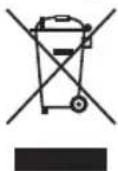
Protect our environment: do not dispose of electrical equipment in the domestic waste.
Please return any electrical equipment that you will no longer use to the collection points provided for their disposal.
This helps avoid the potential effects of incorrect disposal on the environment and human health.
This will contribute to the recycling and other forms of re-utilisation of electrical and electronic equipment.
Information concerning where the equipment can be disposed of can be obtained from your local authority.
Disposal of Batteries
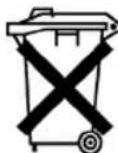
The device includes a rechargeable battery. Used batteries do not belong in household waste.
The battery must be removed before the product is disposed of. Contact qualified specialists to do so.
Information on where the battery must be disposed of can be found via your local authorities or municipalities.
Instrukcja obsługi
CTC Clatronic Sp. z o.o
Ul. Brzeska 1
45-960 Opole