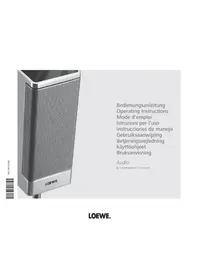
Centerspeaker I Compose - Loudspeaker LOEWE - Free user manual and instructions
Find the device manual for free Centerspeaker I Compose LOEWE in PDF.



| Product type | Center speaker |
| Brand | Loewe |
| Model | Centerspeaker I Compose |
| Dimensions (without stand) | W 82.3 x H 9.1 x D 9.1 cm |
| Dimensions (with wall mount) | W 82.3 x H 9.1 x D 10.1 cm |
| Dimensions (with table) | W 82.3 x H 10.9 x D 25.8 cm |
| Weight (satellite only) | 5.4 kg |
| Weight (with wall mount) | 6.2 kg |
| Weight (with table) | 8.6 kg |
| Composition | 2 × 80 mm bass (paper cone), 2 × 80 mm full range, 1 × 33 mm fabric dome tweeter |
| Nominal power (RMS) | 75 W |
| Maximum power (music) | 120 W |
| Impedance | 4-8 Ohm |
| Sound pressure | 84 dB SPL (1W/m) |
| Included accessories | 6 m speaker cable, wall mount, user manual |
| Maintenance | Soft damp cloth without corrosive products |
| Safety | Protect from moisture, shocks, magnetic fields, overheating, dust |
| Installation | Near the screen, specific cabling for Loewe TVs |
| Warranty | Domestic use only |
| Repairability | Service by Loewe dealer only |
Frequently Asked Questions - Centerspeaker I Compose LOEWE
User questions about Centerspeaker I Compose LOEWE
0 question about this device. Answer the ones you know or ask your own.
Ask a new question about this device
Download the instructions for your Loudspeaker in PDF format for free! Find your manual Centerspeaker I Compose - LOEWE and take your electronic device back in hand. On this page are published all the documents necessary for the use of your device. Centerspeaker I Compose by LOEWE.
USER MANUAL Centerspeaker I Compose LOEWE
Centerspeaker I Compose
Inhalt
Lieferumfang
Zubehör
© by Loewe Opta 2010
Content
Scope of delivery 9
Accessories
Common Notes 10
Disposal
Cardboard box and packaging 10
The unit 10
Cleaning
Removing the protective foil 10
For your safety 10
Setting up 11
Center loudspeaker 11
Suggestion for positioning solution 11
Connection
Wiring Loewe Flat-TV (L27xx/SL1xx) - Individual Sound 12
Wiring Loewe Flat TV-Auro-Individual Sound 13
Connecting the Center speaker to the subwoofer 14
Start-up
Select the center signal on the subwoofer 14
Technical Data 14
9
10
10
12
14
Scope of delivery
Centerspeaker I Compose, Order No. 66209B/L00
1x Centerspeaker I Compose
- 1 x Loudspeaker cable 6m
- Operating Manual
- Installation Instructions
- Wall holder
Accessories
Table stand
Order No. 66477B00
Trims
Aluminium-silver
apple green
ebony
light oak
orange
rosewood
ruby-red
black
Mirror
Satellite
Order No. 89645R80
Order No.89645G80
Order No.89645A80
Order No.89645H80
Order no. 89645180
Order No.89645C80
Order No.89645N80
Order No.89645W80
Order no. 89645Q80
Wooden trims are a natural product. UV light (strong sunshine) can lead to slight discoloration.
Common Notes
Disposal
Cardboard box and packaging
You have opted for a durable and technically sophisticated product. In line with national regulations regarding the disposal of packaging materials, we pay a fee to authorised recyclers who collect packaging from dealers. However, we recommend that you keep the original cardboard box and the rest of the packaging materials so that the unit can, if necessary, be transported in the safest possible conditions.
The unit
Important: The EU Directive 2002/96/EG governs the proper re-acceptance, handling and recycling of used electronic appliances.
Old electronic appliances must therefore be disposed of separately. Never throw this set in the normal domestic waste. You can hand in your old set free of charge at identified collection points or at your dealer if you buy a similar new set. Other details about re-acceptance (also for non-EU countries) are available from your local administration.
Cleaning
Only clean your Loudspeaker system with a damp, soft, clean cloth (without aggressive cleaning agents).
Removing the protective foil
Slowly and carefully remove the protective foil on the trim.
For your safety
For your safety and to avoid unnecessary damage to your TV set, please read and observe the following safety instructions:
- Your Loudspeaker system is designed exclusively for playing audio signals.
- You must switch off your system (Loudspeaker system, Auro, TV and any other components which may be connected) before you can connect or disconnect other devices or loudspeakers.
Protect your Loudspeaker system against ...
- Damp, moisture, rain, splashing water or dew
- Knocks and mechanical stresses
Magnetic and electrical fields
Higher electrical powers than specified
Cold, heat, direct sunlight and extreme temperature variations
Dust - Covering which obstructs air circulation
Manipulations inside the set
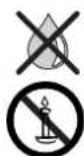
Do not place objects containing liquids on top of the unit.
Candles and other open flames must be kept away from the unit at all times to prevent the spread of fire.
Your Loudspeaker system has been designed exclusively for private household use. Warranty services cover this use for the intended purpose.
WARNING: TO RULE OUT THE DANGER OF ELECTRIC SHOCK, DO NOT REMOVE THE COVER (OR THE REAR PANEL OF THE UNIT). THERE ARE NO PARTS INSIDE THE HOUSING WHICH CAN BE REPAIRED BY THE USER. HAVE REPAIRS DONE ONLY BY YOUR LOEWE DEALER.
If you have moved your Loudspeaker system out of the cold into a warm environment, leave it for about an hour because of the possible forming of condensation. Do not switch on until it has reached room temperature. This avoids seriously damaging the components.
Setting up
Center loudspeaker
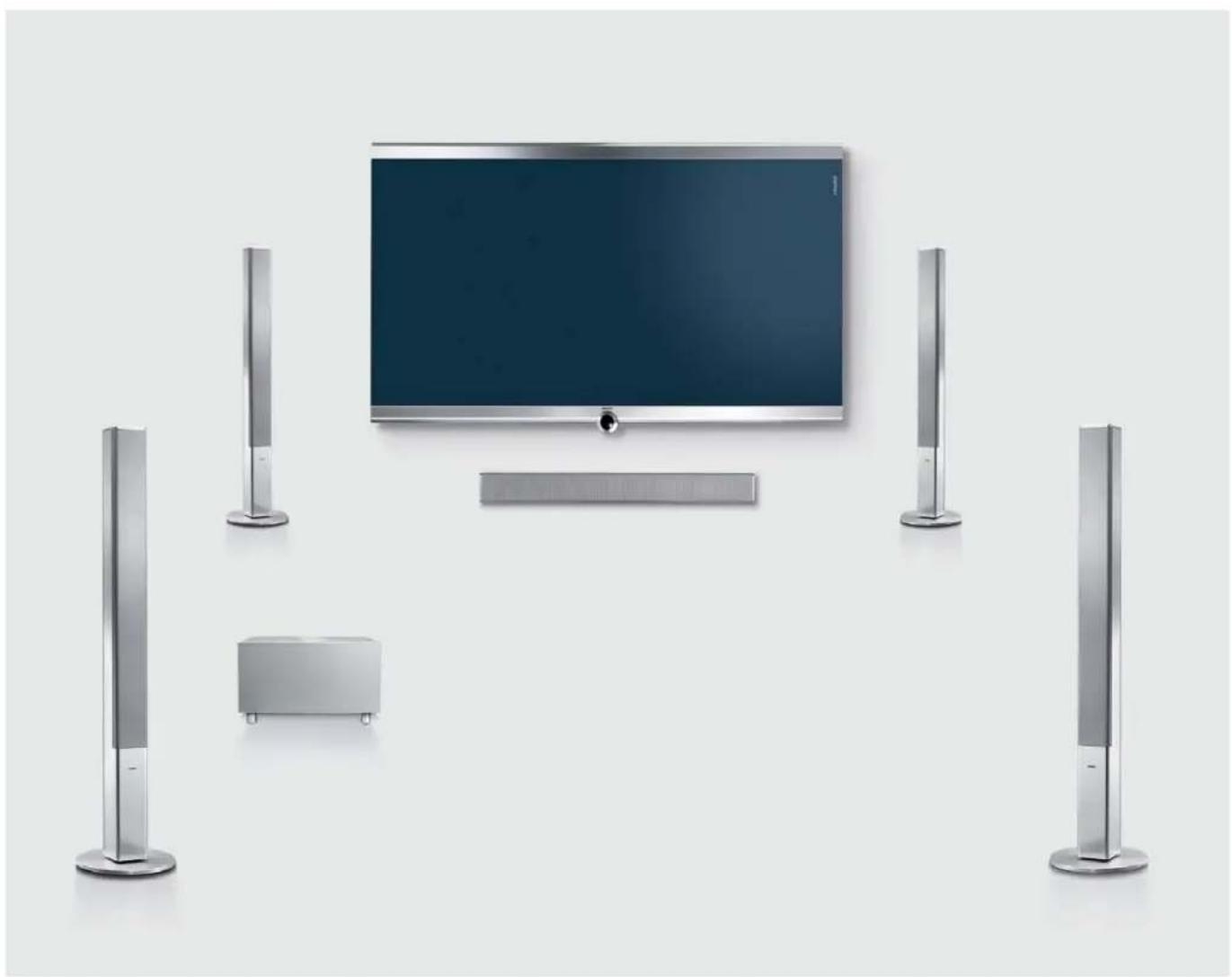
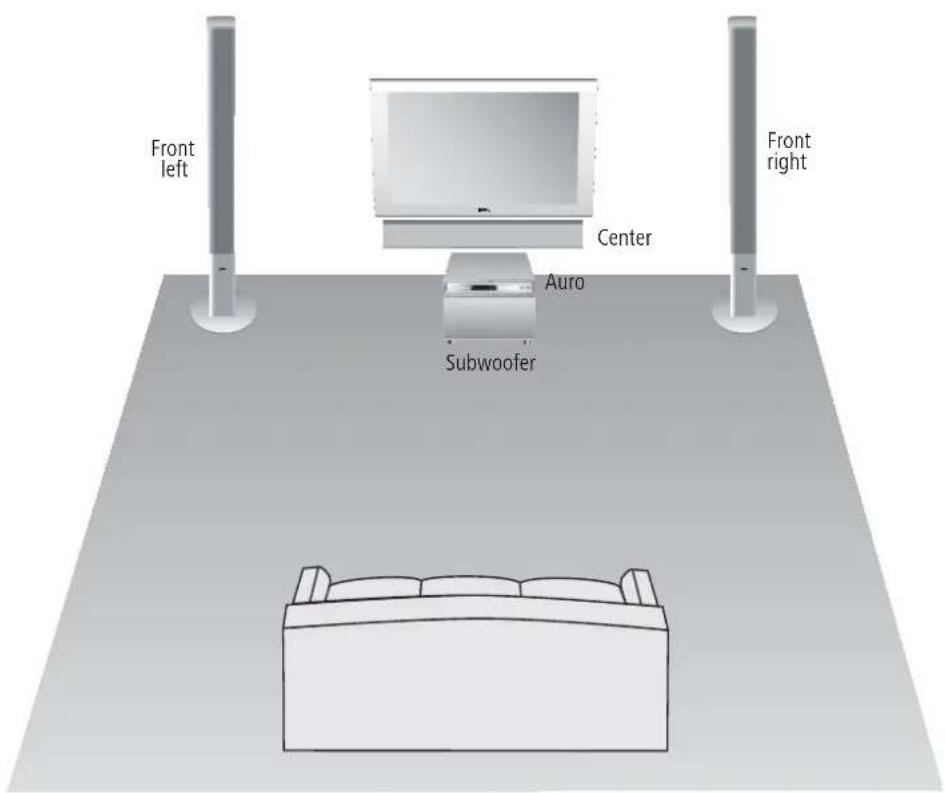
The center loudspeaker should be positioned in the direct vicinity of the screen. Use the table stand (available as accessory) or the enclosed wall holder.
Correct the distance and level of the speakers with the speaker configuration menu of the preceiver or AV receiver.
Suggestion for positioning solution
Connection
Wiring Loewe Flat-TV (L27xx/SL1xx) - Individual Sound
Mount the Audio Link cable with the 25-pin plug on the TV set (with integrated Dolby Digital Decoder or Upgrade kit Audio DD / dts) and subwoofer.
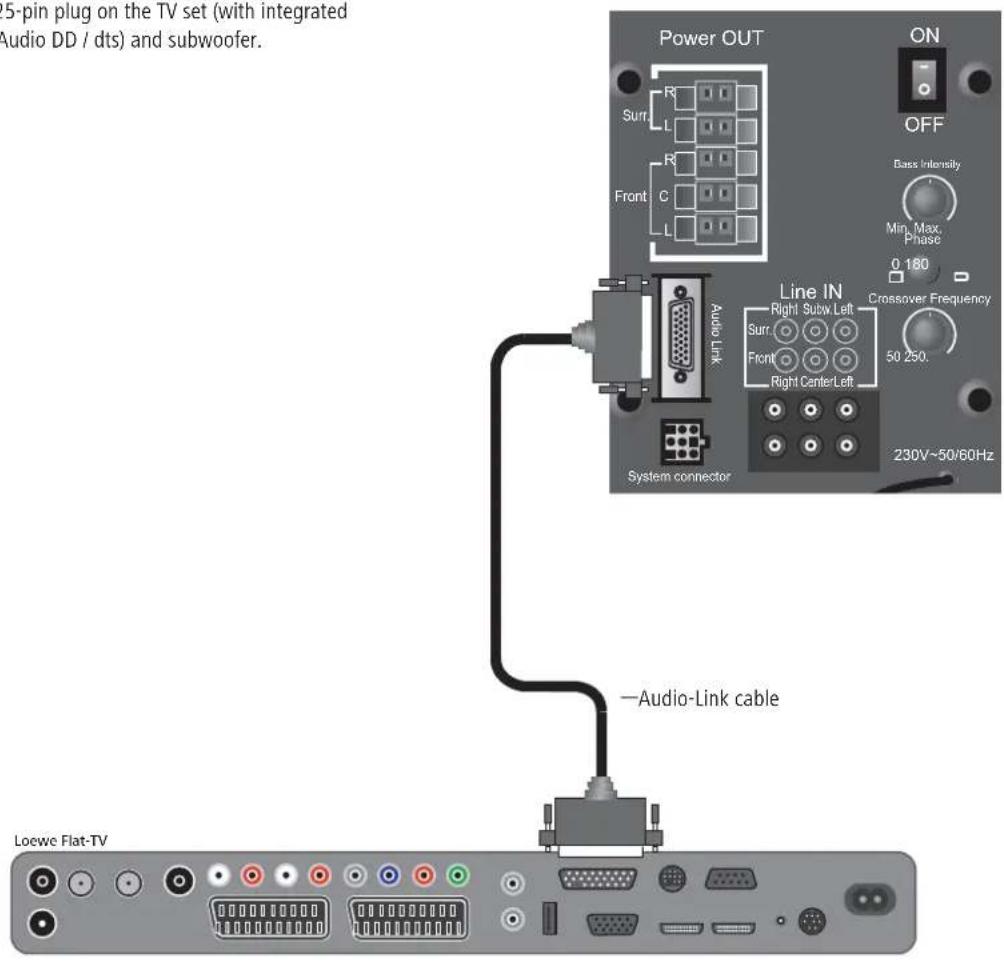
Loewe Individual Sound System (Subwoofer)
Connection
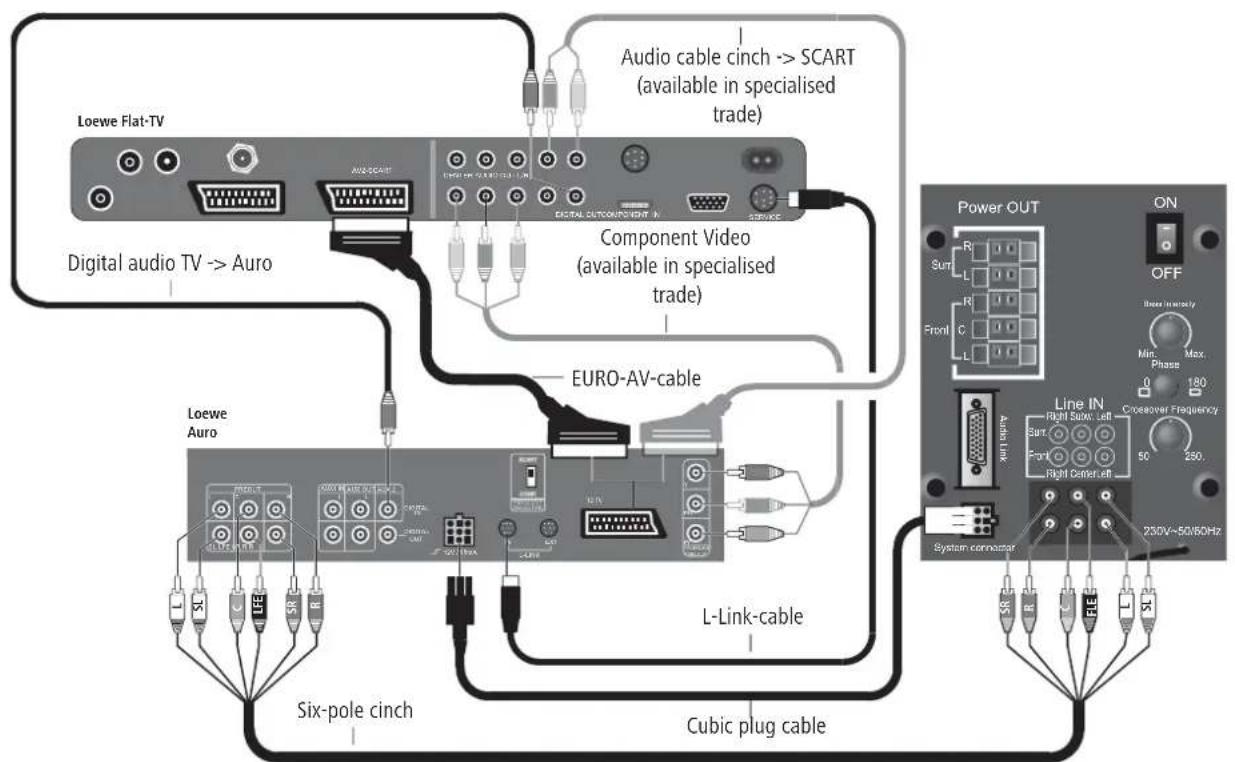
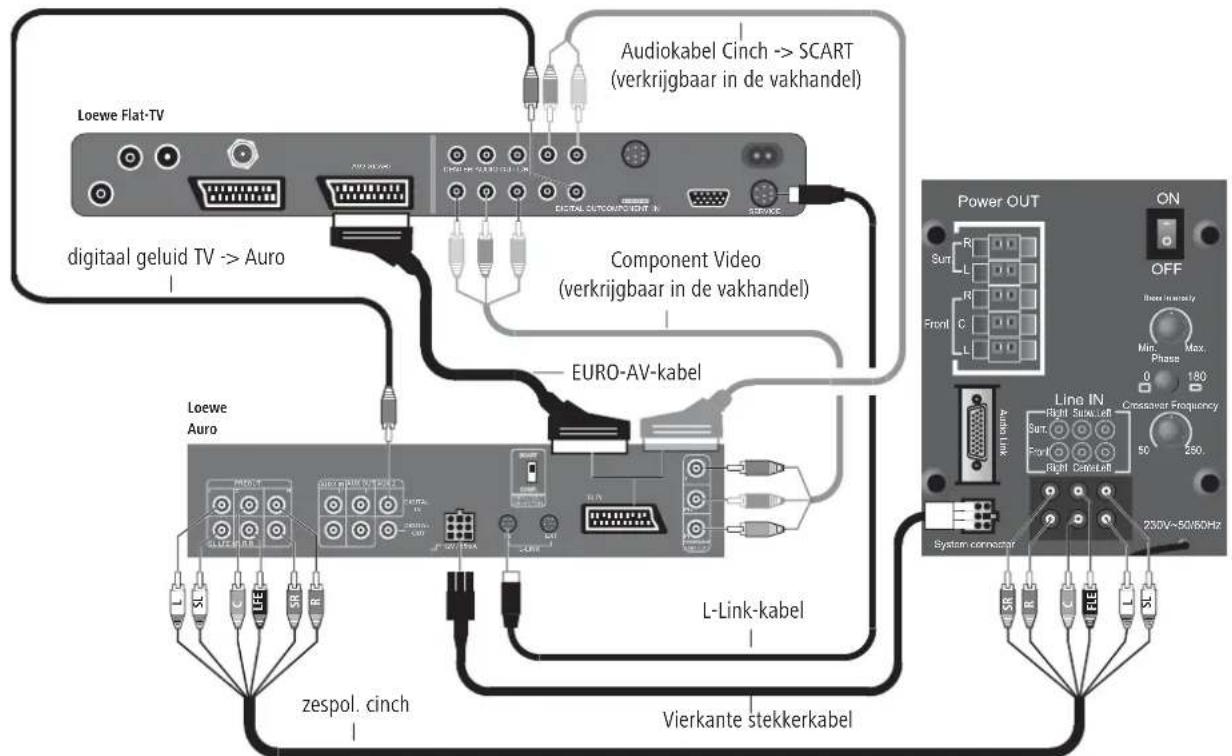
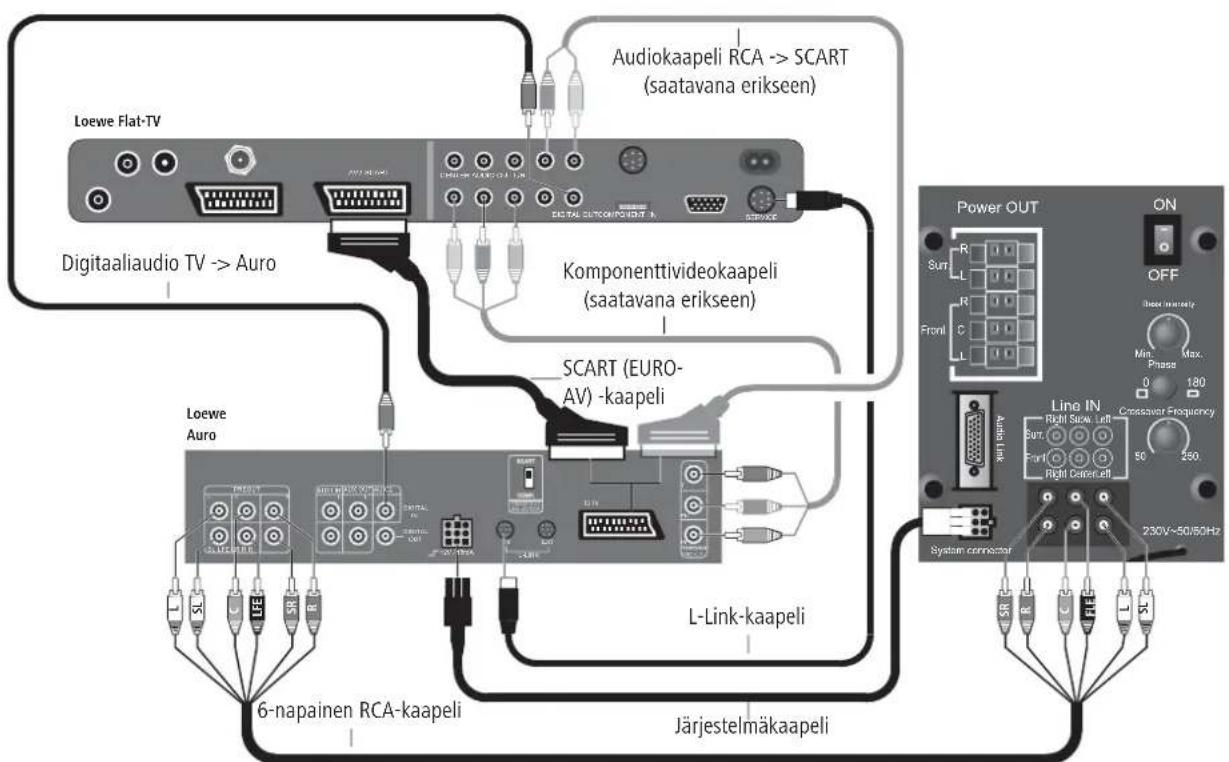
Wiring Loewe Flat TV - Auro - Individual Sound
Connect the cables as shown in the graphic:
- Connect Auro to socket AV2 of the Loewe Flat TV.
- You must use a Euro-AV cable in which all contacts are assembled and connected.
- Letters are embossed on the sides of the plugs on the six-wire cinch cable. Gray plug: "C" for center channel, black plug: "LFE" for Subwoofer, red plug: "FR" for front right or "SR" for surround right, white plug "FL" for front left and "SL" for Surround left.
-
Two-wire (thin) cubic plug cable from Auro to the "Master" socket on Individual Sound (connect the end of the cable with kink protection to Auro). The cubic plugs are secured in the socket by a lug.
-
You have to press down the lug first before you can remove the cubic plug.
- To play the TV sound over Auro/Individual Sound, connect the digital audio output of the TV set "AUDIO DIGITAL OUT" with the "DIGITAL IN" input from Auro with a cinch cable.
- Before establishing the L-Link, Auro and the TV must be in the powerless state otherwise these devices cannot identify each other after switching on.
Connection
Connecting the Center speaker to the subwoofer
One of the two wires of the speaker cable (B) is marked black. Connect these black marked wires with the black terminal on the subwoofer (wiring according to the picture below) and the black terminal (A) on the speaker. Connect the unmarked wires with the red terminals.
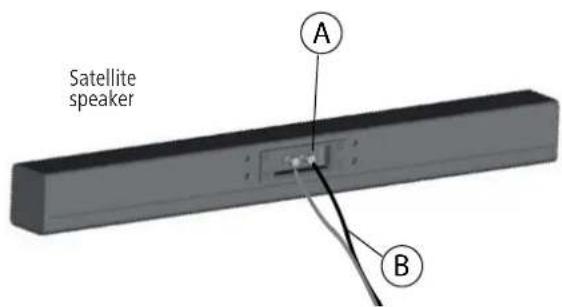
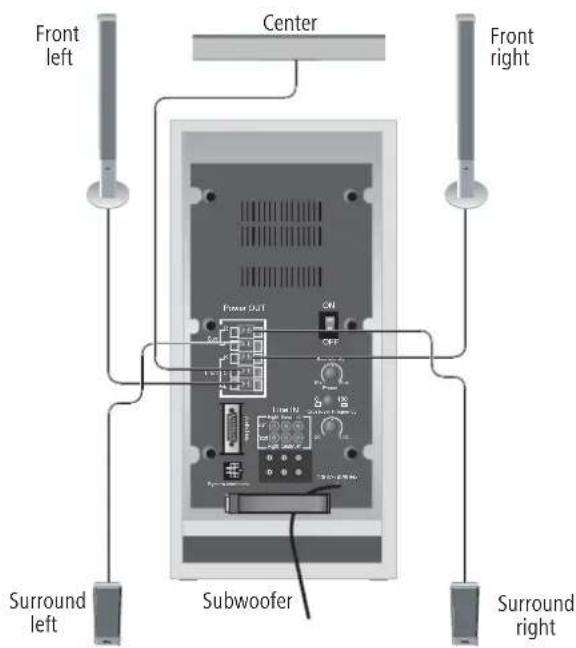
Position the speaker as described on page 11 or mount the speaker at the wall with the wall holder or on the optional stand as described in the respective installation instructions. Before beginning with start-up and operation, make sure that all the cables are connected correctly.
Start-up
Select the center signal on the subwoofer
Switch not pressed = center via satellite speaker.
Technical Data
Dimensions loudspeaker in cm W 82,3 x H 9,1 x D 9,1
with wall holder W 82,3 x H 9,1 x D 10,1
with table stand W 82,3 x H 10,9 x D 25,8
Weight loudspeaker in kg 5,4
with wall holder 6,2
with table stand 8,6
Fitting 2x bass 80 mm, paper diaphragm
2x broadband 80 mm, paper diaphragm
1x treble, coated fabric calotte, 0 33mm
Load capacity 75W (sine) / 120W (max. music)
Impedance 4-8 Ohm
Transmission range 85 Hz-22 kHz ±3dB
Sound pressure 84 dB spl (1w/m)
Table des matieres
Centerspeaker I Compose, Ref. 66209B/L00
Chene clair Ref.89645H80
Orange Ref.89645J80
Palissandre Ref.89645C80
Rubis Ref.89645N80
Noir Ref.89645W80
Miroir Ref.89645Q80
Plage de transmission 85 Hz-22 kHz ±3dB
Bekabeling Loewe Flat-TV - Auro - Individual Sound 37
Bekabeling Loewe Flat-TV - Auro - Individual Sound
Loewe littean television (L27xx/SL1xx) - Individual Sound 48
Loewe littean television - Auro - Individual Sound 49
Kaiuttimien kytkeminen subwooferin 50
Loewe litteän television (L27xx/SL1xx) - Individual Sound
Loewe litteän television - Auro - Individual Sound
Richmond 3121, Victoria
Australia
Tel +61-3-94 29 08 22
Fax+61-3-94290833
Email: mail@international.com
dynamics.com.au
B NL L
Logwe Opta Benelux NV/SA
Uilenbaan 84
2160 Antwerpen, Belgie
Tel+32-3-2709930
Fax+32-3-2710108
Email: ccc@loewe.be
BG
Darlington Service
Kn. Klementina Street, bl. 193
1618 Sofia, Bulgaria
Tel+359-29556399
Fax +359-2 955 63 99
Email: sac@audio-bg.com
CH
Telion AG
Rutistrasse 26
BASYS CS SPOL. S.R.O
Sodomkova 8/1478
10200 Praha 10 - Hostivar, Cesko
Tel +420 2 34 70 67 00
Fax+420234706701
Customer Care Center
Industriestraße 11
Century Court, Riverside Way
Riverside Business Park, Irvine,
Ayrshire
KA11 5DJ,UK
Tel +44-1294 315000
Fax+44-1294315001
Email: enquiries@loewe-uk.com
GR
EISAGOGIKI EMBORIKI ELLADOS
S.A.
321 Mesogion Av.
152 31 Chalandri-Athens, Hellas
Tel +30-210672 1200
Fax+30-2106740204
Email: christina@bose-onkyo.gr
H
Basys Magyarorszqi KFT
To park u.9.
2045 Torokbalint, Maqyar
Tel +36-23415637(121)
Fax+36-23415182
Email: basys@mail.basys.hu
HR
Plug&Play
Bednjanska 8, 10000 Zagreb
Hrvatska (Kroatia)
Tel +385 14929683
Fax+38514929682
Email: loewe@loewe.hr
1
Loewe Italiana S.r.L.
Largo del Perlar, 12
37135 Verona (VR), Italia
Tel +39-045 82 51 611
Fax +39-0458251622
Email: info@loewe.it
IL
Clear electronic entertainment
(2009) Ltd
13 Noah Mozes St
Agish Ravad Building
Tel Aviv 67442, Israel
Tel+972-3-6091100
Fax+972-3-6961795
Email: yossi@pioneer-il.com
IRL
Origo Ltd
Unit 23 Magna Drive
Magna Business Park, City West
Dublin 24, Republic of Ireland
Tel+353-1-4666700
Fax+353-1-4666708
Email: service@origo.ie
KSA
SALEM AGENCIES & SERVICES CO.
Hamad Al Haqueel Street, Raw
dah, Jeddah
Kingdom of Saudi Arabia
Tel+966 (2) 6654616 ext: 666
Fax+9662607864
Email: hkurkjian@aol.com
LT
A Cappella
Ausros Vartu 5, Pasazo skq.
01129 Vilnius, Lithuania
Tel +370-52 12 22 96
Fax+370-52626681
Email: info@loewe.lt
M
DONECO.LTD
34/36 Danny Cremona Street
Hamrun, HMR02, Malta
Tel +356-21-22 53 81
Fax +356-21-23 07 35
Email: info@doneo.com.mt
MA
SOMARA S.A.
377, Rue Mustapha El Maani
20000 Casablanca, Morocco
Tel +212-22 22 03 08
Fax+212-22260006
Email: somara@somara.ma
N
PCE.PREMIUM CONSUMER
ELECTRONICS as
Ostre Kullerod 5
International Dynamics (NZ) Pty
Ltd
PO Box 109 317, Newmarket
Auckland, New Z
Tel+6493790179
Fax+6493790279
Email: enquiries@international
dynamics.co.nz
P
Mavro Magnetics Portugal, Lda.
Email: geral.loewe@mayro.pt
PL
DSV TRADING SA
Plac Kaszubski 8
Email: market@dsv.com.pl
RO
Avitech Co. SRL
1/II Pipera Tunari St
007190 Voluntari, Ilfov, Romania
Tel +40-21 2006464
Fax+40-212006465
Email: andrei.silisteanu@avitech.ro
RUS
Service Center Loewe
ul.Verkhnaya Maslovka, d.29
125083 Moscow, Pocsn
Tel+7-4956125043
Fax +7-4956124710
Email: service@atc.ru
S
Kjaerulff 1 AB
Ridbaneqatan 4,Box 9076
BaSys Czech & Slovak s.r.o.
Stará Vajnorska 17/A
831 04 Bratislava, Slovakia
Tel +421 2 49 10 66 18
Fax+421249106633
Email: loewe@basys.sk
TR
ENKAY ELEKTRONIK SAN. Ve Tic.
Ltd. Sti
Alemdag Cad: Site Yolu No.: 10
81230 Umraniye/Istanbul, Turkeye
Tel+90-2166344444
Fax+90-2166343988
Email: mhatipog@enkaygroup.com
UAE
Dubai Audio Center
P.O. Box 32836, Sheik Zayed Road
Dubai, UAE
Tel+971-43431441
Fax +971-43437748
Email: dacdubai@emirates.net.ae
ZA
THE SOUNDLAB (PTY) LTD
P.O.Box 31952, Kyalami 1684
Republic of South Africa
Te+27-114664700
Fax +27-1 14664285
Email: loewe@mad.co.za
LOEWE.


- Inhalt
- Content
- Common Notes 10
- Setting up 11
- Connection
- Scope of delivery
- Centerspeaker I Compose, Order No. 66209B/L00
- Accessories
- Table stand
- Order No. 66477B00
- Trims
- Satellite
- Common Notes
- Disposal
- Cardboard box and packaging
- The unit
- Cleaning
- Removing the protective foil
- For your safety
- Setting up
- Center loudspeaker
- Suggestion for positioning solution
- Wiring Loewe Flat-TV (L27xx/SL1xx) - Individual Sound
- Connecting the Center speaker to the subwoofer
- Start-up
- Select the center signal on the subwoofer
- Technical Data
- Table des matieres
- Centerspeaker I Compose, Ref. 66209B/L00
- Bekabeling Loewe Flat-TV - Auro - Individual Sound
- Loewe litteän television (L27xx/SL1xx) - Individual Sound
- B NL L
- BG
- CH
- GR
- H
- HR
- 1
- IL
- IRL
- KSA
- LT
- M
- MA
- N
- P
- PL
- RO
- RUS
- S
- TR
- UAE
- ZA
Brand : LOEWE
Model : Centerspeaker I Compose
Category : Loudspeaker