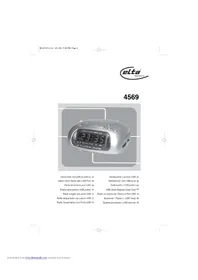
4569 - Alarm Clock ELTA - Free user manual and instructions
Find the device manual for free 4569 ELTA in PDF.



| Product type | Radio alarm clock with USB port |
| Brand | ELTA |
| Model | 4569 |
| Mains power supply | AC 230 V ~ 50 Hz |
| Backup battery | 9 V (type F22 / E-Block, not supplied) |
| Frequency ranges | FM: 87.5 - 108 MHz; AM: 525 - 1615 kHz |
| Dimensions (approx.) | 140 x 150 x 60 mm |
| Weight (without batteries) | Approximately 570 g |
| Main functions | AM/FM radio, alarm by radio or buzzer, snooze function, sleep timer, USB playback, time display |
| Time setting | 24-hour format, setting via TIME, HOUR, MIN buttons |
| Alarm setting | ALARM button + HOUR/MIN, set AUTO for activation |
| Snooze function | Repeat 5 times, 9-minute interval |
| Sleep function | Programmable up to 1 hour 59 minutes |
| USB playback | Rear USB port, compatible with USB flash drives and MP3 players |
| Antenna | Built-in FM wire antenna to extend |
| Maintenance and cleaning | Unplug before cleaning; use a soft, damp cloth; avoid alcohol-based products, ammonia, or abrasives |
| Safety | Do not open the casing; avoid water and humidity; do not obstruct ventilation openings; keep away from heat sources; use only the specified power supply |
| Spare parts and repairability | No user-serviceable parts; refer all repairs to qualified personnel |
| Environment | Do not dispose of with household waste; deposit at a collection point for electrical and electronic equipment; recycle used batteries |
Frequently Asked Questions - 4569 ELTA
User questions about 4569 ELTA
0 question about this device. Answer the ones you know or ask your own.
Ask a new question about this device
Download the instructions for your Alarm Clock in PDF format for free! Find your manual 4569 - ELTA and take your electronic device back in hand. On this page are published all the documents necessary for the use of your device. 4569 by ELTA.
USER MANUAL 4569 ELTA
Alarm Clock Radio with USB Port 📄
Alarm Clock Radio with USB Port
SAFETY INSTRUCTIONS

A triangle with a lightning symbol draws the user's attention to "dangerous voltage" without insulation in the cabinet which may be high enough to entail a risk of electric shock.
WARNING
RISK OF ELECTRIC SHOCK DO NOT OPEN
CAUTION: TO REDUCE THE RISK OF ELECTRIC SHOCK, DO NOT REMOVE COVER (OR BACK). THERE ARE NO USER SERVICE ABLE PART INSIDE. REFER SERVICING TO QUALIFIED SERVICE PERSONNEL.

A triangle with an exclamation mark draws the user's attention to important instructions for use and maintenance in the accompanying manual, which should be studied.
FURTHER INFORMATION


Beware of small pieces and batteries, do not swallow them. It may be hazardous to your health and lead in suffocation. Please, Make sure to keep small devices and batteries especially out of the reach of children.
Important advice regarding hearing protection
Caution:
You care for your hearing, and so do we.
Therefore, use caution while using this appliance.
Our recommendation: Avoid high volumes.
Children should be supervised while using headphones; make sure that the appliance is not set to high volume.
Caution!
High volumes may cause irreparable damage to children's ears.

NEVER let allow anyone, especially children, to put objects into the holes, slots or openings on this devise. This may lead into death due to electric shock. The device must only be opened by a qualified assistant.

Only use the appliance for its intended purpose.
This device may only be used in housings and business premises.

Please keep this instruction manual for further reference.

Instructions on environment protection
Do not dispose of this product in the usual household garbage at the end of its life cycle; hand it over at a collection point for the recycling of electrical and electronic appliances. The symbol on the product, the instructions for use or the packing will inform about the methods for disposal. The materials are recyclable as mentioned in its marking. By recycling, material recycling or other forms of reutilization of old appliances, you are making an important contribution to protect our environment.
Please inquire at the community administration for the authorized disposal location.

Do not obstruct the ventilation of the device. Make sure, that no curtains, newspapers, furniture or any other type of object are blocking the ventilation system of the apparatus. The ventilation system must be clear of objects at all times! Overheating may lead into serious damage of the device and reduce its performance and lifespan.

Heat and warmth
Do not expose the appliance to direct sunlight. Make sure that the appliance is not subject to direct heat sources such as heaters or open fire. Make sure that the ventilation slots of the appliance are not covered.

Moisture and cleaning
This appliance is not waterproof! Do not immerse the unit in water. Do not allow the unit to come in contact with water. If water gets inside the unit, it may cause serious damage. Do not use cleaning agents that contain alcohol, ammoniac, benzene or abrasives as these could damage the unit. For cleaning, use a soft, moistened cloth.

Professional recycling
Batteries and packaging should not be disposed of in the trash. Batteries must be handed over to a collection centre for used batteries. Separating disposable packaging materials is ecologically friendly.
SAFETY INSTRUCTIONS
- READ INSTRUCTIONS - All the safety and operating instructions should be read before the unit is operated.
- RETAIN INSTRUCTIONS - The safety and operating instruction should be retained for future reference.
- HEED WARNINGS - All warnings on the unit and in the operating instructions should be adhered to.
- FOLLOW INSTRUCTIONS - All operating instructions should be followed.
- WATER AND MOISTURE - The unit should not be used near water, for example, near a bathtub, washbowl, kitchen sink, laundry tub, swimming pool or in a wet basement.
- VENTILATION – Openings in the device serve its proper ventilation, are necessary for the operation and prevent overheating. The unit should be situated so that its location or position does not interfere with its proper ventilation. Do not place on bed, sofa, rug or similar surface that may block the ventilation openings, in a built-in installation, such as a bookcase or cabinet that may impede the flow of air through the ventilation openings.
- HEAT - The unit should be situated away from heat sources such as radiators, stoves, or other appliances (including amplifiers) that produce heat.
- POWER SOURCE - The unit should be connected to power supply only of the type described in the operating instructions or as marked on the unit.
- POWER CORD PROTECTION - Power supply cords should be routed so that they are not likely to be walked on or pinched by items placed upon or against them.
- NON-USE – During longer periods of non-use please disconnect from mains power supply and antenna.
- OBJECT and LIQUID ENTRY - Care should be taken so that objects do not fall and liquids are not spilled into the enclosure through openings.
- DAMAGE REQUIRING SERVICE - The unit should be serviced by qualified service personnel when:
a. The power-supply cord or plug has been damaged.
b. Objects have fallen into, or liquid has been spilled into the unit enclosure.
c. The unit has been exposed to rain or moisture.
d. The unit does not appear to operate normally. Only use the units and controls as described in this manual;
e. The unit has been dropped, or the enclosure damaged.
f. The unit displays serious changes in its performance. -
SERVICING - The user should not attempt to service the unit beyond that described in the user operating instructions. All other servicing should be referred to qualified service personnel.
-
CLEANING – Disconnect from mains power supply before cleaning. Do not use liquid or spray cleaners, only use a damp cloth. Follow the care and maintenance instructions in this manual.
- LIGHTNING – During lightning and longer periods of non-use please disconnect from mains power supply and antenna.
- SAFETY CHECK – After servicing the unit ask the customer service for a safety check.
- OVERLOAD – To avoid fire and electric shock do not overload wall outlets and convenience receptacles.
- ELECTROSTATIC DISCHARGE-Disconnect from mains power supply and remove batteries if the unit malfunctions. Reconnect after a short time.
Installation
Avoid installing the player in areas of:
1) direct sunlight or heating radiators or closed automobiles;
2) high temperature or high humidity;
3) excessive dust;
4) excessive vibration, as the internal parts may be seriously damaged.
Stacking:
Place the unit in an upright position. Do not place the unit on or under amplifiers or other equipment, which may heat up.
Mains Power Supply:
Heed the following instructions to avoid malfunction, fire, injury and electric shock:
- Check if the mains voltage as shown on the type plate (under the set) corresponds to your local mains voltage. This unit is designed for AC 230V\~50Hz.
- Connect the mains lead to the AC mains socket and the wall outlet.
- To disconnect from wall outlet only pull the plug and not the cable.
- Hold the plug tight, when connecting to or disconnecting from wall outlet.
- Do not touch the power cord with wet hands.
- Protect the power cord from heat generating devices.
- Please turn off the unit and contact an authorized customer service if it has been dropped or is damaged
otherwise.
Battery Safety Precautions:
- Keep batteries away from children and pets.
- Insert the batteries observing the polarity (+/-). Failure to properly align the battery polarity can cause personal injury and/or property damage.
- Remove exhausted batteries from the device. Remove the batteries when the device will not be used for extended periods of time to prevent damage due to rusted or corroded batteries.
- Never throw batteries into the fire. Do not expose batteries to fire or other heat sources.
- Battery disposal: exhausted batteries must be properly disposed of and recycled in compliance with all applicable laws. For detailed information contact your local municipality's waste authority.
- Follow the battery manufacturer's safety, usage and disposal instructions.
Location of Controls
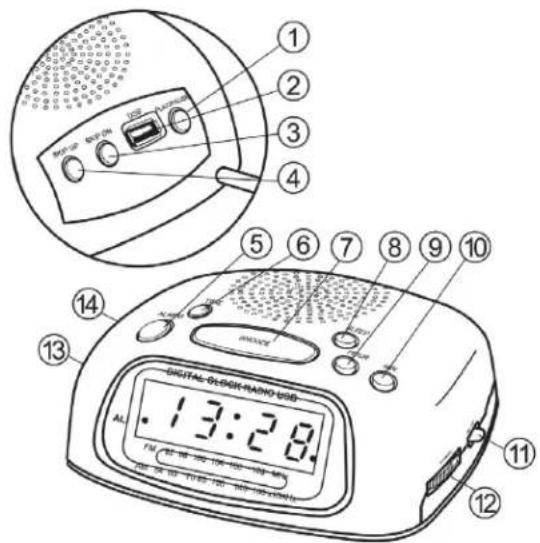
1.
Play/Pause for USB device
- USB port
3.
Skip- for USB device
4.
Skip+ for USB device
- ALARM
Set alarm time (with HOUR and MIN.)
- TIME
Set current time (with HOUR and MIN.)
- SNOOZE
Snooze function after alarm activation or turn off sleep timer
- SLEEP
Set sleep timer (with HOUR and MIN.)
- HOUR
Set hours of current time, alarm time and sleep timer
- MIN.
Set minutes of current time, alarm time and sleep timer
- AM/FM/USB
Source selector AM, FM and USB device
-
TUNING control
-
AL / VOL
Volume control
- AUTO/OFF/ON
Function selector alarm and ON/OFF
Connections
Antenna Connection
The clock radio comes with an FM wire antenna at the rear, please extend for best reception.
Power Source
The unit is powered by 230V\~50Hz mains power supply. The 9V block battery (not supplied) is used for clock back-up only. Please remove the battery during long periods of non-use to avoid battery leakage. To avoid damages not covered by the warranty only connect the unit to above power supply.
Insert/Change Back-Up Battery
Insert the back-up battery in the battery compartment at the bottom of the unit. Please observe the polarity. Change the back-up battery once a year.
Your settings (alarm, current time, etc.) are retained during power failure or when disconnecting from mains power supply; the unit automatically switches to back-up battery.
Basic Operation
Turn Clock Radio On/Off
Turn the radio off with the VOL knob by turning it to AL position, when not in use. Turn the VOL knob to turn the radio on and to adjust the volume. Set the function selector to ON position. Select the mode with the source selector, toggle between FM, AM and USB. After use, please turn the unit off. To save energy, please disconnect the unit from mains power supply when not in use for a long period of time. In all modes the current time is displayed. The unit is designed for continuous operation; it is either in ON mode or in standby mode.
Set Current Time
When first connecting the unit 0:00 flashes on the display. Press and hold the TIME button and simultaneously press HOUR to set the hours in 24-hour mode. Press and hold the button for fast setting or tap it briefly to increase the setting by one hour. Now set the minutes with TIME (press and hold) and MIN. Press and hold the button for fast setting or tap it briefly to increase the setting by one minute. The current time is set.
Radio
Set the function selector to ON position. Select the mode with the source selector between FM and AM. Turn the TUNING control to tune into your favorite station. Turn the VOL knob to adjust the volume Set the function selector to OFF position to turn the radio off.
The radio comes with an FM wire antenna; please unwind for best reception. For best AM reception please direct the radio.
Playback via USB Port
- Connect your portable MP3 player or memory stick via USB cable or directly to the USB port at the rear of the unit.
- Set the mode with the source selector to USB position.
- Press ▶II to play music saved on your USB device.
- Press ◀◀ or ▶▶ to skip forward or back to the next or previous track.
Wake to Radio or Buzzer
Select the desired radio station and volume level.
Press and hold the ALARM set button and simultaneously press the HOUR set button to set the desired alarm hour. Press and hold the button for fast setting or tap it briefly to increase the setting by one hour. Now press and hold the ALARM set button and simultaneously press the MIN. set button to set the desired alarm minutes. Press and hold the button for fast setting or tap it briefly to increase the setting by one minute. Slide the function selector to AUTO position, the AL indicator lights on the display. The radio will turn on to wake you at the preset time with your favorite station. It will play for 1 hour and then automatically turn off. To wake to buzzer instead of radio, make sure to turn the volume control VOL to AL position. To turn off radio or buzzer slide the function selector to OFF position or press the ALARM button. If setting the function selector to OFF or ON the alarm will not come on the next day, the AL indicator turns off. Press the ALARM button instead, if you want the alarm activated the next day at the same time.
Snooze Function
When the buzzer sounds or the radio turns on, press SNOOZE to turn off buzzer or radio temporarily. Approx. 9 minutes later buzzer or radio will sound again. The snooze function is repeated up to five times or until you cancel it by pressing the ALARM button or setting the function selector to OFF position. After 1 hour the snooze function is automatically reset.
Sleep to Radio
Select the desired radio station and volume level.
Press the SLEEP button and the clock display will show 59 minutes (0:59) as the default sleep period. The sleep period can be reduced as desired by simultaneously pressing MIN. and SLEEP. Press and hold the button for fast setting or tap it briefly to decrease the setting by one minute.
The sleep period can also be increased up to 1 hour 59 minutes (1:59) by pressing the HOUR set button while holding the SLEEP button. For a sleep period between 59 minutes and 1 hour and 59 minutes set as follows: Press and hold SLEEP and press HOUR to set the sleep period to 1:59. Do not release the SLEEP button, but now press the MIN. button to count down the minutes. Release both buttons when your desired sleep period is displayed.
The radio will play for the set period and then turn off automatically.
To turn the radio off prior to the end of the preset period, simply press the SNOOZE button.
Sleep to Radio and Wake to Radio or Buzzer
Select the desired radio station and volume level.
Slide the function selector to AUTO position.
Set the alarm as described above.
Press the SLEEP button and set the desired sleep period as described above.
Troubleshooting
If a fault occurs, first check the points listed below before taking the unit for repair. If you are unable to solve a problem by following these tips, consult your dealer or authorized service center.
WARNING: Never open the device. Always refer service or maintenance to authorized customer service personnel.
| Problem Reason Solution | ||
| No Sound Volume is set too | low.Mains power supply is not connected. | Adjust the volume.Connect the power cord to the wall outlet. |
| Key malfunction Electrostatic charge. Turn the unit off and then back on.Alternatively, turn off the unit, disconnect the AC power cord and the back-up battery and then re-connect it. | ||
| Poor reception | Weak signal.Interference from other electric appliances(TV, VCR, Computer, etc.). | Adjust the antenna.Keep distance to other electrical appliances. |
Technical Specifications
Mains power supply: AC 230V\~50Hz
Back-up for current time, settings: DC 9V = block battery (F22 / E-Block)
Frequency range: FM 87.5MHz - 108MHz
AM 525kHz - 1615kHz
Dimensions: approx.140 x 150 x 60 mm
Weight: approx.570 g (without battery)
Subject to changes without prior notice.
MODELE: 4569
Notre recommandations: Evitez les volumes forts.
DOPLŇUJÍCÍ INFORMACE

Technical Specifications
- SAFETY INSTRUCTIONS
- FURTHER INFORMATION
- IMPORTANT ADVICE REGARDING HEARING PROTECTION
- HEAT AND WARMTH
- MOISTURE AND CLEANING
- PROFESSIONAL RECYCLING
- INSTALLATION
- STACKING
- MAINS POWER SUPPLY
- BATTERY SAFETY PRECAUTIONS
- CONNECTIONS
- ANTENNA CONNECTION
- POWER SOURCE
- INSERT/CHANGE BACK-UP BATTERY
- BASIC OPERATION
- TURN CLOCK RADIO ON/OFF
- SET CURRENT TIME
- RADIO
- PLAYBACK VIA USB PORT
- WAKE TO RADIO OR BUZZER
- SNOOZE FUNCTION
- SLEEP TO RADIO
- SLEEP TO RADIO AND WAKE TO RADIO OR BUZZER
- TROUBLESHOOTING
- TECHNICAL SPECIFICATIONS
- DOPLŇUJÍCÍ INFORMACE
Brand : ELTA
Model : 4569
Category : Alarm Clock