4248N - Alarm clock radio ELTA - Free user manual and instructions
Find the device manual for free 4248N ELTA in PDF.



User questions about 4248N ELTA
0 question about this device. Answer the ones you know or ask your own.
Ask a new question about this device
Download the instructions for your Alarm clock radio in PDF format for free! Find your manual 4248N - ELTA and take your electronic device back in hand. On this page are published all the documents necessary for the use of your device. 4248N by ELTA.
USER MANUAL 4248N ELTA
Design clock radio with dual alarm
Design clock radio with dual alarm
The triangular symbol with the lightning bolt warns the user to the presence of dangerous non-isolated voltage on the inside of this device which may cause an electric shock.
WARNING
DANGER OF A HAZARDOUS ELECTRIC SHOCK DO NOT OPEN
WARNING: TO REDUCE THE RISK OF AN ELECTRIC SHOCK, DO NOT REMOVE THE FRONT OR BACK COVER. INSIDE THE UNIT, THERE ARE NO PARTS THAT CAN BE REPAIRED OR ADJUSTED BY THE USER. PLEASE REFER TO QUALIFIED TECHNICIANS.

The triangular symbol with the exclamation highlights important points of which the user should refer to the manual regarding maintenance and repair.
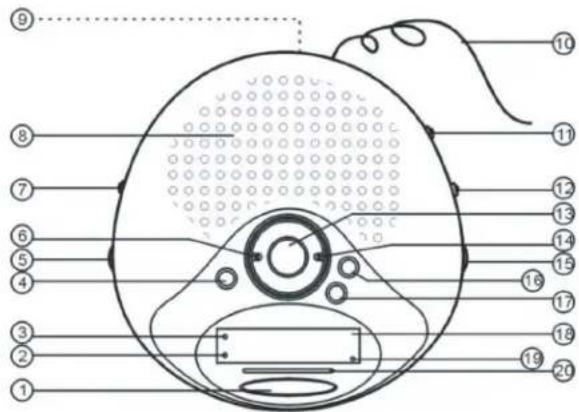
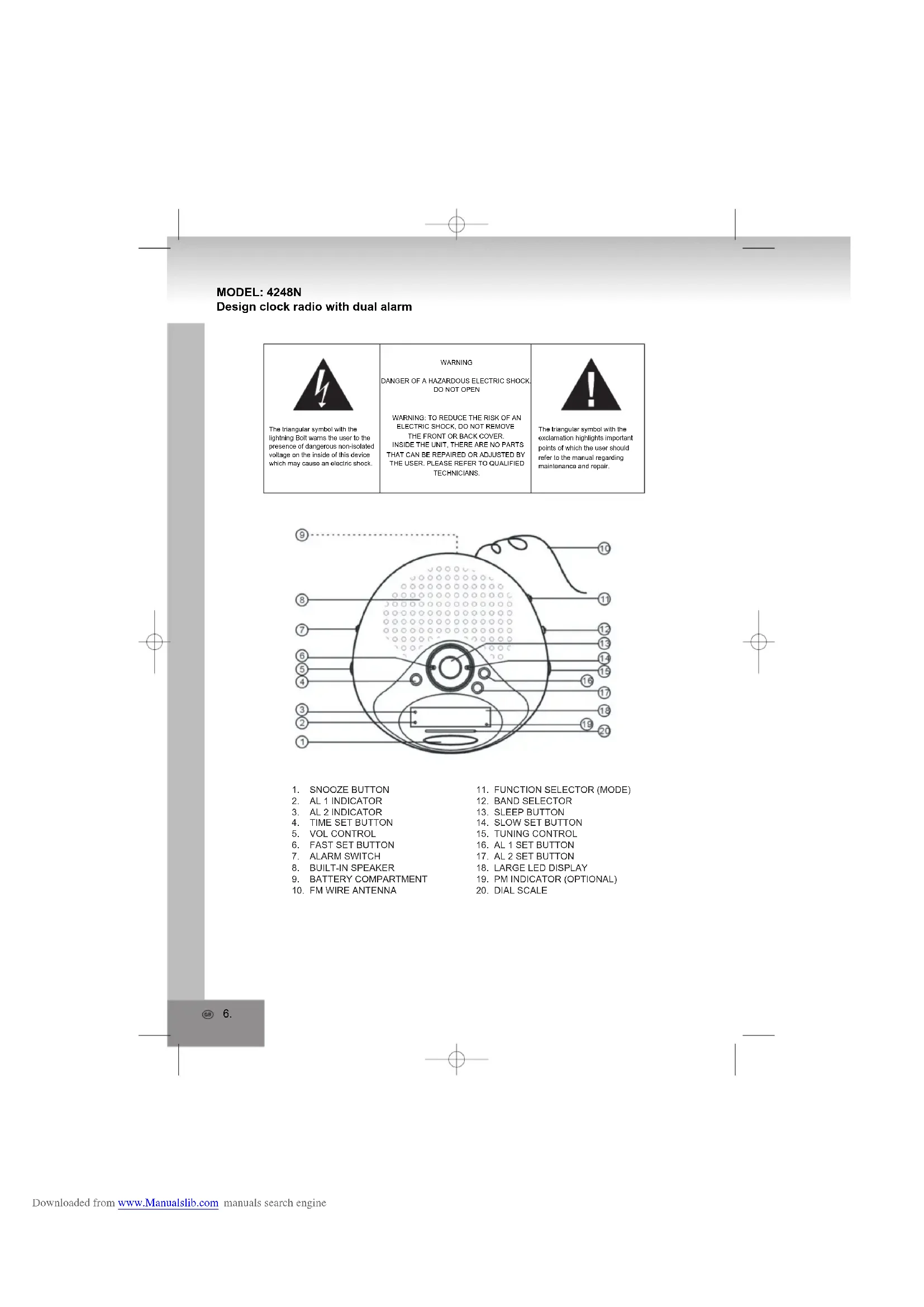
- SNOOZE BUTTON
- AL 1 INDICATOR
- AL 2 INDICATOR
- TIME SET BUTTON
- VOL CONTROL
- FAST SET BUTTON
- ALARM SWITCH
- BUILT-IN SPEAKER
- BATTERY COMPARTMENT
-
FM WIRE ANTENNA
-
FUNCTION SELECTOR (MODE)
- BAND SELECTOR
- SLEEP BUTTON
14.SLOW SET BUTTON - TUNING CONTROL
- AL 1 SET BUTTON
- AL2 SET BUTTON
- LARGE LED DISPLAY
19.PM INDICATOR (OPTIONAL) - DIAL SCALE
POWER SOURCE
The unit operates with mains power supply. Clock and alarm with DC back-up, battery: 1 x 9V (not included).
AC POWER SUPPLY
Ensure that the AC power cord is in accordance with your local voltage cord and connect to mains power supply. Press the POWER button to turn on the unit.
BACK-UP BATTERY
Insert a 9V battery (not included) into the battery compartment located at the bottom; preferably use a long-life battery. In case of power failure when listening to the radio it will switch off and the display will show a wrong radio frequency, because the CPU cannot receive any signals from the radio. After the power failure the radio frequency will be restored to the last frequency and continue working.
RADIO FUNCTION
- Set the FUNCTION SELECTION (MODE) to ON.
- Select desired band with the BAND SELECTOR.
- Rotate the TUNING control to find your desired radio station.
- Adjust the VOLUME to a comfortable level.
- For better reception extend the FM wire antenna to its full length when listening to FM or adjust the direction when receiving AM.
- To switch off the radio set the FUNCTION SELECTOR (MODE) to OFF.
TIME SETTING
Press and hold the TIME SET button and simultaneously press SLOW SET or FAST SET to skip to the correct time.
Notes:
Press SLOW SET button each time to skip one minute, press and hold the button to skip continuously. Press and hold FAST SET button to skip fast and continuously.
ALARM SETTING
Note: You can set two different alarm times on this unit.
- Press and hold either the AL 1 or AL 2 button, then press the SLOW SET/FAST SET button to skip to the desired alarm time.
- Set the FUNCTION SELECTOR (MODE) to AUTO.
- Set the ALARM switch to AL 1 or AL 2 (for one alarm) or AL 1+2 (for two alarms), the corresponding indicator will illuminate. At the preset alarm time the alarm will set on the radio automatically. To pause the alarm and sleep another 9 minutes press the SNOOZE button.
- To stop the alarm, slide the FUNCTION SELECTOR (MODE) to OFF or press AL OFF.
SLEEP FUNCTION
To switch off the radio automatically after 59 minutes slide the FUNCTION SELECTOR (MODE) to AUTO and press SLEEP.
After 59 minutes the radio will switch off automatically.
At the preset alarm time you will be woken by radio.
SPECIFICATIONS
Power supply 230V~50Hz
(check the rated power on rating plate at the bottom of the device)
Back-up 9V DC
Power consumption 3W
Operating temperature +5^ + 35^
Receiving Bands AM/FM
Tuning Range AM:525-1615kHz
FM:87.5-108MHz
Speaker impedance 8Ω
NET WEIGHT: 537g
Specifications are subject to change without prior notice.
CAUTION:
- READ INSTRUCTIONS - All the safety and operating instructions should be read before operating the unit.
- RETAIN INSTRUCTIONS - The safety and operating instruction should be retained for future reference
HEED Warnings - All warnings on the appliance and in the operating instructions should be adhered to.
FOLLOW INSTRUCTIONS - All operating instructions should be followed.
WATER AND MOISTURE - The appliance should not be used near water, for example, near a bathtub, washbowl, kitchen sink, laundry tub, swimming pool or in a wet basement. - VENTILATION - The appliance should be situated so that its location or position does not interfere with its proper ventilation. For situated on bed, sofa, rug or similar surface that may block the ventilation openings, placed in a built-in installation, such as a bookcase or cabinet that may impede the flow of air through the ventilation openings.
- HEAT - The unit should be situated away from heat sources such as radiators, stoves, or other appliances (including amplifiers) that produce heat.
- POWER SOURCE - The unit should be connected to power supply only of the type described in the operating instructions or as marked on the unit.
- GROUNDING - Precautions should be taken to ensure that the grounding means of an unit is not defeated.
- POWER CORD PROTECTION - Power supply cords should be routed so that they are not likely to be walk or pinched by items placed upon or against them.
- OBJECT and LIQUID ENTRY - Care should be taken so that objects do not fall and liquids are not spilled into the enclosure through openings.
- DAMAGE REQUIRING SERVICE - The unit should be serviced by qualified service personnel when:
- The power-supply cord or plug has been damaged.
- Objects have fallen into, or liquid has been spilled into the unit.
- The unit has been exposed to rain.
- The unit has been dropped or the casing is damaged.
- The unit cannot be operated as usual.
- SERVICING - The user should not attempt to service the unit beyond that described in the user operating instructions. All other servicing should be referred to qualified service personnel.
REMARK:
In case of malfunction due to electrostatic discharge reset the unit (reconnection of power source may be required) to resume normal operation.
WARNING:
TO MINIMISE THE RISK OF FIRE OR ELECTRICAL SHOCK, DO NOT EXPOSE THE UNIT TO RAIN OR MOISTURE. DO NOT OPEN THE UNIT AS IT CONTAINS DANGEROUS VOLTAGE. ONLY QUALIFIED TECHNICIANS ARE ALLOWED TO CARRY OUT REPAIR AND SERVICE.
CARE AND MAINTENANCE
Do not subject electronic devices to extreme temperatures or moisture, do not use in bathrooms or near stoves, ovens or heaters.
This unit is manufactured to the highest safety and quality standards. Nevertheless, take care when handling electric devices.
Clean only after disconnecting from mains power supply, use a slightly damp cloth. Do not use polishing or other chemical agents to avoid damaging the surfaces.
READ INSTRUCTIONS
Read all safety and operating instructions before operating the player and keep them for future references.
Do not place any objects on top of the unit.
Cables should be routed so that they are not likely to be walked on or pinched by items placed upon or against them, paying particular attention to cords at plugs, convenience receptacles, and the point where exit from the unit. Do not overload wall outlets, extension cords, or integral convenience receptacles as this may result in a risk of fire or electric shock.
SERVICE AND REPAIRS
Do not attempt to service this unit yourself as opening or removing covers may expose you to dangerous voltage or other hazards. Refer all servicing to qualified service personnel.

Please ensure that children do not put small parts into their mouth or swallow them. Take special care with the packing materials.

HEARING PROTECTION
Your health means a lot to us. Please ensure that the volume is set in such a way, that hearing damage is impossible. Avoid high volume. Please also ensure reasonable volume if the radio is used by children.

Never push objects of any kind through openings into this radio as they may touch dangerous voltage points or short-out parts that could result in a fire or electric shock. Never spill liquid of any kind on the unit.

Use only for intended use.

Read all safety and operating instructions before operating the unit.

The recycling of materials will help to conserve natural resources
This symbol on the product or on its packaging indicates that it shall not be treated as household waste. Instead it shall be handed over to the applicable collection point for the recycling of electrical and electronic equipment. By proper waste handling of this product you ensure that it has no negative consequences for the environment and human health, which could otherwise be caused if this product is thrown into the dustbin; please ensure that it is collected separately for proper recycling in accordance with your local regulations.

Heat
Do not subject the unit to direct sunlight or heat sources such as heaters or open fire. Please ensure that ventilation openings are not blocked.

This unit is not waterproof. Do not bring in contact with water. Clean only with a slightly damp cloth. Do not use cleaning agents containing alcohol, ammonia, benzene or abrasives.

Dispose batteries environmentally acceptable
Batteries do not belong into the domestic waste. Instead they shall be handed over to the applicable collection points for used batteries. Never throw batteries into the fire.
MODELE:4248N
SOURCE D'ALIMENTATION
Design clock radio with dual alarm