
MRC 4151 - Radio AEG - Free user manual and instructions
Find the device manual for free MRC 4151 AEG in PDF.
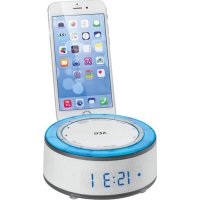


| Product type | Radio alarm clock with smartphone docking station |
| Brand | AEG |
| Model | MRC 4151 |
| Main power supply | External mains adapter 5 V DC (included) |
| Backup power supply | 2 AAA 1.5 V batteries (not included) |
| Power consumption | 3.5 W |
| Protection class | III |
| Net weight | Approximately 0.3 kg |
| Radio frequency range | FM 87.5 – 108.0 MHz |
| Radio functions | Automatic scanning, station presetting, preset recall |
| Alarms | Two independent alarms with sound selection: radio, nature sounds, beep, ambient lighting, combinations |
| Snooze function | Alarm reminder of approximately 9 minutes |
| Sleep timer | Adjustable from 10 to 90 minutes in increments of 10 |
| Temperature display | In degrees Celsius or Fahrenheit |
| Ambient lighting | 7 fixed colors + automatic cycle (non-replaceable LED bulbs) |
| AUX input | 3.5 mm jack socket for external audio sources (MP3 player, smartphone, etc.) |
| Docking station | For smartphone (not included) |
| Antenna | Foldable dipole antenna |
| Care and cleaning | Unplug before cleaning; use a slightly damp cloth without detergent; do not immerse in water |
| Safety | Do not expose to water or moisture; do not open the housing; use only the supplied adapter |
| Repairability | No user-repairable parts; consult a qualified technician |
| Compliance | Compliant with EC directives (electromagnetic compatibility and low voltage) |
| Intended use | Private use, dry indoor (non-commercial) |
Frequently Asked Questions - MRC 4151 AEG
User questions about MRC 4151 AEG
0 question about this device. Answer the ones you know or ask your own.
Ask a new question about this device
Download the instructions for your Radio in PDF format for free! Find your manual MRC 4151 - AEG and take your electronic device back in hand. On this page are published all the documents necessary for the use of your device. MRC 4151 by AEG.
USER MANUAL MRC 4151 AEG
Overview of the Components... Page 3
Instruction Manual... Page 28
Technical Data... Page 31
Disposal... Page 31
Polish
Table of Contents
Battery compartment
Thank you for choosing our product. We hope you will enjoy using the appliance.
Symbols in these Instructions for Use
Important information for your safety is specially marked. It is essential to comply with these instructions in order to avoid accidents and prevent damage to the machine:

WARNING:
Warns of dangers for your health and indicates potential risks of injury.

CAUTION:
Indicates potential dangers for the device or other objects.

NOTE: Highlights tips and information for you.
General Safety Guidelines
Before using this device, carefully read this user manual and keep it together with the Warranty Certificate, cashier receipt and if possible, the original package inclusive its interior packing. If you hand on the device to any third person, include the user manual as well.
- To avoid the risk of fire or electric shock, you should not expose the device to rain or humidity. Do not use the device near water (e.g. bathroom, swimming pool, humid cellars).
- Do not use the unit in extremely hot, cold, dusty, or damp places.
- The unit is designed solely for private use and its intended purpose. This unit is not designed for commercial use.
- Make sure that the power cable is not bent, pinched, or comes into contact with heat sources.
- Make sure that the power cable is not a tripping hazard.
- The power supply unit is only suitable for use in dry rooms.
- Never touch the power supply unit or the cable with wet hands.
- Only connect the power supply unit to a properly installed wall outlet. Ensure that the listed voltage matches the voltage of the wall outlet. Also ensure that the output current, voltage and the polarity of the power supply unit match the information on the connected device. Always install batteries in the correct direction.
- Avoid covering the device's vent openings.
- Never cover the vent holes with objects, such as magazines, tablecloths, curtains etc.
- This appliance shall not be exposed to dripping or splashing water and that no object filled with liquids such as vases shall be placed on apparatus.
- Open sources of fire, such as burning candles, may not be placed onto the unit.
- Never open the device's case. Improper repairs can cause severe danger to the user. If the device or particularly the power cord is damaged, don't use the device any further and have it repaired by a qualified specialist. Check the power cord regularly for damage.
- If you do not use the device for a long period of time, pull the power supply unit from the wall socket and/or remove the batteries.
- Disconnect the unit from the power supply for cleaning or if a fault occurs.

CAUTION:
Do not open the device! There are no serviceable parts inside the device.
These symbols may be found on the machine and are intended to indicate the following:
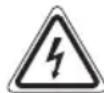
The lightning symbol should advise the user of parts in the inside of the device which carry dangerously high voltage levels.

The symbol with an exclamation mark should advise the user of important operation or maintenance instructions in the accompanying documentation.
Children and Frail Individuals
- In order to ensure your children's safety, please keep all packaging (plastic bags, boxes, polystyrene etc.) out of their reach.

WARNING:
Do not allow small children to play with the foil.
There is a danger of suffocation!
- This device is not intended to be used by individuals (including children) who have restricted physical, sensory or mental abilities and/or insufficient knowledge and/or experience, unless they are supervised by an individual who is responsible for their safety or have received instructions on how to use the device. Children should be supervised at all times in order to ensure that they do not play with the device.
Overview of the Components
1 Smartphone Holder 2 SLEEP/TIMER SET button 3 button 4 Hectton 5 UNC button 6 SNOOZE/ button
7 VOL+ button 8 VOL - button 9 ALARM button
10 MEM/RESET button
Display
A Radio mode B Alarm time 1 C Alarm time 2 D Snooze active
Rear view (without illustration)
Dipole antenna
Power adapter socket -DC 5V-+
AUX jack
Bottom (without illustration)
Battery compartment
Start-up of the device / Introduction
- Choose a suitable location for the device. Suitable would be a dry, level, non-slip surface.
- Sensitive surfaces such as the display may be protected by plastic foil. Remove this foil.
- Set the device onto the smartphone holder. (Smartphone not included in the scope of delivery)
Power supply
- Make sure the grid voltage corresponds to the figures on the rating plate.
- Insert the grid plug into a properly installed three-prong socket.
- Connect the device with the plug connector by inserting its plug into the "DC 5V" jack of the device.

CAUTION:
- Only use the supplied power adaptor for this device. Do not use for other devices.
- Only use power adaptor with 5V (DC), other adaptors may cause damage to the device.
NOTE:
- Disconnect from mains power supply during longer periods of non-use.
- If you did not insert another reserve battery, the time and the station memory will be lost as soon as the power supply is interrupted.
Inserting the reserve batteries (not supplied)
In case of power failure or if the power supply unit is pulled from the plug, the settings are maintained if the reserve batteries are inserted.
- Open the battery compartment on the bottom side.
- Insert 2 type R03 "AAA" 1.5 V batteries. Check that the polarity is correct (see battery compartment).
- Close the battery compartment.

WARNING:
The batteries shall not be exposed to excessive heat such as sunshine, fire or the like. Danger of explosion!

CAUTION:
- Batteries can leak battery acid. If the device is out of use for a long period of time, remove the batteries.
- Different battery types or new and used batteries must not be used together.
- Batteries are not to be disposed of together with domestic wastes. Dispose of the used batteries at the relevant collection bin or at your dealer's.
Switching the device on / off
Switching on: Press the FUNC button.
Switching off: Press and hold the DUNC button for approx. 3 seconds.
Adjusting the volume
Adjust the volume using the VOL - /VOL + buttons.
Temperature display
Proceed as follows to display the temperature.
- Turn the device on.
- Press the FUNC button until the temperature is shown in the display.
- You can use the buttons ▸ and ▸ to switch the temperature display between degrees Centigrade (C) and degrees Fahrenheit (F).

NOTE:
During the temperature display, no sound is possible.
Change the Colour of the Mood Light
During operation, the upper housing of the device is illuminated. You can select between 7 different colour variations and automatic color change.
- Press the SNOOZE / button repeatedly to select the desired color.
- With the 8th color selection, the illumination automatically changes between the 7 colour variations.
You also can switch off the illumination:
- Press the SNOOZE / button for 3 seconds. To turn the illumination on again, press the SNOOZE/ button again for 3 seconds.

CAUTION: You cannot replace the LED lamps.
30 English
Setting the Clock
- Turn off the device.
- Press and hold the SLEEP / TIME SET button for approx. 3 seconds. The hours start flashing. Use the button to adjust the hours.
- Press the SLEEP / TIME SET button to confirm.
- Set the minutes with the ▸ or the ◂ button.
- Confirm the input with the SLEEP / TIME SET button.
NOTE:
The input is stored automatically within approximately 10 seconds when no button is pressed.
Listening to the radio
Scanning stations
- Press the FUNC button to switch on the radio.
- Press the FUNC button repeatedly, until the "symbol and the station frequency are shown in the display.
- When you press the button momentarily, the device changes to the next or the previous station respectively.
NOTE:
If there is interference on the received station, try to improve the reception by changing the position and by unwinding or winding the antenna.
Presetting radio stations
- Search for a station as described in "Scanning stations".
- Press and hold the MEM / PRESET button. The pre-set location will be displayed. Select the pre-set location with the ▶ or the ▶ button.
- Press the MEM / PRESET button to store the station.
Recalling preset radio stations
While in radio operation, repeatedly press the MEM / PRESET button. One pre-set location after the other will be called up.
Alarm function
General information
- Two alarm times can be set.
- You can only set, activate, and deactivate the alarm times during standby.
- You'd like to be woken up by radio? Set the desired station and the volume in advance.
- When the alarm time has been reached, the symbol will blink for the first or respectively the second alarm time.
Setting the Alarm Time
- Turn the device off.
- Press and hold the ALARM button for approx. 3 seconds. The hours start flashing.
- Set the hours with the ▸ I/1 buttons.
- Confirm the setting with the ALARM button.
- Repeat points 3 and 4 to set the minutes.
- Use the button to select how you want to be woken up. Select from:
FM (the radio frequency received last is displayed)
n-1 (naturesounds) L-1 (mood light) b-L (buzzer + mood light) F-L (radio + mood light) n-L (nature sounds + mood light) bp (buzzer)
Confirm your selection with the ALARM button.
- Use the button to select the nature sound for waking you up. Select from:
Twittering of birds
Ocean waves
Frogs
Surf
Confirm your selection with the ALARM button.
- Use the ▸ button to select the colour of the mood light. You can select from 7 different colour variations and an automatic colour change.
Confirm your selection with the ALARM button.
- Now you can make the settings for the second alarm time. Proceed as described in steps 3 to 8.
Activating/deactivating the alarm time
Press the ALARM button repeatedly.
With activated alarm time, the corresponding symbol "D1" or "D2" lights up in the display.
Shutting off of the alarm signal
To turn off the alarm until the next day, press the FUNC button.
Snooze function (SNOOZE)
The automatically set alarm signal can be shut off for approx. 9 minutes with the SNOOZE button. The symbol "Zz" will appear in the display.
Delayed shut-off
Would you like to fall asleep with radio music?
- Press the FUNC button to switch on the radio.
- Press the SLEEP / TIME SET button. The display shows 90 (minutes).
- Press the SLEEP / TIME SET button repeatedly to reduce the time in steps of 10.
- The "OFF" setting will deactivate the function.
- To display the still remaining time, briefly press the SLEEP / TIME SET button.
AUX jack
For connecting to external players, e.g. MP3 player, smartphone, tablet PC etc.
- Connect the external device to the AUX jack with a 3.5 mm stereo jack.
- Press the FUNC repeatedly until "AU" is shown on the display.
- You can listen to the audio playback from an external device through the speaker. Adjust the volume on the external device. The VOL + / VOL - buttons on the device are not functional.
- For further information, please refer to the manual for the external audio source.
NOTE:
Adjust the volume of the external device to an audible level.
Cleaning
CAUTION:
- Do not immerse the device in water.
- Do not use a wire brush or other abrasive objects.
- Do not use any caustic or abrasive cleaning agents.
- Remove the plug before cleaning.
- Clean the appliance with a slightly humid cloth without any additives.
Troubleshooting
| Problem Cause | Solution | |
| The unit cannot be operated | The unit is blocked and "hangs" | Pull the mains plug for approximately 5 seconds. Then connect the unit again. |
Technical Data
Model: MRC 4151
Power supply: DC 5V
Power consumption: 3.5W
Protection Class: III
Battery power reserve: .2 x 1.5 V, type AAA, R03
Net weight: approx. 0.3 kg
Radio section
Frequency ranges: FM 87.5 ~ 108.0 MHz
External power adaptor
Protection Class: II
Input: AC 100-240 V, 50/60 Hz
Output: DC 5 V/700 mA
Polarity:
The right to make technical and design modifications in the course of continuous product development remains reserved.
This device complies with all current CE directives, such as electromagnetic compatibility and low voltage directive and is manufactured according to the latest safety regulations.
Disposal
Meaning of the "Wheelie Bin" Symbol
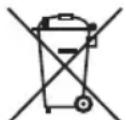
Take care of our environment, do not dispose of electrical appliances via the household waste.
Dispose of obsolete or defective electrical appliances via municipal collection points.
Please help to avoid potential environmental and health impacts through improper waste disposal.
You contribute to recycling and other forms of utilization of old electric and electronic appliances.
Your municipality provides you with information about collecting points.
Polish
Operating instructions
CTC Clatronic Sp. z o.o



- POLISH
- TABLE OF CONTENTS
- SYMBOLS IN THESE INSTRUCTIONS FOR USE
- WARNING
- CAUTION
- GENERAL SAFETY GUIDELINES
- CHILDREN AND FRAIL INDIVIDUALS
- OVERVIEW OF THE COMPONENTS
- DISPLAY
- START-UP OF THE DEVICE / INTRODUCTION
- POWER SUPPLY
- NOTE
- INSERTING THE RESERVE BATTERIES (NOT SUPPLIED)
- SWITCHING THE DEVICE ON / OFF
- ADJUSTING THE VOLUME
- TEMPERATURE DISPLAY
- CHANGE THE COLOUR OF THE MOOD LIGHT
- ENGLISH
- SETTING THE CLOCK
- LISTENING TO THE RADIO
- SCANNING STATIONS
- PRESETTING RADIO STATIONS
- RECALLING PRESET RADIO STATIONS
- ALARM FUNCTION
- GENERAL INFORMATION
- SETTING THE ALARM TIME
- ACTIVATING/DEACTIVATING THE ALARM TIME
- SHUTTING OFF OF THE ALARM SIGNAL
- SNOOZE FUNCTION (SNOOZE)
- DELAYED SHUT-OFF
- AUX JACK
- CLEANING
- TROUBLESHOOTING
- TECHNICAL DATA
- EXTERNAL POWER ADAPTOR
- DISPOSAL
- MEANING OF THE "WHEELIE BIN" SYMBOL
- OPERATING INSTRUCTIONS
Brand : AEG
Model : MRC 4151
Category : Radio