Subwoofer 200 - Loudspeaker LOEWE - Free user manual and instructions
Find the device manual for free Subwoofer 200 LOEWE in PDF.



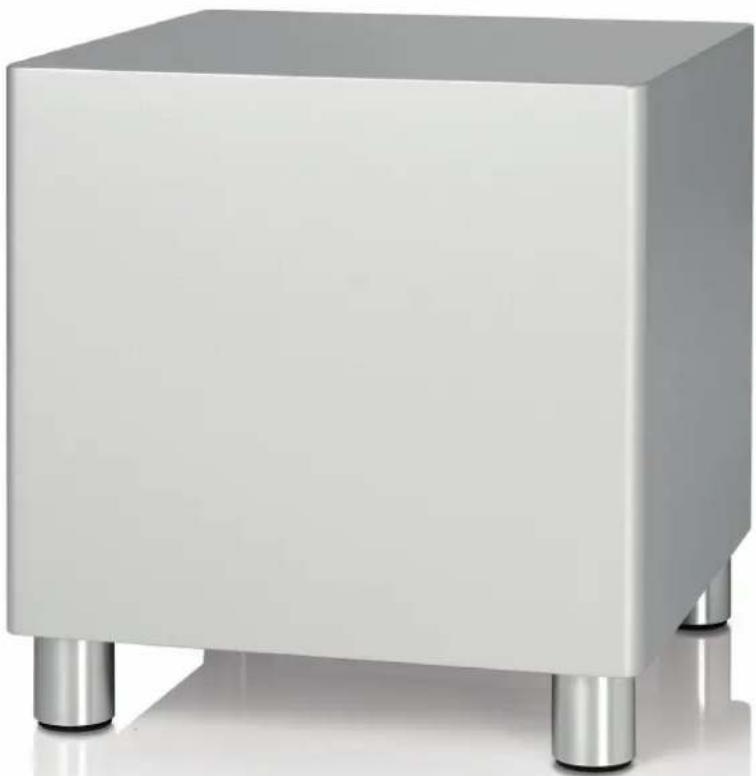
| Product type | Active subwoofer for audio system |
| Brand | Loewe |
| Model | Subwoofer 200 |
| Dimensions (W x H x D) | 24 x 24.5 x 26.1 cm |
| Weight | 5.2 kg |
| Power supply | 220-240 V, 50/60 Hz |
| Max. power consumption | 250 W |
| Standby power consumption | < 0.5 W |
| Speaker impedance | Min. 4 ohms |
| Subwoofer frequency range | 39 Hz – 350 Hz (-3 dB) |
| Other channels frequency range | 20 Hz – 20 kHz (-3 dB) |
| Built-in speaker | 1x 160 mm, bassreflex |
| Subwoofer output power | 100 W (RMS) / 200 W (max. music) |
| Other channels output power | 2x 50 W (RMS) / 100 W (max. music) |
| Audio inputs | Line In RCA (Right, Subw, Left) |
| System connection | Audiolink 26-pin D-Sub |
| Functions | Auto mode, stereo, 2.1, wireless |
| Settings | Crossover frequency (50-350 Hz), equalizer, bass intensity (±12 dB) |
| Care and cleaning | Use a soft, damp cloth without corrosive products |
| Safety | Automatic shutdown, surge protection, do not open the device |
| Package contents | Subwoofer, power cable, Audiolink cable (variant 00), Digital Audiolink/Audiolink converter (variant 30), network cable (variant 30), user manual |
Frequently Asked Questions - Subwoofer 200 LOEWE
User questions about Subwoofer 200 LOEWE
0 question about this device. Answer the ones you know or ask your own.
Ask a new question about this device
Download the instructions for your Loudspeaker in PDF format for free! Find your manual Subwoofer 200 - LOEWE and take your electronic device back in hand. On this page are published all the documents necessary for the use of your device. Subwoofer 200 by LOEWE.
USER MANUAL Subwoofer 200 LOEWE
natural_image
Exterior view of a modern white rectangular electronic device with four metallic legs (no text or symbols visible)Bedienungsanleitung, Operating instructions, Mode d'emploi, Istruzioni per l'uso, Instrucciones de manejo, Gebruiksaanwijzing, Botjoningsvejledning, Kayttöohje, Bruksanvisning
LOEWE.
natural_image
Exterior view of a modern office building (no signage)Subwoofer
Herzlich willkommen
Vielen Dank,
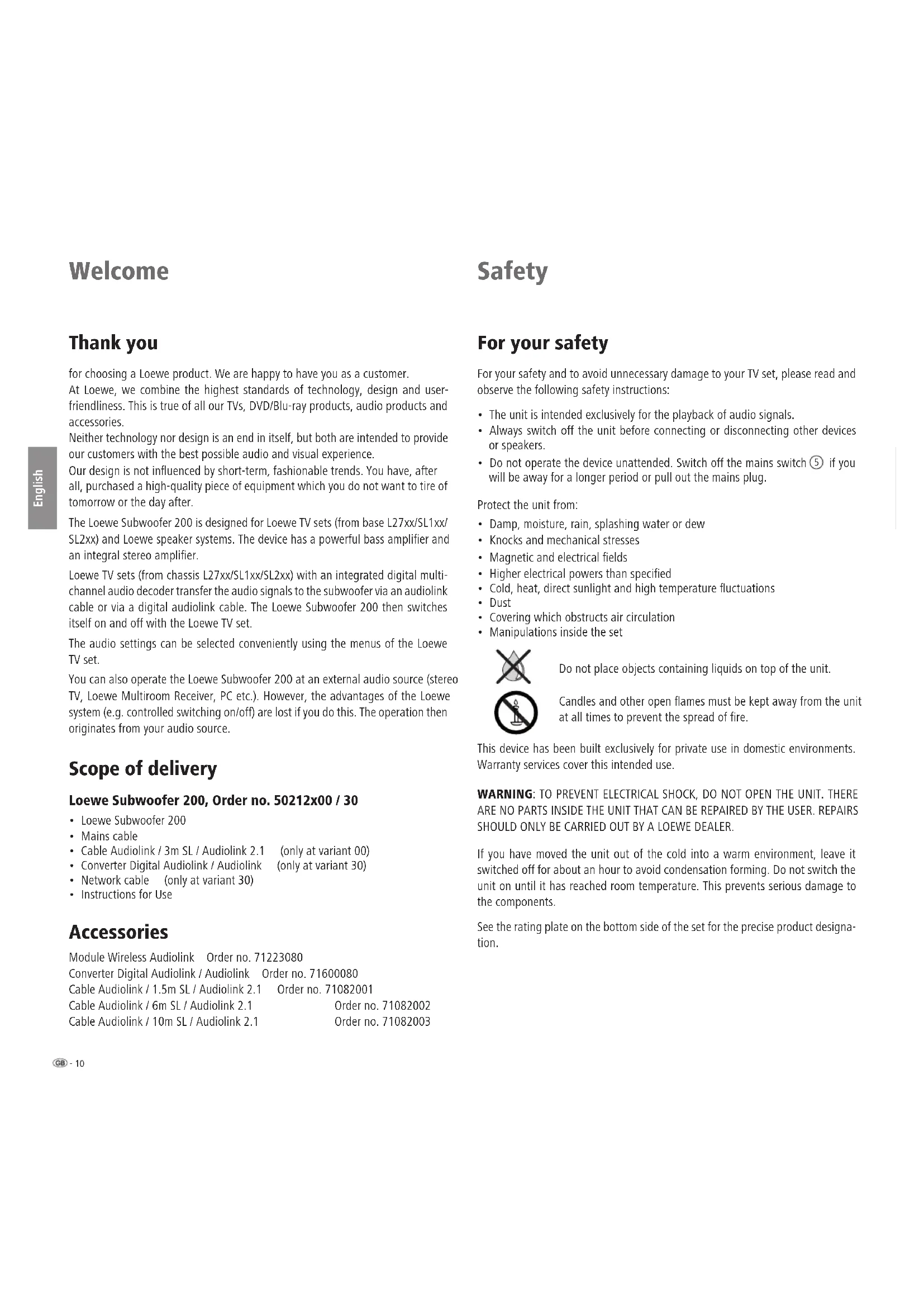
for choosing a Loewe product. We are happy to have you as a customer.
At Loewe, we combine the highest standards of technology, design and user-friendliness. This is true of all our TVs, DVD/Blu-ray products, audio products and accessories.
Neither technology nor design is an end in itself, but both are intended to provide our customers with the best possible audio and visual experience.
Our design is not influenced by short-term, fashionable trends. You have, after all, purchased a high-quality piece of equipment which you do not want to tire of tomorrow or the day after.
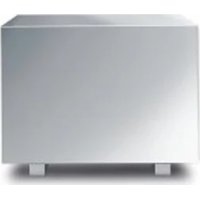
The Loewe Subwoofer 200 is designed for Loewe TV sets (from base L27xx/SL1xx/SL2xx) and Loewe speaker systems. The device has a powerful bass amplifier and an integral stereo amplifier.
Loewe TV sets (from chassis L27xx/SL1xx/SL2xx) with an integrated digital multi-channel audio decoder transfer the audio signals to the subwoofer via an audiolink cable or via a digital audiolink cable. The Loewe Subwoofer 200 then switches itself on and off with the Loewe TV set.
The audio settings can be selected conveniently using the menus of the Loewe TV set.
You can also operate the Loewe Subwoofer 200 at an external audio source (stereo TV, Loewe Multiroom Receiver, PC etc.). However, the advantages of the Loewe system (e.g. controlled switching on/off) are lost if you do this. The operation then originates from your audio source.
Scope of delivery
Loewe Subwoofer 200, Order no. 50212x00 / 30
• Loewe Subwoofer 200
- Mains cable
• Cable Audiolink / 3m SL / Audiolink 2.1 (only at variant 00)
- Converter Digital Audiolink / Audiolink (only at variant 30)
• Network cable (only at variant 30)
- Instructions for Use
Accessories
Module Wireless Audiolink Order no. 71223080
Converter Digital Audiolink / Audiolink Order no. 71600080
Cable Audiolink / 1.5m SL / Audiolink 2.1 Order no. 71082001
Cable Audiolink / 6m SL / Audiolink 2.1 Order no. 71082002
Cable Audiolink / 10m SL / Audiolink 2.1 Order no. 71082003
Safety
For your safety
For your safety and to avoid unnecessary damage to your TV set, please read and observe the following safety instructions:
- The unit is intended exclusively for the playback of audio signals.
- Always switch off the unit before connecting or disconnecting other devices or speakers.
- Do not operate the device unattended. Switch off the mains switch ⑤ if you will be away for a longer period or pull out the mains plug.
Protect the unit from:
• Damp, moisture, rain, splashing water or dew
- Knocks and mechanical stresses
• Magnetic and electrical fields
• Higher electrical powers than specified
• Cold, heat, direct sunlight and high temperature fluctuations
- Dust
• Covering which obstructs air circulation
- Manipulations inside the set

Do not place objects containing liquids on top of the unit.
Candles and other open flames must be kept away from the unit at all times to prevent the spread of fire.
This device has been built exclusively for private use in domestic environments. Warranty services cover this intended use.
WARNING: TO PREVENT ELECTRICAL SHOCK, DO NOT OPEN THE UNIT. THERE ARE NO PARTS INSIDE THE UNIT THAT CAN BE REPAIRED BY THE USER. REPAIRS SHOULD ONLY BE CARRIED OUT BY A LOEWE DEALER.
If you have moved the unit out of the cold into a warm environment, leave it switched off for about an hour to avoid condensation forming. Do not switch the unit on until it has reached room temperature. This prevents serious damage to the components.
See the rating plate on the bottom side of the set for the precise product designation.
Care / Setting up
Cleaning
Only clean the unit with a damp, soft and clean cloth (without using any kind of harsh cleaning agent).
Subwoofer 200 setup
Basic information
- Place the unit on a stable, even surface.
- The distance between the subwoofer and audio source must not exceed 10 m in the same room.
- Do not set up the unit near strong heat sources or in direct sunlight.
- When installing in a cabinet or closed shelf, leave about 10 cm free around the unit to allow the air to circulate freely, thereby avoiding a build-up of heat and sound pressure.
- Pull out the power cable during thunderstorms. Surge voltages caused by lightning strikes can damage the TV through the antenna system and the mains.
- If the unit is not to be used for an extended period, the plug should also be disconnected from the mains.
- The power plug of the TV set must be easily accessible so that the TV can be disconnected from the power supply at all times.
- Lay the speaker and power cables in such a way that they cannot be damaged. The power cable may not be kinked or laid over sharp edges, stood on or exposed to chemicals; the latter also applies to the system as a whole. A power cable with damaged insulation can cause electric shocks and poses a fire risk. As such, it must be changed before the unit is used again.
- When unplugging the unit from the mains, pull the plug housing and not the cable. The cables in the mains plug could otherwise be damaged and could cause a short-circuit when being plugged in again.
- The speakers generate magnetic dispersion fields which act in the vicinity of the housing. We recommend a minimum distance of >0.5m from magnetically sensitive equipment such as CRT-TV sets, magnetic data media etc.
Subwoofer 200
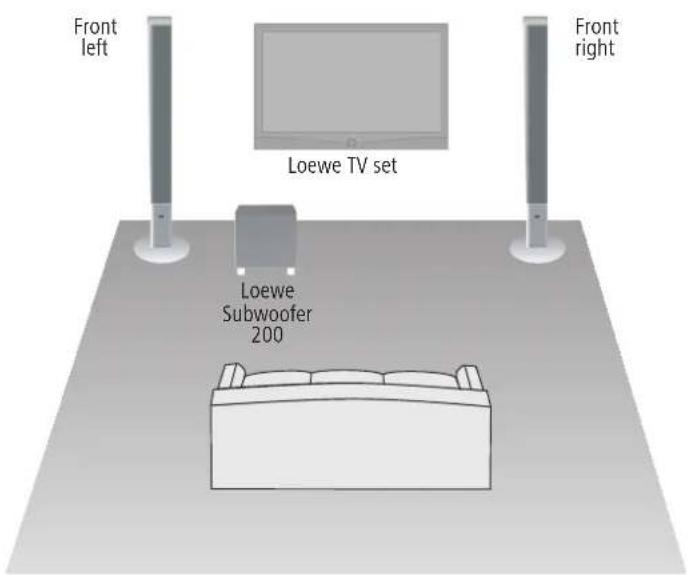
You can position the subwoofer anywhere on the floor.
We recommend the front area of the room in a way that the basses can freely flow to the sides and downwards.
Attention: The air supply on the rear of the subwoofer must never be impeded.
Ensure a sufficient distance (> 10 cm) to the floor or wall.
Suggestion for 2.1 Setup solution
Connection
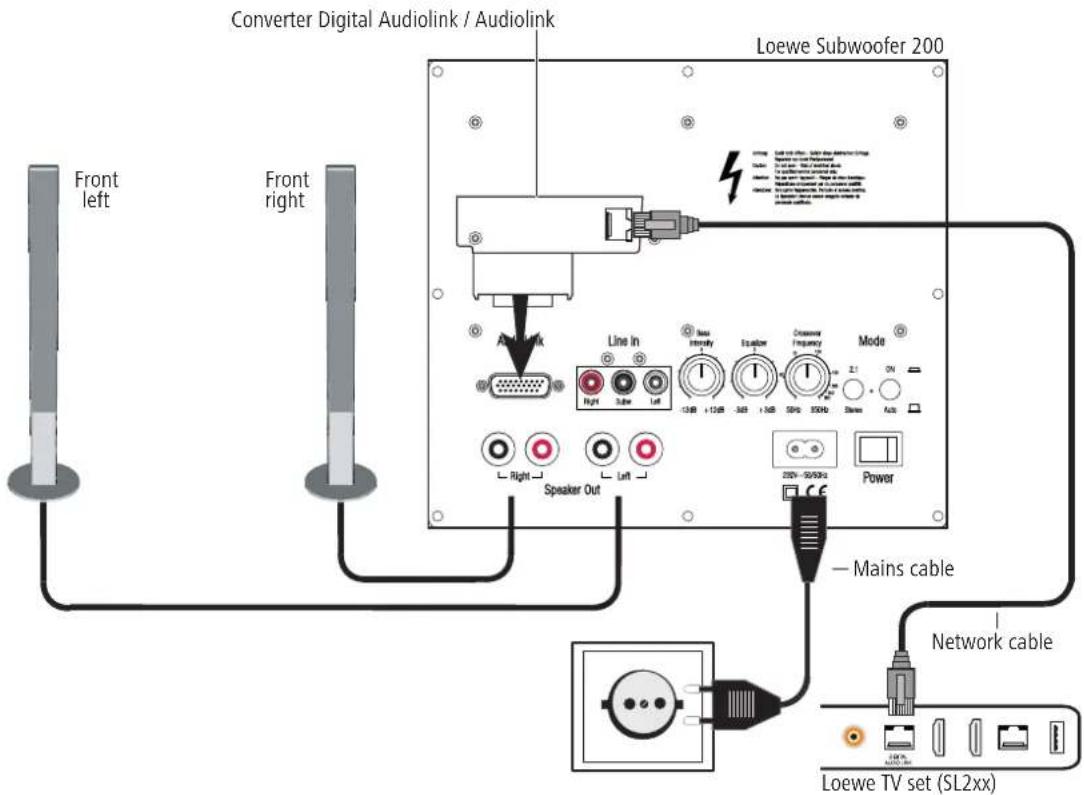
Cabling of Loewe TV set (chassis SL2xx) – Subwoofer 200 – speaker
The TV set must be equipped with a Digital Audiolink.
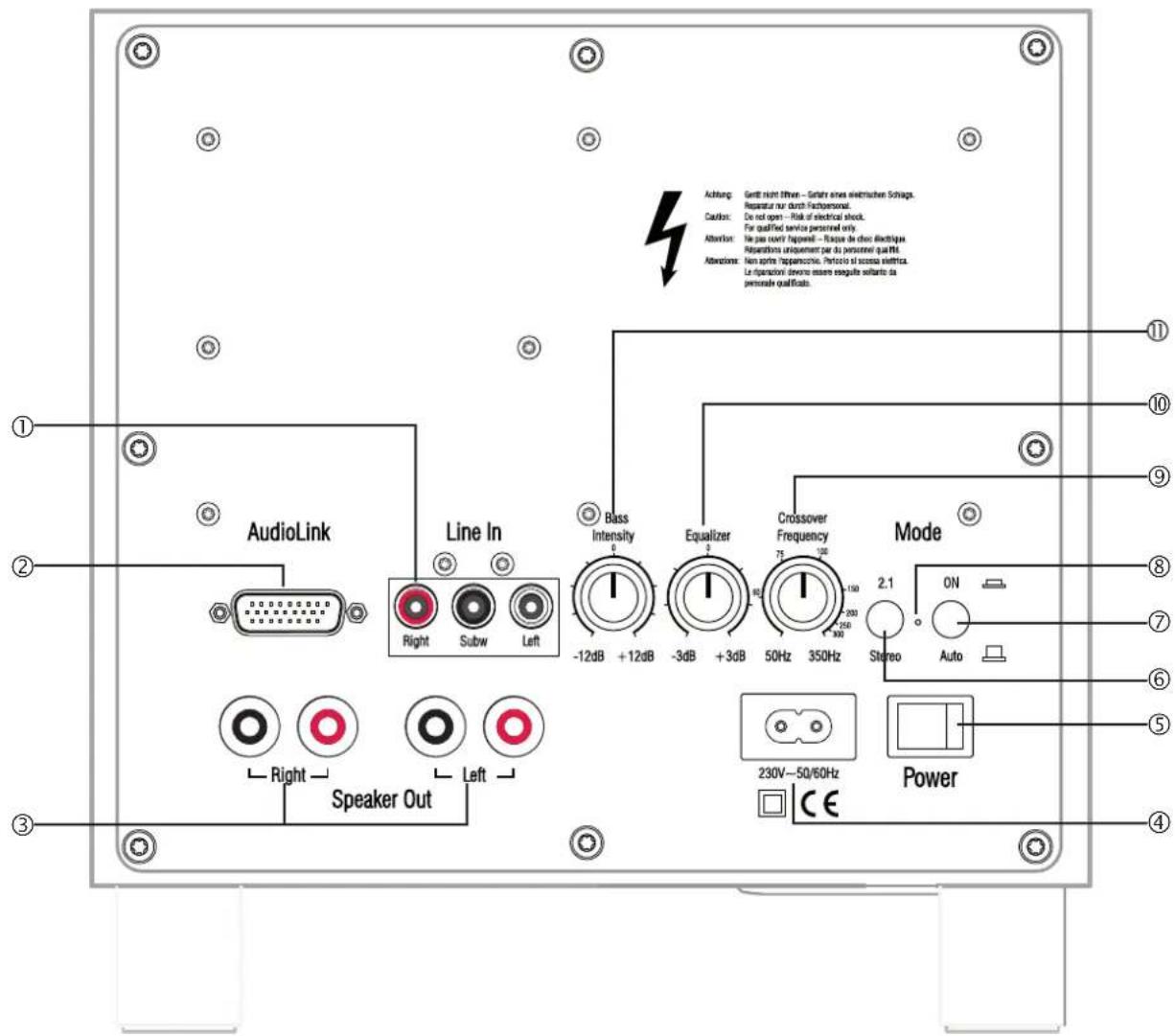
You can either connect the subwoofer via a network cable (Cat. 5e or higher) and the Converter Digital Audiolink / Audiolink (included with the Loewe Subwoofer 200, order no. 50212T/U/W30) or you can connect it wirelessly to a compatible audio source via the Module Wireless AudioLink which can be optionally retrofitted. If you wish to connect the subwoofer using the network cable, connect the Converter Digital Audiolink / Audiolink to the 25-pin Audiolink socket ② of the subwoofer. Use the network cable to connect the Digital Audiolink of the TV set to the socket of the Converter Digital Audiolink / Audiolink.
Connect the speaker cable to the speaker according to the corresponding installation instructions. One of the two wires is usually marked black. Connect this black marked cable respectively with the black screw terminal Speaker Out ③ to the Subwoofer 200 (connection diagram see figure right) and the black terminal on the speaker. For this, turn the screw lock of the relevant terminal on the subwoofer anticlockwise about 5 turns. Guide the wire end into the screw terminal from below and close the screw terminal by turning it clockwise. Connect the unmarked wires to the red terminals.
Use the mains cable supplied to connect the 220-240 V socket ④ of the subwoofer to a 220-240V 50/60 Hz socket.
Connection
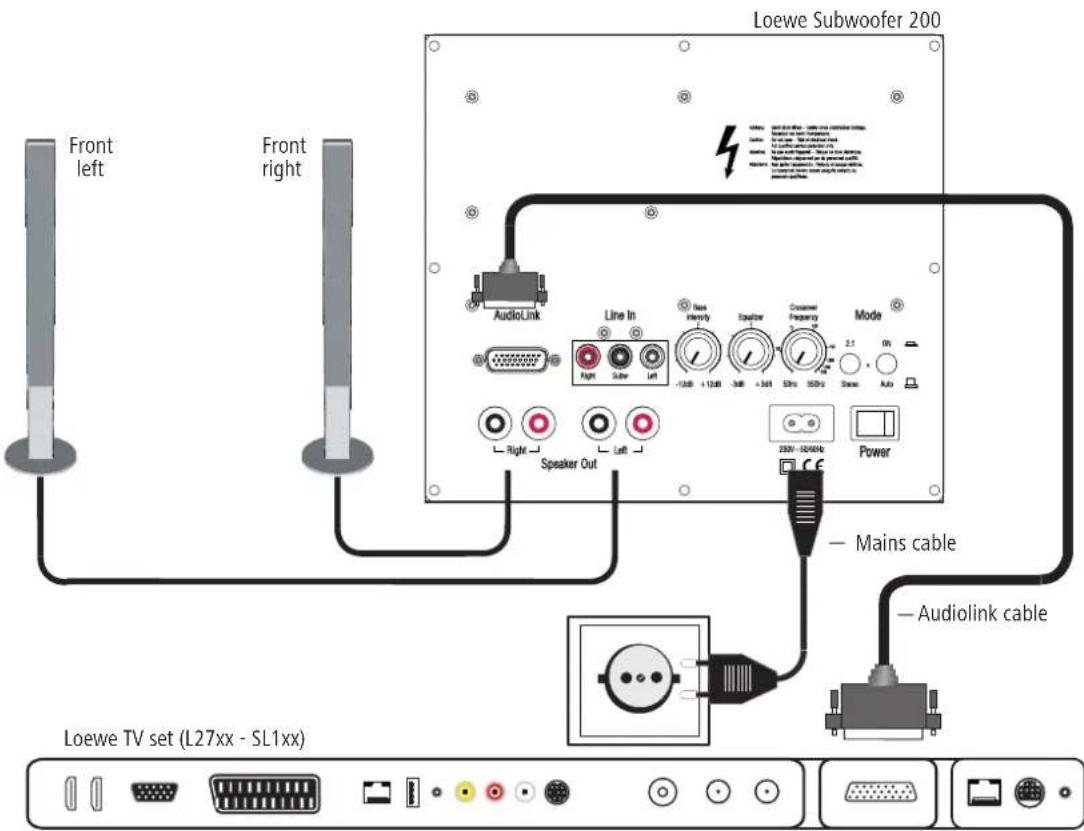
Cabling of Loewe TV set (chassis L27xx/SL1xx) – Subwoofer 200 – speaker
The TV set must be equipped with an integrated digital multi-channel audio decoder. If this has not been done at the factory, please consult your dealer and ask them for the suitable Loewe upgrade kit.
You can connect the subwoofer either via an Audiolink cable or via the optional upgrade Module Wireless AudioLink wirelessly with a compatible audio source (e.g. Loewe MediaVision 3D). If you connect the subwoofer via the Audiolink cable, install it with the 26-pole connector at the Loewe TV set and at the subwoofer (socket Audiolink ②).
Connect the speaker cable to the speaker according to the corresponding installation instructions. One of the two wires is usually marked black. Connect this black marked cable respectively with the black screw terminal Speaker Out ③ to the Subwoofer 200 (connection diagram see figure right) and the black terminal on the speaker. For this, turn the screw lock of the relevant terminal on the subwoofer anticlockwise about 5 turns. Guide the wire end into the screw terminal from below and close the screw terminal by turning it clockwise. Connect the unmarked wires to the red terminals.
Use the mains cable supplied to connect the 220-240 V socket ④ of the subwoofer to a 220-240V 50/60 Hz socket.
Start-up and settings
Before commencing the start-up and settings, please make sure that all cables are connected correctly.
Switching the subwoofer on/off
Use the mains switch Power ⑤ to switch the subwoofer on in position ON and off in position OFF.
If you wish to toggle between the operating modes Wireless or Cable via Audiolink, switch the unit off for minimum 30 seconds and then on again.
Mode with Loewe TV sets
If the subwoofer is connected via the Audiolink connection, as described on page 13, ② the Mode - ON/AUTO ⑦ switch is in the AUTO position and the Mode - 2.1/Stereo ⑥ switch is on the 2.1 position, you no longer need to switch the subwoofer on and off separately. After switching on the subwoofer for the first time, it is automatically switched on and off together with the Loewe TV set.
Register the presence of the subwoofer as described in the instructions for use of your Loewe TV set under "Operating extra devices" or "External devices".
Automatic operation with other audio sources
If there is no Audiolink connection, the Mode - ON/AUTO ⑦ switch is at the AUTO position and if audio signals are present at the Cinch sockets Line IN - Right/Subw/Left ① the subwoofer will switch on automatically. After 10 minutes without an audio signal at these sockets, the subwoofer will switch off automatically.
The subwoofer can switch on automatically if fault signals are present on the audio lines. In this case, activate the mains switch ⑤.
The subwoofer can switch off automatically during longer, very quiet passages. In this case, increase the volume.
Continuous operation with other audio sources
If you wish to operate the subwoofer in continuous mode, switch the Mode - ON/AUTO ⑦ switch to the ON position. Then switch the subwoofer on or off with the mains switch Power ⑤.
Stereo mode
Move the Mode - 2.1/Stereo switch ⑥ switch to the Stereo position if you are only feeding the audio signals in at the Cinch sockets Line IN - Right/Left. ① The bass manager integrated in the subwoofer then automatically directs the bass components contained in the stereo signals to the subwoofer channel.
2.1 Mode
Move the Mode - 2.1/Stereo switch ⑥ switch to the 2.1 if you are feeding the audio signals in at the Cinch sockets Line IN - Right/Subw/Left ①.
Wireless
Move the Mode - ON/AUTO ⑦ switch to the ON position if you wish to connect the subwoofer to a compatible audio source via a wireless link. Activate Coupling mode, as described in the instruction manual of the relevant audio source. Use a sharp object (e.g. paper clip) and press briefly on the button in the opening to move ⑧ the optional Module Wireless Audiolink in Coupling mode. If the registration was not successful, please try again and reduce the distance of the subwoofer to the audio source.
The distance between the subwoofer and audio source must not exceed 10 m in the same room.
The rotary switches Crossover Frequency ⑨, Equalizer ⑩ and Bass Intensity ⑪ do not have any function in the Wireless operating mode.
Setting the crossover frequency
The Crossover Frequency knob⑨ gives you the option to set the limit frequency for the bass playback - depending on which speakers you have connected - between 50 Hz and 350 Hz.
As described on page 13, for Loewe audio systems the knob should be set to 350 Hz because the crossover frequency is set to this in the Loewe audio sources (TV set).
Setting the equalizer
The Equalizer knob ⑩ gives you the option of setting a reduction or increase in the lowest frequency ranges (20 Hz - 50 Hz) for the bass playback.
- If the subwoofer is near the corner of the room, turn the Equalizer knob ^10 more towards -3 dB.
- If the subwoofer is near a wall, then turn the Equalizer knob more to the middle position.
- If the subwoofer is freestanding in the room, turn the Equalizer knob ^10 more towards +3 dB.
Bass intensity
You can use the Bass Intensity control ^⑪ to set the basic bass volume to how you want it.
Technical Data
Loewe Subwoofer 200
| Order no. | 50212T/U/W |
| Operating temperature [°C] 5 ... 40 | |
| Humidity [%] (no condensation) 30 ... 90 | |
| Dimensions [W x H x D in cm] 24 x 24.5 x 26.1 | |
| Weight [kg] 5.2 | |
| Digital power amplifiers 3 | |
| Principle 1 way bass reflex, active | |
| Equipment 1 x bass 160 mm | |
| Load capacity of the subwoofer channel 100 (sinus) / 200 watt (max. music) | |
| Load capacity of other channels 2x 50 (sinus) / 100 watt (max. music) | |
| Mains voltage [volt 50/60 Hz] | 220 - 240V |
| Max. power consumption [Watt] | 250 |
| Nominal power consumption [Watt] | 35 |
| Power consumption on standby [watt] | < 0.5 |
| Power consumption Power OFF [Watt] | 0 |
| Bass intensity [dB] | ± 12 |
| Transmission range of the subwoofer (acoustic) | 39 Hz – 350 Hz - 3dB |
| Transmission range of other channels | 20 Hz – 20 kHz - 3dB |
| Speaker impedance [Ohm] | min. 4 |
| Mains switch | yes |
| Operating mode switch | 2 |
| Integrated bass manager | Yes |
| Signal detector | Yes |
| Line In | RCA socket 3x: Right, Subw, Left |
System link Audiolink 26-pin D-Sub
Masthead
Loewe Opta GmbH is a public limited company of German law with its Head Office in Kronach.
Loewe Opta GmbH
Industriestrasse 11, 96317 Kronach
Editing date 04.13. 4rd issue
© Loewe Opta GmbH, Kronach
All rights reserved including translation.
Design and technical specifications are subject to change without notice.
Disposal
Cardboard box and packaging
In line with national regulations regarding the disposal of packaging materials, we pay a fee to authorised recyclers who collect packaging from dealers. Nevertheless, we recommend that you keep the original cardboard box and the rest of the packaging materials so that the unit can, if necessary, be transported in the safest possible conditions.
The unit
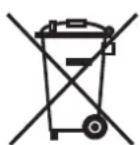
Attention: The EU Directive 2002/96/EC governs the proper return, handling and recycling of used electronic appliances. Old electronic appliances must therefore be disposed of separately. Never dispose of this unit in the normal domestic waste! You can hand in your old unit free of charge at identified collection points or to your dealer if you buy a similar new unit. Other details about re-acceptance (also for non-EU countries) are available from your local authorities.
Bienvenue
natural_image
Interior layout of a living room with a sofa, TV, and two pillars (no text or symbols)Collegamento
Kytkeminen
Kaapelointi Loewe-televisio (chassis L27xx/SL1xx) – Subwoofer 200 – kaiutin
AUS Audio Products Group Pty Ltd 67 O'Riordan St
Alexandria NSW 2015, Australia
Tel +61 - 1300 130 492
Fax +61 - 02 9578 0140
E-mail:help@audioproducts.com.au
B NL L
Loewe Opta Benelux NV/SA Uilenbaan 84
BG Darlington Service
193 Kn. Klementina St.
1612 Sofia, Bulgaria
Tel +359 - 2 9556399
E-mail: darlington@psp-bg.com
CH Telion AG
Rütistrasse 26
Customer Care Center
Industriestraße 11
GB IRL Leowe UK Limited
1st Floor, 237A Kensington High St
London
W8 6SA, UK
Tel +44 - (0) 207 368 1100
Fax +44 - (0) 207 368 1101
E-mail: enquiries@loewe-uk.com
GR RO Issagoci Emboriki
Ellados S.A
321 Mesogion Av.
152 31 Chalandri-Athens, Hellas
Tel +30 - 210 672 12 00
Fax +30 - 210 674 02 04
E-mail: christina_argyropoulou@
isembel.gr
H Basys Magyarorszagi KFT
Tó park u.9.
King's Tower 28/F, 111 King Lam Street
Kowloon, Hong Kong
Tel +852 - 27 77 89 88
Fax +852 - 23 10 08 08
E-mail: service@loewe-cn.com
HR Plug&Play Ltd.
Bednjanska 8, 10000 Zagreb
Hrvatska (Kroatia)
Tel +385 1 4929 683
Fax +385 1 4929 682
E-mail: info@loewe.hr
① Loewe Italiana S.r.L.
Via Monte Baldo, 14/P - 14/N
IL Clear electronic entertainment Ltd
13 Noah Mozes St.
Agish Ravad Building
Tel Aviv 67442, Israel
Tel +972 - 3 - 6091100
Fax +972 - 3 - 6092200
E-mail: info@loewe.co.il
IND Navshiv Retail Pvt. Ltd.
Block D, Plot No. 7 Shanti Kunj
Vasant Kunj
New Delhi - 110070, India
Tel +91 11 47 65 55 00
Fax +91 11 47 67 67 15
E-Mail: admin@navshiv.com
MiMoRa HOLDING CO.
No 1001, Afra Tower
Parsa St. Fereshteh
Tehran, Iran
Tel + 98 921 344 0521
E-Mail: s.zarandooz@gmail.com
KSA Salem Agencies & Services Co
Hamad Al Haqueel Street, Rawdah,
Jeddah 21413
Kingdom of Saudi Arabia
Tel +966 (2) 665 4616
Fax +966 (2) 660 7864
E-mail: hkurkjian@aol.com
LV EST Partners, SIA
A.Čaka iela 80
Rīqa, LV-1011, Latvia
Tel +3 71 - 67 29 29 59
Fax +3 71 - 67 31 05 68
E-mail: olga@dom332.lv
LT A Cappella Ltd.
Ausros Vartu 5, Pasazo skq.
01129 Vilnius, Lithuania
Tel +370 - 52 12 22 96
Fax +370 - 52 62 66 81
E-mail: info@loewe.lt
M Doneo Co. Ltd
34/36 Danny Cremona Street
Hamrun, HMR1514, Malta
Tel +356 - 21 - 22 53 81
Fax +356 - 21 - 23 07 35
E-mail: service@doneo.com.mt
MA Somara S.A.
377, Rue Mustapha El Maani
20000 Casablanca, Morocco
Tel +212 - 22 22 03 08
Fax +212 - 22 26 00 06
E-mail: somara@somara.ma
N
∅stre Kullerød 5
Alexandria NSW 2015, Australia
Tel 0800 174 781
Fax +61 - 02 9578 0140
E-mail:help@audioproducts.com.au
P
105005 Moscow, Russia
Tel +7 - 499 940 42 32 (ext. 454)
Fax +7 - 495 730 78 01
E-mail: service@loewe-cis.ru
S
P.O. Box 32836, Sheikh Zayed Road
Dubai, UAE
Tel +971 - 4 343 14 41
Fax +971 - 4 343 77 48
E-mail: service@dubaiaudio.com
© by Loewe Opta 02.04.13
LOEWE.


- Subwoofer
- Herzlich willkommen
- Vielen Dank,
- Scope of delivery
- Loewe Subwoofer 200, Order no. 50212x00 / 30
- Accessories
- Safety
- For your safety
- Protect the unit from:
- Care / Setting up
- Cleaning
- Subwoofer 200 setup
- Basic information
- Subwoofer 200
- Connection
- Cabling of Loewe TV set (chassis SL2xx) – Subwoofer 200 – speaker
- Cabling of Loewe TV set (chassis L27xx/SL1xx) – Subwoofer 200 – speaker
- Start-up and settings
- Switching the subwoofer on/off
- Mode with Loewe TV sets
- Automatic operation with other audio sources
- Continuous operation with other audio sources
- Stereo mode
- Mode
- Wireless
- Setting the crossover frequency
- Setting the equalizer
- Bass intensity
- Technical Data
- Masthead
- Disposal
- Cardboard box and packaging
- The unit
- Bienvenue
- Collegamento
- Kytkeminen
- Kaapelointi Loewe-televisio (chassis L27xx/SL1xx) – Subwoofer 200 – kaiutin
Brand : LOEWE
Model : Subwoofer 200
Category : Loudspeaker