AC401 Deluxe - Baby monitors ANGELCARE - Free user manual and instructions
Find the device manual for free AC401 Deluxe ANGELCARE in PDF.



User questions about AC401 Deluxe ANGELCARE
0 question about this device. Answer the ones you know or ask your own.
Ask a new question about this device
Download the instructions for your Baby monitors in PDF format for free! Find your manual AC401 Deluxe - ANGELCARE and take your electronic device back in hand. On this page are published all the documents necessary for the use of your device. AC401 Deluxe by ANGELCARE.
USER MANUAL AC401 Deluxe ANGELCARE
Rechargeable Movement & Sound Monitor ..... P.2
natural_image
Two Angelcare medical devices on a grid tray, one displaying a digital display and the other a white conical device with control buttons (no visible text or symbols on the devices themselves)TABLE OF CONTENT
Your Angelcare® Monitor components and special features .....2
How to operate your Angelcare® Monitor ....3
Testing your Angelcare® Monitor ....5
Warnings 5
Maintenance of your Angelcare® Monitor .6
Troubleshooting 7
Warranty 8
Distributors 87
YOUR ANGELCARE® MONITOR COMPONENTS
NURSERY UNIT (TRANSMITTER)

text_image
Angelcare®RECHARGEABLE PARENTS
UNIT (RECEIVER) &
CHARGER

text_image
2.01 Angelcare®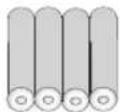
4 AAA RECHARGEABLE
BATTERIES FOR
PARENTS UNIT
natural_image
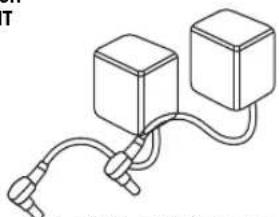
Simple line drawing of two connected blocks with wires (no text or symbols)2 (Two) 7.5 volt AC adapters
YOU WILL ALSO NEED :
4 AAA non-rechargeable batteries (not included) as back up for the nursery unit in case of power failure.

SENSOR PAD(S) 1 or 2
FEATURES

natural_image
Simple line drawing of a circular object with a central hole and two protruding arms (no text or symbols)Practical soothing night light.
text_image
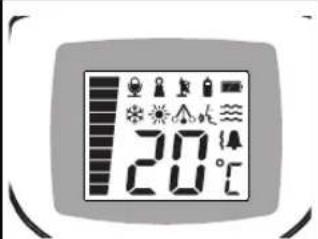
20°CChoice of voice activated or continuous sound reception.

Convenient belt clip.

text_image
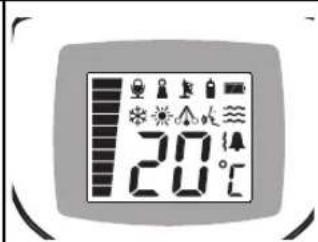
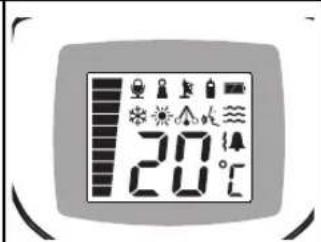
20°CNursery room temperature display on the parents unit.
ALARM AND WARNING
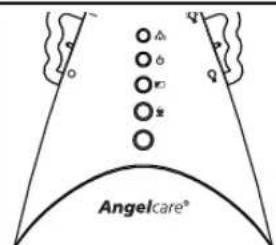
Your Angelcare® monitor will let you know if no movement is detected by alarms, vibration and visual effects. The practical portable parents unit keeps you informed at all time.
text_image
Angelcare°An alarm is triggered on the nursery unit and the flashing pendulum green light stops flashing.

text_image
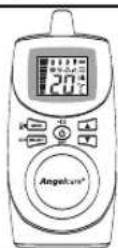
CH SELECT EXIT ANGELCARE®An alarm is triggered on the parents unit.
Vibration on the parents unit (not available in some countries).

text_image
Diagram showing a control panel with icons for lighting, alarm, and warning symbols inside a containerThe parents unit lights up and the nursery unit icon appears.
HOW TO OPERATE YOUR ANGELCARE® MONITOR
STEP 1 INSTALLATION OF THE SENSOR PAD UNDER THE MATTRESS

text_image
Keep at least 38 cm (15 inches) apart Sensor Pad(s) 1 or 2
text_image
POSITION OF SENSOR PAD UNDER MATTRESS 1 sensor pad 2 sensor pads Crib center Crib center- Position the sensor pad as shown above. Make sure the printed side faces up. Do not place any bedding between the mattress and the sensor pad.
- Secure the sensor pad cord to crib using a tie wrap. Run the cord on the floor to ensure it is out of the baby's reach.
- The sensor pad must rest on a completely flat and rigid surface. Place a 6mm (1/4") plywood to cover the full size of the crib base. Make sure the sensor pad's cord passes underneath the mattress as shown above.
STEP 2 INSTALLATION OF THE NURSERY UNIT
text_image
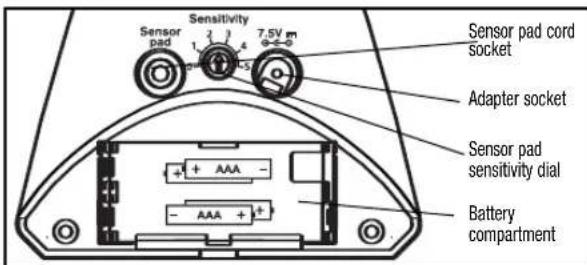
Sensitivity 7.5V m Sensor pad cord socket Adapter socket Sensor pad sensitivity dial Battery compartment- Connect the long sensor pad cord into the nursery unit.
- Insert 4 AAA regular batteries (not included) into nursery unit (for battery backup in case of power failure).
- Connect AC adapter to nursery unit and plug adapter into an electrical outlet in the baby's room.
- After both units are properly installed you may adjust the sensor pad sensitivity level (if necessary).
Note: After each start up, the monitor needs up to 1 minute before the movement function is ready to be used.
STEP 3 INSTALLATION OF THE PARENTS UNIT
text_image
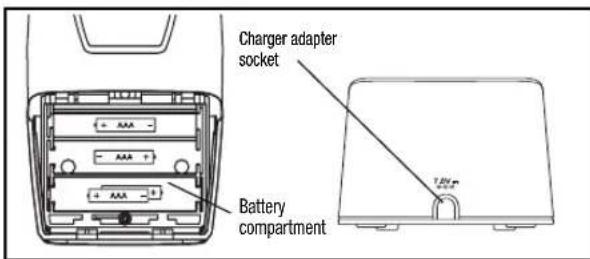
Charger adapter socket Battery compartment- Insert 4 AAA NIMH rechargeable batteries (included) into parents unit. NEVER use regular alkaline batteries.
- Connect AC adapter to parents unit charger and plug adapter into an electrical outlet. Let charge for 15 continuous hours before using the monitor for the first time.
STEP 4 HOW YO USE YOUR ANGELCARE© MONITOR
text_image
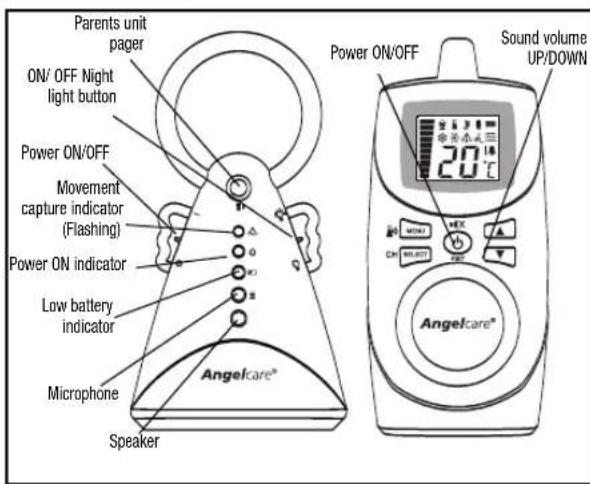
Parents unit pager ON/ OFF Night light button Power ON/OFF Movement capture indicator (Flashing) Power ON indicator Low battery indicator Microphone Speaker Angelcare® Power ON/OFF Sound volume UP/DOWN 20℃ Angelcare®- Once the parents unit is fully charged (after 15 hours) turn the unit ON and turn the nursery unit ON. If the parents unit is turned ON and the nursery unit is OFF, the parents unit will start beeping after 1 minute. After 4 seconds, the unit will shuts itself off.
- The different available options are programmable but you can use the units right away, with the following factory settings:
- Sound, movement and tic activated
- Out of range notification OFF
- Voice activated ON
- Temperature display ON, Room temperature control OFF
- Parents unit alarm ON, vibration OFF
- Speaker volume at 3
- Voice sensitivity at 2
- To avoid feedback (whistling sound), keep both units at least 3 meters apart (10 feet).
- You can adjust the sound volume with the arrow buttons.
- To turn the night light ON, move the right wing button UP.
STEP 5 SCREEN AND BUTTONS

text_image
20°C MENU CH SELECT EXIT- All programmable functions of your Angelcare© monitor are available through the MENU button.
- When the desired option appears on your screen, press SELECT.
- The different choices of each option is available through the UP and DOWN arrows.
- AT ANY TIME after programming a function, if you wish to exit the menu selection, press on the EXIT button. If you wish to perform additional programming press MENU to view the next option.
STEP 6 TICS, SOUNDS AND MOVEMENTS
text_image
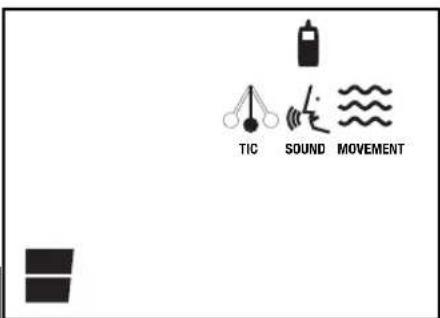
TIC SOUND MOVEMENTYour Angelcare© monitor gives you the possibility to chose what you wish to monitor.
- The "TIC" is a sound that tells you that your sensor pad is detecting movements.
- The "SOUND" function is activated by the baby's voice or is transmitted continuously (see STEP 8)
-
The "MOVEMENT" function is activated when movement is detected by the sensor pads. It detects all baby's movements and warns you when there is no movement.
A CONTINUOS BEEPING SOUND is heard when no movement is detected for 20 seconds. If you are receiving false alarms, adjust the sensor pad sensitivity level (STEP 2). -
Press MENU, the 3 flashing icons will appear.
- Using the arrows, select each icon, and decide if you want it ON or not.
- When your selection is made press SELECT, and it will bring you to the next icon.
- Press MENU to view the next option, or EXIT if you wish to stop programming now.
STEP 7 OUT OF RANGE INDICATOR

natural_image
Simple diagram with two black shapes and a small figure, no text or symbols presentYour monitor is equipped with an optional "Out of range" indicator function, which will advise you when the two units are not communicating with each other. Out of range situations can be caused by distance or by physical interferences. Range: up to 250 meters/820 ft (open field); between 80 meters/262 ft and 100 meters/328 ft (indoors).
When the units are out of range you will hear a DOUBLE BEEP every 8 seconds and the "out of range" icon will flash on the screen of the parents unit.
- Press MENU, the OUT OR RANGE icon and the word OFF will appear on the screen.
- Turn this function ON or OFF by using the arrows.
- Press SELECT
- Press MENU to view the next option, or EXIT if you wish to stop programming now.
STEP 8 MICROPHONE SENSITIVITY

natural_image
Simple graphic with a vertical striped bar and two icons: a microphone and a battery, both without any text or symbols.The sound monitoring can be "voice activated" or "continuous". If you choose the continuous transmission mode, you will hear your baby's every little sounds. If you use "voice activated" you will hear sounds depending on the level of sensitivity that you choose.
- Press MENU, the MICROPHONE and the word ON will appear on the screen.
- Leave it ON to keep it "voice activated" or OFF to be in "continuous" mode. Use the arrows to select On or OFF.
- Press SELECT.
- If you wish to use the voice activated monitoring function, Press MENU again to chose the level of sensitivity of the microphone (4 levels), using the arrows.
- Press SELECT when the desired level appears on the screen.
- Press MENU to view the next option, or EXIT if you wish to stop programming now.
STEP 9 ALARMS AND VIBRATION (VIBRATION NOT AVAILABLE IN SOME COUNTRIES)

natural_image
Simple black-and-white diagram with three bell icons and two stacked blocks, no text or symbols present.This menu will appear ONLY if the vibration option is available on your unit. It allows you to choose between the following notification options :
- Alarm only
- Vibration only
- Alarm and vibration
NOTE: The vibration mode will not work when the batteries are low or if the parents unit is on the charger.
- Press MENU and choose the desired option. The wave icon is for the vibrationmode and the bell icon is for the alarm mode.
- Select the desired option, using the arrows. Press SELECT.
- Press MENU to view the next option, or EXIT if you wish to stop programming now.
STEP 10 ROOM TEMPERATURE CONTROL
text_image
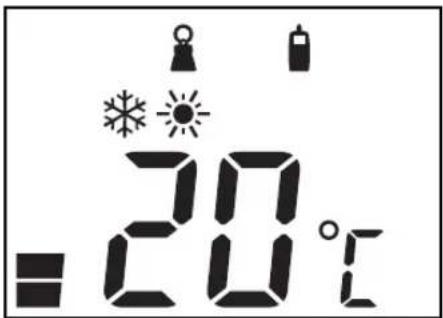
= 20°CYour Angelcare© monitor can also monitor your baby's room temperature and let you know when the temperature is to high or too low. A tripple BEEP will be heard if the temperature reaches levels out of the chosen range.
- Press MENU, the snow flake and sun icons and the word OFF will appear on the screen.
- Turn it ON or OFF using the arrows.
- Press SELECT.
- If you select to have the room temperature control ON, Press MENU.
The SNOW FLAKE icon will appear, with the temperature. Select the desired lowest temperature with the arrows and press SELECT.
- Press MENU. The SUN icon will appear, with the temperature. Select the desired highest temperature with the arrows and press SELECT.
- Press EXIT as this was the last available programmable function.
STEP 11 BATTERY MODE AND WARNINGS
text_image
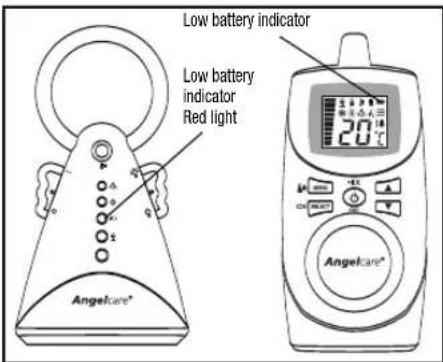
Low battery indicator Low battery indicator Red light Angelcare® 20℃ Angelcare®- The monitor will revert to battery mode during a power failure only if batteries are inserted in both units.
- It is also possible to use the Angelcare© monitor in places where electricity is not available.
- When the nursery unit's low battery RED light is flashing, its batteries need to be replaced. On the screen of the parents unit, the battery icon flashes and the nursery unit icon appears. A short BEEP will also be heard every 15 seconds for about 30 minutes, until the unit shuts itself off.
- Parents unit should be recharged when icon is clear (will not flash) and a beep sound is heard. A short BEEP sound will be heard every 15 seconds until the unit shuts itself down. Note: Do not use Alkaline batteries in the parents unit.
IMPORTANT: If the "Out of range" function is ON, when the nursery unit shuts itself off, the "Out of range" signal will be heard and displayed on the parents unit.
STEP 12 ADDITIONAL FUNCTIONS
text_image
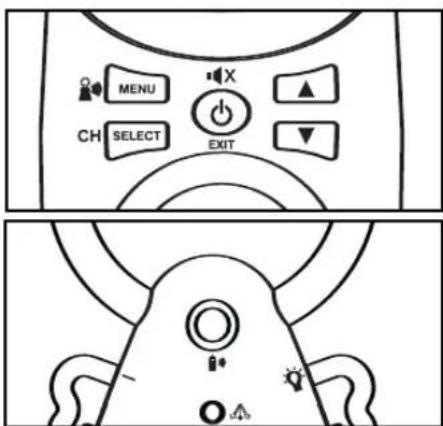
MENU CH SELECT EXIT- CHANNEL SELECTION : If the transmission is not clear, or if you hear parasite sounds, you should change the channel. Press and hold the SELECT button to change the channel (with the arrows). Then press the SELECT button again to confirm.
- TEMPORARY MUTE: If you want to mute the sound for 2 minutes, press the center EXIT button. To reactivate the sound before the 2 minutes have elapsed, press EXIT again. You can also turn the alarm off by pressing the same button (this does not apply to the low battery alarm).
- CONNECTING THE PARENTS UNIT TO THE NURSERY UNIT:
If you lose the connection between the 2 units, press and hold the MENU button on the parents unit, the "out of range" indicator will flash. Press and hold the top button of the nursery unit to re-connect to the nursery unit. The Tic light flashes.
- PAGING: If you want to locate the parents unit, press the top button of the nursery unit.
Testing Your Angelcare® Monitor
Note: Test your Angelcare® monitor BEFORE using it for the first time and then on a regular basis to make sure that it is functioning properly.
The Angelcare® monitor can be used outside of the crib in a different sleeping area. Test your monitor when moving the sensor pad to a new location to ensure sensitivity is adjusted correctly to the new padding or mattress. Consult the movement sensitivity adjustment section (step 6).
- Switch the parents unit to the "Sound Only" function. Have someone else speak into the nursery unit or place a radio near the nursery unit. You should hear sound from the parents unit. If there is no sound, refer to the Troubleshooting section.
- Test your monitor to detect movement. Set the parents unit on the "Movement only" function. Gently move your hand on the mattress. The top green light (with pendulum symbol) will flash on the nursery unit with your every movement. Remove your hand from the mattress. Due to the lack of movement, a "pre-alarm "Tic" sound will be emitted after 15 seconds and 5 seconds later, the alarm will sound and the green light on the nursery unit will turn off.
NOTE: If the alarm does not sound, the Sensor Pad may be detecting a continuous vibration from the floor, a strong draft or the crib is being touched. Avoid contact with crib when monitor is in use. Place crib near a solid supporting wall and away from strong air currents. The sensitivity of the Sensor Pad may need to be reduced, consult the movement sensitivity adjustment section.
- To stop the alarm, place your hand lightly on the mattress so that the sensor pad starts detecting movement again. The green light with the pendulum icon will start flashing again, as movement is detected by the sensor pad. You may also shut the nursery unit OFF and turn it ON again to stop the alarm.
- Verify that the battery mode is functional by operating both units without the AC adapters. If the green light on the nursery unit does not light up, the batteries need to be replaced. If the parents unit doesn't light up and the screen does not appear, it needs to be recharged.
Warnings
- This product is NOT a medical device designed to prevent cases of Sudden Infant Death Syndrome (SIDS).
- This product is NOT a substitute for direct supervision of your baby. Check your baby's activities at regular intervals. Monitoring of premature babies, or those considered to be at risk, should be carried out only under the supervision of a doctor or health professional.
- DO NOT put the parents unit near wireless devices or a microwave oven. Such devices can disrupt the transmission of the alarm signal.
- The sensor pad may detect movement from many sources from both inside and outside your baby's room, coming for example from fans, a washing machine, loud music, etc. Make sure that all vibration sources are eliminated before using the Angelcare® monitor. Avoid contact with crib when monitor is in use. Refer to the Movement Sensitivity Adjustment (step 6) and Troubleshooting sections.
- ALWAYS place both units on a flat surface in the upright position, away from baby's reach.
- Make sure to plug the adapter to the socket outlet nearest to the equipment and that is easily accessible.
- Possible entanglement or strangulation injury. Keep all cord out of baby's reach.
- DO NOT touch the end of the adapter cord when it is plugged into an electrical outlet.
- The Angelcare® monitor uses public airwaves to transmit signals. The parents unit may pick up signals or interference from other nursery monitors in your area. Your monitor may even be picked up by other
households. To protect your privacy, make sure both units are in the OFF position when not in use.
- When monitor is in use, DO NOT use a crib mobile or other crib accessories that produce vibrations. The alarm will not sound as the monitor will still be detecting movement.
- The Angelcare® monitor is perfectly safe. The sensor pad and its cord is entirely passive. They carry no electrical current and do not radiate any form of energy. The nursery unit emits only very low power radio signals through its antenna. These signals do not present a safety hazard.
- Your monitor can be used in any crib or sleeping area (that has no motion or vibration) designed to safely hold a baby.
• To monitor twins :
You will need two Angelcare® AC401 Movement & Sound Monitors. Make sure that each monitor is set to a different channel. You will need to use both parents units (one for each crib).
Do not use the Angelcare® monitor if both babies are placed in one crib or bassinet.
- This product should be serviced by qualified personnel. There are no user serviceable parts inside the monitor. Refer all service questions to your distributor.
Maintenance of your Angelcare® monitor
RETAIN INSTRUCTIONS: Keep the user's manual for future reference.
WATER, MOISTURE AND HEAT DAMAGE: Keep all components away from water (sink, bath tub, swimming pool) and places that emit heat (stove, radiator).
VENTILATION: ALWAYS place both units on a flat surface in the upright position so that air can flow freely around them. The sensor pad is made of plastic and does not permit the air to circulate. Therefore, mildew build up could develop underneath the mattress in the sensor pad area. We suggest rotating the mattress regularly to prevent any mildew.
AC POWER SOURCE: Use only the AC adapters supplied with the Angelcare® monitor.
CORD PROTECTION: Avoid damage to the cords of the sensor pad and adapters. Route cords so that they are not likely to be walked on or pinched by items placed upon or against them.
CLEANING: Disconnect all units before cleaning. DO NOT immerse in water. Use a dry cloth to keep monitor free from dust. DO NOT spray with cleaning products or solvents. Wipe sensor pad with a cloth moistened very slightly with an antiseptic or mild detergent.
OBJECT AND LIQUID ENTRY: Care should be taken so that objects do not fall onto units and that liquids are not spilled into either unit or sensor pad through its openings.
NON-USE PERIODS: When not using the monitor for any long period, remove the batteries from both units and disconnect the AC adapters from electrical outlet.
TROUBLESHOOTING
| Problem Possible Cause Solution | ||
| False alarms. | Baby was removed from crib and nursery unit was not switched OFF.Sensor Pad cord not connected properly to nursery unit.Sensor pad is not in full contact with crib mattress, or crib mattress is not resting on a completely flat or rigid surface.Baby is in a very deep sleep or has moved away from sensor pad, to the edge of the crib. | Turn off the nursery unit.Verify the connection between the sensor pad and nursery unit. Unplug and reconnect the cord.Make sure there is no bedding between mattress and sensor pad. Sensor padmustrest on a completely flat and rigid surface. Place a piece of 6 mm (1/4") plywood to cover the full size of the crib base.Make sure sensor pad is positioned as described under the section How to operate your Angelcare® monitor. Sensitivity may need to be adjusted, consult the section on testing your Angelcare® monitor. |
| Alarm will not sound. | Nursery unit is detecting movement when crib is being touched.Nursery unit is detecting movement from outside the crib such as motorized devices, strong drafts, etc...Sensitivity is set too high. | Avoid contact with the crib when monitor is ON.Place crib near a solid supporting wall to avoid sensor pad from detecting movement from outside crib.You may need to decrease the sensitivity, consult the section on Testing your Angelcare® monitor and the section How to operate your Angelcare® monitor. |
| No sound is being transmitted. | Units are too far apart (out of range indicator is off on the parent Unit).Batteries are low or improperly installed.AC adapters are not connected properly or electrical outlet is out of order.One of the units is not ON. | Bring parents unit closer to nursery unit.Check/replace batteries or recharge parents unitCheck connections or change to another electrical outlet.Ensure both units are ON. |
| Nursery unit power ON indicator (second green light) does not light up. | AC adapters are not connected properly or electrical outlet is out of order.Nursery unit is not ON. | Check connections or change to another electrical outlet.Move the left wing up to the ON position. |
| Parents unit is ON but the digital screen shows “--” and the nursery unit icon is flashing | The nursery unit is not ON. Turn the nursery unit ON. | |
| Very weak reception | Units are too far apart and the “out of range” indicator is OFF.One or both units are placed near a large metal mass.One or both units are not in the upright position.Batteries are low.The link between the parent and nursery unit is lost. | Turn “out of range” indicator ON as shown in STEP 7in the How to operate your Angelcare® Monitor section.Bring units closer together.Change the position of one or both units.Place units on a flat surface away from baby’s reach.Replace the batteries or recharge parents unit .Connect the parent unit to the nursery unit as shown on STEP 12 of the How to operate your Angelcare monitor section. |
| Static, distortion, interference (interference from other monitors, wireless phones, walkie-talkies, etc...). | Selected channel is not free of interference.Parents Unit located near motorized devices, fluorescent lights, television, etc... | Select a different channel as shown on STEP 12 of the How to operate your Angelcare® monitor section.Rotate Parents unit or move it away from source of interference. |
| Feedback (loud noises emitted from Parents Unit). | Units are too close to each other. | Move units farther apart (at least 3 meters/10 feet apart).Decrease volume on parents unit. |
LIMITED WARRANTY
Angelcare® warrants to the original owner of this product that Angelcare® rechargeable movement and sound monitor (model AC401) is free from any material and workmanship defects, for a period of one (1) year from the date of the original purchase. If this monitoring system fails to function properly when used as directed under normal conditions within the one-year period, Angelcare® will either repair or replace the product, at our discretion, free of charge. Please contact your distributor.
The product must be accompanied by a proof of purchase, either a bill of sale or other proof that the monitoring system is within the warranty period. Angelcare® will bear the cost of repairing or replacing the product and shipping it back to you.
This warranty does not apply to a product which has been damaged as a result of improper maintenance, an accident, improper voltage supply or any other form of misuse. The warranty is also void if the owner repairs or modifies the product in any way. Angelcare® is not liable for any incidental or consequential damages with regard to this product. The warranty also excludes any liability other than what is stated above. No other warranty is given.
LEGAL RIGHTS VARY FROM COUNTRY TO COUNTRY. SOME COUNTRIES DO NOT ALLOW THE EXCLUSION OR LIMITATION OF INCIDENTAL OR CONSEQUENTIAL DAMAGES, SO THE ABOVE LIMITATIONS MAY NOT APPLY TO YOU.
WE ARE NOT IN ANY WAY RESPONSIBLE FOR ANY OUTCOME RESULTING FROM THE USE OF THIS PRODUCT.
IMPORTANT! This Angelcare® monitor is a personal care product. Please do not return this product to the store. If you have questions or need help, please call your distributor before returning this product.
This device complies with Part 15 of the FCC Rules. Operation is subject to the following two conditions: (1) this device may not cause harmful interference; and (2) this device must accept any interference received, including interference that may cause undesired operation.
Warning: Changes or modifications to this equipment not expressly approved by the party responsible for compliance could void the user's authority to operate the equipment.
NOTE: This equipment has been tested and found to comply with the limits for a Class B digital device, pursuant to Part 15 of the FCC Rules. These limits are designed to provide reasonable protection against harmful interference in a residential installation. This equipment generates, uses and can radiate radio frequency energy and, if not installed and used in accordance with the instructions, may cause harmful interference to radio communications. However, there is no guarantee that interference will not occur in a particular installation. If this equipment does cause harmful interference to radio or television reception, which can be determined by turning the equipment off and on, the user is encouraged to try to correct the interference by one or more of the following measures:
- Reorient or relocate the receiving antenna.
- Increase the separation between the equipment and receiver.
- Connect the equipment into an outlet on a circuit different from that to which the receiver is needed.
- Consult the dealer or an experienced radio/TV technician for help.
CAUTION:
- To reduce the risk of electric shock, do not expose this appliance to rain or moisture.
- Danger of explosion if battery is incorrectly replaced. The included batteries are 4 AAA NIMH rechargeable batteries manufactured by Sanik Battery Co. Ltd. SN-AAA60HJ 1.2V 600mAh and by GPI International Limited, GN60AAHC, 1.2V 600mAh. They may only be replaced by 4 AAA NIMH rechargeable batteries.
Transmission:
927 MHz (USA and Canada)
864 MHz (Europe, Asia, Africa, Oceania)
Data transmission between the parents unit and nursery unit is made on the 2.4GHz frequency.


Protect the environment!
This electronic equipment contains reusable material and must not be disposed with domestic waste. Please take it to a collecting point for electric and electronic equipment (ask your local authorities for details).
Angelcare®
TABLE DES MATIÈRES
natural_image
Simple line drawing of two connected blocks with wires (no text or symbols)natural_image
Simple line drawing of a circular object with a central hole and two protruding arms (no text or symbols)text_image
Diagram showing a control panel with icons for lighting, alarm, and warning symbolstext_image
TIC SON MOVEMENTnatural_image
Simple diagram with two black shapes and a small flag icon, no text or symbols presentnatural_image
Simple graphic with a vertical striped bar and two icons: a microphone and a battery, both without any text or symbols.natural_image
Simple black-and-white diagram with icons: bell, battery, alarm, and megaphone (no text or labels)natural_image
Simple line drawing of a mechanical component with no text or symbolsAngelcare®
natural_image
Simple line drawing of two connected blocks with wires (no text or symbols)natural_image
Simple line drawing of a circular object with a central hole and two side handles (no text or symbols)Una luz centinela nocturna

text_image
20°Ctext_image
Diagram showing a warning sign with icons for lighting, water, and alarm symbols inside a device paneltext_image
TIC SON MOUVEMENTnatural_image
Simple black-and-white diagram with two vertical shapes and a flag symbol, no text or labels presentnatural_image
Simple graphic with a vertical bar and two icons: a microphone and a battery, both without any text or symbols.natural_image
Simple black-and-white diagram with icons: bell, battery, alarm, and megaphone (no text or labels)natural_image
Simple line drawing of a circular object with a handle and base, no text or symbols present.text_image
Diagram showing a control panel with icons for lighting, alarm, and warning symbolstext_image
TIC SON MOUVEMENTnatural_image
Simple black-and-white diagram with two vertical shapes and a horizontal bar, no text or symbols present.natural_image
Simple diagram showing a vertical bar with a microphone icon and a battery icon, no text or symbols present.natural_image
Simple black-and-white diagram with icons: a bell, a battery, and a bell with a ringing signal (no text or symbols)natural_image
Simple line drawing of two connected blocks with wires (no text or symbols)natural_image
Simple line drawing of a circular object with a central hole and two side handles (no text or symbols)text_image
Diagram showing a warning sign with icons for lighting, water, and alarm symbols inside a device paneltext_image
TIC SON MOVEMENTnatural_image
Simple diagram with two black shapes and a small icon, no text or symbols presentnatural_image
Simple diagram with two microphones and a vertical bar, no text or symbols presentnatural_image
Simple black-and-white diagram with three vertical shapes: a bell, a battery, and a bell with a ringing signal (no text or symbols)natural_image
Simple line drawing of two connected blocks with wires (no text or symbols)2 (twee) 7.5 volt AC adapters

Sensormatje(s) (1 of 2)
KENMERKEN

natural_image
Simple line drawing of a circular object with a central hole and two protruding arms (no text or symbols)ALARM EN WAARSCHUWING
text_image
Diagram showing a safety monitoring system with icons for fire, water, and alarm.text_image
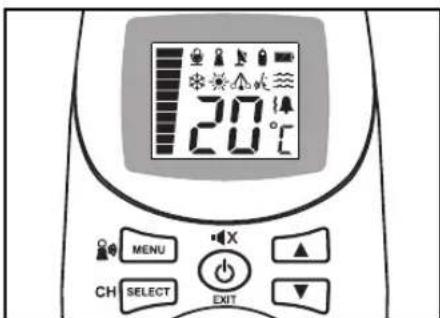
Verbinding van de laadadapter BatterijcompartmentStap 5 SCHERM EN KNOPPEN
text_image
20°C MENU CH SELECT EXITtext_image
TIC SON MOVEMENTStap 7 BUITEN BEREIK INDICATIE

natural_image
Simple diagram with two black shapes and a flag symbol, no text or labels presentnatural_image
Simple diagram with a vertical bar and two icons: a microphone and a bottle, both without any text or labels.natural_image
Simple black-and-white diagram with icons: a bell, a bottle, and a bell with a ringing signal (no text or symbols)natural_image
Simple line drawing of two connected blocks with wires (no text or symbols)2 (to) 7,5 V vekselstrømadaptere
Sensorpute(r) (1 eller 2)
FUNKSJONER

natural_image
Simple line drawing of a mechanical component with a circular top and two side handles (no text or symbols)Praktisk, beroligende nattlys.

text_image
20°Ctext_image
Angelcare°text_image
Diagram showing a fire safety symbol with icons for fire, smoke, and water symbols inside a containerMottakeren lyser, og senderikonet vises.
SLIK BRUKER DU ANGELCARE® BABYCALL
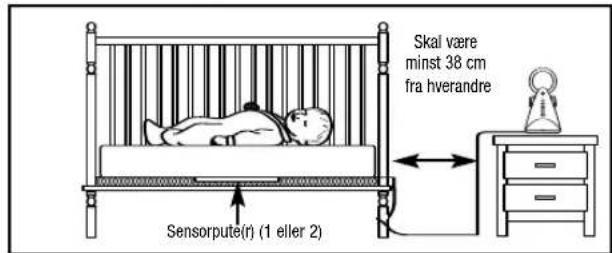
Trinn 1 LEGGE SENSORPUTEN UNDER MADRASSEN
text_image
TIC SON MOUVEMENTMed Angelcare® babycall kan du velge hva du vil overvåke.
natural_image
Simple diagram with two black shapes and a flag symbol, no text or labels presentnatural_image
Simple diagram with a vertical bar and two icons: a microphone and a battery, both without any text or labels.natural_image
Simple black-and-white diagram with four symbols: bell, alarm clock, alarm bell, and two stacked blocks (no text or labels)INNEHÅLLSFÖRTECKNING
natural_image
Simple line drawing of two connected blocks with wires (no text or symbols)natural_image
Simple line drawing of a circular object with a central hole and two protruding arms (no text or symbols)Praktisk lugnande nattlampa
text_image
20°CALARM OCH FÖRESKRIFTER
text_image
Diagram showing a control panel with icons for lighting, alarm, and warning symbols- Mottagarenhet alarm PA (ON) vibration AV (OFF)
text_image
TIC SON MOUVEMENTnatural_image
Simple diagram with two black shapes and a small figure, no text or symbols presentnatural_image
Simple diagram with a vertical bar and two icons: a microphone and a battery, both without any text or labels.natural_image
Simple black-and-white diagram with icons: a bell, a clock, a bell with sound waves, and two stacked blocks (no text or symbols)natural_image
Simple line drawing of two connected blocks with wires (no text or symbols)2 (to) 7,5 volt AC-adaptere
OGSÅ N∅DVENDIGT:
natural_image
Simple line drawing of a circular object with a handle and base (no text or symbols)Praktisk beroligende natlys.
text_image
20℃text_image
Diagram showing a safety monitoring system with icons for fire, water, and alarm symbolstext_image
TIC SON MOVEMENTnatural_image
Simple diagram with two black shapes and a flag symbol, no text or labels presentnatural_image
Simple graphic with a vertical striped bar and two icons: a microphone and a battery, both without any text or symbols.natural_image
Simple black-and-white diagram with icons: bell, megaphone, alarm bell, and two stacked blocks (no text or symbols)natural_image
Simple line drawing of two connected blocks with wires (no text or symbols)natural_image
Simple line drawing of a mechanical component with a circular top and base (no text or symbols)text_image
Diagram showing a device with icons for lighting, alarm, and warning symbols inside a frametext_image
TIC SON MOUVEMENTnatural_image
Simple diagram with two black shapes and a small icon, no text or symbols presentnatural_image
Simple graphic with a vertical bar and two icons: a microphone and a bottle, both without any text or symbols.natural_image
Simple black-and-white diagram with icons: a bell, a clock, a bell with sound waves, and two stacked blocks (no text or symbols)Vaihe 12 LISÄTOIMINNOT

text_image
MENU CH SELECT EXITnatural_image
Simple line drawing of two connected blocks with a power plug (no text or symbols)natural_image
Simple line drawing of a circular ring with a small protrusion at the base (no text or symbols)natural_image
Simple line drawing of a curved mechanical component or bracket (no text or symbols)text_image
Diagram showing a device with icons for color, size, and brightness indicators, including Chinese characters.text_image
TiO SiO MOUNTMENTnatural_image
Simple diagram with three black icons: a flag, a bottle, and a grid on white background (no text or symbols)natural_image
Pure graphical icons showing a vertical bar with a microphone and a battery, no text or symbols present.natural_image
Simple diagram with three black icons: a bell, a clock, and a bell (no text or symbols)natural_image
Pure mechanical component diagram without any text, numbers, or symbolsnatural_image
Simple line drawing of two connected blocks with wires (no text or symbols)2 DB 7,5 V-os AC adapter
natural_image
Simple line drawing of a circular ring with a small protrusion at the base (no text or symbols)natural_image
Simple black-and-white diagram with two vertical shapes and a small rectangle at the bottom (no text or symbols)natural_image
Simple diagram with a vertical gradient bar and two black icons, no text or symbols present.natural_image
Simple diagram with three black icons: a bell, a lock, and a bell with sound waves (no text or symbols)text_image
Control panel interface with buttons labeled 'OK', 'SELECT', and 'OUT' for radio, audio, and display functionsnatural_image
Simple line drawing of a mechanical component with no text or symbolsAngelcare®
Cheltenham 3192, Victoria
Tel.: +61 3 9581 8000
Fax: +61 3 9581 8088
Web Site: www.valco.com.au
BENELUX (Belgium, Netherland,
Luxembourg)
Mykko B.V.B.A
Lossingstraat 146
2900 Schoten, Belgium
Dorel Distribution Canada Inc.
873 Hodge
St-Laurent, Quebec, Canada H4N 2B1
Customer Service : 1-800-544-1108
consumer@djgusa.com
Manufacturer
Angelcare Monitors Inc.
Web: www.MegaFitnessCol.com
Tel: 571-218-4226 Fax: 571-611-0177
DEUTS CHLAND/ ÖSTE RREICH/SWITZERLAND
Phase I, 60 Wing Tai Road
Chai Wan, Hong Kong
Tel: 852-2897-6464
Fax: 852-2889-7387
Damastown Industrial Estate
Dublin 15
Tel.: +353 1 861 4050
Fax: +353 1 861 4684
Web Site: www.bodkin.ie
ÍSLAND
VL heildverslun
Adalstraeti 9
101 Reykjavik
Web site: www.vlh.is
E-Mail: vlh@vlh.is
IS RÆL
Shesek Ltd.
28 B, Halechi St.
51200 Bnei Brak
Tel.: +972-3-5775-133
Fax: +972-3-5575-157
29 Oakridge Way Howick Auckland
Tel.: 64-9-9216580
Fax: 64-9-9216582
E-Mail: dave@childsplay.co.nz
Web Site: www.childsplay.co.nz
NORWAY
MedArt a.s
Gladvollveien 24 D N-1168 OSLO
Tel.: +47 22 750121
Fax:+47 22 750170
E-Mail : firmapost@medart.no
PA NAM Á\*
Cesar Arrocha Graell Y CIA. S.A.
Urbanizacion Industrial Los Angeles,
Cl. Harry Eno
Web: www.arrocha.com
Tel: 507-279-9000
Fax: 507-236-0687
PO LONIA
Abakus
Rynek 22 32-400 Myslenice
Tel.: +48 (12) 27 4 -17-2 5
Fax: +48 (12) 27 4 -17-2 6
www.angelcare.pl
E-Mail: info@babymonitor.pl
RÉ PUBLICA DOMINICANA\*
MKAD 60th km, vlad. 4a
Business center "Kolizey" Office 403
tel: +7-495-648-6424
Web Site: www.edmgroup.ru
SINGAPORE/ASEAN
Vine International PTE Ltd
61 Kaki Bukit Avenue 1
05-40 Shun Li Industrial Park
417943
Tel.: +65-6744-5377
Fax :+65-6744-5345
E-Mail: angelcare@vine.com.sg
(Mon to Fri: 11am – 3pm):
0845 009 1789
Website: www.angelcare-uk.co.uk
UNITED STATES
Unisar Inc.
15 West 36th Street
New York, NY, 10018 USA
Tel.: 1-888-232-6476
Fax: (212) 736-6762
Web Site: www.unisar.com
VENEZU EIA\*
Importadora Tan Center, C.A.
** Representing Valiant Enterprises www.valco.com.au
*** Representing Swr Hungaria kft. www.angelcare.hu
**** Representing Mykko B.V.B.A.
www.angelcare-monitor.com