ANGELCARE AC327 - Baby monitors

AC327 - Baby monitors ANGELCARE - Free user manual and instructions

Find the device manual for free AC327 ANGELCARE in PDF.

English EN Download 💬 AI Question 10 questions ⚙️ Specs
📄

Document temporarily unavailable

The manual is currently being transferred to our new server. It will be accessible again in a few hours. Thank you for your patience.

View the manual : Français FR English EN Español ES
Pick your language and provide your email: we'll send you a specifically translated version.
Brand Angelcare
Model AC327
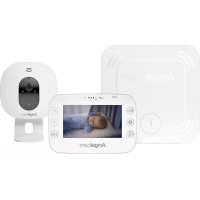
Product type Movement, sound and video baby monitor
Screen 4.3 inches (color)
Max range (open field) 250 m (parent unit ↔ baby unit); 20 m (movement sensor ↔ baby unit)
Parent unit power supply Rechargeable Li-ion battery 3.7 V / 1300 mAh + 5 V / 0.6 A adapter
Movement sensor power supply CR2450 lithium button cell battery (non-rechargeable)
Transmission frequency 2.4 GHz (19 channels)
Main features Movement detection, video (night vision), two-way audio, thermometer, alarms (movement absence, temperature, out of range), VOX, zoom, sensor pause
Movement sensor Under the mattress; adjustable sensitivity (4 levels); alarm after 20 s without movement
Thermometer Automatic calibration; adjustable alarms (presets: high 22 °C, low 16 °C)
Mounting options Wall mount (height < 2 m) or table stand (tiltable)
Box contents Parent unit, baby unit, movement sensor, 2 adapters, Li-ion battery, CR2450 battery, wall/table mount, hardware
Mattress compatibility Standard spring or foam mattress; incompatible with memory foam, hollow frame or water mattress
Maintenance and cleaning Unplug before cleaning; dry, lint-free cloth; do not immerse
Safety Strangulation hazard with cords – keep out of reach (> 1 m); do not use to prevent SIDS; do not expose to moisture
Operating temperature 10 °C to 40 °C
Warranty (North America) 1 year (subject to conditions)
Spare/replacement parts Replacement batteries recommended by Angelcare; use only the provided adapters
Repairability Do not open or repair yourself; contact customer service

Frequently Asked Questions - AC327 ANGELCARE

How to install the movement sensor under the mattress?
Remove the mattress, place the sensor at the center of the base (logo upward). If the crib does not have a rigid surface, use a wooden board at least 30x30 cm and 6 mm thick. Replace the mattress.
What to do if the movement alarm does not sound?
Check that no source of vibration (fan, washing machine) is present. Ensure the sensor is properly placed and the crib is stable. Adjust the sensitivity in the menu. Perform the detection test described in STEP 4.
How to adjust the movement sensor sensitivity?
Access the general settings menu, then select 'Movement sensor sensitivity'. Choose the level (1 to 4, 4 being the most sensitive) and confirm by pressing the ✓ button.
How to pause the movement sensor?
On the baby unit, press the pause/detection button. The pause icon blinks. To reactivate, press again. Remember to turn it back on before placing the baby back in the crib.
What does the 'VOX SOUND' icon mean and how to use it?
VOX SOUND mode cuts audio transmission when no sound is detected, saving energy. In the menu, adjust the sensitivity (the higher the level, the more it picks up faint sounds). For continuous transmission, disable VOX.
How to re-pair the parent unit and baby unit?
Turn on the parent unit, turn off the baby unit. In the main menu, go to 'Pairing', select baby unit 1, remove it if connected (red icon), then choose pairing. Turn on the baby unit and hold the 'pause/pairing' button until the light flashes. The green icon confirms the connection.
How to replace the movement sensor battery?
Remove the battery compartment cover on the sensor. Insert a new CR2450 battery (+ side up). Replace the cover by aligning the two dots until it clicks. Dispose of the old battery according to regulations.
Why does the parent unit screen go black?
The unit may be in sleep mode or turned off. Press and hold the Power button to turn it back on. If the battery is low, charge it for 8 hours before first use. Also check the sleep mode setting in the menu.
How to clean the monitor?
Unplug all units. Use a dry, lint-free cloth to wipe. Never immerse in water and do not use liquid products. For the movement sensor, clean it with a dry cloth.
What is the range of the monitor?
In open field, the range between parent unit and baby unit is up to 250 meters. Between the baby unit and the movement sensor, it is 20 meters. Walls and obstacles reduce the range.

User questions about AC327 ANGELCARE

0 question about this device. Answer the ones you know or ask your own.

Ask a new question about this device

The email remains private: it is only used to notify you if someone responds to your question.

No questions yet. Be the first to ask one.

Download the instructions for your Baby monitors in PDF format for free! Find your manual AC327 - ANGELCARE and take your electronic device back in hand. On this page are published all the documents necessary for the use of your device. AC327 by ANGELCARE.
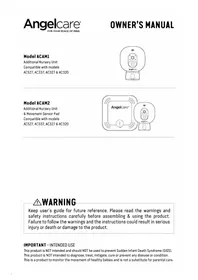
USER MANUAL AC327 ANGELCARE

Manual assistant
Powered by Anthropic
Waiting for your message
Product information

Brand : ANGELCARE

Model : AC327

Category : Baby monitors