
KXNT321 - Cordless phone PANASONIC - Free user manual and instructions
Find the device manual for free KXNT321 PANASONIC in PDF.


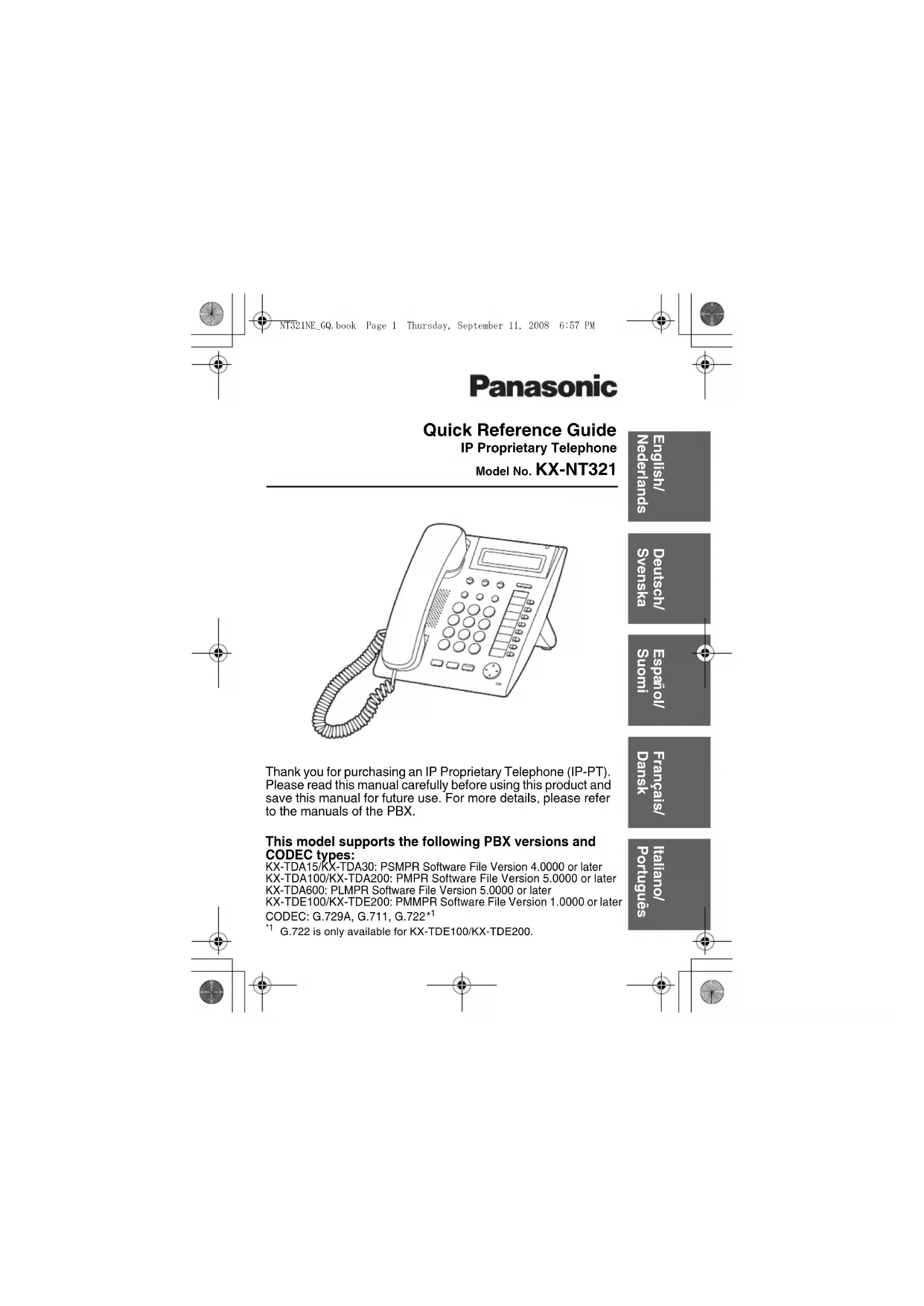


| Product type | Proprietary IP phone (SIP) |
| Brand | Panasonic |
| Model | KX-NT321 |
| Power supply | PoE (Power over Ethernet) or AC adaptor KX-A239CE (PQLV206CE) optional |
| Dimensions (approx.) | 200 x 150 x 100 mm (W x D x H) |
| Weight | Approx. 1.5 kg |
| Display | LCD with contrast adjustment |
| Main functions | Hands-free calls, speed dialing, memory, call transfer, hold, redial, voicemail, intercom, programmable keys |
| Connectivity | 1 Ethernet RJ45 port (CAT5 or higher cable) |
| Headset | Headset jack with volume control |
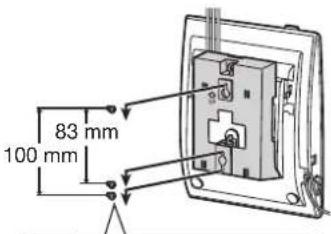
| Wall mount | Wall mount bracket included, can be fixed with screws spaced 83 mm or 100 mm apart |
| Operating temperature | 5°C to 40°C |
| Safety | Immediate disconnection if smoke or odor; do not expose to humidity; use only Panasonic parts |
| Maintenance and cleaning | Clean with a soft cloth; avoid abrasive products, benzene, or thinner |
| Replacement parts and repairability | Repair only by an authorized Panasonic service center; do not disassemble |
| General information | Designed to be connected to a Panasonic PABX; SIP compatibility; protected firmware |
Frequently Asked Questions - KXNT321 PANASONIC
User questions about KXNT321 PANASONIC
0 question about this device. Answer the ones you know or ask your own.
Ask a new question about this device
Download the instructions for your Cordless phone in PDF format for free! Find your manual KXNT321 - PANASONIC and take your electronic device back in hand. On this page are published all the documents necessary for the use of your device. KXNT321 by PANASONIC.
USER MANUAL KXNT321 PANASONIC


Panasonic
Quick Reference Guide
IP Proprietary Telephone
Model No. KX-NT321
Accessories (included)
Handset Handset Cord
One One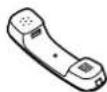
- Wall Mounting Adaptor Screws
One Two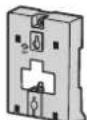
Stand
One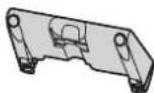



Note: In this manual, the suffix of each model number is omitted unless necessary.


Location of Controls
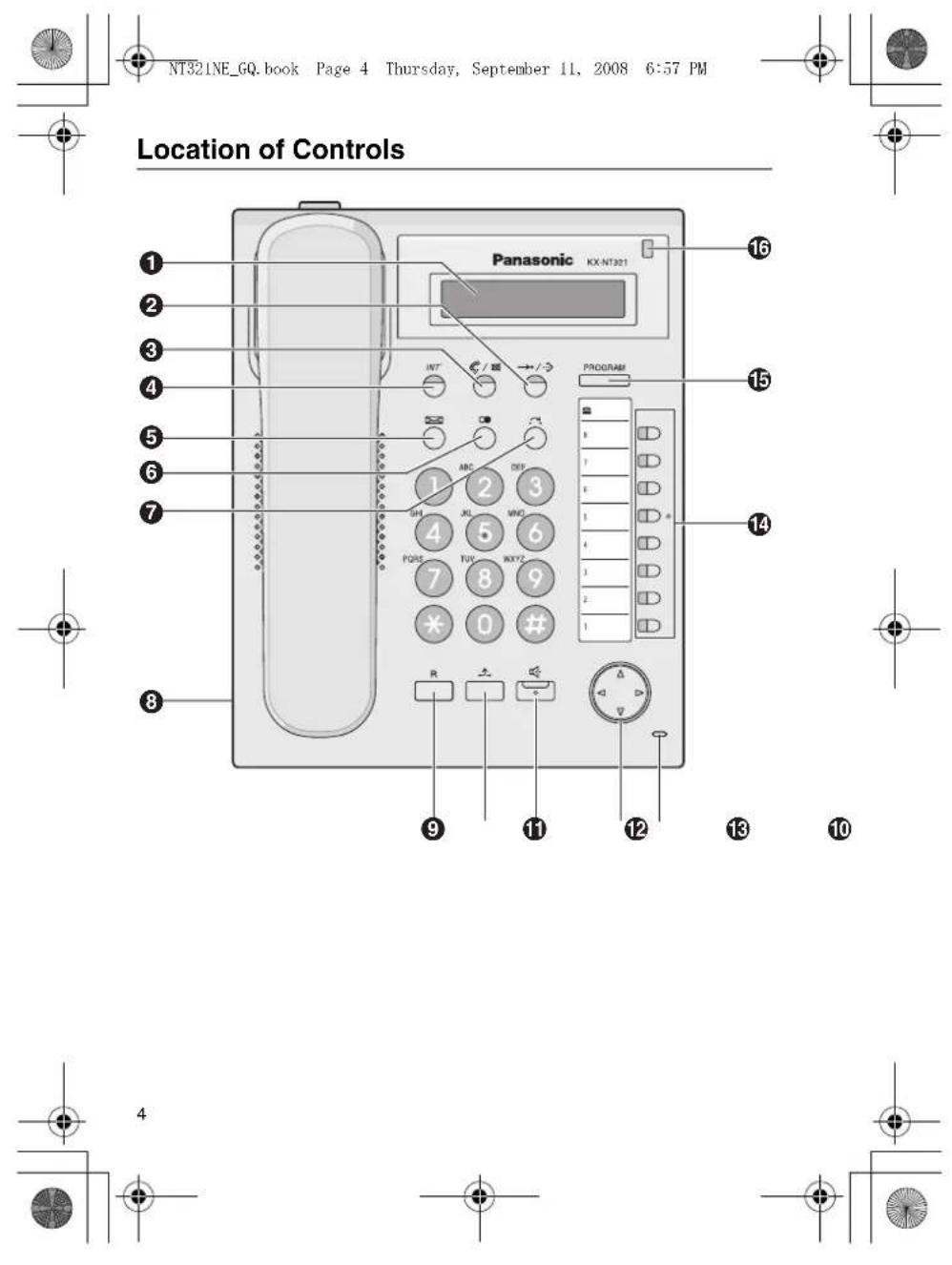
● LCD (Liquid Crystal Display) 2 AUTO DIAL/STORE: Used for System/Personal Speed Dialling or storing programme changes. 3 AUTO ANS (Auto Answer)/MUTE: Used to receive an incoming call in hands-free mode or mute the microphone/handset during a conversation. INTERCOM: Used to make or receive intercom calls. MESSAGE: Used to leave a message waiting indication or call back the party who left the message waiting indication. REDIAL: Used to redial the last dialled number. 7 TRANSFER: Used to transfer a call to another party. Headset Jack FLASH/RECALL: Used to disconnect the current call and make another call without hanging up.
HOLD: Used to place a call on hold. 1 SP-PHONE (Speakerphone): Used for performing hands-free operations. Navigator Key: Used to adjust the volume and the display contrast or select desired items. Microphone: Used for hands-free conversations. 14 Flexible CO Buttons: Used to seize an outside line or perform a feature that has been assigned to the key. 15 PROGRAM: Used to enter and exit the personal programming mode. Message/Ringer Lamp: When you receive a call, the lamp flashes red. When someone has left you a message, the lamp stays on red.


Settings
| Speaker volume | While in a hands-free conversation | Press Up to increase or Down to decrease the volume. |
| Handset/Headset volume*1 | While using the handset or headset | |
| Ringer volume | While on-hook or receiving a call | |
| LCD Contrast While on-hook PROGRAM▶①→/→▶PROGRAM | ||
| Ring Tone PROGRAM▶(CO) OR INT ▶(①+2) 0⑧→▶PROGRAM Press 2 times. | ||
If you hear your own voice through the handset or headset, decrease the volume. 2 The ring tone pattern of patterns 09 to 30 is the same as pattern 01.

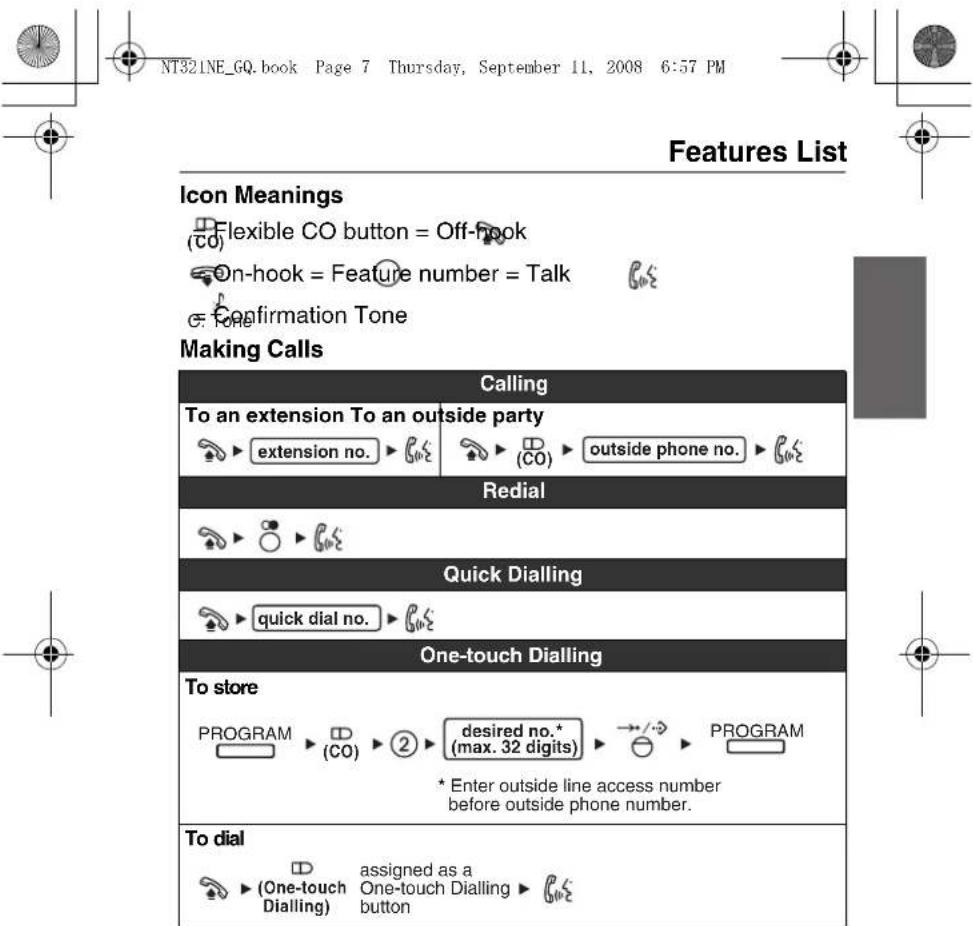
Features List
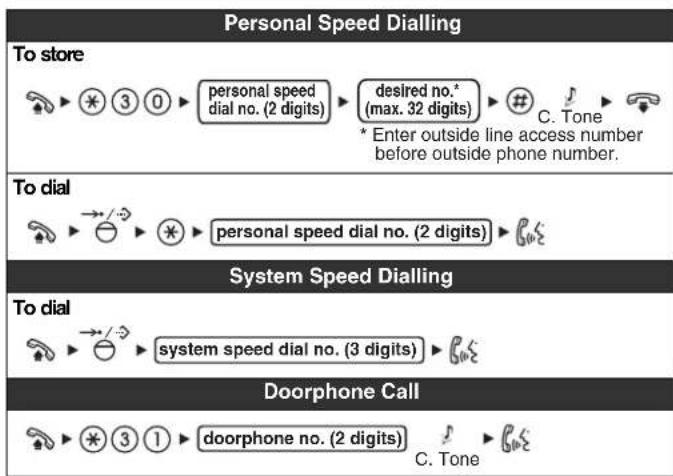
During a Conversation
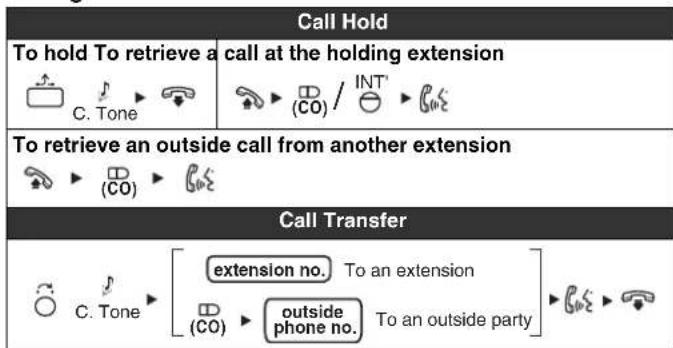
8




Features List
Useful Features
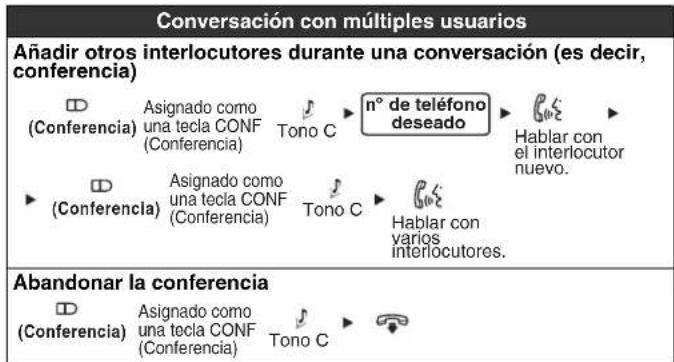
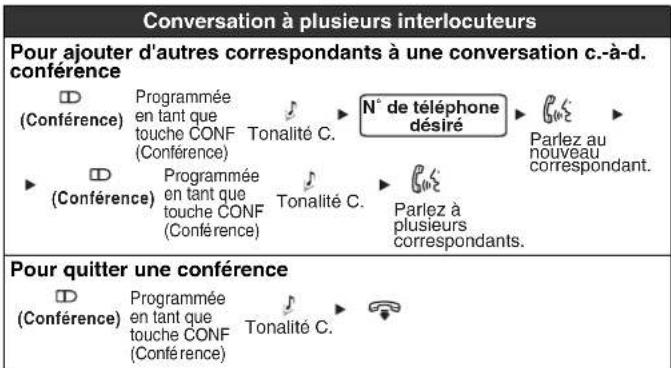
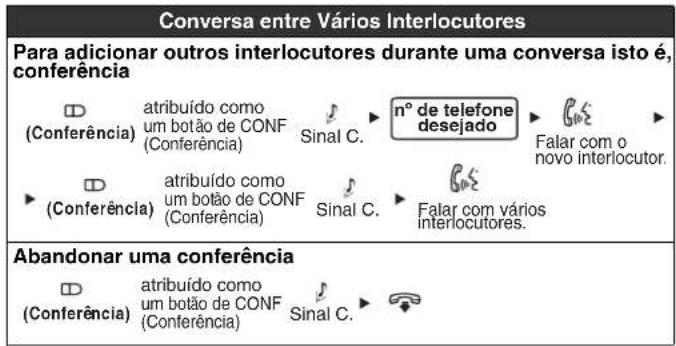
To add other parties during a conversation (i.e., conference)
Multiple Party Conversation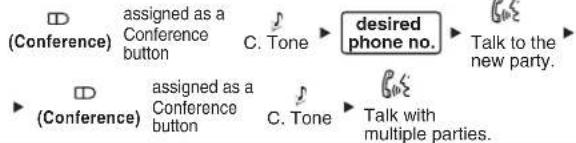
To leave a conference

Setting the Telephone According to Your Needs
Do Not Disturb Timed Reminder
To set To cancel To stop or answer the ring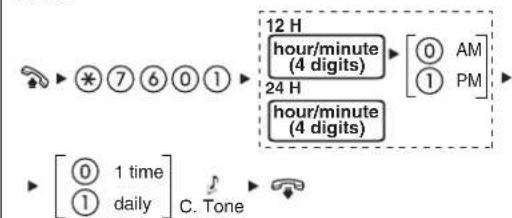


Features List
Before Leaving Your Desk
Call Forwarding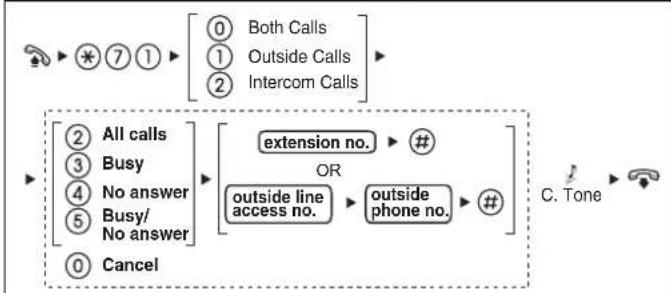
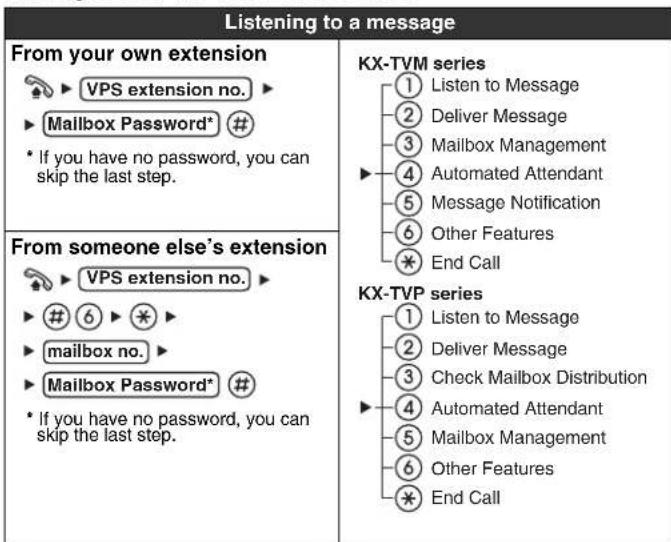
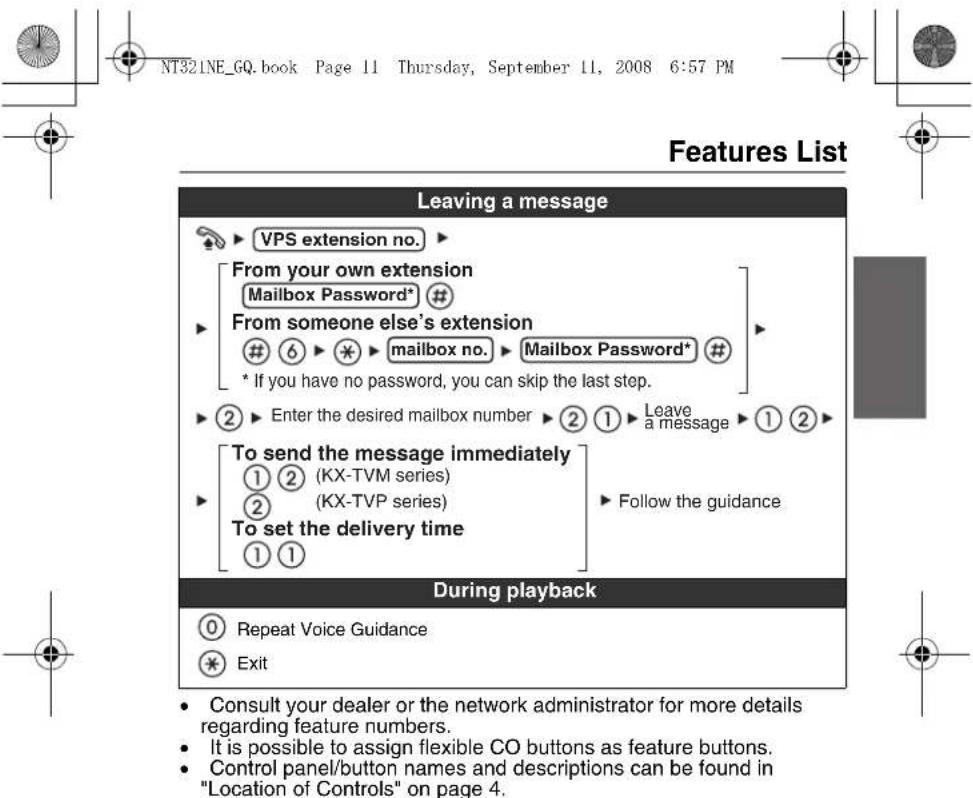
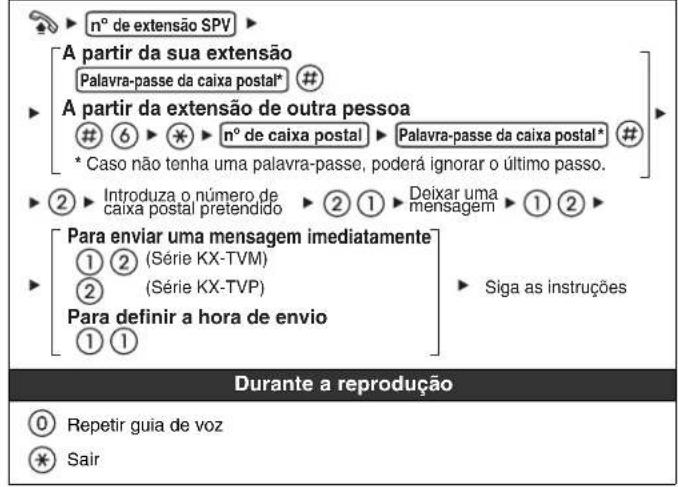
Making Use of the Voice Mail Service

10




Connection
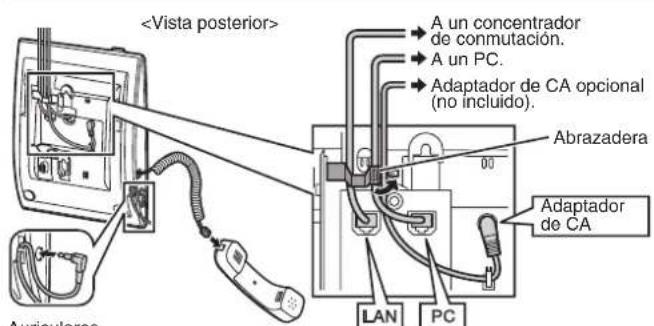
Headset Recommended: KX-TCA89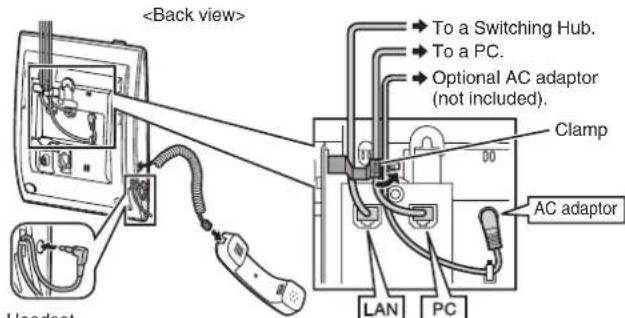
PC connection/Switching Hub connection
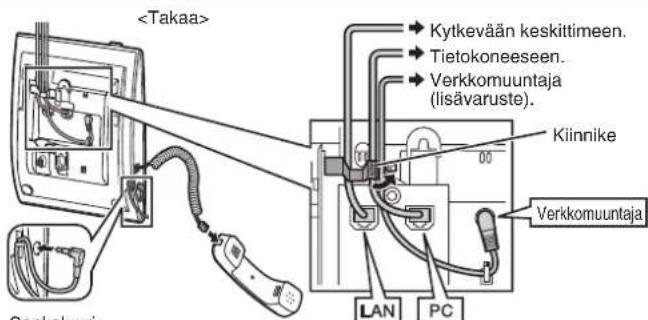
- Use a straight CAT 5 (or higher) Ethernet cable (not included) that is 6.5 mm in diameter or less.
- For further information on the connection to a PC, refer to the documentation provided for the PBX.
AC adaptor
- Use a Panasonic AC adaptor KX-A239CE (PQLV206CE).
- The AC adaptor is used as the main disconnect device. Ensure that the AC outlet is located near the unit and is easily accessible.
CAUTION:
When selecting Ethernet cables
- Use flexible, high-quality, snagless (without strain relief) cables. Do not use cables with coating that may tear or crack when bent.
When connecting cables
- Ensure that the Ethernet cables and the AC adaptor cord are clamped to prevent damage to the connectors.
- Cables may be routed upwards by using the appropriate cable clamp located on the back of the unit.
When connecting a headset and AC adaptor
- Ensure that the headset cord and the AC adaptor cord are wound around the hook to prevent damage to the connectors.


Stand Usage
Attaching the Stand
Place the catches (A) of the stand into the hooks located in the unit.
Gently push the stand in the direction indicated until it locks into place. The stand will be mounted in the high position.
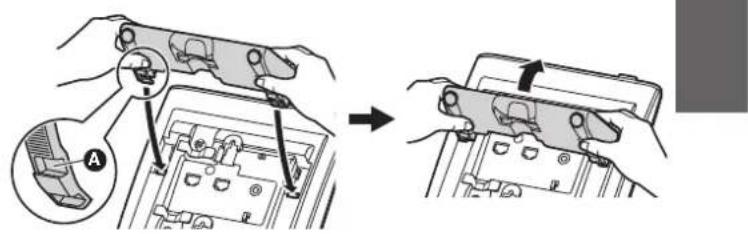
Removing the Stand
Hold the stand with both hands.
Gently rotate the stand in the direction indicated until it is released.
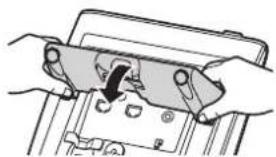
Cabling
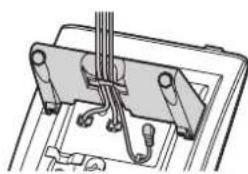
When using the stand, ensure that the cables are clamped as shown.


Stand Usage
Adjusting from High to Low Position
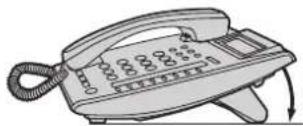
Hold the stand with both hands as shown and rotate the stand in the direction indicated until it locks into the low position (3).
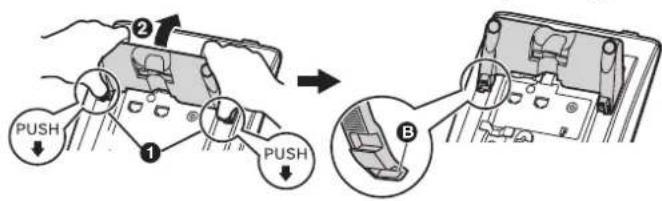
Adjusting from Low to High Position
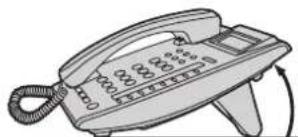
Hold the stand with both hands as shown and rotate the stand in the direction indicated until it locks into the high position (A).
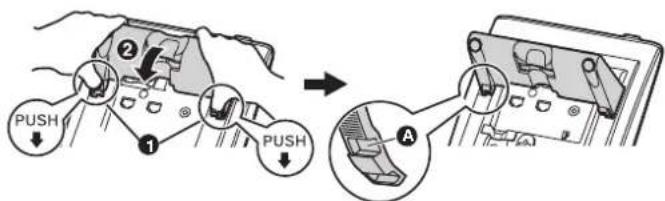


Wall Mounting
- Remove the stand if it is attached. For information on removing the stand, refer to page 13.
- Attach the wall mounting adaptor as shown.
Make sure the cables are not pinched by the wall mounting adaptor. When running the cables from the top of the unit, look through the opening in the wall mounting adaptor to confirm that the cables are not being pinched. Slide the wall mounting adaptor in the direction indicated until it locks into place.
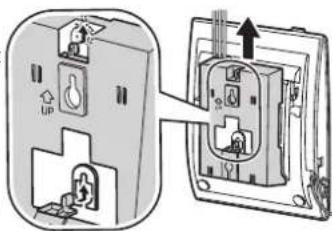

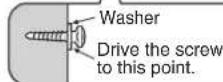
Drive the 2 screws into the wall either 83 mm or 100 mm apart, and mount the unit on the wall.
- You can find a wall mounting template on page 183. Make sure that the wall that the unit will be attached to is strong enough to support the unit (approx. 1.5 kg). Make sure the cables are securely fastened to the wall.
- When this unit is no longer in use, make sure to detach it from the wall.




Wall Mounting
Locking the Handset Hook
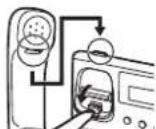
Pull down the handset hook until it locks to prevent the handset from falling off the handset cradle when the unit is mounted to a wall or set at a high angle. To temporarily place the handset down during a conversation, hook it over the top edge of the unit as shown.



Important Information
When using a KX-NT321 IP-PT, keep the following conditions in mind.
If the unit does not operate properly, disconnect the unit from the Ethernet cable and then connect again. - If you are having problems making calls, disconnect the Ethernet cable and connect a known working IP-PT. If the known working IP-PT operates properly, have the defective IP-PT repaired by an authorized Panasonic factory service center. If the known working IP-PT does not operate properly, check the PBX and the Ethernet cable. - Wipe the unit with a soft cloth. Do not clean the unit with abrasive powders or with chemical agents such as benzene or thinner. - Use only the correct Panasonic handset. - Do not disassemble this unit. Dangerous electrical shock could result. The unit must only be disassembled and repaired by qualified service technicians. - If damage to the unit exposes any internal parts, immediately disconnect the cable or cord. If the power is supplied from the network to the IP-PT [Power-over-Ethernet], disconnect the Ethernet cable. Otherwise, disconnect the AC adaptor cord. Then return this unit to a service center. - Never attempt to insert wires, pins, etc. into the vents or other holes of this unit.
Take special care to follow the safety suggestions listed below.
Safety
1) The unit should only be connected to a power supply of the type described in the Quick Reference Guide or as shown on the label on the unit. 2) When left unused for a long period of time, the optional AC adaptor should be unplugged from the AC outlet, if you are using Power-over-Ethernet, disconnect the Ethernet cable.
Installation Environment
1) Do not use this unit near water, for example, near a bathtub, washbowl or sink. Damp basements should also be avoided. 2) Keep the unit away from heating appliances and devices that generate electrical noise, such as fluorescent lamps, motors and televisions. These noise sources can interfere with the performance of the unit. It also should not be placed in rooms where the temperature is less than 5°C or greater than 40°C.

Important Information
Placement
1) Do not place heavy objects on top of this unit. 2) Care should be taken so that objects do not fall onto, and liquids are not spilled into, the unit. Do not subject this unit to excessive smoke, dust, moisture, mechanical vibration, shock or direct sunlight. 3) Place the unit on a flat surface.
WARNING:
TO PREVENT POSSIBLE FIRE OR ELECTRIC SHOCK, DO NOT EXPOSE THIS UNIT TO RAIN OR MOISTURE. THIS HANDSET EARPIECE IS MAGNETIZED AND MAY RETAIN SMALL FERROUS OBJECTS.
THE USE OF EXCESSIVE SOUND VOLUME THROUGH EARPHONES, HEADPHONES, OR HEADSETS MAY CAUSE HEARING LOSS.
DISCONNECT THIS UNIT FROM POWER OUTLET/THE ETHERNET CABLE IF IT EMITS SMOKE, AN ABNORMAL SMELL OR MAKES UNUSUAL NOISE. THESE CONDITIONS CAN CAUSE FIRE OR ELECTRIC SHOCK. CONFIRM THAT SMOKE HAS STOPPED AND CONTACT AN AUTHORIZED SERVICE CENTER.
IMPORTANT NOTICE:
- Under power failure conditions, the IP-PT may not operate. Please ensure that a separate telephone, not dependent on local power, is available for use in remote sites in case of emergency.
- For information regarding network setup of the IP-PT such as IP addresses, please refer to the Installation Manual for the Panasonic PBX. If an error message is shown on your display, consult your dealer or the network administrator.
- The firmware of the KX-NT321 is protected by copyright laws and international treaty provisions, and all other applicable laws. It cannot be reverse engineered, decomposed or disassembled.

18


NT32INE_GQ.book Page 19 Thursday, September 11, 2008 6:57 PM
Important Information
Information for Users on Collection and Disposal of Old Equipment and used Batteries

These symbols on the products, packaging, and/or accompanying documents mean that used electrical and electronic products and batteries should not be mixed with general household waste.
For proper treatment, recovery and recycling of old products and used batteries, please take them to applicable collection points, in accordance with your national legislation and the Directives 2002/96/EC and 2006/66/EC.
By disposing of these products and batteries correctly, you will help to save valuable resources and prevent any potential negative effects on human health and the environment which could otherwise arise from inappropriate waste handling.
For more information about collection and recycling of old products and batteries, please contact your local municipality, your waste disposal service or the point of sale where you purchased the items.
Penalties may be applicable for incorrect disposal of this waste, in accordance with national legislation.
For business users in the European Union If you wish to discard electrical and electronic equipment, please contact your dealer or supplier for further information.
Information on Disposal in other Countries outside the European Union
These symbols are only valid in the European Union. If you wish to discard these items, please contact your local authorities or dealer and ask for the correct method of disposal.
Note for the battery symbol (bottom two symbol examples):
This symbol might be used in combination with a chemical symbol. In this case it complies with the requirement set by the Directive for the chemical involved.




Important Information
C E
This product is intended to be connected to a Panasonic PBX only. Panasonic Communications Company (U.K.) Ltd. declares that this equipment is in compliance with the essential requirements and other relevant provisions of Radio & Telecommunications Terminal Equipment (R&TTE) Directive 1999/5/EC. Declarations of Conformity for the relevant Panasonic products described in this manual are available for download by visiting: http://www.doc.panasonic.de
Contact to Authorised Representative: Panasonic Testing Centre Panasonic Marketing Europe GmbH Winsberging 15, 22525 Hamburg, Germany






Panasonic
Quick Guide
IP Telephone
Model No. KX-NT321
Settings
| Lautsprecher-Lautstärke | Im Freisprechbetrieb | Zum Lauterstellen Auf, zum Leiserstellen Ab drucken. |
| Lautstärke Hörer/Headset*1 | Bei Verwendung von Hörer oder Headset | |
| Tonruflautstärke | Bei aufgelegtem Hörer oder Tätigen eines Anrufs | |
| LCD-Kontrast Bei aufgelegtem HörerPROGRAM→①→/→→→→→→→→→→→→→→→→→→→→→→→→→→→→→→→→→→→→→→→→→→→→→→→→→→→→→→→→→→→→→→→→→→→→→→→→→→→→→→→→→→→→→→→→→→→→→→→→→→→→> | ||
| Rufton ändernPROGRAM→(IDL)ODERINT(Zeimal drucken.→→→→→→→→→→→→→→→→→→→→→→→→→→→→→→→→→→→→→→→→→→→→→→→→→→→→→→→→→→→→→→→→→→→→→→→→→→→→→→→→→→→→→→→→→→→→→→→→→→→≥ | ||

List of functions
List of functions
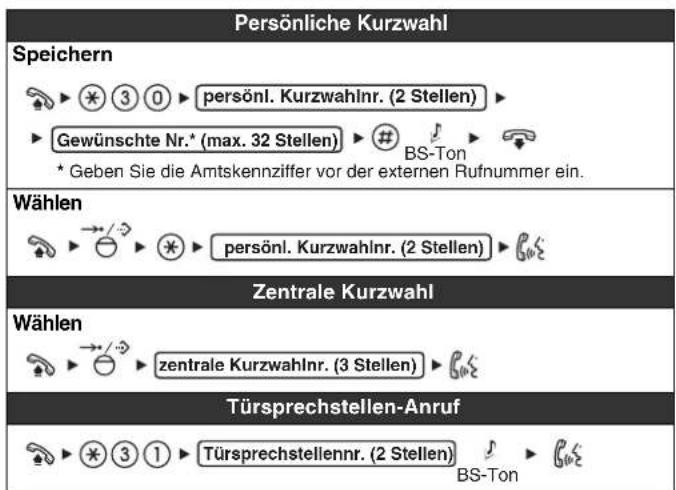

List of functions
List of functions


List of functions
Connection
Wall mounting
Wall mounting
Winsberging 15, 22525 Hamburg, Germany


Panasonic

Settings
| Volumen del altavoz | En una conversación con manos libres | Pulse Arriba para subir el volumen o pulse Abajo para bajo lo. |
| Volumen del microtelefono / auriculares1 | Al utilizar el microtelefono o los auriculares | |
| Volumen del timbre | Con el Telefono colgado o al recibir una llamada | |
| Contraste de la LCD Con el Telefono colgado PROGRAM→①→/→→→→→→→→→→→→→→→→→→→→→→→→→→→→→→→→→→→→→→→→→→→→→→→→→→→→→→→→→→→→→→→→→→→→→→→→→→→→→→→→→→→→→→→→→→→→→→→→→→→→ | →/→→→/→→→→→→→→→→→→→→→→→→→→→→→→→→→→→→→→→→→→→→→→→→→→→→→→→→→→→→→→→→→→→→→→→→→→→→→→→→→→→→→→→→→→→→→→→→→→→→→→→ | |
| Tono de llamada PROGRAM→(LN) ○INT ○Pulse 2 vezes. | (01)→(0)1*2 ○INT ○Pulse 2 vezes. | →/→→→→→→→→→→→→→→→→→→→→→→→→→→→→→→→→→→→→→→→→→→→→→→→→→→→→→→→→→→→→→→→→→→→→→→→→→→→→→→→→→→→→→→→→→→→→→→→→→> |

System list
System list
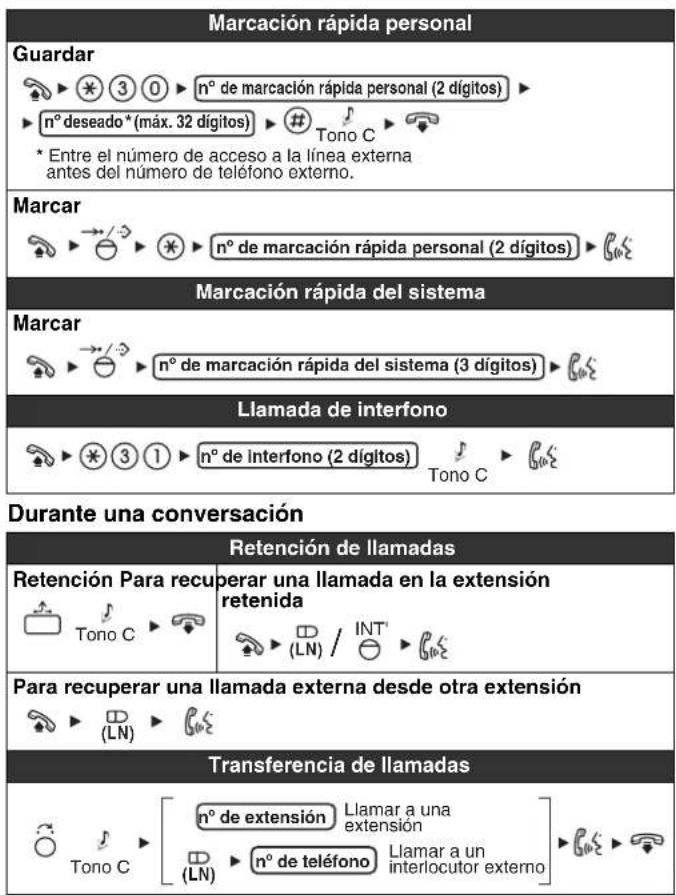


System list
Useful functions
System list
System list
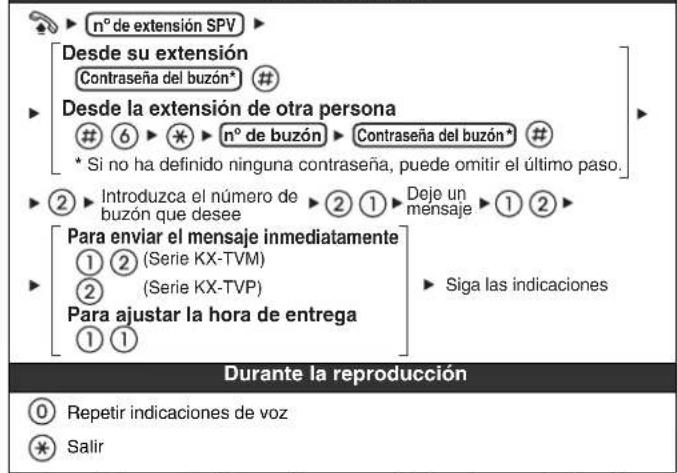
Leave a message
Connection
Headset recommended: KX-TCA89
Using the support
Install the bracket
Use of the provided
Panasonic Testing Centre
Panasonic Marketing Europe GmbH
Winsberging 15, 22525 Hamburg, Germany

56



Panasonic
Memo to use
Accessories (included)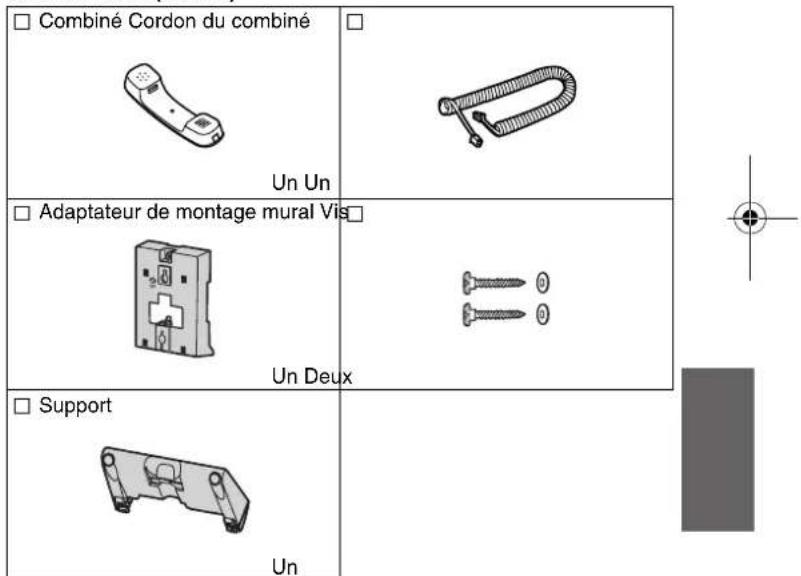
Settings

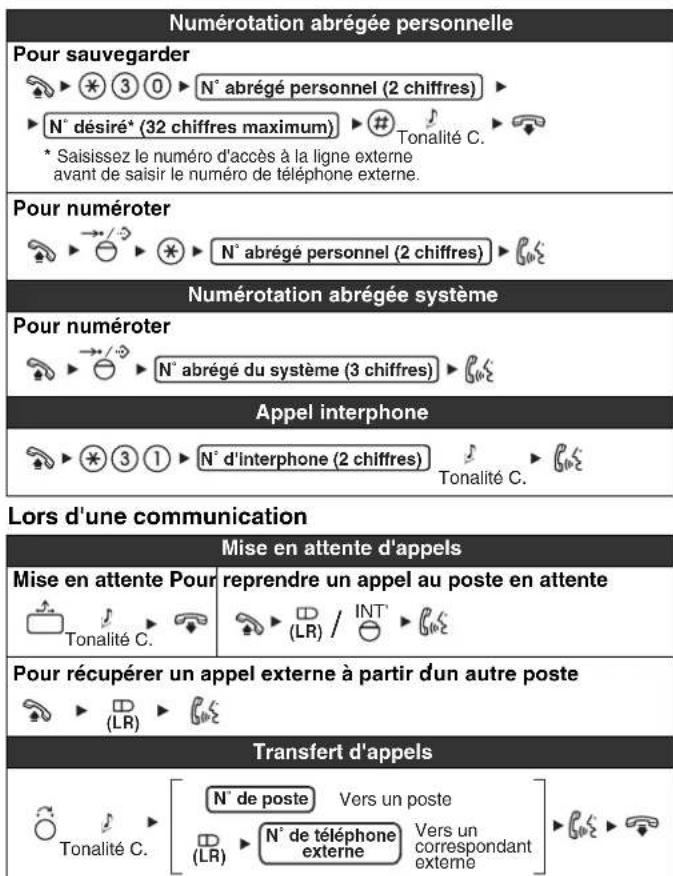
List of functions
Meaning of icons
Programmable LR keys = Uncheck
List of functions


List of functions
Useful functions
List of functions


List of functions
Leave a message
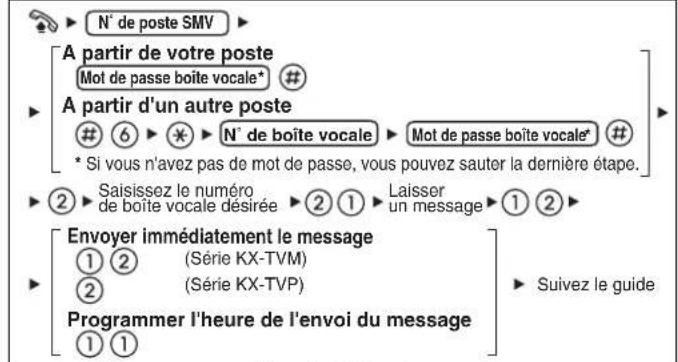
While listening
Connection
Headset recommended: KX-TCA89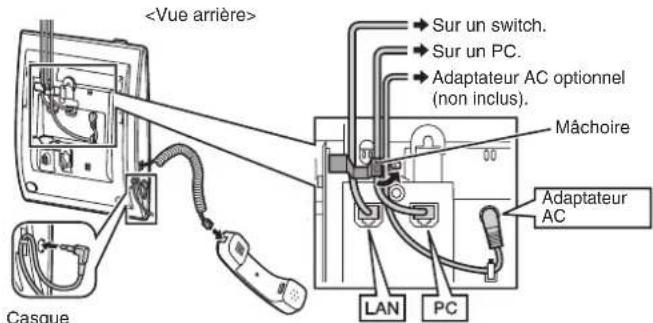


Wall mounting

Wall mounting
Important information
Important information
Important information
Important information
C E


Panasonic


Settings





Connection
Wall mounting

Wall mounting
Panasonic Testing Centre
Panasonic Marketing Europe GmbH
Winsbergring 15, 22525 Hamburg, Germany


Panasonic

Installations
| Luidspreker volume | Tijdens handen-vrij telefoneren | Druk op Omhoog om het volume te verhogen of op Omlaag tom het te verlagen. |
| Volume van Hoorn/headset*1 | Tijdens gebruik van de hoorn of headset | |
| Bel volume | Terwijl de hoorn op de haak ligt of een gesprek ontvangen worden | |
| Displaycontrast Terwijl de hoorn op de haak ligt | ||
| PROGRAM | →○①→○→○→○→○→○→○→○→○→○→○→○→○→○→○→○→○→○→○→○→○→○→○→○→○→○→○→○→○→○→○→○→○→○→○→○→○→○→○→○→○→○→○→○→○→○→○→○→○→○→○→×→○→○→○→○→○→○→○→○→○→○→○→○→○→○→○→○→○→○→○→○→○→○→○→○→○→○→○→○→○→○→○→○→○→○→○→○→○→○→○→○→○→○→○→○→○→○→○→○→○→ ○→○→○→○→○→○→○→○→○→○→○→○→○→○→○→○→○→○→○→○→○→○→○→○→○→○→○→○→○→○→○→○→○→○→○→○→○→○→○→○→○→○→○→○→○→○→○→○→○→○→←○→○→○→○→○→○→○→○→○→○→○→○→○→○→○→○→○→○→○→○→○→○→○→○→○→○→○→○→○→○→○→○→○→○→○→○→○→○→○→○→○→○→○→○→○→○→○→○→○→○←○→○→○→○→○→○→○→○→○→○→○→○→○→○→○→○→○→○→○→○→○→○→○→○→○→○→○→○→○→○→○→○→○→○→○→○→○→○→○→○→○→○→○→○→○→○→○→○→○→×←○→○→○→○→○→○→○→○→○→○→○→○→○→○→○→○→○→○→○→○→○→○→○→○→○→○→○→○→○→○→○→○→○→○→○→○→○→○→○→○→○→○→○→○→○→○→○→○→○→←×←○→○→○→○→○→○→○→○→○→○→○→○→○→○→○→○→○→○→○→○→○→○→○→○→○→○→○→○→○→○→○→○→○→○→○→○→○→○→○→○→○→○→○→○→○→○→○→○→○←×←○→○→○→○→○→○→○→○→○→○→○→○→○→○→○→○→○→○→○→○→○→○→○→○→○→○→○→○→○→○→○→○→○→○→○→○→○→○→○→○→○→○→○→○→○→○→○→○→×←○←○→○←○→○←○→○←○→○←○→○←○→○←○←○→○←○←○←○←○←○←○←○←○←○←○←○←○←○←○←○←○←○←○←○←○←○←○←○←○←○←○←○←○←○←○←○←○←○←○←○←○←○←○←○←○←○←○←○←○←○←○←○←○←○←○ ←×←○←○←○←○←○←○←○←○←○←○←○←○←○←○←○←○←○←○←○←○←○←○←○←○←○←○←○←○←○←○←○←○←○←○←○←○←○←○←○←○←○←○←○←○←○←○←○←○←○←×←○←○←○←○←○←○←○←○←○←○←○←○←○←○←○←○←○←○←○←○←○←○←○←○←○←○←○←○←○←○←○←○←○←○←○←○←○←○←○←○←○←○←○←○←○←○←○←○←○ ← ×←×←○←○←○←○←○←○←○←○←○←○←○←○←○←○←○←○←○←○←○←○←○←○←○←○←○←○←○←○←○←○←○←○←○←○←○←○←○←○←○←○←○←○←○←○←○←○←○←○←×←×←○←○←○←○←○←○←○←○←○←○←○←○←○←○←○←○←○←○←○←○←○←○←○←○←○←○←○←○←○←○←○←○←○←○←○←○←○←○←○←○←○←○←○←○←○←○←○←○← ○←×←○←○←○←○←○←○←○←○←○←○←○←○←○←○←○←○←○←○←○←○←○←○←○←○←○←○←○←○←○←○←○←○←○←○←○←○←○←○←○←○←○←○←○←○←○←○←○←○← | |
| Beltoon | ||
| PROGRAM | ( CO) OF INT | ( 0 1 *2 ) ( 1 0 8 ) → × / √ × → PROGRAM |
| Tweemaal indrukken. | ||

Properties

Properties
Properties
Connection
Headset Recommended: KX-TCA89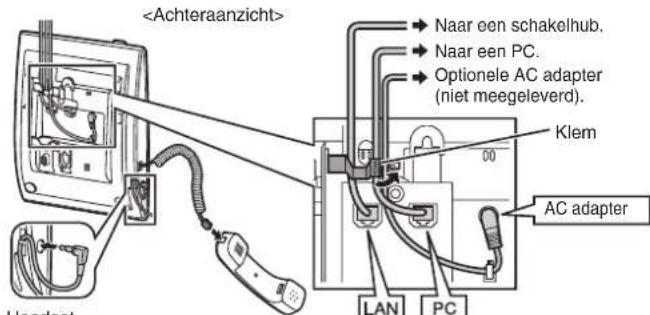


Wall mounting



Wall mounting



Panasonic Testing Centre
Panasonic Marketing Europe GmbH



Panasonic
Quick Guide
IP Telephone Systems
Model KX-NT321
Button Locations
LCD Display
2AUTO ANSWER/STORE:
Settings



Feature List
Icon Explanations
Programmable Line Keys = Off-hook
Luren pa = Function number = Tone

B-ton = Confirmation tone
Ringasamtal
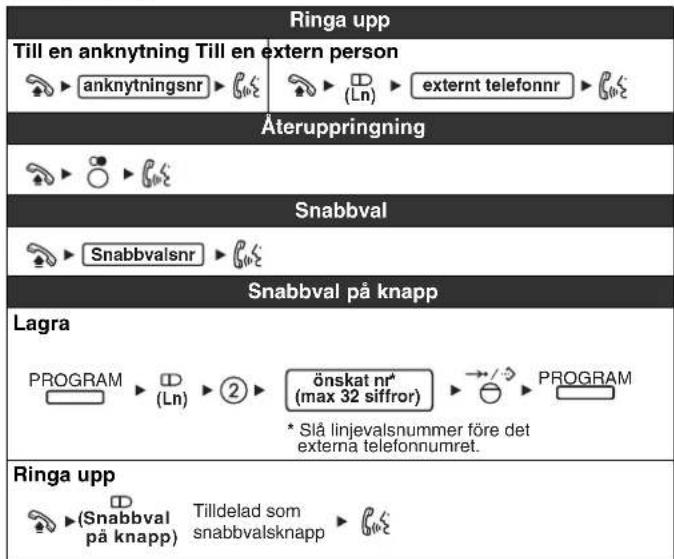



List of Functions
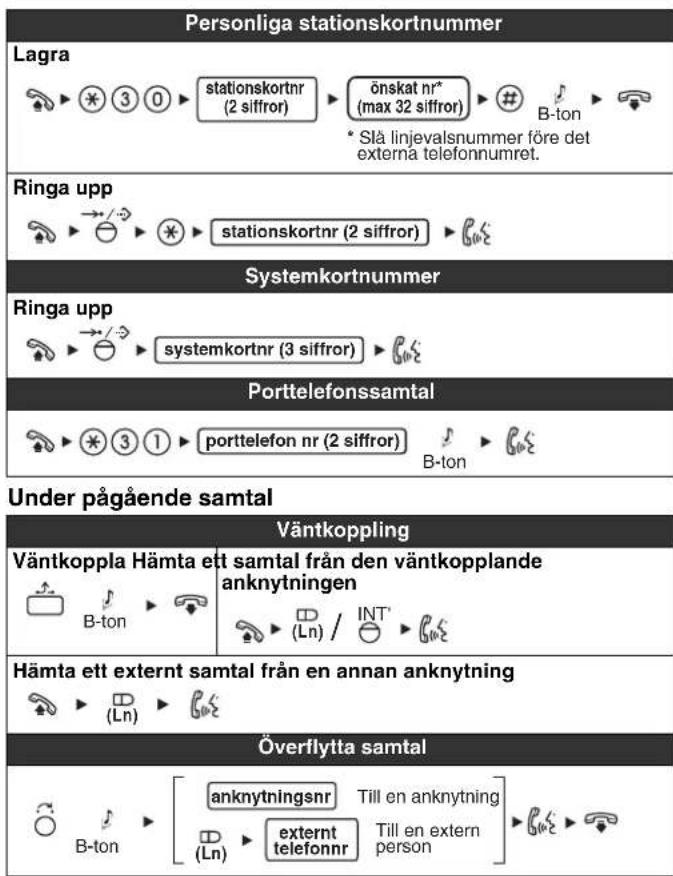

116




List of Functions
List of Functions
Connection
Headset Recommended: KX-TCA89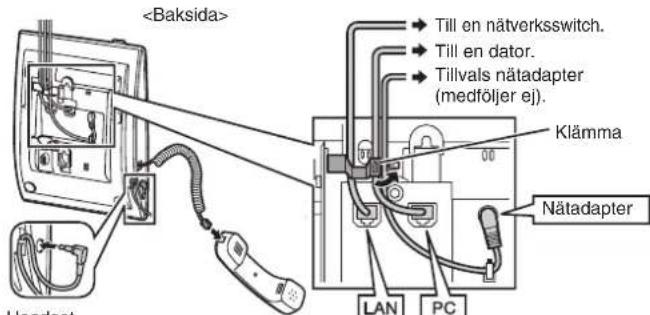
Computer connection/Network switch connection
When a headset and another adapter are connected
Using the stand
Mounting the stand
Using the stand


Important information
Important information
Placement
Important information
Important information
C E
Panasonic Communications Company (U.K.) Ltd. hereby declares that this equipment complies with the essential requirements and other relevant provisions of Directive 1999/5/EC for Radio & Telecommunications Terminal Equipment (R&TTE).
The equipment fulfills the necessary requirements and other relevant provisions specified in Directive 1999/5/EC for Radio & Telecommunications Terminal Equipment (R&TTE).
Panasonic Marketing Europe GmbH
Winsbergring 15, 22525 Hamburg, Germany
128

NT321NE_GQ.book Page 129 Thursday, September 11, 2008 6:57 PM





Quick Guide
NT321NE_GQ.book Page 131 Thursday, September 11, 2008 6:57 PM
NT321NE_GQ.book Page 132 Thursday, September 11, 2008 6:57 PM

Settings
NT321NE_GQ.book Page 133 Thursday, September 11, 2008 6:57 PM
| Kaiuttimen äänenvoimakkuus | Käytettäessä kaiutinkeskustelua: | Voit lisätä äänenvoimakkuutta painamalla Ylös ja piennentää äänenvoimakkuutta painamalla Alas. |
| Lurin/sankaluurin äänenvoimakkuus1 | Käytettäessä luuria tai sankaluuria: | |
| Hälytysänen voimakkuus | Lurin ollesa alhaalla tai puhelun soidessa: | |
| LCD:n kontrasti Lurin ollesa alhaalla: PROGRAM→①→/→→→→→→→→→→→→→→→→→→→→→→→→→→→→→→→→→→→→→→→→→→→→→→→→→→→→→→→→→→→→→→→→→→→→→→→→→→→→→→→→→→→→→→→→→→→→→→→→→→→→ | PROGRAM→①→/→→→→→→→→→→→→→→→→→→→→→→→→→→→→→→→→→→→→→→→→→→→→→→→→→→→→→→→→→→→→→→→→→→→→→→→→→→→→→→→→→→→→→→→→→→→→→→ | |
| Soittoäni PROGRAM→(KJ) TAI INT Paina 2 kertaa. | →/→→→→→→→→→→→→→→→→→→→→→→→→→→→→→→→→→→→→→→→→→→→→→→→→→→→→→→→→→→→→→→→→→→→→→→→→→→→→→→→→→→→→→→→→→→→→→→→→→ | |


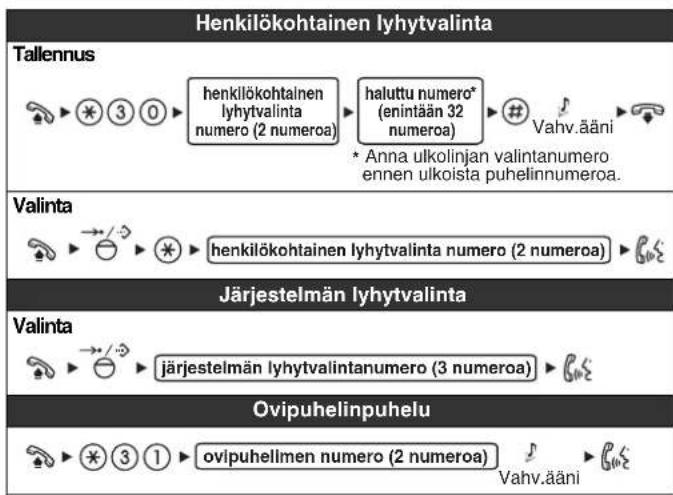
Features
Features
During a call
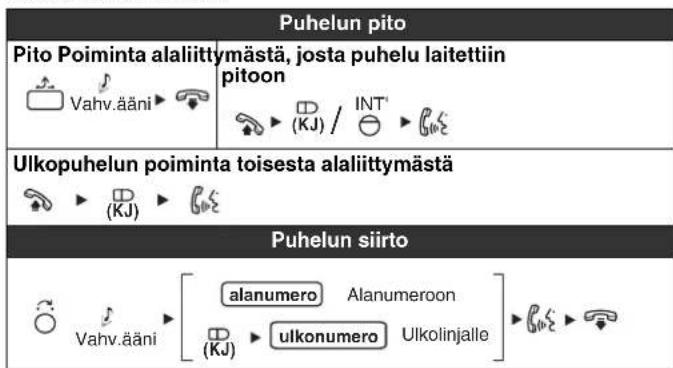

Features
Features


Features
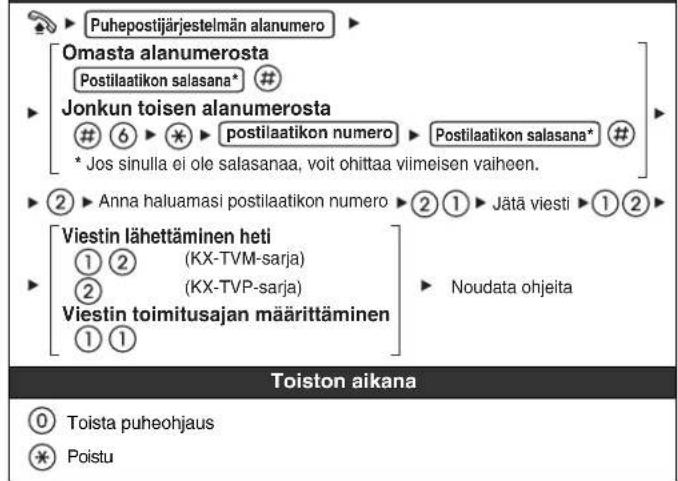
Leaving a message
Connection

Desktop use
Mounting the stand
Stand operation

Important information
Important information
Placement

Important information
Important information

Panasonic Marketing Europe GmbH
Winsbergring 15, 22525 Hamburg, Germany

146



NT321NE_GQ.book Page 147 Thursday, September 11, 2008 6:57 PM



Panasonic
Quick guide
IP Panasonic phone
Model No. KX-NT321
Wall mounting adapter Screws
One Two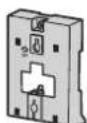
□ Foot
One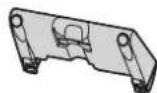



NT321NE_GQ.book Page 149 Thursday, September 11, 2008 6:57 PM

Control positions
NT321NE_GQ.book Page 150 Thursday, September 11, 2008 6:57 PM
Setup







Connection


Using the foot
Mounting the foot
Using the foot
Wall mounting
Wall mounting

Important information
Important information
Location
Important information

Important information
C E



Panasonic
Settings


List of features
Meanings of icons
Flexible LR keys = Rest mode In rest mode = Function number Speak confirmation signal
Making Calls
List of features

List of features
Useful Features


List of features


List of features
Leave a message
Connection
Headset recommended: KX-TCA89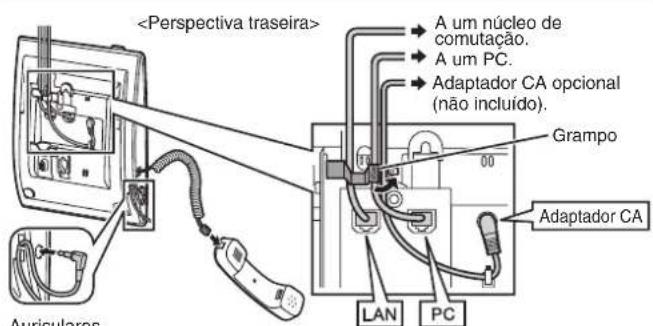

Wall mounting
Wall mounting
Panasonic Communications Company (U.K.) Ltd.
Pencarn Way, Duffryn, Newport, South Wales, NP10 8YE, United Kingdom
Copyright:
This material is copyrighted by Panasonic Communications Co., Ltd., and may be reproduced for internal use only. All other reproduction, in whole or in part, is prohibited without the written consent of Panasonic Communications Co., Ltd.
© Panasonic Communications Co., Ltd. 2008


- PANASONIC
- QUICK REFERENCE GUIDE
- IP PROPRIETARY TELEPHONE
- MODEL NO. KX-NT
- ACCESSORIES (INCLUDED)
- LOCATION OF CONTROLS
- FEATURES LIST
- DURING A CONVERSATION
- USEFUL FEATURES
- TO LEAVE A CONFERENCE
- SETTING THE TELEPHONE ACCORDING TO YOUR NEEDS
- CONNECTION
- AC ADAPTOR
- CAUTION
- WHEN SELECTING ETHERNET CABLES
- WHEN CONNECTING CABLES
- WHEN CONNECTING A HEADSET AND AC ADAPTOR
- STAND USAGE
- ATTACHING THE STAND
- REMOVING THE STAND
- CABLING
- WALL MOUNTING
- LOCKING THE HANDSET HOOK
- IMPORTANT INFORMATION
- WHEN USING A KX-NT321 IP-PT, KEEP THE FOLLOWING CONDITIONS IN MIND
- TAKE SPECIAL CARE TO FOLLOW THE SAFETY SUGGESTIONS LISTED BELOW
- SAFETY
- INSTALLATION ENVIRONMENT
- PLACEMENT
- WARNING
- IMPORTANT NOTICE
- INFORMATION FOR USERS ON COLLECTION AND DISPOSAL OF OLD EQUIPMENT AND USED BATTERIES
- INFORMATION ON DISPOSAL IN OTHER COUNTRIES OUTSIDE THE EUROPEAN UNION
- NOTE FOR THE BATTERY SYMBOL (BOTTOM TWO SYMBOL EXAMPLES)
- C E
- LIST OF FUNCTIONS
- SETTINGS
- SYSTEM LIST
- USEFUL FUNCTIONS
- LEAVE A MESSAGE
- USING THE SUPPORT
- INSTALL THE BRACKET
- USE OF THE PROVIDED
- MEANING OF ICONS
- WHILE LISTENING
- PROPERTIES
- BUTTON LOCATIONS
- LCD DISPLAY
- AUTO ANSWER/STORE
- FEATURE LIST
- ICON EXPLANATIONS
- RINGASAMTAL
- WHEN A HEADSET AND ANOTHER ADAPTER ARE CONNECTED
- USING THE STAND
- MOUNTING THE STAND
- QUICK GUIDE
- FEATURES
- DURING A CALL
- LEAVING A MESSAGE
- DESKTOP USE
- STAND OPERATION
- CONTROL POSITIONS
- USING THE FOOT
- MOUNTING THE FOOT
- LOCATION
- LIST OF FEATURES
- MEANINGS OF ICONS
- MAKING CALLS
- COPYRIGHT
Brand : PANASONIC
Model : KXNT321
Category : Cordless phone