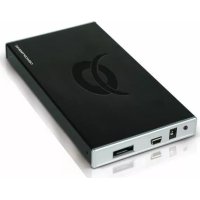
CHD2UES200 - External hard drive CONCEPTRONIC - Free user manual and instructions
Find the device manual for free CHD2UES200 CONCEPTRONIC in PDF.



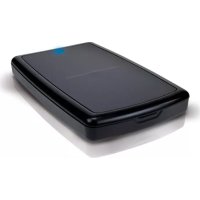
| Product type | 2.5" External Hard Drive Enclosure |
| Brand | Conceptronic |
| Model | CHD2UES200 |
| Host interface | USB 2.0 + eSATA |
| Compatible hard drive | SATA 2.5" (Serial ATA) |
| Power supply | USB bus (no power adapter) |
| Dimensions (approx.) | 120 x 75 x 10 mm |
| Weight (approx.) | 100 g (without disk) |
| Enclosure material | Plastic |
| Color | Black |
| Package contents | CHD2UES enclosure, USB cable, eSATA cable, USB power cable, 2 mounting screws, protective foam, carrying case, quick installation guide, warranty card |
| Main functions | External storage, data backup, file transfer, secondary hard drive |
| Supported formatting | FAT32, NTFS (NTFS limitation for partitions > 32 GB) |
| Operating systems | Windows 2000, XP, Vista (plug-and-play) |
| Disk installation | Tool-free installation (slide and drop) with fixing screws |
| Cooling | Passive (fanless) |
| Maintenance and cleaning | Wipe with a dry, soft cloth. Do not use liquids or solvents. |
| Safety | Disconnect before opening the enclosure. Comply with CE standards (EMC and low voltage). |
| Spare parts and repairability | User-replaceable hard drive. Standard USB/eSATA cables available in stores. |
| Warranty | Warranty card included (details not specified in the manual) |
| Declaration of conformity | Directives 2004/108/EC (EMC) and 73/23/EC (low voltage) |
Frequently Asked Questions - CHD2UES200 CONCEPTRONIC
User questions about CHD2UES200 CONCEPTRONIC
0 question about this device. Answer the ones you know or ask your own.
Ask a new question about this device
Download the instructions for your External hard drive in PDF format for free! Find your manual CHD2UES200 - CONCEPTRONIC and take your electronic device back in hand. On this page are published all the documents necessary for the use of your device. CHD2UES200 by CONCEPTRONIC.
USER MANUAL CHD2UES200 CONCEPTRONIC
Conceptronic Grab'n'GO CHD2UES
Conceptronic Grab'n'GO CHD2UES
Quick Installation Guide
Congratulations on the purchase of your Conceptronic 2,5" eSATA & USB harddisk box for SATA HDD.
The enclosed Hardware Installation Guide gives you a step-by-step explanation of how to install the Conceptronic CHD2UES.
When problems occur, we advise you to go to our support-site (go to www.conceptronic.net and click 'Support'. Here you will find the Frequently Asked Questions Database.
When you have other questions about your product and you cannot find it at our website, then contact us by e-mail: support@conceptronic.net.
For more information about Conceptronic products, please visit the Conceptronic Web Site: www.conceptronic.net
1. Introduction
This product provides a fast and easy way to add extra storage space to your Desktop or Notebook. You can assemble a 2,5" SATA hard disk in the CHD2UES to provide you with portable storage.
The hard disk box is perfect for transferring data, making backups or for use as a second hard disk on your computer.
Note: The CHD2UES can only be used with 2,5" Serial ATA Harddisks. 2,5" IDE disks can not be used with this enclosure.
2. Package Contents
The following items must be present in your package:
1x CHD2UES
2x Assembly screw (not included when CHD2UES is pre-assembled)
1x HDD foam (not included when CHD2UES is pre-assembled)
1x Travel Bag for CHD2UES
1xE SATA Cable
1x USB Cable 1x USB Powercable
1x Quick Installation Guide 1x Warranty Card
ENGLISH
3. Hardware Installation CHD2UES
3.1 Assembling the CHD2UES (When no hard disk is installed yet)
If you bought the CHD2UES with a hard disk pre-installed, you can skip this step and continue to step 3.2
a. Gently slide the hard disk tray out of the back of the housing.
b. Remove the bag with the 2 assembly screws and HDD foam from the housing.
c. Connect the 2,5" hard disk gently to the connector. Make sure the connector is connected correctly to the hard disk.
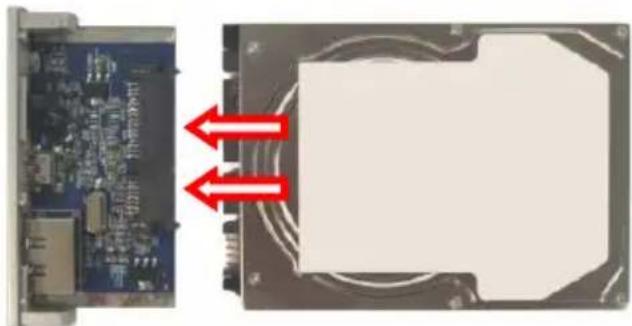
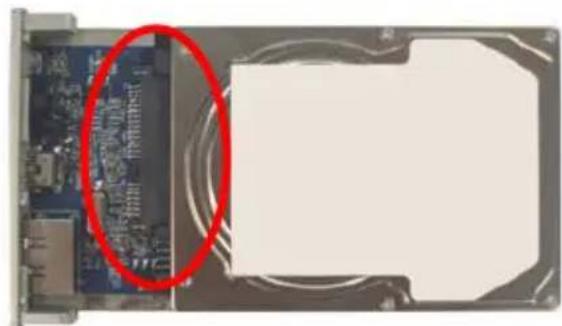
d. Stick the included foam on the bottom of the harddisk, before you place the harddisk in the housing.
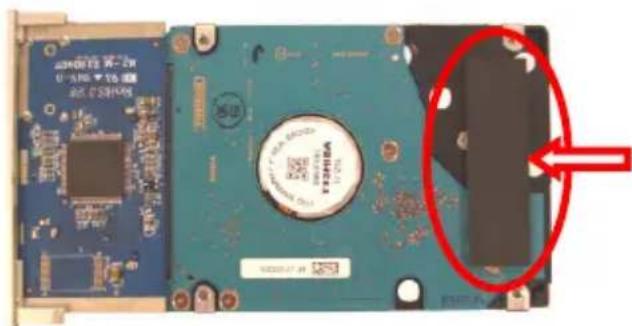
e. Slide back the tray in the housing.
f. Use the 2 delivered screws to secure the tray in the housing.
ENGLISH
3.2 Cable connections
a. Connect the USB cable to the CHD2UES and to a free USB port on your computer. The device will automatically power on.
Windows 2000, XP & Vista will automatically recognize the hard disk. No driver installation is required to operate the CHD2UES.
4. Create and format a partition on the CHD2UES
It is possible that the hard disk you are using is not partitioned/formatted yet. In this situation the CHD2UES will not show a replaceable hard disk with partitions in your operating system. To create and/or format the partition on the CHD2UES, you can use the default Windows format utility.
Note: When creating and/or formatting the Harddisk all current data will be deleted!
- Click on "Start", "Run", execute the command "diskmgmt.msc" and press "OK".
- Select your external hard disk and right click on it. If there is a partition present which you want to delete, choose "Delete Partition". To create a new partition, select "Create New Partition".
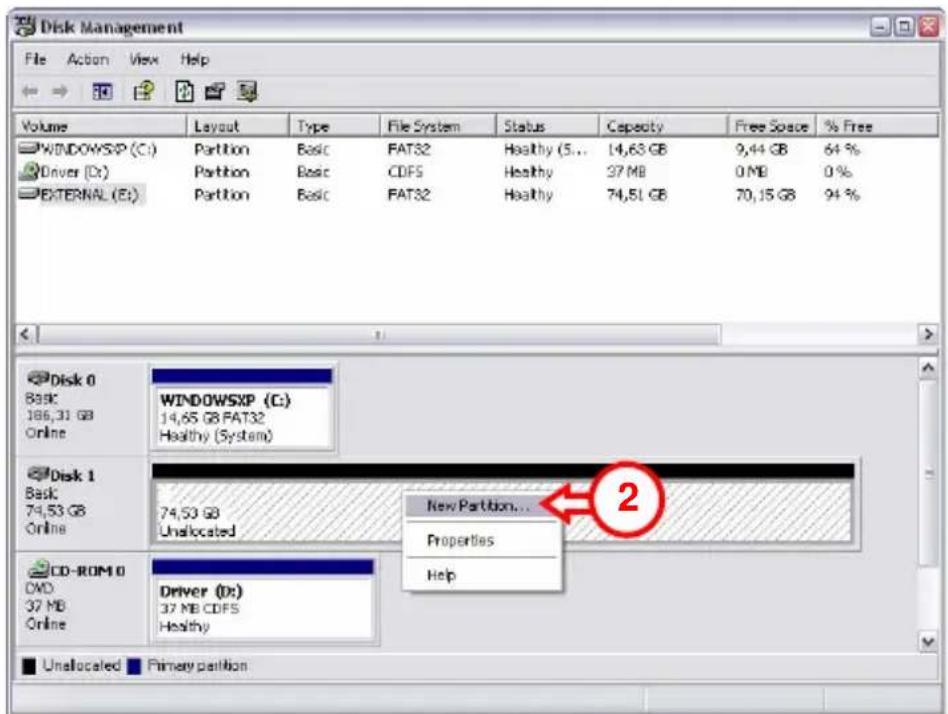
ENGLISH
-
The "New Partition Wizard" will appear. Click "Next".
-
Select the option "Primary Partition" and click "Next".
-
Set up the size of your new partition. It is set to the maximum size by default. Click "Next".
-
Assign a drive letter for your new partition. By default, the first free drive letter is assigned. Click "Next".
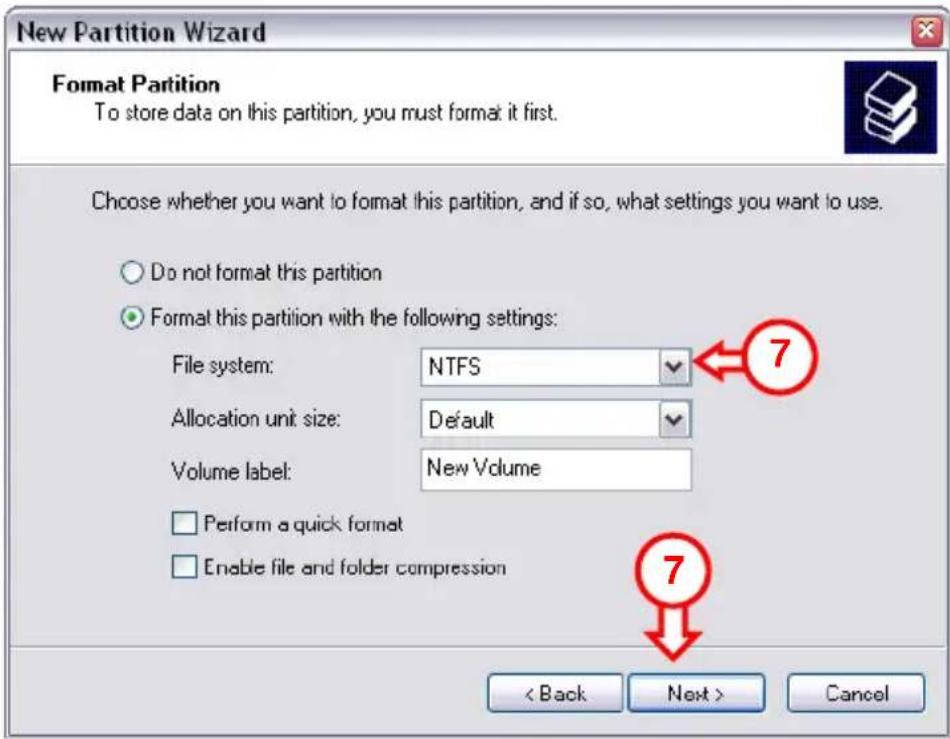
- You can make different settings to format the hard disk. At "File System", you can choose between NTFS or FAT32. You can also assign a volume name for the partition and choose for "Quick Format". Click "Next" to continue.
Note: Partitions bigger than 32GB can only be formatted with the NTFS file system when using Windows Disk Management!
- You will see a summary of the selected commands. By selecting "Finish", all commands will be executed and your hard disk will be ready to use.
The hard disk built-in your CHD2UES is now ready for use.
DECLARATION OF CE CONFORMITY
The manufacturer 2L International BV
Address Databankweg 7
3821 AL Amersfoort, the Netherlands
Hereby declares that the product
Type 2,5" USB/eSATA HDD
Product CHD2UES
Brandname Conceptronic
Complies with following directives:
2004/108/EEC
EMC directive:
Electromagnetic Compatibility
73/23/EEC
Low Voltage Directive:
Electrical equipment designed for use within certain voltage
The following standards were consulted to assess conformity:
EN55022/9.98 Class B
EN55024/9.98
EN 50081-1/1994
EN 61000-3-2/3/4/1995
EN 50082-1/1994
EN 60950/1995
The symbol confirms that this product conforms to the above named standards and regulations.
C
Place and date of issue: Amersfoort, 03/08/2007 (dd/mm/yyyy)
Herman Looijen, Product Marketing Manager
ESPÁÑOL
Conceptronic Grab'n'GO CHD2UES
Guia de iniciación
- Directa EMC 2004/108/CE EMC
Herman Looijen, Director de marketing
DEUTSCH
Conceptronic Grab'n'GO CHD2UES
Herman Looijen, Product Marketing Manager
FRANÇAIS
Conceptronic Grab'n'GO CHD2UES
Conceptronic Grab'n'GO CHD2UES
Herman Looijen, Product Marketing Manager
PORTUGUES
Conceptronic Grab'n'GO CHD2UES
Iniciacao Rapaia
ParabénsPGA do disco eSATA de 2,5"e USB para HDD SATA da Conceptronic.
Conceptronic Grab'n'GO CHD2UES
Conceptronic Grab'n'GO CHD2UES
Hizli Kurulum Kilanduzu
DECLARATION OF CE CONFORMITY
The manufacturer 2L International BV
Address Databankweg 7
3821 AL Amersfoort, the Netherlands
Hereby declares that the product
Type 2,5" USB/eSATA HDD
Product CHD2UES
Brandname Conceptronic
Complies with following directives:
2004/108/EEC
EMC directive: Electromagnetic Compatibility
73/23/EEC Low Voltage Directive:
Electrical equipment designed for use within certain voltage limits
The following standards were consulted to assess conformity:
EN55022/9.98 Class B
EN55024/9.98
EN 50081-1/1994
EN 61000-3-2/3/4/1995
EN 50082-1/1994
EN 60950/1995
The symbol confirms that this product conforms to the above named standards and regulations.

Place and date of issue: Amersfoort, 03/08/2007 (dd/mm/yyyy)

- CONCEPTRONIC GRAB'N'GO CHD2UES
- QUICK INSTALLATION GUIDE
- INTRODUCTION
- PACKAGE CONTENTS
- ENGLISH
- HARDWARE INSTALLATION CHD2UES
- 3.1 ASSEMBLING THE CHD2UES (WHEN NO HARD DISK IS INSTALLED YET)
- 3.2 CABLE CONNECTIONS
- CREATE AND FORMAT A PARTITION ON THE CHD2UES
- DECLARATION OF CE CONFORMITY
- THE MANUFACTURER 2L INTERNATIONAL BV
- HEREBY DECLARES THAT THE PRODUCT
- COMPLIES WITH FOLLOWING DIRECTIVES
- THE FOLLOWING STANDARDS WERE CONSULTED TO ASSESS CONFORMITY
- ESPÁÑOL
- GUIA DE INICIACIÓN
- DEUTSCH
- FRANÇAIS
- PORTUGUES
- INICIACAO RAPAIA
- HIZLI KURULUM KILANDUZU
Brand : CONCEPTRONIC
Model : CHD2UES200
Category : External hard drive