Titan 100 - Phone TOPCOM - Free user manual and instructions
Find the device manual for free Titan 100 TOPCOM in PDF.



User questions about Titan 100 TOPCOM
0 question about this device. Answer the ones you know or ask your own.
Ask a new question about this device
Download the instructions for your Phone in PDF format for free! Find your manual Titan 100 - TOPCOM and take your electronic device back in hand. On this page are published all the documents necessary for the use of your device. Titan 100 by TOPCOM.
USER MANUAL Titan 100 TOPCOM
UK The features described in this manual are published with reservation to modifications.
1 Before Initial use
Thank you for purchasing this new desktop telephone.
1.1 Intended Purpose
This product is intend to be connected indoor to an analogue PSTN telephone line.
1.2 Connection
This device has been designed and manufactured to comply with the 98/482/EC rule, referent to the Pan European connection of a terminal to the Public Switching Telephone Network (PSTN) and following the established guidelines by the 1999/5/EC Directive about radio electric equipments and the reciprocal acknowledge of their conformity. However, due to the fact that there are some differences in the PSTNs from one country to another, the verifying measurements by themselves do not set up an unconditional guarantee for an optimal working in every connection point to the PSTN of any country. If any problem comes up, get in touch firstly with the distributor.
In any case, use conditions for which the product has been created should be respected as well as avoid its use in public or private networks with technical requirements clearly different to those established in the EU.
2 Cleaning
Clean the telephone with a slightly damp cloth or with an anti-static cloth. Never use cleaning agents or abrasive solvents.
3 Disposal of the device (environment)

At the end of the product lifecycle, you should not throw this product into the normal household garbage but bring the product to a collection point for the recycling of electrical and electronic equipments. The symbol on the product, user guide and/or box indicate this.
Some of the product materials can be re-used if you bring them to a recycling point. By re-using some parts or raw materials from used products you make an important contribution to the protection of the environment.Please contact your local authorities in case you need more information on the collection points in your area.
4 Safety advice

The following safety advice must always be followed before using this equipment.
Please read carefully through the following information concerning safety and proper use. Make yourself familiar with all the functions of the equipment. Be careful to keep these advice notes and if necessary pass them on to a third party.
- Do not operate the equipment if the telephone cable or the equipment itself is damaged.
- If the equipment is dropped, it must be checked by a professional before further use.
- Dangerous voltages are present inside the equipment. Never open the housing or insert objects through the ventilation holes.
- Do not allow liquids to get into the equipment. In case of emergency, pull out the plug from the socket.
- Similarly, if a fault develops during use or before you start to clean the equipment, pull the plug out of the socket.
- Do not touch plug contacts with sharp or metal objects.
- Do not carry out any modifications or repairs to the equipment yourself. Have repairs done to the equipment or the mains cable only by a specialist service centre. Unsatisfactory repairs can lead to considerable danger for the user.
- Children frequently underestimate the dangers associated with electrical equipment. Therefore you must never leave children unsupervised in the vicinity of electrical equipment.
- The equipment is not to be used in a damp room (e.g. bathrooms) or rooms where there is a lot of dust.
- Equipment connected to the telephone line during a thunderstorm can be damaged by lightning. Therefore you should pull the plug out of the main socket during a storm.
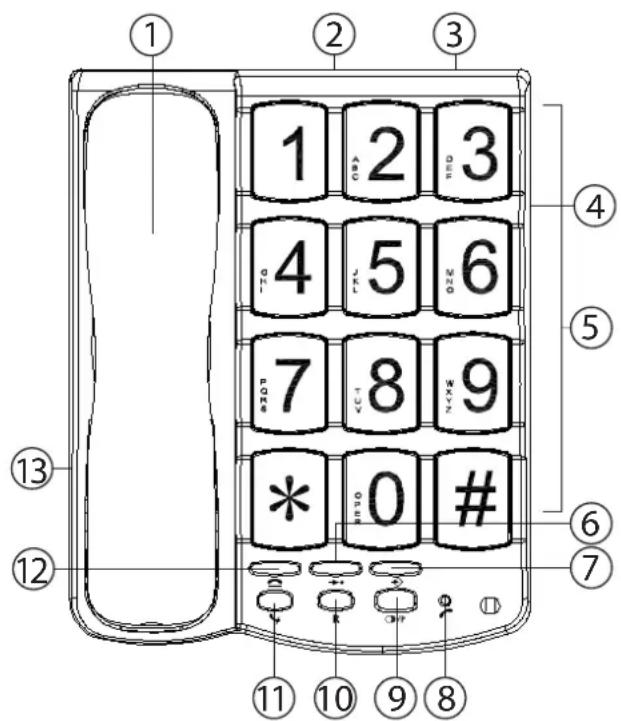
5 Buttons/LED
- Handset
- Line cord connector
- Ringer switch (on/off)
- Handset volume switch
5.Keypad - Program button
- Memory button
- In use LED
- Redial/Pause button
- Flash button R
- Mute button
- Music on hold button
- Handset curl cord connector
6 Installing the line cord
For installation, do the following:
- Put the telephone on a flat surface.
- Plug one end of the line cord into the telephone wall outlet and the other end into the Line connector on the backside of the telephone (2).
7 Getting started
7.1 Making a phone call
To make a phone call, pick up the receiver. Enter the telephone number.
7.2 Handset volume
The handset volume can be adjusted (Low, Medium, High) by the handset volume switch (4) on the right side of the telephone.
7.3 Last number redial
The last dialled telephone numbers are saved in the radial memory.
- Pick up the handset.
- Press, the number will be dialled automatically.
Note: The Redial button can also be used as a Pause button while entering a telephone number!
7.4 Mute
It is possible to mute the microphone during a conversation by pressing and holding the mute button. You can now talk freely without the caller hearing you.
Release the Mute button if you want to resume your conversation.
7.5 Music on hold
It is possible to put the caller on Hold during a conversation by pressing the music on hold button. You can now talk freely without the caller hearing you. The caller will hear a digital melody.
Press the Music on Hold button again if you want to resume your conversation.
7.6 Ringer volume
When you receive a phone call, the unit will ring. The ring volume can be switched off with the Ringer switch (3)
7.7 Flash Key
Press the Flash button (R) to use certain services as 'Call Waiting' (if this service is provided by your telephone company); or to transfer phone calls when you are using a telephone exchange (PABX).
8 Memory numbers
You can program 10 indirect memory numbers (0-9) in the phone's memory.
8.1 Programming an indirect memory number
Pick up the handset.
- Press the program button (6).
- Enter the telephone number.
- Press the program button (6).
- Press the desired memory location 0..9 (numerical buttons).
- Put the handset back on the phone.
8.2 Calling an indirect memory number
Pick up the handset and press the Memory button (7)
- Press the number of the memory location (0-9), the programmed number will be dialled automatically.
9 Technical Data
Dialing mode: Tone (DTMF)
Flash: 100 ms
Ambient temperature: +5^ C to +45^ C
Permitted relative air humidity: 25 to 85%
10 Topcom warranty
10.1 Warranty period
The Topcom units have a 24-month warranty period. The warranty period starts on the day the new unit is purchased. Consumables or defects causing a negligible effect on operation or value of the equipment are not covered.
The warranty has to be proven by presentation of the original purchase receipt, on which the date of purchase and the unit-model are indicated.
10.2 Warranty handling
A faulty unit needs to be returned to a Topcom service centre including a valid purchase note.
If the unit develops a fault during the warranty period, Topcom or its officially appointed service centre will repair any defects caused by material or manufacturing faults free of charge.
Topcom will at its discretion fulfil its warranty obligations by either repairing or exchanging the faulty units or parts of the faulty units. In case of replacement, colour and model can be different from the original purchased unit.
The initial purchase date shall determine the start of the warranty period. The warranty period is not extended if the unit is exchanged or repaired by Topcom or its appointed service centres.
10.3 Warranty exclusions
Damage or defects caused by incorrect treatment or operation and damage resulting from use of non-original parts or accessories not recommended by Topcom are not covered by the warranty. The warranty does not cover damage caused by outside factors, such as lightning, water and fire, nor any damage caused during transportation. No warranty can be claimed if the serial number on the units has been changed, removed or rendered illegible.
7.1 Ppaaymuatooinon tnAeawvikns kAnons
Iia va TpaymuatoTIOINOETe MIA TnAeewvIKn KAnon, ONKwOTc TOV dEKTn. IaNkTpoAooynoTe Tov TnAeewvIKo apiOo.
7.2 Evtaon nXou aKouotikou
Eivai duvatn n puθmion tnc evtaanç nxou tou akouotikou (Xaunló, Meoio, Ypno) aTTOV diaKOTTN evtaonc nxou akouotikou (4) OTN δεiα πλερα tou Tnλεφωvou.
8.1 Programarea unui numar indirect in memorie
6 PoiKJIIOHHe TeIefoHHoro shypa
IЯ noKIOUeHЯ BbINOHNTe cJeDyOuNe Oepaunn:
-Помecтinte TelepoH Ha ПLOCKOI NOBepxHocTn.
BCTaBbTe OINH KOHeT TeNeΦoHnHO U Hypa B TeNeΦoHnHyU pO3eTKy, a DpyroN KOHeC B pa3bEm TeNeΦoHnHO U Hypa Ha 3aDHeN NaHeN TeNeΦoHa.
7 Haayano pa6oTbI
7.1 TeJeΦoHHbI Bbl3OB
YTo6bI BbINOHNHTb TeNefoHHbI Bbl3OB, CHIMITE Tpy6ky c annapata.
BVeIte TeIefoHHbI HOMep
7.2 TpomKocTb Tpy6kn
Typ: Corded Telephone Device
Model: Titan 100
RETURN WITH YOUR DEFECT PRODUCT
(Original Proof of Purchase has to be attached to this return card to be valid for warranty)
visit our website www.topcom.net