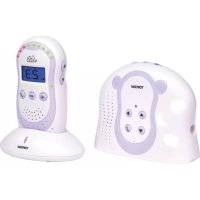
Babytalker 2500 - Baby monitors TOPCOM - Free user manual and instructions
Find the device manual for free Babytalker 2500 TOPCOM in PDF.


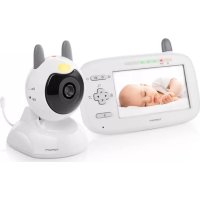
| Brand | Topcom |
| Model | Babytalker 2500 |
| Product type | Digital baby monitor |
| Parent unit power supply | AC adapter 6 V DC / 200 mA |
| Baby unit power supply | AC adapter 6 V DC / 300 mA |
| Parent unit batteries | 2 rechargeable AAA 1.2 V batteries (included) |
| Baby unit batteries | 3 AA alkaline batteries (non-rechargeable) |
| Outdoor range | Up to 300 m |
| Indoor range | Up to 50 m |
| Operating frequency | 1.880 - 1.900 GHz |
| Listening and voice activation (VOX) | Yes, adjustable sensitivity |
| Talk to baby function | Yes, with PTT button |
| Lullabies | 5 built-in melodies |
| Nightlight | Yes, remotely or locally operable |
| Temperature display | Yes, with adjustable range alerts |
| Parent unit paging | Yes, emits a beep for 30 seconds |
| Adjustable volume | 5 levels on parent unit |
| Sound alert | Beep when volume is off and baby cries |
| Menu languages | Multilingual (French, English, etc.) |
| Safety | Compliant with EMC standards; keep 1 meter away from baby; do not cover |
| Maintenance | Slightly damp or antistatic cloth |
| Warranty | 24 months (batteries: 6 months) |
Frequently Asked Questions - Babytalker 2500 TOPCOM
User questions about Babytalker 2500 TOPCOM
0 question about this device. Answer the ones you know or ask your own.
Ask a new question about this device
Download the instructions for your Baby monitors in PDF format for free! Find your manual Babytalker 2500 - TOPCOM and take your electronic device back in hand. On this page are published all the documents necessary for the use of your device. Babytalker 2500 by TOPCOM.
USER MANUAL Babytalker 2500 TOPCOM
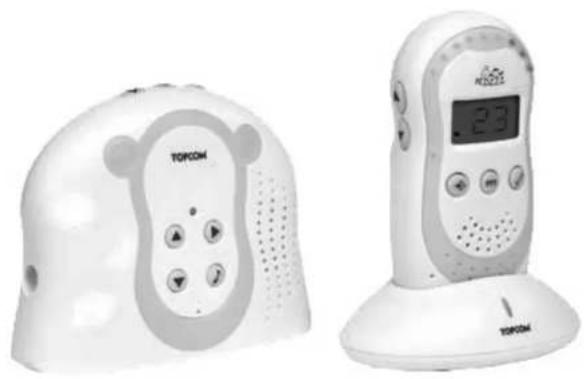
BABYTALKER 2500
USER GUIDE / HANDLEIDING / MANUEL D'UTILISATEUR / BEDIENUNGSANLEITUNG / MANUAL DE USUARIO / BRUKSANVISNING / BRUGERVEJLEDNING / ANVÄNDARHANDBOK / KÄYTTÖOHJE / MANUALE D'USOMANUAL DO UTILIZADOR / UŽIVATELSKÁ PŘÍRUČKA / OĐHΓIEŞ XPHEHZ / HASZNÁLATI ÚTMUTATÓ / INSTRUKCJA OBSŁUGI / UŽIVATEL'SKÝ MANUÁL
V 1.2 - 10/08
CE
UK The features described in this manual are published with reservation to modifications.
B
C
D
1 Introduction
Thanks for purchasing the Babytalker 2500. This Babyphone with digital communication ensures that you can hear your baby clearly without any distracting noise or interference.
2 Safety Instructions

WARNING:
- This baby monitor is compliant to all relevant standards regarding electromagnetic fields and is, when handled as described in the user guide, safe to use. Therefore, always read the user guide instructions carefully before using the device.
- Adult assembly required. Keep small parts away from children when assembling.
- This product is not a toy. Do not allow children to play with it.
• This baby monitor is not a substitute for responsible adult supervision. - Keep this User's Manual for future reference.
- Do not place the baby unit or cables in the crib or within the arm reach of the baby (at least 1 meter away).
- Secure the cords away from babies reach.
- Do not cover the baby monitor with a towel or blanket.
- Never use extension cords with the enclosed AC adapters.
- Test the monitor before use. Get familiar with the functionality.
- Do not use the monitor near water.
- Do not install the monitor on heat sources.
- Only use the chargers and power adapters supplied. Do not use other chargers or power adapters, as this may damage the device and battery cells.
- Only insert batteries of the same type. Never use ordinary, non-rechargeable batteries, in the parent unit. Insert batteries so they connect to the right poles (indicated in the battery compartment).
- Do not touch the charger or plug contacts with sharp or metal objects.
3 Description
See folded cover page
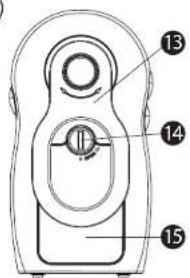
3.1 Parent Unit (Illustration A and B)
- Volume indicator LED's
- On/Off button ⏻
- Push to talk button (Talk to baby)
- Confirm button
- Speaker
- Desktop charger
- Charging LED
- Menu button

-
Link indicator LED
-
Volume down button ▼
-
Volume up button
-
Display
-
Belt Clip
-
Battery cover screw
-
Battery cover
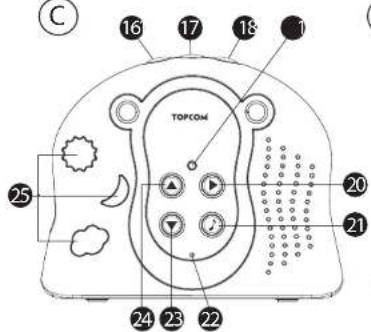
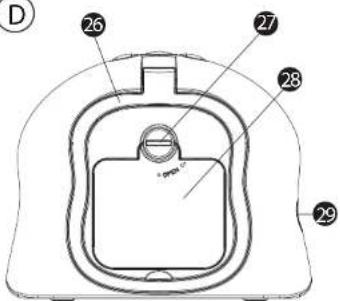
3.2 Baby unit (Illustrations C and D)
-
Night Light button
-
On/Off button ⏻
-
Paging button ⏻
-
Power LED
-
Play button
-
Melody button
-
Microphone
-
Volume down button
-
Volume up button
-
Night Light
-
Hang handle
-
Battery cover screw
-
Battery cover
-
Power adapter connector
4 Getting started
4.1 Baby unit battery Installation
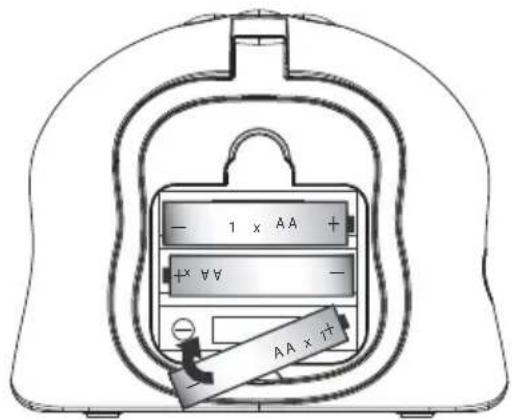
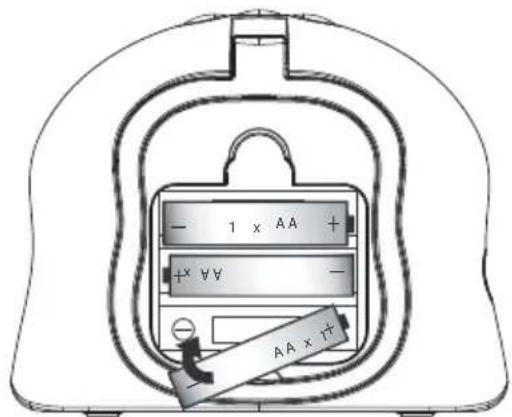
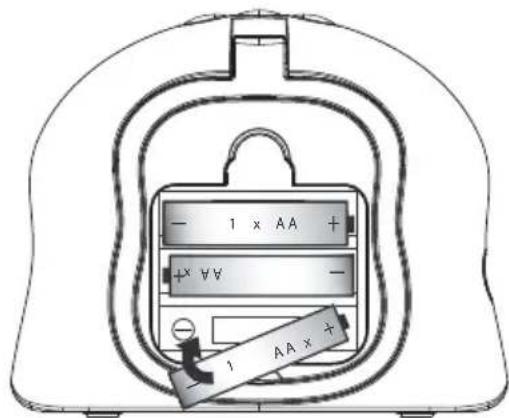
The baby unit can be used either with 3 AA - Size batteries (alkaline batteries recommended) or the household AC current. The baby unit has no charging function!
It is recommended to add the batteries. It will automatic backup when there is a main power interruption.
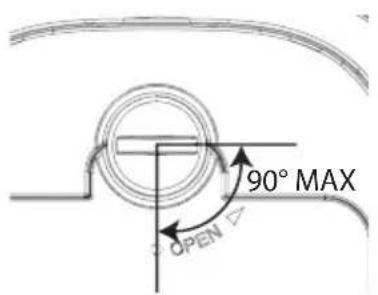
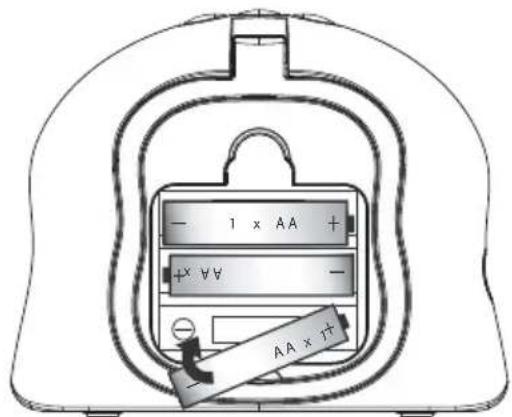
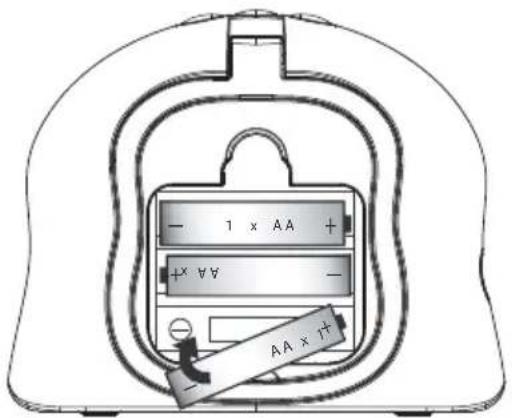
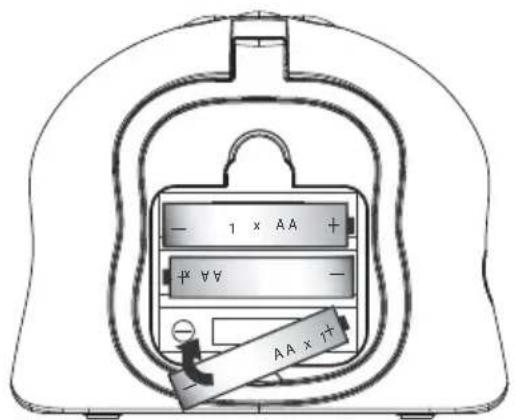
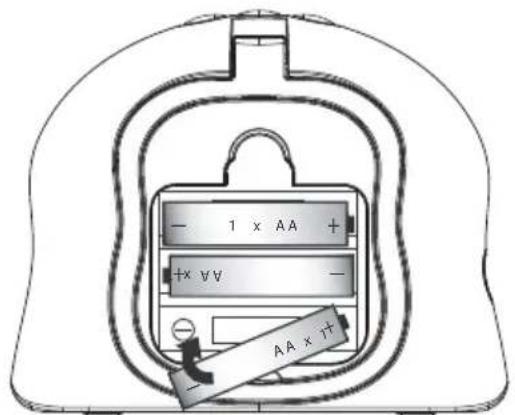
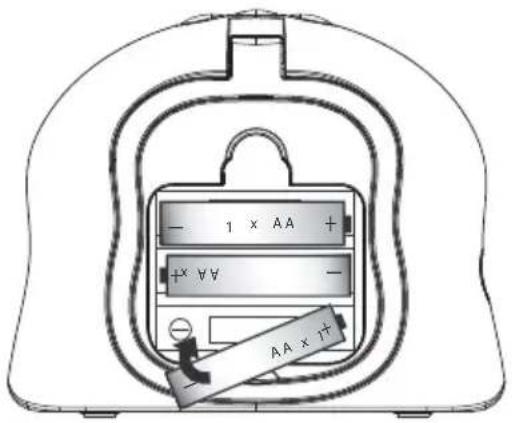
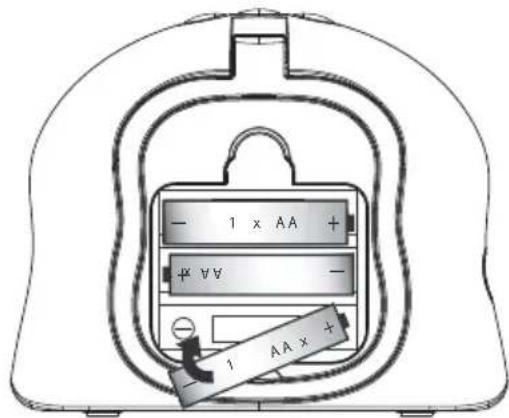
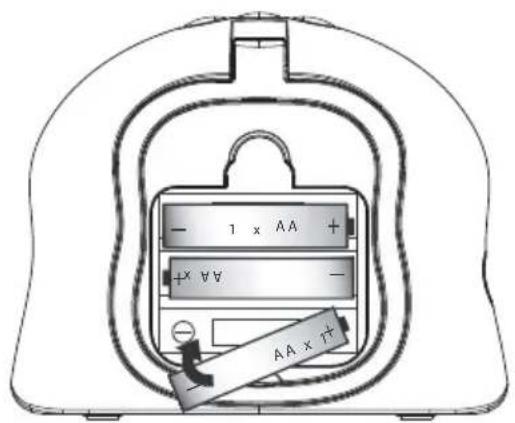
- Turn the screw 90° of the battery cover (27) on the backside of the baby unit in a counter clockwise direction using a screw driver. Remove the battery cover (28). Do not try to rotate the screw further than the position ‘open’.
- Install 3 AA alkaline batteries following the polarity as shown.
- Close the battery compartment.
- Press (17). The power LED (19) will illuminate.
- Press and hold (17) to switch off the baby unit.
When the battery level is low, the power LED (19) will blink.

Do not mix old batteries with new ones.
Keep batteries away from small children
Do not short-circuit & dispose of in fire.
Remove the batteries if this device is not going to be used for a long period.
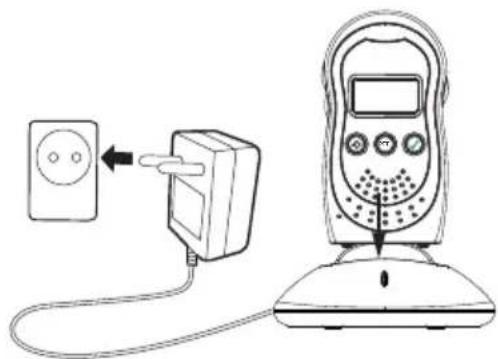
4.2 Baby unit power supply
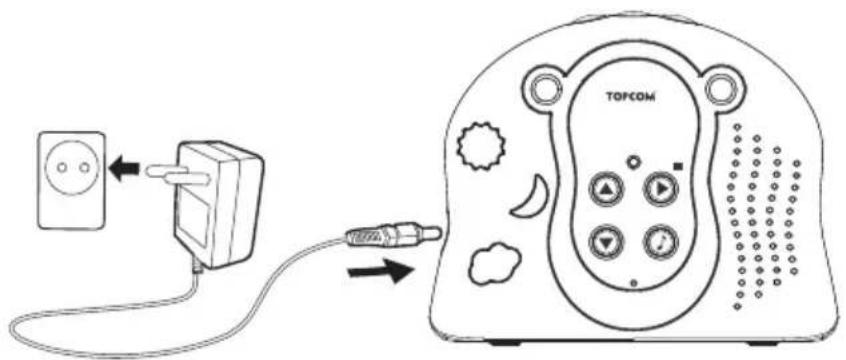
- Connect the small plug of the AC adaptor to the power connector of the baby unit (29) and the other end of the adapter cable to the electric socket (230V/50Hz).
Only use the enclosed adapter (6V DC / 300mA).
- Press (17). The power LED will illuminate.
- Press and hold (17) to switch off the baby unit.
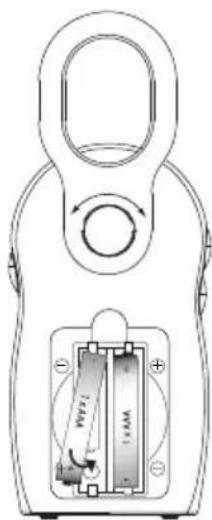
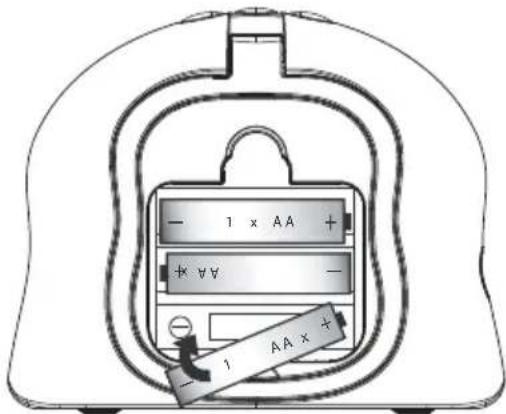
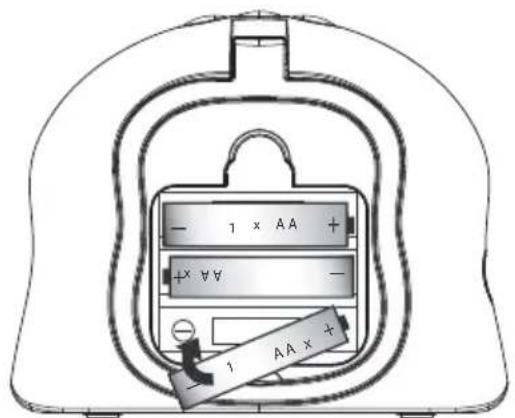
4.3 Parent unit battery Installation
- Turn the belt clip facing upwards.
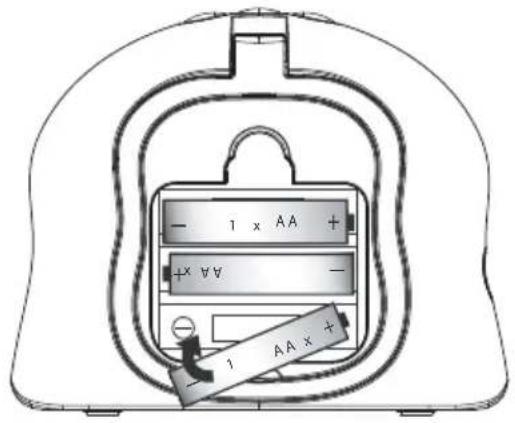
- Turn the screw 90° of the battery cover (14) on the backside of the baby unit in a counter clockwise direction using a screw driver. Remove the battery cover (15). Do not try to rotate the screw further than the position ‘open’.
- Install the enclosed 2 'AAA' rechargeable batteries following the polarity as shown.
Do not install alkaline batteries!
- Close the battery compartment.
- Press ②. The LCD display (12) will illuminate.
- Press and hold (2) to switch off the patent unit.
4.4 Parent unit power supply
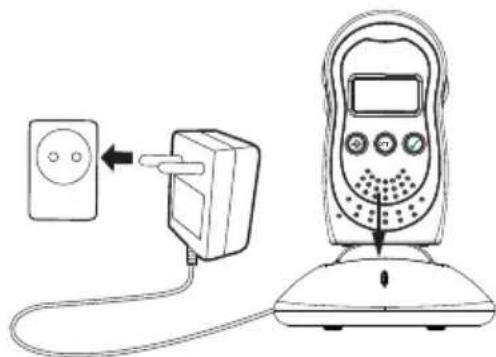
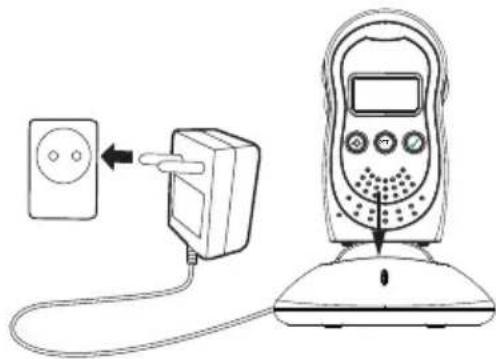
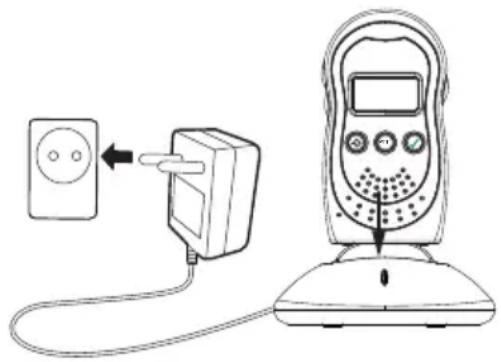
- Connect the power adapter cable to the main power socket (230V/50Hz).
Only use the enclosed adapter (6V DC / 200mA).
- Slide the parent Unit into the charger (6). The red charging light (7) illuminates.
- It takes about 13 hours to charge the unit.
- Press ②. The LCD display (12) will illuminate.
- Press and hold ② to switch off the patent unit.
4.5 Link
Do not place the baby unit or cables in the crib or within the arm reach of the baby (at least 1 meter away).
When using the Babytalker the first time, it is advised to test the connection.
• Install the parent unit in the same room as the baby unit, but have at least 1 meter between the 2 units.
- When both units are switched on, the parent unit will search for the baby unit.
- The green link LED (9) on the parent unit will flash until they communicate. Once the link is established, the LED will light continuously.
- The voice captured by the microphone will be audible on the parent unit.
- The level of the detected speech is represented by the LED's on top of the parent unit (1).
- When the speech reached the maximum level, a beep will be audible.
- When the connection is established, move the parent unit to the monitor room, but within the operation range.
- When there is no connection, an alert signal (double beep) will be audible (out of range warning) and the green connection LED will blink.
- Move the parent unit closer until the link is re-established.
4.6 Paging
When your parent unit is lost, you can track it by pressing ⏻ (18) on the baby unit for 2 seconds.
The parent unit will emit a high beep tone for 30 seconds which helps you to find it very easily.
- Press on the parent unit (2) briefly to stop the beep.
5 Using the Babytalker 2500
5.1 Volume adjustment
5.1.1 Parent unit
There are 5 volume levels on the parent unit.
- Press (11) to increase the volume level.
- Press (10) to decrease the volume level.
- When ‘OFF’ is displayed, the babies crying will only be visible by the LED’s on top of the unit.
5.1.2 Baby unit
- Press (24) to increase the volume level.
- Press (23) to decrease the volume level.
The volume of the babyunit has effect on the talk to baby mode and when the melody is playing.
5.2 Talk to baby
With the Babytalker 2500 it is possible to talk to your baby.
- Press and hold (3) on the parent unit to talk to your baby.
- Release the button to stop talking.

Make your baby familiar with the talk function. If they do not know it, they might get confused.
5.3 Menu operation
- Press (8) on the parent unit for entering the menu.
- Press (11) or (10) to scroll through the menu.
- Press (4) to select the desired setting.
- Press (8) to leave the setting.
5.4 Display language
- Press (8) on the parent unit, 'Night Light' is displayed.
- Press (11) to select 'Language'.
- Press (4). The actual language is displayed.
- Press (11) or (10) to select the desired language.
- Press √ (4).
- Press (8) to leave the menu.
5.5 Night Light
5.5.1 Remote activation:
- Press (8) on the parent unit, 'Night Light' is displayed.
- Press √ (4). ‘On?’ is displayed.
- Press (4) again to activate the night light on the baby unit.
- Press (8) to leave the menu.
• To remotely deactivate the night light, follow the same instructions, but select 'Off?'.
5.5.2 Local activation:
Press (16) on the baby unit to switch the night light on or off.
5.6 Lullaby
5 lullabies can be played on the baby unit.
5.6.1 Remote activation:
- Press (8) on the parent unit, 'Night Light' is displayed.
- Press (11) until 'Lullaby' is displayed.
- Press √ (4). 'Play' is displayed.
- Press (11) to select 'Select New'
- Press √ (4).
- Press (11) to select the desired Melody or select 'Play All' to play all lullabies one after the other.
- Press (8) to leave the melody setting.
- Select √Play' and press (4) to start the lullaby.
• To remotely deactivate the Lullaby, follow the same instructions, but select 'Stop'.
The audio level of the played lullaby can only be adjusted on the baby unit. The baby unit will remember the set audio level.
If you press (3) on the parent unit, the lullaby will automatically stop.
5.6.2 Local activation:
- Press (20) on the baby unit. The actual selected lullaby is played.
- Press (24) to increase the audio level or (23) to decrease the audio level.
- Press (21) to select the desired lullaby.
- Press (20) to stop playing.
5.7 Temperature
In standby mode, the room temperature of the baby unit is displayed on the parent unit.
5.7.1 Temperature range
The display will indicate when the room temperature has exceeded the upper of lower limit.
- Press (8) on the parent unit, 'Night Light' is displayed.
- Press (11) until 'Temperature' is displayed.
- Press √ (4). 'Set Range' is displayed.
- Press √ (4).
- Press (11) or (10) to select the desired upper limit (max 26°C ).
- Press √ (4).
- Press (11) or (10) to select the desired lower limit (min 14°C).
- Press (8) to leave the range setting.
When the limits are exceeded the display will show 'High' of 'Low' and the temperature will flash.
5.7.2 Temperature alert
When the temperature limits are exceeded, a double beeptone can alert you.
- Press (8) on the parent unit, 'Night Light' is displayed.
- Press (1) until 'Temperature' is displayed.
- Press √ (4).
- Press (1) until 'Temp Alert' is displayed.
- Press √ (4). ‘On?’ is displayed.
- Press (4) to activate the temperature alert.
- Press (11) or (10) to select the desired volume.
- Press (4) to confirm.
- Press (8) to leave the menu.
To deactivate the alert, follow the same instructions, but select 'Off?'.
5.7.3 Temperature unit (°C or °F)
- Press (8) on the parent unit, 'Night Light' is displayed.
- Press (1) until 'Temperature' is displayed.
- Press √ (4).
- Press (11) until 'Degree F?' is displayed.
- Press (4) to confirm.
- Press (8) to leave the range setting.
To set the unit to °C, follow the same instructions, but select 'Degree C?'.
5.8 VOX sensitivity
The level of the voice detection (VOX) sensitivity from the Baby Monitor can be changed. If the baby is a quiet sleeper, the sensitivity level can be increased so that minor disturbance can be detected and transmitted to the parent unit.
- Press (8) on the parent unit, 'Night Light' is displayed.
- Press (11) until 'Sensitivity' is displayed.
- Press (4) to confirm.
- Press (11) or (10) to select the desired VOX sensitivity.
- Press (4) to confirm.
- Press (8) to leave the menu.
5.9 Sound alert
The babies voice detection level is indicated by the number of volume indicator LED's (1) on top of the display. Only when the volume of the parent unit is set to 'Off', a beep can inform you when the voice level reached the red led zone.
- Press (8) on the parent unit, 'Night Light' is displayed.
- Press (1) until 'Sound alert' is displayed.
- Press √ (4). ‘On?’ is displayed.
- Press (4) to confirm.
- Press (11) or (10) to select the sound level of the beep tone.
- Press (4) to confirm.
- Press (8) to leave the menu.
To deactivate the Sound alert, follow the same instructions, but select 'Off?'.
6 Registration
When the baby unit night lights are flashing and/or no communication can be established between the baby- and parent unit (the green link LED on the parent unit will flash), the parent unit needs to be registered to the baby unit.
6.1 Registration
- When baby unit is in power off state, press and hold the On/Off button on the baby unit, while connecting the power adaptor.
- The baby unit will power on and enter registration mode.
- Release the On/Off button. Under baby unit registration mode, the night light will flash for 60 seconds.
- During registration mode, press and hold the On/Off button on the parent unit while inserting charged batteries.
- The parent unit will power on and 3 red volume indicator LED's will flash.
- If the registration is success, the baby unit night light will stop flashing and exit registration mode.
- The 3 red volume indicator LED's on the parent unit will go out and exit registration mode with confirmation tone (1 long beep).
- If the registration is unsuccessful or the registration mode time is elapsed, the baby unit night light will stop flashing and exit registration mode.
- The 3 red volume indicator LED's on the parent unit indication will go out and exit registration mode with an error tone (3 short beeps).
- Retry the procedure.
To verify the linkage between parent unit and baby unit:
- Pressing the paging button on the baby unit for 2 seconds.
- The parent unit will emit a high beep tone for 30 seconds.
- Press any button on the parent unit briefly to stop the beep.
7 Disposal of the device (environment)
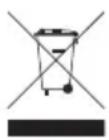
At the end of the product lifecycle, you should not throw this product into the normal household garbage but bring the product to a collection point for the recycling of electrical and electronic equipments. The symbol on the product, user guide and/or box indicate this.
Some of the product materials can be re-used if you bring them to a recycling point. By re-using some parts or raw materials from used products you make an important contribution to the protection of the environment.
Please contact your local authorities in case you need more information on the collection points in your area.
Dispose of the batteries in an environment friendly manner according to your country regulations.
8 Cleaning
Clean the babytalker with a slightly damp cloth or with an anti-static cloth. Never use cleaning agents or abrasive solvents.

This product is in compliance with the essential requirements and other relevant provisions of the the R&TTE directive.
The Declaration of conformity can be found on:
http://www.topcom.net/cedeclarations.php
9 Specifications
Frequency
1.880 GHz -to 1.900 Ghz
Maximum range
Outdoor : up to 300m
Indoor : up to 50m
Power supply
Parent unit charger : 6V / 200mA DC
Baby unit : 6V / 300mA DC
Batteries
Parent unit : 1,2V x 2 AAA rechargeable batteries
Baby unit : 3 x AA Alkaline batteries (no charging function)
10 Topcom warranty
10.1 Warranty period
The Topcom units have a 24-month warranty period. The warranty period starts on the day the new unit is purchased. The warranty on batteries is limited to 6 months after purchase.
Consumables or defects causing a negligible effect on operation or value of the equipment are not covered.
The warranty has to be proven by presentation of the original purchase receipt, on which the date of purchase and the unit-model are indicated.
10.2 Warranty handling
A faulty unit needs to be returned to a Topcom service centre including a valid purchase note. If the unit develops a fault during the warranty period, Topcom or its officially appointed service centre will repair any defects caused by material or manufacturing faults free of charge.
Topcom will at its discretion fulfil its warranty obligations by either repairing or exchanging the faulty units or parts of the faulty units. In case of replacement, colour and model can be different from the original purchased unit.
The initial purchase date shall determine the start of the warranty period. The warranty period is not extended if the unit is exchanged or repaired by Topcom or its appointed service centres.
10.3 Warranty exclusions
Damage or defects caused by incorrect treatment or operation and damage resulting from use of non-original parts or accessories not recommended by Topcom are not covered by the warranty.
Topcom cordless phones are designed to work with rechargeable batteries only. The damage caused by the use of non-rechargeable batteries is not covered under warranty.
The warranty does not cover damage caused by outside factors, such as lightning, water and fire, nor any damage caused during transportation.
No warranty can be claimed if the serial number on the units has been changed, removed or rendered illegible.
Any warranty claims will be invalid if the unit has been repaired, altered or modified by the buyer or by unqualified, non-officially appointed Topcom service centres.
1 Inleiding
4.5 Verbinding
4.5 Liaison
4.5 Verbindung
4.5 Conexión
4.5 Förbindelse
4.5 Link
4.5 Tilkobling
4.5 Collegamento
4.5 Ligação
4.5 Spojení
4.5 Σύνδεση
4.5 Kapcsolat
4.5 Połączenie
4.4 Napájanie rodičovskiej jednotky
- Pripojte kábel sie'ového adaptéra do rozvodnej zásuvky (230V/50Hz).
Použite iba priložený adaptér (6V JSM / 200mA). - Zasuňte rodičovskú jednotku do nabíjačky (6). Rozsvieti sa červená kontrolka nabíjačky (7).
- Nabitie jednotky trvá približne 13 hodín.
- Stlačte (2). LEDka displeja (12) sa rozsvieti.
- Stlačte a podržte tlačidlo (2) po dobu 2 sekúnd na vypnutie rodičovskéj jednotky.
4.5 Linka
Typ: Residential Dect BB Monitor baby and parent unit
Model: Babytalker 2500
Klasa sprzętu: /
EC R&TTE – Telecommunication Directive 1999/5/EC
EC Low Voltage Directive 72/23/EEC
EC EMC Directive 2004/108/EC
RETURN WITH YOUR DEFECT PRODUCT
Location/Ort./Lieu/Plaats: Post code/Postleitzahl/Code Postal/Postcode:

| Country/Land/Pays/Land: |
| Tel./Tél.: |

(Original Proof of Purchase has to be attached to this return card to be valid for warranty)

- BABYTALKER 2500
- 1 INTRODUCTION
- 2 SAFETY INSTRUCTIONS
- WARNING
- 3 DESCRIPTION
- 3.1 PARENT UNIT (ILLUSTRATION A AND B)
- 3.2 BABY UNIT (ILLUSTRATIONS C AND D)
- 4 GETTING STARTED
- 4.1 BABY UNIT BATTERY INSTALLATION
- 4.2 BABY UNIT POWER SUPPLY
- 4.3 PARENT UNIT BATTERY INSTALLATION
- 4.4 PARENT UNIT POWER SUPPLY
- 4.5 LINK
- DO NOT PLACE THE BABY UNIT OR CABLES IN THE CRIB OR WITHIN THE ARM REACH OF THE BABY (AT LEAST 1 METER AWAY)
- 4.6 PAGING
- 5 USING THE BABYTALKER 2500
- 5.1 VOLUME ADJUSTMENT
- 5.1.1 PARENT UNIT
- 5.1.2 BABY UNIT
- 5.2 TALK TO BABY
- 5.3 MENU OPERATION
- 5.4 DISPLAY LANGUAGE
- 5.5 NIGHT LIGHT
- 5.5.1 REMOTE ACTIVATION
- 5.5.2 LOCAL ACTIVATION
- 5.6 LULLABY
- 5.6.1 REMOTE ACTIVATION
- 5.6.2 LOCAL ACTIVATION
- 5.7 TEMPERATURE
- 5.7.1 TEMPERATURE RANGE
- 5.7.2 TEMPERATURE ALERT
- 5.7.3 TEMPERATURE UNIT (°C OR °F)
- 5.8 VOX SENSITIVITY
- 5.9 SOUND ALERT
- 6 REGISTRATION
- 6.1 REGISTRATION
- 7 DISPOSAL OF THE DEVICE (ENVIRONMENT)
- 8 CLEANING
- 9 SPECIFICATIONS
- 10 TOPCOM WARRANTY
- 10.1 WARRANTY PERIOD
- 10.2 WARRANTY HANDLING
- 10.3 WARRANTY EXCLUSIONS
- 1 INLEIDING
- 4.5 VERBINDING
- 4.5 LIAISON
- 4.5 VERBINDUNG
- 4.5 CONEXIÓN
- 4.5 FÖRBINDELSE
- 4.5 TILKOBLING
- 4.5 COLLEGAMENTO
- 4.5 LIGAÇÃO
- 4.5 SPOJENÍ
- 4.5 ΣΎΝΔΕΣΗ
- 4.5 KAPCSOLAT
- 4.5 POŁĄCZENIE
- 4.4 NAPÁJANIE RODIČOVSKIEJ JEDNOTKY
- 4.5 LINKA
- TYP: RESIDENTIAL DECT BB MONITOR BABY AND PARENT UNIT
- MODEL: BABYTALKER 2500
- KLASA SPRZĘTU
Brand : TOPCOM
Model : Babytalker 2500
Category : Baby monitors