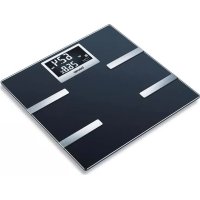
USER MANUAL BF 700 BEURER
EN Diagnostic bathroom scale Instruction for Use 12
natural_image
Diagram showing three sequential steps of a mechanical or structural assembly with no visible text or symbols
Read these instructions for use carefully and keep them for later use, be sure to make them accessible to other users and observe the information they contain.
Contents
- Getting to know your instrument....12
- Signs and symbols....13
- Safety notes....14
- Information 15
- Unit description....15
- Initial use of the scale....16
-
Initial use with the app....16
-
Taking measurements .....17
- Evaluation of results .....18
- Other functions....19
- Cleaning and care of the unit ....20
- Disposal....20
- What if there are problems? 20
- Warranty 21
Included in delivery
- Quick Install Guide
• Diagnostic scale BF 700
- 3 x 1.5 V AAA batteries
• These operating instructions
- 1x warranty leaflet
1. Getting to know your instrument
Function of the unit
This digital scale is intended for weighing and providing a diagnosis of your personal fitness data. It is intended for self-testing in the private domain.
The scale has the following functions that can be used by up to 8 persons:
• body weight measurement,
• measurement of body fat percentage,
• body water percentage,
- muscle percentage,
- bone mass,
- basic and active metabolic rate.
This scale also has the following functions:
- switch between kilograms "kg", pounds "lb" and stones "st",
• automatic shutoff function,
- battery change indicator for weak batteries,
• Automatic user recognition
• LCD display of three initials of the user
- Storage of the last 30 measurements for 8 users if the data cannot be transferred to the app.
- A maximum of 20 unknown measurements can be stored,
- The product uses Bluetooth® low energy technology, frequency band 2400 - 2483,5 MHz, transmission power max. -2,47 dBm.
System requirements
iOS from version 12.0, Android™ from version 8.0 with Bluetooth® 4.0.
List of compatible devices:
2. Signs and symbols
The following symbols appear in these instructions for use:
 | WARNINGWarning notice indicating a risk of injury or damage to health. |
 | IMPORTANTSafety note indicating possible damage to the device/accessory. |
 | NoteNote on important information |
 | Observe the instructions for use |
 | Disposal in accordance with the Waste Electrical and Electronic Equipment EC Directive – WEEE |
 | Dispose of packaging in an environmentally friendly manner |
 | This product satisfies the requirements of the applicable European and national directives. |
 | United Kingdom Conformity Assessed Mark |
 | The device may not be used by people with medical implants (e.g. pacemakers), as this may affect their functionality. |
 | Manufacturer |
 | The products demonstrably meet the requirements of the Technical Regulations of the EAEU. |
 | Do not load the scale bey-ond 180 kg/396 lb/28 st. | 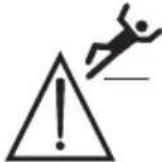 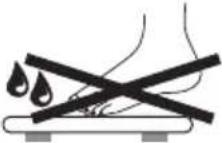 | Danger of slipping: do not step on the scale with wet feet. |
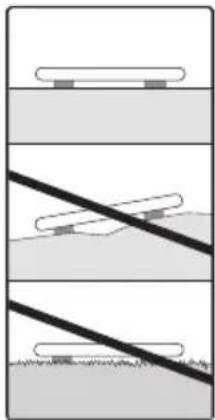
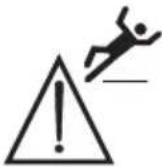 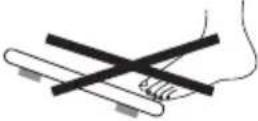 | Danger of tipping: position yourself in the centre of the weighing surface. | 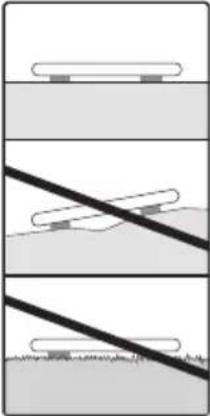 | Place the scale on an even surface. No carpet. |
3. Safety notes
Please read these instructions for use carefully and keep them for later use, be sure to make them accessible to other users and observe the information they contain.

WARNING
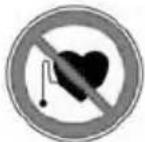
- The scales must not be used by persons with medical implants (e.g. heart pacemakers) Otherwise their function could be impaired.
- Do not use during pregnancy.
- Do not stand on the outer edge to one side of the scale otherwise it may tip!
- Batteries are highly dangerous if swallowed. Keep batteries and scale out of reach of small children. If batteries are swallowed, get medical help immediately.
- Keep children away from packaging materials (risk of suffocation).
- Caution! Do not step onto the scale with wet feet or when the scale's surface is damp – danger of slipping!

Notes on handling batteries
- If your skin or eyes come into contact with battery fluid, flush out the affected areas with water and seek medical assistance.
- Choking hazard! Small children may swallow and choke on batteries. Store the batteries out of the reach of small children.
- Observe the plus (+) and minus (-) polarity signs.
- If a battery has leaked, put on protective gloves and clean the battery compartment with a dry cloth.
- Protect the batteries from excessive heat.
- Risk of explosion! Never throw batteries into a fire.
- Do not charge or short-circuit batteries.
- If the device is not to be used for a long period, take the batteries out of the battery compartment.
- Use identical or equivalent battery types only.
• Always replace all batteries at the same time.
- Do not use rechargeable batteries.
- Do not disassemble, split or crush the batteries.

General notes
- The unit is for personal use only and is not intended for medical or commercial applications.
- Note that technical tolerances mean that results may vary, because the scale is not calibrated for professional medical use.
- The capacity of the scale is 180 kg (396 lb, 28 st). For weight measurement and bone mass measurement, the results are shown in 100 g increments (0.2 lb).
- The measuring results of the body fat, body water and muscle percentage are shown in 0.1% increments.
• The caloric requirements is specified in steps of 1 kcal.
- When supplied to the customer, the scale is set to weigh and measure in "kg" and "cm". You can change the unit settings during initial use of the app.
- Place the scale on a firm level floor; a firm floor covering is required for correct measurement.
- Protect the unit against hard knocks, moisture, dust, chemicals, major temperature fluctuations and heat sources which are too close (stoves, heating radiators).
- Repairs may only be carried out by Beurer customer service or authorised dealers. Before submitting any complaint, first check the batteries and replace them if necessary.
- We hereby confirm that this product complies with the European RED Directive 2014/53/EU. The CE Declaration of Conformity for this product can be found under: https://www.beurer.com/web/we-landingpages/de/cedeclarationofconformity.php
Storage and maintenance
The accuracy of the measurements and service life of the device depend on its careful handling:

IMPORTANT
- The unit should be cleaned occasionally. Do not use abrasive detergents and never immerse the unit in water.
- Ensure that no liquid gets on the scale. Never dip the scale into water. Never wash it under running water.
- Do not place any objects on the scale when it is not being used.
- Protect the unit against hard knocks, moisture, dust, chemicals, major temperature fluctuations and heat sources which are too close (stoves, heating radiators).
- Do not press the buttons using excessive force or with pointed objects.
- Do not expose the scale to high temperatures or strong electromagnetic fields (e.g. mobile phones).
The measuring principle
This scale works on the principle of B.I.A. (bioelectrical impedance analysis). This involves the calculation of body content within seconds, using a current that is not noticeable, is completely non-hazardous and does not pose any risk.
When this measurement of the electrical resistance (impedance) is considered alongside constants and/or individual values (age, height, gender, activity level), the body fat percentage and other variables in the body can be calculated. Muscle tissue and water conduct electricity well and therefore have a lower resistance. In contrast, bones and fat tissue have low conductivity as the fat cells and bones are barely able to conduct the current due to very high levels of resistance.
Please note that the values calculated by the diagnostic scale only represent an approximation of the actual medical analytical values for the body. Only a specialist doctor can precisely establish the body fat, body water, muscle percentage and bone structure using medical methods (e.g. computer tomography).
General tips
- If possible, always weigh yourself at the same time of day (preferably in the morning), after using the toilet, on an empty stomach and unclothed, in order to achieve comparable results.
- Important for the measurement: only measure body fat when barefoot and with the soles of the feet slightly moist.
Completely dry soles can result in unsatisfactory measurements due to inadequate conductivity.
- Stand still and upright during the measurement.
- Wait a few hours after unaccustomed physical activity.
- Wait approx. 15 minutes after getting up in the morning to allow the water in the body to distribute.
- Remember that only long-term trends are important. Short-term changes in weight within a few days are usually caused by a loss of fluid. Body water plays an important role towards our general wellbeing.
Limitations
When measuring body fat and other values, deviating and implausible results may occur in:
• children under approx. 10 years,
• competitive athletes and body builders,
- pregnant women,
- persons with fever, undergoing dialysis treatment or with symptoms of edema or osteoporosis,
- persons taking cardiovascular medication (affecting the heart and vascular system),
- persons taking vascular dilating or vascular constricting medication,
- persons with considerable anatomic deviations of the legs in relation to total body size (length of the legs considerably shortened or lengthened).
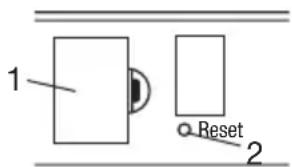
5. Unit description
Rear
- Battery compartment
- Reset button
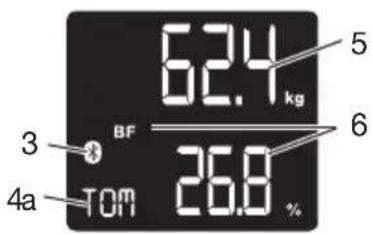
Display
- Bluetooth® symbol for connection between scale and smartphone
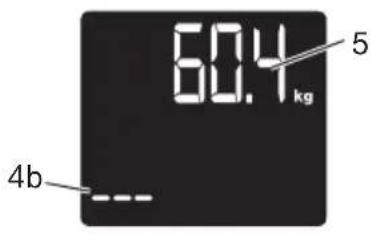
4a. Initials of the user, e.g. Tom
4b. Unknown measurements “---”
- Body weight
- Body data e.g. BMI, body fat etc.
6. Initial use of the scale
Inserting batteries
Remove the batteries from the protective packaging and insert the batteries into the scale ensuring that the battery polarity is correct. If the scale does not function, remove the batteries completely and reinsert them.
Setting up the scale
Place the scale on a firm level floor; a firm floor covering is required for correct measurement.
7. Initial use with the app
natural_image
Diagram showing three sequential steps of a mechanical or structural assembly with no visible text or symbols
You must enter personal user parameters in order to measure your body fat percentage and other physical data.
The scale has 8 user memory locations which allows, for example, you and your family members to save personal settings.
It is also possible to activate users via other mobile end devices on which the “beurer HealthManager Pro” / “beurer HealthManager” App has been installed or by changing the user profile in the app (see the app settings).
Keep the smartphone close to the scale in order to maintain an active Bluetooth® connection during initial use.
- Activate Bluetooth® in the smartphone settings.
- Download the free "beurer HealthManager Pro" / "beurer HealthManager" app from the Apple App Store (iOS) or at Google Play (Android™).
- Start the app and follow the instructions.
- Select BF 700 in the app.
Select the scale in the settings menu of the app. A randomly generated six-digit PIN code will appear in the scale display. At the same time, an input field will appear on the smartphone in which you must enter this six-digit PIN code.
- Enter the BF 700-related data.
The following settings must be set or entered in the "beurer HealthManager Pro" / "beurer HealthManager" app:
| User data Parameters | |
| Initials/abbreviation of name | max. 3 characters or numbers |
| Body height 100 to 220 cm (3' | 3.5" to 7' 2.5") |
| Age 10 to 100 Years | |
| Sex man ( | ), woman ( |
| Degree of activity 1 to 5 | |
Degrees of activity
Selection of the degree of activity must refer to the medium and long term.
| Degree of activity | Physical activity |
| 1 None. | |
| 2 | Low: A small amount of light physical effort (e.g. short walks, light garden work, gymnastic exercises). |
| 3 Medium: Physical effort for 30 minutes at least 2 to 4 times a week. |
| 4 High: Physical effort for 30 minutes at least 4 to 6 times a week. |
| 5 | Very high: Intensive physical effort, intensive training or hard physical work for at least one hour daily. |
- Assign the user when requested to do so by the app.
For automatic personal recognition, the first measurement must be assigned to your personal user data. Follow the app instructions for this. Step onto the scale with bare feet and ensure that you are standing still with equal weight distribution and with both legs on the electrodes.
8. Taking measurements
Place the scale on a firm level floor; a firm floor covering is required for correct measurement.
Weighing, carrying out diagnostics
Step onto the scale with bare feet and ensure that you are standing still with equal weight distribution and with both legs on the electrodes.
Note: There must be no skin contact between your feet, legs, calves or thighs. Otherwise the measurement cannot be performed correctly.
Note: The measurement result will be incorrect if the measurement is carried out with socks on.
The scale begins to take measurements straight away. First, the weight is displayed.
Whilst the other parameters are being measured, "0000" appears.
The measurement is displayed shortly afterwards.
If a user has been assigned, the BMI, body fat, water, muscle, bone, BMR and AMR are shown. This is the case if the initials are shown.
The following appears:
- Weight in kg with BMI
- Body fat in % with interpretation of BF
- Body water in % ≈
- Muscle percentage in %
- Bone mass in kg
- Basal metabolic rate in kcal (BMR)
- Active metabolic rate in kcal (AMR)
If the user is not recognised, only the weight can be shown and no initials appear “---”.
Only weight measurement
Now step on the scale wearing shoes. Stand still on the scale with your weight distributed evenly between both legs. The scale immediately begins to measure your weight.
The weight is shown and “---” runs across the LCD.
If a user has been assigned then the BMI, BMR and AMR are displayed. This is the case if the initials are shown.
If the user is not recognised, only the weight can be shown and no initials appear “---”.
Note: Only the measurements displayed on the scale may be used for further observations.
Switching off the scale
The scale will then switch itself off automatically.
9. Evaluation of results
Body fat percentage
The following body fat percentages are guide values (contact your physician for further information).
Man Woman
| Age low | normal | high | very high | Age low | normal | high | very high | | | | |
| 10-14<1 | 1% | 11-16 | % | 16,1-21% | >21,1% | 10-14 | <16% | 16-21% | | 21,1-26% | >26,1% |
| 15-19<1 | 2% | 12-17 | % | 17,1-22% | >22,1% | 15-19 | <17% | 17-22% | | 22,1-27% | >27,1% |
| 20-29<1 | 3% | 13-18 | % | 18,1-23% | >23,1% | 20-29 | <18% | 18-23% | | 23,1-28% | >28,1% |
| 30-39<1 | 4% | 14-19 | % | 19,1-24% | >24,1% | 30-39 | <19% | 19-24% | | 24,1-29% | >29,1% |
| 40-49<1 | 5% | 15-20 | % | 20,1-25% | >25,1% | 40-49 | <20% | 20-25% | | 25,1-30% | >30,1% |
| 50-59<1 | 6% | 16-21 | % | 21,1-26% | >26,1% | 50-59 | <21% | 21-26% | | 26,1-31% | >31,1% |
| 60-69<1 | 7% | 17-22 | % | 22,1-27% | >27,1% | 60-69 | <22% | 22-27% | | 27,1-32% | >32,1% |
| 70-100< | 18% | 18-23 | % | 23,1-28% | >28,1% | 70-100 | <23% | 23-28% | | 28,1-33% | >33,1% |
A lower value is often found in athletes. Depending on the type of sports, training intensity and physical constitution, values may result which are below the recommended values stated. It should, however, be noted that there could be a danger to health in the case of extremely low values.
Body water percentage
The body water percentage is normally within the following ranges:
Man Woman
| Age poor | good very good | good Age poor | good very good | | | | |
| 10-100<5 | 50% 50-65%> | 65% | 10-100<45% 45 | -60%>60 | % | | |
Body fat contains relatively little water. Therefore persons with a high body fat percentage have body water percentages below the recommended values. With endurance athletes, however, the recommended values could be exceeded due to low fat percentages and high muscle percentage.
This scale is unsuitable for measuring body water in order to draw medical conclusions concerning age-related water retention, for example. If necessary ask your physician. Basically, a high body water percentage should be the aim.
Muscle percentage
The muscle percentage is normally within the following ranges:
Man Woman
| Age | low | normal | high |
| 10–14 | <44% | 44–57% | >57% |
| 15–19 | <43% | 43–56% | >56% |
| 20–29 | <42% | 42–54% | >54% |
| 30–39 | <41% | 41–52% | >52% |
| 40–49 | <40% | 40–50% | >50% |
| 50–59 | <39% | 39–48% | >48% |
| 60–69 | <38% | 38–47% | >47% |
| 70–100 | <37% | 37–46% | >46% |
| Age | low | normal | high |
| 10–14 | <36 % | 36–43 % | >43 % |
| 15–19 | <35 % | 35–41 % | >41 % |
| 20–29 | <34 % | 34–39 % | >39 % |
| 30–39 | <33 % | 33–38 % | >38 % |
| 40–49 | <31 % | 31–36 % | >36 % |
| 50–59 | <29 % | 29–34 % | >34 % |
| 60–69 | <28 % | 28–33 % | >33 % |
| 70–100 | <27 % | 27–32 % | >32 % |
Bone mass
Like the rest of our body, our bones are subject to the natural development, degeneration and ageing processes. Bone mass increases rapidly in childhood and reaches its maximum between 30 and 40 years of age. Bone mass reduces slightly with increasing age. You can reduce this degeneration somewhat with healthy nutrition (particularly calcium and vitamin D) and regular exercise.
With appropriate muscle building, you can also strengthen your bone structure. Note that this scale will not show you the calcium content of your bones, but will measure the weight of all bone constituents
(organic substances, inorganic substances and water). Little influence can be exerted on bone mass, but it will vary slightly within the influencing factors (weight, height, age, gender). no recognised guidelines or recommendations relating to bone mass measurement.

ATTENTION:
Please do not confuse bone mass with bone density.
Bone density can be determined only by means of a medical examination (e.g. computer tomography, ultrasound). It is therefore not possible to draw conclusions concerning changes to the bones and bone hardness (e.g. osteoporosis) using this scale.
BMR
The basal metabolic rate (BMR) is the amount of energy required by the body at complete rest in order to maintain its basic functions (e.g. when lying in bed 24 hours a day). This value is primarily dependent on weight, height and age.
It is displayed on the diagnostic scale in the unit kcal/day and calculated using the scientifically recognised Harris-Benedict equation.
This is the amount of energy that is required by your body under all circumstances and must be re-supplied to the body in the form of food. If your energy intake is below this level in the longer term, this can result in damage to health.
AMR
The active metabolic rate (AMR) is the amount of energy required daily by the body in its active state. The energy consumption of a human being rises with increasing physical activity and is measured on the diagnostic scale in relation to the degree of activity entered (1–5).
To maintain your existing weight, the amount of energy used must be reintroduced into the body in the form of food and drink. If less energy is introduced than is used over a longer period of time, your body will obtain the difference largely from the amount of fat stored and your weight will decrease. If, on the other hand, over a longer period of time more energy is introduced than the total active metabolic rate (AMR) calculated, your body will be unable to burn off the excess energy, and the excess will be stored in the body as fat and your weight will increase.
10. Other functions
User assignment
It is possible to assign up to 8 scale users for a weight-only measurement (with shoes) and for a diagnosis measurement (bare feet).
For a new measurement, the scale assigns the measurement to the user whose most recently saved measurement falls within +/- 2 kg of this and, if a diagnosis was possible, +/- 2% of the body fat.
Unknown measurements
If measurements cannot be assigned to any user, the scale stores them as unknown measurements. Up to 20 unknown measurements are saved on the scale.
You can use the app to directly assign unknown measurements to your user.
Saving the assigned measurements on the scale
If the app is open and there is an active Bluetooth ^® connection to the scale, newly assigned measurements are sent immediately to the app. In this case, the values are not saved on the scale.
If the app is not open, the newly assigned measurements are saved on the scale. A total of 30 measurements per user can be saved on the scale. The saved measurements are transferred automatically to the app if you open the app within the Bluetooth ^® range.
Data synchronisation takes place within 10 seconds. It is possible to automatically transfer data when the scale is switched off.
Deleting scale data
If you would like to completely delete all measurements and old user data on the scale, switch on the scale and press the reset button for approx. 3 seconds.
“dEL” will appear in the display for several seconds.
This is necessary if you would like to delete scale users who have been set up incorrectly or are no longer required, for example.
You must then carry out the actions in chapter 7 again (user assignment).
Replacing batteries
Your scale is equipped with a "low battery indicator". If you operate the scale with flat batteries, "Lo" will appear on the display and the scale will automatically switch off. In this case, the batteries must be replaced (3 x 1.5 V AAA).

NOTE:
- When changing batteries, always use batteries of the same type, brand and capacity.
- Do not use rechargeable batteries.
- Use batteries that are free of heavy metals.
11. Cleaning and care of the unit
The unit should be cleaned occasionally.
Clean using a damp cloth, to which you can apply a little detergent if necessary.

IMPORTANT
- Do not use aggressive solvents or cleaning agents!
- Never immerse the unit in water!
- Do not wash the unit in a dishwasher!
12. Disposal
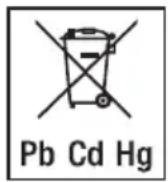
The empty, completely flat batteries must be disposed of through specially designated collection boxes, recycling points or electronics retailers. You are legally required to dispose of the batteries.
The codes below are printed on batteries containing harmful substances:
Pb = Battery contains lead,
Cd = Battery contains cadmium,
Hg = Battery contains mercury.
For environmental reasons, do not dispose of the device in the household waste at the end of its useful life. Dispose of the unit at a suitable local collection or recycling point.
Dispose of the device in accordance with EC Directive – WEEE (Waste Electrical and Electronic Equipment). If you have any questions, please contact the local authorities responsible for waste disposal.
Dispose of packaging in an environmentally friendly manner.


13. What if there are problems?
If the scale detects and error when measuring, the following is displayed:
| Display Cause Remedy | | |
| “- - - ”Unknown measurement as it is outside the user assignment limit or a unique assignment is not possible. | Assign unknown measurement in app or repeat user assignment. | |
| “- - - - ” runs across the LCD. | The fat percentage is outside the measurable range (less than 3 % or greater than 65 %). | Repeat the measurement barefoot or, if necessary, moisten the soles of your feet slightly. |
| Err | The maximum load-bearing capacity of 180 kg was exceeded. | The load must not exceed 180 kg |
| Err or incorrect weight is displayed. | No flat, stable surface. Place the | scale on a flat, stable surface. |
| Err or incorrect weight is displayed. | Not standing still. Stand as still as possible. | |
| Incorrect weight is displayed. | Scale zero setting is incorrect. | Wait until the scale switches itself off. Activate scale, wait for “0.0 kg” to appear and repeat measurement. |

| Display Cause Remedy | | |
| No Bluetooth® connection (✗ symbol is missing). | Device outside the range. | The minimum range in a free field is approx. 25 m. Walls and ceilings reduce the range. Other radio waves may interfere with the transmission. Therefore, do not position the scale near devices such as WIFI, microwaves, induction hobs etc. and, ideally, switch off any other Bluetooth® devices that are within range. |
| FULL | User memory space is full. No more measurements can be saved. | Open the app. The data is transferred automatically. This may take up to one minute. |
| Lo | The batteries in the scale are empty. | Replace the batteries of scale. |
14. Warranty
Further information on the warranty and warranty conditions can be found in the warranty leaflet supplied.
FRANÇAIS

natural_image
Diagram showing three sequential steps of a mechanical or structural assembly with no visible text or symbols
natural_image
Diagram showing three sequential steps of a mechanical or electrical component assembly (no text or symbols)
natural_image
Three-panel diagram showing a flat object on a surface, with two parallel diagonal lines and a horizontal line below (no text or symbols)
natural_image
Diagram showing three sequential steps of a mechanical or structural assembly with no visible text or symbols
https://www.beurer.com/web/we-landingpages/de/cedeclarationofconformity.php
Хранение и уход
natural_image
Three-panel diagram showing a flat object on a surface, with a diagonal line and a small object placed between them (no text or symbols)
| Возраст мало норма | много | | очень много | Возраст мало норма | много | | очень много |
| 10–14<1 | 1% 11–16% | 16,1–21% | >21,1% 10–14 | 14<16% 16–21% | | 21,1–26% | >26,1% |
| 15–19<1 | 2% 12–17% | 17,1–22% | >22,1% 15–19 | 19<17% 17–22% | | 22,1–27% | >27,1% |
| 20–29<1 | 3% 13–18% | 18,1–23% | >23,1% 20–29 | 29<18% 18–23% | | 23,1–28% | >28,1% |
| 30–39<1 | 4% 14–19% | 19,1–24% | >24,1% 30–39 | 19–24% | | 24,1–29% | >29,1% |
| 40–49<1 | 5% 15–20% | 20,1–25% | >25,1% 40–49 | 20–25% | | 25,1–30% | >30,1% |
| 50–59<1 | 6% 16–21% | 21,1–26% | >26,1% 50–59 | 21–26% | | 26,1–31% | >31,1% |
| 60–69<1 | 7% 17–22% | 22,1–27% | >27,1% 60–69 | 22–27% | | 27,1–32% | >32,1% |
| 70–100< | 18% 18–23% | 23,1–28% | >28,1% 70–100 | 23–28% | | 28,1–33% | >33,1% |
natural_image
Three sequential diagrams showing a horizontal bar, diagonal line, and horizontal beam with a flat base (no text or symbols)
The Bluetooth ^® word mark and logos are registered trademarks owned by Bluetooth SIG, Inc. and any use of such marks by Beurer GmbH is under license. Other trademarks and trade names are those of their respective owners.
Apple and the Apple logo are trademarks of Apple Inc., registered in the U.S. and other countries. App Store is a service mark of Apple Inc., registered in the U.S. and other countries.
Google Play and the Google Play logo are trademarks of Google LLC.
Android is a trademark of Google LLC.