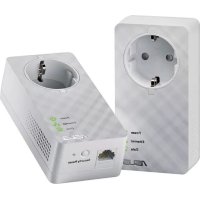
PLE52P Duo - Powerline Adapter ASUS - Free user manual and instructions
Find the device manual for free PLE52P Duo ASUS in PDF.



| Product Type | Powerline Adapter |
| Model | PLE52P Duo (kit of 2 adapters) |
| Network Interface | 1 Ethernet port 10/100/1000 Mbps (RJ45) |
| Powerline Speed | Up to 600 Mbps |
| Encryption | AES 128-bit |
| Communication Distance | Approximately 300 meters (depending on electrical environment) |
| Coverage | Up to 150 m² |
| Power Supply | AC 100-240 V, 50/60 Hz |
| Dimensions (W x D x H) | 140 x 75 x 42.4 mm |
| Weight | 285 g |
| LED Indicators | 1 power LED, 1 Ethernet LED, 1 powerline connection LED |
| Operating Temperature | 0 to 40 °C |
| Operating Humidity | 10% to 95% |
| Storage Temperature | -20 to 70 °C |
| Storage Humidity | 5% to 95% |
| Minimum System Requirements | Configured Ethernet network, computer with Ethernet port and correct TCP/IP settings |
| Buttons | Reset (restore factory settings), Security (pairing and encryption) |
| Main Functions | Wired network extension via electrical wiring, AES encryption, button pairing, auto standby |
| Maintenance and Cleaning | Unplug the device before cleaning; use a dry, soft cloth. Do not use solvents. |
| Safety | Do not plug into a power strip, extension cord, or surge protector. Respect the supply voltage. Keep out of reach of children. |
| Spare Parts and Repairability | Contact ASUS customer service for any repairs. The device contains no user-serviceable parts. |
Frequently Asked Questions - PLE52P Duo ASUS
User questions about PLE52P Duo ASUS
0 question about this device. Answer the ones you know or ask your own.
Ask a new question about this device
Download the instructions for your Powerline Adapter in PDF format for free! Find your manual PLE52P Duo - ASUS and take your electronic device back in hand. On this page are published all the documents necessary for the use of your device. PLE52P Duo by ASUS.
USER MANUAL PLE52P Duo ASUS
Q9083/First Edition/March 2014
Index
English 3
Cesky 7
Dansk 11
Nederlands 15
Suomi 19
Francais 23
Deutsch 27
Italiano 31
Portugues 35
Polski 39
Pycckn 43
Espanol 47
Svenska 51
Türkce 55
Package contents
- PL-E52P/PL-E52P DUO HomePlug AV Powerline Adapter x 1 (x2 for PL-E52P DUO)
LAN cable x1 (x2 for PL-E52P DUO)
Quick Start Guide x1
Warranty Card x1
Specification summary
| Port | 1 x 10/100/1000 Mbps Ethernet port |
| Power Supply | AC 100~240VAC/50~60Hz |
| Dimensions | 112(L) X 57(W) X 32(H) mm |
| Weight | 200g |
| Powerline Speed | Up to 600 Mbps |
| LED Indicator | 1 x Power LED indicator 1 x Ethernet LED indicator 1 x PLC (Powerline Connection) status LED indicator |
| Encryption | 128-bit AES Encryption |
| Coverage | Up to 150 square meters |
| Communication Distance | Approximately 300 meters (varies depending on the electrical wiring) |
| Temperature & Humidity | • Operating temperature: 0-40 °C • Non-operating temperature: -20-70 °C • Operating relative humidity: 10% to 95% • Storage humidity: 5% to 95% |
System Requirements
- A working Ethernet-based LAN
Available Ethernet port on a desktop PC or laptop - Properly configured TCP/IP settings on each PC on the network

Do not connect the PL-E52P/PL-E52P DUO to a power strip, extension cord, or surge protector as this may degrade network performance or even prevent the adapters from working properly.
Setting up the PL-E52P/PL-E52P DUO
The PL-E52P/PL-E52P DUO HomePlug AV Ethernet adapter allows you to enjoy lag-free network computer games, run media applications for video streaming, and make Voice Over Internet Protocol (VoIP) calls.
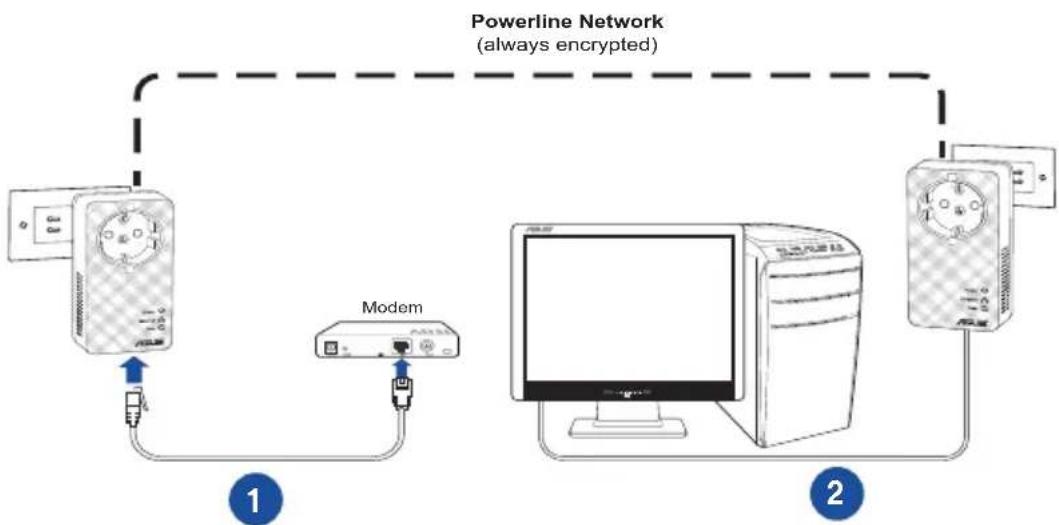
- Plug the included Ethernet cable into PL-E52P/PL-E52P DUO and into a LAN port on your network's router or switch. Connect the PL-E52P/PL-E52P DUO to a power socket.
- Plug the second PL-E52P/PL-E52P DUO to a power outlet located in the same power circuit in your home or location. Connect a computer to this second PL-E52P/PL-E52P DUO to join the network.
Getting to know your device
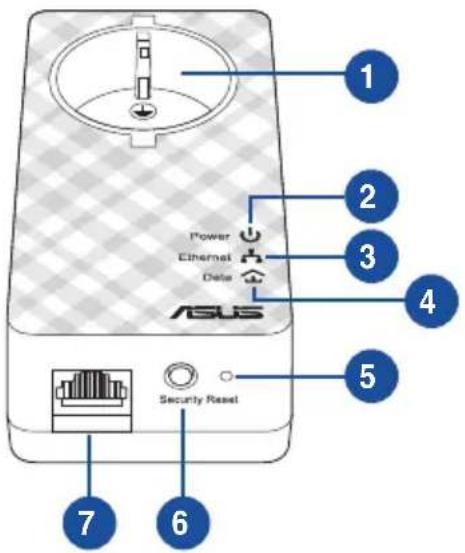
| Item Feature | Description |
| 1 Power plug | European standard EU power plug |
| 2 Power LED indicator | Solid green - the device is turned on Blinking green - the device is in standby mode Off - the device is turned off |
| 3 10/100/1000 Mbps LED indicator | Solid green - network link present; port enabled Blinking green - data/network activity Off - no connection available |
| 4 PLC (Powerline Connection) status LED indicator | Solid green - Great powerline connection Solid orange - Normal powerline connection Solid red - Bad powerline connection Off - no other compatible powerline devices using the same powerline Network name are found |
| 5 Reset button | Use a paperclip to press the Reset button for three seconds to restore settings to factory defaults. |
| 6 Security | Press the Security button for 1-3 seconds to start the grouping process and secure the connection within the powerline network, or more than 10 seconds to leave the current PLC security group. |
| 7 10/100/1000 Mbps Ethernet port | 10/100/1000 Mbps Ethernet port |
Security pairing (Optional)
Data sent over the powerline network can be encrypted ensuring a private and secure network using the installed software or by pressing the Security button.
Software Installation (Optional)
The Configuration Utility can be downloaded from the ASUS support website at www.asus.com. The application includes a powerline utility and network monitor.
Installing the Software
Visit www.asus.com and download the powerline utility. To install the software:
- Double-click Setup.exe.
- Follow the Installation Wizard to install the ASUS PL-E52P/PL-E52P DUO utility.
- Click Close to finish.
After installing the application, double-click the PL-E52P/PL-E52P DUO icon to launch the utility.
Troubleshooting Tips
Q1: The PL-E52P/PL-E52P DUO utility cannot detect any powerline devices on the network.
A. Press the Reset button on the PL-E52P/PL-E52P DUO to restore factory default settings.
Q2: After changing the network name using the PL-E52P/PL-E52P DUO utility, the powerline adapters stopped communicating with each other.
A. To restore connection between powerline adapters, do the following:
- Launch the PL-E52P/PL-E52P DUO utility and select the Privacy tab.
- Click Use Default (Public Network).
- Click the Main tab and check that the utility detects all the devices on your powerline network.
Obsah baleni
- PL-E52P/PL-E52P DUO HomePlug AV Powerline Adapter x 1 (x2 pro PL-E52P DUO)
- LAN kabel x1 (x2 pro PL-E52P DUO)
- Prüvodce rychlym startem x 1
Zarucni list x1
Souhrn specifikace
ASUS recycling and takeback programs come from our commitment to the highest standards for protecting our environment. We believe in providing solutions for you to be able to responsibly recycle our products, batteries, other components, as well as the packaging materials. Please go to http://csr.asus.com/english/Takeback.htm for the detailed recycling information in different regions.
REACH
Complying with the REACH (Registration, Evaluation, Authorisation, and Restriction of Chemicals) regulatory framework, we published the chemical substances in our products at ASUS REACH website at http://csr.asus.com/english/REACH.htm
Federal Communications Commission Statement
This device complies with Part 15 of the FCC Rules. Operation is subject to the following two conditions:
This device may not cause harmful interference.
- This device must accept any interference received, including interference that may cause undesired operation.
This equipment has been tested and found to comply with the limits for a class B digital device, pursuant to part 15 of the FCC Rules. These limits are designed to provide reasonable protection against harmful interference in a residential installation.
This equipment generates, uses and can radiate radio frequency energy and, if not installed and used in accordance with the instructions, may cause harmful interference to radio communications. However, there is no guarantee that interference will not occur in a particular installation. If this equipment does cause harmful interference to radio or television reception, which can be determined by turning the equipment off and on, the user is encouraged to try to correct the interference by one or more of the following measures:
Reorient or relocate the receiving antenna.
- Increase the separation between the equipment and receiver.
- Connect the equipment into an outlet on a circuit different from that to which the receiver is connected.
- Consult the dealer or an experienced radio/TV technician for help.

WARNING! Any changes or modifications not expressly approved by the party responsible for compliance could void the user's authority to operate the equipment.
Prohibition of Co-location
This device and its antenna(s) must not be co-located or operating in conjunction with any other antenna or transmitter.
IMPORTANT NOTE:
Radiation Exposure Statement: This equipment complies with FCC radiation exposure limits set forth for an uncontrolled environment. End users must follow the specific operating instructions for satisfying RF exposure compliance. To maintain compliance with FCC exposure compliance requirement, please follow operation instruction as documented in this manual.
Declaration of Conformity for R&TTE directive 1999/5/EC
Essential requirements - Article 3
Protection requirements for health and safety - Article 3.1a
Testing for electric safety according to EN 60950-1 has been conducted. These are considered relevant and sufficient.
Protection requirements for electromagnetic compatibility - Article 3.1b
Testing for electromagnetic compatibility according to EN 301 489-1 and EN 301 489-17 has been conducted. These are considered relevant and sufficient.
Effective use of the radio spectrum - Article 3.2
Testing for radio test suites according to EN 300 328- 2 has been conducted. These are considered relevant and sufficient.
CE Mark Warning
This is a Class B product, in a domestic environment, this product may cause radio interference, in which case the user may be required to take adequate measures. Operation Channels: CH1~11 for N. America; CH1~14 for Japan; CH1~13 for Europe (ETSI) This equipment may be operated in AT, BE, CY, CZ, DK, EE, FI, FR, DE, GR, HU, IE, IT, LU, MT, NL, PL, PT, SK, SL, ES, SE, GB, IS, LI, NO, CH, BG, RO, RT.
Canada, Industry Canada (IC) Notices
This Class B digital apparatus complies with Canadian ICES-003 and RSS-210.
Operation is subject to the following two conditions: (1) this device may not cause interference, and (2) this device must accept any interference, including interference that may cause undesired operation of the device.
Radio Frequency (RF) Exposure Information
The radiated output power of the ASUS Wireless Device is below the Industry Canada (IC) radio frequency exposure limits. The ASUS Wireless Device should be used in such a manner such that the potential for human contact during normal operation is minimized.
This device has been evaluated for and shown compliant with the IC Specific Absorption Rate ("SAR") limits when installed in specific host products operated in portable exposure conditions (antennas are less than 20 centimeters of a person's body).
This device has been certified for use in Canada. Status of the listing in the Industry Canada's REL (Radio Equipment List) can be found at the following web address: http://www.ic.gc.ca/app/sitt/reltel/srch/nwRdSrch.do?lang=eng
Additional Canadian information on RF exposure also can be found at the following web: http://www.ic.gc.ca/eic/site/smt-gst.nsf/eng/sf08792.html
Canada, vis d'Industry Canada (IC)
http://www.ic.gc.ca/app/sitt/reTel/srch/nwRdSrch.do?lang eng
http://www.ic.gc.ca/eic/site/smt-gst.nsf/eng/sf08792.html
NCC 警語
EC Declaration of Conformity
We, the undersigned,
| Manufacturer: | ASUSTeK COMPUTER INC. |
| Address, City: | 4F, No. 150, LI-TE Rd., PEITOU, TAPEI 112, TAIWAN |
| Country: | TAIWAN |
| Authorized representative in Europe: | ASUS COMPUTER GmbH |
| Address, City: | HARKORT STR. 21-23, 40880 RATINGEN |
| Country: | GERMANY |
declare the following apparatus:
| Product name : | HomePlug AV 600Mbps PowerLine Adapter |
| Model name : | PL-E52P, PL-E52P DUO |
conform with the essential requirements of the following directives:
2004/108/EC-EMC Directive
| EN 55022:2010+AC:2011 | EN 55024:2010 |
| EN 61000-3-2:2006+A2:2009 | EN 61000-3-3:2008 |
| EN 55013:2001+A1:2003+A2:2006 | EN 55020:2007+A11:2011 |
1999/5/EC-R &TTE Directive
| □ EN 300 328 V1.7.1(2006-10) | □ EN 301 489-1 V1.9.2(2011-09) |
| □ EN 300 440-1 V1.6.1(2010-08) | □ EN 301 489-3 V1.4.1(2002-08) |
| □ EN 300 440-2 V1.4.1(2010-08) | □ EN 301 489-4 V1.4.1(2009-05) |
| □ EN 301 511 V9.0.2(2003-03) | □ EN 301 489-7 V1.3.1(2005-11) |
| □ EN 301 908-1 V5.2.1(2011-05) | □ EN 301 489-9 V1.4.1(2007-11) |
| □ EN 301 908-2 V5.2.1(2011-07) | □ EN 301 489-17 V2.2.1(2012-09) |
| □ EN 301 893 V1.6.1(2011-11) | □ EN 301 489-24 V1.5.1(2010-09) |
| □ EN 302 544-2 V1.1.1(2009-01) | □ EN 302 326-2 V1.2.2(2007-06) |
| □ EN 302 623 V1.1.1(2009-01) | □ EN 302 326-3 V1.3.1(2007-09) |
| □ EN 50360:2001 | □ EN 301 357-2 V1.4.1(2008-11) |
| □ EN 62479:2010 | □ EN 302 291-1 V1.1.1(2005-07) |
| □ EN 50385:2002 | □ EN 302 291-2 V1.1.1(2005-07) |
| □ EN 62311:2008 |
2006/95/EC-LVD Directive
| EN 60950-1/A12:2011 | EN 60065:2002/A12:2011 |
| 2009/125/EC-ErP Directive | |
| Regulation (EC) No. 1275/2008 | Regulation (EC) No. 278/2009 |
| Regulation (EC) No. 642/2009 | Regulation (EC) No. 617/2013 |
2011/65/EU-RoHS Directive
CE marking
Ver. 130816

(EC conformity marking)
Position: CEO
Name: Jerry Shen

Signature :
Declaration Date: 27/02/2014
Year to begin affixing CE marking: 2014
2006/95/EC-LVD Directive
| EN 60950-1 / A12:2011 | EN 60065:2002 / A12:2011 |
2009/125/EC-ErP Directa
| Regulation (EC) No. 1275/2008 | Regulation (EC) No. 278/2009 |
| Regulation (EC) No. 642/2009 | Regulation (EC) No. 617/2013 |
2011/65/EU-RoHS Directa
Marca de CE
CE
Ver.130816
Directiva 2006/95/EC-LVD
EN60950-1/A12:2011
EN60065:2002/A12:2011
Directiva 2009/125/EC-Erp
Regulation (EC) No. 1275/2008
Regulation (EC) No. 278/2009
Regulation (EC) No. 642/2009
Regulation (EC) No.617/2013
Directiva 2011/65/EU-RoHS
Ver.130816
Insemnul CE
CE
| Regulation (EC) No. 1275/2008 | Regulation (EC) No. 278/2009 |
| Regulation (EC) No. 642/2009 | Regulation (EC) No. 617/2013 |
2011/65/EU-RoHS Direktili
CE isareti
Ver. 130816
CE