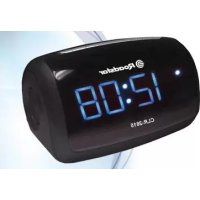
CLR2615 - Radio ROADSTAR - Free user manual and instructions
Find the device manual for free CLR2615 ROADSTAR in PDF.



| Product type | Clock radio |
| Brand | Roadstar |
| Model | CLR2615 |
| Main power supply | AC/DC adapter 5V 1A (included) |
| Backup power | 2 AAA batteries (not included) |
| Recommended batteries | Alkaline to prolong battery life |
| Radio frequencies | FM |
| Tuner | Digital with auto scan |
| Preset memory | Yes, programmable |
| Alarm functions | 2 independent alarms (Buzzer or radio), snooze (9 min) |
| Sleep function | Timer from 10 to 90 minutes (in 10-minute steps) |
| Brightness adjustment | 3 levels: high, normal, low |
| Display | LED with clock, date, alarm and sleep indicators |
| Time format | 12 or 24 hours |
| Speaker | Built-in |
| Antenna | FM wire (adjustable) |
| Maintenance | Clean with a soft, slightly damp cloth (mild detergent), avoid solvents and abrasives |
| Safety | Do not expose to moisture, rain, extreme temperatures; do not insert objects into openings |
| Compliance | Directive 2014/53/EU |
| Warranty | Compliant with directive 99/44/EC |
Frequently Asked Questions - CLR2615 ROADSTAR
User questions about CLR2615 ROADSTAR
0 question about this device. Answer the ones you know or ask your own.
Ask a new question about this device
Download the instructions for your Radio in PDF format for free! Find your manual CLR2615 - ROADSTAR and take your electronic device back in hand. On this page are published all the documents necessary for the use of your device. CLR2615 by ROADSTAR.
USER MANUAL CLR2615 ROADSTAR
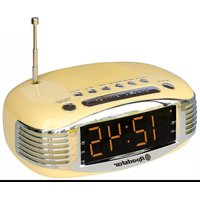
Digital FM Clock Radio
User manual
Bedienungsanleitung
This unit works with an AC/DC adaptor of 5V 1A. Connect the adaptor to the DC input (15) at the back of the unit and into a wall AC power outlet. Check that the rated voltage of the adaptor matches your local voltage. Make sure that the DC plug is fully inserted into the appliance. Notes: Use only the supplied AC/DC adaptor. Using other types of adaptor may damage the unit. Do not touch the AC/DC adaptor with wet hands.
BATTERY BACK-UP POWER FAILURE PROTECTION
This radio has a battery back up circuit that will keep the correct time and alarm settings in the event of a temporary power interruption.
Install 2x AAA batteries (not included), into the battery compartment located on the bottom of the unit.
Note: We recommend an alkaline battery for longer usable life. Change the battery every 9 to 12 months for best result and avoid possible battery leakage.
If power is temporarily interrupted the display will blink and the radio will not play. However, the battery back-up circuit will continue to maintain the clock and alarm settings. When power is restored the clock will display the correct time and alarm settings, and no adjustment is necessary.
DIMMER FUNCTION
Press and hold the [SNOOZE/SLEEP] button (4) to adjust the display intensity: HIGH, NORMAL, LOW.
CLOCK AND DATE SETTING
In stand-by mode:
Press and hold the [M] button (1) until the hour will flash;
Press the [<<->>>] button (3) to adjust the hour;
Press the [<<->>>] button (3) to adjust the minutes;
Press the [M] button (1) and select with [ - ] to choose 12 or 24 hour format;
ALARM SETTING
In stand-by mode:
Press and hold the [-] button (7) to enter into the Alarm 1 Buzzer setting.
Press again for Alarm 1 Radio setting.
Press the [<<->] buttons (2/3) to adjust the hour;
Press the [<<->>>] buttons (2/3) to adjust the minutes;
After confirming the minute, the week "1-7" flashes at this time, press [ dot ] buttons (2/3) to select 1-7, 6-7, 1-5, 1, 2, 3, 4, 5, 6, 7, adjust and press [-] button (7) to confirm;
After confirming the week, press the [-] button to select BUZZER/FM or OFF, and when you select BUZZER or FM, the corresponding indicator lights up. Then Alarm AL1 setting is complete.
Alarm 2: same operation of Alarm 1, pressing [+] button.
The duration of the ALARM is 60 minutes;
If AL1 and AL2 are both set within one hour perimeter, the earlier alarm clock will ring first and then the last will cover first;
If AL1 and AL2 have the same time setting, the AL1 alarm clock will ring first;
If the Snooze time of AL1 overlaps with the time set by AL2, the system will give priority to AL1.
ACTIVATE/DEACTIVATEALARM SETTINGS:
in stand-by mode, press repeatedly the [ALARM 1 or 2] buttons (5/6) to select alarm mode (Buzzer / Radio / OFF) (When the alarm is ON, the “●” indicator will light up on the right side of the display).
ALARM OFF: During Alarm on, press [POWER] button (7) to deactivate the alarm sound (the Alarm setting remains) or press [SNOOZE] button (4) to postpone the alarm for 9 min.
TO USE THE RADIO
Press the [POWER] button (7) to power ON the unit;
Adjust radio frequency to your desired station by pressing the [TUNING +/-] buttons (2/3). (If you hold tuning button it will scan until it finds the next station);
Adjust the volume with the [VOLUME +/-] (5/6);
To switch off the radio, press and hold the [POWER] button (7).
Note: For a better reception reorient the antenna (13).
PRESETS
Tune the desired station as explained above;
Press and hold [M] button (1) until "P" will flash;
Press the [TUNING +/-] buttons (2/3) to choose the number;
Press the [M] button (1) to save the radio station.
Recall a preset station: Press the [MEM] button (1) and then choose the number of the preset by pressing [M] button.
SLEEP FUNCTION
Press and hold the [SNOOZE/SLEEP] button to turn on the sleep function, and then press the [SNOOZE/SLEEP] button to set the sleep time: 90-80-70-60-50-40-30-20-
10-OFF. The SLEEP indicator lights up when the sleep function is turned on. Press the [SNOOZE / SLEEP] button in the middle of the sleep time to preview the remaining time. The machine will automatically OFF when the set sleep time is reached.
CARE AND MAINTENANCE
To prevent fire or shock hazard, do not allow this clock radio to be exposed to rain or moisture. This clock radio should not be exposed to direct sunlight, very high or low temperature, moisture, vibration, or placed in a dusty environment.
Do not use abrasives, benzine, thinners, or other solvents to clean the surfaces of the clock radio. To clean it, wipe with a mild non-abrasive defergent solution on a clean soft cloth. Never attempt to insert wires, pins, or other objects into the ventilation holes or openings on the clock radio.
TECNCAL SPECIFICATIONS
Power Supply:
AC 100-230V ~50/60Hz / DC 5V/1A.
Radio Frequency Coverage
87.5 - 108 MHz.
FM:
Speaker
Output Power: 1 × 0.8 Wrms.
Specifications and design are subject to possible modifications without notice due to improvement.
WARNING

The exclamation point within the triangle is a warning sign alerting the user of important instructions accompanying the product.

The lightening flash with arrowhead symbol within the triangle is a warning sign alerting the user of "dangerous voltage" inside the unit.
To reduce the risk of electric shock, do not remove the cover. No user serviceable parts inside the unit. Refer all servicing to qualified personnel.

This unit operates on Power adaptor. If the unit is not used for a long period of time, remove the plug from the AC mains.
Ensure all connections are properly made before operating the unit.
This unit must not be exposed to moisture or rain.

This unit should be positioned so that it is properly ventilated. Avoid placing it, for example, close to curtains, on the carpet or in a built-in installation such as a bookcase.
Do not expose this unit to direct sunlight or heat radiating sources.

CORRECT DISPOSAL OF THIS PRODUCT (Waste Electrical & Electronic Equipment)
This marking shown on the product or its literature, indicates that it should not be disposed with other household wastes at the end of its working life. To prevent possible harm to the environment or human health from uncontrolled waste disposal, please separate this from other types of wastes and recycle it responsibly to promote the sustainable reuse of material resources. Household users should contact the retailer where they purchased this product, or their local government office, for details of where and how they can take this item for environmentally safe recycling. Business users should contact their supplier and check the terms and conditions of the purchase contract. This product should not be mixed with other commercial wastes for disposal.
LAGE DER BEDIENELEMENTE
Puisance: 1 x 0.8 Wrms
AC 230V ~50Hz / CC 5V/1A
87.5 - 108 MHz.
Pulse los botones [<<->>>] (2/3) paraaabstar loscretos;
Hereby, Roadstar Management SA declares that the radio equipment type CLR-2615N is in compliance with Directive 2014/53/EU. The full text of the EU declaration of conformity is available at the following internet address: http://roadstar.com/images/ce/CLR-2615N.pdf or by scanning the following QR Code.
| TEST REPORT - Energy Efficiency Regulations Energy Efficiency of External Power Suppliers | |||
| Nameplate Information | Value and precision | Unit | Verdict (PASS/FAIL) |
| Manufacturer's name or trade mark, commercial registration number and address | JFEC Electronic NO.18, Minye Street, No.178 Industrial Zone, Tangxia Town, DongGuan City, Guangdong Province,P.R.China | -- -- | |
| Model identifier | JF005WR-0500100VH, JF005WR-0500100VV, JF005WR-0500100VU, JF005WR-0500100VA | -- -- | |
| Input voltage | 100-240V | V | -- |
| Input AC frequency | 50/60Hz | Hz | -- |
| Output voltage | 5.0 | V | -- |
| Output current | 1.0 | A | -- |
| Output power | — | W | -- |
| Average active efficiency | 73.63 | % | -- |
| Efficiency at load 10% | -- | % | -- |
| No-load power consumption | 0.051 | W | -- |
Roadstar®
INTERNATIONAL WARRANTY -INTERNATIONALE GARANTIE GARANTIE INTERNATIONALE - GARANZIA INTERNAZIONALE GARANTIA INTERNACIONAL - GARANTIA INTERNACIONAL Δ IEONH EΓΥH H
Roadstar Warranty Terms and Conditions
Roadstar- by means of its sales organisation, representative or distributor- guarantees its products against manufacturing defects in material and/or workmanship throughout the period of warranty. Should the product fail to work or shows manufacturing defect within the warranty period, Roadstar- by means of its sales organisation, representative or distributor will take the necessary actions to restore the perfect functioning of the product. To repair or to replace is at discretion of Roadstar or it's representative or distributor. The warranty period is in accordance with directive 99/44/CE of the European Union. For all non EU members, please refer to the local law of each country. This warranty does not cover normal wear and tear of the product and/or its parts, any damage, failure, or loss caused by accident, misuse, and any other failure not directly related to a defect of the product. This warranty does not void consumer's rights in accordance with EU Directive99/44/CE. For further information please visit the website www.roadstar.com, or write to aftersales@roadstar.com.
DEUTSCH
Allgemeine "Roadstar" Garantiebedingungen
Roadstar- by means of its sales organisation, representative or distributor - will take the necessary actions to restore the perfect functioning of the product. To repair or to replace is at discretion of Roadstar or it's representative or distributor.
The warranty period is in accordance with directive 99/44/CE of the European Union. For all non EU members, please refer to the local law of each country.
This warranty does not cover normal wear and tear of the product and/or its parts, any damage, failure, or loss caused by accident, misuse, and any other failure not directly related to a defect of the product.
This warranty does not void consumer's rights in accordance with EU Directive99/44/CE. For further information please visit the website www roadstar.com, or write to aftersales@roadstar.com.
DEUTSCH
Allgemeine "Roadstar" Garantiebedingungen
Roadstar Management SA, via Passegiata 7 CH 6883 Novazzano (Switzerland)

- Digital FM Clock Radio
- BATTERY BACK-UP POWER FAILURE PROTECTION
- DIMMER FUNCTION
- CLOCK AND DATE SETTING
- ALARM SETTING
- ACTIVATE/DEACTIVATEALARM SETTINGS:
- TO USE THE RADIO
- PRESETS
- SLEEP FUNCTION
- CARE AND MAINTENANCE
- TECNCAL SPECIFICATIONS
- WARNING
- CORRECT DISPOSAL OF THIS PRODUCT (Waste Electrical & Electronic Equipment)
- LAGE DER BEDIENELEMENTE
- Roadstar®
- Roadstar Warranty Terms and Conditions
- DEUTSCH
- Allgemeine "Roadstar" Garantiebedingungen
Brand : ROADSTAR
Model : CLR2615
Category : Radio