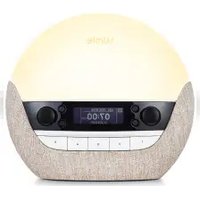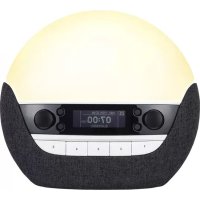
Bodyclock ELITE 300 - Light therapy LUMIE - Free user manual and instructions
Find the device manual for free Bodyclock ELITE 300 LUMIE in PDF.


User questions about Bodyclock ELITE 300 LUMIE
0 question about this device. Answer the ones you know or ask your own.
Ask a new question about this device
Download the instructions for your Light therapy in PDF format for free! Find your manual Bodyclock ELITE 300 - LUMIE and take your electronic device back in hand. On this page are published all the documents necessary for the use of your device. Bodyclock ELITE 300 by LUMIE.
USER MANUAL Bodyclock ELITE 300 LUMIE
1 Introduction
2 Important
3 Getting started
4 Basic set-up
5 Using Bodyclock Elite
Waking up with a sunrise alarm
When you don't need an alarm
6 Programming features
Alarm options
Sleep sound
Display auto-dim
Sunrise duration
Sunset duration
Nightlight
Security option
7-day alarms
Language
Snoopze
7 Audio features
FM and AM radio
Meditainment
SD card or external analogue source
8 Problem-solving
English
1 Introduction
Lumie Bodyclock Elite wakes you with a sunrise that naturally helps to regulate your sleep and wake patterns. You'll wake up in a better mood, find it easier to get up and feel more energetic during the day. There's also a fading sunset to help you unwind at the end of the day and drift off to sleep.
In clinical trials, 'dawn simulators' such as Bodyclock Elite have been shown to improve mood, energy, productivity and the quality of sleep and awakening*. They can also help SAD (Seasonal Affective Disorder) and winter blues sufferers cope with dark winter mornings.
Lumie was the first to launch a dawn simulator range and began selling an early version of Bodyclock in 1993.
Please read these instructions carefully to get the most out of your Bodyclock Elite.
*Acta Psychiatr Scand 1993 Jul;88 (1):67-71.
English
2 Important!
- Do not use Bodyclock Elite if the lamp cover is broken, damaged or missing. If you need to remove the lamp cover, unplug the unit first and let it cool down.
The lamp cover gets warm when the light is on so keep the unit clear of anything that may be damaged by heat. Take care that you don't accidentally cover the unit with your bedding! - Do not open the base - there are no user-serviceable parts inside.
For indoor use only. Keep away from water and damp.
Clean only with a dry or lightly moistened cloth.
Always use the correct bulb (maximum 42W E14 halogen bulb). Replacements are available from Lumie.
It's possible there may be some interference between this product and other electronic products close by, notably mobile phones. Usually this is in the form of audible noise and all you need do is move them apart. - Keep the cable away from heated surfaces.
At the end of its life, do not throw the unit out with normal domestic waste. Please take it to an official recycling point to be disposed of responsibly.

English
3 Getting started
The best position for Bodyclock Elite is by your bedside.
Screw in the bulb firmly and fit the glass bulb cover.

- Hook one of the clips over the inside of the bulb cover. Make sure the other clip is tucked inside as you lower the bulb cover onto the base.
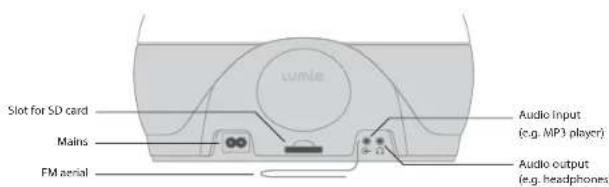
Plug in, switch on at the mains and you're ready for Basic set-up.
English
4 Basic set-up
Setting the clock and alarm time will provide you with basic Bodyclock Elite functions: a 30-minute sunrise to wake you up, including an audible alarm for added reassurance; an optional 30-minute sunset to help you sleep; and auto-dimming display.
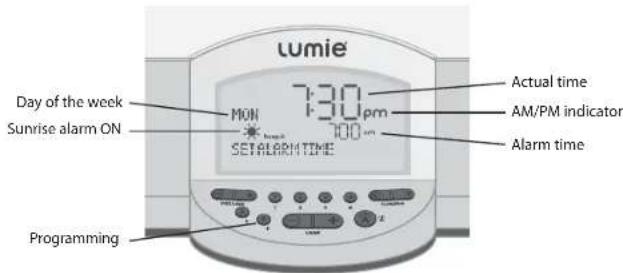
You can only program Bodyclock Elite when the alarm is turned off so make sure the A button is down (alarm time / is not showing).
Press P button to access programs. Display shows SET ALARM TIME.
Use Lamp - / + buttons to set alarm time.
Press P to skip to the next program, SET ACTUAL TIME.
Use Lamp-/+ buttons to set the clock.
Press P to skip to the next program, 24 HOUR.
Use Lamp-/+ buttons to choose 12 or 24 hour clock display.
Press P to skip to the next program. Display shows e.g. MONDAY.
Use Lamp - / + buttons to set day of the week.
English
You've finished basic programming. The display will revert to normal (after 12 seconds) and any changes will be saved.
Note: When you next access programs, the display will show your new settings. All settings are saved if the unit is unplugged or if there's a power failure.
Once you've been using Bodyclock Elite for a few days, you might like to change this basic set-up; for full details and additional options see Programming features.
5 Using Bodyclock Elite
Ideally, you should use Waking up with the sunrise alarm all year round to help keep your sleep/wake cycle on track. But life's not like that. When you don't need an alarm explains how to use Bodyclock Elite and still enjoy a lie-in.
Waking up with a sunrise alarm
When you're ready to sleep, turn on the alarm. This also activates the sunset and auto-dim display* to help create a relaxing sleeping environment. When you wake up with the sunrise, simply turn off the alarm.
Note: *These are the basic sleep features but any others you have programmed will also be activated. For more details see Sleep sound and Nightlight.
Use the Lamp + to turn on the light.
When you're ready to sleep, push A up to turn on the sunrise alarm (display shows alarm time briefly and).
The display dims and the light starts to slowly fade (sunset).
If you don't want a sunset, simply use the Lamp - button to turn out the light.
English
- When you wake up, push A down to turn off the alarm and use Lamp - to turn out the light.
To'snooze, instead of turning off the alarm, use Lamp - to dim the light.
After 9 minutes the light reaches full brightness and the audible alarm sounds again. - When you're ready to get up, push A down to turn off the alarm and use Lamp - to turn out the light.
Note: Both the light and the audible alarm will turn off after 20 minutes if they are not turned off manually.
When you don't need an alarm
If you're looking forward to a lie-in, instead of turning on the alarm when you're ready to sleep, follow the sequence below. This activates the sunset and auto-dim display features to help create a relaxing sleeping environment but without a sunrise to wake you up.
Use the Lamp ^+ button to turn on the light.
- When you're ready to sleep, press both Lamp - and + buttons at the same time (display shows SUNSET).
The display dims and the light starts to slowly fade (sunset).
If you don't want a sunset, use the Lamp - button to turn off the light.
Note: if you don't need to wake up with an alarm you could, of course, simply leave it turned off! However, you won't have the sunset option and the display would remain at its usual brightness. Any other sleep features you have programmed will also not be activated, for example Sleep sound and Nightlight.
English
6 Programming features
Bodyclock Elite offers the following range of features to help you sleep and wake better.
Please see the relevant section for more information and details of how to change the settings used for Basic set-up.
| PROGRAM | BASIC SET-UP DEFAULTS |
| Alarm optionsWake up to a simple sunrise or add other alarm features. | Sunrise with alarm beeps |
| Sleep soundControls the volume of any audio source,fading down as you fall asleep or staying on at low level to mask other noise. | Not set - volume controlled manually |
| Display auto-dimControls the brightness of the display when you're ready to sleep. | Automatically drops to low level |
| Sunrise durationChoose a shorter or longer sunrise. | 30 minute sunrise |
| Sunset durationChoose a shorter or longer sunset. | 30 minute sunset |
| NightlightSet the light to stay on at low level. | Not set |
| Security optionLight automatically comes on in the evening while you're away. | Not set |
| 7-day alarmsSet different alarm times for the whole week. | Not set - alarm time used for Basic set-up is generic |
| LanguageChoose to display the program options in another language. | English |
English
Note: You can only program Bodyclock Elite when the alarm is turned off so make sure the A button is down (alarm time / 喜 is not showing). Then you can program these in much the same way as you set the clock, alarm time etc. in Basic set-up.
Alarm options
Choose to wake with just a sunrise or add extra alarm features.
Program options:
WAKE BEEP - sunrise and alarm beep. Display shows beep.
HAKE AUDIO -sunrise and audio, e.g. the radio or MP3 files. Display shows radio or mp3.
MAKE FLASH - sunrise then light flashes quickly on/off.
MAKE LIGHT -sunrise only.
Make sure A is down.
Press P to skip to the alarm options e.g. WAKE BEEP.
Use Lamp - / + to change setting.
- Press P to skip to next program; otherwise the display will revert to normal after 12 seconds.
Note: When you choose MAKE AUDIO the default audio source is P1, Meditainment DAHN CHORUS. To wake to a different Meditainment sound (see Meditainment for more options), the radio (see FM and AM radio) or your own MP3 tracks (see SD card and external analogue source) you must save them to P1 (see Audio features).
English
Sleep sound
If you enjoy listening to audio before sleep, you might like to set the volume to fade down as you fall asleep. Or maybe have low level background sound until you wake up - great if you work shifts and need to block out other noise! This feature is activated when you turn on the alarm (see also When you don't need an alarm).
Program options:
SLEEP SOUND QFF - no auto-fade, you control volume manually.
SLEEP SOUND PERM - plays at your chosen volume for 22 minutes then drops to permanent low volume. Display shows .
SLEEP SOUND AUTO - plays at your chosen volume for 22 minutes volume then drops to low volume (or goes off if the light is off at this point). Remains at low volume then goes off when the light turns off (or reaches nightlight level if you've selected a Nightlight option.) Display shows ±b
Make sure A is down.
- Press P to skip to the volume auto-fade options e.g. SLEEP SOUND OFF.
Use Lamp - / + to change setting.
- Press P to skip to next program; otherwise the display will revert to normal after 12 seconds.
Note: When you choose SLEEP SOUND PERM or SLEEP SOUND AUTO the default audio source is P4, Meditainment WHITE NOISE. To fall asleep to a different Meditainment sound (see Meditainment for more options), the radio (see FM and AM radio) or your own MP3 files (see SD card and external analogue source) you must save it to P4 (see Audio features).
English
Display auto-dim
Controls the brightness of the display to minimise sleep distractions. This feature is activated when you turn on the alarm before going sleep (see also When you don't need an alarm).
Program options:
DISPLAY AUTO - brightness drops to low level.
DISPLAY HIGH - no auto-dim; display remains at usual brightness.
DISPLAY AUTO OFF - brightness drops to low level. Remains at low level then goes completely dark when the light turns off (or reaches nightlight level if you've selected a Nightlight option.)
Make sure A is down.
Press P to skip to the display auto-dim options e.g. DISPLAY AUTO.
Use Lamp - / + to change setting.
- Press P to skip to next program; otherwise the display will revert to normal after 12 seconds.
Note: If you choose DISPLAY AUTO OFF and need to check the time whilst the display is dark, one quick press on any button (except A, or you will turn off the alarm!) will illuminate the display for 12 seconds only.
Sunrise duration
Choose to wake with a short or long sunrise to suit you. Using SUNRISE 30 as an example, when the alarm time is set to 07:00, the light will gently come on at 06:30 and gradually increase to full brightness over 30 minutes.
English
Program options:
SUNRISE 15 - the light takes 15 minutes to reach full brightness.
SUNRISE 30 - the light takes 30 minutes to reach full brightness.
SUNRISE 60 - the light takes 60 minutes to reach full brightness.
SUNRISE 90 -the light takes 90 minutes to reach full brightness.
Make sure A is down.
Press P to skip to the sunrise duration options e.g. SUNRISE 30.
Use Lamp - / + to change setting.
Press P to skip to next program; otherwise the display will revert to normal after 12 seconds.
Sunset duration
Choose to fall asleep with a short or long sunset to suit you. Using SUNSET 30 as an example, starting from full brightness, the light will take 30 minutes to gradually fade and turn off.
Program options:
SUNSET 15 - the light takes 15 minutes to fade and turn off.
SUNSET 30 - the light takes 30 minutes to fade and turn off.
SUNSET 60 - the light takes 60 minutes to fade and turn off.
SUNSET 90 - the light takes 90 minutes to fade and turn off.
Make sure A is down.
Press P to skip to the sunset duration options e.g. SUNSET 30.
Use Lamp - / + to change setting.
Press P to skip to next program; otherwise the display will revert to normal after 12 seconds.
English
Nightlight
Instead of fading to darkness, the sunset fades until reaching your pre-selected level to provide a continuous soft nightlight.
Program options:
Make sure A is down.
Press P to skip to the nightlight options e.g. NIGHTLIGHT OFF.
Use Lamp - / + to change setting.
Press P to skip to next program; otherwise the display will revert to normal after 12 seconds.
Security option
Useful when you're away. The light will switch on and off for random periods between 16:00 and 23:00 to give the impression that there is someone at home.
Program options:
SECURITY OFF;SECURITY ON
Make sure A is down.
Press P to skip to the security options e.g. SECURITY OFF.
Use Lamp -1+ to change setting.
Wait until the program display reads SECURITY.
Press any button to cancel and revert to SECURITY OFF.
English
7-day alarms
You may find this useful if you regularly need different alarm times for different days of the week. The default alarm time for all seven days is 07:00.
Make sure A is down.
Press P to search for e.g. MONDAY ALARM.
Use Lamp - / + to set the alarm time.
Press P to skip to TUESDAY ALARM or skip to next program; otherwise the display will revert to normal after 12 seconds.
Note: Setting one or more alarm times using this program overrides the basic alarm program. To revert to generic alarm time, press P to skip to SET ALARM TIME and set new time.
Language
Choose to display the program options in another language.
Program options:
FRANCAIS; DEUTSCH, SVENSKA; DANSK; SUOMI; ITALIANO; ESPANOL; PORTUGUES; NEDERLANDS; PYCKHIN
Make sure A is down.
Press P to search for e.g. ENGL I SH.
Use Lamp - / + to change setting.
- Press P to skip to next program; otherwise the display will revert to normal after 12 seconds.
Display now shows day of the week in your chosen language; when you next access programs they will also be in your chosen language.
English
Snoopze
For a few extra minutes in bed!
Instead of turning off the alarm, use Lamp-to turn off the light.
The light will gradually brighten again over 9 minutes.
Any extra alarm or audio options will also repeat.
OR press Lamp - just once to leave the light on.
Any extra alarm or audio options will repeat in 9 minutes.
7 Audio features
Bodyclock Elite comes with a range of sounds from Meditainment, a leading creator of relaxation, sleep and well-being audio content. In addition, you can listen to FM and AM radio and your own mp3 tracks, either via an SD card or by connecting an mp3 player.
There are four presets available for you to store your favourite audio settings.
Note: When adjusting volume, the display shows volume indicator and reverts to normal after 12 seconds. For 'instant off' volume press A once (or twice).
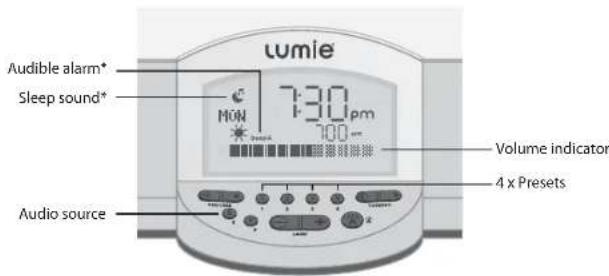
*Only shows when this program option has been set.
English
Please see the relevant section for more information and details of how to change the settings used for Basic set-up.
| SOURCE | BASIC SET-UP DEFAULTS |
| FM radio Allows you to listen to an FM radio station. | 89.1 MHz (BBC Radio 2) |
| AM radio Allows you to listen to an AM radio station. | 909 KHz (BBC Radio 5) |
| Meditainment Library of 12 sounds to use with the sunrise alarm and/or to help you unwind for sleep. | DAHN CHORUS |
| SD card Use the SD card reader to listen to saved mp3 tracks. | Not applicable |
| External audio Allows you to listen to mp3 tracks via an external mp3 player. | Not applicable |
| Preset 1 Preset 2 Preset 3 Preset 4 Press and hold any preset button to save any favourite audio setting. | P1 - Meditainment DAWN CHORUS Note: if you choose to have an audible alarm (see Alarm options) your wake up audio selection must be saved to P1. P2 - 89.1 MHz (BBC Radio 2) P3 - 909 KHz (BBC Radio 5) P4 - Meditainment WHITE NOISE Note: if you choose to have the volume fade when you go to sleep (see Sleep sound) your bedtime audio selection must be saved to P4. |
Note: You can only program Bodyclock Elite audio when the alarm is turned off so make sure the A button is down (alarm time / 票 is not showing).
English
FM and AM radio
Listen to your favourite radio stations and save settings for next time.
Make sure A is down.
Press $ to skip to FM or AM audio source; or use a preset with radio already saved.
Use Tuning < / > to change the frequency.
- Press and hold a preset button if you would like to save (release when sound is restored); otherwise the display will revert to normal after 12 seconds.
Note: You can save your favourite radio station to any preset. However, if you want to wake up to a sunrise with radio you must use P1 (see also Alarm options). Use Volume +I- to set the wake-up volume then press P1 to save. If you want to fall asleep with the radio and have the volume fade you must use P4 (see also Sleep sound).
Meditainment
Bodyclock Elite comes with a range of tracks from Meditainment, a leading creator of relaxation, sleep and wellbeing audio content. Wake-up options can be used to complement the Bodyclock Elite sunrise alarm; whilst the Sleep options (including two 20-minute meditative stories) help you to wind down ready for sleep. For more information visit www.meditainment.com.
Wake-up options:
DAWN CHORUS; GENERIC ALARM; WAKE UP ASSERTIVE; MUSICAL HARD; MUSICAL SOFT; WAKE UP GENTLE; RAIN; WAVES
*Spoken wake-up call; also available in French (REVEIL ACTIF; REVEIL DOUX) and German (AUFWACHEN BESTIMMT; AUFWACHEN SANFT)
English
Make sure A is down.
Press $ to skip to Meditainment source or use a preset with Meditatinment option already saved e.gDAWN CHORUS.
Use Tuning < / > to change the track.
Press and hold a preset button if you would like to save (release when sound is restored); otherwise the display will revert to normal after 12 seconds.
Note: You can save Meditainment tracks to any preset. However, if you want to wake up to a sunrise and a wake-up track you must use P1 (see also Alarm options). Use Volume +I- to set the wake-up volume then press P1 to save.
Sleep options:
WHITE NOISE; SLEEP TROPICAL*; SLEEP PASTORAL* RAIN;WAVES;SLEEP AMBIENT
*22 minutes of spoken guided meditation: also available in French (SOMMEIL PASTORAL;SOMMEIL TROPICAL) and German (SCHLAF PASTORAL;SCHLAF TROPISCH)
The guided meditation tracks use stories, natural sound effects and music to help you relax and drift into a deep and natural sleep. You don't need to have any knowledge of relaxation techniques and both options follow the same structure:
0-5 mins. Easy-to-follow, calming routine to relax your body and prepare you for sleep.
6-12 mins. Storyline to capture your imagination and encourage feelings of contentment and wellbeing e.g. walking along a beach (SLEEP TROPICAL) or relaxing in a field (SLEEP PASTORAL).
13-18 mins. Period of deep relaxation with opportunities for you to fall asleep.
18-21 mins. Story ends as you are guided into a deep and natural sleep.
English
Make sure A is down.
Press $ to skip to Meditainment source or use a preset with Meditainment option already saved e.g.WHITE NOISE.
Use Tuning < / > to change the track.
Press and hold a preset button if you would like to save (release when sound is restored); otherwise the display will revert to normal after 12 seconds.
Note: You can save Meditainment tracks to any preset. However, if you want to fall asleep with fading volume you must save your chosen sleep track to P4 (see also Sleep sound).
SD Card or external analogue source
Use Bodyclock Elite to listen to your favourite MP3 tracks.
Tips for using an SD card:
Use
a
a s i c
S D
C a r d
(maxim
JH
display is too bright
T h e S D
C a r d
should
contai n
See display auto-dim for
filename extensions saved - no folders or other file types.
- T r a c k s p l a y o n e a t use Tuning < /> to skip to another track.
D o n t r e m o v e t h e you have saved a file to a preset.
a t i m e
S D C a r d
r The light will not come on but the clock still works. n u o u s l y ;
Check to make sure the bulb is fully screwed into the socket. If this floesn ^ work, try replacing the bulb. o t w h i l e p I a y
Neither the clock nor the light works, or the clock is not doing what I expect it to.
Turn off the power at the mains. Press and hold P as you turn the power back on. This restores all the programs to the default state. If this doesn't work, check the fuse in the plug.
Please contact your distributor if you have any other problems.
Make sure A is down.
At the back of the unit, insert the SD card into the slot or plug the mp3 player into the connector.
Press to skip to SD CARD or EXTERNAL AUDIO source. Display shows READING...
- Use Tuning < / > to select a track.
English
Warranty
This unit is covered under warranty against any manufacturing defect for 24 months from the date of purchase. This is in addition to your statutory rights. If you are returning the unit for service, please use original packaging if possible, including internal pieces. Make sure that the mains plug is prevented from moving in transit and damaging the unit. If the unit is received damaged, then we may have to charge to put it right. Please call your distributor for advice before sending the unit back.
Technical specification
Subject to change without notice.
Lumie Bodyclock Elite 300
230Vac,50Hz,50W
Halogen bulb E14 42W
Operating temperature: 0^ - 35^
Class I Medical Device

English
Contact us
Lumie is Europe's leading specialist in light therapy. Our products are based on the latest scientific studies and we focus solely on light therapy and its benefits. If you have any suggestions that you feel could help us improve our products or service, or if there are problems you think we should know about, please call the Lumie Careline on 01954 780500 or email info@lumie.com.
Lumie
3 The Links, Trafalgar Way
Bar Hill
Cambridge
CB23 8UD
UK
Lumie is a trademark of:
Outside In (Cambridge) Limited, incorporated in England and Wales.
Registered Number: 2647359. VAT No: GB 880 9837 71.
Bodyclock is a registered trademark of Lumie.
Lumie 2011
Français
NOTICE D'UTILISATION
Bodyclock Elite 300
WHITE NOISE;SLEEP TROPICAL*;SLEEP PASTORAL* RAIN;WAVES;SLEEP AMBIENT
WHITE NOISE;SLEEP TROPICAL*SLEEP PASTORAL* RAIN;WAVES;SLEEP AMBIENT
Program alternative:
VAKNA PIP - soluppgang och ljudsignal. Displayen visar beep
VAKNA AUDIO - soluppgang samt ljd, exemplpelvis radion erler
MP3 filer. Displayen visar radio' erlermp3
VAKNA BLINKA - soluppgang foljt av snabbt blinkande Ijus.
VAKNA LJUS - soluppgang enbart.
Program alternative:
NATTLJUS AV;NATTLJUS LAGT;NATTLJUS MED; NATTLJUS HOGT
WHITE NOISE:SLEEP TROPICAL*SLEEP PASTORAL* RAIN;HAVES:SLEEP AMBIENT
Displayer lyser for starkly
WHITE NOISE:SLEEP TROPICAL*SLEEP PASTORAL* RAIN;HAVES:SLEEP AMBIENT
Nederlands
Distributor details:
lumie
3 The Links, Trafalgar Way
Bar Hill
Cambridge CB23 8UD
UK
Lumie is a trademark of:
Outside In (Cambridge) Limited, incorporated in England and Wales.
Registered Number: 2647359. VAT No: GB 880 9837 71.
Bodyclock is a registered trademark of Lumie.
© Lumie 2011