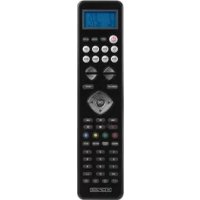
IRURC30 - Remote control KONIG - Free user manual and instructions
Find the device manual for free IRURC30 KONIG in PDF.


| Product type | 8 in 1 universal remote control |
| Brand | Konig |
| Model | IRURC30 |
| Dimensions (approx.) | 200 x 50 x 25 mm |
| Weight (approx.) | 100 g |
| Power supply type | 2 AAA batteries (1.5 V) |
| Display | LCD screen with adjustable backlight |
| Compatible devices | TV, VCR, DVB, DVD, CD, TUNER, TAPE, AUX |
| Programming methods | Auto search, direct code, brand selection |
| Learning function | Yes (infrared signal learning) |
| Macro function | Yes (customized command sequences) |
| Show View function | Yes (channel scanning) |
| Lock | Volume and device |
| Built-in clock | Yes, with manual adjustment |
| Backup memory | Permanent (battery-free) |
| Low battery indicator | Yes, on LCD screen |
| Dedicated keys | Volume, channels, menu, colors (Red, Yellow, Blue, Green), mute, play, etc. |
| Infrared range | About 8 meters |
| Maintenance and cleaning | Dry cloth only, no solvents |
| Safety | Do not expose to humidity, observe battery polarity |
| Spare parts | No user-serviceable parts |
| Warranty | Limited warranty, unauthorized modification voids warranty |
| General information | Design and specifications subject to change without notice |
Frequently Asked Questions - IRURC30 KONIG
User questions about IRURC30 KONIG
0 question about this device. Answer the ones you know or ask your own.
Ask a new question about this device
Download the instructions for your Remote control in PDF format for free! Find your manual IRURC30 - KONIG and take your electronic device back in hand. On this page are published all the documents necessary for the use of your device. IRURC30 by KONIG.
USER MANUAL IRURC30 KONIG
IR-URC30
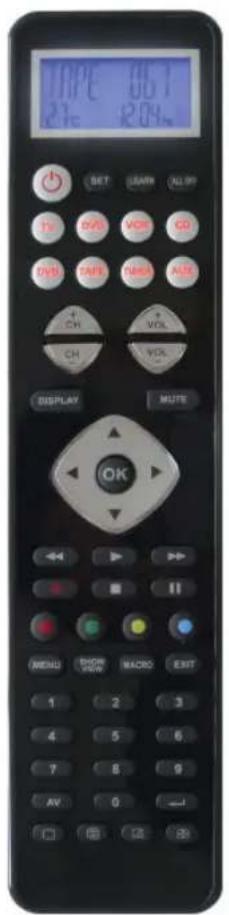
MANUAL (p. 2)
Universal 8:1 remote control
ANLEITUNG (s. 8)
MANUAL DE USO (p. 36)
The IR-URC30 universal remote controls almost all brands of Televisions (TV), DVD-players and DVR-players (DVD), DVB receivers and (digital) Satellite receivers and Cable box (DVB), Video Recorders (VCR), Tuner receivers (TUNER), Tape receivers (TAPE), CD-players (CD), Audio amplifiers and LD-players and other Audio (AUX). The IR-URC30 universal remote control operates all main functions of your selection of devices. It features the largest infrared code library for European market.
This RC provides Auto Search-, Learn-, Show View-, Macro-, Volume lock-, Device lock- function and Low battery indication, permanent back up memory, real time clock as well.
Please read this user manual carefully before using your new LCD remote control.
For very special functions which are not described in your language please use the English manual.
Device Code Assignment
| Bank for Device Initial code Total of codes | |||
| TV TV 048 | 488 | ||
| VCR VCR 075 | 182 | ||
| DVB Satellite, Cable, DVB 075 | 403 | ||
| DVD DVD,DVR 026 | 190 | ||
| CD CD 035 | 124 | ||
| TUNER TUNER 039 | 114 | ||
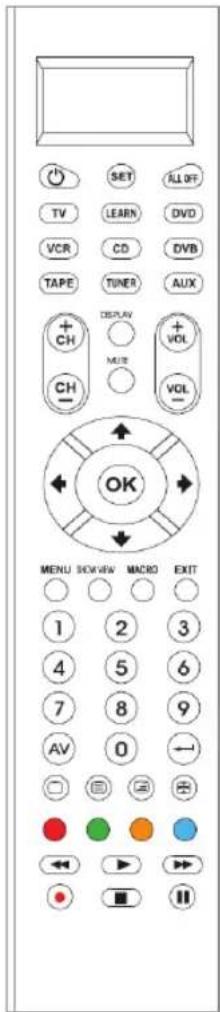
Realize the Key
SET For you start to set up the remote control or show the status in LCD screen.
LEARN Enter to learning mode.
TV VCR DVB CD DVD TUNER TAPE AUX Let you select the device you want to control.
POWER Turns the device on and off.
0-9 The number keys operate the same as on your original remote control, and maybe also used for entering device codes when set up.
Works like the Enter on your original remote.
AV Works like the TV/Video key on your original TV remote, and TV/SAT key on your original satellite remote A.B in cable and CD modes.
MENU Works like the Menu or OSD (on-screen display) or Memory key on your original remote control.
CH± Works like the Channel Up and Down keys on your original remote control.
VOL± Control the volume like the Volume Up and Down on your original remote control.
Key to mute the sound
REW (fast reverse)
▶ PLAY (operate your DVD, CD etc)
FFWD (fast forward)
REC (record)
■ STOP (terminate your operation)
II PAUSE
▲▼◀▶ OK EXIT Works like the UP, DOWN, LEFT, RIGHT, OK, EXIT Keys on your original remote control for
menu function. But during set up mode they are used for cursor, confirm and exit to program your remote control only.
RED YELLOW BLUE GREEN for TV Fast Text.
SHOW VIEW Scans all channels for your program quick view.
ALL OFF Switches off all your devices only with one button.
MACRO Let you make sequent operation for you home theater.
□ Television video
TV and text mixed
Teletext mode
Page hold
Displays info on the selected channel
Direct Set Up (by Brand and Code)
-
Turn on the device (e.g. TV) you would like to operate. If it is a VCR, please insert a tape.
-
Press and hold the SET key on your remote control. Then press (simultaneously) one of the device keys (e.g. TV)
-
Then release them, the brand will be displayed on the screen.
-
You can press the ▲ or ▼ key to select the brand of your device (e.g. your TV brand: Life)
-
Check the function of the keys. If none of the keys of your new remote control can work, or most of the keys work improperly, please try another code by the ◀ or ▶ key, until all basic functions operate properly.
-
If you are satisfied with the code, just press the OK key to save it. LCD shows SUCCESS and then finishes the set up.
![graph TD A["TV 048\n11:58^AM"] -->|SET+TV| B["ACCENT\n023"] B -->|OK| C["ACME\n004"] C -->|OK| D["ACME\n010"] D -->|OK| E["SUCCESS\n12.00_PM"] E -->|1s| F["TV 010\n12.00_PM"]](/content/2026/02/358371/images/b548c85e4f3d43f1577b146b91420ff3c0be4773548388c4783b87cc4beef483.jpg)
Set-up by Auto Search
-
Turn on the device (e.g. television) you would like to operate. If it is a VCR, please insert a tape.
-
Press the SET key on your new remote control for more than 3 seconds, then release it.
-
Press the ▲ or ▼ key to select to CODE SETUP in the LCD menu, and press the OK key.
-
The screen shows the DEV SEARCH in the LCD menu, and press the OK key, then you press device key to select your desired operation device(e.g. DVD) and then press the OK key to start the Auto Search.(you must point your remote control to your device at the moment)
-
See if the device reacts or not, once the device reacts, press any key to stop the search.
-
Test if most of keys work good or not. If most keys work not good enough, please step 4\~5.
-
If you find one satisfied code please press the OK key to save it and LCD shows SUCCESS then show DEV SEARCH. You can press device key (e.g. DVD) again to finish SET UP or use ▲ or ▼ to select other set up.
![graph TD A["DVD 026\n12:02 PM"] -->|SET 3S| B["CODE SETUP"] B -->|OK| C["DEV SEARCH"] C -->|OK| D["TV 048\nSEARCHING"] D -->|OK| E["TV 048"] E -->|OK| F["TV 055\n11:45AM"] F -->|Press any key to stop search if your device reacts, then test the key functions.| G["SUCCESS"] G -->|1S| H["DEV SEARCH"]](/content/2026/02/358371/images/33bfb0602b9c8f66253671ca96b1d90fca587a57f2230669642dafd3a95b2b74.jpg)
Set-up by Enter Code
- Switch on the device, which you would like to control (e.g. TV set).
- In the back section of this manual, find the brand name and code number of your device brand (e.g. Lifetec 003, 010, 062).
- Press the SET key on your new remote control for more than 3 seconds, then release it.
- Press the ▲ or ▼ keys to select to CODE SETUP in the LCD menu, and press the OK key.
- The screen shows the DEV SEARCH in the LCD menu, press the ▲ or ▼ keys to select to CODE SETUP in the LCD menu, and press the OK key.
- Then you press device key to select your desired operation device(e.g. TV) and then press the OK key, you must now enter the 3-digit device code (e.g. 003 for Lifetec TV)
- Press the OK key to save it and LCD shows SUCCESS, and press EXIT key two times to exit the SETUP mode.
- You check the function of the keys on the remote control. If most keys on your new remote control do not function correctly, try another 3-digit device code (e.g. 010...) from the list under the same brand. Repeat steps 3 to 7 until all the basic functions operate correctly.
![graph TD A["VCR 075\n12:02 PM"] -->|SET 3S| B["CODE SETUP"] B -->|OK| C["DEV SEARCH"] C -->|OK| D["DEV SETUP"] D -->|OK| E["TV 048"] E -->|TV| F["VCR 075"] F --> G["TV 003"] G -->|OK\nPress code number. (e.g. 003)| H["SUCCESS"] H -->|1S| I["DVE SETUP"]](/content/2026/02/358371/images/a5dc4ecb0daa440a1b9e2a291ac9ba9c1b9305c20b20b74d1bbaafca58bc3498.jpg)
Learning
Learn a Command
- Press a device key (e.g. TV) where you want to learn to.
- Press and hold the SET key for more than 3 seconds, then release it.
-
Scroll ▲ or ▼ key to LEARNING in the LCD menu, then press the OK key.
-
Scroll ▲ or ▼ key to LEARN KEY in the LCD menu and then press the OK key.
- Select the (target) key you want to learn (e.g. Power). The LCD display SELECT KEY.
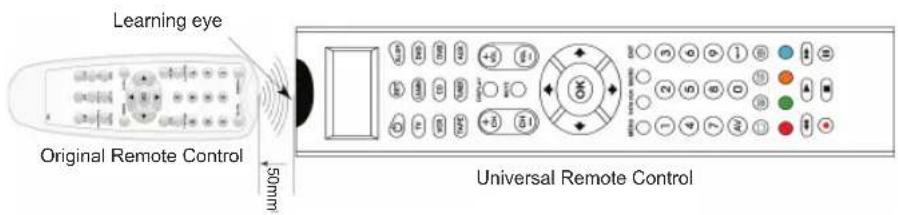
- Point the transmitter of the original remote control remotes face to the receiver window of IR-URC30 by approximately 30mm apart.
- Press and hold the original remote key (e.g. Power) until the LCD display shows SUCCESS for 1 second. If LCD display shows FAILED, please repeat steps 4-6.
- Repeat steps 4-6 to learn more keys.
![graph TD A["TV 048\n11:45"] --> B["SET 3S"] B --> C["CODE SETUP"] C --> D["LEARNENG"] D --> E["OK"] E --> F["LEARN KEY"] F --> G["SELECT KEY"] G --> H["OK"] H --> I["WAITING"] I --> J["Press a source key\non original remote"] J --> K["SUCCESS"] K --> L["to learn in next key"] style A fill:#f9f,strok…](/content/2026/02/358371/images/5c5db9a52cefb7aba15b5d747eb37d532ddb68aed5b2ecc46c56c0982d4901bd.jpg)


Delete the Learnt Key
If you like to delete a learned command, you can follow the steps as below:
- Press the device key (e.g. TV) where the command you like to delete from.
- Press and hold the SET key for more than 3 seconds, then release it.
- Scroll ▲ or ▼ key to LEARNING in the LCD menu, then press the OK key and the LCD display shows LEARN KEY.
- Scroll ▲ or ▼ key to DELETE KEY in the LCD menu and then press the OK key.
- Press the key on IR-URC30 that you want to delete, the LCD shows SURE DELET and then press the OK key to confirm, the LCD will show SUCCESS.
- Repeat Step 4 to delete next key you want.
- Press a device key (e.g. TV) to quit the delete operation when all desired remote commands are deleted.
![graph TD A["TV 048\n11:45"] --> B["SET 3S CODE SETUP"] B --> C["LEARNING"] C --> D["OK"] D --> E["SELECT KEY"] E --> F["OK"] F --> G["DELETE KEY"] G --> H["OK"] H --> I["Select a key you want to delete"] I --> J["SURE DELET"] J --> K["OK"] K --> L["SUCCESS"] L --> M["1S SELECT KEY"]](/content/2026/02/358371/images/0fd93a2a9a6ecd4b407efab69fc8941b2ae72c1288000d9b2e221b4445b0fa0c.jpg)
Delete All Learnt Command For a Device
- Press a device key (e.g. TV) where you want to delete commands from.
- Press and hold the SET key for more than 3 seconds, then release it.
- Scroll ▲ or ▼ key to LEARNING in the LCD menu, and then press the OK key and the LCD display LEARN KEY.
- Scroll ▲ or ▼ key to DELETE DEV in the LCD menu and then press the OK key.
- You select the device want to delete, then press the OK key.
- The LCD shows SURE DELET and then press the OK key, the LCD shows SUCCESS.
- Repeat step 5 to delete commands in other device key.
- Press EXIT key (e.g. TV) to quit deletes operation.
![graph TD A["SUCCESS"] -->|SET 3S| B["CODE SETUP"] B --> C["LEARNENG"] C --> D["LEARN KEY"] D --> E["DELETE DVE"] E --> F["SELECT DVE"] F --> G["SURE DELET"] G --> H["SUCCESS"] H -->|1S| I["SELECT DVE"] style A fill:#f9f,stroke:#333 style B fill:#f9f,stroke:#333 style C fill:#f9f,stroke:#333 style D…](/content/2026/02/358371/images/103e1f5018c03bae1cf5503be4ddeadb75143486a72af135120b3e58337a50f8.jpg)
Remark: sometimes it can take about 3 minutes to delete all commands in one device. If there aren't many commands, delete commands one by one.
Other Set Up
A. Set up Clock
- Press and hold the SET key for more than 3 seconds, then release it.
-
Press the ▲ or ▼ key to select the CONFIGURE in the LCD menu, and then press the OK key.
-
Press the ▲ or ▼ key to select the TIME SETUP in the LCD menu, and then press the OK key.
-
Press the ◀ or ▶ key to move the cursor to select hour or minute or AM/PM, then press the number key to set hour and minute, and press the ▲ or ▼ key to select AM or PM.
-
Press the OK key to save the setting and LCD display SUCCESS for 1 second then exit to current setup state, if you enter errors the LCD screen shows ERROR for 1 second. You can press any device key to finish the set up or press EXIT key return to the last state.
![graph TD A["TV\n048\n11:45"] --> B["SET 3S"] B --> C["CODE SETUP"] C --> D["CONFIGURE"] D --> E["TIME\n01.45AM"] E --> F["SUCCESS"] F --> G["TIME\n01.45AM"] G --> H["TIME\n11:45AM"] H --> I["TIME\n1S"] I --> J["TIME SETUP"] style A fill:#f9f,stroke:#333 style B fill:#ccf,stroke:#333 style C fill:#cf…](/content/2026/02/358371/images/35c5f78bb022620bf23afcd28dde714544f6bbb2f5f1092f8ec5071da2acf67a.jpg)
Background Light
- Press and hold the SET key for more than 3 seconds, then release it.
- Press the ▲ or ▼ key to select the CONFIGURE in the LCD menu, and then press the OK key.
- Press the ▲ or ▼ key to select the LIGHT in the LCD menu, then press the OK key.
- Press the ◀ or ▶ key to change to the ON or OFF mode.
- Press the OK key to save setting and LCD shows SUCCESS then exit to current set up state, you can press any device key to finish set up or press the EXIT key to last state, or you can use ▲ or ▼ to select other set up.
Contrast Adjust
- Press and hold the SET key for more than 3 seconds, then release it.
- Press the ▲ or ▼ key to select the CONFIGURE in the LCD menu, then press the OK key.
- Press the ▲ or ▼ key to select the CONTRAST in the LCD menu, then press the OK key.
- Press the ◀ or ▶ key to adjust contrast level, and then press the OK key when you are satisfied.
- Press the OK key to save the setting and the LCD shows SUCCESS then exit to current setup state, you can press any device key to finish set up or press the EXIT key to last state, or you can use ▲ or ▼ to select another set up.
Show View Function
- Press the device key to select the device (such as TV) that you want to operate.
- Press and hold the Show View key about 1 second. When the device's LED flashes and it goes into Show View mode. The remote control automatically scans all channels for a brief quick view.
Remark:
- The remote control must be pointed at the device until the Show View mode is finished.
- If you want to exit the show view mode, please press any key.


Clear All
Erase all the setting up data, and go back to the factory default settings.
- Press and hold the SET key for more than 3 seconds, then release it.
- Press the ▲ or ▼ key to select the CONFIGURE in the LCD menu, then press the OK key.
- Press the ▲ or ▼ key to select the CLEAR ALL in the LCD menu, then press the OK key and LCD shows SURE CLEAR.
- Then press the OK key to clear all settings and go back to original default settings.
Maintenance:
Clean only with a dry cloth. Do not use cleaning solvents or abrasives.
Warranty:
No guarantee or liability can be accepted for any changes and modifications of the product or damage caused due to incorrect use of this product.
General:
Designs and specifications are subject to change without notice.
All logos brands and product names are trademarks or registered trademarks of their respective holders and are hereby recognized as such.
Keep this manual and packaging for future reference.
Attention:
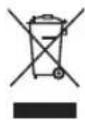
This product is marked with this symbol. It means that used electrical and electronic products should not be mixed with general household waste. There is a separate collections system for these products.
DEUTSCH
Key to mute the sound
Delete All Learnt Command For a Device
Painiketoiminnot
Verkställa koden


- REALIZE THE KEY
- DIRECT SET UP (BY BRAND AND CODE)
- SET-UP BY AUTO SEARCH
- SET-UP BY ENTER CODE
- LEARNING
- LEARN A COMMAND
- DELETE THE LEARNT KEY
- DELETE ALL LEARNT COMMAND FOR A DEVICE
- OTHER SET UP
- BACKGROUND LIGHT
- CONTRAST ADJUST
- SHOW VIEW FUNCTION
- REMARK
- CLEAR ALL
- MAINTENANCE
- WARRANTY
- GENERAL
- ATTENTION
- DEUTSCH
- PAINIKETOIMINNOT
- VERKSTÄLLA KODEN
Brand : KONIG
Model : IRURC30
Category : Remote control